1
2.1.3
Windows
There is a tar.gz archive in the source directory which contains:
• a file how to install.txt which lead you for the installation. We recommand
you to have a good internet connexion and at least 1.6 Gb because Qt is
greddy :) . The manipulations were done on windows Vista but it should run
on a windows XP.
• the Makefile for compiling.
• three folders include, dll and lib which are useful for installing glut (the
library used to write in the interface).
The tar.gz file can be extracted by 7-zip or winrar for example.
2.2
2.2.1
First use
Launching ViTE
After compiling the sources, you can type on your console the path to vite, which
is bin/vite if you have just compiled from the source directory.
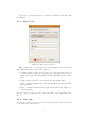
When you launch ViTE without any options (these will be described in the
section 3), you will have a window like the one in the figure 2.1:
Figure 2.1: Launching of Vite
2.2.2
Open a file
You go on the File menu and click on Open. A dialog box will appear and you will
have to choose the file you want to open.
After choosing it, you must click on Open to open the file or Cancel if you do
not want to open the selected file.
6