1
If you try to open a file which is not recognised by ViTE, an error message will
be displayed.
2.2.3
Export a file
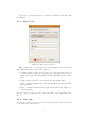
Figure 2.2: The export option box.
After opening a file, you can export it by choosing Export on the File menu.
Extra informations can be added in the dialog box:
• if export a part of the trace is enable, you can add floating values in
both fields min and max time. By default, min time and max time are initialized respectively with the minimum and the maximum displayed entity
time.
• if More options is enable, you can add the following floating values
• wide : to widden elements in the output (an element wide is wide-value time
its time-duration).
• grow : to heighten elements in the output (the heighten is the height of a
container in pixel)
If you do not know or do no want to change the values, let the pre-defined ones.
The next dialog box will invit you to choose the name of the destination file and
save it.
2.2.4
Close a file
You can close a trace file on choosing Close on the File menu. The window will
be the same as if no file is shown.
7