1
I. INTRODUCTION
1. Before Usages
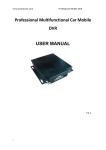
This manual is help to understand how to use CF-Mini DVR for all users.
Also, must be read carefully before use it. All users must follow the steps
this manual before installation hardware and set up the menu.
II. FUNCTIONS
Our 4 channel DVR (Stand Alone Digital Video Recorder) for CF-card interface is
a Digital Security System designed to record/retrieve up to 4 channel video
streams at the same time. It adopts a digital image compression technology to
compress the input channel video streams, and uses a CF-memory card to
record the compressed video stream.
CF-Mini DVR displays 1/4 channels partition on a screen by user’s control. It
can be surveillance 24 hours 7 days. It will be applied car or regular users.
2. Important Safeguard and Warning
Warning
1. Use the adaptor, which is supplied or recommended by the supplier. It may
cause fire.
2. Do not dismantle or assemble the product. It may cause malfunction or fire.
3. Do not touch the product with wet hands. It may cause malfunction or fire.
4. Matters must be ensured to a professional for installation. It may cause malfunction, electric shock or fire.
5. Consult the place of purchase if the need for installation arises. Delinquent
installation may be the reason for malfunction, electric shock or fire.
6. Ground applies to video products equipped with a 3-wire grounding type plug
having a third (grounding) pin. This plug only fits into a grounding-type power
outlet. If grounding is not done, it may cause malfunction or electric shock.
7. Ground connection must not touch gas pipe, water pipe or telephone line. If
grounding is not done properly, it may cause electric shock.
8. Prevent metallic foreign substance inside the product. It may cause malfunction
or electric shock.
9. Do not spray insecticide or flammable spray while driving. It may cause fire.
10. Prevent water from entering inside electrical parts. Clean with a dry towel or
malfunction or electric shock could result.
Caution
1. Use the power cord, which is supplied or recommended by the supplier. The
internal fan rotates at high speed and may cause an accident.
2. Do not drop, give strong vibration, or shock to the product. It may cause malfunction.
3. The air inhaler on each sides and the fan of the back panel must not be blocked
during installation. The internal temperature of the product would be greater than
allowable and could cause malfunction or fire.
4. Do not touch the product or the power cord when there is thunder. It may cause
electric shock.
5. Do not install the product near or on top of heating source. The internal temperature would be greater than allowable and could cause malfunction or fire.
6. Do not install the product on inclined or unstable location or where vibration could
be committed. It may cause malfunction.
7. Do not remove or insert CF-Card before turn off the electric power.
8. Must use CF-Card at least 1G or more.
9. Manufacturer or seller never response any problem related CF-Cards.
4
All functions are;
* Triplex (Record / Playback / Live)
* Real Time Quad Display
* High Quality and Simple Version System
* Stand Alone Type (Non-PC, Non-OS)
* Full / Quad Display Mode Selectable
* Programming the MENU in OSD (On Screen Display)
* Built-in Time / Date / Title Generator
* Motion Detection Function (230 Lists)
* Motion / Sensor Detection recording
* Quick Search : Time / Event List
* CF-Memory Overwrite
* MJPEG Compression
* Remote Control
5