1
DAP-1150
Quick Installation Guide
CONFIGURING ACCESS POINT
Connecting to Web-based Interface
1. Start a web browser.
2. In the address bar of the web browser, enter the IP address of the access
point (by default, the following IP address is specified:
192.168.0.50). Press the Enter key.
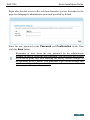
3. On the opened page, enter the username (login) and password for the
administrator account (by default, the following username and password
are specified: admin, admin). Then click the Enter link.
!
If the error “The page cannot be displayed” (or “Unable to display the
page”/“Could not connect to remote server ”) occurs upon connecting to
the web-based interface of the access point, make sure that you have
properly connected the device to your computer.
12