1
LOMBOM TECHNOLOGY 3D Sound Solution For USB 5.1Channel User Manual Rev. 1.0
Multi-Easy/Multi-Sound
0
LOMBOM TECHNOLOGY 3D Sound Solution For USB 5.1Channel User Manual Rev. 1.0
C-1000
User Manual
Revision: 1.1
Rev. Date:May, 2005
1
LOMBOM TECHNOLOGY 3D Sound Solution For USB 5.1Channel User Manual Rev. 1.0
Notice
The content furnished in this document is LOMBOM product knowledge . The information
included is subject to change without notice. This publication supersedes and replaces all
information supplied previously. No part of this manual can be reproduced or transmitted
in any form or by any means for any purpose without the permission of LOMBOM
TECHNOLOGY CORP.
Trademarks
C-Media logo and Xear 3D are trademarks of C-Media Electronics Inc. EAX and A3D are
trademarks of Creative Technology Ltd. Microsoft, DirectSound3D, Windows are
trademarks of Microsoft Corporation. DOLBY, Dolby Digital, RTCE, Dolby Earphone and
Pro Logic Ilx are trademarks of Dolby Laboratories, Inc. Other company and product
names may be trademarks of the respective companies with which they are associated.
License
Dolby Digital RTCE, Dolby Earphone and Pro Logic Ilx driver is manufactured under
license from Dolby Laboratories.
Copyright
Copyright © 2004-2005 LOMBOM TECHNOLOGY CORP.
2
LOMBOM TECHNOLOGY 3D Sound Solution For USB 5.1Channel User Manual Rev. 1.0
Table of Content
1. Introduction U Chang C-1000 Sound Technology
3
2. Function Structure and Overview
4
3. Advantages of USB Xear 3D Sound Solution
5
4. System Requirement and Installation
8
5. Sound Environment Set Up
15
6. User Interface and Function Control
19
7. FAQ & Technical Support
25
3
LOMBOM TECHNOLOGY 3D Sound Solution For USB 5.1Channel User Manual Rev. 1.0
1. Introduction C-1000 Xear 3D Sound Technology
Thanks for choosing C-1000 audio solution! The user manual is a guide for users to
understand how to use the new generation USB Digital Audio with exclusive Xear 3DTM
sound technology. All kinds of applications can get maximum support. With this manual,
users can quickly take advantage of these great features to enjoy amazing sound
effects even better than consumer electronics devices. Xear 3D™ Sound Technology is
a unique and innovative total audio solution exclusively featured by C-Media
Electronics Inc. in 2002. This patented 3D sound technology not only supports
real-time 3D gaming and industry-standard 5.1CH or 7.1CH DVD, but also offers an
immersive virtual 5.1Ch and 7.1CH sound field to the users regardless of what type of
output device is actually utilized. Thanks to Xear 3D™ Sound Technology, even if users
are using a pair of earphones or 2CH speakers, still they can avail themselves of a
much better virtual 5.1CH or 7.1CH environment capable only by Xear 3D™ Sound
Technology. Better yet, all audio formats can be converted to thrilling 3-dimensional
audio by this technology.
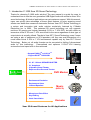
Personalized and optimum 5.1CH/7.1CH listening
environment and experience is thus achieved.
- Support EAX2.0TM or A3D1.0TM
- Support DS3DTM H/W &S/W
Games
-
5.1 & 7.1 Virtual SPEAKER SHIFTER
5.1 Xearphone
2-Speaker Virtual Theater
Earphone Plus Personal Theater
DVD Movies
-
Environment Emulation
Environment Sizes
10-Band Equalizer
Music
(MP3/CD)
-
Microphone Echo Effect
Key-Shifting
Vocal Cancellation
Karaoke
Xear 3D Sound Features for All Applications
4
LOMBOM TECHNOLOGY 3D Sound Solution For USB 5.1Channel User Manual Rev. 1.0
2. Function Structure and Overview
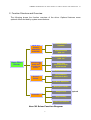
The following shows the function overview of the driver. Optional features mean
optional offers decided by system manufactures.
5.1CH Virtual
Speaker
Multi-CH
Virtual
SPEAKER
SHIFTER
EAX2.0&1.0&
A3D 1.0
EAX2.0&1.0&
A3D 1.0
Xear 3DTM
Driver
Sensaura®
HRTF 3D
Positional
Audio
Microsoft
DirectSound 3D
H/W & S/W
Multi-drive 5.1
Environment
Emulation/Size
Sound
Effect
10-Band Equalizer
Microphone Echo
Magic Voice
Karaoke
Key-Shifting
Vocal Cancellation
Xear 3D Driver Function Diagram
5
Optional
LOMBOM TECHNOLOGY 3D Sound Solution For USB 5.1Channel User Manual Rev. 1.0
3. Advantages of USB Xear 3D Sound Solution
The 1st Advantage of Xear 3D™ Sound Technology: Virtual Multi-Channel Audio
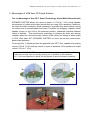
SPEAKER SHIFTER allows the users to obtain a 5.1CH & 7.1CH virtual speaker
environment no matter what output device they are using (2CH speakers). Moreover,
the users are able to drag the virtual speakers to anywhere they want without moving
the actual ones to accommodate their need. Therefore, by dragging a specific virtual
speaker shown on the GUI to the preferred position, enhanced individual channel
output is feasible. This revolutionary technology is welcome by those who always
complain about the not-loud-enough volume of the center (for dialog) or bass output
in DVD. With Xear 3D™ SPEAKER SHIFTER, no more low-volume center and/or
bass output problems.
To remedy this, C-Media provides the patented Xear 3D™ filter, capable of providing
virtual 5.1CH & 7.1CH audio by means of a pair of speakers (2CH speakers to output
virtual 5.1CH or 7.1CH).
Xear 3D™ SPEAKER SHIFTER allows users to obtain comprehensive 5.1CH and 7.1CH
audio even though they are actually using a pair of speakers of 2CH speakers.
PS: 7.1CH was supported on WinXP OS and depend on device hardware capability.
6
LOMBOM TECHNOLOGY 3D Sound Solution For USB 5.1Channel User Manual Rev. 1.0
The 2nd Advantages of Xear 3D™ Sound Technology: Environment FX™ and
3D Positional Audio
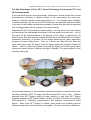
In the real world sounds travel directionally; furthermore, sounds would have myriad
manifestations according to different factors of the environment: the room size,
distance, reflecting materials, obstructing objects, etc. For example, same footsteps
in different settings, say the cave and the sewer pipe, will generate distinctive effects
to the ears. In that regard, besides eye perception, sound cues also play an important
role in helping people tell the changes of the surroundings.
Regarding 3D VR (Virtual Reality) implementation, not only actual 3D visual images
are concerned, but what people would hear in the real world is count as well. One of
the major 3D VR implementations is 3D gaming for PC. When a command for 3D
audio is given, Microsoft operation system would provide DirectSound3D, an interface
conversion technology, to function as the bridge interfacing the upper application
program and lower audio device. Even so, it should be noted that only when the
lower audio device has 3D engine could the upper application program activate 3D
effects. Hence, if audio device does not provide 3D engine, no real-time audio effect
conversion (sound effects in different settings) is feasible. The gaming effect is thus
seriously destroyed.
As previously explained, in the process of real-time simulation of visual and acoustic
elements, powerful HRTF 3D engine and EnvironmentFX™ are a must. C-Media
patented Xear 3D™ Engine excels all other solutions in that Xear 3D™ Engine
supports powerful HRTF (Head Related Transfer Function) 3D audio and real-time
EnvironmentFX™, exhibiting comprehensive and supreme environmental audio
effects. When Xear 3D™ Engine is utilized, game players can instantly perceive
different sound effect when the setting is changed. No more confusion in directions.
7
LOMBOM TECHNOLOGY 3D Sound Solution For USB 5.1Channel User Manual Rev. 1.0
The 3rd Advantages of Xear 3D™ Sound Technology: Karaoke Functions
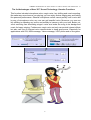
This function included microphone echo, magic voice, key shifting and vocal canceling.
No matter any sound source you playing, you can enjoy various singing way and feeling
like personal performance. General microphone control cannot prettify user’s voice but
by way of microphone echo, any one can get beautiful voice. Moreover, you can use
key shifting to adjusting any music and melody to harmony with your tune. Better yet,
vocal canceling can eliminating singer’s voice and make the song to be background
music for happy singing. Furthermore, magic voice not only can provide interest effects
but also can use on Internet voice communicate to keep anonymous. Especially for
applications with ICQ, MSN message, Yahoo message, VOIP phone and on line game
8
LOMBOM TECHNOLOGY 3D Sound Solution For USB 5.1Channel User Manual Rev. 1.0
4. System Requirement and Installation
This device must be applied on USB specification products. And user should to confirm
that PC operation supports USB function, USB 1.1 or 2.0.
Case1--No external driver installed:
¾OS Support :Win98SE, WinME, Win2000, WinXP
¾System recommended:use Intel Pentium III 或 AMD K6 500 CPU above
¾At least 64 MB RAM (Win98SE) or 128MB RAM (WinME, Win2000 and WinXP)
¾At least 50 MB hard disk space
¾For good sound quality, please adjust your system’s H/W acceleration and Sample
rate conversion quality to Full and Best.
Note: Some USB Host Controller may have problem with data stream package loss,
this will influence output audio data and make some discontinuous sound. But
this is very rare.
Sometime, when user plug USB Personal Multi-media Device on PC system
and OS cannot auto change audio device to USB audio, please switch the
audio device to USB audio sound and audio devices properties in control
9
LOMBOM TECHNOLOGY 3D Sound Solution For USB 5.1Channel User Manual Rev. 1.0
panel.
Case3--Install C-Media Xear 3D technology driver:
¾OS Support :Win98SE, WinME, Win2000, WinXP
¾System recommended:use Intel Pentium III 或 AMD K6 500 CPU above
¾At least 64 MB RAM (Win98SE) or 128MB RAM (WinME, Win2000 and WinXP)
¾ At least 50 MB hard disk space
¾Support direct sound 3D
Note : Windows OS has default USB driver support, but no support for HRTF 3D,
EAX , Virtual Multi-channel sound effect and Dolby Digital sound DSP function.
Thus, if user wants to enjoy these fancy experiences must install C-Media Xear
3D sound audio driver.
Before users install C-Media Xear 3D sound audio driver, they must make sure
that USB Multi-media Sound Device have connected to PC system already.
If your PC system has more than one USB connecting port, please remember
10
LOMBOM TECHNOLOGY 3D Sound Solution For USB 5.1Channel User Manual Rev. 1.0
which one is connected for install, and next time when you plug this USB
Multi-media Sound Device to PC, you have to plug the same port for initialize
the Xear 3D driver.
C-1000 Xear 3D Sound Audio Driver Installation Step:
nTurn on PC system and connect USB Multi-media Sound Device to PC system.
oInsert Installation CD on your CD-ROM or DVD ROM, the program will pop up auto
run information.
11
LOMBOM TECHNOLOGY 3D Sound Solution For USB 5.1Channel User Manual Rev. 1.0
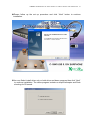
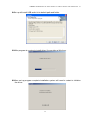
pPlease follow up the set up procedure and click “Next” button to continue
installation.
qYou can Select install driver only or both driver and demo program then click “Next”
to continue installation. The demo program includes a simple helicopter and Rock
shooting for 3D sound.
12
LOMBOM TECHNOLOGY 3D Sound Solution For USB 5.1Channel User Manual Rev. 1.0
rSet up will install USB audio kit to default path and folder.
sWhile program is running to install driver it’s may take a little time.
tWhen set up program complete installation system will need to restart to initialize
the driver.
13
LOMBOM TECHNOLOGY 3D Sound Solution For USB 5.1Channel User Manual Rev. 1.0
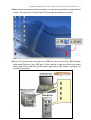
uAfter reboot and system running up again, you can see a small icon on right down of
screen. You can click it to open Xear 3D Sound driver functions for control.
vIf your PC system has more than one USB port, you can just plug USB Personal
Multi-media Device to any USB port. If this connect is right that driver will detect
device and show a task bar on the bottom right side of the screen to guiding you
which port is correct.
14
LOMBOM TECHNOLOGY 3D Sound Solution For USB 5.1Channel User Manual Rev. 1.0
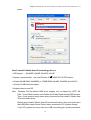
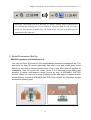
When this USB sound icon was showing, it’s mean C-Media Xear3D sound driver
was initialed and working now. If your USB port was more than one and you forgot
which one was installed C-Media Xear 3D sound driver, this icon was mean you are
connecting to the right port.
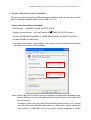
5. Sound Environment Set Up
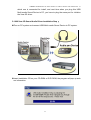
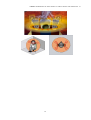
USB 2CH speakers and headphone set
You may use Xear 3D sound on 2CH speakerphone products or headphone set. The
best thing for Xear 3D sound technology was easy to suit and create great sound
effects on any kind of listening environment. Even if only 2CH physical speaker or
headphone, Xear 3D sound can create virtual 5.1CH surround sound effect and
dynamic to adjust multi-channel sound source by way of SPEAKER SHIFTER
function. Better yet, user can in terms of different music and song to re-define favorite
sound effect by function of SPEAKER SHIFTER, EnvironmentFX or Equalizer and got
personalize listening style.
15
LOMBOM TECHNOLOGY 3D Sound Solution For USB 5.1Channel User Manual Rev. 1.0
16
LOMBOM TECHNOLOGY 3D Sound Solution For USB 5.1Channel User Manual Rev. 1.0
6. User Interface and Function Control
Main Setting
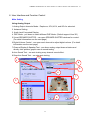
Using Analog Output
1.Analog Output channels Mode:Earphone, 2CH, 4CH, and 6Ch for selected.
2. Advance Setting.
3. Audio Jack Connected Display
4. DSP Mode:pull down to select different DSP Mode. (Default support Xear 3D)
5.Virtual SPEAKER SHIFTER:can open SPEAKER SHIFTER windows for control.
(For detail information see the next page)
6.Digital Volume Control:can open each channel to adjust digital volume. (For detail
information see the next page)
7.Channel Display & Speaker Test:can show analog output channel status and
directly click speaker graphic can do sound testing.
8.Auto Sound Test:can auto testing every channel sound effect.
9.Stop Auto Sound Test:can stop auto testing.
2
1
4
5
3
6
5
6
7
3
8
17
9
LOMBOM TECHNOLOGY 3D Sound Solution For USB 5.1Channel User Manual Rev. 1.0
Main Setting
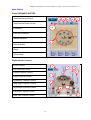
Virtual SPEAKER SHIFTER
1.Total Volume Up Control
4
3
5
6
7
2.Total Volume Down Control
1,2
3.Clockwise
4.Counter Clockwise
5.Manual Rotation
8
6.Manual Shifter
7.Reset
8.Shifter Drag
Digital Volume Control
1.Reset Volume
1
3
2.Left Channel Control
4
5
3.Center Channel Control
2
4.Right Channel Control
5.Subwoofer Channel Control
9
6.Rear Right Channel Control
7.Right Back Channel Control
8
7
8.Left Back Channel Control
6
9.Rear Left Channel Control
18
LOMBOM TECHNOLOGY 3D Sound Solution For USB 5.1Channel User Manual Rev. 1.0
Mixer
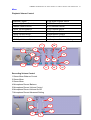
Playback Volume Control
1.Balance Control
9. SW Synth Volume On/Off
2.Volume Up/Down Control
10.CD Volume Balance
3.Master Volume On/Off
11.CD Volume Control
4.Wave Volume Balance
12.CD Volume On/Off
5.Wave Volume Control
13.Microphone Balance
6.Wave Volume On/Off
14.Microphone Control
7.SW Synth Volume Balance
15.Microphone On/Off
8. SW Synth Volume Control
16.Microphone Advanced Setting
7
10
13
4
1
2
14
5
8
11
16
3
6
9
12
Recording Volume Control
1.Stereo Mixer Balance Control
2.Stereo Mixer
3.Stereo Mixer
4.Microphone Record Balance
5.Microphone Record Volume Control
6.Microphone Record Volume On/Off
7.Microphone Record Advanced Setting
1
4
5
2
19
3
6
7
15
LOMBOM TECHNOLOGY 3D Sound Solution For USB 5.1Channel User Manual Rev. 1.0
Effects
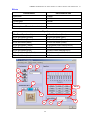
Environment
Environment Size
1.Bathroom
6.Large
2.Opera
7.Middle
3.Underwater
8.Small
4.Music Pub
5.More option:27 mode for selected
Equalizer
9.Ten Band Equalizer Adjust
18.Pre-Set Mode (Metal)
10.Pre-Set Mode (Default)
19.Pre-Set Mode (RAP)
11.Pre-Set Mode (Dance)
20.Pre-Set Mode (Classic)
12.Pre-Set Mode (Bass)
21.Pre-Set Mode (Vocal)
13.Pre-Set Mode (Treble)
22.Equalizer User Define On/Off
14.Pre-Set Mode (Live)
23.Pull to select user define mode
15.Pre-Set Mode (Rock)
24.User Define naming key in
16.Pre-Set Mode (Soft-Rock)
25.Add new user define mode
17.Pre-Set Mode (Jazz)
26.Del user define mode
1
5
9
2
3
4
7
10~21
6
25
8
22
20
23
26
24
LOMBOM TECHNOLOGY 3D Sound Solution For USB 5.1Channel User Manual Rev. 1.0
Karaoke
1.Karaoke On/Off
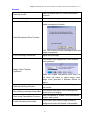
Click this button then can control all karaoke
functions
2.Karaoke Setting Reset
Can reset all setting to default value
Select this button will pop up a dialog box to
enable microphone function.
3.Start Microphone Echo Function
Click “OK” button to select recording source and
enable microphone
4.Echo Low/High Control Bar
Adjust echo low/high
This function only supported in multi-channel
audio products.
5.Magic Voice Function
(Optional)
When you enable microphone echo then can
pull down the menu to select magic voice.
Magic voice provides 5 different effects for
choice.
6.Start Key Shifting Function
Select this button to enable key shifting function
and control.
7.Key Shifting Low/High Control Bar
This function can adjust tune of background
music to fit your singing.
8.Start Vocal Cancellation Function
Select this button to enable vocal cancellation
function and control.
9.Vocal Canceling Control Bar
This function can control singer’s vocal of
background music and cancel it as possible.
21
LOMBOM TECHNOLOGY 3D Sound Solution For USB 5.1Channel User Manual Rev. 1.0
2
1
3
5
4
6
7
8
9
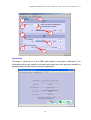
Information
This page is showing all of the USB audio product and system information. The
information will be very useful to end user and vender once they got some troubles or
problems with function control or product application.
22
LOMBOM TECHNOLOGY 3D Sound Solution For USB 5.1Channel User Manual Rev. 1.0
7. FAQ & Technical Support
Q1:Why play CD without sound ?
Most general case was digital CD playback function did not open. Because USB
audio is digital signal, it is use different path to process CD music with traditional
analog CD.
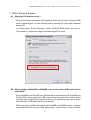
You should open “Device Manager”, select “DVD/CD ROM drives” and open it.
Then switch to “properties” page and enable digital CD audio.
Q2:Why sometimes Win98SE and WinME can not auto detect USB audio device
and switch?
Since Win98SE and Win ME have different driver architecture with Win2000 and
WinXP. When users plug in/out USB audio device too much time or faster, these
two OSs may not detect the change on device. So, sometimes user got to switch
audio device to USB audio device by them self.
While user plug in USB audio device on Win98SE and WinME system, if system
cannot switch audio device to USB, please open “Control Panel”, select “Sounds
23
LOMBOM TECHNOLOGY 3D Sound Solution For USB 5.1Channel User Manual Rev. 1.0
and Audio Devices”, choice “Audio” page then switch “Default device” to USB
Device or C-Media USB Device.
Q3:When using software application program (Like: Media player, Winamp,
PowerDVD, WinDVD….) to playback any media files, can I plug out USB
audio device while playing?
It is incorrect mode of operations, because while application programs were
playing audio stream, windows system is stilling using audio device to process
and deliver data real-time. So, when user plug out USB audio device windows
system can not delivering audio data to the same device, so that system will be
confused and make application programs failure or system crash.
The right way to plug out USB Audio device was stop playback function first.
Especially when your Windows system was Win98SE or WinME, this corrected
operation will keep stability of working system. Otherwise, uncorrected plug out
will cause application program or system crash.
24
LOMBOM TECHNOLOGY 3D Sound Solution For USB 5.1Channel User Manual Rev. 1.0
※ Do not plug out while application programs were playing media files. Please
stop playback before plug out USB audio device.
Q4:Xear 3D Sound technology provide amazing function In virtual 5.1 speaker
shifter, how to using this function in different media format?
Virtual 5.1 Speaker shifter can process 2CH, 4CH or 5.1CH audio format and
make 2CH audio file like MP3, stereo wave to transfer in virtual 5.1 surround
sound. However, the most perfect application is playing 5.1CH DVD content like
Dolby digital AC-3 and DTS. User can using physical 2CH device (earphone,
speaker) to enjoyed dynamic 5.1CH surround sound by moving graphic user
interface.
In general, when user buy a new computer usually got a free bundle software
DVD player like PowerDVD or WinDVD. Most of these free bundle software
version only provide 2CH DVD audio playback capability that because 5.1CH
decoding was more expensive. So that, when user playback real 5.1CH DVD
content it can not processing different 6 channel audio source to spread out
characteristic with each channel. If user wants to enjoy real 5.1CH DVD
surround sound, you can buy a software DVD player with Dolby digital AC-3 or
DTS 5.1CH decoding function.
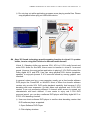
※ User can check software DVD player to confirm what decoding version that
DVD software player supported.
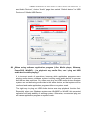
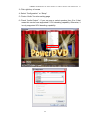
1. Open Software DVD Player
2. Click display windows
25
LOMBOM TECHNOLOGY 3D Sound Solution For USB 5.1Channel User Manual Rev. 1.0
3. Click right key of mouse
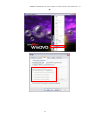
4. Select “Configuration” or “Setup”
5. Choice “Audio” function setting page
6. Check “Audio Output”→If you can see or select speaker from 2 to 6 that
mean this version was supported 5.1CH decoding capability. Otherwise, it
is only supported 2CH decoding capability.
26
LOMBOM TECHNOLOGY 3D Sound Solution For USB 5.1Channel User Manual Rev. 1.0
or
27