1
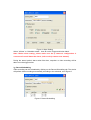
In the 'Alarm action settings' section, user can select other sound file (.wav) as siren sound. The default sound will be used in case this field is blank. Users can also configure “Siren Duration, Snapshot Number, Record Duration” data. 2) About storage location:: User can define the picture and video files storage location, leaving this field blank the default location is the application installation directory. Pictures and videos will be stored in. /snap, and. /record directory. If tick “Delete the oldest files When the disk space is insufficient”, when the disk space is less than 500M, this programmer will automatically delete the first day's data and then realize the cycle record function, or it will stop recording. 3) The other options: Play all the devices when running this software or not Stretch video from all channels or not Hide status bar or not Prompt before shutting down this system or not 8.2 History Log By clicking on the History Log, the video play will be opened, and enter the record directories, user can play the videos sorted by device name. 9 Further Notifications 1) Use administrator to login in your operating system, and then install the ipcmonitor software. 2) Before using this software, please ensure the devices can be access by web browsers from LAN or WAN, please consult the user manual of the IP Camera 3) When performing centralization monitoring, please open Windows Task Manager and check the percentage of CPU usage. If it take more than 80% of CPU usage, the CPU's performance may not be good enough, please refer to the third part in 6.2, click “advanced” and access video setting page to adjust the bitrates or resolution.