1
DRUM KIT
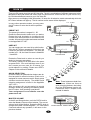
There are 50 preset drum kits and 30 User Kits. The kit is combination of different instrument voice
assigned to each pad which has unitary style for performance. All the kits are for your choice. Any
kit could be edited and saved as your own User Kit.
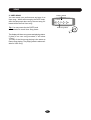
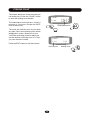
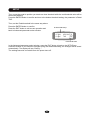
After power on and display initial information, it’ll enter the kit selection mode automatically while the
KIT button indicator will light up. The kit number and its name will be displayed.
Kit number
In some other operation modes, you may press
the KIT button to enter the kit select operation
mode.
KIT
Pop
PRESET KIT
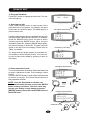
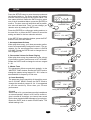
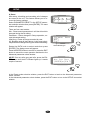
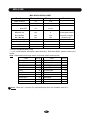
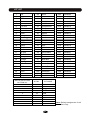
The preset kit number is ranged 01 - 50.
Rotate the Data knob to select a kit you desire.
Rotate the knob clockwise to increase the kit
number and anticlockwise to decrease the kit
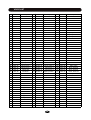
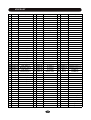
number. All preset kit number and name are listed
in the Appendix KIT LIST.
01
Kit name
+
Kit number
USER KIT
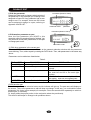
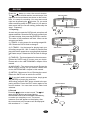
You can create your own user kit by edit function.
Click the KIT button repeatedly will switch the
Preset Kit and User Kit selection. The User Kit
number is 51 - 80; the User Kit name is UserKit01
- UserKit30.
Kit
UserKit01
51
User Kit name
+
Rotate the Data knob to select an user kit you
desire in the same way above.
The factory setting for all User Kits is the same
as preset kit 01. You could call them even if you
don’t create your own user kit. Of course, you
could replace it by editing. Please see <EDIT>
Chapter in this manual for details.
10
9
8
7
6
5
4
QUICK SELECTION
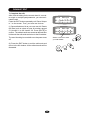
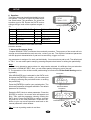
In the Kit mode, ten pad selection buttons are defined as quick kit selection buttons. Each one is
assigned to a most common use kit. Simply press 1
a button to select kit directly. The default quick
selection assignment is listed in the Appendix
<KIT LIST>.
After you select a kit, you can assign it to a quick
selection button by pressing and holding down
the KIT button then pressing a pad button.
Your assignment is nonvolatile even the
power turns off.
3
2
Note: These buttons are dual-function buttons. When use them as
quick kit select buttons, the indicator of the EDIT button must be off,
Please see <EDIT> Chapter in this
manual for details.
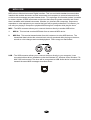
MASTER VOLUME
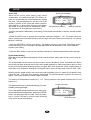
In the Kit and Song window, push the DATA knob to
enter the Master Volume control window. The current
volume level will be blinking. Rotate the DATA knob to
change the master volume ranged 0 - 127. After about
5 seconds without any operation, it will return to the
previous window.
8
Master
Volume
115
Volume indicator Master volume
+