1
CRYSTAL FREQUENCY
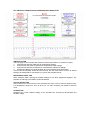
Fixed value of 32768Hz, the crystal frequency
OSCILLATOR FREQUENCY
Measure the oscillator frequency and set the measured value by using the slider.
The range is ±6.5Hz or ±198ppm from the centre frequency 32768Hz.
Incremental change 0.01Hz, page change 0.1Hz.
OSCILLATOR FREQUENCY DEVIATION
Display showing the frequency difference between the crystal and oscillator frequency
CRYSTAL TURNOVER POINT
Use the slider to set the peak position of the curve.
Standard it should be set to 25.0°C, however, crystal manuals mention a turnover point of
25°C ±5°C.
Use this setting to observe the effect of a different peak position.
Range 25°C ±5°C, incremental change 0.1°C, page change 0.5°C.
CRYSTAL TEMPERATURE COEFFICIENT
This setting controls the slope of the curve, the typical value expressed in ppm/°C² can be
found in the crystal manual.
Use this setting to observe the effect of a different curve slope.
Range 0.035 ±0.01, incremental change 0.001, page change 0.005.
ACTUAL DEVIATION AT TURNOVER POINT
Display showing the actual deviation in ppm and seconds per month at the peak position of
the curve.
As for the “Sec/Month” display, it is showing the deviation for an average month,
1 month = 365/12 months
APPLICATION OPERATING TEMPERATURE RANGE SETTINGS
By default these 2 sliders are set to 25°C, the corresponding display will show the same
values compared with the actual deviation value at the turnover point display.
This will change when a range is set with a minimum and maximum value for the application
operating temperature.
Deviation compensation calculations are usually done for the 25°C point only but the
application might be used in different environmental conditions.
In that case the calculation for 25°C might be not accurate anymore, for example if the
application is always used within a temperature range from 0°C to 20°C.
Use the 2 sliders to set this temperature range, the corresponding display will now show the
average deviation in this temperature range.
Also use this feature when temperature correction is required in the application by using an
external temperature sensor or for seasonal correction by using the clock date data.
Stepwise you can calculate the compensation value for each range.
Range 25°C +60°C/ –65°C, incremental change 0.1°C, page change 0.5°C.
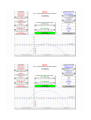
See the next pictures for best compensation at:
1. Standard settings, -40°C to –20°C
2. Standard settings, -20°C to –0°C
3. Standard settings, 0°C to 50°C
4. Standard settings, 50°C to 70°C
5. Standard settings, 70°C to 85°C
6. Deviation +0.853Hz, temp coefficient 0.04, temp. range 10°C to 40°C, narrow range