1
PREFACE
CONDITIONAL ACCESS
The manual provides:
Smart Card
Important safety precautions; please study them.
Overview material; read only those parts that interest you.
It is not necessary to study the manual from cover to cover
before using the STU.
You were supplied with a FOXTEL Smart Card when you
subscribed. The Smart Card looks similar to a credit card and is
inserted into the slot behind the right-hand front flap of the STU.
Inserting the Smart Card
Step-by-step instructions on how to use the STU.
Step-by-step instructions on how to install the STU and
connect it to basic sound and TV systems. It is beyond the
scope of this manual to include all of the possible
configurations or installation procedures.
Troubleshooting guide to assist you if you have difficulty
with operating the STU correctly, or if technical problems
occur.
The operation of the STU can be upgraded using over-the-air
signals This manual and the menus downloaded in the STU are
therefore subject to change at any time.
This document and the information contained herein are the
subject of copyright and intellectual property rights under
international convention. All rights are reserved. No part of this
document may be reproduced, stored in a retrieval system or
transmitted in any form by any means, electronic, mechanical or
optical, in a whole or in part, without the prior written permission of
UEC Technologies (Pty) Ltd, the Manufacturer.
The Smart Card is the key to unlocking the subscribed services in
the STU. The STU will not unscramble scrambled TV or audio
services if the card is not inserted or is incorrectly inserted.
Inserting the Smart Card into the STU allows instant access to
the subscribed services.
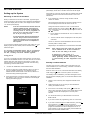
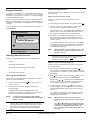
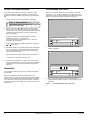
To insert the Smart Card, follow the instructions carefully.
1
Open the right hand flap on the front of the STU (see
figure). Swing the flap downwards to expose the card
slot.
2
Hold the Smart Card horizontally with the logo on top and
the arrows pointed towards the slot. Insert the Card fully
into the slot.
3
Close the flap.
DIGITAL SATELLITE SERVICES
The STU has been designed to receive and process digital signals
transmitted from orbiting satellites. The satellites act as mirrors in
the transmission process, beaming the Service Provider’s signals
back to your satellite dish.
Lower flap here
Satellite technology enables excellent reception of satellite TV
services in remote rural areas where good quality terrestrial
reception has never before been possible.
In addition to the digital TV and audio signals, satellite signals also
contain data that the STU extracts, processes and stores. This
provides up-to-date text information on the content and status of
the various services at the touch of a button. Convenient facilities
are also provided to manipulate received data in order to
customise viewing and listening preferences.
I R D E T O
fluids on it
1 Do not bend viewing card
2 Do not remove and re-nisert unnecessarily
3 Never submerge card in liquid or use cleaning
OPERATING INSTRUCTIONS
I M P O R T A N T
STU 700
3