1
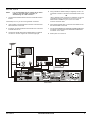
STU, TV (SCART or RF Interfaces), Hi-Fi
NOTE:
4
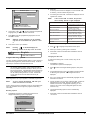
Using a SCART-to-SCART cable (not supplied), connect the
TV SCART socket on the STU to the SCART socket on the TV.
OR
Using a SCART to RCA connector (not supplied), connect the
TV SCART to the AV connectors on your TV.
If only one audio socket is available on your TV, the mono
audio connector should be used.
5
If the TV does not have a SCART socket or RCA AV connector,
use an RF flylead to connect the RF OUT connector on the STU
to the RF IN connector on the TV.
It is recommended that you switch off the mains
supply to the STU before connecting or
disconnecting the LNB connector.
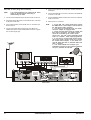
1
Connect the terrestrial antenna connector to the RF IN socket on
the STU.
2
Connect a flylead between the variable stereo sound outputs
on the STU and the audio inputs on the Hi-Fi.
3
Connect the coaxial cable connector from the LNB on the
satellite dish into the connector marked LNB IN on the STU. The
connector on the coaxial cable to the STU should be finger tight.
HI-FI
R
L
SCART TO SCART
AUDIO
INPUTS
RF IN
A
SCART TO RCA
V
WARNING! High Voltage
DANGER! Do not open
Unauthorised opening
renders warranty invalid
Protect against moisture
N4078
Republic of South Africa
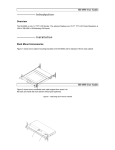
REAR PANEL
8
OPERATING INSTRUCTIONS
STU 720V1.0