1
AlertCam Manual:Layout 5
17/8/11
18:30
Page 2
IMPORTANT
IF IN ANY DOUBT ABOUT THE INSTALLATION OF THIS PRODUCT,
CONSULT A QUALIFIED ELECTRICIAN
I This product must be grounded
I Do not mount the unit against inflammable surfaces
I The motion detector will not operate correctly if it is installed:
1. Near the outlet of a central heating boiler
2. Near air conditioning
3. Pointing directly at moving vehicles (may cause false triggering)
4. Within sight of reflections from moving water (may cause false
triggering)
I Where other lamps could shine on the detector
BEFORE ATTEMPTING ANY INSTALLATION OR MAINTENANCE, ENSURE
THAT THE ELECTRICAL SUPPLY IS SWITCHED OFF AND THE CIRCUIT
FUSES REMOVED OR THE CIRCUIT BREAKER IS IN THE OFF POSITION.
Please make sure the voltage and polarity are correct before
connection. Incorrect voltage may cause electric shock. If you are
not sure, please contact your distributor.
Table of contents
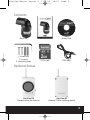
Contents and Optional Extras . . . . . . . . . . . . . . . . . . . . . . . . . . . . . . . . . . . . . 3
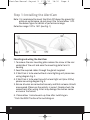
Step 1: Installing the AlertCam . . . . . . . . . . . . . . . . . . . . . . . . . . . . . . . . . . . . 4
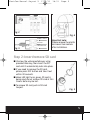
Step 2: Insert/remove SD card. . . . . . . . . . . . . . . . . . . . . . . . . . . . . . . . . . . . . 5
Step 3: Adjusting the Settings . . . . . . . . . . . . . . . . . . . . . . . . . . . . . . . . . . . . 6
Step 4: Set the Date and Time . . . . . . . . . . . . . . . . . . . . . . . . . . . . . . . . . . . . 8
Step 5: Viewing recorded or live footage via a PC. . . . . . . . . . . . . . . . . . . 8
Step 6: Viewing video . . . . . . . . . . . . . . . . . . . . . . . . . . . . . . . . . . . . . . . . . . . 10
Technical Specification . . . . . . . . . . . . . . . . . . . . . . . . . . . . . . . . . . . . . . . . . . 12
2