1
AlertCam Manual:Layout 5
17/8/11
18:31
Page 5
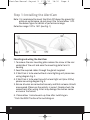
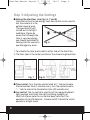
Fig. 2
BROWN - LIVE IN
NEUTRAL
Fig. 3
RED SWITCHED LIVE
Fig. 4
Important note:
Please remove the plastic
lens cover from camera
after installation.
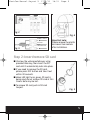
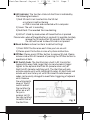
Step 2: Insert/remove SD card
I Unscrew the waterproofed cover using
provided Allen key, then insert the SD
card until it automatically locks into place.
I If you need to remove the SD card,
please press OFF button and take it out
within 30 seconds.
I When LED light turns green, SD card is
being read, do not remove SD card at this
time or data may be lost.
I To remove SD card, push in SD card
to eject.
Fig. 5
5