1
Introducing Catalyst
Catalyst VST instrument blends and shapes oscillator waveforms together to form hybrid waveforms
which are then passed through an analogue style filter and chorus unit. The design focuses on
producing interesting waveforms using rectification in a way likely to be unfamiliar to most
synthesists outside the world of modular synthesis. The synthesiser is designed to be easy to use and
offers something a bit different from the usual subtractive synthesiser design. Some of the controls
may be a little unfamiliar to users, but a quick jiggle of a slider or knob will give you a good idea of
what the control can do. This manual has been written for those of you interested in understanding
what‘s going on ’under the hood’. The synthesiser is so intuitive you won’t need the manual open to
work out what’s going on.
Installation
Put Catalyst.dll in your VST plug in folder.
Schematic Overview
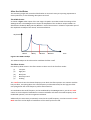
Catalyst follows the standard subtractive synthesiser architecture, as illustrated below:
V.C.F.
V.C.A.
OSC 1
gain
Chorus
Gain
Sound
out
cutoff
L.F.O.
OSC 2
ADSR
Figure 1: Simplified Schematic of the Catalyst Synthesiser
This layout will be familiar to anyone used to conventional subtractive synthesis:
•
•
•
•
•
•
Two oscillators are passed to a
Voltage controlled amplifier (VCA) the gain of which is shaped by an
ADSR envelope generator after which the signal passes through a
Voltage controlled filter (VCF), where the cutoff can be modulated by the envelope
generator in addition to
A low frequency oscillator (LFO). After filtering the signal passes to a
Chorus unit following which the overall gain is set.
The main refinement offered by Catalyst to this familiar synthesiser design is the oscillator stage.
This is explained in the next section.