1
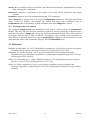
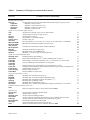
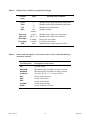
Table 1. In this report, keywords are shown in bold italic Arial type, e.g. Output data. Keywords
often have data associated with them, usually in the cell or cells to the right of the keyword. In
response to questions, y or yes signify “Yes” and any other input is “No”. The format (case, font,
size, colour) of keywords and all other input is ignored.
4. Specification of 3-PG parameters and options
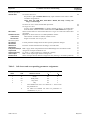
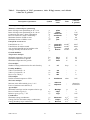
The 3-PG parameters that characterise a species are given on a worksheet named 3PG_Parameters.
This must have the form shown in 3PGpjs.data.xls. Columns to the right of the Units column
contain the parameter values for the species named at the head of the column. Do not edit parameter
names, but you may edit parameter values or add columns of values for new species. The species
selected by a Species keyword on the running sheet is compared with the species names on
3PG_Parameters to select the parameters to be used in a run. If parameters for this species are not
on 3PG_Parameters, or this sheet is not in the active workbook, internal values are used. The latter
are the default values for E. globulus determined by Sands and Landsberg (2002).
Parameter values can also be specified on single-site and sensitivity analysis sheets. 3PGPJS assigns
parameters in the following steps so the values used are those found on the active worksheet:
1.
2.
3.
4.
The internal, coded values are assigned.
Default parameters for the species selected by the run are then read from 3PG_Parameters.
Values given on single-site sheets replace these default values.
For a sensitivity analysis, parameters are then read from the sensitivity analysis sheet.
3PGPJS also has run-time options whose default values are specified on 3PG_Parameters:
•
•
•
•
Interpolate between silvicultural events determines how silvicultural event tables are treated
Output frequency determines the frequency of output for stand development summaries.
Clear output region determines if potential output cells are cleared prior to fresh output.
Output variables for any single-site run are defined.
5. The SingleSite run-type
A single-site sheet has the run-type keyword SingleSite.
The keyword Site on a single-site sheet identifies a name for the site. The keyword Species
identifies the name of the species to be used to select parameter sets from 3PG_Parameters. If the
species does not match a species on 3PG_Parameters, or that sheet is not present in the workbook,
the parameter values coded into 3PGPJS are used.
The minimum data required to run 3-PG are the following:
•
•
•
•
Climate data: Monthly mean temperature, solar radiation, rainfall, vapour pressure deficit,
and frost days.
Site factors: Site-latitude, maximum available water stored in the soil, soil fertility rating.
Initial conditions: Stem, root and foliage biomass, stocking and soil water at some time.
3-PG parameters: Parameters characterising the species modelled.
The following data are optional:
•
•
Changes to default parameters.
Silvicultural events: e.g., changes in fertility rating or irrigation rates can be specified.
Data are provided on a single-site sheet through three mandatory data blocks, Climate data, Site
factors, and Initialisation, and optional blocks for parameter changes and silvicultural events.
Optional inputs control the output resolution (monthly or annual), and a list of output variables.
3PGPJS vsn 2.4
8
May 2004