1
Operating Your TD Device
Chapter 5
Viewing the Screens and the Alarms
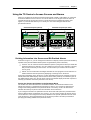
As described in Chapter 4, you can configure screens and alarms for the TD device. If you
configure both alarms and screens, you also designate which set of messages (screens or
alarms) are the default display mode for the TD device. The default configuration selects the
screens to be the default display.
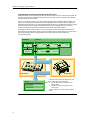
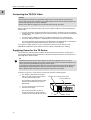
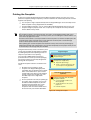
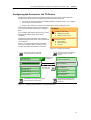
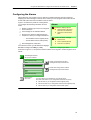
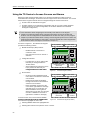
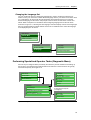
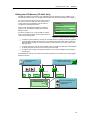
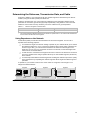
After power-up or after a period of inactivity (one minute), the TD device shows the text of the
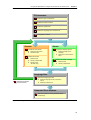
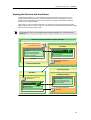
default display mode. As shown in Figure 5-7, the operator can switch between the default display
mode and the secondary display mode.
Tip
For the TD 200C: If you do not configure buttons for ESC or ENTER, you cannot access the
main menu.
Screens: Up to 8 Screens Each for Up to 8 Groups
Press ESC to display the User
Menu (of the screens)
ESC
User Menu
User menu item 1
User menu item 2
...
(Up to 8 entries)
Screen 1
Use the UP or DOWN arrow
button to scroll through the
screens for this group
Screens
ESC
Enter
Press ESC to display the
Main Menu
Default Display Mode
Secondary Display
Main Menu
ESC
Press ESC to display the
default display
Display Alarms
Operator Menu
Diagnostic Menu
Release Password
Figure 5-7
Bit-Enabled Alarms
Alarm message
Use the UP or DOWN arrow
buttons to scroll through the list
of alarm messages
Enter
ESC
Press ESC to display the
Main Menu
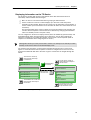
Navigating between the Default and Secondary Displays
59