1
10. 4
Configuring the Thermostat Settings.
11. Verify that all the heating and cooling stages are working correctly. See 8 Testing the System.
12. If the thermostat uses an outdoor sensor, air filter sensor, or heat pump fault sensor, see 7
Options and Accessories.
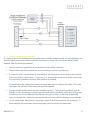
13. If the HVAC equipment has two transformers, see 6.1.3
Dual Transformer .
14. To connect the HVAC equipment to a zone control system, see 6.2 Zone Control Systems.
15. Provision the thermostat to allow it to communicate with the ZigBee gateway or the optional Meter
Data Collector or pager module. See.
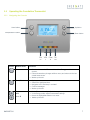
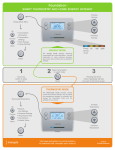
16. Show the homeowner how to use their new thermostat as described in 1.1
Foundation Thermostat. In particular make sure they know how to:
Operating the
a. Change the mode between Heat, Cool, Auto and Off.
b. Set a temporary hold, which they can also use to override an energy or price conservation
event.
c. Modify their conservation settings if the electricity provider is sending price information.
d. Modify their schedule time and temperature settings.
For answers to some common user questions, see 12.2 User Questions.
17. Explain how the electricity provider’s demand response program works to the homeowner.
18. Provide the homeowner with the thermostat user guide and electric utility documentation.
AW000873-H
13