1
TROUBLESHOOTING
TimeCommander or STARGATE cannot communicate with the IR-XP2
1) Check that both the Timecommander or STARGATE and IR-XP2 are powered up.
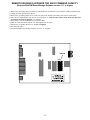
2) Check that jumpers J1 through J4 are all in the "AUX" position.
3) Check that the correct DATA CABLE is connected between the "RS232/AUX" jack of the IR-XP2 and the "AUX" jack of the
TimeCommander or STARGATE.
4) Check that the correct software (WinEVM 1.10 or higher) and firmware (version 2.28 or higher) are installed.
5) Check that "IR-XPANDER" is selected in the UTILITES | OPTIONS | IR REMOTE menu.
Computer cannot communicate with the IR-XP2 (Serial Mode)
1) Check that both the computer and IR-XP2 are powered up.
2) Check that jumpers J1 and J2 are in the "RS232" position and J3 and J4 are in the "AUX" position.
3) Check that the correct DATA CABLE is connected between the "RS232/AUX" jack of the IR-XP2 and the DB-9 Serial Adaptor.
4) Check that the correct DB-9 Serial Adaptor is connected.
Some IR commands work but others don't
NOTE: THE IRXP2 IS COMPATIBLE WITH REMOTES IN THE 20KHz - 85KHz RANGE
1) Check that you have fresh batteries in the remote you are having problems with.
2) Position the problem remote control at different distances and angles from the IR-XP2 IR window when learning.
3) Press the remote control button very briefly when learning.
4) Check that the IR-XP2 IR Window is not exposed to fluorescent lighting when learning IR commands.
5) Try learning the questionable ir command(s) into one of the last 16 memory locations (#235-250 or #485-500) .
6) Select ALT (Alternate Play) in the IR SETUP menu for the IR commands that don't operate, then re-download the schedule.
7) Select a different carrier frequency then try re-learning and playing the IR command. There are several popular carrier frequency
choices available: 40.0 kHz, 36.7 kHz, 56.8 kHz and 38.0 kHz, 20KHz, 85KHz.
8. Some cable box remotes use no carrier frequency. Select 20KHz for these remotes.
Repeat does not function or is intermittent
NOTE: REPEAT WILL ONLY FUNCTION WITH REMOTES THAT USE 40KHz CARRIER FREQUENCY
1) Try aiming your remote at a slight angle to the IR-XP2.
2) Turn off (or relocate) space heaters or other nearby sources of IR energy.
3) If the IR-XP2 is located in the same room as the IR-controlled devices, use the included BLACK (IR OPAQUE) SHELL and
IR WINDOW MASK to prevent interference from reflected IR signals (see instructions included with IR emitter).
4) Click REPEAT DSP to select a different DSP value and retry the Repeat. There are 7 choices for Repeat DSP (0, 1, 2, 3, 4, 5, 6).
The IR-XP2 is designed for compatibility with IR remote controls of varying models and manufacturers. However, due to differences
in IR formats used by different manufacturers, it is possible to experience difficulty learning or playing certain IR commands. If you
experience problems, first follow the troubleshooting procedures in this section. If you continue to experience difficulties, contact the
dealer/distributor from whom you purchased or contact JDS Customer Support at:
Attn: Customer Service
JDS Technologies
12200 Thatcher Court
Poway, CA 92064-6876 U.S.A.
TEL 858-486-8787 M-F 10am-4pm PT
FAX 858-486-8789
EMAIL [email protected]
- 14 -