1
ABELDent Platform Setup Conventions
b.
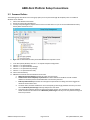
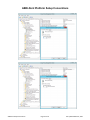
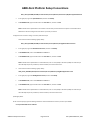
Locate and then click the following registry subkey:
HKEY_LOCAL_MACHINE\SYSTEM\CurrentControlSet\Services\W32Time\Parameters\Type
c.
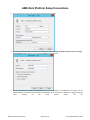
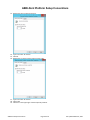
In the right pane, right-click Type, and then click Modify.
d.
In Edit Value, type NTP in the Value data box, and then click OK.
Set AnnounceFlags to 5. To do this, follow these steps:
.
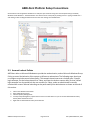
Locate and then click the following registry subkey:
HKEY_LOCAL_MACHINE\SYSTEM\CurrentControlSet\Services\W32Time\Config\AnnounceFlags
a.
b.
In the right pane, right-click AnnounceFlags, and then click Modify.
In Edit DWORD Value, type 5 in the Value data box, and then click OK.
Enable NTPServer. To do this, follow these steps:
.
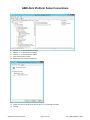
Locate and then click the following registry subkey:
HKEY_LOCAL_MACHINE\SYSTEM\CurrentControlSet\Services\W32Time\TimeProviders\NtpServer
a.
b.
In the right pane, right-click Enabled, and then click Modify.
In Edit DWORD Value, type 1 in the Value data box, and then click OK.
Specify the time sources. To do this, follow these steps:
.
Locate and then click the following registry subkey:
HKEY_LOCAL_MACHINE\SYSTEM\CurrentControlSet\Services\W32Time\Parameters
a.
b.
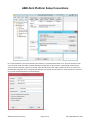
In the right pane, right-click NtpServer, and then click Modify.
In Edit Value, type Peers in the Value data box, and then click OK.
Note Peers is a placeholder for a space-delimited list of peers from which your computer obtains time stamps. Each DNS
name that is listed must be unique. You must append ,0x1 to the end of each DNS name. If you do not append ,0x1 to
the end of each DNS name, the changes made in step 5 will not take effect.
Select the poll interval. To do this, follow these steps:
.
Locate and then click the following registry subkey:
ABELDent Setup Conventions
Page 21 of 25
Last updated March 6, 2014