1
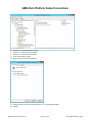
ABELDent Platform Setup Conventions o Data only backups. This will have to be setup after ABELDent is installed. ABEL recommends that the ABELDent folder and its sub-folders be backed up. Note: A regular user will not have appropriate privileges to perform full system backups; any users that perform backups will have to be added to the Backup Operator’s group. o A backup schedule can also be set. Most customers will have enough space available on their backup media to perform a full backup with system state on a daily basis. This is recommended for small offices without an on-site IT person to ensure that all data from all applications is backed up. More sophisticated backup rotations can be set up if and when space becomes an issue. If the customer has a high speed always on Internet connection it is recommended that Automatic Updates be turned on. Setup the group policy to: Note: This is an optional step to enhance security logs. o Audit successful and unsuccessful account login events, o Audit successful and unsuccessful account management events, o Account lockout to 3 invalid lockout attempts, and the lockout duration to 15 minutes, and the reset account lockout counter to 15 minutes. Turn off unnecessary Services such as Messenger, IIS (If it will not be needed) and FTP. If using these services do not allow anonymous access. Note that some practices use ABEL’s kiosk and case presentation software & will need IIS. Install and configure a reputable Anti-Virus Product. Set it up to automatically get updates regularly. It should be configured for Real-time scanning and for at least 1 full disk scan per week. Some products require that ABELDent be added to exceptions. 1.4.1.2 Testing Test Windows printing from all workstations, to all printers to which they will need to print. 1.4.2 Windows 8 or Windows 7 File Server 1.4.2.1 Setup Please conform to the following conventions when setting up a small practice file server based on a client OS like Windows 8 or Windows 7. We recommend the NTFS file system. Setup TCP/IP as the network protocol. Set static IP addressing for the server. ABEL recommends a router with a firewall on all high-speed Internet connections. Name the computer with the customer’s ABEL client ID number. For example if the ABEL customer ID number is C09999-ODS, name the server C09999. You can get the customer ID number by calling ABEL’s production department and asking for it. TURN OFF sharing wizard/simple file sharing. Open My computer > Tools >Folder Options >Go to the view Tab>Uncheck simple file sharing. ABELDent Setup Conventions Page 3 of 25 Last updated March 6, 2014