1
I am sure that you have all seen those three little icons next to one of the buttons
on your camera; the mountain, flower, and clock. This button is used to activate
the macro setting for your camera. The macro setting, represented by the flower, is
toggled on or off with the other settings depending upon the number of times you
depress the activation button. When the macro setting is activated, a flower icon is
typically displayed on your camera’s LCD. By using this feature you can now place
the camera closer to the subject, filling the capture area with the subject.
Depth of Field
Depth of field is the distance between objects in focus in your photograph. I am sure
you have seen photographs where you have a long depth of field; meaning objects
in the foreground, background, and everything in between are in focus. Conversely
a shallow depth of field will only have the central object in focus and the foreground
and backgrounds will be blurry. The depth of field is controlled by the aperture of
the lens/exposure time, how close you are to a subject, and how much the lens is
zoomed. Not all digital cameras have the aperture iris, thus they control depth of field
with exposure time.
The lens aperture is the opening in the lens that allows light to pass through, it is
controlled by an iris inside the lens. Since your camera is set to automatic, you don’t
have direct control of the aperture setting and thus depth of field. To check the f-stop,
look at the f# on the LCD screen; the larger the number, f22, the greater the depth of
field; the smaller the number, f2.8, the
smaller the depth of field. Many digital
cameras don’t allow you to alter the
aperture; however, you can affect the
depth of field by controlling the amount
of light on your sample figure, which is
why I bring it up. The more light you
have on your subject the smaller the iris
will open (the larger f#) the greater the
depth of field; however, you can wash
out your figure with too much light so
be careful. When the subject figure is
not well lit, the iris opens more to allow
additional light to enter the camera (the
smaller the f#), which narrows the depth
of field. This means the objects in your
figures hands might be out of focus while
the main body of the figure is in focus.
There are three ways to combat a narrow
depth of field when photographing
figures; one is to make sure that the figure
and any thing they are holding are in the
same plane of focus (Line them up in a
straight line such that they are all about
equal distance from the camera lens),
the second is to use a wider angle of
view (don’t zoom in), and the third is to
increase the lighting. Proper lighting can
solve many of the depth of field issues;
it will be addressed in the photo studio
section shortly. You can take your camera
out of automatic mode and adjust the
aperture more precisely than by altering
the light levels, distance to subject, or
level of zoom; to do so please refer to
your user’s guide.
Conversely, a shallow depth of field
can be used by the photographer to
isolate subject matter or make part of a
photograph stand out to the viewer, so
this is an area where experimentation
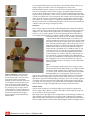
Figure 3 – Depth of Field: Note the difference
in these two images of the same vignette. In the
photo on the left look at the two regions circled.
These are the closest and furthest items in the
photo, and they are out of focus and blurry. In the
second image the lighting has been altered and
a longer exposure time was used resulting in a
larger f-stop, which increased the depth of field to
bring these areas into focus. Depth of field can get
so small that an entire Minifig isn’t in focus. Be
careful of lighting as this is the best remedy for a
narrow depth of field.
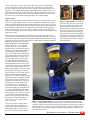
Figure 4 – Narrow Depth of Field: This figure was made for a special Houston TEXLug event,
where it was photographed by Anthony Sava in a well lit area. Anthony demonstrates a narrow depth
of field in this photo, which removes the distracting background by blurring it in the image. The depth of
field in this photo can be seen by examining the corners of the black box the figure is displayed on; notice
the near and far corners are slightly out of focus. This figure is sporting a custom gun from BrickArms.
Photo used with permission.
BrickJournal • Issue 6, Volume 1 • Fall/Winter 2006
00