1
is encouraged. Think about your photos before you take them: decide what you are
trying to capture; use them to show off or highlight your custom work.
Insufficient light/aperture opening can be one reason you get blurry photos. If the
camera can not open the aperture wide enough to get sufficient light in automatic
mode, it will extend the exposure time in order to get the additional light. When the
exposure time is greater than 1/60 to 1/30 of a second you will detect motion in either
or both, your subject and/or in your hands as they hold the camera, thus blurring the
image captured. If you can’t get sufficient light on a subject figure, consider setting
your camera on a stationary object or a tripod and using the timer feature. I suggest
the timer feature as the act of depressing the button can cause camera movement and
continue to blur your images on longer exposures.
Resolution
This is a tricky subject and one tends to think the higher the resolution the better the
image. After all, cameras with more mega-pixels have higher resolution and are more
expensive, so they must be better, right? This is not necessarily true depending on
your how you are going to display or print your photographs. Most of the time we
use our digital photographs to post online or email to friends, we don’t need a 2272
x 1704 pixel image to put on the web. We need a small image
of approximately 400 to 600 pixels high. If you capture your
image at the highest resolution your camera can capture, details
not visible to the naked eye will be visible. This is because you
have essentially placed the figure under a microscope. You are
magnifying the figure by using the resolution in combination
with the macro features. If you merely shrink this image to a
smaller size this “magnified” view will still be visible, as well
as the larger file size. You will need to resample the image as
you resize it in order to reduce the magnification effect and
to reduce the file size. Another solution is to take images at a
lower resolution. I suggest something in the 1280-1024 pixel
size as this is a middle of the road resolution and will not create
the “magnified” views as easily. Thus when you crop your
image to the 400 pixel size it will appear as close to the lifelike
item as possible.
Flash
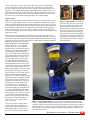
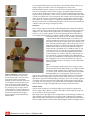
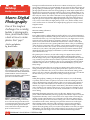
Figure 5 - Resolution: This series of images
demonstrates what happens with the various
resolution settings of your camera. This custom
figure has been cropped out of a 640x480,
1280x960, and 2272x1704 images; which results
in several different sized images. When we post
online we need a figure of approximately 400
pixels tall. This means that the 1280x960 would
be a good starting size for our image, when we
crop out the figure it is 614 pixels. This allows us
to resample and resize the image to make it easier
for others to download and view. This figure
sports a custom sabre hilt by Deathstickman of
FBTB and MCN.
00
There are advantages and disadvantages to using your flash.
The flash will increase the light falling on your subject and thus
increase the depth of field by using a smaller aperture (larger
f#), which is good. The flash will also help remove any motion
that might appear in your image from camera movement,
which is also good. However if you want to minimize the shadows created from the
light placed on the subject figure a flash isn’t good. A flash will create a very hard/
dark shadow region from the flash hitting your figure. Also if you are taking a picture
of a subject with flat surfaces the flash could reflect off these surfaces and wash out
your image. If you are going to use your flash make sure the light from the flash hits
these surfaces at an angle so the light reflects in an angle away from the lens.
II Photo Studio
A photo studio is made of a few elements; light source (typically 2), background,
camera, and possibly a diffuser or reflector. The studio is fairly simple to set up and
can be created on any desk or tabletop.
Desk lamps work well as light sources, it helps if they are the same type, but this isn’t
critical. Merely place the light sources on opposite sides of the figure and angle the
light such that it falls on the figure at 45 degree angles. This helps reduce the shadows
as the two lights interfere with each other minimizing the shadows each light creates.
BrickJournal • Issue 6, Volume 1 • Fall/Winter 2006