1
Agent 6.5 User’s Guide for Microsoft Windows
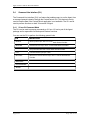
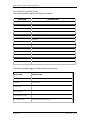
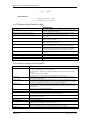
5.4.1.3 Restore Command Options
The following qualifiers apply to all Restore commands:
QUALIFIER
DESCRIPTION
/CREATESUBDIRS[=YES]
Creates all necessary sub-directories.
/DESTINATION=<destination>
States the destination to Restore to. (e.g. c:\.\*.*)
/INCLUDE=<filelist>
Outlines the list of files to include.
/EXCLUDE=<filelist>
Outlines the list of files to exclude.
/IGNSECURITY[=YES]
Does not Restore file ownership and permission information.
/OVRWRITE[=YES]
Overwrites existing files. If this option is not specified, the user will be notified of each
existing file.
/OVRLOCKED[=YES]
Overwrites locked files.
/SOURCE=<source>
Names the location of the safeset file.
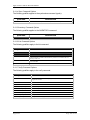
/IGNDATA[=YES]
/SVRADDRESS
Server/Vault address.
/SVRACCOUNT
Server/Vault account name.
/SVRUSERNAME
Server/Vault user name.
/SVRPASSWORD
Server/Vault user password (case sensitive).
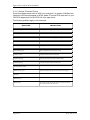
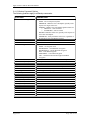
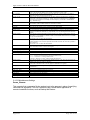
The following qualifiers apply to Windows Restore commands:
QUALIFIER
DESCRIPTION
/REGISTRY[=YES]
Restores the Windows Registry under Windows.
/AD[=YES]
Active Directory.
/SYSST[=YES]
/INCLUDEEXCH
/ROLLFORWARD[=YES]
/EXCHLOGALTLOC
Appendix
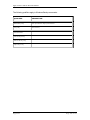
Restore Exchange log alternate location.
Page 106 of 121