1
Agent 6.5 User’s Guide for Microsoft Windows
2.5.5
Performance
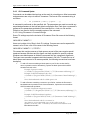
If the Agent is on a multi-cpu system, you can use multi-threading to improve the
performance of backups and restores for files larger than 32 kB.
There are three threading models available:
-
Single threading. All the data processing is handled by a single thread.
-
Combined threading. Data processing is divided up between two threads.
-
Block Processor threading. Data processing is spread across four or more threads.
Threading Model User Options:
1. Default. With this option the Agent will check both backup settings and current hardware
to determine which model it should use. This is the default setting used by the Agent.
On a single CPU system, the Single threading model will be used.
On a multi-CPU system the threading model used will depend on backup settings. If
compression and/or encryption are turned ON, the Block Processor threading model will be
used, otherwise the Combined threading model will be used.
2. Single. A Single threading model will be used.
3. Combined. The Combined threading model will be used.
4. Block Processor. The Block Processor threading model will be used with up to four
processing threads.
5. Maximum Block Processor. The Block Processor threading model will be used with up to
five processing threads.
Using the Options:
You can specify a threading model in the Job CFG file, or on the command line with VV.EXE:
1. “Backup” section of the job configuration file: Thread_Model = Default
Possible values: Default, Single, Combined, BlockProcessor or MaximumBlockProcessor.
2. “Restore” section of the job configuration file: Thread_Model = Default
Possible values: Default, Single, Combined or BlockProcessor. (Notice that there is no
“MaximumBlockProcessor” option here.)
3. At the command prompt, specify: “/ThreadModel=Value”, where Value is one of the
options above. (For example “/ThreadModel=Single”).
Agent Configuration
Page 69 of 121