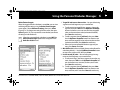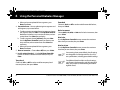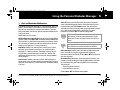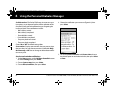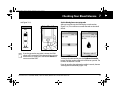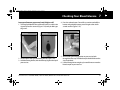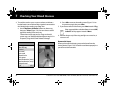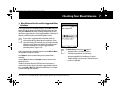
1
FrontMatter.fm Page 0 Saturday, September 10, 2011 7:06 PM
Contacts and Important Information
Use the spaces below to record important health and product information.
o
Doctor
Pharmacy
Name
Name
Address
Address
Telephone and Fax
Telephone and Fax
Email Address
Email Address
Nurse/Educator
Name
Address
Telephone and Fax
Email Address
Health Insurance
Name
Address
Telephone Number(s)
Policy Number
OmniPod System Start Date: ______________________
PDM Model: CAT35E Serial Number: ____________________
Distributor:
GlaxoSmithKline Inc.
7333 Mississauga Road, Mississauga, Ontario, Canada
L5N 6L4
Customer Care:
Please call 1 855 POD INFO (1 855 763 4636).
When outside of Canada, please call 647-788-3132.
Visit www.myOmniPod.ca for additional information and
resources.
FrontMatter.fm Page i Saturday, September 10, 2011 7:06 PM
Copyright © 2011 Insulet Corporation. All rights reserved.
Copyright © 2011 GlaxoSmithKline Inc. All rights reserved.
OmniPod® is a registered trademark of Insulet Corporation, used under license by GlaxoSmithKline Inc.
FreeStyle® is a registered trademark of Abbott Laboratories.
Third-party trademarks used here in are the trademarks of their respective owners.
14737-AW Rev C
OmniPodUG-G2 ConditionalTOC.fm Page iii Saturday, September 10, 2011 8:42 PM
Contents
Introduction. . . . . . . . . . . . . . . . . . . . . . . . . . . . . . . . . . . . . . . . . . . . . . ix
Before You Get Started . . . . . . . . . . . . . . . . . . . . . . . . . . . . . . . . . . . . . . ix
Indication. . . . . . . . . . . . . . . . . . . . . . . . . . . . . . . . . . . . . . . . . . . . . . . . . . . . . . ix
Contraindications . . . . . . . . . . . . . . . . . . . . . . . . . . . . . . . . . . . . . . . . . . . . . ix
You and your healthcare provider . . . . . . . . . . . . . . . . . . . . . . . . . . . . . x
Your Role: Safely Using the OmniPod System. . . . . . . . . . . . . . . . xi
About This User Guide. . . . . . . . . . . . . . . . . . . . . . . . . . . . . . . . . . . . . . xii
Conventions and Terms . . . . . . . . . . . . . . . . . . . . . . . . . . . . . . . . . . . . . . . xii
Symbols . . . . . . . . . . . . . . . . . . . . . . . . . . . . . . . . . . . . . . . . . . . . . . . . . . . . . xii
1 Your New OmniPod Insulin Management System. . . . . . . 1
Insulin Delivery with the OmniPod System . . . . . . . . . . . . . . . . . . 1
How Does the OmniPod System Work? . . . . . . . . . . . . . . . . . . . . . 2
No tubing. . . . . . . . . . . . . . . . . . . . . . . . . . . . . . . . . . . . . . . . . . . . . . . . . . . . . . . 2
Automated cannula insertion. . . . . . . . . . . . . . . . . . . . . . . . . . . . . . . . . . 2
A fully-integrated design with blood glucose monitoring . . . . 2
Suggested bolus calculation . . . . . . . . . . . . . . . . . . . . . . . . . . . . . . . . . . . 3
Carb presets . . . . . . . . . . . . . . . . . . . . . . . . . . . . . . . . . . . . . . . . . . . . . . . . . . . . 3
Record keeping. . . . . . . . . . . . . . . . . . . . . . . . . . . . . . . . . . . . . . . . . . . . . . . . . 3
Personalizing your System. . . . . . . . . . . . . . . . . . . . . . . . . . . . . . . . . . . . . 3
The Pod . . . . . . . . . . . . . . . . . . . . . . . . . . . . . . . . . . . . . . . . . . . . . . . . . . . . . . 4
The Personal Diabetes Manager . . . . . . . . . . . . . . . . . . . . . . . . . . . . 4
Buttons that program and control the OmniPod
System . . . . . . . . . . . . . . . . . . . . . . . . . . . . . . . . . . . . . . . . . . . . . . . . . . . . . . . . . 5
Primary screens . . . . . . . . . . . . . . . . . . . . . . . . . . . . . . . . . . . . . . . . . . . . . . . . 6
Safety Features. . . . . . . . . . . . . . . . . . . . . . . . . . . . . . . . . . . . . . . . . . . . . . 8
Automatic priming, safety checks, and insertion. . . . . . . . . . . . . . 8
Rapid occlusion detection. . . . . . . . . . . . . . . . . . . . . . . . . . . . . . . . . . . . . 8
Alerts and alarms . . . . . . . . . . . . . . . . . . . . . . . . . . . . . . . . . . . . . . . . . . . . . . 8
2 Getting Started . . . . . . . . . . . . . . . . . . . . . . . . . . . . . . . . . . . . . . . 9
Set Up the Personal Diabetes Manager (PDM) . . . . . . . . . . . . . . 9
Turn on the PDM. . . . . . . . . . . . . . . . . . . . . . . . . . . . . . . . . . . . . . . . . . . . . . . 9
The OmniPod Setup Wizard. . . . . . . . . . . . . . . . . . . . . . . . . . . . . . . . 10
Set date and time. . . . . . . . . . . . . . . . . . . . . . . . . . . . . . . . . . . . . . . . . . . . . 11
Enter basal settings . . . . . . . . . . . . . . . . . . . . . . . . . . . . . . . . . . . . . . . . . . . 11
Enter blood glucose sound setting and BG goal. . . . . . . . . . 12
Set the suggested bolus calculator. . . . . . . . . . . . . . . . . . . . . . . 12
Enter target blood glucose value. . . . . . . . . . . . . . . . . . . . . . . . . 12
Customer Care: 1 855 POD INFO (1 855 763 4636). Outside of Canada: 647-788-3132.
iii
OmniPodUG-G2 ConditionalTOC.fm Page iv Saturday, September 10, 2011 8:42 PM
Contents
Enter minimum BG allowed for use in bolus calculation . . . .
Enter insulin-to-carbohydrate ratio . . . . . . . . . . . . . . . . . . . . . . . . . .
Enter correction factor . . . . . . . . . . . . . . . . . . . . . . . . . . . . . . . . . . . . . . .
Set reverse correction . . . . . . . . . . . . . . . . . . . . . . . . . . . . . . . . . . . . . . . .
Enter the duration of insulin action . . . . . . . . . . . . . . . . . . . . . .
Select bolus increment and enter maximum bolus . . . . . .
Set extended bolus doses. . . . . . . . . . . . . . . . . . . . . . . . . . . . . . . .
Set low reservoir advisory. . . . . . . . . . . . . . . . . . . . . . . . . . . . . . . . . . . .
Set expiration notification. . . . . . . . . . . . . . . . . . . . . . . . . . . . . . . . . . . .
13
13
13
14
14
14
14
15
15
3 Understanding and Adjusting Basal Rates . . . . . . . . . . . .
What Is a Basal Rate? . . . . . . . . . . . . . . . . . . . . . . . . . . . . . . . . . . . . . . .
Personalized Basal Programs. . . . . . . . . . . . . . . . . . . . . . . . . . . . . . .
Create a basal program . . . . . . . . . . . . . . . . . . . . . . . . . . . . . . . . . . . . . .
Enable an existing basal program. . . . . . . . . . . . . . . . . . . . . . . . . . . .
Change, rename, copy, or delete a basal program. . . . . . . .
Temporary Basal Rates and Presets . . . . . . . . . . . . . . . . . . . . . . . .
What is a temporary basal rate?. . . . . . . . . . . . . . . . . . . . . . . . . . . . . .
Enable a one-time temporary basal rate. . . . . . . . . . . . . . . . . . . . .
Cancel a one-time temporary basal rate. . . . . . . . . . . . . . . . . . . . .
Create a temporary basal preset . . . . . . . . . . . . . . . . . . . . . . . . . . . . .
Enable an existing temporary basal preset . . . . . . . . . . . . . . . . . .
Cancel an active temporary basal preset . . . . . . . . . . . . . . . . . . . .
Change, rename, or delete a temporary basal preset . . . . . . .
Maximum Basal Rate. . . . . . . . . . . . . . . . . . . . . . . . . . . . . . . . . . . . . . .
16
16
16
17
19
20
22
22
23
24
24
25
26
26
27
iv
What is the maximum basal rate? . . . . . . . . . . . . . . . . . . . . . . . . . . . . 27
Change the maximum basal rate . . . . . . . . . . . . . . . . . . . . . . . . . . . . 27
4 Understanding and Delivering Bolus Doses . . . . . . . . . . . 28
What Is a Bolus? . . . . . . . . . . . . . . . . . . . . . . . . . . . . . . . . . . . . . . . . . . . . 28
Bolus Dose Options . . . . . . . . . . . . . . . . . . . . . . . . . . . . . . . . . . . . . . . . 29
Suggested Bolus Calculator . . . . . . . . . . . . . . . . . . . . . . . . . . . . . . . . 29
How a suggested bolus is calculated. . . . . . . . . . . . . . . . . . . . . . . . . 29
Deliver a Normal Bolus . . . . . . . . . . . . . . . . . . . . . . . . . . . . . . . . . . . . . 30
Deliver a bolus when suggested bolus calculator is On . . . . . 30
Deliver a bolus manually (suggested bolus calc is Off) . . . . . . 33
Deliver an Extended Bolus. . . . . . . . . . . . . . . . . . . . . . . . . . . . . . . . . . 33
Deliver an extended bolus instead of a normal bolus . . . . . . . 33
Cancel Active Boluses . . . . . . . . . . . . . . . . . . . . . . . . . . . . . . . . . . . . . . 35
Replace an Extended Bolus. . . . . . . . . . . . . . . . . . . . . . . . . . . . . . . . . 36
Bolus Presets . . . . . . . . . . . . . . . . . . . . . . . . . . . . . . . . . . . . . . . . . . . . . . . 37
Create a bolus preset . . . . . . . . . . . . . . . . . . . . . . . . . . . . . . . . . . . . . 37
Enable an existing bolus preset . . . . . . . . . . . . . . . . . . . . . . . . . . . . . . 38
Change, rename, or delete a bolus preset. . . . . . . . . . . . . . . . . . . . 38
Cancel an active bolus preset. . . . . . . . . . . . . . . . . . . . . . . . . . . . . . . . . 39
Carb Presets . . . . . . . . . . . . . . . . . . . . . . . . . . . . . . . . . . . . . . . . . . . . . . . . 39
Create a carb preset. . . . . . . . . . . . . . . . . . . . . . . . . . . . . . . . . . . . . . . . . . . 39
Change or edit a carb preset . . . . . . . . . . . . . . . . . . . . . . . . . . . . . . . . . 40
Delete a carb preset . . . . . . . . . . . . . . . . . . . . . . . . . . . . . . . . . . . . . . . . . . 41
Customer Care: 1 855 POD INFO (1 855 763 4636). Outside of Canada: 647-788-3132.
OmniPodUG-G2 ConditionalTOC.fm Page v Saturday, September 10, 2011 8:42 PM
Contents
5 Using the Pod . . . . . . . . . . . . . . . . . . . . . . . . . . . . . . . . . . . . . . . . 42
The Pod Change Process . . . . . . . . . . . . . . . . . . . . . . . . . . . . . . . . . . . 42
Gather equipment and supplies . . . . . . . . . . . . . . . . . . . . . . . . . . . . . 43
Deactivate the current Pod . . . . . . . . . . . . . . . . . . . . . . . . . . . . . . . 43
Fill a new Pod. . . . . . . . . . . . . . . . . . . . . . . . . . . . . . . . . . . . . . . . . . . . . . . . . 45
Select the infusion site . . . . . . . . . . . . . . . . . . . . . . . . . . . . . . . . . . . . . . . 48
Prepare the infusion site. . . . . . . . . . . . . . . . . . . . . . . . . . . . . . . . . . . . . . 49
Apply the new Pod . . . . . . . . . . . . . . . . . . . . . . . . . . . . . . . . . . . . . . . . . . . 49
Insert cannula and begin insulin delivery. . . . . . . . . . . . . . . . . . . . 51
Check Pod Status. . . . . . . . . . . . . . . . . . . . . . . . . . . . . . . . . . . . . . . . . . . 53
Suspend Insulin Delivery . . . . . . . . . . . . . . . . . . . . . . . . . . . . . . . . . . . 54
Resume Insulin Delivery. . . . . . . . . . . . . . . . . . . . . . . . . . . . . . . . . . . . 55
Avoid Infusion Site Infections. . . . . . . . . . . . . . . . . . . . . . . . . . . . . . . 55
Get the Most From Your Pod . . . . . . . . . . . . . . . . . . . . . . . . . . . . . . . 56
Avoid extreme temperatures . . . . . . . . . . . . . . . . . . . . . . . . . . . . . . . . 56
Water and your Pod . . . . . . . . . . . . . . . . . . . . . . . . . . . . . . . . . . . . . . . . . . 56
Safe storage . . . . . . . . . . . . . . . . . . . . . . . . . . . . . . . . . . . . . . . . . . . . . . 56
6 Using the Personal Diabetes Manager . . . . . . . . . . . . . . . . 57
The Status Screen . . . . . . . . . . . . . . . . . . . . . . . . . . . . . . . . . . . . . . . . . . 57
Insulin gauge and display . . . . . . . . . . . . . . . . . . . . . . . . . . . . . . . . 58
PDM settings . . . . . . . . . . . . . . . . . . . . . . . . . . . . . . . . . . . . . . . . . . . . . 58
The System Setup Menu . . . . . . . . . . . . . . . . . . . . . . . . . . . . . . . . . . . 59
Reset the Date or Time . . . . . . . . . . . . . . . . . . . . . . . . . . . . . . . . . . . . . 59
Reset the time . . . . . . . . . . . . . . . . . . . . . . . . . . . . . . . . . . . . . . . . . . . . . . . . 59
Reset the date. . . . . . . . . . . . . . . . . . . . . . . . . . . . . . . . . . . . . . . . . . . . . . . . . 60
Change Bolus and Basal Settings. . . . . . . . . . . . . . . . . . . . . . . . . . . 60
Bolus calcs . . . . . . . . . . . . . . . . . . . . . . . . . . . . . . . . . . . . . . . . . . . . . . . 61
Ratios/factors/targets. . . . . . . . . . . . . . . . . . . . . . . . . . . . . . . . . . . . . . . . . 63
Temp basal. . . . . . . . . . . . . . . . . . . . . . . . . . . . . . . . . . . . . . . . . . . . . . . . . . . . 64
Extended. . . . . . . . . . . . . . . . . . . . . . . . . . . . . . . . . . . . . . . . . . . . . . . . . . . . . . 64
Bolus increment . . . . . . . . . . . . . . . . . . . . . . . . . . . . . . . . . . . . . . . . . . . . . . 64
Max bolus. . . . . . . . . . . . . . . . . . . . . . . . . . . . . . . . . . . . . . . . . . . . . . . . . . . . . 64
Max basal rate. . . . . . . . . . . . . . . . . . . . . . . . . . . . . . . . . . . . . . . . . . . . . . . . . 64
Alert and Reminder Notifications . . . . . . . . . . . . . . . . . . . . . . . . . . 65
Set alert and reminder notifications. . . . . . . . . . . . . . . . . . . . . . . . . . 66
Change Blood Glucose Meter Settings . . . . . . . . . . . . . . . . . . . . . 68
Change BG goal limits . . . . . . . . . . . . . . . . . . . . . . . . . . . . . . . . . . . . . . . . 68
Manage the blood glucose tags list . . . . . . . . . . . . . . . . . . . . . . . . . . 69
Change BG sound . . . . . . . . . . . . . . . . . . . . . . . . . . . . . . . . . . . . . . . . . . . . 69
Customize the Personal Diabetes Manager . . . . . . . . . . . . . . . . 70
Set PDM options. . . . . . . . . . . . . . . . . . . . . . . . . . . . . . . . . . . . . . . . . . . . . . 70
Set Diagnostic Functions. . . . . . . . . . . . . . . . . . . . . . . . . . . . . . . . . . . 71
Diagnostic options. . . . . . . . . . . . . . . . . . . . . . . . . . . . . . . . . . . . . . . . . . . . 72
Set a Notification to Vibrate . . . . . . . . . . . . . . . . . . . . . . . . . . . . . . . . 73
Get the Most from Your PDM . . . . . . . . . . . . . . . . . . . . . . . . . . . . . . 73
Keep it handy . . . . . . . . . . . . . . . . . . . . . . . . . . . . . . . . . . . . . . . . . . . . . . . . . 73
Communicating with the Pod. . . . . . . . . . . . . . . . . . . . . . . . . . . . . . . . 73
Water and your PDM. . . . . . . . . . . . . . . . . . . . . . . . . . . . . . . . . . . . . . . . . . 74
Customer Care: 1 855 POD INFO (1 855 763 4636). Outside of Canada: 647-788-3132.
v
OmniPodUG-G2 ConditionalTOC.fm Page vi Saturday, September 10, 2011 8:42 PM
Contents
Avoid extreme temperatures . . . . . . . . . . . . . . . . . . . . . . . . . . . . . . . . 74
Electrical interference . . . . . . . . . . . . . . . . . . . . . . . . . . . . . . . . . . . . . . . . 74
7 Checking Your Blood Glucose . . . . . . . . . . . . . . . . . . . . . . . . . 75
The Built-in FreeStyle® Blood Glucose Meter . . . . . . . . . . . . . . . 75
The FreeStyle® Blood Glucose Test Strips. . . . . . . . . . . . . . . . . . . 76
Important test strip information . . . . . . . . . . . . . . . . . . . . . . . . . . . . . 76
The FreeStyle® Control Solution. . . . . . . . . . . . . . . . . . . . . . . . . . . . 77
When to perform a control solution test. . . . . . . . . . . . . . . . . . . . . 77
Check that the meter and test strips are working . . . . . . . . . . . 77
Control solution expiration date . . . . . . . . . . . . . . . . . . . . . . . . . . . . . 77
Ensure accurate control solution results . . . . . . . . . . . . . . . . . . . . . 77
Out-of-range control solution results. . . . . . . . . . . . . . . . . . . . . . . . 78
Performing a Control Solution Test . . . . . . . . . . . . . . . . . . . . . . . . 79
Performing a blood glucose reading. . . . . . . . . . . . . . . . . . . . . . . 82
Prepare the lancing device. . . . . . . . . . . . . . . . . . . . . . . . . . . . . . . . . . . 83
Insert the blood glucose test strip . . . . . . . . . . . . . . . . . . . . . . . . . . . 84
Set the blood glucose test strip code. . . . . . . . . . . . . . . . . . . . . 85
Lance your finger . . . . . . . . . . . . . . . . . . . . . . . . . . . . . . . . . . . . . . . . 86
Lance your forearm, upper arm, hand, thigh, or calf. . . . . . . . . 87
Fill the blood glucose test strip with blood . . . . . . . . . . . . . . . . . . 88
Wait for the reading . . . . . . . . . . . . . . . . . . . . . . . . . . . . . . . . . . . . . . . . . . 89
Remove the lancet . . . . . . . . . . . . . . . . . . . . . . . . . . . . . . . . . . . . . . . . . . . 90
Blood Glucose Results and the Suggested Bolus Calculator 91
Entering Blood Glucose Readings Manually. . . . . . . . . . . . . . . . 92
vi
Editing Tags . . . . . . . . . . . . . . . . . . . . . . . . . . . . . . . . . . . . . . . . . . . . . . . . 92
Low and High Blood Glucose Readings. . . . . . . . . . . . . . . . . . . . . 93
Low readings . . . . . . . . . . . . . . . . . . . . . . . . . . . . . . . . . . . . . . . . . . . . . . . . . 93
High readings. . . . . . . . . . . . . . . . . . . . . . . . . . . . . . . . . . . . . . . . . . . . . . . . . 94
Important Health-Related Information . . . . . . . . . . . . . . . . . . . . . 95
8 Understanding Your Records . . . . . . . . . . . . . . . . . . . . . . . . . 96
Record Keeping . . . . . . . . . . . . . . . . . . . . . . . . . . . . . . . . . . . . . . . . . . . . 96
Special symbols in record screens . . . . . . . . . . . . . . . . . . . . . . . . 96
Insulin Delivery Records . . . . . . . . . . . . . . . . . . . . . . . . . . . . . . . . . . . . 97
View insulin delivery records . . . . . . . . . . . . . . . . . . . . . . . . . . . . . . . . . 97
Blood Glucose Records . . . . . . . . . . . . . . . . . . . . . . . . . . . . . . . . . . . . . 99
View single-day trends . . . . . . . . . . . . . . . . . . . . . . . . . . . . . . . . . . . . . . . 99
View multiple-day trends. . . . . . . . . . . . . . . . . . . . . . . . . . . . . . . . . . . . 100
Alarm Records. . . . . . . . . . . . . . . . . . . . . . . . . . . . . . . . . . . . . . . . . . . . 101
Carbohydrate Records. . . . . . . . . . . . . . . . . . . . . . . . . . . . . . . . . . . . 101
All Records . . . . . . . . . . . . . . . . . . . . . . . . . . . . . . . . . . . . . . . . . . . . . . . 102
User Information/Support. . . . . . . . . . . . . . . . . . . . . . . . . . . . . . . . 102
Add or change user information . . . . . . . . . . . . . . . . . . . . . . . . . . . . 103
9 Living with Diabetes. . . . . . . . . . . . . . . . . . . . . . . . . . . . . . . . . 104
Your Role: Safely Using the OmniPod System. . . . . . . . . . . . . 104
Daily Diabetes Management Activities . . . . . . . . . . . . . . . . . . . 105
Check your blood glucose frequently. . . . . . . . . . . . . . . . . . . . . . . 105
Inspect the infusion site daily. . . . . . . . . . . . . . . . . . . . . . . . . . . . . . . . 105
Prepare for Emergencies. . . . . . . . . . . . . . . . . . . . . . . . . . . . . . . . . . 106
Customer Care: 1 855 POD INFO (1 855 763 4636). Outside of Canada: 647-788-3132.
OmniPodUG-G2 ConditionalTOC.fm Page vii Saturday, September 10, 2011 8:42 PM
Contents
Water and Your Pod . . . . . . . . . . . . . . . . . . . . . . . . . . . . . . . . . . . . . . . 106
Traveling and Vacationing. . . . . . . . . . . . . . . . . . . . . . . . . . . . . . . . . 107
Plan for changing time zones . . . . . . . . . . . . . . . . . . . . . . . . . . . . . . . 107
Take enough supplies. . . . . . . . . . . . . . . . . . . . . . . . . . . . . . . . . . . . . . . 107
Minimize airport security delays . . . . . . . . . . . . . . . . . . . . . . . . . 108
Keep supplies accessible . . . . . . . . . . . . . . . . . . . . . . . . . . . . . . . . . . . . 108
Avoid Lows, Highs, and DKA. . . . . . . . . . . . . . . . . . . . . . . . . . . . . . . 109
General precautions. . . . . . . . . . . . . . . . . . . . . . . . . . . . . . . . . . . . . . . . . 109
Hypoglycemia (low blood glucose). . . . . . . . . . . . . . . . . . . . . . . . . 109
Hyperglycemia (high blood glucose) . . . . . . . . . . . . . . . . . . . . . . . 113
Diabetic ketoacidosis (DKA). . . . . . . . . . . . . . . . . . . . . . . . . . . . . . . . . 117
Handling Special Situations . . . . . . . . . . . . . . . . . . . . . . . . . . . . . . . 118
Sick days . . . . . . . . . . . . . . . . . . . . . . . . . . . . . . . . . . . . . . . . . . . . . . . . . . . . . 118
Exercising, playing sports, or working hard. . . . . . . . . . . . . . . . . 118
X-rays, MRIs, and CT scans. . . . . . . . . . . . . . . . . . . . . . . . . . . . . . . . . . . 119
Surgery or hospitalization. . . . . . . . . . . . . . . . . . . . . . . . . . . . . . . . . . . 119
10 Alerts and Alarms . . . . . . . . . . . . . . . . . . . . . . . . . . . . . . . . . . . 120
Safety Checks . . . . . . . . . . . . . . . . . . . . . . . . . . . . . . . . . . . . . . . . . . . . . 120
Blood Glucose Meter Alerts . . . . . . . . . . . . . . . . . . . . . . . . . . . . . . . 120
Alarms. . . . . . . . . . . . . . . . . . . . . . . . . . . . . . . . . . . . . . . . . . . . . . . . . . . . . 123
Advisory Alarms . . . . . . . . . . . . . . . . . . . . . . . . . . . . . . . . . . . . . . . . . . . . . 123
Hazard Alarms. . . . . . . . . . . . . . . . . . . . . . . . . . . . . . . . . . . . . . . . . . . . . . . 123
Manual Shutoff of a Hazard Alarm. . . . . . . . . . . . . . . . . . . . . . . . . 129
11 Communication Failures. . . . . . . . . . . . . . . . . . . . . . . . . . . . . 130
The Communication Process. . . . . . . . . . . . . . . . . . . . . . . . . . . . . . 130
Failure During Pod Activation or Operation . . . . . . . . . . . . . . . 130
Failure During Pod Deactivation . . . . . . . . . . . . . . . . . . . . . . . . . . 132
Failure During Request for Status . . . . . . . . . . . . . . . . . . . . . . . . . 133
Failure During Bolus Cancellation . . . . . . . . . . . . . . . . . . . . . . . . . 134
Appendix . . . . . . . . . . . . . . . . . . . . . . . . . . . . . . . . . . . . . . . . . . . . . . 136
Pod Care and Maintenance . . . . . . . . . . . . . . . . . . . . . . . . . . . . . . . 136
Storage. . . . . . . . . . . . . . . . . . . . . . . . . . . . . . . . . . . . . . . . . . . . . . . . . . . . . . . 136
Cleaning . . . . . . . . . . . . . . . . . . . . . . . . . . . . . . . . . . . . . . . . . . . . . . . . . . . . . 136
Personal Diabetes Manager Care and Maintenance. . . . . . . 136
Storage. . . . . . . . . . . . . . . . . . . . . . . . . . . . . . . . . . . . . . . . . . . . . . . . . . . . . . . 136
Cleaning and Disinfecting . . . . . . . . . . . . . . . . . . . . . . . . . . . . . . . . . . . 137
Replacing batteries . . . . . . . . . . . . . . . . . . . . . . . . . . . . . . . . . . . . . . . . . . 137
If the PDM becomes submerged in water . . . . . . . . . . . . . . . . . . 139
If you drop the PDM . . . . . . . . . . . . . . . . . . . . . . . . . . . . . . . . . . . . . . . . . 139
Storage and Supplies . . . . . . . . . . . . . . . . . . . . . . . . . . . . . . . . . . . . . 140
Storage. . . . . . . . . . . . . . . . . . . . . . . . . . . . . . . . . . . . . . . . . . . . . . . . . . . . . . . 140
Ordering supplies. . . . . . . . . . . . . . . . . . . . . . . . . . . . . . . . . . . . . . . . . . . . 140
Suggested Bolus Calculator Examples and Guidelines . . . . 140
Meal bolus calculation. . . . . . . . . . . . . . . . . . . . . . . . . . . . . . . . . . . . . . . 141
Insulin-on-board (IOB) calculation. . . . . . . . . . . . . . . . . . . . . . . . . . . 141
Examples of suggested bolus calculations. . . . . . . . . . . . . . . . . . 141
Calculator guidelines . . . . . . . . . . . . . . . . . . . . . . . . . . . . . . . . . . . . . . . . 143
Customer Care: 1 855 POD INFO (1 855 763 4636). Outside of Canada: 647-788-3132.
vii
OmniPodUG-G2 ConditionalTOC.fm Page viii Saturday, September 10, 2011 8:42 PM
Contents
OmniPod System Options and Settings. . . . . . . . . . . . . . . . . . . 144
Pod Specifications . . . . . . . . . . . . . . . . . . . . . . . . . . . . . . . . . . . . . . . . 145
Accuracy Test Results . . . . . . . . . . . . . . . . . . . . . . . . . . . . . . . . . . . . . 146
Flow rate from startup . . . . . . . . . . . . . . . . . . . . . . . . . . . . . . . . . . . . . . 146
Flow rate error. . . . . . . . . . . . . . . . . . . . . . . . . . . . . . . . . . . . . . . . . . . . . . . 146
Personal Diabetes Manager Specifications. . . . . . . . . . . . . . . . 147
Blood Glucose Meter Specifications. . . . . . . . . . . . . . . . . . . . . . . 147
OmniPod System Label Symbols. . . . . . . . . . . . . . . . . . . . . . . . . . 148
Personal Diabetes Manager Icons. . . . . . . . . . . . . . . . . . . . . . . . . 148
OmniPod System Notice Concerning Interference . . . . . . . 149
Electromagnetic Compatibility . . . . . . . . . . . . . . . . . . . . . . . . . . . 150
Limited Warranty for the Personal Diabetes Manager. . . . . 154
Privacy Code. . . . . . . . . . . . . . . . . . . . . . . . . . . . . . . . . . . . . . . . . . . . . . 155
You and Your Healthcare Provider . . . . . . . . . . . . . . . . . . . . . . . . 155
Glossary. . . . . . . . . . . . . . . . . . . . . . . . . . . . . . . . . . . . . . . . . . . . . . . . 156
Index. . . . . . . . . . . . . . . . . . . . . . . . . . . . . . . . . . . . . . . . . . . . . . . . . . . 162
viii
Customer Care: 1 855 POD INFO (1 855 763 4636). Outside of Canada: 647-788-3132.
Intro.fm Page ix Saturday, September 10, 2011 7:06 PM
Introduction
■ Before You Get Started
Indication
The OmniPod Insulin Management System is intended for subcutaneous (below the skin) delivery of insulin at set and variable
rates for the management of diabetes mellitus in persons requiring insulin and for the quantitative measurement of glucose in
fresh whole capillary blood (in vitro).
Contraindications
Insulin pump therapy is NOT recommended for people who are
either:
• Unable to perform at least four (4) blood glucose tests per day
• Unable to maintain contact with their healthcare provider
• Unable to use the System according to instructions
Do not use the integrated FreeStyle® Blood Glucose Monitoring
System for:
• Testing on newborns
•
•
Testing arterial blood
Diagnosing of or screening for diabetes mellitus
This User Guide is intended for use only with PDM
model CAT35E. To learn which version of the PDM
you have, turn it over. On the back of the PDM, look
for “CAT35E.” If you see it, this is the correct User
Guide. If you do not see “CAT35E” on the back of the
PDM, please call Customer Care at 1 855 POD INFO
(1 855 763 4636). When outside of Canada,
please call 647-788-3132.
This device is intended for self-testing by the user.
This User Guide is periodically updated. Visit
www.MyOmnipod.ca and www.MonOmniPod.ca to
see the most recent version.
Customer Care: 1 855 POD INFO (1 855 763 4636). Outside of Canada: 647-788-3132.
ix
Intro.fm Page x Saturday, September 10, 2011 7:06 PM
Introduction
If you are unable to use the System according to
instructions, you may be putting your health and
safety at risk. Talk with your healthcare provider if
you have questions or concerns about using the
System properly.
The OmniPod System is designed to use rapidacting U-100 insulin. The following U-100 rapidacting insulin analogs have been tested and found
to be safe for use in the Pod: NovoRapid®, Humalog®,
or Apidra®. Before using a different insulin with the
OmniPod System, check the insulin drug label to
make sure it can be used with a pump. Refer to the
insulin labeling and follow your healthcare provider’s
directions for how often to replace the Pod.
Please read all the instructions provided in this User
Guide and practice the blood glucose testing
procedures before using the System. Monitor your
blood glucose with the guidance of your healthcare
provider. Undetected hyperglycemia or
hypoglycemia can result without proper monitoring.
x
Screen displays shown in this User Guide are for
illustrative purposes only and should not be considered
suggestions for user settings. Consult with your
healthcare provider to determine the appropriate
settings for you.
You and Your Healthcare Provider
The contents of the OmniPod® user manual are not intended to
replace or substitute the advice of your physician or other qualified healthcare professionals. You should speak to your own
healthcare professional, who is the best source of information
regarding your own health related questions. Absolutely no
information contained in the OmniPod® user manual should be
construed as taking the place of your physician’s or other qualified healthcare professional's advice.
Work with your healthcare provider to establish diabetes management guidelines and settings that best fit your needs. These
may include:
Insulin-to-Carbohydrate Ratio: Number of grams of carbohydrate covered by one unit of insulin. For example, if your insulinto-carbohydrate ratio is 1:15, then you need to deliver one unit of
insulin to cover every fifteen grams of carbohydrate you eat.
Correction or Sensitivity Factor: How much one unit of insulin
will lower blood glucose. For example, if your sensitivity factor is
2.8, one unit of insulin will lower your blood glucose by 2.8
mmol/L.
Customer Care: 1 855 POD INFO (1 855 763 4636). Outside of Canada: 647-788-3132.
Intro.fm Page xi Saturday, September 10, 2011 7:06 PM
Introduction
Target Blood Glucose Value: The blood glucose level you want
to achieve. For example, you may want to keep your blood glucose close to 5.6 mmol/L.
Duration of insulin action: The length of time that insulin
remains active and available in your body after a bolus.
Your individual needs influence the initial settings you and your
healthcare provider will enter into the Personal Diabetes
Manager (PDM) during setup (see Chapter 2, Getting Started).
Your healthcare provider must help you enter these initial settings. Soon you will enter and change your own settings with
confidence and ease. The OmniPod System is more user-friendly
than most electronic devices you use every day. In fact, technology is what makes the OmniPod System so easy to use.
Your healthcare provider is a valuable resource. You will rely on
him or her for a lot of critical information about your OmniPod
System, especially during the first few weeks and months. When
you have questions about diabetes management after starting
on the OmniPod System, do not hesitate to talk with your healthcare provider. For nonmedical emergencies or for technical
questions about your OmniPod System setup or operation, you
can call Customer Care 24 hours a day, 7 days a week.
Customer Care:
Please call customer care at 1 855 POD INFO (1 855 763
4636). When outside of Canada, please call 647-7883132.This user guide is periodically updated. Please visit
www.MyOmniPod.ca and www.MonOmniPod.ca to see the
most recent version and to find other helpful information.
■ Your Role: Safely Using the OmniPod System
Your healthcare provider will give you all the tools and training
you need to be successful with the OmniPod Insulin Management System. However, in the end, your success depends on
YOU. You must become actively involved in your own diabetes
management to enjoy the outstanding control, freedom, and
flexibility that is possible with the OmniPod System.
Being actively involved means:
• Frequently monitoring blood glucose levels
• Learning how to operate your OmniPod System and practicing proper techniques
• Visiting your healthcare provider
If you are having symptoms that are not consistent
with your blood glucose test and you have followed
all instructions described in this User Guide, call your
healthcare professional.
Do NOT attempt to use the OmniPod Insulin
Management System before you receive training
from your healthcare provider. Inadequate training
could put your health and safety at risk.
Customer Care: 1 855 POD INFO (1 855 763 4636). Outside of Canada: 647-788-3132.
xi
Intro.fm Page xii Saturday, September 10, 2011 7:06 PM
Introduction
■ About This User Guide
Conventions and Terms
Convention/Term Meaning
Conventions and Terms
A row of three unlabeled buttons on the
PDM whose label or function appears on
the screen directly above the button. The
label changes depending on the task you
are performing.
Soft keys
Convention/Term Meaning
Bold
Names of buttons, soft keys, menus, and
screens are in bold.
Italics
Words in italics are defined in the
Glossary at the end of this User Guide.
Press
Press and release a button or soft key.
Hold
Keep pressing a button until its function is
complete.
Menu
A list of options on the PDM. Options allow
you to perform tasks.
Symbols
Symbol
Term
Meaning
Warning
Describes potential serious adverse
reactions, or indicates conditions that
could cause death or serious injury.
Caution
Indicates conditions that could cause
minor or moderate injury to you or
damage to the device.
Screen
Displays programming, operating, and
alarm/alert information.
Button
A physical button on the PDM, such as the
Home/Power button.
Note
Provides helpful information.
Icon
An image on the PDM screen that indicates a menu option or item of information. A table of screen icons appears in the
Appendices.
Tip
Offers a suggestion for successful use
of the OmniPod Insulin Management
System.
xii
Customer Care: 1 855 POD INFO (1 855 763 4636). Outside of Canada: 647-788-3132.
Chapter1 New.fm Page 1 Saturday, September 10, 2011 6:51 PM
CHAPTER 1
Your New OmniPod Insulin Management System
■ Insulin Delivery with the OmniPod System
The OmniPod Insulin Management System is an innovative
continuous insulin delivery system that provides all the proven
benefits of continuous subcutaneous insulin infusion (CSII) therapy
in a way no conventional insulin pump can. The System’s innovative design and features allows you to live your life—and
manage your diabetes—with unprecedented freedom, comfort,
convenience, and ease.
The long-term health benefits of better blood glucose control
are well known. Maintaining near-normal blood glucose levels
can help you live a longer, healthier life with fewer diabetesrelated complications. The OmniPod System also has many practical, everyday benefits, including convenience, freedom,
flexibility, and ease of use.
Continuous insulin delivery at preset rates eliminates the need
for injections and the interruptions that come with them. In addition, with the OmniPod System, insulin delivery can be changed
with the press of a button to adapt to snacks or unexpected
changes in daily routine. The OmniPod System is a great option
for people with diabetes who require insulin.
The OmniPod System works much like the pancreas of a person
without diabetes by delivering insulin in two ways:
• A small, constant, background supply of insulin (called a basal
rate) is delivered automatically at a programmed rate, all day
and night.
• An extra dose of insulin (called a bolus) can be delivered
when you need it to match the carbohydrates in a meal or
snack or to correct a high blood glucose.
Continuous insulin delivery most closely mimics the insulin
release of a healthy pancreas. Since the landmark 10-year
Diabetes Control and Complications Trial (DCCT), the longterm health benefits of maintaining near-normal blood
glucose levels have been widely recognized.
Customer Care: 1 855 POD INFO (1 855 763 4636). Outside of Canada: 647-788-3132.
1
Chapter1 New.fm Page 2 Saturday, September 10, 2011 6:51 PM
1 Your New OmniPod Insulin Management System
■ How Does the OmniPod System Work?
The Pod is a small, lightweight, self-adhesive device that you fill
with insulin and wear directly on your body. The Pod delivers
precise, personalized doses of insulin into your body through a
small flexible tube (called a cannula), based on instructions that
you program into its wireless companion, the Personal Diabetes
Manager. The cannula is inserted only once with each Pod.
The Personal Diabetes Manager (PDM) is a wireless, handheld
device that:
• Programs the Pod with your personalized insulin-delivery
instructions
• Wirelessly monitors the Pod’s operation
• Incorporates a FreeStyle® blood glucose meter
With just two parts, you’ll enjoy all the functionality and benefits
of continuous insulin delivery and blood glucose monitoring.
Plus you’ll enjoy the safety, convenience, and freedom of:
2
No tubing
There is no tubing connecting the Pod to the PDM. You wear the
Pod comfortably and discreetly under your clothes. You can carry
the PDM separately in a backpack, briefcase, or purse. With the
OmniPod Insulin Management System, you don’t have to worry
about snagging, tangling, or feeling tethered by tubing.
Automated cannula insertion
With the OmniPod System, you don’t have to insert the infusion
set manually or carry around a separate inserter. You simply press
a button on the PDM and the Pod’s automated insertion system
safely and consistently inserts the cannula beneath the skin, virtually pain free. It then begins delivering insulin according to
your programmed basal rate.
A fully-integrated design with blood glucose monitoring
With a fully integrated two-part design, there’s no need to carry
separate infusion sets, reservoirs, or inserters. It’s all integrated
into the Pod. With the PDM, you can check your blood glucose
level using FreeStyle® blood glucose test strips, but without the
hassle of carrying a separate blood glucose meter.
If you prefer to use another blood glucose meter, you can enter
the readings manually into the PDM.
Customer Care: 1 855 POD INFO (1 855 763 4636). Outside of Canada: 647-788-3132.
Chapter1 New.fm Page 3 Saturday, September 10, 2011 6:51 PM
Your New OmniPod Insulin Management System
Suggested bolus calculation
Calculating bolus doses has never been easier. After you check
your blood glucose, enter the carbs for your snack or meal. Based
on your individual settings, the System displays a suggested
bolus dose. You can accept the suggestion, change it, or cancel it.
Carb presets
To make carbohydrate counting easier, the OmniPod System
includes “carb presets.” You can enter your favorite foods, snacks,
or entire meals as “carb presets.” Presets contain the grams of carbohydrate in the food item or meal. Next time you eat this same
food, you don’t have to count the carbs; just select your carb preset and the System does the calculating for you. The System
stores up to 36 carb presets.
1
Record keeping
Another convenient part of the OmniPod System is record keeping. Paper charts are useful, but sometimes they can be
inconvenient to carry or use. The data storage system in the
Personal Diabetes Manager (PDM) displays up to 90 days’ worth
of information. This includes blood glucose readings, basal rates
and bolus doses, carbohydrates, and alarms.
Personalizing your System
You can personalize your OmniPod System in other ways, too:
• Enter and name basal programs
• Name and save temporary basal presets
• Add your own customized reminders
• Enter your name, phone number, doctor’s names and
numbers, and other emergency information
Customer Care: 1 855 POD INFO (1 855 763 4636). Outside of Canada: 647-788-3132.
3
Chapter1 New.fm Page 4 Saturday, September 10, 2011 6:51 PM
1 Your New OmniPod Insulin Management System
■ The Pod
■ The Personal Diabetes Manager
The Pod (Figure 1-1) is applied to your skin with an adhesive
backing, similar to an adhesive bandage.
All Pod operations are programmed and controlled through the
palm-sized Personal Diabetes Manager (PDM; Figure 1-2).
Figure 1-1
Figure 1-2
USB Port
Top
Bottom
LCD Screen
Fill port
Adhesive
backing
Soft Key
Label
Soft Keys
Viewing window
Needle cap
4
User Info/
Support
Home/
Power
Test Strip Port
Up/Down
Controller
Customer Care: 1 855 POD INFO (1 855 763 4636). Outside of Canada: 647-788-3132.
Chapter1 New.fm Page 5 Saturday, September 10, 2011 6:51 PM
Your New OmniPod Insulin Management System
1
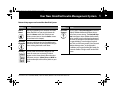
Buttons that program and control the OmniPod System
Button
Action
Home/
Power
Pressing and holding turns the PDM on and off.
When the PDM is on, pressing this button displays the Home screen, from which you can
choose a menu item or view the Status screens
(shown later in this chapter).
Up/Down
Controller
Pressing scrolls through a list of available menu
options or numbers, so you can pick the one you
want. Holding the button scrolls faster.
Soft Keys
Soft key labels and functions depend on the
menu or screen you are viewing. The label
appears on the screen directly above the physical button you press. Select, Save, and Back are
just three examples of the soft key labels on your
PDM.
Button
User Info/
Support
Action
Pressing opens a User Info/Support screen that
displays additional information about the current screen you are viewing. The User Info/Support icon appears when additional information
can be viewed. It may be displayed at the top of
the screen, to the right of an event detail (such as
a suggested bolus), or to the right of a record
item (such as a BG history record). (See “Personal
Diabetes Manager Icons” in the Appendix.)
In addition, pressing and holding this button for
2 seconds enables a “bright mode” on the PDM
screen.
Customer Care: 1 855 POD INFO (1 855 763 4636). Outside of Canada: 647-788-3132.
5
Chapter1 New.fm Page 6 Saturday, September 10, 2011 6:51 PM
1 Your New OmniPod Insulin Management System
Primary screens
Messages on the screen either:
• Tell you how the System is operating
• List menu choices
• Explain how to perform certain tasks
The System’s primary screens are the Status screen (Figure 1-3)
and the Home screen (Figure 1-4).
Figure 1-3
Figure 1-4
Status screen
Lists the System’s current operating status.
From top to bottom, the Status screen displays:
• Time, date, and result of last blood glucose checked or
entered manually
• Time, date, and total amount of last bolus delivered
• Amount of insulin on board (IOB), if suggested bolus calculator is in use
• Name and rate of active basal program or temp basal
program
• “Ext bolus,” the amount of insulin, and the delivery time
remaining if an extended bolus is being delivered
• “INSULIN SUSPENDED” if insulin delivery has been
suspended
• Time and date when the Pod will expire
If a Pod has not yet been activated (as during Pod
changes), the screen displays “No active Pod. Would you
like to activate a Pod now?” (See Chapter 5, Using the Pod,
for details on activating a Pod.)
6
Customer Care: 1 855 POD INFO (1 855 763 4636). Outside of Canada: 647-788-3132.
Chapter1 New.fm Page 7 Saturday, September 10, 2011 6:51 PM
Your New OmniPod Insulin Management System
Status support screen
From the Status screen, press the User Info/Support button to
see details about the current
Insulin on board (IOB) in your body (Figure 1-5).
Figure 1-5
1
Home screen
Lists all the major menus (Figure 1-4 on previous page).
• Bolus menu to deliver bolus doses
• More actions menu to change the Pod, manually enter
blood glucose readings, and assign and edit tags for BG readings that are less than 2 hours old.
• Temp basal menu to deliver temporary basal rates (This
submenu does not appear if Temp basal is turned Off in
Settings.)
• My records menu to review insulin delivery, blood glucose
history, alarm history, carb history, and personal user information
• Settings menu to edit, enter, and name basal programs,
temp basal, carbohydrate, and bolus presets, and to customize System settings
• Suspend menu to suspend, cancel, or resume insulin
delivery programs
You can go to the Status screen at any time by
pressing Status from the Home screen.
Customer Care: 1 855 POD INFO (1 855 763 4636). Outside of Canada: 647-788-3132.
7
Chapter1 New.fm Page 8 Saturday, September 10, 2011 6:51 PM
1 Your New OmniPod Insulin Management System
■ Safety Features
The OmniPod System’s state-of-the-art design includes the latest
safety technology. Its built-in safety features include:
Automatic priming, safety checks, and insertion
Every time you activate a new Pod, the System automatically
primes and performs a safety check on the Pod, then inserts
and primes the cannula (see Chapter 5, Using the Pod). Microprocessor technology makes it possible to complete thousands
of safety checks in only a few seconds.
The OmniPod System also performs safety checks on the PDM. If
it detects any problems in the PDM or the Pod—or in communication between them—it informs you with beeps and on-screen
messages.
8
Rapid occlusion detection
An occlusion is a blockage or interruption in insulin delivery. If
the OmniPod System detects an occlusion, it sounds a hazard
alarm and prompts you to deactivate and change your Pod (see
Chapter 10, Alerts and Alarms).
Alerts and alarms
For your safety, the OmniPod System provides a range of alerts
and alarms to tell you that your attention is needed, or to warn
you of hazardous situations.
See Chapter 6, Using the Personal Diabetes Manager, for a
description of notifications and how to set them. See Chapter 10,
Alerts and Alarms, for a list of safety alarms built into the OmniPod System and how to respond to them.
Customer Care: 1 855 POD INFO (1 855 763 4636). Outside of Canada: 647-788-3132.
Chapter2 Starting.fm Page 9 Saturday, September 10, 2011 6:50 PM
CHAPTER 2
Getting Started
■ Set Up the Personal Diabetes Manager (PDM)
If you are a first-time OmniPod System user, you need to meet
with your healthcare provider for training and System setup
before using it. To get a head start on learning about your new
OmniPod System, review this User Guide. If you have a basic
understanding of the System in advance, you will get more out
of your training sessions.
Do NOT use the OmniPod Insulin Management
System until you have been trained by your healthcare
provider. He or she will initialize the System based on
your individual needs. Inadequate training or improper
setup could put your health and safety at risk.
Chapter 6 describes the PDM options in detail. The instructions
in this chapter are simplified to help you get started.
Turn on the PDM
1. Open the battery compartment on the back of the PDM
by pushing the compartment latch and lifting upward
(Figure 2-1). No special tools are necessary.
Figure 2-1
Prepare and keep an emergency kit with you at all times
to quickly respond to any diabetes emergency. For
details, see Chapter 9, Living with Diabetes.
Customer Care: 1 855 POD INFO (1 855 763 4636). Outside of Canada: 647-788-3132.
9
Chapter2 Starting.fm Page 10 Saturday, September 10, 2011 6:50 PM
2 Getting Started
2. Insert two (2) new AAA alkaline batteries into the compartment.
The diagram inside the compartment shows you which
direction to insert the batteries (Figure 2-2).
4. Turn the PDM face-up. The PDM has begun to power on
automatically.
■ The OmniPod Setup Wizard
The first time you turn on the Personal Diabetes Manager, the
Setup Wizard comes on automatically. Although setup is easy
with the Wizard, if you are a first-time user, your healthcare provider must guide you through the process. Setup takes only a
few minutes and is easy to do:
• Use the Up/Down Controller buttons to increase or
decrease a number or to move up or down a list.
Initial settings are “---” [blank] for target blood glucose
value, insulin-to-carbohydrate ratio, correction factor,
and duration of insulin action.
Figure 2-2
•
•
Hard Reset
Do not use any other type of batteries than AAA
alkaline batteries to power the PDM. Never use old
or used batteries; the PDM may not work properly.
Press the soft key labeled Next, Select, Done, or Save to continue to the next screen.
Press Back to return to the previous screen.
You can adjust these settings later as your needs
change or you fine-tune your OmniPod System. See
“OmniPod System Options and Settings” in the
Appendix.
3. Replace the battery door.
10
Customer Care: 1 855 POD INFO (1 855 763 4636). Outside of Canada: 647-788-3132.
Chapter2 Starting.fm Page 11 Saturday, September 10, 2011 6:50 PM
Getting Started
The Wizard’s Welcome screen (Figure 2-3) gets you started. Press
Next to begin setting up your PDM.
Figure 2-3
Set date and time
1. Use the Up/Down Controller buttons to increase or
decrease the time. (Press 12/24hr if you prefer a different
time format.) Then press Next.
2. Enter the current year, then press Next.
3. Choose the current month, then press Next.
4. Enter the current day of the month, then press Next.
5. Choose the date format you prefer, then press Next.
2
Enter basal settings
1. Choose a maximum basal rate, then press Next. (The default
maximum basal rate is 3 U/hr.)
2. Choose the initial basal rate to use, then press Next.
The initial basal program created with the Setup Wizard is
named basal 1. You can change the name in the Settings >
Basal programs menu (see Chapter 3, Understanding and
Adjusting Basal Rates).
3. Press Done to confirm the basal program shown on the
screen. To add more basal segments to the program, or to
change the rate shown, see Chapter 3, Understanding and
Adjusting Basal Rates.
4. To see the basal program as a list, press List. To return to the
graphic view, press Graph.
5. Press Save to accept the basal program you have set.
6. Choose a temporary basal feature, then press Next. Choose
% to show temporary basal rates as a percent increase or
decrease of your current basal rate. Choose U/hr to show
temporary basal rates in units per hour. Or choose Off to turn
off the temporary basal feature. For details about setting temporary basals, see Chapter 3, Understanding and Adjusting
Basal Rates.
You can add up to 7 basal programs and set 24
segments per program
Customer Care: 1 855 POD INFO (1 855 763 4636). Outside of Canada: 647-788-3132.
11
Chapter2 Starting.fm Page 12 Saturday, September 10, 2011 6:50 PM
2 Getting Started
Enter blood glucose sound setting and BG goal
1. To set the sound for the blood glucose meter, choose On or
Off, then press Next.
2. Use the Up/Down Controller buttons to enter the lower
limit for your blood glucose (BG) goal, then press Next.
3. Enter the upper limit for your BG goal, then press Next.
The lower and upper BG limits are only used when
viewing BG History (see Chapter 8, Understanding
Your Records).
4. Press Save to accept the BG goal.
Check with your healthcare provider before adjusting
these settings.
Set the suggested bolus calculator
1. To set the suggested bolus calculator feature, choose On or
Off, then press Next.
If the suggested bolus calculator is set to On, perform
the following steps. If set to Off, you will be prompted
to “Select bolus increment” and “Enter maximum
bolus.”
12
Enter target blood glucose value
1. Use the Up/Down Controller buttons to enter a target blood
glucose (BG) value, then press Next.
2. Use the Up/Down Controller buttons to enter the “correct
above” value or correction threshold (the BG value above
which you want the PDM to suggest a correction bolus), then
press Next.
If the suggested bolus calculator is On, a correction
bolus will be suggested only when your BG is above
the value shown in brackets on the screen.
3. To save the target BG value, press Done. To change these settings, select the segment you wish to change and press Edit.
You can define up to 4 target BG time segments. To enter
additional segments, choose [add new], then:
a. Press New.
b. Enter a start time for the target BG segment, then press
Enter.
c. Enter an end time for the target BG segment, then press
Next.
d. Enter a target blood glucose value, then press Next.
Customer Care: 1 855 POD INFO (1 855 763 4636). Outside of Canada: 647-788-3132.
Chapter2 Starting.fm Page 13 Saturday, September 10, 2011 6:50 PM
Getting Started
e. Use the Up/Down Controller buttons to enter the “correct above” value or correction threshold (the BG value
above which you want the PDM to suggest a correction
bolus), then press Next.
f. When you have finished entering segments, press Done.
4. To see the segments as a list, press List. To return to the
graphic view, press Graph.
5. Press Save to accept the target BG profile you have set.
Enter minimum BG allowed for use in bolus calculation
1. Use the Up/Down Controller buttons to enter a minimum
blood glucose value, below which the System will not calculate a suggested bolus. The values are in 0.1 mmol/L increments and range from 2.8 to 3.9 mmol/L.
2. Press Next.
Enter insulin-to-carbohydrate ratio
1. Use the Up/Down Controller buttons to enter your insulinto-carbohydrate ratio, then press Next. (Insulin-to-carbohydrate ratio is the number of carbs covered by 1 unit of insulin.)
2
2. To save the ratio, press Done. To change the ratio, select the
segment you wish to change and press Edit.
You can define up to 4 insulin-to-carbohydrate time segments. To enter additional ratios, choose [add new], then:
a. Press New.
b. Enter a start time for the segment, then press Next.
c. Enter an end time for the segment, then press Next.
d. Enter the insulin-to-carb ratio for the new time segment,
then press Next.
e. To save the new ratio, press Done.
3. To see the ratios as a list, press List. To return to the graphic
view, press Graph.
4. Press Save to accept the ratios you have set.
Enter correction factor
1. Use the Up/Down Controller buttons to enter how much
one unit of insulin decreases your blood glucose, then press
Next.
2. To save the correction factor, press Done. To change the
factor, select the segment you wish to change and press Edit.
Customer Care: 1 855 POD INFO (1 855 763 4636). Outside of Canada: 647-788-3132.
13
Chapter2 Starting.fm Page 14 Saturday, September 10, 2011 6:50 PM
2 Getting Started
You can define correction factors for up to 4 time segments.
To enter additional correction factors, choose [add new],
then:
a. Press New.
b. Enter a start time for the segment, then press Next.
c. Enter an end time for the segment, then press Next.
d. Enter the correction factor, then press Next.
e. To save the new correction factor segment, press Done.
3. To see the factors as a list, press List. To return to the graphic
view, press Graph.
4. Press Save to accept the correction factors you have set.
Set reverse correction
1. To set reverse correction, use the Up/Down Controller
buttons to choose On or Off, then press Next.
If you enter carbs and reverse corrections are On, the
System will subtract insulin from the suggested meal
bolus to compensate for a low blood glucose (below
the BG target you set). With reverse correction Off,
the System will not subtract insulin from the suggested meal bolus dose due to a low BG. Follow your
healthcare provider’s recommendation to set
reverse correction On or Off.
14
Enter the duration of insulin action
1. Use the Up/Down Controller buttons to enter the duration
of insulin action (how long insulin lasts in your body), then
press Next.
The duration-of-insulin-action setting is used to
calculate the amount of insulin on board (IOB) from a
previous correction bolus or meal bolus, when you
use the suggested bolus calculator.
Select bolus increment and enter maximum bolus
1. Choose a bolus increment (how much each press of the
Up/Down Controller buttons will increase or decrease a
bolus amount)—either 0.05, 0.10, 0.50, or 1.00 units of insulin—then press Next.
2. Choose the maximum bolus you can give at one time, then
press Next.
The maximum bolus default is 10 units. Check with
your healthcare provider before adjusting these
settings.
Set extended bolus doses
1. To set the units for an extended bolus dose, choose % for percent of the total bolus, or choose Units for units of insulin. To
turn off the extended bolus feature, choose Off. Then press
Next.
Customer Care: 1 855 POD INFO (1 855 763 4636). Outside of Canada: 647-788-3132.
Chapter2 Starting.fm Page 15 Saturday, September 10, 2011 6:50 PM
Getting Started
Set low reservoir advisory
1. Choose the level of insulin in the reservoir at which the
PDM should give you an alarm. Choose from 10 to 50 units
in 5-unit increments, then press Next.
Set expiration notification
1. Choose the number of hours before a Pod expires when the
PDM should give you a notification, then press Next. The
values are in 1 hour increments and range from 1 to 24 hours.
(The default is 4 hours.)
The PDM now asks whether you want to activate a Pod
(Figure 2-4).
Figure 2-4
•
•
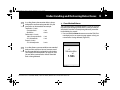
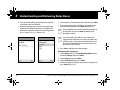
2
Press Yes if you are ready to activate a new Pod. See Chapter 5, Using the Pod, to learn how to activate a new Pod.
Press No if you do not want to activate a Pod at this time.
The PDM displays the Home screen.
You can press and hold the Power button to turn off the
PDM at any time during setup. Otherwise, it turns off
automatically after 5 minutes. If you do not complete the
entire setup within 60 minutes, when you turn on the
PDM again you will return to the beginning of the Setup
Wizard.
Your healthcare provider will help you fill and apply your first
Pod. The process is easy because on-screen messages walk you
through every step. Please refer to Chapter 5, Using the Pod, for
detailed instructions.
You may want to adjust the PDM screen time-out
and backlight time-out. For more information on
how to do this, see Chapter 6, Using the Personal
Diabetes Manager.
Use the form at the end of this User Guide to write
down all your settings from the Setup Wizard. If you
ever need to reset your PDM, having these settings
handy will make setup very easy. The data management software will also retain your settings.
Customer Care: 1 855 POD INFO (1 855 763 4636). Outside of Canada: 647-788-3132.
15
Chapter3 Basal.fm Page 16 Saturday, September 10, 2011 6:50 PM
CHAPTER 3
Understanding and Adjusting Basal Rates
■ What Is a Basal Rate?
A basal rate is a small base or background amount of insulin that
is delivered, at a preset rate, continuously for a specified period of
time.
Even without eating, our bodies need a small, constant supply
of insulin for normal daily living. In people without diabetes, the
pancreas continuously delivers this basal insulin. For people
using the OmniPod Insulin Management System, the Pod mimics a healthy pancreas by delivering insulin at the rate that you’ve
programmed into the Personal Diabetes Manager (PDM).
Approximately 50% of a person’s total daily insulin dose
typically comes from basal insulin delivery; the remaining 50% typically comes from bolus doses (see Chapter 4,
Understanding and Delivering Bolus Doses).
■ Personalized Basal Programs
Insulin needs vary throughout the day. Therefore, most people
set their basal rates to deliver slightly more or less insulin at
16
certain times. For example, one person may need to deliver a
higher rate of insulin during the early morning and a lower rate
during the late evening. A basal program describes the amount
of insulin to be delivered during an entire 24-hour period.
A basal program contains at least one basal rate for the 24-hour
period, but for most people it will be broken into several time
segments, or basal segments, each delivering a different rate of
insulin. A sample basal program with three basal segments
might be:
12:00 am–8:00 am
0.60U/hr Between 12:00 am (midnight)
and 8:00 am, the Pod delivers
0.60 units of insulin per hour.
8:00 am–3:00 pm
0.80U/hr Between 8:00 am and 3:00 pm,
the Pod delivers 0.80 units of
insulin per hour.
3:00 pm–12:00 am
0.70U/hr Between 3:00 pm and 12:00 am
(midnight), the Pod delivers 0.70
units of insulin per hour.
Customer Care: 1 855 POD INFO (1 855 763 4636). Outside of Canada: 647-788-3132.
Chapter3 Basal.fm Page 17 Saturday, September 10, 2011 6:50 PM
Understanding and Adjusting Basal Rates
In addition to normal daily changes, insulin needs can vary with
different routines or days of the week. For example, regular
school or workday routines may differ from weekend routines,
and insulin needs may differ, too. With your healthcare provider,
you will decide on the basal rates that best match your lifestyle
and insulin needs. You will enter at least one basal program (your
Basal 1 program) into your PDM during the setup process (see
Chapter 2, Getting Started). You can add other programs later as
you fine-tune your System settings or when your needs change.
You can also create temporary basal presets to use on occasions
when you need to adjust your basal rate for a short period of
time. See “Temporary Basal Rates and Presets” later in this
chapter.
Create a basal program
The Personal Diabetes Manager can store up to 7 different basal
programs. Each program can contain 24 rates, programmed in
half-hour increments. Once you enter a basal program into the
PDM, you only need to press a few buttons to pick the program
you want. The Pod continues to deliver insulin at those rates until
you change that program or switch to another one.
Check with your healthcare provider before adjusting
these settings.
3
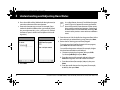
1. On the Home screen, use the Up/Down Controller buttons
to choose Settings; then press Select.
2. Choose Basal programs (Figure 3-1), then press Select.
Figure 3-1
Figure 3-2
3. Choose [add new] (Figure 3-2), then press New.
4. To use the default naming system, simply press Next. The
default naming system automatically assigns program
names in numerical order, such as basal 1, basal 2, basal 3.
If you want to give a different name to the program:
a. Press the Up/Down Controller buttons to scroll through
the list of characters. An up-and-down-arrow symbol on
the screen indicates the character you are changing.
Customer Care: 1 855 POD INFO (1 855 763 4636). Outside of Canada: 647-788-3132.
17
Chapter3 Basal.fm Page 18 Saturday, September 10, 2011 6:50 PM
3 Understanding and Adjusting Basal Rates
b. Press the middle soft key (labeled with the right arrow) to
move the underscore to the next character.
c. Enter each character one at a time. For example, if your
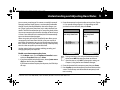
weekend schedule is different from your weekday schedule, you might enter W, e, e, k, e, n, d (Figure 3-3). (A blank
character or space is the first and last option in the scrolling menu.)
Figure 3-3
d. Press Next.
18
Figure 3-4
As a safety feature, the words “Invalid basal program
name” (Figure 3-4) appear if the name you entered
does not have at least one character or if the name is
being used for another basal program. Capitals and
lowercase letters are considered the same. Press OK
to return to the previous screen and enter a different
name.
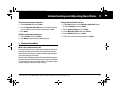
5. Enter the rate, in U/hr, for the first basal segment (from 0.05 to
the maximum you entered during setup), then press Next.
6. Review the list showing your new basal program.
To use the same basal rate for the entire 24-hour program,
press Done and continue with step 7.
Or, to add basal segments and rates (for example, a higher
basal rate between 8:00 am and 3:00 pm):
a. Choose an existing basal segment, then press Edit.
Or, choose [add new], then press New.
b. Enter the start time (for example, 8:00 am), then press
Next. Basal segments are in 30-minute increments.
c. Enter the end time (for example, 3:00 pm), then press
Next.
d. Enter the rate for the new basal segment (for example,
0.80U/hr), then press Next.
Customer Care: 1 855 POD INFO (1 855 763 4636). Outside of Canada: 647-788-3132.
Chapter3 Basal.fm Page 19 Saturday, September 10, 2011 6:50 PM
Understanding and Adjusting Basal Rates
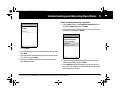
Basal rates outside the changed segment do not
change.
Figure 3-5
3
Figure 3-6
e. Repeat steps a–d for each new segment and rate you
want, then press Done.
Press and hold the Power button to turn the screen
back on. In some cases, if it has been less than 5
minutes since the screen timed out, pressing the
Power button returns you to the same screen you
were using. If it has been longer than 5 minutes, the
PDM brings you to the Status screen.
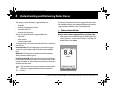
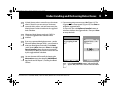
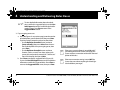
7. Review the graph of the new basal program (Figure 3-5).
8. To see the program as a list, press List (Figure 3-6). To see the
graph again, press Graph.
The total daily basal that will be delivered is shown at the
bottom of each “Basal programs” graph and list.
9. To add the program to the PDM’s memory, press Save.
Repeat steps 1 through 9 above for each basal program (up to 7)
you want to create.
Enable an existing basal program
1. On the Home screen, use the Up/Down Controller buttons
to choose Settings; then press Select.
2. Choose Basal programs, then press Select.
Customer Care: 1 855 POD INFO (1 855 763 4636). Outside of Canada: 647-788-3132.
19
Chapter3 Basal.fm Page 20 Saturday, September 10, 2011 6:50 PM
3 Understanding and Adjusting Basal Rates
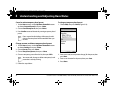
3. Choose the program you want from the list (Figure 3-7), then
press Enable.
A diamond icon (♦) appears next to the program that
is active. You cannot select the active program to
enable it, because it is already running.
Figure 3-7
4. Press Enable again to start the selected basal program. If a
Pod is active, the PDM beeps to indicate that the chosen
basal program is running.
As a safety feature, you cannot enable a new basal
program while a temporary basal program is in process (see “Temporary Basal Rates and Presets” later in
this chapter); you must first cancel the active temporary basal program.
Change, rename, copy, or delete a basal program
1. On the Home screen, use the Up/Down Controller buttons
to choose Settings; then press Select.
2. Choose Basal programs, then press Select.
3. Choose a program from the list, then press Select.
To view the segments of the basal program
1. Choose View, then press Select (Figure 3-8).
20
Customer Care: 1 855 POD INFO (1 855 763 4636). Outside of Canada: 647-788-3132.
Chapter3 Basal.fm Page 21 Saturday, September 10, 2011 6:50 PM
Understanding and Adjusting Basal Rates
Figure 3-8
Figure 3-9
3
3. Enter a start time for the segment you want to change, then
press Next.
4. Enter an end time for this segment, then press Next.
5. Enter a basal rate for the new segment, then press Enter.
6. To save the newly entered segment into the basal program,
press Save (Figure 3-10). If you want to make additional edits,
repeat steps 2–5.
Figure 3-10
To edit or add a segment or rate in the basal program
1. Choose Edit, then press Select.
As a safety feature, you must suspend insulin delivery
before editing an active basal program (see Chapter
5, Using the Pod.) Remember to resume delivery after
the edits are made.
2. Choose the segment to change, then press Edit (Figure 3-9).
Or, choose [add new], then press New.
7. To see the program as a list, press List. To see the graph again,
press Graph.
Customer Care: 1 855 POD INFO (1 855 763 4636). Outside of Canada: 647-788-3132.
21
Chapter3 Basal.fm Page 22 Saturday, September 10, 2011 6:50 PM
3 Understanding and Adjusting Basal Rates
To rename a basal program
1. After choosing a program from the list, choose Rename, then
press Select.
2. Press the Up/Down Controller buttons to enter the characters that spell out the new name you want. Press the middle
soft key (labeled with the right arrow) to move the underscore to the next character, then press Save.
To delete a basal program
1. After choosing a program from the list, choose Delete and
then press Select.
2. Press Delete to permanently delete the program.
To copy a basal program
1. After choosing a program from the list, choose Copy, then
press Select.
2. Press the Up/Down Controller buttons to enter the characters that spell out the name you want for the copied file. Press
the middle soft key (labeled with the right arrow) to move the
underscore to the next character, then press Next.
3. To use the same basal program for the entire 24-hour period,
press Save.
To edit or add segments to the newly copied basal program, follow the steps under “To edit or add a segment or rate in the basal
program” earlier in this chapter.
■ Temporary Basal Rates and Presets
Instead of suspending, changing, and then resuming
the active basal program, try this: Copy the active
program, rename it, make the changes, save it, then
enable it.
22
As a safety feature, you cannot delete the active basal
program.
What is a temporary basal rate?
A temporary basal rate lets you adjust your basal rate for a predetermined period of time.
On occasion, you may need to change the active basal rate for
only a short time. For example, if you are going cross-country
skiing for several hours, you may want to lower the basal rate
during and after you exercise. This is called a “one-time temporary basal rate.”
Some temporary changes are easy to predict and respond to.
They happen routinely and you may know from experience how
they affect your insulin needs. For example, you might take the
same exercise class twice a week for a few weeks or months, or
Customer Care: 1 855 POD INFO (1 855 763 4636). Outside of Canada: 647-788-3132.
Chapter3 Basal.fm Page 23 Saturday, September 10, 2011 6:50 PM
Understanding and Adjusting Basal Rates
join a summer soccer league. For women, a monthly hormonal
change that affects blood glucose is an example of predictable
change. To easily handle predictable, short-term changes, you
can “preset” a temporary basal rate, so it is ready whenever you
need it. The PDM can remember up to 7 temporary basal presets.
You can set a temporary basal rate for a duration of 30 minutes to
12 hours. Once the time limit is reached, the PDM automatically
returns to the active basal program.
When using units per hour, the OmniPod System allows you to
set temporary basal rates from 0.0 U/hr, up to your max basal
rate. When using percent rate, you can set temporary basal rates
from -100% to +95% of your active rate, as long as the temporary
rate is less than or equal to your max basal rate.
See the sections below on creating, enabling, canceling, and
changing temporary basal presets.
Enable a one-time temporary basal rate
1. On the Home screen, use the Up/Down Controller buttons
to choose Temp basal; then press Select.
2. If you have created temp basal presets, choose [enter manually] from the list, then press Select.
If you have not created any temp basal presets, the PDM skips
this step.
3
3. Enter the temporary basal rate in either units per hour (Figure
3-11) or percent change (Figure 3-12), depending on how
you chose to show the rates; then press Enter.
Figure 3-11
Figure 3-12
During initial setup, you and your healthcare provider
either turned Off temporary basal rates or chose to
show the rates as % or U/hr. To change this setting, see
Chapter 6, Using the Personal Diabetes Manager.
4. Enter the duration for the temporary rate, then press Enter.
5. Press Confirm to start the temporary basal rate shown on the
screen. The Pod beeps to indicate that the temporary basal
rate is running.
Customer Care: 1 855 POD INFO (1 855 763 4636). Outside of Canada: 647-788-3132.
23
Chapter3 Basal.fm Page 24 Saturday, September 10, 2011 6:50 PM
3 Understanding and Adjusting Basal Rates
Cancel a one-time temporary basal rate
1. On the Home screen, use the Up/Down Controller buttons
to choose Suspend/cancel; then press Select.
2. Choose Cancel temp basal (Figure 3-13), then press Select.
Figure 3-13
3. Press Confirm to cancel the temporary basal shown on the
screen.
Create a temporary basal preset
1. On the Home screen, use the Up/Down Controller buttons
to choose Settings; then press Select.
2. Choose Presets, then press Select.
3. Choose Temp basal presets, then press Select.
4. Choose [add new], then press New.
5. To use the OmniPod System’s default naming system, simply
press Next. The default naming system automatically assigns
program names in numerical order, such as temp basal 1,
temp basal 2, temp basal 3.
Or, to give a different name to the program:
a. Press the Up/Down Controller buttons to scroll through
the list of characters. An up-and-down-arrow symbol on
the screen indicates the character you are changing.
b. Press the middle soft key to move the underscore to the
next character.
c. Enter each character one at a time. For example, if you
take an aerobics class two nights a week, you might enter
A, e, r, o, b, i, c, s (Figure 3-14 on the next page). (A blank
character or space is the first and last option in the scrolling menu.)
Capitals and lowercase letters are considered the
same.
24
Customer Care: 1 855 POD INFO (1 855 763 4636). Outside of Canada: 647-788-3132.
Chapter3 Basal.fm Page 25 Saturday, September 10, 2011 6:50 PM
Understanding and Adjusting Basal Rates
Figure 3-14
3
Enable an existing temporary basal preset
1. On the Home screen, use the Up/Down Controller buttons
to choose Temp basal; then press Select.
2. Choose the temporary basal preset you want to use from the
list (Figure 3-15), then press Select.
Figure 3-15
d. Press Next.
6. Enter the new temporary basal rate (or percent change), then
press Next.
7. Enter the duration of the temporary basal rate, from 0.5 hours
to 12 hours, then press Next.
8. Review the temporary basal name, rate, and duration, then
press Save to accept it.
3. If you want, change the duration for the temporary rate, in
half-hour increments, then press Enter.
4. Press Confirm to begin the temporary basal rate shown on
the screen. The Pod beeps to indicate that the chosen temporary basal preset is running.
Customer Care: 1 855 POD INFO (1 855 763 4636). Outside of Canada: 647-788-3132.
25
Chapter3 Basal.fm Page 26 Saturday, September 10, 2011 6:50 PM
3 Understanding and Adjusting Basal Rates
Cancel an active temporary basal preset
1. On the Home screen, use the Up/Down Controller buttons
to choose Suspend/cancel; then press Select.
2. Choose Cancel temp basal, then press Select.
3. Press Confirm to cancel the actively running temporary basal
preset.
To change a temporary basal preset
1. Choose Edit, then press Select (Figure 3-16).
Figure 3-16
If you suspend insulin delivery while a temp basal is
running, the temp basal will be cancelled when you
resume.
Change, rename, or delete a temporary basal preset
1. On the Home screen, use the Up/Down Controller buttons
to choose Settings; then press Select.
2. Choose Presets, then press Select.
3. Choose Temp basal presets, then press Select.
4. Choose a temporary preset from the list, then press Edit.
You cannot edit, change, or delete a temporary basal
preset that is actively running.
2. Enter a new rate (or new percent change), for the preset, then
press Next.
3. Enter a new duration for the preset, then press Save.
4. Press Done.
5. Follow the steps below.
26
Customer Care: 1 855 POD INFO (1 855 763 4636). Outside of Canada: 647-788-3132.
Chapter3 Basal.fm Page 27 Saturday, September 10, 2011 6:50 PM
Understanding and Adjusting Basal Rates
To rename a temporary basal preset
1. Choose Rename, then press Select.
2. Press the Up/Down Controller buttons to enter the characters that spell out the name you want; then press Save.
3. Press Done.
To delete a temporary basal preset
1. Choose Delete, then press Select.
2. Press Delete to permanently delete the preset.
3
Change the maximum basal rate
1. On the Home screen, use the Up/Down Controller buttons
to choose Settings; then press Select.
2. Choose System setup, then press Select.
3. Choose Bolus/basal/calcs, then press Select.
4. Choose Max basal, then press Select.
5. Enter a new maximum basal rate, then press Enter.
■ Maximum Basal Rate
What is the maximum basal rate?
The maximum basal rate is a safety feature that limits the basal
rate (U/hr) that the Pod can deliver. Once you enter it into the
PDM memory, the maximum applies to both regular basal programs and temporary basal rates.
You and your healthcare provider will enter an initial maximum
basal rate into your PDM during the setup process (see Chapter
2, Getting Started). You can change it later as you fine-tune your
System settings or when your needs change.
Customer Care: 1 855 POD INFO (1 855 763 4636). Outside of Canada: 647-788-3132.
27
Chapter4 Bolus.fm Page 28 Saturday, September 10, 2011 6:49 PM
CHAPTER 4
Understanding and Delivering Bolus Doses
■ What Is a Bolus?
•
A bolus is an extra dose of insulin, delivered when needed to:
• Match the carbohydrates (sugar content) in a meal or snack—
also known as a meal bolus
• Lower blood glucose when it gets too high—also known as a
correction bolus
This extra dose is in addition to the basal rate delivered throughout the day and night (see Chapter 3, Understanding and
Adjusting Basal Rates).
The size of a bolus dose depends on the factors current at the
time you deliver the bolus:
• Your blood glucose level
• Your insulin-to-carbohydrate ratio
• Your correction factor
• Your target blood glucose
• The amount of insulin on board (IOB) from previous meal and
correction boluses
28
Your correction threshold, the BG level above which you
would like to take insulin to reduce an elevated blood
glucose
• Your activity level
• The type and amount of food you eat
With the OmniPod System, it is easy to adapt to any situation.
With just a few button presses, you can adjust to unexpected or
changing insulin needs.
During setup, you entered bolus dose settings in the PDM (see
Chapter 2, Getting Started). You can adjust these settings as you
fine-tune your System or when your needs change (see Chapter
6, Using the Personal Diabetes Manager).
Check with your healthcare provider before you adjust
these settings.
Customer Care: 1 855 POD INFO (1 855 763 4636). Outside of Canada: 647-788-3132.
Chapter4 Bolus.fm Page 29 Saturday, September 10, 2011 6:49 PM
Understanding and Delivering Bolus Doses
4
■ Bolus Dose Options
■ Suggested Bolus Calculator
So that you can fully enjoy freedom and flexibility in your life, the
OmniPod System offers the following bolus dose options:
Suggested bolus calculator: When you want the System to
calculate your suggested bolus, based on your personal settings,
your current blood glucose, the amount of insulin still active in
your body from previous boluses, and the grams of carbohydrate (“carbs” for short) you are about to eat
Normal bolus: When you need a dose of insulin right away, to
cover a meal or snack you are about to eat or to reduce a high
blood glucose level
Extended bolus: When you are eating high-fat or high-protein
foods (which take longer to digest and are slower to affect blood
glucose) or when you are eating for an extended period (for
example, at a party or during a holiday meal)
The suggested bolus calculator lets the OmniPod System recommend your bolus based on your personal settings. To review or
adjust these settings—including turning the suggested bolus
calculator On or Off—see Chapter 6, Using the Personal Diabetes Manager.
If the suggested bolus calculator is turned On, the System
automatically calculates a bolus dose. If the suggested bolus
calculator is turned Off, you must enter a bolus amount
manually.
The bolus features in the OmniPod System are designed
for flexibility and convenience. You can easily transition
from a normal to an extended bolus with just a few
button presses.
The suggested bolus calculator will display a suggested bolus dose based on the settings you have
programmed into the PDM. Check with your healthcare provider before using this feature or adjusting
these settings.
How a suggested bolus is calculated
The suggested bolus calculator estimates the suggested amount
for each bolus portion based on your personal settings and
inputs.
Customer Care: 1 855 POD INFO (1 855 763 4636). Outside of Canada: 647-788-3132.
29
Chapter4 Bolus.fm Page 30 Saturday, September 10, 2011 6:49 PM
4 Understanding and Delivering Bolus Doses
The settings used to calculate a suggested bolus are:
• target BG
• insulin-to-carbohydrate (IC) ratio
• correction factor (CF)
• duration of insulin action
The inputs used to calculate a suggested bolus are:
• current BG
• carbs entered
• insulin on board (IOB)
A suggested bolus can have a correction bolus only, a meal bolus
only, or both.
Correction bolus: The correction bolus, as the name suggests,
“corrects” for a blood glucose (BG) level above your target BG
level.
Meal bolus: The meal bolus provides insulin for the carbohydrates you enter into the System.
Insulin on board (IOB): IOB is the amount of insulin still working
in your body from previous boluses. The amount of time insulin
remains “on board” or “active” depends on what you set for your
duration of insulin action.
For formulas for each element of the suggested bolus calculation, detailed examples, and additional guidelines of how the
suggested bolus calculator works, see the Appendix.
■ Deliver a Normal Bolus
Deliver a bolus when suggested bolus calculator is On
1. After you check your blood glucose, the PDM displays the
results (Figure 4-1; see the end of Chapter 7, Checking Your
Blood Glucose). Press Next.
Figure 4-1
The OmniPod System can only subtract insulin on board
(IOB) from a suggested bolus when the current BG is
known.
30
Customer Care: 1 855 POD INFO (1 855 763 4636). Outside of Canada: 647-788-3132.
Chapter4 Bolus.fm Page 31 Saturday, September 10, 2011 6:49 PM
Understanding and Delivering Bolus Doses
A blood glucose value is current for up to 10 minutes
after it is tested. So you can wait up to 10 minutes,
restart the bolus process, and not have to retest your
blood glucose in order to include it in the suggested
bolus calculator.
When your blood glucose result reads “HIGH” or
“LOW,” the suggested bolus calculator will be
disabled.
4
2. If you are not going to eat now, press No (Figure 4-2). The
Suggested Bolus screen appears (Figure 4-3). Press Enter to
accept the suggested bolus.
Or, if you wish, press the Up/Down Controller buttons to
increase or decrease the suggested bolus. Then press Enter
to accept the bolus.
Figure 4-2
Figure 4-3
If you use a separate blood glucose meter—not the
Personal Diabetes Manager (PDM)—you will need to
enter your blood glucose manually. On the Home
screen, choose Bolus, then press Select. Use the Up/
Down Controller buttons to enter your current BG
value, then press Yes if you want this value to be used
by the suggested bolus calculator.
You can also enter a BG manually by choosing the
More actions menu, then choosing Add BG Reading. See the end of Chapter 7, Checking Your Blood
Glucose.
In the Suggested Bolus screen, “adjusted for IOB”
appears only when IOB is a factor in the calculation.
Customer Care: 1 855 POD INFO (1 855 763 4636). Outside of Canada: 647-788-3132.
31
Chapter4 Bolus.fm Page 32 Saturday, September 10, 2011 6:49 PM
4 Understanding and Delivering Bolus Doses
To view detailed information about the calculations used for this suggested bolus, press the User
Info/Support button and scroll through the information screens. Press Close to return to the
Suggested Bolus screen.
3. If you are going to eat now:
a. Press Yes (Figure 4-2 on previous page), enter the number
of carbohydrates you are about to eat, then press Enter.
If you’ve previously entered a carb preset, then either:
• Use the Up/Down Controller buttons to choose
[enter manually], then press Select. Enter the number of carbohydrates that you are going to eat, then
press Enter.
• Use the Up/Down Controller buttons to choose
favorites, snacks, or meals. From there, select a carb
preset you have previously entered (see “Carb Presets”
later in this chapter), then press Select.
b. Press Enter to accept the suggested bolus (Figure 4-4).
Or press the User Info/Support button to view calculation
information used for this suggested bolus. Press Close to
return to the Suggested Bolus screen, then press Enter.
32
Figure 4-4
If the reverse correction feature is turned On and if
your blood glucose level is below your target, the
System subtracts a correction amount from the meal
portion of the bolus.
If the reverse correction setting is turned Off, the
System does not subtract anything for a blood glucose level below your target.
Customer Care: 1 855 POD INFO (1 855 763 4636). Outside of Canada: 647-788-3132.
Chapter4 Bolus.fm Page 33 Saturday, September 10, 2011 6:49 PM
Understanding and Delivering Bolus Doses
4. If you have set the blood glucose reminder option to On and
you want to add a reminder:
a. Press Yes.
b. Enter the time for the reminder, then press OK.
5. Press Confirm to begin the bolus delivery.
Deliver a bolus manually (suggested bolus calc is Off)
1. On the Home screen, use the Up/Down Controller buttons
to choose Bolus; then press Select.
2. Enter the number of units you want to deliver, then press
Enter.
3. If the blood glucose reminders feature is turned On, you can
now set a blood glucose reminder.
4. Press Confirm to begin the bolus delivery.
4
■ Deliver an Extended Bolus
The extended bolus feature lets the OmniPod System deliver
some (or no) insulin now and the remainder over a period of
time you choose.
Deliver an extended bolus instead of a normal bolus
1. After you get your suggested bolus, press Extend instead of
Enter (see Figure 4-5).
Figure 4-5
As a safety feature, the OmniPod System only allows
you to give a bolus at or below the maximum bolus
dose you have set. See Chapter 6, Using the Personal
Diabetes Manager, for information on resetting your
maximum bolus dose. Consult your healthcare provider before changing this setting.
Customer Care: 1 855 POD INFO (1 855 763 4636). Outside of Canada: 647-788-3132.
33
Chapter4 Bolus.fm Page 34 Saturday, September 10, 2011 6:49 PM
4 Understanding and Delivering Bolus Doses
If you have set the Extended bolus option to Off,
the PDM will not display the Extend soft key. For
information on turning this feature on and off, see
Chapter 6, Using the Personal Diabetes Manager.
2. Enter the units of insulin or percentage of the bolus that you
want to take immediately (Figure 4-6), then press Enter.
3. Enter the time (up to 8 hours, in 30-minute increments) over
which to deliver the remainder of the bolus, then press Enter
(Figure 4-7). In Figure 4-8 you can see a detail of the extended
bolus.
Figure 4-7
Figure 4-8
Figure 4-6
4. If the blood glucose reminders feature is turned On, you
can now set a blood glucose reminder.
5. Press Confirm to begin the bolus delivery.
To learn how to set extended boluses in percentages
or units, see Chapter 6, Using the Personal Diabetes
Manager.
34
Customer Care: 1 855 POD INFO (1 855 763 4636). Outside of Canada: 647-788-3132.
Chapter4 Bolus.fm Page 35 Saturday, September 10, 2011 6:49 PM
Understanding and Delivering Bolus Doses
As a safety feature, the correction bolus is always
delivered first and cannot be extended. Only the
meal bolus can be extended. For example:
Total bolus = 5 units
Correction bolus
1 unit
Meal bolus
4 units
Deliver now = 2 units
100% of correction bolus 1 unit
25% of meal bolus
1 unit
Extend = 3 units
75% of meal portion
3 units
4
■ Cancel Active Boluses
The OmniPod System is extremely flexible, so you can use it to
respond to your changing insulin needs. It is easy to cancel an
active bolus (one that is currently being delivered), even after
insulin delivery has started.
1. Press and hold the Power button to turn on the PDM, if it is
not already on. An on-screen message appears as long as a
normal bolus is being delivered (Figure 4-9).
Figure 4-9
As a safety feature, you cannot deliver two extended
boluses at the same time. You can, however, cancel
the first extended bolus and replace it with another
(see “Replace an Extended Bolus” on page 36). And
you can deliver a normal bolus while an extended
bolus is being delivered.
Customer Care: 1 855 POD INFO (1 855 763 4636). Outside of Canada: 647-788-3132.
35
Chapter4 Bolus.fm Page 36 Saturday, September 10, 2011 6:49 PM
4 Understanding and Delivering Bolus Doses
If the bolus has already been completely delivered,
the “Delivering bolus” message and Cancel do not
appear, but the Status screen does appear.
2. Press Cancel.
The Pod beeps to confirm the bolus is canceled. An on-screen
message tells you how much insulin was delivered before
you canceled the bolus (Figure 4-10).
Figure 4-10
If your suggested bolus contains both a correction
bolus and a meal bolus, the correction bolus is always
delivered first.
■ Replace an Extended Bolus
You can replace one extended bolus with another. The System
tells you how much of the first bolus has not yet been delivered.
1. After you see your suggested bolus, press Extend instead of
Enter (see Figure 4-5 on page 33).
2. Press Yes to cancel the active extended bolus (Figure 4-11).
Or press Back to return to the Suggested Meal Bolus screen.
Figure 4-11
3. Press OK to return to the Status screen.
36
Customer Care: 1 855 POD INFO (1 855 763 4636). Outside of Canada: 647-788-3132.
Chapter4 Bolus.fm Page 37 Saturday, September 10, 2011 6:49 PM
Understanding and Delivering Bolus Doses
■ Bolus Presets
3. Press Confirm (Figure 4-12).
Figure 4-12
4
Figure 4-13
Bolus presets are bolus amounts that you program for frequent
use. For example, if you often take the same bolus at lunchtime,
you can create a bolus preset for that amount and name it
“Lunch.”
Bolus presets are available only when the suggested
bolus calculator feature is turned Off. (If the suggested
bolus calculator is turned On, you can still use carb presets. See “Carb Presets” on page 39.)
4. The screen displays the amount of the old extended bolus
that remained to be delivered (Figure 4-13). Press Next to
return to the Suggested Meal Bolus screen.
You can add what remained of the old extended
bolus to the new one.
Create a bolus preset
1. On the Home screen use the Up/Down Controller buttons
to choose Settings; then press Select.
2. Choose Presets, then press Select.
3. Choose Bolus presets, then press Select.
4. Choose [add new], then press New.
5. To use the OmniPod System’s default naming system, simply
press Next. The default naming system automatically assigns
program names in numerical order, such as bolus 1, bolus 2,
bolus 3.
Customer Care: 1 855 POD INFO (1 855 763 4636). Outside of Canada: 647-788-3132.
37
Chapter4 Bolus.fm Page 38 Saturday, September 10, 2011 6:49 PM
4 Understanding and Delivering Bolus Doses
Or, to give a different name to the program:
a. Press the Up/Down Controller buttons to enter the characters that spell the name you want. An up- and downarrow symbol on the screen indicates which character
you are changing.
b. Press the middle soft key (labeled with the right arrow) to
move the underscore to the next character.
c. Enter each character one at a time. For example, if you
frequently take the same bolus at lunchtime, you might
enter L, u, n, c, h (Figure 4-14).
d. Press Next.
Figure 4-14
Figure 4-15
6. Enter the new bolus preset amount, up to the maximum
bolus you entered during setup; then press Next.
7. Review the bolus preset name and amount; press Save to
accept it.
Enable an existing bolus preset
1. On the Home screen, use the Up/Down Controller buttons
to choose Bolus; then press Select.
2. Choose the bolus preset you want to use from the list (Figure
4-15), then press Select.
3. Press Enter to confirm the bolus preset amount, or, if necessary, use the Up/Down Controller buttons to adjust the
bolus amount.
4. Press Confirm to deliver the bolus shown on the screen.
Change, rename, or delete a bolus preset
1. On the Home screen, use the Up/Down Controller buttons
to choose Settings; then press Select.
2. Choose Presets, then press Select.
3. Choose Bolus presets, then press Select.
4. Choose a preset from the list, then press Edit.
38
Customer Care: 1 855 POD INFO (1 855 763 4636). Outside of Canada: 647-788-3132.
Chapter4 Bolus.fm Page 39 Saturday, September 10, 2011 6:49 PM
Understanding and Delivering Bolus Doses
Change a bolus preset
1. Choose Edit, then press Select.
2. Enter a new insulin amount for the bolus, then press Save.
Rename a bolus preset
1. Choose Rename, then press Select.
2. Press the Up/Down Controller buttons to enter the characters that spell out the name you want; then press Next.
Delete a bolus preset
1. Choose Delete and then press Select.
2. Press Delete to permanently delete the preset.
Cancel an active bolus preset
1. Press and hold the Power button to turn on the PDM, if it is
not already on. An on-screen message appears as long as a
bolus is being delivered.
2. Press Cancel.
The Pod beeps to confirm the bolus is canceled. An on-screen
message tells you how much insulin was delivered before
you canceled the bolus.
3. Press OK to return to the Status screen.
For more details, see “Cancel Active Boluses” earlier in this
chapter.
4
■ Carb Presets
Carb presets are favorite food items, snacks, or meals that you eat
frequently. After you enter these items, you can quickly select
one when entering carbs during the suggested bolus calculator
process.
Create a carb preset
1. On the Home screen, use the Up/Down Controller buttons
to choose Settings; then press Select.
2. Choose Presets, then press Select.
3. Choose Carb presets, then press Select.
4. Choose the category for this carb preset: Favorites, Snacks,
or Meals, then press Select.
5. Choose [add new], then press New.
6. To use the OmniPod System’s default naming system, simply
press Next. The default naming system automatically assigns
program names in numerical order, such as carb preset 1,
carb preset 2, carb preset 3.
Or, to give a different name to the program:
a. Press the Up/Down Controller buttons to enter the characters that spell the name you want. An up-and-downarrow symbol on the screen indicates the character you
are changing.
Customer Care: 1 855 POD INFO (1 855 763 4636). Outside of Canada: 647-788-3132.
39
Chapter4 Bolus.fm Page 40 Saturday, September 10, 2011 6:49 PM
4 Understanding and Delivering Bolus Doses
b. Press the middle soft key (the right arrow) to move the
underscore to the next character.
c. Enter each character one at a time. For example, if you
frequently eat a breakfast of plain low-fat yogurt with
blueberries, sweetener, and cinnamon, you might enter
B, l, u, e, [space], Y, o, g, u, r, t (Figure 4-16).
Figure 4-16
Figure 4-17
7. Enter the grams of carbohydrate in the meal, then press Next.
8. If you want, enter the grams of fiber, fat, and protein in the
meal, and the total calories. Press Next after each entry.
These additional units are not required. If you prefer not
to enter them, simply press Next repeatedly to step
through the screens.
If you do include grams of fiber in step 8 above, the
suggested bolus calculator uses carbs minus fiber. Alternatively, in step 7, you can enter the total of carbs minus
fiber yourself. Your healthcare provider can best advise
you how to make this entry.
9. Press Save to add the preset to the category.
d. Press Next.
40
Change or edit a carb preset
1. On the Home screen, use the Up/Down Controller buttons
to choose Settings; then press Select.
2. Choose Presets, then press Select.
3. Choose Carb presets, then press Select.
4. Choose the category of the preset you want to change, then
press Select (Figure 4-17).
Customer Care: 1 855 POD INFO (1 855 763 4636). Outside of Canada: 647-788-3132.
Chapter4 Bolus.fm Page 41 Saturday, September 10, 2011 6:49 PM
Understanding and Delivering Bolus Doses
To change the category for a carb preset
1. Choose the carb preset you want to move to another category, then press Tag (Figure 4-18).
Figure 4-18
4
3. To rename the carb preset, press the Up/Down Controller
buttons to enter the characters that spell out the name you
want, then press Next.
To “erase” characters, press either Up or Down until you reach
the end of the characters, which is a blank.
4. Enter the grams of carbohydrate in the meal, then press Next.
5. If you want, enter the grams of fiber, fat, and protein in the
meal, and the total calories. Press Next after each entry.
These additional units are not required. If you prefer
not to enter them, simply press Next repeatedly to
step through the screens.
6. Press Save to update the preset.
2. Choose a new category, then press Select.
To edit a carb preset
1. Choose the carb preset you want to change, then press Edit.
2. Press Edit again on the next screen.
Delete a carb preset
1. On the Home screen, use the Up/Down Controller buttons
to choose Settings; then press Select.
2. Choose Presets, then press Select.
3. Choose Carb presets, then press Select.
4. Choose the category of the preset you want to change, then
press Select.
5. Choose the carb preset you want to delete, then press Edit.
6. Press Delete.
7. Press Delete again to permanently delete the preset.
Customer Care: 1 855 POD INFO (1 855 763 4636). Outside of Canada: 647-788-3132.
41
Chapter5 Pod.fm Page 42 Saturday, September 10, 2011 6:49 PM
CHAPTER 5
Using the Pod
■ The Pod Change Process
Refer to the insulin labeling and follow your healthcare provider’s
directions for how often to replace the Pod. If you like, you can
set the PDM to notify you when it is time to replace the Pod (see
Chapter 6, Using the Personal Diabetes Manager).
•
•
WARNINGS!
•
•
•
•
42
Do NOT apply or use a Pod if its sterile packaging is open or
damaged, as this may increase the risk of infection. Pods are
sterile unless packaging has been opened or damaged.
Do NOT apply or use a Pod if it is damaged in any way. A damaged Pod may not work properly.
To minimize the possibility of site infection, do NOT apply a
Pod without first using aseptic technique. This means to:
• Wash your hands.
• Clean the insulin vial with an alcohol prep swab.
•
• Clean the infusion site with soap and water.
• Keep sterile materials away from any possible germs.
Do NOT use a Pod if you are sensitive to or have allergies to
acrylic adhesives or have fragile or easily damaged skin.
Check often to make sure the Pod and soft cannula are
securely attached and in place. A loose or dislodged cannula
may interrupt insulin delivery.
Do NOT apply a new Pod until you have deactivated and
removed the old Pod. A Pod that has not been deactivated
properly may continue to deliver insulin as programmed, putting you at risk of over infusion and possible hypoglycemia.
Because insulin Pods use only rapid-acting insulin, users are
at increased risk for developing hyperglycemia (high blood
glucose) if insulin delivery is interrupted. If it is untreated,
severe hyperglycemia can quickly lead to diabetic ketoacidosis (DKA). DKA can cause symptoms like breathing difficulties,
shock, coma, or death. If insulin delivery is interrupted for any
reason, youmay need to replace the missing insulin—usually
with an injection of rapid-acting insulin. Ask your healthcare
Customer Care: 1 855 POD INFO (1 855 763 4636). Outside of Canada: 647-788-3132.
Chapter5 Pod.fm Page 43 Saturday, September 10, 2011 6:49 PM
Using the Pod
provider for instructions on handling interrupted insulin
delivery.
Gather equipment and supplies
Gather the following before you begin:
• Vial of rapid-acting U-100 insulin (See the warning on page iv
of the Introduction for insulins approved for use in the OmniPod System.)
5
Deactivate the current Pod
1. On the Home screen, use the Up/Down Controller buttons
to choose More actions, then press Select.
2. Choose Change Pod (Figure 5-1), then press Select.
3. Press Confirm (Figure 5-2) to deactivate the current Pod.
Figure 5-1
Figure 5-2
NEVER use insulin that is cloudy; it may be old or inactive. Failure to use rapid-acting U-100 insulin, or using
insulin that is expired or inactive, may lead to hyperglycemia or diabetic ketoacidosis (DKA).
•
•
An unopened Pod
Alcohol prep swab
If you are a first-time OmniPod System user, your
healthcare provider will guide you through the steps
for initializing and applying your first Pod. Do NOT
attempt to apply or use a Pod until you have been
trained by your healthcare provider. Use of the System with inadequate training or improper setup
could put your health and safety at risk.
Customer Care: 1 855 POD INFO (1 855 763 4636). Outside of Canada: 647-788-3132.
43
Chapter5 Pod.fm Page 44 Saturday, September 10, 2011 6:49 PM
5 Using the Pod
4. If an extended bolus or temporary basal or both are actively
running, you will see the message in Figure 5-3. Press Confirm to accept the cancellation.
Or press Back to return to the More actions menu.
Figure 5-3
Figure 5-5
Figure 5-6
Figure 5-4
b. Use soap and water to remove any adhesive that remains
on the skin or, if necessary, use an adhesive remover.
5. After you press Confirm, you will see the message in
Figure 5-4. To remove the old Pod:
a. Gently lift the edges of the adhesive tape from your skin
and remove the entire Pod (Figure 5-5).
Removing the Pod slowly will help to avoid
possible skin irritation.
44
Check the infusion site for signs of infection.
See “Avoid Infusion Site Infections” later in this
chapter.
c. Pods contain batteries that must not be disposed of with
household waste. To dispose of expired Pods, follow the
instructions you receive from the distributor or from
Customer Care.
6. After removing the old Pod, press Next (Figure 5-4).
7. Press Yes to fill a new Pod (Figure 5-6).
Customer Care: 1 855 POD INFO (1 855 763 4636). Outside of Canada: 647-788-3132.
Chapter5 Pod.fm Page 45 Saturday, September 10, 2011 6:49 PM
Using the Pod
Fill a new Pod
Before filling a Pod with insulin, ensure that the Pod
is above 10° Celsius (50° Fahrenheit). If the Pod has
been exposed to temperatures below 10° C (50° F),
then allow the Pod to be brought back to room temperature before filling it with insulin.
1. Use an alcohol prep swab to clean the top of the insulin vial,
then discard the prep swab.
2. Securely twist the fill needle onto the syringe (Figure 5-7).
Figure 5-7
Figure 5-8
5
3. Pull outward to remove the protective cap from the needle
(Figure 5-8). Save the cap; you will need it later.
Use care after removing the needle cap and
exposing the fill needle.
Only use room temperature insulin when filling
the Pod.
4. Determine the amount of insulin you need to insert into the
Pod. For example, if you will use this Pod for 48 hours, you
need enough insulin to last you 48 hours. Your healthcare
provider will help you determine the correct amount.
The Pod requires a minimum of 85 units of insulin to
begin operation.
The Pod can deliver up to 200 units of insulin.
5. Draw air into the syringe up to the amount of insulin you
want.
6. Insert the needle into the insulin vial and inject the air. This
makes it easier to withdraw insulin from the vial.
Customer Care: 1 855 POD INFO (1 855 763 4636). Outside of Canada: 647-788-3132.
45
Chapter5 Pod.fm Page 46 Saturday, September 10, 2011 6:49 PM
5 Using the Pod
7. Turn the vial and syringe upside down. Withdraw insulin from
the vial into the syringe, expelling any air bubbles. Fill at least
to the MIN (minimum) fill line (Figure 5-9).
Figure 5-9
To ensure proper fill, do not insert fill syringe at an
angle into the fill port.
Do not use any other type of needle or filling
device besides the syringe provided with each
Pod.
Figure 5-10
9. Depress the syringe plunger to completely empty the insulin
into the Pod. The Pod will beep, indicating that the System is
ready to proceed to the next step.
NEVER use a Pod if you hear a crackling noise or
feel resistance when you depress the plunger.
These conditions can result in underdelivery of
insulin.
10. Remove the needle from the insulin fill port. The port is selfsealing; insulin will not leak after the needle is removed.
Avoid using insulin from more than one vial,
which may introduce air into the syringe.
8. Remove the needle from the vial and insert it straight down
into the insulin fill port on the underside of the Pod
(Figure 5-10).
46
Do not insert the fill syringe into the fill port more
than once.
NEVER inject air into the fill port. Doing so may
result in unintended or interrupted insulin delivery.
Customer Care: 1 855 POD INFO (1 855 763 4636). Outside of Canada: 647-788-3132.
Chapter5 Pod.fm Page 47 Saturday, September 10, 2011 6:49 PM
Using the Pod
11. Place the protective cap back on the needle and remove the
needle from the syringe.
12. Place the capped needle in a sharps container. Dispose of
used needles according to local waste disposal regulations.
Figure 5-11
5
Figure 5-12
The fill syringe is intended for single use only and
should be used only with the OmniPod System.
13. After you fill the Pod, it will beep twice. After you hear the
beeps, press Next (Figure 5-11).
The Pod will only beep if you have filled it with at least 85 units
of insulin.
If you have filled the Pod with more than 85 units and still do
not hear the 2 beeps, call Customer Care.
14. The System performs a series of safety checks and automatically primes the Pod (Figure 5-12). Once complete, the PDM
beeps, letting you know that the priming and safety checks
were successful.
Once a Pod is activated and communicates with the
PDM, it can only receive commands from that PDM,
not from any other.
After filling the Pod with insulin, you should complete
the Pod-change process within 60 minutes. As a
reminder that the Pod has been filled, it will beep
every 5 minutes to indicate that time is passing. If you
do not set up the Pod within 60 minutes, you must
deactivate and discard it.
Customer Care: 1 855 POD INFO (1 855 763 4636). Outside of Canada: 647-788-3132.
47
Chapter5 Pod.fm Page 48 Saturday, September 10, 2011 6:49 PM
5 Using the Pod
Select the infusion site
Before applying a new Pod, you must first select an appropriate
infusion site. Due to ease of access and viewing, the abdomen is
often used. Your healthcare provider may suggest other potential sites that, like the abdomen, typically have a layer of fatty
tissue, such as the hip, back of upper arm, upper thigh, or lower
back (Figure 5-13, and Figure 5-14 on the following page).
Figure 5-13: Infusion Sites
Avoid sites where belts, waistbands, or tight clothing
may rub against, disturb, or dislodge the Pod. Also
avoid sites where the Pod will be affected by folds of
skin.
Change the site each time you apply a new Pod. A
new infusion site should be at least 2.5 cm (1”) away
from the last site. (Using the same location repeatedly may reduce insulin absorption.)
Do NOT apply the Pod within 5.0 cm (2”) of your
navel or over a mole or scar, where insulin absorption may be reduced.
Front
Back
To help avoid condensation from occurring in the
viewing window, make sure both your Pod and your
insulin are at room temperature.
48
Customer Care: 1 855 POD INFO (1 855 763 4636). Outside of Canada: 647-788-3132.
Chapter5 Pod.fm Page 49 Saturday, September 10, 2011 6:49 PM
Using the Pod
Prepare the infusion site
You can reduce the risk of infection at the infusion site by following aseptic technique and disinfecting the infusion site. Before
applying a new Pod, always:
1. Wash hands with soap and water.
2. Use soap to wash the infusion site.
Antibacterial soap may irritate skin, especially at the
infusion site. Ask your healthcare provider how to
treat any skin irritation.
3. Dry the site with a clean towel.
4. Use an alcohol prep swab to disinfect the infusion site. Start at
the center of the site and gently rub outward in a circular
motion.
5. Let the site air-dry thoroughly. Do not blow on the site to dry
it.
5
Apply the new Pod
Prepare the Pod for applying to your infusion site:
1. To remove the needle cap on the underside of the Pod, pull it
upward (Figure 5-14). Do not remove needle cap until
instructed by the PDM.
When you remove the needle cap, a drop of insulin
may be visible at the end of the needle.
Figure 5-14
Customer Care: 1 855 POD INFO (1 855 763 4636). Outside of Canada: 647-788-3132.
Figure 5-15
49
Chapter5 Pod.fm Page 50 Saturday, September 10, 2011 6:49 PM
5 Using the Pod
2. Using the pull tabs, remove and discard the white paper
backing from the adhesive tape (Figure 5-15).
3. Apply the Pod to the prepared infusion site. Press firmly to
secure it to your skin.
For the Pod to work best, apply it:
1. Crosswise or at a slight angle on your abdomen, hip, upper back, or buttocks (see A in
Figure 5-16)
2. Up and down or at a slight angle on your
upper arm or thigh (see B in Figure 5-16)
3. At least one inch away from the last site
The Pod’s adhesive keeps it securely in place for up to
3 days. However, if necessary, several products are
available to enhance adhesion. Ask your healthcare
provider about these products. Avoid getting body
lotion, creams, or oils near the infusion site; these
products may loosen the adhesive.
Figure 5-16
A:
B:
50
Customer Care: 1 855 POD INFO (1 855 763 4636). Outside of Canada: 647-788-3132.
Chapter5 Pod.fm Page 51 Saturday, September 10, 2011 6:49 PM
Using the Pod
4. After you securely apply the Pod, press Next (Figure 5-17).
5
Insert cannula and begin insulin delivery
1. To insert the soft cannula, press Start (Figure 5-18).
Figure 5-17
Figure 5-18
The adhesive is designed for one-time use. Once
removed, a Pod cannot be reapplied.
Figure 5-19
If you are applying a Pod in a place that does not have
a lot of fatty tissue or is very lean, pinch the skin
around the Pod (Figure 5-19) after you press Start ,
and hold it until the cannula inserts. Occlusions may
result in lean areas if you do not use this technique.
Customer Care: 1 855 POD INFO (1 855 763 4636). Outside of Canada: 647-788-3132.
51
Chapter5 Pod.fm Page 52 Saturday, September 10, 2011 6:49 PM
5 Using the Pod
The Pod automatically inserts the soft cannula below your
skin. It takes a few seconds to complete the insertion process.
Once the cannula is inserted, the Pod delivers a prime bolus to
fill the cannula with insulin (Figure 5-20).
Figure 5-20
Figure 5-21
Check the infusion site after insertion to ensure
that the cannula was properly inserted. It is also a
good idea to check your blood glucose about
two hours after after each Pod change and to
check the infusion site periodically. If the cannula is
not properly inserted, hyperglycemia may result.
If you observe blood in the cannula, check your
blood glucose more frequently to ensure insulin
delivery has not been affected. If you experience
unexpected elevated blood glucose levels,
change your Pod.
You will hear a click when the cannula inserts.
Once the soft cannula is inserted, the PDM indicates that the
Pod is active (Figure 5-21).
Figure 5-21 also displays a reminder to check the infusion site
and cannula. Make sure the Pod is securely attached to your
skin. You can see the cannula through the small viewing
window on the Pod.
To help avoid condensation from occurring in the
viewing window, make sure both your Pod and your
insulin are at room temperature.
52
Customer Care: 1 855 POD INFO (1 855 763 4636). Outside of Canada: 647-788-3132.
Chapter5 Pod.fm Page 53 Saturday, September 10, 2011 6:49 PM
Using the Pod
2. Press Yes if you can see that the cannula is properly inserted.
The PDM returns to the Status screen.
Or press No if you see a problem with the cannula. The PDM
instructs you to deactivate the new Pod (Figure 5-22). Press
Discard to restart the process with a new Pod.
Figure 5-22
5
■ Check Pod Status
To check Pod status, if the PDM is turned off, press and hold the
Power button to display the Status screen. If the PDM is on,
press Back until you reach the Status screen. (If you press and
hold the Power button, you will turn off the PDM instead.) Or,
from the Home screen, press Status.
The PDM automatically checks the status of the Pod. The PDM
then displays the current reservoir volume, PDM battery level,
last blood glucose, last bolus dose, active basal program, and any
alarm conditions. See Chapter 6, Using the Personal Diabetes
Manager, for details of what you see on the Status screen.
Once a Pod is activated and communicates with the
PDM, it can only receive commands from that PDM,
not from any other.
If the Pod goes into hazard alarm condition and the PDM is
unable to communicate with it to turn off the alarm, you can turn
it off manually. See the end of Chapter 11, Communication Failures, for instructions.
Or press Back to return to the previous screen.
NEVER inject insulin (or anything else) into the
fill port while the Pod is on your body. Doing so may
result in unintended or interrupted insulin delivery.
Customer Care: 1 855 POD INFO (1 855 763 4636). Outside of Canada: 647-788-3132.
53
Chapter5 Pod.fm Page 54 Saturday, September 10, 2011 6:49 PM
5 Using the Pod
■ Suspend Insulin Delivery
Sometimes you may need to briefly stop insulin delivery (for
example, when editing an active basal program or changing the
time or date). The OmniPod System lets you suspend all insulin
delivery for up to 2 hours. While in suspension, the Pod beeps
once every 15 minutes, reminding you that insulin delivery is
suspended.
2. Enter how long you want to stop all insulin delivery, from 30
minutes to 2 hours in 30-minute increments (Figure 5-23),
then press Enter.
Figure 5-23
Figure 5-24
At any time during a suspension period, press Resume
to resume the basal program that was running when you
suspended insulin delivery.
Extended boluses and temporary basal rates will be cancelled when you suspend insulin delivery.
1. On the Home screen, use the Up/Down Controller buttons
to choose Suspend; then press Select.
If a temporary basal or extended bolus is in process, the
menu item is Suspend/cancel instead, and options for
canceling these programs also appear in the menu. If
these options appear, choose Suspend insulin delivery.
54
3. Press Confirm to confirm that you want to halt all insulin
delivery (basal and bolus). The PDM beeps and an on-screen
message lets you know that insulin delivery is indeed suspended (Figure 5-24).
The Pod beeps every 15 minutes until the end of the suspension period. The Status screen shows INSULIN SUSPENDED
until you resume insulin delivery (see “Resume Insulin Delivery” below).
Customer Care: 1 855 POD INFO (1 855 763 4636). Outside of Canada: 647-788-3132.
Chapter5 Pod.fm Page 55 Saturday, September 10, 2011 6:49 PM
Using the Pod
At the end of the suspend time, a Pod Advisory alarm occurs
(Figure 5-25).
Figure 5-25
Figure 5-26
5
■ Resume Insulin Delivery
1. On the Home screen, use the Up/Down Controller buttons
to choose Resume (Figure 5-26); then press Select.
2. Press Confirm to restart the basal program for that time segment.
■ Avoid Infusion Site Infections
•
•
•
4. To resume your programmed basal rate, press OK.
•
The Advisory alarm repeats every 15 minutes until you
press OK.
•
Always wash your hands and use aseptic technique to prepare the infusion site before applying a Pod.
Do not apply a Pod to any area of skin with an active infection. If you are unsure whether to use a specific site, ask your
healthcare provider.
At least once a day, use the Pod’s viewing window to check
the site for signs of infection and to confirm that the soft cannula is securely in place.
Be aware of the signs of infection, including pain, swelling,
redness, discharge, or heat at the site. If you suspect an infection, immediately remove the Pod and apply a new one in a
different location. Then call your healthcare provider.
Change the Pod as instructed by your healthcare provider.
Insulin delivery will not resume until you press OK. If
you do not press OK to resume insulin delivery, you
could develop hyperglycemia (high blood glucose).
Customer Care: 1 855 POD INFO (1 855 763 4636). Outside of Canada: 647-788-3132.
55
Chapter5 Pod.fm Page 56 Saturday, September 10, 2011 6:49 PM
5 Using the Pod
■ Get the Most From Your Pod
Avoid extreme temperatures
The Pod’s operating temperature is between 5° C and 40° C
(between 40° F and 104° F). Under normal circumstances, your
body temperature will keep the Pod well within this range.
Do NOT expose a Pod to direct sunlight for long periods of time. It is recommended that you remove your
Pod prior to using hot tubs, whirlpools, or saunas.
These conditions could expose the Pod to extreme
temperatures and may also affect the insulin inside
the Pod.
Remember to check your blood glucose levels frequently
before and after removing the Pod. Check with your
healthcare provider for guidelines on removing the Pod
for extended periods.
Insulin degrades at high temperatures and will freeze
near 0° C (32° F). Check the insulin manufacturer’s instructions for use.
56
Water and your Pod
The Pod is waterproof to a depth of 7.6 m (25’) for up to 60 minutes (IPX8). After exposure to water, rinse off the Pod with clean
water and gently dry it with a towel.
Do not expose your Pod to water at depths greater
than 7.6 m (25’) or for more than 60 minutes. Check
often to make sure the Pod and soft cannula are
securely attached and in place. If the cannula is not
properly inserted, hyperglycemia may result.
The PDM is not waterproof. Do not place it in or near
water.
Safe storage
Store unopened Pods in a cool, dry place. Extreme heat or cold
can damage Pods and cause them to malfunction. If Pods are
exposed to extreme temperatures, allow them to return to room
temperature before use.
Pods are sterile unless their packaging is opened or
damaged. Do NOT apply or use a Pod if its sterile
packaging is opened or damaged, as this may
increase the risk of infection or serious injury.
Customer Care: 1 855 POD INFO (1 855 763 4636). Outside of Canada: 647-788-3132.
Chapter6 PDM.fm Page 57 Saturday, September 10, 2011 6:47 PM
CHAPTER 6
Using the Personal Diabetes Manager
■ The Status Screen
When a Pod is active and the PDM is turned on, the PDM establishes communication with the Pod to obtain a status check.
During the status check, the PDM collects information from the
Pod about bolus deliveries, active basal programs, and Pod expiration. The information obtained is then displayed in the status
screen, which shows the System’s current operating status.
The Status screen (Figure 6-1) displays:
• Time, date, and result of last blood glucose checked or
entered manually
• Time, date, and total amount of last bolus delivered
• Amount of insulin on board, (IOB) if suggested bolus calculator is in use
• Name and rate of active basal program or temp basal
program
• “Ext bolus,” the amount of insulin, and the delivery time
remaining if an extended bolus is being delivered
Figure 6-1
•
•
“INSULIN SUSPENDED” if insulin delivery has been
suspended
Time and date when the Pod will expire
Customer Care: 1 855 POD INFO (1 855 763 4636). Outside of Canada: 647-788-3132.
57
Chapter6 PDM.fm Page 58 Saturday, September 10, 2011 6:47 PM
6 Using the Personal Diabetes Manager
If a Pod has not yet been activated (as during Pod changes),
the screen displays “No active Pod. Would you like to activate a Pod now?” (See Chapter 5, Using the Pod, for details
on activating a Pod.)
Insulin gauge and display
One of the important icons on the Status screen is the insulin
gauge at the top of the screen. It indicates how much insulin is
left in the Pod’s reservoir. As the reservoir empties, the icon
changes to indicate the amount of insulin remaining.
Next to the insulin gauge, the PDM displays the number of units
remaining in the Pod. As long as more than 50 units remain, the
gauge displays “50+ U.” Once the reservoir volume drops to 50
units, the gauge counts down unit by unit. When the volume
falls below 5 units, the display changes to “LOW.”
PDM settings
You can adjust the PDM settings to meet your individual needs.
1. From the Status screens, press Home.
2. Use the Up/Down Controller buttons to choose Settings;
then press Select.
3. Choose System setup, then press Select.
4. Choose an option from the System setup list, then press
Select (Figure 6-2). Check with your healthcare provider
before making any changes.
Figure 6-2
Regularly checking the insulin gauge enables you
to plan Pod changes easily. For example, if you
know you will need approximately 20 units during
your work day and the insulin gauge shows only 17
units remaining, you can either take a new Pod with
you or change it before you leave for the day.
58
Customer Care: 1 855 POD INFO (1 855 763 4636). Outside of Canada: 647-788-3132.
Chapter6 PDM.fm Page 59 Saturday, September 10, 2011 6:47 PM
Using the Personal Diabetes Manager
6
■ The System Setup Menu
■ Reset the Date or Time
The System setup menu lets you personalize the settings that
control the OmniPod System. These include:
• Date and time
• Bolus doses, basal rates, and bolus calculator settings
• Alert and reminder notifications
• Blood glucose meter settings and tags
• PDM options
• Diagnostics
You and your healthcare provider entered initial System settings
using the Setup Wizard (see Chapter 2, Getting Started). After
setup, you can use the System setup menu to customize or
change those settings, as described in this chapter.
Occasionally, you need to change date and time settings (for
example, to adjust for daylight savings time or after resetting the
PDM). As a safety feature, you can change date and time settings
only when the Pod is deactivated or when insulin delivery is suspended (see Chapter 5, Using the Pod).
1. Suspend insulin delivery.
If you are changing the Pod, you can reset the date or
time without suspending by changing the date or
time before activating the new Pod.
2. On the Home screen, use the Up/Down Controller buttons
to choose Settings; then press Select.
3. Choose System setup, then press Select.
4. Choose Date/time, then press Select.
5. Choose either Time or Date, then press Edit.
Reset the time
1. To enter the current time, press the Up/Down Controller
buttons. Press and hold the button to increase or decrease
the time faster.
Customer Care: 1 855 POD INFO (1 855 763 4636). Outside of Canada: 647-788-3132.
59
Chapter6 PDM.fm Page 60 Saturday, September 10, 2011 6:47 PM
6 Using the Personal Diabetes Manager
2. Press 12/24 hr to choose either a 12-hour or 24-hour clock,
then press Enter (Figure 6-3).
Figure 6-3
Figure 6-4
4. Choose the date format to be displayed by the PDM, then
press Select.
5. Press Confirm to accept the new date and format.
If you suspended insulin delivery to change the
time or date, remember to resume insulin delivery. If you changed the time or date during the
Pod change process, remember to activate a new
Pod.
■ Change Bolus and Basal Settings
3. Press Confirm to accept the new time (Figure 6-4).
Reset the date
1. Press the Up/Down Controller buttons to choose the current year, then press Next.
2. Choose the current month, then press Next.
3. Choose the current day, then press Next.
60
You and your healthcare provider entered initial bolus and basal
System settings using the Setup Wizard. Using the System setup
menu, you can edit all the OmniPod System bolus and basal settings as your needs change. Check with your healthcare provider
before making any changes.
1. On the Home screen, use the Up/Down Controller buttons
to choose Settings; then press Select.
2. Choose System setup, then press Select.
3. Choose Bolus/basal/calcs, then press Select.
Customer Care: 1 855 POD INFO (1 855 763 4636). Outside of Canada: 647-788-3132.
Chapter6 PDM.fm Page 61 Saturday, September 10, 2011 6:47 PM
Using the Personal Diabetes Manager
4. Choose one of the options (Figure 6-5a and Figure 6-5b), then
press Select. Each option is described below.
Figure 6-5a
Figure 6-5b
6
Bolus calcs
When the suggested bolus calculator is turned Off and you want
to turn it On, press On and follow these steps:
1. Target BG and correct-above value—You can edit existing
time segments and add segments, up to a total of four.
a. To edit an existing target BG time segment, choose the
segment, then press Edit. Use the Up/Down Controller
buttons to choose a new start time, end time, target BG
value, and correct-above value (correction threshold). Press
Next after each entry.
b. To add a segment, choose [add new], then press New.
Use the Up/Down Controller buttons to choose a start
time, end time, target BG value, and correct-above value
(correction threshold). Press Next after each entry.
c. When you have completed all the time segments you
want, press Done, then Save.
2. Min BG for calcs (minimum blood glucose value allowed for
calculating boluses)—Use the Up/Down Controller buttons
to enter a new minimum BG, then press Next.
Customer Care: 1 855 POD INFO (1 855 763 4636). Outside of Canada: 647-788-3132.
61
Chapter6 PDM.fm Page 62 Saturday, September 10, 2011 6:47 PM
6 Using the Personal Diabetes Manager
3. Insulin to carb (IC) ratio—You can edit existing time segments and add segments, up to a total of four.
a. To edit an existing IC ratio time segment, choose the segment, then press Edit (Figure 6-6). Use the Up/Down
Controller buttons to choose a new start time, end time,
and IC ratio. Press Next after each entry.
4.
Figure 6-6
5.
6.
7.
c. When you have completed all time segments, press
Done, then Save.
Correction factor—You can edit existing time segments and
add segments, up to a total of four.
a. To edit an existing correction factor time segment, choose
the segment, then press Edit. Use the Up/Down Controller buttons to choose a new start time, end time, and correction factor. Press Next after each entry
b. To add a segment, choose [add new], then press New.
Use the Up/Down Controller buttons to choose a start
time, end time, and correction factor. Press Next after
each entry.
c. When you have completed all time segments, press
Done, then Save.
Reverse correction—Choose On or Off, then press Next.
Insulin action (duration)—Use the Up/Down Controller
buttons to choose a duration of insulin action, then press
Done.
Press OK.
b. To add a segment, choose [add new], then press New.
Use the Up/Down Controller buttons to choose a start
time, end time, and IC ratio. Press Next after each entry.
62
Customer Care: 1 855 POD INFO (1 855 763 4636). Outside of Canada: 647-788-3132.
Chapter6 PDM.fm Page 63 Saturday, September 10, 2011 6:47 PM
Using the Personal Diabetes Manager
Ratios/factors/targets
When the suggested bolus calculator is turned On, you can view
and change all the settings using the Ratios/factors/targets
menu option. Choose Review all settings, then press Select
(Figure 6-7a ). Or choose one setting from the menu, then press
Select (Figure 6-7b). The steps are the same whether you choose
all settings or individual ones.
When the suggested bolus calculator is turned Off, the
Ratios/factors/targets option does not appear in the
Bolus/basal/calcs menu.
Figure 6-7a
Figure 6-7b
6
1. Target BG and correct-above value—You can edit existing
segments and add segments, up to a total of four.
a. To edit an existing target BG time segment, choose the
segment, then press Edit. Use the Up/Down Controller
buttons to choose a new start time, end time, target BG
value, and correct-above value (correction threshold).
Press Next after each entry.
b. To add a segment, choose [add new], then press New.
Use the Up/Down Controller buttons to choose a start
time, end time, target BG value, and correct-above value
(correction threshold). Press Next after each entry.
c. When you have completed all the time segments you
want, press Done, then Save.
2. Min BG for calcs (minimum blood glucose value allowed for
calculating boluses)—Use the Up/Down Controller buttons
to enter a new minimum BG, then press Enter.
3. Insulin to carb (IC) ratio—You can edit existing time segments and add segments, up to a total of four.
a. To edit an existing IC ratio time segment, choose the segment, then press Edit. Use the Up/Down Controller buttons to choose a new start time, end time, and IC ratio.
Press Next after each entry.
b. To add a segment, choose [add new], then press New.
Use the Up/Down Controller buttons to choose a start
time, end time, and IC ratio. Press Next after each entry.
Customer Care: 1 855 POD INFO (1 855 763 4636). Outside of Canada: 647-788-3132.
63
Chapter6 PDM.fm Page 64 Saturday, September 10, 2011 6:47 PM
6 Using the Personal Diabetes Manager
c. When you have completed all time segments, press
Done, then Save.
4. Correction factor—You can edit existing time segments and
add segments, up to a total of four.
a. To edit an existing correction factor time segment, choose
the segment, then press Edit. Use the Up/Down Controller buttons to choose a new start time, end time, and correction factor. Press Next after each entry.
b. To add a segment, choose [add new], then press New.
Use the Up/Down Controller buttons to choose a start
time, end time, and correction factor. Press Next after
each entry.
c. When you have completed all time segments, press
Done, then Save.
5. Reverse correction—Choose On or Off, then press Select.
6. Insulin action (duration)—Use the Up/Down Controller
buttons to choose a duration of insulin action, then press
Enter.
Temp basal
Choose %, U/hr , or Off to set the mode for temporary basal
rates and presets, then press Select.
64
Extended
Choose %, Units, or Off to set the mode for extended boluses,
then press Select.
Bolus increment
Choose 0.05, 0.10, 0.50, or 1.00 units for bolus increments, then
press Select.
Max bolus
Use the Up/Down Controller buttons to enter the maximum
bolus dose you can take, then press Enter.
Max basal rate
Use the Up/Down Controller buttons to enter the maximum
basal rate you can choose, then press Enter.
Some settings have preset defaults, but all settings
are changeable. See the Appendix for a list of System specifications, including preset default settings.
For additional details on bolus and basal settings,
see Chapter 3, Understanding and Adjusting Basal
Rates, and Chapter 4, Understanding and Delivering Bolus Doses.
Customer Care: 1 855 POD INFO (1 855 763 4636). Outside of Canada: 647-788-3132.
Chapter6 PDM.fm Page 65 Saturday, September 10, 2011 6:47 PM
Using the Personal Diabetes Manager
■ Alert and Reminder Notifications
In addition to automatic safety alarms (see Chapter 10, Alerts and
Alarms), the OmniPod System offers a number of notifications
that you can set to help you manage your diabetes. These features are optional. You can turn alert or reminder notifications on
or off at any time.
Notifications you can use are:
BG (blood glucose) reminder: Reminds you to check your blood
glucose. Choose from On or Off. The default setting is Off. When
the reminder is on, the PDM asks you each time you enter a bolus
dose whether you want to set a BG reminder, and you can then
choose a time interval, in 1/2-hour increments.
Expiration: Notifies you when the Pod is nearing the 72-hour
expiration time. Choose a period from 1 to 24 hours before
expiration, in 1-hour increments. The default setting is 4 hours.
You will hear 2 sets of beeps every minute for 3 minutes. The
notification will repeat every 15 minutes until you press OK to
acknowledge it.
Low reservoir: Notifies you when insulin in the Pod reaches a
certain level, so you can plan ahead to change the Pod. Choose a
level from 10 to 50 units, in 5-unit increments. The default setting
is 10 units.
6
Auto-off: Alerts you if the PDM does not receive a Pod status
within a predefined period of time. Obtain Pod status by pressing and holding the PDM’s Power button. This alert can be
especially reassuring if you are prone to hypoglycemia unawareness. Choose a time period from 1 to 24 hours, in 1-hour
increments, or choose Off. The default setting is Off.
The Auto-off alert will escalate to a hazard alarm if
ignored and will result in the deactivation of your
active Pod. Be sure to respond to the alert when it
occurs.
Turning the PDM on by inserting a blood glucose
test strip does not send a Pod status to the PDM.
Bolus reminders: Notifies you if you have not delivered a meal
bolus, manually or using the suggested bolus calculator,
between the times you specify. Choose On or Off and choose up
to 6 time segments.
Reminder alerts: Pod beeps when a program is in process (see
Chapter 3, Understanding and Adjusting Basal Rates, and Chapter 4, Understanding and Delivering Bolus Doses, for details).
These include:
• Temporary basal in process
• Extended bolus in process
Choose On or Off. The default setting is On.
Customer Care: 1 855 POD INFO (1 855 763 4636). Outside of Canada: 647-788-3132.
65
Chapter6 PDM.fm Page 66 Saturday, September 10, 2011 6:47 PM
6 Using the Personal Diabetes Manager
Confidence alerts: The Pod or PDM beeps in response to your
instructions, so you become familiar with the operation of the
OmniPod System and feel confident that you are getting the
insulin you need. These notifications include:
• Bolus delivery started
• Bolus delivery completed
• Extended bolus started
• Extended bolus completed
• Temporary basal rate started
• Temporary basal completed
Choose On or Off. The default setting is On.
Custom alerts: Displays text reminders that you enter, at times
that you select. You can choose to receive a notification Daily,
One time only, or Off. You can change or delete these notifications at any time.
Set alert and reminder notifications
1. On the Home screen, use the Up/Down Controller buttons
to choose Settings, then press Select.
2. Choose System setup, then press Select.
3. Choose Alerts/reminders, then press Select.
66
4. Choose the notification you want to set (Figure 6-8), then
press Select.
Figure 6-8
5. For all except Bolus reminders and Custom alerts, choose
the desired option or set the desired value, then press Select
or Enter.
Customer Care: 1 855 POD INFO (1 855 763 4636). Outside of Canada: 647-788-3132.
Chapter6 PDM.fm Page 67 Saturday, September 10, 2011 6:47 PM
Using the Personal Diabetes Manager
6. For Bolus reminders
• Use the Up/Down Controller buttons to choose On or
Off, then press Select.
• If you chose On, you are taken to a new screen where you
can add, edit or delete reminders:
To add a Bolus reminder
a. Use the Up/Down Controller buttons to choose [add
new], then press New.
b. Choose a start time, then press Next.
c. Choose an end time, then press Save.
To edit a Bolus reminder
a. Choose the bolus reminder you wish to edit, then
press Edit.
b. Choose Edit, then press Select.
c. Enter a new start time, then press Next.
d. Enter a new end time, then press Save.
6
7. For Custom alerts
• Use the Up/Down Controller buttons to choose [add
new], then press New.
• To use the OmniPod System’s default naming system, simply press Next. The default naming system automatically
assigns names in numerical order, such as alert 1, alert 2,
alert 3.
If you want to give a different name to the notification:
a. Use the Up/Down Controller buttons to scroll
through the list of characters. An up-and-down-arrow
symbol on the screen indicates the character you are
changing.
b. Press the middle soft key to move the underscore to
the next character.
c. Enter each character one at a time. For example, for a
reminder to pick up a prescription, you might enter
R, x (Figure 6-9 on next page). (A blank character or
space is the first and last option in the scrolling menu.)
To delete a Bolus reminder
a. Choose the bolus reminder you wish to delete, then
press Edit.
b. Choose Delete then press Select.
c. Press Delete to remove the bolus reminder.
Customer Care: 1 855 POD INFO (1 855 763 4636). Outside of Canada: 647-788-3132.
67
Chapter6 PDM.fm Page 68 Saturday, September 10, 2011 6:47 PM
6 Using the Personal Diabetes Manager
Figure 6-9
■ Change Blood Glucose Meter Settings
Figure 6-10
You can adjust blood glucose (BG) meter settings:
• BG goal lower and upper limits (for BG history)
• Manage BG tags list
• BG sound—On or Off
•
•
d. Press Next.
Enter the time of day for the notification, in 30-minute
increments, then press Next.
Choose Daily, One time only, or Off, then press Select.
1. On the Home screen, use the Up/Down Controller buttons
to choose Settings; then press Select.
2. Choose System setup, then press Select.
3. Choose BG meter, then press Select.
4. Choose the setting you want to change (Figure 6-10), then
press Select.
Change BG goal limits
To change the BG goal limits, press Edit, change either or both
values, then press Save.
Custom alerts will repeat every 15 minutes until
acknowledged.
You can change or delete alert and reminder notifications at any time.
68
Customer Care: 1 855 POD INFO (1 855 763 4636). Outside of Canada: 647-788-3132.
Chapter6 PDM.fm Page 69 Saturday, September 10, 2011 6:47 PM
Using the Personal Diabetes Manager
Manage the blood glucose tags list
You can create up to 15 custom blood glucose tags and hide any
of the standard tags you do not plan to use. Standard BG tags are
shown first on the screen (Figure 6-11a), followed by custom
tags, then [add new] (Figure 6-11b). For more information about
tagging BG readings, see Chapter 7, Checking Your Blood
Glucose.
Figure 6-11a
Figure 6-11b
6
1. To hide or show a standard BG tag, choose the tag, and press
Show (if it is marked as hidden) or Hide.
Tags you choose to show will be checkmarked; hidden ones
will not be.
2. To add a custom tag, choose [add new] at the end of the list
of custom tags, then press New.
In the Edit name screen, either:
a. Press Save to save the new tag with the default name,
custom tag1, custom tag2, and so on; or
b. Use the Up/Down Controller key to choose letters and
numbers for a name, followed by the middle soft key to
move forward one space. Then press Save.
3. To delete a custom tag, choose the tag, press Delete, then
press Delete again. Or press Cancel to leave the tag
unchanged.
Change BG sound
To change BG sound, choose On or Off, then press Select.
Customer Care: 1 855 POD INFO (1 855 763 4636). Outside of Canada: 647-788-3132.
69
Chapter6 PDM.fm Page 70 Saturday, September 10, 2011 6:47 PM
6 Using the Personal Diabetes Manager
■ Customize the Personal Diabetes Manager
Additional options let you customize how the PDM operates:
PDM lock: “Locks” the buttons on the PDM. The default setting is
Off. This safety feature can help avoid accidentally changing
basal rates or giving boluses.
Screen time-out: The screen turns off after a time interval that
you set, which occurs if you have not pressed any buttons on the
PDM. This setting preserves battery power by turning off the
screen when you are not using it. Set it at the lowest setting to
maximize battery life.
Press and hold the Power button to turn the screen back
on. In some cases, if it has been less than 5 minutes since
the screen timed out, pressing the Power button returns
you to the same screen you were using. If it has been longer than 5 minutes, the PDM brings you to the Status
screen.
70
Backlight time-out: The backlight is on by default while you are
using the PDM. The time-out setting dims the backlight and
causes the screen to dim when you have not used it within the
time interval that you set. Set at the lowest setting to maximize
battery life.
For extra brightness on the PDM screen, press and
hold the User Info/Support button (?) for 2 seconds.
This enables a “bright mode.” The screen will remain
in this mode until the PDM times out or you turn it off.
To preserve battery life, use this feature only when
necessary.
Set PDM options
1. On the Home screen, use the Up/Down Controller buttons
to choose Settings, then press Select.
2. Choose System setup, then press Select.
3. Choose PDM options (Figure 6-12 on the following page),
then press Select.
Customer Care: 1 855 POD INFO (1 855 763 4636). Outside of Canada: 647-788-3132.
Chapter6 PDM.fm Page 71 Saturday, September 10, 2011 6:47 PM
Using the Personal Diabetes Manager
Figure 6-12
Figure 6-13
6
When the screen times out and goes black, turn it on again by
pressing the Home/Power button.
Set the Backlight time-out
Choose a time interval, then press Select.
When the screen dims, turn it on again by pressing any button.
The PDM will ignore the usual command and relight the screen.
The lowest setting will drain the battery the least.
■ Set Diagnostic Functions
4. Choose one of the options (Figure 6-13), then press Select.
Set PDM lock
Choose On or Off, then press Select.
If you choose On, other PDM options and most
other soft keys are locked and will not respond to
button presses. To use them, you must first set PDM
lock to Off.
Set the Screen time-out
Choose a time interval, then press Select.
The Diagnostics screen allows you to instantly confirm how the
System is working or to completely update settings entered during setup (see Chapter 2, Getting Started). Options include:
Check alarms: Confirms that all alarms work properly when
needed. When you select this function, the PDM beeps and
vibrates, then the Pod beeps.
If the PDM fails to beep, immediately call Customer
Care. If a Pod is active and fails to beep, change the
Pod immediately (see Chapter 5, Using the Pod).
Continuing to use the System in these situations
may put your health and safety at risk.
Customer Care: 1 855 POD INFO (1 855 763 4636). Outside of Canada: 647-788-3132.
71
Chapter6 PDM.fm Page 72 Saturday, September 10, 2011 6:47 PM
6 Using the Personal Diabetes Manager
Reset PDM (soft reset): Restores all settings in the PDM to the
factory defaults.
Resetting the PDM deletes all basal programs, temp
basal presets, carb presets, bolus presets, and all suggested bolus settings. Before you use this feature
and delete these settings, be sure you have a written
record of the information you need. History records
will not be deleted.
To reset the PDM
1. Choose Reset PDM, then press Select.
2. If the Pod is deactivated, the PDM asks for confirmation and
reminds you that you will lose all user settings (Figure 6-14).
Press Confirm to reset the PDM.
If the Pod is still active, you will be unable to reset the PDM
(Figure 6-15). Press OK to return to the Diagnostics menu.
Figure 6-14
Figure 6-15
As a safety feature, you cannot reset the PDM when a
Pod is active. You must first deactivate the Pod.
Diagnostic options
1. On the Home screen, use the Up/Down Controller buttons
to choose Settings, then press Select.
2. Choose System setup, then press Select.
3. Choose Diagnostics, then press Select.
To check alarms
1. Choose Check alarms, then press Select.
2. Press OK. The PDM beeps three times and vibrates three
times. If a Pod is active, it then beeps three times.
Check the alarm function at every Pod change.
72
Customer Care: 1 855 POD INFO (1 855 763 4636). Outside of Canada: 647-788-3132.
Chapter6 PDM.fm Page 73 Saturday, September 10, 2011 6:47 PM
Using the Personal Diabetes Manager
Use the form at the end of this User Guide to write
down all your settings from the Setup Wizard. If you
ever need to reset your PDM, having these settings
handy will make setup very easy.
■ Set a Notification to Vibrate
For certain notifications, you can choose vibration instead of
beeps or vibration followed by beeps, instead of only beeps. If
you set the vibration alert, the PDM will vibrate for:
• Blood Glucose reminders
• Missed Bolus reminders
• Custom Alerts
• “No active Pod” reminders
The PDM cannot be set to vibrate for hazard or advisory
alarms.
To change the type of alert
1. Use the Up/Down Controller button to choose Settings;
then press Select.
2. Choose Vibration alert, then press Select.
6
3. Choose Vibrate, Vibrate then beep, or Off (beep only), then
press Select. (Vibrate then beep means the PDM will repeat
the reminder twice using vibration. After that, it uses beeps.)
Or press Back to return to the Settings menu.
■ Get the Most from Your PDM
Keep it handy
Wireless communication technology means you don’t have to
keep the PDM right next to the Pod for the Pod to work. Once
you set your basal program, the Pod continues to deliver your
basal program 24 hours a day, regardless of the location of the
PDM. However, you still need the PDM to deliver a bolus, change
the basal rate, and so on. You can store the PDM conveniently
inside an article of clothing (like a shirt pocket) or put it discreetly
into a drawer, briefcase, or purse.
Communicating with the Pod
When you use the PDM to communicate with the Pod, hold the
PDM within 61 cm (24”) of the Pod. If you wear the Pod on your
abdomen, holding the PDM in your hands when pressing the
buttons should be close enough.
Customer Care: 1 855 POD INFO (1 855 763 4636). Outside of Canada: 647-788-3132.
73
Chapter6 PDM.fm Page 74 Saturday, September 10, 2011 6:47 PM
6 Using the Personal Diabetes Manager
Water and your PDM
The PDM is not waterproof. Do NOT place it in or near water.
Do NOT use IV Prep wipes, alcohol swabs, soap,
detergent, or solvents to clean the screen or any
other part of the PDM.
Avoid extreme temperatures
Extreme operating temperatures can affect PDM batteries and
interfere with System operation. Avoid using the PDM in temperatures below 5°C (40°F) or above 40°C (104°F).
Do not store or leave the PDM where it may be
exposed to extreme temperatures, such as inside a
car. Extreme heat or cold can cause the device to
malfunction.
Never attempt to test your blood glucose while your
PDM is connected via USB cable to a computer.
Doing so could result in electrical shock.
Electrical interference
The PDM is designed to withstand normal radio interference and
electromagnetic fields. However, as with all wireless communication technology, certain operating conditions can interrupt
communication. For example, electric appliances such as microwave ovens and electric machinery located in manufacturing
environments may cause interference. In most cases, interruptions are easy to resolve (see Chapter 11, Communication
Failures).
Only connect a USB cable to your PDM when downloading data to a computer. Other PDM functions are
disabled while a USB cable is connected, and the
PDM cannot communicate with the Pod.
The PDM is compatible only with Windows®-based
operating systems. Do not connect a USB cable
from your PDM or attempt to download your data to
a computer using a non-Windows®-based operating
system, as the PDM may alarm and require a reset.
When you connect a USB cable to the PDM, only use
a cable that is less than or equal to 2.7 meters (9 feet)
in length.
74
Customer Care: 1 855 POD INFO (1 855 763 4636). Outside of Canada: 647-788-3132.
Chapter7 BG.fm Page 75 Saturday, September 10, 2011 6:46 PM
CHAPTER 7
Checking Your Blood Glucose
■ The Built-in FreeStyle® Blood Glucose Meter
With the FreeStyle® blood gluFigure 7-1
cose meter, you can check your
blood glucose on your finger,
Illustration of
hand, forearm, upper arm,
test areas on
thigh, or calf (Figure 7-1).
the body
Checking with the FreeStyle®
blood glucose meter requires a
very small sample size, 0.3
microliter of blood.
Most healthcare providers recommend checking on your
hand, arm, thigh, or leg when
blood glucose values are stable:
before meals and before bedtime. However, when blood
glucose is changing, it is best to
test on your fingers. Blood from
the fingertips may show these changes sooner than blood from
other sites.
We recommend that you test on your fingers if you
are checking for hypoglycemia (low blood glucose) or
if you suffer from hypoglycemia unawareness. Blood
from the fingertips may show changes in blood glucose sooner than blood from other sites.
You may also want to test for low blood glucose:
• When you feel symptoms such as weakness, sweating,
nervousness, headache, or confusion
• When you have delayed a meal after taking insulin
• When your healthcare provider advises you to do so
This device is intended for self-testing by the user.
The system and the FreeStyle® accessories contain
small parts that may be dangerous if swallowed.
Customer Care: 1 855 POD INFO (1 855 763 4636). Outside of Canada: 647-788-3132.
75
Chapter7 BG.fm Page 76 Saturday, September 10, 2011 6:46 PM
7 Checking Your Blood Glucose
Only use FreeStyle® test strips and FreeStyle® control
solution with the system. Using other brands of test
strips and control solutions with the system can produce inaccurate results.
•
Never attempt to test your blood glucose while your
PDM is connected via USB cable to a computer.
Doing so could result in electrical shock.
•
•
•
•
Please read all the instructions provided in this User
Guide and practice the testing procedures before
using the system and FreeStyle® accessories. Follow
the guidance of a healthcare professional for proper
blood glucose monitoring.
Store test strips in their original vial only; never transfer them
to another vial or any other container.
Never store individual test strips outside the vial.
After removing a blood glucose test strip from the vial, immediately close the vial cap tightly.
With clean, dry hands, you can gently touch the test strip anywhere when removing it from the vial or inserting it into the
test strip port.
Do not bend, cut, or alter blood glucose tests strips in any
way.
Do not use strips beyond the expiration date printed
on the package, as this may cause inaccurate results.
For detailed storage and usage information, refer to the
package insert in the box containing the test strip vial.
■ The FreeStyle® Blood Glucose Test Strips
Important test strip information
• Store the blood glucose test strip package between 4° and
30° C (40° and 86° F).
• Use test strips only when the system is within its operating
temperature range, between 4° and 40° C (40° and 104° F).
• Keep test strips away from direct sunlight and heat.
76
The cap or vial contains drying agents that may be
harmful if inhaled or swallowed and may cause skin
or eye irritation.
Customer Care: 1 855 POD INFO (1 855 763 4636). Outside of Canada: 647-788-3132.
Chapter7 BG.fm Page 77 Saturday, September 10, 2011 6:46 PM
Checking Your Blood Glucose
■ The FreeStyle® Control Solution
The FreeStyle® control solution (Figure 7-2) is a
liquid that contains a fixed amount of glucose
and has two important uses:
• To ensure that your meter and test strips
are working together properly
• To practice testing without having to use
your own blood
Figure 7-2
When to perform a control solution test
You should perform a control solution test:
• When you suspect that your meter or test
strips are not working properly
• When you think your test results are not accurate, or if your
test results are not consistent with how you feel
• When you drop or damage your PDM or expose it to liquids
• When your healthcare provider advises you to do so
For information on how to obtain control solution, call Customer
Care.
7
Check that the meter and test strips are working
A control solution test follows the same procedure as a blood
glucose reading, except that you use a sample of control solution
instead of a drop of blood. (See “Performing a blood glucose
reading” later in this chapter.)
When you perform a control solution test, if the reading is within
the control solution acceptable range, the meter is working
properly.
Control solution expiration date
FreeStyle® control solution is good for 3 months after opening
the bottle, or until the expiration date printed on the label,
whichever comes first. Count forward 3 months from the date
you open a new bottle of control solution. This is your discard
date. Write this date on the side of the control solution bottle. For
example, if you open the control solution on January 15, count
forward 3 months to April 15. This is the discard date to record
on the bottle, and the date to discard it and begin using a new
bottle.
Ensure accurate control solution results
• Replace the cap on the control solution bottle immediately
after using it.
Customer Care: 1 855 POD INFO (1 855 763 4636). Outside of Canada: 647-788-3132.
77
Chapter7 BG.fm Page 78 Saturday, September 10, 2011 6:46 PM
7 Checking Your Blood Glucose
Use only FreeStyle® control solution with the system. Other brands of control solution may produce inaccurate results with this system.
Do not use control solution past the expiration
date or you may get inaccurate results.
•
•
Do not add water or any liquid to control solution.
Control solution tests are specified to be accurate only when
performed between 15° and 40° C (59° and 104° F).
Results from FreeStyle® control solution tests do
not reflect your blood glucose level.
•
The control solution test results should fall within the range
printed on the test strip vial label.
Out-of-range control solution results
Out-of-range test results may be caused by:
• Expired or bad control solution
• Expired or bad test strip
• Error in performing test
• Code on test strip vial does not match code set in the PDM
• Malfunction of the system
• Control solution test done outside 15° to 40° C (59° to 104° F)
If your control solution test results continue to fall outside the
range printed on the test strip vial:
1. The system may not be working properly.
2. Do not use the system to test your blood glucose.
3. Call Customer Care.
The control solution range is a target range for control
solution only. It is not a target range for your blood
glucose.
If control solution results are out of this range, REPEAT THE
TEST.
78
Customer Care: 1 855 POD INFO (1 855 763 4636). Outside of Canada: 647-788-3132.
Chapter7 BG.fm Page 79 Saturday, September 10, 2011 6:46 PM
Checking Your Blood Glucose
■ Performing a Control Solution Test
1. Grasp the bottom of the test strip with the printed side facing
up (Figure 7-3).
Figure 7-3
7
If you need to adjust the code number after the PDM
has moved to the next screen, just press the Up/Down
Controller buttons. The code screen reappears and you
can adjust the number.
The code number remains on the PDM screen for your
reference until you have completed the control test.
Top, to insert into meter
FreeStyle® test strip
Figure 7-4
Figure 7-5
Bottom edges, for blood sample
2. Insert the top of the test strip into the test strip port (Figure 7-4)
until it stops. This turns on the PDM and displays the code
number on the screen.
Be ready to adjust the code on the PDM to match the
code number on the test strip vial (Figure 7-5).
Customer Care: 1 855 POD INFO (1 855 763 4636). Outside of Canada: 647-788-3132.
79
Chapter7 BG.fm Page 80 Saturday, September 10, 2011 6:46 PM
7 Checking Your Blood Glucose
The code number on the screen should match
the code number on the side of your test strip
vial (Figure 7-5 on previous page). They must
always match, or your results will be inaccurate.
(See “Set the blood glucose test strip code” later
in this chapter.)
Figure 7-6
Figure 7-7
From some PDM screens, you cannot access the Freestyle® blood glucose meter. For example, you cannot
use the meter while you are activating a Pod or when
an alert, alarm, or communication error screen is displayed. In these cases, if you insert a test strip, the
PDM beeps to alert you.
3. To help you see the test strip port in reduced lighting, when
you insert a test strip into the PDM, you can turn on the port
light. Press the middle soft key labeled Light. To turn the light
off, press Light again.
4. Wait for the PDM to display “Apply a blood sample to the
strip” on the screen (Figure 7-6).
80
5. Gently touch only ONE EDGE of the test strip to the control
solution. Specifically, apply the control solution to the test
strip edge next to one of the dark-colored half-circles (Figure
7-7). If BG sound is set to On, the PDM beeps when the test
strip is full.
If you do not apply the sample within 10 seconds, the stripport light turns off. To turn it on again, press Light.
Customer Care: 1 855 POD INFO (1 855 763 4636). Outside of Canada: 647-788-3132.
Chapter7 BG.fm Page 81 Saturday, September 10, 2011 6:46 PM
Checking Your Blood Glucose
The “Checking” screen appears while the sample is processing (Figure 7-8). The strip-port light turns off when the sample is accepted.
Figure 7-8
Figure 7-9
7
6. To mark the result as a control solution result rather than a
blood glucose test:
a. Press Tag.
b. Use the Up/Down Controller buttons to select Control
(Figure 7-9), then press Select. You can select a second tag
for the test result in the same way.
You can select a maximum of 2 tags.
c. Press OK.
7. If you do not want to mark the test as a control solution test,
press Next instead of Tag.
If the suggested bolus calculator feature is turned Off,
the Bolus soft key appears instead of Next.
Do not apply control solution to both edges of the
test strip.
If BG sound is set to On, the PDM beeps twice. The result
appears on the screen.
If you mark a test as a control solution test by mistake,
you can unmark it: Press Tag, select Control, then
press Clear.
8. Compare the control solution test result to the range printed
on the test strip vial label. If the result does not fall within the
range, repeat the test. If the result still does not fall within
the range, call Customer Care.
Customer Care: 1 855 POD INFO (1 855 763 4636). Outside of Canada: 647-788-3132.
81
Chapter7 BG.fm Page 82 Saturday, September 10, 2011 6:46 PM
7 Checking Your Blood Glucose
9. Remove the test strip. If the strip-port light was turned on, it
now turns off.
If you remove the test strip before this step, you will still see
the available soft keys.
Be sure to discard used test strips. (You can only use
test strips once.)
■ Performing a blood glucose reading
Figure 7-10
Cocking handle
Depth settings dial
Depth indicator window
Figure 7-10 shows the parts of the FreeStyle® lancing device.
Release button
To ensure accurate results, wash your hands and the
test site (for example, your forearm) with soap and
water. Do not leave any cream or lotion on the test
site. Thoroughly dry your hands and the test site.
Clear cap, for testing sites
other than the finger
Gray cap, for testing on the
fingers
82
Customer Care: 1 855 POD INFO (1 855 763 4636). Outside of Canada: 647-788-3132.
Chapter7 BG.fm Page 83 Saturday, September 10, 2011 6:46 PM
Checking Your Blood Glucose
Prepare the lancing device
1. Snap off the cap on the lancing device at an angle
(Figure 7-11).
4. Replace the cap until it snaps or clicks into place (Figure 7-14).
Be careful not to touch the exposed needle on the lancet.
Figure 7-13
Figure 7-11
7
Figure 7-14
Figure 7-12
2. Insert a new FreeStyle® lancet firmly into the white lancet
holder cup (Figure 7-12). Pushing the device into the cup may
cock the device, which is fine.
3. Hold the lancet firmly in place with one hand. With your other
hand, twist off the rounded top (Figure 7-13).
Use the clear cap to lance at the following test sites:
forearm, upper arm, hand, thigh, and calf. Use the
gray cap for finger tests only.
Customer Care: 1 855 POD INFO (1 855 763 4636). Outside of Canada: 647-788-3132.
83
Chapter7 BG.fm Page 84 Saturday, September 10, 2011 6:46 PM
7 Checking Your Blood Glucose
5. The lancing device offers four different depth settings. Level 1
is the shallowest depth; level 4 is the deepest. Move the dial
to the desired setting as shown in the depth indicator window (Figure 7-15). To lance your finger, we recommend that
you start at Level 1. To lance your arm, we recommend that
you start at level 2.
Figure 7-15
Figure 7-16
6. Pull out the dark gray cocking handle until it clicks (Figure 716). (You may have already cocked the handle in step 2. This is
okay.)
You are now ready to perform a blood glucose test.
Insert the blood glucose test strip
1. Insert a new blood glucose test strip into the test strip port
until it stops. The test strip port is at the bottom of the PDM.
From some PDM screens, you cannot access the Freestyle® blood glucose meter. For example, you cannot
use the meter while you are activating a Pod or when
an alert, alarm, or communication error screen is displayed. In these cases, if you insert a test strip, the
PDM beeps to alert you.
2. To help you see the test strip port in reduced lighting, press
the middle soft key labeled Light. To turn the light off, press
Light again.
3. Insert only the top end of the strip into the test strip port, with
the dark colored rectangle going into the meter (Figure 7-17
84
Customer Care: 1 855 POD INFO (1 855 763 4636). Outside of Canada: 647-788-3132.
Chapter7 BG.fm Page 85 Saturday, September 10, 2011 6:46 PM
Checking Your Blood Glucose
and Figure 7-18).
Figure 7-17
Figure 7-18
Top
7
Set the blood glucose test strip code
After you insert the strip, the PDM displays a code number
(Figure 7-19). This number must match the code on the side of
the vial.
Figure 7-19
Figure 7-20
Bottom
If you do not start the test within 2 minutes, the PDM
powers off. To restart the PDM, take out the unused strip
and reinsert it, or simply press and hold the Power button to turn on the PDM.
To change the code number, press the Up/Down Controller
buttons until the number matches the number on your vial. The
numbers are between 1 and 50.
If you do not adjust the code number within 2 seconds, the next
screen appears automatically (Figure 7-20).
Customer Care: 1 855 POD INFO (1 855 763 4636). Outside of Canada: 647-788-3132.
85
Chapter7 BG.fm Page 86 Saturday, September 10, 2011 6:46 PM
7 Checking Your Blood Glucose
If you need to adjust the code number after the PDM
has moved to the next screen, just press the Up/Down
Controller buttons. The code screen reappears and you
can adjust the number.
The code number remains on the PDM screen for your
reference until you have completed the BG test.
4. Press the release button.
5. Gently squeeze your finger, if needed, until a blood drop the
size of a pinhead forms.
Figure 7-21
Figure 7-22
The code number on the screen should match the
code number on the side of your test strip vial (Figure 7-5). They must always match, or your results will
be inaccurate.
Lance your finger
1. To stimulate blood flow, keep your hand warm or lower your
hand to waist level and gently massage your finger.
2. Set the depth setting on the lancing device (Figure 7-21).
3. Lightly touch the lancing device (with the gray cap) against
the side of your fingertip (Figure 7-22).
86
Customer Care: 1 855 POD INFO (1 855 763 4636). Outside of Canada: 647-788-3132.
Chapter7 BG.fm Page 87 Saturday, September 10, 2011 6:46 PM
Checking Your Blood Glucose
Lance your forearm, upper arm, hand, thigh, or calf
1. To bring fresh blood to the surface of the test site, rub the site
vigorously for a few seconds (Figure 7-23) until you feel it getting warm.
7
4. Press the release button. Do not lift up; continue to hold the
button and gradually increase pressure against the site for
several seconds (Figure 7-25).
Figure
Figure
7-1
7-25
Figure 7-23
Figure 7-24
2. Set the depth setting on the lancing device (Figure 7-24).
3. Hold the lancing device (with the clear cap) against the top of
your test site.
5. While holding the lancing device on your test site, look
through the clear cap. The blood sample should be about the
size of a pinhead.
6. Lift the lancing device straight up; be careful not to smear the
blood sample on your test site.
Customer Care: 1 855 POD INFO (1 855 763 4636). Outside of Canada: 647-788-3132.
87
Chapter7 BG.fm Page 88 Saturday, September 10, 2011 6:46 PM
7 Checking Your Blood Glucose
Avoid lancing areas with obvious veins or moles,
to avoid excess bleeding. Also avoid lancing
areas where tendons or bones stick out (for
example, hand bones).
Fill the blood glucose test strip with blood
1. Make sure that the strip is in the PDM and the PDM is powered on. If the PDM has powered off, take out the strip and
reinsert it (Figure 7-26), or simply press and hold the Power
button to turn on the PDM.
Figure 7-26
2. Bring the strip to the blood sample at a slight angle
(Figure 7-27).
If you do not apply the sample within 10 seconds, the stripport light turns off. To turn it on again, press Light.
Use only one edge of the blood glucose test strip per test. Do
not apply blood to both edges (Figure 7-28). Only use strips
once. Discard used strips.
Figure 7-28
Figure 7-29
Figure 7-27
Edge of
test strip
The strip pulls the blood into the strip through the edge
(Figure 7-29).
88
Customer Care: 1 855 POD INFO (1 855 763 4636). Outside of Canada: 647-788-3132.
Chapter7 BG.fm Page 89 Saturday, September 10, 2011 6:46 PM
Checking Your Blood Glucose
Do not:
• Press the strip against the test site
• Scrape the blood onto the strip
• Apply blood to the flat side of the strip
• Apply blood to the strip when it is out of the meter
• Put blood or foreign objects into the test strip port
Wait for the reading
1. Do not pull the test strip away from the sample until you hear
1 beep or see the word “Checking” on the screen (Figure 730). This means you applied enough blood and the meter is
reading your glucose.
2. If after 5 seconds the PDM does not display “Checking,” the
sample may be too small. If needed, add more blood to the
same edge of the strip for up to 60 seconds from the time of
the first application.
The strip-port light turns off when the blood sample is
accepted.
Figure 7-30
7
Figure 7-31
3. The reading is complete when you hear 2 beeps (if BG sound
is turned On) and the PDM shows your reading on the screen
(Figure 7-31).
The time the test takes depends on your blood glucose level.
The higher your glucose level, the longer it takes to get a
result.
Customer Care: 1 855 POD INFO (1 855 763 4636). Outside of Canada: 647-788-3132.
89
Chapter7 BG.fm Page 90 Saturday, September 10, 2011 6:46 PM
7 Checking Your Blood Glucose
4. To mark the result as a pre- or post-meal test, to indicate a
level of exercise, or to indicate other situations connected to
this blood glucose reading, press Tag. Then:
a. Use the Up/Down Controller buttons to select a tag,
then press Select (Figure 7-32).You can select a second
tag for the reading in the same way.
To learn how to manage your list of tags and to add
custom tags, see ”Manage the blood glucose tags list” in
Chapter 6, Using the Personal Diabetes Manager.
Figure 7-32
90
Figure 7-33
b. Press OK to return to the reading screen (Figure 7-31 on
the previous page), then press Next.
5. If you do not want to mark the test, press Next instead of Tag.
If the suggested bolus calculator feature is turned Off,
the Bolus soft key appears instead of Next.
6. Remove the test strip. If the strip-port light was turned on, it
now turns off.
Remove the lancet
When you have finished testing, remove the lancet from the
lancing device (Figure 7-33). Discard the used lancet properly in a
puncture-resistant container.
Customer Care: 1 855 POD INFO (1 855 763 4636). Outside of Canada: 647-788-3132.
Chapter7 BG.fm Page 91 Saturday, September 10, 2011 6:46 PM
Checking Your Blood Glucose
■ Blood Glucose Results and the Suggested Bolus
Calculator
7
Figure 7-34
If the suggested bolus calculator feature is turned On when you
check your blood glucose, the PDM will display the result. From
here, press Next to enter carbs (if eating) and have the System
calculate a suggested bolus. (See “Suggested Bolus Calculator” in
Chapter 4, Understanding and Delivering Bolus Doses.)
If you use the suggested bolus calculator within 10
minutes after taking a blood glucose reading, or if you
store a BG reading (for example, one you enter manually)
within the same 10 minutes, the BG value will be populated automatically for use in the suggested bolus
calculator process (Figure 7-34).
If the suggested bolus calculator feature is turned Off, the Next
soft key does not appear. Instead:
Press Bolus to open a screen where you can enter a bolus
manually.
Or press Done to return to the Status screen to see the most
recent BG result.
The BG result, either from the PDM or from manual entry, is
stored in the System’s history, whether suggested bolus calculator is turned On or Off. (See “Blood Glucose Records” in Chapter
8, Understanding Your Records.)
The Bolus Entry screen does not open if:
• A regular bolus is currently in process
• The meter temperature is out of range
• You have tagged this BG reading as a Control
• The BG reading is less than your “Min BG for calcs”
• Insulin is suspended
Customer Care: 1 855 POD INFO (1 855 763 4636). Outside of Canada: 647-788-3132.
91
Chapter7 BG.fm Page 92 Saturday, September 10, 2011 6:46 PM
7 Checking Your Blood Glucose
■ Entering Blood Glucose Readings Manually
■ Editing Tags
You can enter blood glucose readings manually into the PDM.
This is particularly helpful if you use a separate blood glucose
meter.
1. On the Home screen, use the Up/Down Controller buttons
to choose More actions; then press Select.
2. Choose Add BG reading, then press Select.
3. Use the Up/Down Controller buttons to enter the BG reading from your separate meter.
Within 2 hours of a blood glucose reading, you can remove or
change a tag or add one. However, you cannot alter a Control tag.
1. On the Home screen, use the Up/Down Controller buttons
to choose More actions; then press Select.
2. Choose Assign/Edit BG tags, then press Select.
3. Use the Up/Down Controller buttons to choose a reading,
then press Tag (Figure 7-35). A User Info/Support icon (?) is
shown to the right of any reading to which you have already
assigned one or two tags.
To enter a “LOW” reading, press the Up/Down
Controller buttons down until you reach the minimum value (1.1); then press down one more time.
To enter a “HIGH” reading, press up until you reach
the maximum value (27.8); then press up one
more time.
Figure 7-35
4. Press Tag to assign a tag to the reading. Press OK when finished. (For an explanation of entering tags, see page 90.)
5. Press Save to save the reading.
Or press Cancel to return to the More actions menu without
saving the reading.
Or press Done to return to the More actions menu.
92
Customer Care: 1 855 POD INFO (1 855 763 4636). Outside of Canada: 647-788-3132.
Chapter7 BG.fm Page 93 Saturday, September 10, 2011 6:46 PM
Checking Your Blood Glucose
4. Use the Up/Down Controller buttons to choose the first tag
you want, then press Select (Figure 7-36). A diamond icon
appears next to selected tags, as in “Pre-meal” in the figure. You
can select up to two tags for each BG reading.
5. To remove a selected tag, highlight it and press Clear. (The
soft key changes from Select to Clear when you highlight
the tag.)
Figure 7-36
Figure 7-37
7
6. Press OK to return to the list of readings.
If no BG readings have been entered into the PDM within the
past 2 hours, you will see the screen in Figure 7-37. Press OK to
return to the More actions menu.
To learn how to manage your list of tags and to add custom tags,
see ”Manage the blood glucose tags list” in Chapter 6, Using the
Personal Diabetes Manager.
■ Low and High Blood Glucose Readings
WARNINGS!
“LOW” or “HIGH” blood glucose readings can indicate a potentially serious condition requiring immediate medical attention.
If left untreated, this situation can quickly lead to diabetic ketoacidosis (DKA), shock, coma, or death.
Low readings
If your reading is below 1.1 mmol/L, the PDM displays: “LOW
Treat your low BG!” This indicates severe hypoglycemia (low
blood glucose).
Customer Care: 1 855 POD INFO (1 855 763 4636). Outside of Canada: 647-788-3132.
93
Chapter7 BG.fm Page 94 Saturday, September 10, 2011 6:46 PM
7 Checking Your Blood Glucose
Low reading with symptoms
If you get a “LOW Treat your low BG!” reading and feel symptoms
such as weakness, sweating, nervousness, headache, or confusion, follow your healthcare provider’s recommendation to treat
hypoglycemia.
Low reading without symptoms
If you get a “LOW Treat your low BG!” reading, but have no symptoms of low blood glucose, then retest with a new test strip on
your fingers. If you still get a “LOW Treat your low BG!” reading,
perform a control solution test to ensure your system is working
properly. If the system is working properly, follow your healthcare provider's recommendation to treat hypoglycemia.
High reading without symptoms
If you get a “HIGH Check for ketones!” reading, but have no
symptoms of high blood glucose, then retest with a new test
strip on your fingers. If you still get a “HIGH Check for ketones!”
reading, perform a control solution test to ensure your system is
working properly. If the system is working properly, follow your
healthcare provider's recommendation to treat hyperglycemia.
You can add and edit tags for LOW and HIGH BG readings
just as you would to any other reading. To add tags, see
page 90; to edit tags, see page 92.
High readings
If your reading is above 27.8 mmol/L, the PDM displays “HIGH
Check for ketones!” This indicates severe hyperglycemia (high
blood glucose).
High reading with symptoms
If you get a “HIGH Check for ketones!” reading and feel symptoms such as fatigue, thirst, excess urination, or blurry vision,
follow your healthcare provider’s recommendation to treat
hyperglycemia.
94
Customer Care: 1 855 POD INFO (1 855 763 4636). Outside of Canada: 647-788-3132.
Chapter7 BG.fm Page 95 Saturday, September 10, 2011 6:46 PM
Checking Your Blood Glucose
■ Important Health-Related Information
•
WARNINGS!
•
•
•
•
•
Severe dehydration and excessive water loss may cause false
low results. If you believe you are suffering from severe dehydration, consult your healthcare provider immediately.
Test results below 3.9 mmol/L mean low blood glucose
(hypoglycemia).
Test results greater than 13.9 mmol/L mean high blood
glucose (hyperglycemia).
If you get results below 3.9 mmol/L or above 13.9 mmol/L,
but do not have symptoms of hypoglycemia or hyperglycemia (see Chapter 9, Living with Diabetes), repeat the test. If
you have symptoms or continue to get results that fall below
3.9 mmol/L or above 13.9 mmol/L, follow the treatment
advice of your healthcare provider.
If you are experiencing symptoms that are not consistent
with your blood glucose test and you have followed all
instructions described in this User Guide, call your healthcare
provider immediately.
•
•
•
•
7
Blood circulation is different between the finger and other
test sites like the forearm, upper arm, hand, thigh, and calf.
You may see differences in blood glucose measurements
between the other test sites and your finger after eating, insulin medication, or exercise.
You may see changes in blood glucose in blood samples
from the finger sooner than in blood samples from the forearm and other alternate sites. Vigorous rubbing of the alternate test sites before lancing helps to minimize these
differences.
Do not use during xylose-absorption testing.
The lancing device is for individual use only and must not be
shared.
For additional information, consult your test strip product
information sheet.
Customer Care: 1 855 POD INFO (1 855 763 4636). Outside of Canada: 647-788-3132.
95
Chapter8 Records.fm Page 96 Saturday, September 10, 2011 6:44 PM
CHAPTER 8
Understanding Your Records
■ Record Keeping
Record keeping is an important part of successful diabetes management. The Personal Diabetes Manager (PDM) helps simplify
this task. It automatically stores records of insulin-delivery history, blood glucose readings, alarms, and carbohydrates. The PDM
can store over 5,000 records or approximately 90 days’ worth of
information. Once the memory is full, new information begins to
replace the oldest information.
If the PDM batteries run out, data in the memory is at
risk. Do NOT remove the old batteries until you have
new ones at hand. The PDM protects data in the
memory for up to 2 hours after the batteries run out
or are removed.
96
Special symbols in record screens
In the record screens, you may encounter several special symbols:
Records with a question-mark symbol next to them have
additional information available. To see this information, use
the Up/Down Controller buttons to highlight the record,
then press the User Info/Support button to view details
about that record.
The record for this item has been “lost.”
If the PDM can no longer communicate with an
active Pod, then you must activate a new Pod. The
PDM may not be able to communicate with the
active Pod because of signal interference or because
you have discarded the Pod. If you change the Pod
without getting a Status update, any “unconfirmed”
records will be “lost.” If this occurs, the PDM will not
display insulin totals for any day containing “lost”
records.
Customer Care: 1 855 POD INFO (1 855 763 4636). Outside of Canada: 647-788-3132.
Chapter8 Records.fm Page 97 Saturday, September 10, 2011 6:44 PM
Understanding Your Records
✔ The record for this item is “unconfirmed.”
When you power on the PDM, it will request a status
update from the active Pod and then update the
insulin history. If the PDM does not receive a status
update from the Pod, the PDM will update history
with “unconfirmed” records. The next time the PDM
receives a status update, it will update these records.
Figure 8-1
8
Figure 8-2
This insulin delivery item spans midnight. The date given
is the start date.
■ Insulin Delivery Records
The PDM stores:
• Basal rates (including any rate changes and temporary basals)
• Bolus doses (both normal and extended)
• Dates, times, and how long insulin delivery was suspended,
and dates and times when it was resumed
• Total daily doses (basal plus boluses) by date
View insulin delivery records
1. On the Home screen, use the Up/Down Controller buttons
to choose My records, then press Select.
2. Choose Insulin delivery, then press Select (Figure 8-1).
The PDM displays a summary of today’s information,
including total boluses delivered, total basal amount delivered, and total daily dose delivered (Figure 8-2). Press the
Up/Down Controller buttons to view the summary for
previous days.
Wherever you see the ? symbol, press the User Info/Support
button to see additional information.
3. To review your basal history by day, press Basal.
The display shows the basal deliveries that have occurred for
the current day, most recent first (Figure 8-3 on the next
page). The active basal rate or program is indicated by a diamond icon (♦).
Customer Care: 1 855 POD INFO (1 855 763 4636). Outside of Canada: 647-788-3132.
97
Chapter8 Records.fm Page 98 Saturday, September 10, 2011 6:44 PM
8 Understanding Your Records
Figure 8-3
Figure 8-4
For a temporary basal program, the display shows the %
adjustment that has been made o the default basal rate. So,
in Figure 8-3, “1.10 temp U/hr (+10%)” means that you delivered a temporary basal of 1.10 units per hour, which was 10%
more than the default basal. (Notice that two hours later, the
basal rate returns to the default.)
Also, the “Pod activated” entry shows what time you applied
a new Pod.
Press the Up/Down Controller buttons for earlier or later
dates.
98
Press Event to use the Up/Down Controller buttons to scroll
through the list of information on the screen. Choose a
record, then press the User Info/Support button to view
details about that record. Record details may include insulin
delivery that was interrupted due to a Pod alarm, Pod deactivation, or user cancellation. The screen shows the amount of
the bolus or basal that remained undelivered.
4. Press Day to return to dates.
5. To review your bolus history by day, press Bolus.
The display indicates whether the bolus was normal or
extended (marked “e” in Figure 8-4). Normal and extended
boluses are displayed separately even if they were programmed at the same time. Extended boluses are shown
with time and duration. If an extended bolus is active, a diamond icon (♦) appears next to it. If a bolus was cancelled,
only the amount delivered before cancellation is shown.
The amount shown after cancellation may be in 0.05
unit increments, even though you may have programmed the bolus increment to be in 0.10 units.
Press the Up/Down Controller buttons for different dates.
Press Event to use the Up/Down Controller buttons to scroll
through the list of information on the screen. Press Day to
return to dates.
Customer Care: 1 855 POD INFO (1 855 763 4636). Outside of Canada: 647-788-3132.
Chapter8 Records.fm Page 99 Saturday, September 10, 2011 6:44 PM
Understanding Your Records
■ Blood Glucose Records
Figure 8-5
8
Figure 8-6
The PDM stores blood glucose records for the past 90 days. You
can choose to view individual readings, single-day trends with
individual readings, or trends for the previous 7, 14, 30, 60, or 90
days.
View single-day trends
1. On the Home screen, use the Up/Down Controller buttons
to choose My records, then press Select.
2. Choose BG history, then press Select.
The PDM displays the current-day trends first (Figure 8-5),
including:
• Number of days and number of blood glucose
readings (n)
• Average blood glucose (Avg BG)
• Lowest and highest blood glucose (Min/max)
• The BG goal you have set
• Percentage of readings within the BG goal
• Percentage of readings above the BG goal
• Percentage of readings below the BG goal.
LOW and HIGH readings are included in the number
of BG readings (n), but not in calculations or averages.
3. Press List to see a list of the current day’s readings
(Figure 8-6).
Customer Care: 1 855 POD INFO (1 855 763 4636). Outside of Canada: 647-788-3132.
99
Chapter8 Records.fm Page 100 Saturday, September 10, 2011 6:44 PM
8 Understanding Your Records
In the List view, press Event to select individual readings.
Readings with a question-mark icon next to them have additional information available (Figure 8-7). To see this information, use the Up/Down Controller buttons to choose the
reading. Then press the User Info/Support button to view
details about that reading (Figure 8-8).
Figure 8-7
Figure 8-8
View multiple-day trends
1. On the Home screen, use the Up/Down Controller buttons
to choose My records, then press Select.
2. Choose BG history, then press Select.
3. Press Trends to display blood glucose data for the past 7
days.
4. Continue pressing the middle soft key to view trends for the
previous 14, 30, 60, and 90 days.
The PDM displays the same details for multiple days as for
single days, plus the average number of BG measurements
taken per day (Figure 8-10).
Figure 8-9
Figure 8-10
4. Press Close to return to the List view.
5. Press Graph to see a graph of the data (Figure 8-9).
100
Customer Care: 1 855 POD INFO (1 855 763 4636). Outside of Canada: 647-788-3132.
Chapter8 Records.fm Page 101 Saturday, September 10, 2011 6:44 PM
Understanding Your Records
5. For the 7-, 14-, and 30-day trends, press Graph to see a graph
of the trends (Figure 8-11). (Graphs are not available for 60-, or
90-day trends.) Press Stats to return to the detail view.
Figure 8-11
Figure 8-12
8
■ Alarm Records
The PDM lists the entire alarm history for the OmniPod System.
The PDM can store over 90 days’ worth of alarm records.
1. On the Home screen, use the Up/Down Controller buttons
to choose My records, then press Select.
2. Choose Alarm history, then press Select.
The PDM displays the date, time, and type of each alarm
(Figure 8-12).
3. Press the Up/Down Controller buttons to see additional
screens.
4. Choose an alarm record, then press User Info/Support to
see more information.
■ Carbohydrate Records
6. Press Back to return to the single-day trends.
The PDM displays the record of carbohydrates you have entered.
1. On the Home screen, use the Up/Down Controller buttons
to choose My records, then press Select.
2. Choose Carb history, then press Select.
The PDM displays the date, time, and grams of carbohydrate
you have entered (Figure 8-13 on the following page).
Customer Care: 1 855 POD INFO (1 855 763 4636). Outside of Canada: 647-788-3132.
101
Chapter8 Records.fm Page 102 Saturday, September 10, 2011 6:44 PM
8 Understanding Your Records
Figure 8-13
2. Choose All history, then press Select.
The PDM displays all history for the most recent date (Figure
8-14).
3. Press the Up/Down Controller buttons to see additional
days.
Press Event to use the Up/Down Controller buttons to scroll
through the list of information on the screen. Press Day to
use the Up/Down Controller for dates.
Figure 8-14
■ User Information/Support
3. Press the Up/Down Controller buttons to see additional
days.
Press Event to use the Up/Down Controller buttons to scroll
through the list of information on the screen. Press Day to
use the Up/Down Controller for dates.
■ All Records
The PDM displays the combined insulin delivery, blood glucose,
alarm, and carbohydrate records.
1. On the Home screen, use the Up/Down Controller buttons
to choose My records, then press Select.
102
You or your healthcare provider may have entered personal
contact information during your start-up visit. To view this information, press the User Info/Support button (to the right of the
Power button) while on the Home screen. Or follow the steps
below to view the information. You can add or change the user
information at any time.
You may want to include your name, address, phone, email
address, emergency contact and phone, doctor’s or healthcare
provider’s name and phone, prescription numbers, or other
information.
The user information screen also displays product information
for your OmniPod System (make, model, serial number). You cannot change this information.
Customer Care: 1 855 POD INFO (1 855 763 4636). Outside of Canada: 647-788-3132.
Chapter8 Records.fm Page 103 Saturday, September 10, 2011 6:44 PM
Understanding Your Records
The User Info/Support icon is also displayed on
the suggested bolus screen. For information about
the support information displayed on these
screens, see Chapter 4, Understanding and Delivering Bolus Doses.
Add or change user information
1. On the Home screen, use the Up/Down Controller buttons
to choose My records, then press Select.
2. Choose My info, then press Select.
3. Choose [My info] (Figure 8-15), then press Edit.
Figure 8-15
Figure 8-16
8
4. Press the Up/Down Controller buttons to scroll through the
list of characters. An up-and-down-arrow symbol ( ) on the
screen indicates the character you are changing.
5. Press the middle soft key to move the underscore to the next
character.
6. Enter each character one at a time. For example, if you want
to enter your address, you might enter 5, 6, 5, [space], M, a, i, n,
[space], S, t, [period]. (A blank character or space is the first
and last option in the scrolling menu.)
For your healthcare provider and local phone number, you
might enter J, a, n, e, [space], S, m, i, t, h, [comma], [space], 5, 5,
5, [hyphen], 1, 2, 3, 4 (Figure 8-16).
7. Press Save.
8. Repeat steps 3–7 for each line of personal information you
want to enter or change. Twenty lines are available.
Customer Care: 1 855 POD INFO (1 855 763 4636). Outside of Canada: 647-788-3132.
103
Chapter9 Living.fm Page 104 Saturday, September 10, 2011 6:46 PM
CHAPTER 9
Living with Diabetes
■ Your Role: Safely Using the OmniPod System
“Before deciding on the OmniPod Insulin Management System,
you and your healthcare provider discussed the benefits and
potential risks of the OmniPod System, as well as the responsibilities that come with insulin pump therapy.”
Most problems are easily avoided by:
• Learning all you can about successful diabetes management.
• Being actively involved in your treatment.
• Checking your blood glucose levels frequently.
• Washing your hands and disinfecting infusion sites to reduce
the possibility of infection.
104
•
•
•
Being aware of the signs of hypoglycemia (low blood glucose), hyperglycemia (high blood glucose), and diabetic ketoacidosis (DKA). (See “Avoid Lows, Highs, and DKA” later in this
chapter.)
Keeping a diabetes emergency kit with you at all times. (See
“Prepare for Emergencies” later in this chapter.)
Knowing how to contact your healthcare provider in case of
an emergency.
If you are unable to use the OmniPod Insulin Management System according to instructions, you may
be putting your health and safety at risk. Talk with
your healthcare provider if you have questions or concerns about using the OmniPod System.
Customer Care: 1 855 POD INFO (1 855 763 4636). Outside of Canada: 647-788-3132.
Chapter9 Living.fm Page 105 Saturday, September 10, 2011 6:46 PM
Living with Diabetes
■ Daily Diabetes Management Activities
To ensure proper OmniPod System operation and your continued good health:
• Check your blood glucose frequently
• Inspect the infusion site daily
Check your blood glucose frequently
When you routinely check your blood glucose level, you can identify and treat high or low blood glucose before it becomes a
problem (see “Avoid Lows, Highs, and DKA” later in this chapter).
Check your blood glucose (BG):
• At least 4 to 6 times a day: when you wake up, before every
meal, and before going to bed
• Whenever you feel nauseated or sick
• Before driving a car
• Whenever your blood glucose has been running unusually
high or low
• If you suspect that your blood glucose is high or low
• Before, during, and after exercise
• As directed by your healthcare provider
9
Inspect the infusion site daily
At least once a day, use the Pod’s viewing window to inspect the
infusion site. Check the site for signs of infection, such as pain,
swelling, redness, discharge, or heat.
If an infusion site shows signs of infection:
1. Immediately remove the Pod and apply a new
one at a different site (see Chapter 5, Using
the Pod).
2. Contact your healthcare provider.
3. Treat the infection according to instructions from
your healthcare provider. (Refer to Chapter 5, Using
the Pod, for how to prepare and care for a site.)
Consider making infusion site checks a part of your
regular daily routine (like showering or brushing your
teeth). That way, it’s easy to remember.
If you observe blood in the cannula, check your blood
glucose more frequently to ensure insulin delivery
has not been affected. If you experience unexpected
elevated blood glucose levels, change your Pod.
Customer Care: 1 855 POD INFO (1 855 763 4636). Outside of Canada: 647-788-3132.
105
Chapter9 Living.fm Page 106 Saturday, September 10, 2011 6:46 PM
9 Living with Diabetes
■ Prepare for Emergencies
•
Keep an emergency kit with you at all times to
quickly respond to any diabetes emergency. The kit
should include:
• Several new, sealed Pods
• Extra new PDM batteries (at least two AAA alkaline)
• A vial of rapid-acting U-100 insulin (See the warning on page iv of the Introduction for insulins
approved for use in the OmniPod System.)
• Syringes for injecting insulin
• Instructions from your healthcare provider about
how much insulin to inject if delivery from the
Pod is interrupted
• Blood glucose test strips
• Ketone test strips
• Lancing device and lancets
• Glucose tablets or another fast-acting source of
carbohydrate
• Alcohol prep swabs
• A copy of the letter from your healthcare provider for airline security (see “Minimize airport
security delays” later in this chapter)
106
•
Phone numbers for your healthcare provider
and/or doctor in case of an emergency
Glucagon kit and written instructions for giving
an injection if you are unconscious (see ”Avoid
Lows, Highs, and DKA” later in this chapter)
Ask your healthcare provider to help you develop
plans for handling emergency situations, including
what to do if you cannot reach your healthcare
provider.
■ Water and Your Pod
The Pod is waterproof to a depth of 7.6 m (25’)for up to 60 minutes (IPX8). After the Pod gets wet, rinse it off with clean water
and dry it with a towel.
Do NOT expose your Pod to water at depths greater
than 7.6 m (25’) or for longer than 60 minutes. Check
the infusion site often to make sure the Pod and soft
cannula are securely applied and in place. If the cannula is not properly inserted, hyperglycemia may
result.
The Personal Diabetes Manager (PDM) is not waterproof. Do NOT place it in or near water.
Customer Care: 1 855 POD INFO (1 855 763 4636). Outside of Canada: 647-788-3132.
Chapter9 Living.fm Page 107 Saturday, September 10, 2011 6:46 PM
Living with Diabetes
■ Traveling and Vacationing
Plan for changing time zones
If you’re planning a vacation or business trip to a different time
zone, you may need to adjust your basal rate programs. For
changes of just a few hours, basal rate adjustments are minor
and easy to calculate. For long-distance travel, however, figuring
out the correct program can be more challenging. Your healthcare provider can help with these adjustments.
Take enough supplies
Keeping your emergency kit with you during trips or vacations
is especially important (see “Prepare for Emergencies” earlier in
this chapter). It may be difficult or impossible to get insulin or
supplies in an unfamiliar place. If traveling by air, be sure to pack
your supplies in your carry-on luggage. When packing for travel,
take more supplies than you think you’ll need. Be sure to include:
• Diabetes emergency kit packed in your carry-on luggage
• Enough Pods for your trip, plus a backup supply
• Extra new PDM batteries
• Additional blood glucose meter
•
•
•
•
•
9
Insulin syringes or pens in case you need injections
Several vials of insulin or insulin cartridges if you use a pen
Glucagon kit (Make sure any person you are traveling with
knows how to give the injection.)
Alcohol prep swabs
Written prescriptions for all medications and supplies
When you travel, be sure to take extra Pod supplies.
Please call 1-855-POD-INFO or from outside Canada
647-788-3132 to order additional supplies for your
trip.
Customer Care: 1 855 POD INFO (1 855 763 4636). Outside of Canada: 647-788-3132.
107
Chapter9 Living.fm Page 108 Saturday, September 10, 2011 6:46 PM
9 Living with Diabetes
Minimize airport security delays
Contact the airlines in advance for information on their current
security requirements. To make airport security checks go
smoothly, be sure you have the following easily accessible:
• A signed letter from your healthcare provider explaining that
you need to carry insulin supplies and OmniPod System
equipment
• An emergency kit (see “Prepare for Emergencies” earlier in
this chapter)
• A list of the supplies you must carry, including the contents of
your emergency kit
• Prescriptions for insulin and all supplies, clearly marked with
their original pharmacy labels
If the security detector goes off, tell the security screener that you
have diabetes and wear an insulin Pod (pump).
Keep supplies accessible
On airplanes and trains, keep these items with you, rather than
checking them:
• Personal Diabetes Manager (PDM)
• An emergency kit
• Vials of insulin (cargo area temperatures may affect insulin)
• A copy of your healthcare provider’s letter (see “Minimize airport security delays”)
• Prescriptions for insulin and supplies
• Snacks, in case food is not available
• Bottled water (especially on planes) to prevent dehydration
• The name and phone number of a physician at your final
destination, in case of emergency
Pods and PDMs can safely pass through airport X-ray
machines (see the FCC notice in the Appendix).
108
Customer Care: 1 855 POD INFO (1 855 763 4636). Outside of Canada: 647-788-3132.
Chapter9 Living.fm Page 109 Saturday, September 10, 2011 6:46 PM
Living with Diabetes
■ Avoid Lows, Highs, and DKA
You can avoid most risks related to using the OmniPod System
by practicing proper techniques and by acting promptly at the
first sign of trouble. You can avoid potential problems by
knowing the signs of hypoglycemia (low blood glucose), hyperglycemia (high blood glucose), and diabetic ketoacidosis (DKA).
The easiest and most reliable way to avoid these conditions is to
check your blood glucose often.
General precautions
• Keep careful records and discuss changes and adjustments
with your healthcare provider.
• Tell your healthcare provider if you have extreme highs or
lows, or if highs or lows are occurring more often than usual.
• If you have technical problems with your OmniPod System
and cannot resolve them, do not hesitate to call Customer
Care.
Hypoglycemia (low blood glucose)
Hypoglycemia can occur even when a Pod is working properly.
Never ignore the signs of low blood glucose (no matter how
mild). If left untreated, severe hypoglycemia can cause seizures
or lead to unconsciousness. If you suspect that your blood glucose level is low, check your BG level to confirm.
9
Hypoglycemia unawareness is a condition in which
you do not realize when your blood glucose level is
low. If you are prone to hypoglycemia unawareness,
you may want to use the OmniPod System’s blood
glucose reminder and check your blood glucose
more frequently. See “Alert and Reminder Notifications” in Chapter 6, Using the Personal Diabetes
Manager, for how to set the reminder.
Symptoms of hypoglycemia
Never ignore these symptoms:
• Shakiness
• Fatigue
• Unexplained sweating
• Cold, clammy skin
• Weakness
• Blurred vision or a headache
• Sudden hunger
• Rapid heart rate
• Confusion
• Tingling in the lips or tongue
• Anxiety
Customer Care: 1 855 POD INFO (1 855 763 4636). Outside of Canada: 647-788-3132.
109
Chapter9 Living.fm Page 110 Saturday, September 10, 2011 6:46 PM
9 Living with Diabetes
To avoid hypoglycemia (low blood glucose)
Make sure your blood glucose is at least 5.6 mmol/L
before driving or working with dangerous machinery
or equipment. Hypoglycemia may cause you to lose
control of a car or dangerous equipment. Also, when
you focus intently on a task, you may miss the symptoms of hypoglycemia.
•
•
•
•
Work with your healthcare provider to establish individualized blood glucose targets and guidelines.
Keep a fast-acting carbohydrate with you at all times to
respond quickly to low blood glucose. Examples of fastacting carbs are glucose tablets, hard candies, or juice.
Teach your friends, family members, and colleagues to
recognize the signs of hypoglycemia, so they can help if you
develop hypoglycemia unawareness or a severe adverse
reaction.
Keep a glucagon injection kit with your emergency supplies.
Teach friends and family members how to give a glucagon
injection in case you have severe hypoglycemia and become
unconscious.
Always carry medical identification (emergency
wallet card) and wear an emergency medical necklace or bracelet such as the Medic Alert tag.
Again, frequent blood glucose checks are the key to avoiding
potential problems. Detecting low blood glucose early lets you
treat it before it becomes a problem.
Check with your healthcare provider for guidance in any and all
areas listed above.
To treat hypoglycemia (low blood glucose)
Any time your blood glucose is low, treat it immediately. Check it
every 15 minutes while you are treating, to make sure you don’t
overtreat the condition and cause blood glucose levels to rise
too high.
Even if you cannot check your blood glucose, do NOT
wait to treat symptoms of hypoglycemia, especially
if you are alone. Waiting to treat symptoms could
lead to severe hypoglycemia, which can quickly lead
to shock, coma, or death.
Periodically check the expiration date of your glucagon
kit to make sure it has not expired.
110
Customer Care: 1 855 POD INFO (1 855 763 4636). Outside of Canada: 647-788-3132.
Chapter9 Living.fm Page 111 Saturday, September 10, 2011 6:46 PM
Living with Diabetes
1. If blood glucose is below 3.9 mmol/L, eat or drink 15 grams of
fast-acting carbohydrate, such as glucose tablets, juice, or
hard candy (see “How much is 15 grams of carbohydrate?”
below).
Do NOT use chocolate or candy bars to treat low
blood glucose. Their fat content slows down glucose
absorption.
2. Check blood glucose again after 15 minutes.
3. If blood glucose remains low, take another 15 grams of
carbohydrate. Contact your healthcare provider as needed
for guidance.
4. Repeat steps 2 and 3 until blood glucose is within the BG goal.
5. Investigate possible cause for hypoglycemia to avoid similar
problems in the future (see “Possible causes of hypoglycemia
(low blood glucose)” on the next page).
9
How much is 15 grams of carbohydrate?
Examples of fast-acting foods:
Three 5-gram glucose tablets, or four 4-gram tablets
118 milliliters (4 ounces) of apple or orange juice
6 Lifesavers or similar hard candy
1/2 can of regular (non-diet) soda
2 tablespoons (30 milliliters) of table sugar, honey, or corn syrup
Teach people you trust (like family members and
close friends) how to give a glucagon injection. You
will need to rely on them to give it to you if you have
severe hypoglycemia and become unconscious.
Include a copy of the glucagon instructions in your
emergency kit and periodically review the procedure with family and friends.
Customer Care: 1 855 POD INFO (1 855 763 4636). Outside of Canada: 647-788-3132.
111
Chapter9 Living.fm Page 112 Saturday, September 10, 2011 6:46 PM
9 Living with Diabetes
Possible causes of hypoglycemia (low blood glucose)
Possible cause of low
Incorrect basal
program
Incorrect bolus
timing
Bolus too large
112
Suggested action
Possible cause of low
Confirm that correct basal program
is active.
Confirm that PDM time is set correctly.
Consult your healthcare provider
about adjusting your basal programs or using a temporary (temp)
basal rate.
Incorrect target
blood glucose levels
Take bolus with food.
Check blood glucose before giving
meal bolus; if necessary, adjust
bolus.
Check bolus size and timing.
Do NOT overcorrect for post-meal
glucose levels.
Check carb intake.
Consult healthcare provider for
guidance.
Prone to severe hypoglycemia
Suggested action
Consult healthcare provider about
refining these settings as needed.
Incorrect correction
factor (sensitivity
factor)
Incorrect insulin-tocarb ratio
Hypoglycemia
unawareness
Unplanned physical
activity
Consult healthcare provider about
hypoglycemia unawareness and
about raising target blood glucose
levels.
If blood glucose is below 5.6 mmol/
L, eat a snack before activity.
Consult your healthcare provider
about using a temporary (temp)
basal rate.
Customer Care: 1 855 POD INFO (1 855 763 4636). Outside of Canada: 647-788-3132.
Chapter9 Living.fm Page 113 Saturday, September 10, 2011 6:46 PM
Living with Diabetes
Possible cause of low
Suggested action
Prolonged or intense
exercise
Adjust insulin delivery as instructed
by your healthcare provider.
Check blood glucose before, during, and after activity and treat as
necessary.
Effects of exercise can last
several hours—even a full
day—after activity ends.
Consult your healthcare provider
about adjusting your basal programs or using a temporary (temp)
basal rate.
Low carbohydrate
intake prior to
activity
Consume carbohydrate before
activity, especially if you have not
decreased insulin beforehand.
Alcohol consumption
Check blood glucose before going
to bed.
Consult healthcare provider for
guidance.
9
Hyperglycemia (high blood glucose)
Insulin Pods use rapid-acting insulin, so you have no long-acting
insulin in your body. If an occlusion (interruption of insulin delivery from the Pod) occurs, your blood glucose can rise rapidly.
An occlusion may result from a blockage, Pod malfunction, or from using old or inactive insulin. If
insulin delivery is interrupted by an occlusion, check
your blood glucose level and follow the treatment
guidelines established by your healthcare provider.
Hyperglycemia could result if appropriate actions
are not taken.
Symptoms of hyperglycemia (high blood glucose)
• Fatigue
• Frequent urination, especially during the night
• Unusual thirst or hunger
• Unexplained weight loss
• Blurred vision
• Slow healing of cuts or sores
Customer Care: 1 855 POD INFO (1 855 763 4636). Outside of Canada: 647-788-3132.
Hyperglycemia symptoms can be confusing.
Always check your blood glucose before you
treat for hyperglycemia.
113
Chapter9 Living.fm Page 114 Saturday, September 10, 2011 6:46 PM
9 Living with Diabetes
To avoid hyperglycemia (high blood glucose)
Check your blood glucose at least 4–6 times a day (when you
wake up, before each meal, and before going to bed). In addition, always check it:
• If you feel nauseated or sick
• Before driving a car
• Whenever your blood glucose has been running unusually
high or low
• If you suspect that your blood glucose is high or low
• Before, during, and after exercise
• As directed by your healthcare provider
To treat hyperglycemia (high blood glucose)
Always check your blood glucose levels frequently while treating
hyperglycemia. You don’t want to over-treat the condition and
cause your BG level to drop too far.
1. Check your blood glucose level. The result will help you to
find out how much insulin is needed to return your blood
glucose to the BG goal.
2. If your blood glucose is 13.9 mmol/L or above, check for
ketones. If ketones are present, follow your healthcare
provider’s guidelines.
3. If ketones are not present, take a correction bolus as prescribed by your healthcare provider.
114
4. Check blood glucose again after 2 hours.
5. If blood glucose levels have not decreased, take a second
bolus by injection, using a sterile syringe. Ask your healthcare
provider whether to inject the same amount of insulin as in
step 3.
6. If you feel nauseated at any point, check for ketones and call
your healthcare provider immediately (see “Diabetic ketoacidosis (DKA)” later in this chapter).
7. If blood glucose remains high after another 2 hours (a total of
4 hours), replace the Pod. Use a new vial of insulin to fill the
new Pod. Then:
• Contact your healthcare provider for guidance.
• Drink eight ounces of water every 30 minutes until blood
glucose is within BG goal.
If you need emergency attention, ask a friend or
family member to take you to the emergency
room or call an ambulance. Do NOT drive yourself.
8. Investigate possible cause for hyperglycemia to avoid similar
problems in the future (see “Possible causes of hyperglycemia (high blood glucose)” below).
Customer Care: 1 855 POD INFO (1 855 763 4636). Outside of Canada: 647-788-3132.
Chapter9 Living.fm Page 115 Saturday, September 10, 2011 6:46 PM
Living with Diabetes
9
Possible causes of hyperglycemia (high blood glucose)
Possible cause of high
Suggested action
Possible cause of high
Suggested action
Expired insulin
Deactivate and remove used Pod.
Apply new Pod filled with insulin
from a new vial.
Empty Pod
Deactivate and remove used Pod.
Apply a new Pod in a different
location.
Incorrect basal
program
Confirm that correct basal program
is active.
Confirm that PDM time is set
correctly.
Consult your healthcare provider
about adjusting your basal programs or using a temporary (temp)
basal rate.
Incorrect bolus
timing
Check carb intake.
Take bolus with food.
Check blood glucose before giving
meal bolus; if necessary, adjust
bolus.
Consult healthcare provider for
guidance.
Insulin exposed
to extreme
temperatures
Infusion site in or
near a scar or mole
Deactivate and remove used Pod.
Apply a new Pod in a different
location.
Infected infusion site
Deactivate and remove used Pod.
Apply a new Pod in a different location and consult your healthcare
provider.
Dislodged cannula
Deactivate and remove used Pod.
Apply a new Pod in a different
location.
Avoid sites near a waistband,
belt, or other areas where friction may dislodge the cannula.
Bolus too small
Customer Care: 1 855 POD INFO (1 855 763 4636). Outside of Canada: 647-788-3132.
115
Chapter9 Living.fm Page 116 Saturday, September 10, 2011 6:46 PM
9 Living with Diabetes
Possible cause of high
Suggested action
Possible cause of high
Suggested action
High-protein or
high-fat meal
Calculate protein/fat intake and
account for it in your bolus timing
and bolus type.
Consult healthcare provider about
using the extended bolus option.
Weight loss or gain
Consult your healthcare provider
for guidance.
Less activity than
normal
Consult your healthcare provider
about adjusting your basal programs or using a temporary (temp)
basal rate.
Blood glucose value
greater than
13.9 mmol/L (with
ketones present)
before exercise
Do NOT exercise when ketones are
present. (Blood glucose increases
with exercise when ketones are
present.)
Consult healthcare provider for
guidance.
Infection or illness
See “Sick days” later in this chapter.
Consult your healthcare provider
about sick-day guidelines and
about medication changes.
Medication change
116
Menstrual cycle
Pregnancy
Check with your healthcare provider for guidance on any
of the causes or suggested actions above.
Customer Care: 1 855 POD INFO (1 855 763 4636). Outside of Canada: 647-788-3132.
Chapter9 Living.fm Page 117 Saturday, September 10, 2011 6:46 PM
Living with Diabetes
Diabetic ketoacidosis (DKA)
Insulin Pods use rapid-acting insulin, so you have no long-acting
insulin in your body. If insulin delivery from the Pod is interrupted
(an occlusion), your blood glucose can rise rapidly and lead to
diabetic ketoacidosis (DKA). DKA is a serious—but totally preventable—emergency that can occur if you ignore high blood
glucose levels.
If left untreated, DKA can cause breathing difficulties,
shock, coma, and eventually death.
Symptoms of DKA
Nausea and vomiting
Abdominal pain
Dehydration
Fruity-smelling breath
Dry skin or tongue
Drowsiness
Rapid pulse
Labored breathing
The symptoms of DKA are much like those of the flu. Before
assuming you have the flu, check your blood glucose and check
for ketones to rule out DKA.
9
To avoid DKA
The easiest and most reliable way to avoid DKA is by checking
your blood glucose at least 4–6 times a day. Routine checks
allow you to identify and treat high blood glucose before DKA
develops.
To treat DKA
• Once you have begun treatment for high blood glucose,
check for ketones. Check for ketones any time your blood
glucose is 13.9 mmol/L or above.
• If ketones are negative or trace, continue treating for high
blood glucose.
• If ketones are present, and you are feeling nauseated or ill,
immediately call your healthcare provider for guidance.
• If ketones are positive, but you are not feeling nauseated or ill,
replace the Pod, using a new vial of insulin.
• Check blood glucose again after 2 hours. If blood glucose
level has not declined, immediately call your healthcare
provider for guidance.
Customer Care: 1 855 POD INFO (1 855 763 4636). Outside of Canada: 647-788-3132.
If you need emergency attention, ask a friend or
family member to take you to the emergency
room or call an ambulance. Do NOT drive yourself.
117
Chapter9 Living.fm Page 118 Saturday, September 10, 2011 6:46 PM
9 Living with Diabetes
■ Handling Special Situations
•
Sick days
Any physical stress can cause your blood glucose to rise, and illness is a physical stress. Your healthcare provider can help you
make a plan for sick days. The following are only general
guidelines.
When you are ill, check your blood glucose more often (at least
once every 2 hours) to avoid DKA. The symptoms of DKA are
much like those of the flu. Before assuming you have the flu,
check your blood glucose to rule out DKA (see ”Diabetic ketoacidosis (DKA)” earlier in this chapter).
•
To handle sick days
• Treat the underlying illness to promote faster recovery.
• Eat as normally as you can.
• Adjust bolus doses, if necessary, to match changes in meals
and snacks.
• Always continue your basal insulin, even if you are unable to
eat. Contact your healthcare provider for suggested basal
rate adjustments during sick days.
• Check your blood glucose every 2 hours and keep careful
records of results.
• Check for ketones when blood glucose is 13.9 mmol/L or
higher.
118
Follow your healthcare provider’s guidelines for taking additional insulin on sick days.
Drink plenty of noncaffeinated fluids to prevent dehydration.
If you are well enough to eat, drink sugar-free beverages. However, if you are too sick to eat solid foods,
alternate between sugar-free beverages and those
containing sugar.
•
Call your healthcare provider immediately if you have:
• Persistent nausea
• Vomiting for more than 2 hours
• High blood glucose or ketones that stay high even
though you take extra insulin
• Low blood glucose with nausea and vomiting
Exercising, playing sports, or working hard
Check your blood glucose levels before, during, and after exercising, playing sports, or doing unusually hard physical labor.
The Pod’s adhesive keeps it securely in place for up to 3 days.
However, if necessary, several products are available to enhance
adhesion. Ask your healthcare provider about these products.
Avoid getting body lotion, creams, or oils near the infusion site;
these products may loosen the adhesive.
For some contact sports, you may want to remove the Pod.
Customer Care: 1 855 POD INFO (1 855 763 4636). Outside of Canada: 647-788-3132.
Chapter9 Living.fm Page 119 Saturday, September 10, 2011 6:46 PM
Living with Diabetes
Be sure to check your blood glucose levels before removing the
Pod and after applying a new one. Pods are designed for onetime use. Do not attempt to reapply a used Pod.
If possible, avoid wasting Pods by planning removal
times that coincide with a scheduled Pod replacement.
If you will need to remove the Pod for more than 1 hour, ask your
healthcare provider to recommend appropriate guidelines.
X-rays, MRIs, and CT scans
9
Surgery or hospitalization
For scheduled surgeries or hospitalization, you should tell the
doctor/surgeon or hospital staff about your insulin Pod. It may
be necessary to remove it for certain procedures or treatments.
Remember to replace the basal insulin that was missed while the
Pod was removed. Your healthcare provider can help you prepare for these situations.
Always carry medical identification and wear an
emergency medical necklace or bracelet such as
the Medic Alert tag.
The Pod and PDM may be affected by strong radiation or magnetic fields. Before having an X-ray, MRI, or
CT scan (or any similar test or procedure), remove
your Pod and put it and the PDM outside the treatment area. Check with your healthcare provider on
Pod removal guidelines.
The Pod and PDM can tolerate common electromagnetic and electrostatic fields, including airport security
and cellular phones.
Customer Care: 1 855 POD INFO (1 855 763 4636). Outside of Canada: 647-788-3132.
119
Chapter10 Alarms.fm Page 120 Saturday, September 10, 2011 6:57 PM
CHAPTER 10
Alerts and Alarms
■ Safety Checks
The OmniPod System has a very important safety feature: It can
check its own functions and let you know when something
needs attention. When you turn on the Personal Diabetes Manager (PDM), the System automatically performs a series of safety
checks. To make you aware of a serious or potentially serious
condition, the System sounds an alarm and displays an onscreen message. The message has instructions for taking care of
the alarm condition. Alarm conditions are easy to handle. They
are not a problem if you attend to them promptly.
If you are having symptoms that are not consistent
with your blood glucose test and you have followed
all instructions described in this User Guide, call your
healthcare professional.
Figure 10-1
■ Blood Glucose Meter Alerts
These alerts let you know about an error in the blood glucose
meter, test strip, sample, or results. The PDM beeps and displays
an error message number, as in Figure 10-1.
The following table explains what the message could mean and
what you should do.
120
Customer Care: 1 855 POD INFO (1 855 763 4636). Outside of Canada: 647-788-3132.
Chapter10 Alarms.fm Page 121 Saturday, September 10, 2011 6:57 PM
Alerts and Alarms
Alert error message
Meter Error 1
See user manual for
further instructions.
Meter Error 2
See user manual for
further instructions.
Possible causes
10
Action
•
•
•
•
Blood sample is too small.
Problem with the test strip.
Problem with the meter.
Very low blood glucose: less
than 1.1 mmol/L.
1. If you have symptoms such as weakness, sweating, nervousness,
headache, or confusion, follow the recommendations of your healthcare
provider for treating hypoglycemia.
2. Conduct a control solution test using a new test strip. If the results of
the control solution test are within the range printed on the side of
the test strip vial, retest using blood and a new test strip.
3. If the control solution test does not work, or the error persists, call
Customer Care.
•
•
•
Problem with the test strip.
Problem with the meter.
Very high blood glucose:
above 27.8 mmol/L.
HIGH control solution
applied when temperature
is too cold. (This applies
only to control solution
labeled HIGH.)
1. If you have symptoms such as thirst, fatigue, excess urination, or
blurry vision, follow the recommendations of your healthcare provider for treating hyperglycemia.
2. Conduct a control solution test using a new test strip. If the results of
the control solution test are within the range printed on the side of
the test strip vial, retest using blood and a new test strip.
3. If the control solution test does not work or the error persists, call
Customer Care.
•
Customer Care: 1 855 POD INFO (1 855 763 4636). Outside of Canada: 647-788-3132.
121
Chapter10 Alarms.fm Page 122 Saturday, September 10, 2011 6:57 PM
10 Alerts and Alarms
Alert error message
Meter Error 3
Possible causes
•
1. Be sure you see the Blood Drop and Test Strip symbols on the display
screen before you apply blood or control solution.
2. Conduct a control solution test using a new test strip. If the results of
the control solution test are within the range printed on the side of
the test strip vial, retest using blood and a new test strip.
3. If the control solution test does not work or the error persists, call
Customer Care.
•
•
Incorrect test procedure.
For example, putting blood
on the test strip before
inserting the test strip into
the meter, or applying
blood before the Blood
Drop and Test Strip symbols
display.
Problem with the test strip.
Problem with the meter.
•
•
Problem with the test strip.
Problem with the meter.
1. Conduct a control solution test using a new test strip. If the results of
the control solution test are within the range printed on the side of
the test strip vial, retest using blood and a new test strip.
2. If the control solution test does not work or the error persists, call
Customer Care.
•
Blood sample was applied
while the code number was
being changed.
1. Retest using a new test strip. Do not press any buttons or soft keys
while applying blood or control solution to the test strip.
2. If the error persists, call Customer Care.
See user manual for
further instructions.
Meter Error 4
Action
See user manual for
further instructions.
Meter Error 6
See user manual for
further instructions.
122
Customer Care: 1 855 POD INFO (1 855 763 4636). Outside of Canada: 647-788-3132.
Chapter10 Alarms.fm Page 123 Saturday, September 10, 2011 6:57 PM
Alerts and Alarms
■ Alarms
The OmniPod System provides alarms to make you aware of
serious or potentially serious conditions. When a condition
occurs that requires your attention an Advisory Alarm or a
Hazard Alarm will sound. Advisory alarms beep intermittently
and inform you about a condition that requires your attention.
Hazard alarms are continuous tones and occur when either the
Pod or PDM is in a serious condition. During an alarm the PDM
will display an on screen message with instructions for taking
care of the alarm condition. Be sure to respond to all alarms
when they occur.
Details on how to handle an Advisory or a Hazard Alarm are
below:
Many alarms (such as Auto-off) will escalate and
result in deactivation of the active Pod if ignored. Be
sure to respond to all alarms when they occur.
Advisory Alarms
Advisory alarms tell you about a condition that requires your
attention. Each advisory alarm beeps intermittently. When you
hear an advisory alarm, first turn on the PDM to display the
Status screen. The PDM communicates with the Pod, if
necessary, and the screen displays a message describing the
alarm and how to resolve it. All advisory alarms are time-sensitive
and require a response. Some advisory alarms escalate to hazard
10
alarms if you do not respond within a certain time period (as
noted in the following table).
Some advisory alarms are controlled by levels you set in the
Settings screen. One example is the level at which the Low
reservoir volume alarm sounds.
Hazard Alarms
Hazard alarms occur either when the Pod is in a very serious condition or something is wrong with the PDM. Hazard alarms are
continuous tones and each has an on-screen message. Follow
the instructions in the message to fix the alarm situation. For
details, see the following table.
When a hazard alarm occurs in the Pod, all insulin
delivery stops. Failing to address the situation could
result in hyperglycemia. If you had a temp basal or
extended bolus running when the hazard occurred,
the PDM will remind you of this.
Due to the serious nature of hazard alarms, you must
act promptly to resolve them.
1. Acknowledge the alarm condition by pressing
OK, which silences the alarm.
2. Deactivate and remove the active Pod (see Chapter 5, Using the Pod).
3. Activate and apply a new Pod (see Chapter 5,
Using the Pod).
Customer Care: 1 855 POD INFO (1 855 763 4636). Outside of Canada: 647-788-3132.
123
Chapter10 Alarms.fm Page 124 Saturday, September 10, 2011 6:57 PM
10 Alerts and Alarms
If you ever need to return the PDM for repair or
replacement, contact your healthcare provider
for instructions on going back to treatment by
injections.
Alarm
Use the form at the end of this User Guide to write
down all your settings from the Setup Wizard. If you
ever need to reset your PDM, having these settings
handy will make setup very easy.
Type
Source
Beep Pattern
Action
End of insulin suspend.
Press “Ok” to resume basal
rate delivery.
Advisory
Alarm
Pod
2 sets of beeps every minute for 3 minutes.
Press OK to resume insulin delivery
at programmed basal rate.
Auto-off alert
Advisory
Alarm
124
Repeats every 15 minutes until insulin
delivery is resumed.
Pod
and
PDM
2 sets of beeps every minute for 15 minutes.
Escalates to Auto-off hazard alarm if not
acknowledged within 15 minutes.
Insulin delivery will not
resume until you press OK. If
you do not press OK to
resume insulin delivery, you
could develop hyperglycemia
(high blood glucose).
Press OK to acknowledge..
The Auto-off alert will escalate
to a hazard alarm if ignored
and will result in the deactivation of your active Pod. Be
sure to respond to the alert
when it occurs.
Customer Care: 1 855 POD INFO (1 855 763 4636). Outside of Canada: 647-788-3132.
Chapter10 Alarms.fm Page 125 Saturday, September 10, 2011 6:57 PM
Alerts and Alarms
Alarm
Auto-off.
Remove pod now.
Type
Source
Beep Pattern
Action
Hazard
Alarm
Pod
and
PDM
Continuous tone
Pod has been deactived. Insulin
delivery stopped. Press OK to
acknowledge.
10
Change Pod.
Check blood glucose.
Low reservoir.
Replace pod soon.
(This is based on the volume level you selected.)
Advisory
Alarm
Pod
and
PDM
2 sets of beeps every minute for 3 minutes.
Press OK to acknowledge.
Repeats every 60 minutes until
acknowledged.
Escalates to Empty reservoir hazard
alarm when empty.
Empty reservoir.
Insulin delivery stopped.
Change pod now.
Hazard
Alarm
Pod
and
PDM
Continuous tone
This alarm occurs when the Pod's
reservoir is out of insulin. Press OK
to acknowledge.
Change Pod.
Check blood glucose.
Customer Care: 1 855 POD INFO (1 855 763 4636). Outside of Canada: 647-788-3132.
125
Chapter10 Alarms.fm Page 126 Saturday, September 10, 2011 6:57 PM
10 Alerts and Alarms
Alarm
Pod expiration advisory.
Change pod now.
Type
Source
Beep Pattern
Action
Advisory
Alarm
Pod
2 sets of beeps that repeat periodically.
Press OK to acknowledge.
Repeats every 15 minutes during the
last hour of the Pod’s life and is independent of the Expiration Notification that
you can set. (See Chapter 6, Using the
Personal Diabetes Manager.)
Change Pod (see Chapter 5, Using
the Pod).
Escalates to Pod expired hazard alarm.
Pod expired.
Insulin delivery stopped.
Change pod now.
Hazard
Alarm
Pod
Continuous tone
This alarm occurs when the Pod has
reached the end of its operating
life. Press OK to acknowledge.
Change Pod.
Check blood glucose.
Stuck key detected.
Advisory
Alarm
Check Home button to
resolve.
For technical support refer
to your User Guide.
126
PDM
2 sets of beeps every 5 minutes.
Check the key described on the
screen. (In this example, the stuck
key is the Home button.) Press the
key to unstick it.
If this does not work, call Customer
Care.
Customer Care: 1 855 POD INFO (1 855 763 4636). Outside of Canada: 647-788-3132.
Chapter10 Alarms.fm Page 127 Saturday, September 10, 2011 6:57 PM
Alerts and Alarms
Alarm
Type
Source
Beep Pattern
Action
Occlusion detected.
Insulin delivery stopped.
Change pod now.
Hazard
Alarm
Pod
Continuous tone
Press OK to acknowledge.
Pod Error.
Insulin delivery stopped.
Change pod now.
Hazard
Alarm
10
Change Pod.
Check blood glucose.
Pod
or
PDM
Continuous tone
This alarm occurs when the Pod
detects an unexpected error. Press
OK to acknowledge.
Change Pod.
Check blood glucose.
PDM Error.
Remove pod now.
For customer support,
refer to your User Guide.
Hazard
Alarm
PDM
Continuous tone
This alarm occurs if an unexpected
error is detected in the PDM. Press
OK to acknowledge.
Remove Pod.
Call Customer Care immediately.
Check blood glucose.
Customer Care: 1 855 POD INFO (1 855 763 4636). Outside of Canada: 647-788-3132.
127
Chapter10 Alarms.fm Page 128 Saturday, September 10, 2011 6:57 PM
10 Alerts and Alarms
Alarm
Type
Source
Beep Pattern
Action
PDM Error.
Memory corruption.
Press “Ok” to reset PDM
and delete all user settings. History records will
not be deleted.
Hazard
Alarm
PDM
Continuous tone
This alarm occurs after the PDM is
reset and a memory corruption
error occurs. Press OK to acknowledge.
System Error.
Remove pod now.
For customer support,
refer to your User Guide.
Hazard
Alarm
Change Pod.
Check blood glucose.
PDM
or
Pod
Continuous tone
This alarm occurs if an unexpected
error is detected in the Pod or PDM.
Press OK to acknowledge.
Remove Pod.
Call Customer Care immediately.
Check blood glucose.
PDM Error.
Press “Ok” to reset clock.
Hazard
Alarm
PDM
Continuous tone
This alarm occurs after the PDM is
reset, indicating that the time and
date must be reset. Press OK to
acknowledge.
Reset clock.
Check blood glucose.
128
Customer Care: 1 855 POD INFO (1 855 763 4636). Outside of Canada: 647-788-3132.
Chapter10 Alarms.fm Page 129 Saturday, September 10, 2011 6:57 PM
Alerts and Alarms
Alarm
Type
Pod deactivation required. Hazard
Alarm
Press “Ok” to deactivate.
10
Source
Beep Pattern
Action
PDM
Continuous tone
This alarm occurs after a PDM error
occurs that requires the user to
reset the date and time. Press OK to
acknowledge.
Change Pod.
Check blood glucose.
■ Manual Shutoff of a Hazard Alarm
If you respond to a hazard alarm but the PDM cannot communicate with the Pod to acknowledge or shut off the alarm, you can
shut off the alarm manually.
1. Remove the Pod from your body if you have not already
done so.
2. Press the end of a paper clip or similar item straight down into
the manual alarm shut-off port (Figure 10-2) on the top side
of the Pod (Figure 10-3). The port can be found by following
the bright white trail on the top of the Pod. Move the paper
clip back and forth until the alarm stops. Then discard the Pod
according to local waste disposal regulations.
Figure 10-2
Customer Care: 1 855 POD INFO (1 855 763 4636). Outside of Canada: 647-788-3132.
Figure 10-3
129
Chapter11 Comm.fm Page 130 Saturday, September 10, 2011 6:45 PM
CHAPTER 11
Communication Failures
■ The Communication Process
■ Failure During Pod Activation or Operation
When you turn on or use the Personal Diabetes Manager (PDM),
it establishes communication with the active Pod. Usually,
communication occurs quickly. Occasionally, communication
takes longer, and the PDM displays the communication icon
during that time, in the upper left hand corner of the current
screen.
However, if communication does not work, the PDM will walk
you through the necessary steps to re-establish communication.
Communication can fail if the PDM is:
• Too far from the Pod—It must be within 61 cm (24”) when
you are entering or changing settings.
• Interrupted by outside interference—See the “OmniPod
System Notice Concerning Interference” in the Appendix.
When you send an instruction from the PDM—such as Start to
begin bolus delivery, or Enable to begin using a different basal
program—the Pod usually responds quickly. However, if the
PDM cannot send your instruction within a few seconds, it
displays the “Communication error” screen (Figure 11-1 on the
next page).
1. Move the PDM closer to the Pod. The PDM will try to
communicate with the Pod again. If communication still fails,
you will see the message in Figure 11-2 on the next page.
130
Customer Care: 1 855 POD INFO (1 855 763 4636). Outside of Canada: 647-788-3132.
Chapter11 Comm.fm Page 131 Saturday, September 10, 2011 6:45 PM
Communication Failures
Figure 11-1
Figure 11-2
2. Move across the room or to a different room. Then press
Retry.
a. If you press Retry within 2 minutes, the PDM tries to
communicate with the Pod again. If it cannot
communicate, it displays the same screen as in
Figure 11-2, then finally the “Communication timeout”
screen (Figure 11-3). Press OK to check the Pod status.
Figure 11-3
11
Figure 11-4
b. If the status check fails, you will see Figure 11-4. Press OK
to try checking Pod status again, or press Discard to
begin the deactivation process.
Customer Care: 1 855 POD INFO (1 855 763 4636). Outside of Canada: 647-788-3132.
131
Chapter11 Comm.fm Page 132 Saturday, September 10, 2011 6:45 PM
11 Communication Failures
3. If at any point in this process the PDM can communicate
again with the Pod, you will see either:
a. Figure 11-5, indicating that your original instruction or
command was successfully sent to the Pod. When you
press OK, or within 5 seconds, the System displays the next
screen in the command sequence you were entering.
b. Figure 11-6, indicating that your last command was not
sent to the Pod. Press OK.
If you were activating a Pod, the System returns to the previous screen, where you can continue activation. If you
were issuing any other command, the System returns to
the Status screen, where you can reissue the command.
Figure 11-5
■ Failure During Pod Deactivation
To review the deactivation process, see “Deactivate the current
Pod” in Chapter 5, Using the Pod.
If you press Confirm to deactivate the active Pod and the PDM
cannot send your instruction to the Pod, you will see the screen
in Figure 11-7.
Figure 11-7
Figure 11-6
Either:
1. Press Retry to try deactivating the Pod again. If the PDM still
cannot send the instruction, you will see Figure 11-7 again.
Follow step 2.
132
Customer Care: 1 855 POD INFO (1 855 763 4636). Outside of Canada: 647-788-3132.
Chapter11 Comm.fm Page 133 Saturday, September 10, 2011 6:45 PM
Communication Failures
2. Press Discard. The PDM will consider the Pod lost, and ask
whether you want to activate a new Pod.
If you have an unconfirmed correction bolus when you
discard a Pod, then the bolus calculator will be
temporarily disabled. In this situation, the bolus
calculator is dis-abled until the duration-of-insulin-action
period passes (Figure 11-8). If you have any questions,
call Customer Care.
Figure 11-8
11
■ Failure During Request for Status
If you turn on the PDM or press Status and the PDM cannot
communicate with the Pod, it displays a communication icon
(Figure 11-9). Below the icon is a soft key labeled Skip.
Either:
1. Wait until you see the “Pod status not available” screen
(Figure 11-10).
Figure 11-9
Figure 11-10
Or press Skip to skip the communication process and immediately bring up Figure 11-10.
Customer Care: 1 855 POD INFO (1 855 763 4636). Outside of Canada: 647-788-3132.
133
Chapter11 Comm.fm Page 134 Saturday, September 10, 2011 6:45 PM
11 Communication Failures
If the Pod has expired, you will see the screen in
Figure 11-11 instead.
the “Communication error” screen (Figure 11-12).
Figure 11-12
Figure 11-13
Figure 11-11
At either “Pod status not available” screen, press Home to return
to the Home screen, or press Status to send another status
request.
1. Move the PDM close to the Pod. The PDM tries to
communicate with the Pod again.
2. If the PDM still cannot communicate with the Pod, you will
see the “Bolus status unknown” message (Figure 11-13).
■ Failure During Bolus Cancellation
When you instruct the PDM to cancel a bolus, if the PDM cannot
send your instruction to the Pod within a few seconds, it displays
134
Customer Care: 1 855 POD INFO (1 855 763 4636). Outside of Canada: 647-788-3132.
Chapter11 Comm.fm Page 135 Saturday, September 10, 2011 6:45 PM
Communication Failures
3. Move across the room or to a different room. Then either:
a. Press Discard to begin the deactivation process.
b. Press Retry to repeat the attempts to communicate with
the Pod. The PDM tries to communicate with the Pod
again. If it cannot communicate, it displays the same
screen as in Figure 11-13, then finally a second “Bolus
status unknown” screen (Figure 11-14). Press OK to check
the Pod status or press Discard to begin the deactivation
process.
11
4. If at any point in this process the PDM can communicate
again with the Pod, you will see Figure 11-15. The message
indicates that your original instruction to cancel the bolus
was successful.
a. Press OK. The PDM displays the screen in Figure 11-16,
showing how much insulin was delivered before the
bolus was canceled.
Figure 11-15
Figure 11-16
Figure 11-14
b. Press OK again to return to the Status screen.
Customer Care: 1 855 POD INFO (1 855 763 4636). Outside of Canada: 647-788-3132.
135
Appendix.fm Page 136 Saturday, September 10, 2011 6:51 PM
Appendix
Appendix
The OmniPod Insulin Management System has no user-serviceable parts. If you require assistance operating or maintaining
the System, please contact Customer Care.
■ Pod Care and Maintenance
■ Personal Diabetes Manager Care and
Maintenance
Storage
Store unopened Pods in a cool, dry place. Extreme heat or cold
can damage Pods and cause them to malfunction. If Pods are
exposed to extreme temperatures, inspect them carefully before
use. Pods are sterile unless packaging is opened or damaged. Do
not apply or use a Pod if its sterile packaging is opened or
damaged.
Cleaning
Pods are waterproof. If you need to clean a Pod, you can gently
wash it with a clean, damp cloth. Or you can use mild soap and
water. However, do not use strong detergents or solvents. They
can damage the Pod’s casing or irritate the infusion site.
Hold the Pod securely and take care while cleaning
it, so the cannula doesn’t kink and the Pod doesn’t
become detached from your skin.
136
Storage
When you are not actively using the Personal Diabetes Manager
(PDM) to enter or change programs, you can store it in a convenient, nearby location. The storage location should be cool and
dry.
Do not store or leave the PDM where it may be
exposed to extreme temperatures, such as inside a
car. Extreme heat or cold can cause the device to
malfunction.
If the PDM is not safe from children or others who may press the
buttons by accident, consider using the optional PDM lock
safety feature to prevent accidental program changes (see
Chapter 6, Using the Personal Diabetes Manager).
Customer Care: 1 855 POD INFO (1 855 763 4636). Outside of Canada: 647-788-3132.
Appendix.fm Page 137 Saturday, September 10, 2011 6:51 PM
Appendix
Cleaning and Disinfecting
Keep your PDM test strip port and USB port free of debris and liquids. Dirt, dust, blood, and control solution may impair the
functionality of your PDM or damage it.
If the battery compartment becomes solid, gently shake out the
debris or use a dry, lint-free cloth to remove it.
Do NOT use IV Prep wipes, alcohol wipes, soap,
detergent, or solvents. Never put any liquid into the
battery compartment. The PDM is not waterproof.
Do NOT immerse it or place it in or near water. Do
NOT try to clean the test strip port or USB port.
Use the guidelines below to clean or disinfect your PDM:
1. Clean your PDM if it is visibly dirty. Disinfect your PDM at least
once per month.
2. Be sure to turn off your PDM before cleaning or disinfecting.
3. To clean and disinfect the outside surfaces of the PDM housing, use Dispatch® Cleaner Disinfectant Towels with Bleach
(Available online through major retailers) or equivalent 10%
bleach disinfectant product.
4. Following the instructions on the label of the Dispatch®
Cleaner Disinfectant Towels with Bleach, wipe the outside surfaces of your PDM. Treated surfaces must remain wet for a full
(2) minutes.
While cleaning, do NOT allow debris or liquid to get into
the test strip port, USB port, battery compartment, or
buttons.
5. Let your PDM air dry completely before checking your BG next.
We recommend you perform a control solution test to ensure
the system functions properly. See “Performing a Control Solution Test” in Chapter 7, Checking Your Blood Glucose.
6. When finished, thoroughly wash your hands with soap and
water.
7. If you require assistance, contact customer care.
Replacing batteries
The PDM uses two (2) AAA alkaline batteries. You can purchase
them at any grocery, hardware, or convenience store.
Do not use any other type of batteries than AAA
alkaline batteries to power the PDM. Never use old
or used batteries; the PDM may not work properly.
Using any kind of batteries other than alkaline may
reduce battery life and cause damage to the PDM.
A pair of AAA alkaline batteries powers the PDM for approximately 3 weeks. The battery life indicator on the PDM shows the
battery power level.See “Personal Diabetes Manager Icons” on
page 148 for the various battery power levels and their respective icons.
Customer Care: 1 855 POD INFO (1 855 763 4636). Outside of Canada: 647-788-3132.
137
Appendix.fm Page 138 Saturday, September 10, 2011 6:51 PM
Appendix
The PDM automatically alerts you when its battery power gets
low (see Figure A-1). When you see the “Low PDM battery” alert,
press OK to turn off the alert. Replace the batteries as soon as
you can.
If the batteries run out, data in the memory is at risk.
DO NOT remove the old batteries until you have
new ones at hand. The PDM protects data in the
memory for up to 2 hours after the batteries run out
or are removed.
Figure A-1
To replace batteries
1. Open the battery compartment on the back of the PDM by
pushing the compartment latch inward and then upward
(Figure A-2). No special tools are necessary.
Figure A-2
When your PDM alerts you that battery power is getting
low, the PDM will maximize remaining battery life by:
• Turning off your vibration alert (if set)
• Disabling bright mode
• Disabling the test strip port light
Once the batteries are replaced, these functions resume.
138
Customer Care: 1 855 POD INFO (1 855 763 4636). Outside of Canada: 647-788-3132.
Appendix.fm Page 139 Saturday, September 10, 2011 6:51 PM
Appendix
2. Insert 2 new AAA alkaline batteries into the compartment.
The diagram inside the compartment shows you
which direction to insert the batteries.
3. Replace the battery door.
4. Turn the PDM face up. The PDM powers on automatically.
The PDM is now ready to use. Dispose of the old batteries in
accordance with local waste disposal regulations.
If the PDM becomes submerged in water
The PDM is not waterproof. Do not place it in water or leave it
near water where it can accidentally fall in. If it becomes submerged in water:
1. Dry the outside of the PDM with a clean, lint-free cloth.
2. Open the battery compartment; remove the batteries and
discard them.
3. Use a clean, lint-free cloth to gently absorb any water in the
battery compartment.
4. Leave the battery compartment door open until the PDM is
thoroughly dry.
5. Do not put in fresh batteries or attempt to use the PDM until
it has thoroughly air-dried.
If you drop the PDM
The PDM is built to withstand reasonable amounts of abuse, but
shock or a severe impact can damage it. If you drop the PDM or if
it is otherwise subjected to severe impact:
1. Inspect the outside of the PDM for visible signs of damage.
2. Press and hold the Power button to see whether the PDM
turns on and whether the LCD screen is damaged.
3. Inspect the inside of the battery compartment for visible
signs of damage.
4. Do NOT use the PDM if it appears damaged or is not working
as it should.
If you require assistance, contact Customer Care.
Never use a blow dryer or hot air to dry the Pod or
PDM. Extreme heat can damage the electronics.
Customer Care: 1 855 POD INFO (1 855 763 4636). Outside of Canada: 647-788-3132.
139
Appendix.fm Page 140 Saturday, September 10, 2011 6:51 PM
Appendix
■ Storage and Supplies
■ Suggested Bolus Calculator Examples and
Guidelines
Storage
Store all OmniPod System products and supplies
(including unopened Pods) in a cool, dry place.
Products or supplies that have been exposed to
extreme temperatures may not function properly.
It is especially important to store your insulin in a wellcontrolled environment. Inspect insulin before using
it; never use insulin that looks cloudy or discolored.
Insulin that is cloudy or discolored may be old, contaminated, or inactive. Check the insulin manufacturer’s
instructions for use and expiration date.
Ordering supplies
You can order all OmniPod System products and supplies by
contacting Customer Care at 1 855 POD INFO (1 855 763
4636). When outside of Canada, please call 647-788-3132.
140
A suggested bolus is equal to the sum of a correction bolus and
meal bolus, then adjusted for insulin on board (IOB), if applicable.
Examples of each of these elements are shown below.
Example of correction bolus
Target BG: 5.6 mmol/L
Current BG: 11.2 mmol/L
Correction factor (CF): 2.8
11.2 mmol/L (current) – 5.6 mmol/L (target) = 5.6 mmol/L
5.6 mmol/L ÷ 2.8 (CF) = 2 units correction bolus
If the reverse correction feature is turned On and if your current
BG is below your target BG, the suggested bo)lus calculator subtracts a correction amount from the meal bolus.
Example of reverse correction bolus:
Target BG: 5.6 mmol/L
Current BG: 4.2 mmol/L
Correction factor (CF): 2.8
4.2 mmol/L (current) – 5.6 mmol/L (target) = –1.4 mmol/L
–1.4 mmol/L ÷ 2.8 CF = –0.5 units reverse correction bolus
(reduces meal bolus)
Customer Care: 1 855 POD INFO (1 855 763 4636). Outside of Canada: 647-788-3132.
Appendix.fm Page 141 Saturday, September 10, 2011 6:51 PM
Appendix
Meal bolus calculation
Carbs entered ÷ insulin-to-carb (I/C) ratio
Example of meal bolus
Carbs entered: 45 grams of carb
Insulin-to-carb ratio: 15
45 carbs ÷ 15 I/C ratio = 3 units meal bolus
Insulin-on-board (IOB) calculation
(Duration of insulin action – time since your previous bolus) ÷
(duration of insulin action) ∗ (previous bolus)
IOB from a previous correction bolus is called “correction IOB,”
and IOB from a previous meal bolus is called “meal IOB.”
Example of correction IOB
Duration of insulin action: 3 hours
Time since previous correction bolus: 1 hour
Previous correction bolus: 3 units
3 hours – 1 hour = 2 hours
2 hours ÷ 3 hours = 2/3
2/3 ∗ 3 units = 2 units correction IOB
In other words, one hour after your previous correction bolus,
you have received only 1 unit of insulin from it; 2 units of insulin
are still working to correct your BG. This feature prevents delivering too much insulin when correcting a high BG.
Example of meal IOB
Duration of insulin action: 3 hours
Time since previous meal bolus: 2 hours
Previous meal bolus: 4.5 units
3 hours – 2 hours = 1 hour
1 hours ÷ 3 hours = 1/3
1/3 ∗ 4.5 units = 1.5 units meal IOB
In other words, two hours after your previous meal bolus, you
have received 3 units of insulin from it; 1.5 units of insulin are still
working to cover your meal.
Meal IOB is only used to reduce a correction bolus,
and the correction bolus is only reduced until it
becomes 0 units.
Examples of suggested bolus calculations
The examples below use these settings:
• Target BG: 5.6 mmol/L
• I/C ratio: 1:15
• Correction factor (CF): 2.8
• Duration of insulin action: 3 hrs
Customer Care: 1 855 POD INFO (1 855 763 4636). Outside of Canada: 647-788-3132.
141
Appendix.fm Page 142 Saturday, September 10, 2011 6:51 PM
Appendix
Example 1
Current BG level: 8.4 mmol/L
Carb intake: 0 grams of carbohydrate (carbs)
Meal IOB: 1 units
Correction IOB: 1 units
Correction bolus: 8.4 mmol/L (current) – 5.6 mmol/L (target) = 2.8
2.8 ÷ 2.8 (CF) = 1 unit
Meal bolus: 0 (carbs) ÷ 15 (I/C ratio) = 0 units
Suggested bolus dose = 1 (correction) + 0 (meal) – 2 (IOB) = 0U
Example 3
Current BG level: 5.6 mmol/L
Carb intake: 45 carbs
Meal IOB: 1 units
Correction IOB: 0 units
Correction bolus: 5.6 mmol/L (current) – 5.6 mmol/L (target) = 0
0 ÷ 50 (CF) = 0 units
Meal bolus: 45 (carbs) ÷ 15 (I/C ratio) = 3 units
Suggested bolus dose = 0 (correction) + 3 (meal) – 0 (IOB) = 3U
Example 2
Current BG level: 8.4 mmol/L
Carb intake: 45 carbs
Meal IOB: 0 units
Correction IOB: 0 units
Correction bolus: 8.4 mmol/L (current) – 5.6 mmol/L (target) = 2.8
2.8 ÷ 2.8 (CF) = 1 unit
Meal bolus: 45 (carbs) ÷ 15 (I/C ratio) = 3 units
Suggested bolus dose = 1 (correction) + 3 (meal) – 0 (IOB) = 4U
Meal IOB is never subtracted from another meal
bolus—only from a correction bolus.
142
Example 4
Current BG level: 8.4 mmol/L
Carb intake: 60 carbs
Meal IOB: 0 units
Correction IOB: 1 unit
Correction bolus: 8.4 mmol/L (current) – 5.6 mmol/L (target) = 2.8
2.8÷ 2.8 (CF) = 1 unit
Meal bolus: 60 (carbs) ÷ 15 (I/C ratio) = 4 units
Suggested bolus dose = 1 (correction) + 4 (meal) – 1 (IOB) = 4U
Customer Care: 1 855 POD INFO (1 855 763 4636). Outside of Canada: 647-788-3132.
Appendix.fm Page 143 Saturday, September 10, 2011 6:51 PM
Appendix
Calculator guidelines
When the suggested bolus calculator is turned On, the OmniPod
System applies these guidelines to the suggested bolus doses:
• Suggested bolus doses are rounded down to the nearest
0.05U.
• If the total of the suggested bolus calculation (correction
bolus plus meal bolus) is less than zero, the suggested bolus
dose is 0.00U.
• The System will not suggest a bolus dose if your current
blood glucose (BG) reading is below the minimum BG you
have set for bolus calculation (see Chapter 2, Getting Started,
and Chapter 6, Using the Personal Diabetes Manager).
• The System suggests a correction bolus only when your BG
reading is above the correction threshold or correct-above
value you have set (see Chapter 2, Getting Started, and
Chapter 6, Using the Personal Diabetes Manager).
• Meal IOB, which is insulin on board (IOB) from a previous
meal bolus, is subtracted first from the current correction
bolus, if any, until it is zero. However, any remaining meal IOB
is never subtracted from the current meal bolus.
• Correction IOB, which is insulin on board (IOB) from a
previous correction bolus, is then subtracted from the current
correction bolus, if any remains, until it is zero. At that point,
any remaining correction IOB is subtracted from the current
meal bolus.
•
•
•
•
•
•
The calculated insulin on board (IOB) is rounded up to the
nearest 0.05U.
A reverse correction only occurs if the meal bolus is greater
than 0.00U.
If your blood glucose value is below the target blood glucose
value and you have set reverse correction to On, the suggested correction bolus is subtracted from the suggested
meal bolus. If you have set reverse correction to Off, the
System will not subtract insulin from the suggested meal
bolus dose.
If you manually increase or decrease the suggested bolus, the
following rules apply:
If you increase a suggested bolus, the increase is applied to
the meal bolus unless there is no meal bolus, in which case it
is applied to the correction bolus.
If you decrease a suggested bolus, the decrease is applied to
the meal bolus until it reaches zero; then it is applied to the
correction bolus. If there is no meal bolus, the decrease is
applied to the correction bolus.
Customer Care: 1 855 POD INFO (1 855 763 4636). Outside of Canada: 647-788-3132.
143
Appendix.fm Page 144 Saturday, September 10, 2011 6:51 PM
Appendix
■ OmniPod System Options and Settings
Time
Date
12-hour or 24-hour clock
MM/DD/YY
DD/MM/YY
MM.DD.YY
DD.MM.YY
YY-MM-DD
Maximum basal rate
30 U/hr
Default is 3.00 U/hr
Basal programs
7
Basal rate segments
24 per program
Basal rate increment
0.05 units
Temp basal presets
7
Temp basal
%, Units, or Off
30 minutes to 12 hours in 30minute increments
Default is Off
Blood glucose (BG) goal for Upper and lower limits; 3.9 to 11.1
BG history
mmol/L in 0.1 mmol/L increments
Blood glucose reminder
On or Off; maximum of 4
Reminder time of 1 to 4 hours
after every bolus dose in 30minute increments
Default is Off
Blood glucose meter sound On or Off
Default is On
144
Suggested bolus calculator On or Off
Default is On
Target BG value and
4 time segments; 3.9 to 11.1
correction threshold
mmol/L in 0.1 mmol/L increments
Minimum BG allowed for
2.8 to 3.9 mmol/L in 0.1 mmol/L
use by the suggested bolus increments
calculator
Default is 3.9 mmol/L
Insulin-to-carb (IC) ratio
4 time segments; 1 to 150 g carb/
U in 1g carb/U increments
Correction (sensitivity)
4 time segments; 0.1 to 16.7
factor
mmol/L in 0.1 mmol/L increments
Reverse correction
On or Off
Default is On
Duration of insulin action 2 to 6 hours in 30-minute increments
Bolus increment
0.05, 0.1, 0.5, or 1.0 units
Default is 0.1 units
Maximum bolus size
30 units
Default is 10 units
Extended bolus
%, Units, or Off
30 minutes to 8 hours in 30minute increments
Default is Off
Bolus presets
7
Carbohydrate presets
36
Customer Care: 1 855 POD INFO (1 855 763 4636). Outside of Canada: 647-788-3132.
Appendix.fm Page 145 Saturday, September 10, 2011 6:51 PM
Appendix
Suspend
Low reservoir volume
indicator
Pod expiration alert
Auto-off alert
PDM lock
History storage
Language
30 minutes to 2 hours
10 to 50 units in 5-unit increments
Default is 10.0 units
1 to 24 hours in 1-hour increments
Default is 4 hours
1 to 24 hours or Off in 1-hour
increments
Default is Off
On or Off
Default is Off
5400 records/90 days
English
■ Pod Specifications
Size: 4.1cm x 6.2cm x 1.7cm
(1.6" wide x 2.4" long x 0.7" high)
Weight (with full reservoir): 34 grams (1.2 oz)
Operating temperature range: 5° C to 40° C (40° F to 104° F)
Under normal circumstances, your body temperature will keep
the Pod well within this range.
Startup temperature: above 10° C (50° F)
Storage temperature range: -10° C to 50° C (14° F to 122° F)
Reservoir volume (deliverable): 200 units
Cannula insertion depth: 6.5 mm
Waterproof rating: IPX8 (7.6 m (25’) for 60 minutes)
Insulin concentration: U-100
Alarm type: Audible
Operating relative humidity range: 20–85%, noncondensing
Storage relative humidity range: 20–85%, noncondensing
Operating atmospheric pressure: 700 hPA to 1060 hPA
Storage atmospheric pressure: 700 hPA to 1060 hPA
Flow Capability:
Basal: Programmable by the user in 0.05U pulses
up to 30.0 U per hour
Bolus:
Rate: 1.5 units per minute
Range: 0.05 to 30.0 units
Delivery accuracy (tested per IEC 60601-2-24):
Basal: +/- 5% at rates > 0.1 U/hr
Bolus: +/- 5% for all set values > 0.1 units
Customer Care: 1 855 POD INFO (1 855 763 4636). Outside of Canada: 647-788-3132.
145
Appendix.fm Page 146 Saturday, September 10, 2011 6:51 PM
Appendix
■ Accuracy Test Results
The following graphs are designed to show flow accuracy of the
Pod against given time periods.
Flow rate from startup
The following graph shows changes in the flow rate over the
stabilization period. The measurements were made using a Pod
with a basal rate of 1.0 U/h at high operating temperature.
146
Flow rate error
The following trumpet curve shows the accuracy of the delivery
rate in relation to the observation period. The measurements
were made using a Pod with a basal rate of 1.0 U/h at high operating temperature. The overall mean percentage flow error was
1.94%.
Customer Care: 1 855 POD INFO (1 855 763 4636). Outside of Canada: 647-788-3132.
Appendix.fm Page 147 Saturday, September 10, 2011 6:51 PM
Appendix
■ Personal Diabetes Manager Specifications
■ Blood Glucose Meter Specifications
Size: 6.4 cm x 11.4 cm x 2.5 cm (2.5" wide x 4.5" long x 1.0" high)
Weight (with batteries): 125 grams (4.4 oz)
Screen: 3.6 cm x 4.8 cm (1.4" wide x 1.9" long); 6.1cm diagonal
(2.4" ) LCD
Battery: Powered by 2 AAA alkaline batteries
Battery life: Approximately 3 weeks
Operating temperature range: 5° C to 40° C (40° F to 104° F)
Storage temperature range: -10° C to 50° C (14° F to 122° F)
Operating relative humidity range: 5% to 90% noncondensing
Storage relative humidity range: 5% to 90% noncondensing
Operating atmospheric pressure: 700 hPA to 1060 hPA
Storage atmospheric pressure: 700 hPA to 1060 hPA
Communication distance: Up to 61 cm (24”)
Alarm type: Audible
Alert type: Audible and Vibratory (Optional)
Assay method: Coulometric electrochemical sensor
Calibration: Plasma equivalent
Hematocrit: 15% to 65%
Measurement units: mmol/L
Result range: 1.1 to 27.8 mmol/L
Sample: Whole blood, capillary
Sample size: 300 nanoliters (0.3 microliter)
Test time: Results as fast as 7 seconds
Customer Care: 1 855 POD INFO (1 855 763 4636). Outside of Canada: 647-788-3132.
147
Appendix.fm Page 148 Monday, September 12, 2011 4:45 PM
Appendix
■ OmniPod System Label Symbols
Symbol
Symbol
Meaning
Storage temperature
Do not reuse this device; single-use only
Do not use if package is damaged
Caution: Consult accompanying documents
Product is designed and manufactured in accordance with applicable standards/guidelines and
may be sold in the EU (European Union).
Refer to instruction manual
Sterilized by ethylene oxide
Lot number
No Symbol Expiration date (use-by date): (yyyy-mm-dd)
Reference/reorder number
Do not throw away; contains mercury.
■ Personal Diabetes Manager Icons
Device serial number
Type BF medical device
(protection from electrical shock)
148
Meaning
Icon
Meaning
Icon
Meaning
Non-pyrogenic; fluid pathway only
Power
More actions
Not MRI-safe
Bolus
Communication
Waterproof to 7.6 m (25’) for 60 minutes
Pod change
Up/Down
Keep dry
Diagnostics/
settings
Up/Down (on color)
Temp basal
Status
Customer Care: 1 855 POD INFO (1 855 763 4636). Outside of Canada: 647-788-3132.
Appendix.fm Page 149 Saturday, September 10, 2011 6:51 PM
Appendix
Icon
Meaning
Icon
Meaning
Suspend/cancel
Text entry right
My Records
Submenu
Advisory alarm
Home screen
(alternating)
Hazard alarm
Insulin gauge
Alert
Apply blood sample/
Blood glucose records
PDM lock
Setup Wizard
Battery 3/4 full
Battery full
Battery 1/4 full
Battery half full
Basal program
Battery empty
“Lost” history
record
“Unconfirmed”
history record
“Delivery Spans
Midnight”
history record
User Information/
Support
Temperature out of
range
Active/default
program or selected
BG tag
■ OmniPod System Notice Concerning
Interference
The OmniPod Insulin Management System (both the Pod and
the Personal Diabetes Manager or PDM) complies with Part 15 of
the FCC Rules. Operation is subject to the following two
conditions:
1. These devices may not cause harmful interference.
2. These devices must accept any interference received, including interference that may cause undesirable operation.
Changes or modifications not expressly approved by Insulet
could void the user’s authority to operate the equipment.
Both the Pod and the PDM generate, use, and can radiate radio
frequency energy, and may cause harmful interference to radio
communications. There are no guarantees that interference will
not occur in a particular installation. If the OmniPod System does
cause harmful interference to radio and television reception, the
interference may be corrected by one of the following measures:
• Move or relocate the OmniPod System.
• Increase the distance between the OmniPod System and the
other device that is emitting or receiving interference.
Insulet Corporation declares that the OmniPod System is in compliance with the essential requirements and other relevant
provisions of Directive 1999/5/EC. This ISM device complies with
Canadian ICES-003 and IC-RSS-210.
Customer Care: 1 855 POD INFO (1 855 763 4636). Outside of Canada: 647-788-3132.
149
Appendix.fm Page 150 Saturday, September 10, 2011 6:51 PM
Appendix
■ Electromagnetic Compatibility
The information contained in this section (such as separation
distances) is, in general, specifically written with regard to the
OmniPod System. The numbers provided will not guarantee
faultless operation but should provide reasonable assurance of
such. This information may not be applicable to other medical
electrical equipment; older equipment may be particularly susceptible to interference.
General Notes
Medical electrical equipment requires special precautions
regarding electromagnetic compatibility (EMC) and needs to be
installed and put into service according to the EMC information
provided in this document and the instructions for use.
Portable and mobile RF communications equipment can affect
medical electrical equipment.
This ISM device complies with Canadian ICES-003 and ICRSS-210.
Cables and accessories not specified within the instructions for
use are not authorized. Using other cables and/or accessories
may adversely impact safety, performance, and electromagnetic
compatibility (increased emission and decreased immunity).
Care should be taken if the System is used adjacent to other electrical equipment; if adjacent use is inevitable, such as in work
environments, the System should be observed to verify normal
operation in this setting.
150
The System communicates by low level RF energy. As with all RF
receivers, the potential for disturbance exists, even with equipment that complies with FCC and CISPR emissions requirements.
The OmniPod System communicates with the following
characteristics:
Frequency: 13.56 Mhz, ASK modulation, with an effective
radiated power of 16mW
The OmniPod System greatly exceeds the immunity requirements of the general standard for electromagnetic compatibility,
IEC 60601-1-2.
Customer Care: 1 855 POD INFO (1 855 763 4636). Outside of Canada: 647-788-3132.
Appendix.fm Page 151 Saturday, September 10, 2011 6:51 PM
Appendix
Electromagnetic Emissions
This equipment is intended for use in the electromagnetic environment specified below. The user of this equipment should assure
that is used in such an environment.
Emissions
Compliance according to
Electromagnetic environment
RF Emissions (CISPR 11)
Group 2
The Pod and the PDM emit low level electromagnetic energy (RF) in
order to communicate. Although unlikely, nearby electronic equipment may be affected.
CISPR B
Class B
The System is suitable for use in all establishments including domestic
Emissions Classification
establishments.
Electromagnetic Immunity
The System is intended for use in the electromagnetic environment specified below. You should observe these requirements in the
use of the System.
IEC 60601-1-2
Compliance level
Immunity against
test level
(of this device)
Electromagnetic environment
ElectroStatic Discharge, contact discharge: ± 8 kV
If floors are covered with synthetic material, try to avoid electroESD (IEC 61000-4-2)
± 6 kV
± 15 kV
static discharges.
air discharge: ± 8 kV
Power Frequency mag- 3 A/m
400 A/m
Suitable for most environments. Magnetic field strengths in
netic fields 50/60 Hz
excess of 400 A/m would be unlikely except in close proximity
(IEC 61000-4-8)
to industrial magnetic devices.
Customer Care: 1 855 POD INFO (1 855 763 4636). Outside of Canada: 647-788-3132.
151
Appendix.fm Page 152 Saturday, September 10, 2011 6:51 PM
Appendix
Conducted RF
(IEC 61000-4-6)
Radiated RF
(IEC 61000-4-3)
Electromagnetic Immunity (Continued)
3 Vrms
3 V/m
Portable and mobile RF communications equipment should
150 kHz to 80 Mhz
be used no closer to any part of the System than the recommended separation distance calculated from the equation
applicable to the frequency of the transmitter as below.
80 MHz–2.5 GHz
10 V/m
Recommended separation distance:
d=1.17 √P
d=0.35/ √P 80 MHz to 800 MHz
d=0.7 √P 800 MHz to 2.5 GHz
where P is the maximum output power rating of the transmitter in watts (W) according to the transmitter manufacturer and
d is the recommended separation distance in meters (m).
Field strengths from fixed RF transmitters, as determined by an
electromagnetic site survey,a should be less than the compliance level in each frequency range.
Interference may occur in the vicinity of equipment marked
with the following symbol:
Note 1: At 80 MHz and 800 MHz, the higher frequency range applies.
Note 2: These guidelines may not apply in all situations. Electromagnetic propagation is affected by absorption and reflections from structures, objects, and
people.
a Field strengths from fixed transmitters, such as base stations for radio (cellular/cordless) telephones and land mobile radios, amateur radio, AM and FM
radio broadcast, and TV broadcast, cannot be predicted theoretically with accuracy. To assess the electromagnetic environment due to fixed RF transmitters,
an electromagnetic site survey should be considered. If the measured field strength in the location in which the equipment is used exceeds the applicable
RF compliance level above, the equipment should be observed to verify normal operation. If abnormal performance is observed, additional measures may
be necessary, such as reorienting or relocating the equipment.
152
Customer Care: 1 855 POD INFO (1 855 763 4636). Outside of Canada: 647-788-3132.
Appendix.fm Page 153 Saturday, September 10, 2011 6:51 PM
Appendix
Recommended separation distances between portable and mobile RF communications equipment
and the System
You can help prevent electromagnetic interference by maintaining a minimum distance between portable and mobile RF communications equipment (transmitters) and the System, as recommended below, according to the maximum output power of the communications equipment.
Rated maximum output power Separation distance according to frequency of transmitter, in meters
of transmitter, in watts
150 kHz to 80 MHz, d = 1.17 √P 80 MHz to 800 MHz, d = 0.35 √P 800 MHz to 2.5 GHz, d = 0.7 √P
0.01
0.12
0.035
0.070
0.1
0.37
0.11
0.22
1
1.17
0.35
0.7
10
3.70
1.11
2.21
100
11.7
3.5
7.0
For transmitters rated at a maximum output power not listed above, the recommended separation distances in meters (m) can be estimated
using the equation applicable to the frequency of the transmitter, where P is the maximum output power rating of the transmitter in watts
(W) according to the transmitter manufacturer.
NOTE 1: At 80 MHz and 800 MHz, the separation distance for the higher frequency range applies.
NOTE 2: These guidelines may not apply in all situations. Electromagnetic propagation is affected by absorption and reflection from structures, objects, and people.
Customer Care: 1 855 POD INFO (1 855 763 4636). Outside of Canada: 647-788-3132.
153
Appendix.fm Page 154 Saturday, September 10, 2011 6:51 PM
Appendix
■ Limited Warranty for the Personal Diabetes
Manager
Limited Warranty Coverage
Insulet Corporation (the manufacturer of the OmniPod™ system)
warrants to the original end-user (“you”) that the Personal Diabetes
Manager (the “PDM”) will be free from defects in materials and
workmanship, under normal use and conditions, for a period of five
(5) years from the date of delivery. If Insulet Corporation determines
that the PDM is defective during the warranty period, Insulet
Corporation will either repair or replace, at its option, the PDM at no
charge to you, subject to the conditions and exclusions stated herein.
This Warranty applies only to new devices and, in the event the PDM
is repaired or replaced, the warranty period shall not be extended.
Warranty Claim Procedure
You must notify Insulet Corporation of the claimed defect within the
warranty period by calling the Canadian customer care line at: 1-855PODINFO (763-4636) maintained by the Canadian distributor of
OmniPod™ in Canada, GlaxoSmithKline Inc. The claim must include
the date of purchase, model number, serial number, and a description
of the claimed defect. Insulet Corporation's authorization must be
obtained prior to returning the PDM. If authorized, the PDM must be
properly packaged and returned to Insulet Corporation. Insulet
Corporation will pay all freight and transportation charges, where
154
applicable, incurred in shipping a PDM to be repaired or replaced
under this Warranty. Coordination and further direction of this return
shipment can be provided for by calling the Canadian customer care
line at: 1-855-PODINFO (763-4636).
Conditions
Proof of Purchase in the form of a bill of sale or receipted invoice
showing that the PDM is within the warranty period must be
presented to obtain warranty service.
Exclusions
This Warranty covers only the original end-user and cannot be
transferred with sale, rental or other transfer of the PDM to any other
person or entity.
THIS WARRANTY DOES NOT APPLY IF THE PDM HAS BEEN:
• changed or modified by any person or entity other than
Insulet Corporation;
• serviced or repaired by any person or entity other than
Insulet Corporation; or damaged by an act of God, misuse,
abuse, negligence, accident, wear and tear, unreasonable
use, or by other causes unrelated to defective materials or
workmanship.
Customer Care: 1 855 POD INFO (1 855 763 4636). Outside of Canada: 647-788-3132.
Appendix.fm Page 155 Saturday, September 10, 2011 6:51 PM
Appendix
Miscellaneous
REPAIR OR REPLACEMENT AS PROVIDED UNDER THIS WARRANTY IS
YOUR EXCLUSIVE REMEDY. ANY APPLICABLE IMPLIED WARRANTIES
OR CONDITIONS, INCLUDING WARRANTIES AND CONDITIONS OF
MERCHANTABILITY AND FITNESS FOR A PARTICULAR PURPOSE, ARE
LIMITED IN DURATION TO THE DURATION OF THIS WARRANTY. IN NO
EVENT SHALL INSULET CORPORATION, ITS SUPPLIERS, OR ITS
DISTRIBUTORS BE LIABLE FOR CONSEQUENTIAL OR INCIDENTAL
DAMAGES FOR BREACH OF ANY EXPRESS OR IMPLIED WARRANTY OR
CONDITION ON THE PDM. Some jurisdictions do not allow limitations
on how long an implied warranty or condition lasts, and some
jurisdictions do not allow the exclusion or limitation of consequential
or incidental damages, so the above limitations or exclusions may not
apply to you. This Warranty gives you specific legal rights, and you
may also have other rights which vary from jurisdiction to jurisdiction.
This Warranty is valid only in the United States and Canada.
No Other Warranty
This Warranty is understood to be the complete and exclusive warranty for the PDM. No employee of Insulet Corporation,
GlaxoSmithKline Inc. or any other party is authorized to make any
warranty in addition to those made in this Warranty.
■ Privacy Code
GlaxoSmithKline Inc. and Insulet Corporation (collectively,
“GSK”) are committed to the protection of the personal
information of individuals with whom it comes into contact.
Accordingly, GSK adheres to the principles of its Privacy
Code, which is based on and incorporates principles set out
in Schedule 1 of the Personal Information Protection and
Electronic Documents Act, Canada (PIPEDA). GSK complies
with all relevant provisions of PIPEDA. GSK’s Privacy Code is
available on-line at www.gsk.ca.
■ You and Your Healthcare Provider
The contents of the OmniPod® user manual are not intended to
replace or substitute the advice of your physician or other qualified healthcare professionals. You should speak to your own
healthcare professional, who is the best source of information
regarding your own health related questions. Absolutely no
information contained in the OmniPod® user manual should be
construed as taking the place of your physician’s or other qualified healthcare professional's advice.
Customer Care: 1 855 POD INFO (1 855 763 4636). Outside of Canada: 647-788-3132.
155
Glossary.fm Page 156 Saturday, September 10, 2011 6:52 PM
Glossary
Glossary
Blood glucose (see glucose)
A1c (see Hemoglobin A1c)
Blood glucose level
The amount of glucose, or sugar, in the blood.
Advisory alarm
Notification by the PDM that a serious condition exists.
Blood glucose meter
A device used to check blood glucose content.
Aseptic technique
A method for maintaining sterilization and preventing
contamination.
Bolus dose
A dose of insulin taken to correct an elevated blood glucose level
or to cover carbohydrates in a meal or snack.
Basal program
One or more basal rates that together cover a 24-hour period
from midnight to midnight.
Bolus preset
A bolus dose of insulin, in units, that can be assigned a custom
name and preprogrammed into the PDM.
Basal rate
A small base or background amount of insulin that is delivered, at
a preset rate, continuously for a specified period of time. Basal
rates are measured in units per hour (U/hr).
Calorie
A unit of measurement used to express the energy value of food.
Calories come from carbohydrate, protein, fat, and alcohol.
Basal segment (time segment)
The time period during which a specific basal rate is delivered.
Cannula
A small, thin tube inserted below the skin, which serves to introduce a liquid medication into the body.
BG goal
A range of blood glucose levels that you are trying to achieve during a certain period of the day. For example, you may want one
BG goal before meals, a different BG goal two hours after meals,
and yet another BG goal for bedtime.
Carbohydrate (carb)
One of the three main nutrients found in food. (The other two
are protein and fat.) Foods that contain carbohydrates include
starches, sugars, vegetables, fruits, and dairy products.
156
Customer Care: 1 855 POD INFO (1 855 763 4636). Outside of Canada: 647-788-3132.
Glossary.fm Page 157 Saturday, September 10, 2011 6:52 PM
Glossary
Carbohydrate counting
A method of meal planning based on counting the number of
grams of carbohydrate in a given food.
Correction threshold
The blood glucose level above which you would like to take insulin to reduce an elevated blood glucose.
Carb preset
A favorite food item, snack, or entire meal that can be assigned a
custom name and preprogrammed into the PDM. You set the
carbohydrate value (and, optionally, the fat, protein, fiber, and
total calories) for each carb preset.
CSII (continuous subcutaneous insulin infusion)
Delivering insulin continuously under the skin (“subcutaneously”)
on a programmed schedule.
Complications (of diabetes)
Harmful effects of diabetes such as damage to the eyes, kidney,
heart, blood vessels, nervous system, teeth and gums, feet, and
skin.
Correction bolus
An amount of insulin taken to compensate for high blood glucose
levels. The OmniPod System calculates the correction bolus by
taking the difference between your current blood glucose level
and your target blood glucose value, then dividing the result by
your correction factor.
Correction factor (also known as sensitivity factor)
A value that indicates how much one unit of insulin will lower
your blood glucose. For example, if your correction factor is 2.8,
one unit of insulin will lower your blood glucose by 2.8 mmol/L.
Dawn phenomenon
An early morning rise in blood glucose level caused by the normal release of hormones that block insulin’s effect.
Diabetes Control and Complications Trial (DCCT)
A study by the National Institute of Diabetes and Digestive and
Kidney Diseases (NIDDK), conducted from 1983 to 1993 in
people with type 1 diabetes, which showed that good blood
glucose control significantly helped prevent or delay diabetes
complications.
Diabetes, diabetes mellitus
A condition characterized by hyperglycemia (high blood glucose)
resulting from the body’s inability to use blood glucose for energy.
In type 1 diabetes, the pancreas no longer makes insulin and
therefore blood glucose cannot enter the cells to be used for
energy. In type 2 diabetes, either the pancreas does not make
enough insulin or the body is unable to use insulin correctly.
Diabetic ketoacidosis (see Ketoacidosis)
Customer Care: 1 855 POD INFO (1 855 763 4636). Outside of Canada: 647-788-3132.
157
Glossary.fm Page 158 Saturday, September 10, 2011 6:52 PM
Glossary
Duration of insulin action
The length of time that certain types of insulin remain active and
available in your body after a bolus. This duration can vary greatly
depending on the type of insulin you take. Only use rapid-acting
insulin with the OmniPod Insulin Management System.
Extended bolus
A feature of the OmniPod System that allows a meal bolus dose to
be given over an extended period of time.
Fat
One of the three main energy sources in food (the other two are
carbohydrate and protein). Fat is a concentrated source of energy,
providing 9 calories per gram. Foods high in fat include oils, margarine, salad dressings, red meat, and whole-milk dairy foods.
Fibre
The indigestible part of plant foods. Foods that are high in fiber
include broccoli, beans, raspberries, squash, whole grain bread,
and bran cereal. Fiber is a type of carbohydrate but does not raise
blood glucose levels as other carbohydrates do.
Glucose
A simple sugar (also known as dextrose) used by the body for
energy. Without insulin, the body cannot use glucose for energy.
Healthcare provider
A professional who practices medicine or teaches people how to
manage their health. All healthcare providers are a resource for
valuable diabetes management information.
Hemoglobin A1c (HbA1c)
A test that measures a person’s average blood glucose level over
the past 2 to 3 months. Also called glycosylated hemoglobin, the
test shows the amount of glucose that sticks to the red blood cell,
which is proportional to the amount of glucose in the blood.
Hyperglycemia (high blood glucose)
A higher-than-normal level of glucose in the blood; generally
10.0 mmol/L or higher.
Hypoglycemia (low blood glucose)
A lower-than-normal level of glucose in the blood; generally 3.9
mmol/L or lower.
Hypoglycemia unawareness
A condition in which a person does not feel or recognize the
symptoms of hypoglycemia.
Infusing
Introducing a liquid substance under the skin into the body.
Hazard alarm
Notification by the PDM that a dangerous condition exists.
158
Customer Care: 1 855 POD INFO (1 855 763 4636). Outside of Canada: 647-788-3132.
Glossary.fm Page 159 Saturday, September 10, 2011 6:52 PM
Glossary
Infusion site
Place on the body where an infusion set or Pod is placed and
cannula is inserted.
Insulin
A hormone that helps the body use glucose for energy. The beta
cells of a healthy pancreas make insulin.
Insulin on board (IOB) - (active insulin)
The amount of insulin that is still “active” in the body from a previous bolus dose. In the OmniPod System, insulin on board (IOB) is
considered in two parts: the IOB from a previous correction bolus
and the IOB from a previous meal bolus.
The amount of time insulin remains “on board” or “active”
depends on each individual’s duration of insulin action. Talk with
your healthcare provider to determine your duration of insulin
action.
The OmniPod System continually calculates the IOB to help prevent “stacking” of bolus doses, which is a major cause of
hypoglycemia.
Insulin reaction (see hypoglycemia
Insulin-to-carbohydrate ratio (IC)
Number of grams of carbohydrate covered by one unit of insulin.
For example, if your insulin-to-carbohydrate ratio is 1:15, then
you need to deliver one unit of insulin to cover every fifteen
grams of carbohydrate you eat.
In vitro
Literally, “in glass.” Refers to a biological function taking place in a
laboratory dish rather than in a living organism.
Ketoacidosis (diabetic ketoacidosis or DKA)
A very serious condition in which extremely high blood glucose
levels and a severe lack of insulin cause the body to break down
fat for energy. The breakdown of fat releases ketones into the
blood and urine. DKA can take hours or days to develop, with
symptoms that include stomach pain, nausea, vomiting, fruity
breath odor, and rapid breathing.
It is important to rule out ketoacidosis when you
experience symptoms that might otherwise indicate
the flu.
Ketones
Acidic by-products that result from the breakdown of fat for
energy. The presence of ketones indicates that the body is using
stored fat and muscle (instead of glucose) for energy.
Customer Care: 1 855 POD INFO (1 855 763 4636). Outside of Canada: 647-788-3132.
159
Glossary.fm Page 160 Saturday, September 10, 2011 6:52 PM
Glossary
Meal bolus (also known as carbohydrate bolus)
An amount of insulin administered before a meal or snack to
ensure that blood glucose levels stay within the desired BG goal
after a meal. The OmniPod System calculates a meal bolus by
dividing the grams of carbohydrates you are about to eat by your
insulin-to-carbohydrate ratio.
Multiple daily injections (MDIs)
Introducing insulin into the body with a syringe several times a
day.
Occlusion
A blockage or interruption in insulin delivery.
Prime bolus
An amount of insulin used to fill the cannula, preparing it to
begin delivering insulin under your skin.
Protein
One of the three main energy sources in food (the other two are
carbohydrate and fat). Protein is necessary for the growth, maintenance, and repair of body cells and tissues. Protein contains 4
calories per gram. Foods high in protein include meat, poultry,
fish, legumes, and dairy products.
Reverse correction (negative correction)
Using an individual’s correction factor (sensitivity factor), the
reverse correction is a calculation that reduces a portion of a
meal bolus dose when the patient’s blood glucose level is below
their blood glucose target. This feature is an option in the
OmniPod Insulin Management System, which should be turned
on or off according to the advice of a healthcare provider.
Sensitivity factor (see correction factor)
Sharps
Any medical item that may cause punctures or cuts to those
handling them. Sharps include needles, syringes, scalpel blades,
disposable razors, and broken medical glassware. Dispose of
used sharps according to local waste disposal regulations.
Sharps container
A puncture-proof container used for storage and disposal of
used sharps.
Soft key
A button on the PDM whose label or function appears on the
screen directly above the button. The label changes depending
on the task you are performing.
Subcutaneous
Under the skin.
160
Customer Care: 1 855 POD INFO (1 855 763 4636). Outside of Canada: 647-788-3132.
Glossary.fm Page 161 Saturday, September 10, 2011 6:52 PM
Glossary
Suggested bolus calculator
A feature that calculates bolus doses with user-specific settings
and inputs. The settings used to calculate a suggested bolus are
target BG, insulin-to-carbohydrate (IC) ratio, correction factor (CF),
and duration of insulin action. The inputs used to calculate a suggested bolus are current BG, carbs entered, and insulin on board.
The bolus calculator can be turned Off or On in the PDM.
Target blood glucose level
The ideal number at which you would like your blood glucose
level to be. The OmniPod System uses this number in calculating
bolus doses.
Temp basal
A basal rate that is used to cover predictable, short-term changes
in basal insulin need. Temporary rates are often used during exercise and for sick-day insulin adjustments.
Temporary basal preset
An adjustment in a basal rate, in either % or U/hr, that can be
assigned a custom name and preprogrammed into the PDM.
Time segment (see basal segment)
Customer Care: 1 855 POD INFO (1 855 763 4636). Outside of Canada: 647-788-3132.
161
OmniPodUGIX.fm Page 162 Saturday, September 10, 2011 7:05 PM
Index
Index
A
activate a new Pod . . . . . . . . . . . . . . . . 42–56
active insulin . . . . . . . . . See insulin on board
add
basal segment or rate. . . . . . . . . . 17–21
bolus reminder . . . . . . . . . . . . . . . . . . . . 67
custom alerts . . . . . . . . . . . . . . . . . . . . . . 67
user information . . . . . . . . . . . . . 102-103
adhesive. . . . . . . . . . . . . . . . . . . . . . . . . . . . .4, 50
remover. . . . . . . . . . . . . . . . . . . . . . . . . . . . 44
advisory alarms. . . . . . . . . . . . .123–126, 156
airport security . . . . . . . . . . . . . . . . . . . . . . .108
alarms . . . . . . . . . . . . . . . . . . . . . . . . 8, 123–129
acknowledge . . . . . . . . . . . . . . . . . . . . .123
advisory. . . . . . . . . . . . . . . . . . . . . 123–126
hazard . . . . . . . . . . . . . . . . . . . . . . 123–129
history records . . . . . . . . . . . . . . . .96–102
alert escalation . . . . . . . . . . . . . . . . . . . . . . .123
alerts and reminders. . . . . . . . . . . . .8, 65–68
auto-off . . . . . . . . . . . . . . . . . . . . . . . . . . . . 65
BG reminder . . . . . . . . . . . . . . . . . . . . . . . 65
162
confidence alerts . . . . . . . . . . . . . . . . . . 66
custom alerts . . . . . . . . . . . . . . . . . . . . . . 66
low reservoir. . . . . . . . . . . . . . . . . . . .15, 65
missed bolus . . . . . . . . . . . . . . . . . . . . . . 65
Pod expiration . . . . . . . . . . . . . . . . . . . . . 65
aseptic technique . . . . . . . . . . . . .42, 55, 156
automated cannula insertion . . . . . . . 2, 52
B
backlight time-out . . . . . . . . . . . . . . . . . . . . 70
set . . . . . . . . . . . . . . . . . . . . . . . . . . . . . . . . . 71
basal history. . . . . . . . . . . . . . . . . . . . . . . . . . . 97
basal program. . . . . . . . . . . . . 11, 16–22, 156
add segment or rate . . . . . . . . . . . . . . . 21
copy . . . . . . . . . . . . . . . . . . . . . . . . . . . . . . . 22
create. . . . . . . . . . . . . . . . . . . . . . . . . . . . . . 17
delete. . . . . . . . . . . . . . . . . . . . . . . . . . . . . . 22
edit segment or rate . . . . . . . . . . . . . . . 21
enable . . . . . . . . . . . . . . . . . . . . . . . . . . . . . 19
rename . . . . . . . . . . . . . . . . . . . . . . . . . . . . 22
basal rate. . . . . . . . . . . . . . . 1, 11, 16–27, 156
maximum . . . . . . . . . . . . . . . . . . . . . . . . . 27
temporary . . . . . . . . . . . . . . . . . . . . . . . . . 22
basal segment. . . . . . . . . . . . . . . . . . . . . .11, 16
basal settings . . . . . . . . . . . . . . . . . . . . . . . . . 11
batteries . . . . . . . . . . . . . . . . . . . . . . 10, 96, 138
BG tag . . . . . . . . . . . . . . . . . . .See tag a BG result
blood glucose
BG goal. . . . . . . . . . . . . . . . . . . . 12, 68, 156
BG reminder. . . . . . . . . . . . . . . . . . . . . . . 65
checking . . . . . . . . . . . . . . . . . .x, xi, 75–95
goal limit . . . . . . . . . . . . . . . . . . . . . . . . . . 68
history. . . . . . . . . . . . . . . . . . . . . . . . . . . . . 99
level . . . . . . . . . . . . . . . . . . . . . . . . . . .28, 156
monitoring . . . . . . . . . . . . . x, xi, 2, 75–95
sound . . . . . . . . . . . . . . . . . . . . . . . . . .12, 69
test sites . . . . . . . . . . . . . . . . . . . . 75, 86–87
test strip. . . . . . . . . . . . . . . . . . . . . . . . . . . 84
blood glucose meter. . . . . . . 2, 75–95, 156
error messages . . . . . . . . . . . . . . 120–122
readings. . . . . . . . . . . . . . . . . . . . . . . . . 3, 89
settings. . . . . . . . . . . . . . . . . . . . . . . . . . . . 68
specifications. . . . . . . . . . . . . . . . . . . . . 148
blood glucose readings
enter manually . . . . . . . . . . . . . . . . . . . . 92
low and high . . . . . . . . . . . . . . . . . . . . . . 94
bolus. . . . . . . . . . . . . . . . . . . . . . . . . . 1, 3, 28–41
Customer Care: 1 855 POD INFO (1 855 763 4636). Outside of Canada: 647-788-3132.
OmniPodUGIX.fm Page 163 Saturday, September 10, 2011 7:05 PM
Index
cancel . . . . . . . . . . . . . . . . . . . . . . . . . . . . . 35
dose. . . . . . . . . . . . . . . . . . . . . . . . . . .28, 156
extended. . . . . . . . . . . . . . . . . . . . . . .29, 33
history. . . . . . . . . . . . . . . . . . . . . . . . . . . . . 98
manual delivery . . . . . . . . . . . . . . . . . . . 33
normal . . . . . . . . . . . . . . . . . . . . . . . . . 29, 30
presets . . . . . . . . . . . . . . . . . . . .37–39, 156
ratios/factors/targets . . . . . . . . . . . . . . 63
reminders . . . . . . . . . . . . . . . . . . . . . . 65, 67
settings. . . . . . . . . . . . . . . . . . . . . . . . .60–64
suggested bolus calculator. . . . 29–33,
141–144
bolus presets. . . . . . . . . . . . . . . . . .37–39, 156
cancel . . . . . . . . . . . . . . . . . . . . . . . . . . . . . 39
change . . . . . . . . . . . . . . . . . . . . . . . . . . . . 39
create . . . . . . . . . . . . . . . . . . . . . . . . . . . . . 37
delete . . . . . . . . . . . . . . . . . . . . . . . . . . . . . 39
enable. . . . . . . . . . . . . . . . . . . . . . . . . . . . . 38
rename. . . . . . . . . . . . . . . . . . . . . . . . . . . . 39
bolus reminder
add. . . . . . . . . . . . . . . . . . . . . . . . . . . . . . . . 67
Bolus/basal/calcs menu. . . . . . . . . . . . . . . 60
bright mode . . . . . . . . . . . . . . . . . . . . . . . . 5, 70
buttons
Home/Power. . . . . . . . . . . . . . . . . . . . . . . . 5
Up/Down Controller . . . . . . . . . . . . . . . . 5
User Info/Support. . . . . . . . . . . . . . . . . . . 5
C
calorie . . . . . . . . . . . . . . . . . . . . . . . . . . . . . . . 156
cancel
bolus. . . . . . . . . . . . . . . . . . . . . . . . . . . . . . .35
bolus preset. . . . . . . . . . . . . . . . . . . . . . . .39
one-time temporary basal rate. . . . .24
temporary basal presets . . . . . . . . . . .26
cannula . . . . . . . . . . . . . . . . . . . . . . . . . . . . 2, 156
automated insertion . . . . . . . . . . . . 8, 51
carb preset
change category . . . . . . . . . . . . . . . . . . .41
create . . . . . . . . . . . . . . . . . . . . . . . . . . . . . .39
delete . . . . . . . . . . . . . . . . . . . . . . . . . . . . . .41
edit. . . . . . . . . . . . . . . . . . . . . . . . . . . . . . . . .41
rename. . . . . . . . . . . . . . . . . . . . . . . . . . . . .41
carb presets. . . . . . . . . . . . . . . . . . . 39–41, 157
carbohydrate . . . . . . . . . . . . . . . . . . . . . . 1, 157
counting . . . . . . . . . . . . . . . . . . . . . . . . . 157
history . . . . . . . . . . . . . . . . . . . . . . . . . . . 101
Customer Care: 1 855 POD INFO (1 855 763 4636). Outside of Canada: 647-788-3132.
carbohydrate bolus . . . . . . . See meal bolus
care and maintenance. . . . . . . . . . . . . . . .137
cellular phones . . . . . . . . . . . . . . . . . . . . . . .119
change
basal programs . . . . . . . . . . . . . . . . . . . . 20
basal settings . . . . . . . . . . . . . . . . . . . . . . 60
bolus presets . . . . . . . . . . . . . . . . . . . . . . 39
bolus settings. . . . . . . . . . . . . . . . . . . . . . 60
carb presets. . . . . . . . . . . . . . . . . . . . . . . . 40
temporary basal presets . . . . . . . . . . . 26
user information . . . . . . . . . . . . . . . . . .103
check alarms . . . . . . . . . . . . . . . . . . . . . . . . . . 71
check blood glucose . . . . . . . . . . . . . . 75–95
cleaning . . . . . . . . . . . . . . . . . . . . . . . . . . . . . .137
clock
12-hour or 24-hour . . . . . . . . . . . . . . . . 60
code number, test strip vial. . . . . . . . 80, 86
communication
distance to Pod . . . . . . . . . . . . . . . 73, 148
interruption. . . . . . . . . . . . . . . . . . . 74, 131
communication failure . . . . . . . . . . 130-135
bolus cancellation . . . . . . . . . . . . . . . .135
hazard alarm. . . . . . . . . . . . . . . . . . . . . .129
163
OmniPodUGIX.fm Page 164 Saturday, September 10, 2011 7:05 PM
Index
Pod activation . . . . . . . . . . . . . . . . . . . .131
Pod deactivation. . . . . . . . . . . . . . . . . .133
Pod operation . . . . . . . . . . . . . . . . . . . .131
request for status . . . . . . . . . . . . . . . . .134
complications, diabetes-related . . . 1, 157
confidence alerts . . . . . . . . . . . . . . . . . . . . . . 67
contact information . . . . . . . . . . . . . . . . . .102
continuous subcutaneous insulin
infusion . . . . . . . . . . . . . . . . . . . . . . . . . .157
control solution . . . . . . . . . . . . . . . . . . . . . . . 77
expiration. . . . . . . . . . . . . . . . . . . . . . . . . . 77
results. . . . . . . . . . . . . . . . . . . . . . . . . . . . . . 77
test. . . . . . . . . . . . . . . . . . . . . . . . . . . . . 79–82
copy basal program . . . . . . . . . . . . . . . . . . . 22
correct-above value . . . . . . . See correction
threshold
correction bolus . . . . . . . . . . . . . 30, 141, 157
correction factor. . . . . . . 13, 28, 62, 64, 157
correction IOB . . . . . . . . . . . . . . . . . . . . . . . .141
correction threshold. . . . . . .28, 61, 63, 157
create
basal program . . . . . . . . . . . . . . . . . . . . . 17
bolus preset. . . . . . . . . . . . . . . . . . . . . . . . 37
164
carb preset . . . . . . . . . . . . . . . . . . . . . . . . 39
temporary basal presets . . . . . . . . . . . 24
CSII . . . . . . . . .See continuous subcutaneous
insulin infusion
CT scans. . . . . . . . . . . . . . . . . . . . . . . . . . . . . . 119
custom alerts. . . . . . . . . . . . . . . . . . . . . . .66, 67
customize PDM . . . . . . . . . . . . . . . . . . . . . . . 70
D
date and time . . . . . . . . . . . . . . . . . . . . . .11, 59
dawn phenomenon. . . . . . . . . . . . . . . . . . 156
deactivation . . . . . . . . . See Pod deactivating
dehydration . . . . . . . . . . . . . . . . . . . . . . . . . . . 95
delete
basal program . . . . . . . . . . . . . . . . . . . . . 22
bolus presets . . . . . . . . . . . . . . . . . . . . . . 39
bolus reminder . . . . . . . . . . . . . . . . . . . . 67
carb preset . . . . . . . . . . . . . . . . . . . . . . . . 41
temporary basal presets . . . . . . . . . . . 27
depth settings, lancing device. . . . . . . . . 84
diabetes. . . . . . . . . . . . . . . . . . . . . . . . . . . . . . 157
Diabetes Control and Complications Trial
(DCCT). . . . . . . . . . . . . . . . . . . . . . . . . . . . 157
diabetes emergency kit . . . . . . . . . . . . . . 106
diabetes mellitus. . . . . . . . . . . . . . . . . . . . . . . ix
diabetic ketoacidosis . . . . . . . . . . . . . .See DKA
diagnostic functions . . . . . . . . . . . . . . . . . . 71
check alarms . . . . . . . . . . . . . . . . . . . . . . 71
reset PDM . . . . . . . . . . . . . . . . . . . . . . . . . 72
DKA. . . . . . . . . . . . . . . . . . . . . . . . . . . . . . . . . . 159
avoiding. . . . . . . . . . . . . . . . . . . . . . . . . . 117
symptoms. . . . . . . . . . . . . . . . . . . . . . . . 117
treating. . . . . . . . . . . . . . . . . . . . . . . . . . . 117
duration of insulin action . x, 14, 30, 141–
142, 158
E
edit
basal segment or rate . . . . . . . . . . . . . 21
bolus reminder . . . . . . . . . . . . . . . . . . . . 67
carb preset . . . . . . . . . . . . . . . . . . . . . . . . 41
electrical interference . . . . . . . . . . . . . . . . . 74
electrical safety . . . . . . . . . . . . . . . . . 151–154
electromagnetic compatibility . . 151–154
electromagnetic fields . . . . . . . . . . . . . . . . 74
emergency kit . . . . . . . . . . . . . 104, 106, 107
empty reservoir hazard alarm. . . . . . . . 125
enable
Customer Care: 1 855 POD INFO (1 855 763 4636). Outside of Canada: 647-788-3132.
OmniPodUGIX.fm Page 165 Saturday, September 10, 2011 7:05 PM
Index
basal program. . . . . . . . . . . . . . . . . . . . . 19
bolus preset . . . . . . . . . . . . . . . . . . . . . . . 38
one-time temporary basal rate . . . . 23
temporary basal presets. . . . . . . . . . . 25
enter tags . . . . . . . . . . . . . . . . . . . . . . . . . . 69, 90
error messages, BG meter. . . . . . . 120–122
exercise . . . . . . . . . . . . . . . . . . . . . . . . . 113, 118
expiration
control solution . . . . . . . . . . . . . . . . . . . 77
Pod. . . . . . . . . . . . . . . . . . . . . . . . . . . . . . . . 65
test strips. . . . . . . . . . . . . . . . . . . . . . . . . . 76
extended bolus . . . . . . . 14, 29, 33–35, 158
Extended option . . . . . . . . . . . . . . . . . . . . . . 64
extreme temperatures . . . . . . . . . . . . . . . . 74
F
failure . . . . . . . . . .See communication failure
fat. . . . . . . . . . . . . . . . . . . . . . . . . . . . . . . . . . . . 157
fiber. . . . . . . . . . . . . . . . . . . . . . . . . . . . . . .40, 157
fill syringe . . . . . . . . . . . . . . . . . . . . . . . . . .45–47
Flow accuracy
Pod. . . . . . . . . . . . . . . . . . . . . . . . . . . . . . . 147
Flow rate error . . . . . . . . . . . . . . . . . . . . . . . 147
G
glucagon . . . . . . . . . . . . . . . . . . . . . . . . . . . . 107
glucose . . . . . . . . . . . . . . . . . . . . . . . . . . . .ix, 158
H
hard work. . . . . . . . . . . . . . . . . . . . . . . . . . . . 118
hazard alarms. . . . . . . . . . . . . . 123–129, 158
healthcare provider. . . . . . . . . . . . . . . . x, 158
hemoglobin A1c (HbA1c). . . . . . . . . . . . 158
high blood glucose . . .See hyperglycemia
history
alarms. . . . . . . . . . . . . . . . . . . . . . . . . . . . 101
all . . . . . . . . . . . . . . . . . . . . . . . . . . . . . . . . 102
basal . . . . . . . . . . . . . . . . . . . . . . . . . . . . . . .97
blood glucose. . . . . . . . . . . . . . . . . . . . . .99
bolus. . . . . . . . . . . . . . . . . . . . . . . . . . . . . . .98
carbohydrates. . . . . . . . . . . . . . . . . . . . 101
insulin delivery. . . . . . . . . . . . . . . . . 96, 97
Home screen . . . . . . . . . . . . . . . . . . . . . . . . 6–7
Home/Power button. . . . . . . . . . . . . . . . . . . . 5
hospitalization. . . . . . . . . . . . . . . . . . . . . . . 119
hyperglycemia. . . . . 95, 104, 113–116, 158
avoiding . . . . . . . . . . . . . . . . . . . . . . . . . 114
Customer Care: 1 855 POD INFO (1 855 763 4636). Outside of Canada: 647-788-3132.
causes . . . . . . . . . . . . . . . . . . . . . . . . . . . .115
symptoms . . . . . . . . . . . . . . . . . . . . . . . .113
treating . . . . . . . . . . . . . . . . . . . . . . . . . . .114
hypoglycemia . 75, 95, 104, 109–113, 158
avoiding . . . . . . . . . . . . . . . . . . . . . . . . . .110
causes . . . . . . . . . . . . . . . . . . . . . . . . . . . .112
symptoms . . . . . . . . . . . . . . . . . . . . 75, 109
treating . . . . . . . . . . . . . . . . . . . . . . . . . . .110
hypoglycemia unawareness. 75, 110, 158
I
icons. . . . . . . . . . . . . . . . . . . . . . . . . . . . . . . . . .149
insulin gauge . . . . . . . . . . . . . . . . . . . . . . 58
illness. . . . . . . . . . . . . . . . . . . . . . . . . . . . . . . . .118
infection. . . . . . . . . . . . . . . . . . . . . . . . . . 55, 105
infusion set, automated insertion . . . . . . 2
infusion site . . . . . . . . . . . . . .48, 55, 105, 159
infusion site, inspection . . . . . . . . . . . . . .105
insulin16, 28, 42, 45, 46, 106, 108, 140, 159
insulin action . . . . . . See duration of insulin
action
insulin delivery
resume. . . . . . . . . . . . . . . . . . . . . . . . . . . . . 55
suspend . . . . . . . . . . . . . . . . . . . . . . . . . . . 54
165
OmniPodUGIX.fm Page 166 Saturday, September 10, 2011 7:05 PM
Index
insulin delivery records . . . . . . . . . . . . 96–98
insulin delivery, continuous . . . . . . . . . . . . 1
insulin gauge icon . . . . . . . . . . . . . . . . . . . . . 58
insulin on board (IOB)28, 30, 141–144, 159
insulin reservoir . . . . . . . . . . . . . . . . . . . . . . . 58
insulin, rapid-acting vs. long-acting . .117
insulin-to-carb (IC) ratio . x, 13, 28, 62, 63,
158
interruption in communication. . . . . . . . 74
IV Prep wipes . . . . . . . . . . . . . . . . . . . . . 73, 138
K
ketoacidosis . . . . . . . . . . . . . . . . . . . . . . . . .See DKA
ketones. . . . . . . . . . . . . . . . . . . . . . 94, 117, 159
L
lancet. . . . . . . . . . . . . . . . . . . . . . . . . . . . . . . . . . 83
lancing
finger . . . . . . . . . . . . . . . . . . . . . . . . . . . . . . 86
lancing device . . . . . . . . . . . . . . . . . . . . . 82–87
long-acting insulin . . . . . . . . . . . . . . . . . . .117
low battery alert. . . . . . . . . . . . . . . . . . . . . .138
low blood glucose . . . . .See hypoglycemia
low reservoir advisory . . . . . . . . 15, 65, 125
166
lows, highs, and DKA, avoid . . . . . . . . . . 109
M
maximum basal rate . . . . . . . . . . . . . . .27, 64
maximum bolus. . . . . . . . . . . . . . . . . . . .14, 64
meal bolus . . . . . . . . . . . . . 30, 141–144, 159
meal IOB . . . . . . . . . . . . . . . . . . . . . . . . . . . . . 142
Medic Alert tag. . . . . . . . . . . . . . . . . . . . . . . 119
medical electrical equipment . . .151–154
menu
Bolus/basal/calcs . . . . . . . . . . . . . . . . . . 60
More actions. . . . . . . . . . . . . . . . . . . . . 7, 31
My records. . . . . . . . . . . . . . . . . . . . . . . . . . 7
Settings. . . . . . . . . . . . . . . . . . . . . . . . . . . . . 7
Suspend/resume . . . . . . . . . . . . . . . . . . . 7
System setup . . . . . . . . . . . . . . . . . . . . . . 59
Temp basal . . . . . . . . . . . . . . . . . . . . . . . . . 7
microwave ovens . . . . . . . . . . . . . . . . . . . . . 74
Min BG for calcs . . . . . . . . . . . . . . . . 13, 61, 63
missed bolus reminder. . . . . . . . . . . . 65–67
More actions menu . . . . . . . . . . . . . . . . . . . 31
MRIs. . . . . . . . . . . . . . . . . . . . . . . . . . . . . . . . . . 119
multiple daily injections (MDIs). . . . . . . 160
multiple-day trends, BG history . . . . . . 100
OmniPod label symbols. . . . . . . . . . . . . . 149
OmniPod Setup Wizard . . . . . . . . . . . . . . . 10
OmniPod System . . . . . . . . . . . . . . . . . . . . . . .2
N
normal bolus. . . . . . . . . . . . . . . . . . . . . . .29, 30
O
occlusion. . . . . . . . . . . . . . . . . 8, 113, 117, 160
occlusion detected hazard alarm . . . . 127
one-time temporary basal rate. . . . . . . . 23
cancel . . . . . . . . . . . . . . . . . . . . . . . . . . . . . 24
enable. . . . . . . . . . . . . . . . . . . . . . . . . . . . . 23
operating temperatures . . . . .74, 146, 148
options
Bolus calcs. . . . . . . . . . . . . . . . . . . . . . . . . 61
Extended. . . . . . . . . . . . . . . . . . . . . . . . . . 64
Max basal rate . . . . . . . . . . . . . . . . . . . . . 64
Max bolus . . . . . . . . . . . . . . . . . . . . . . . . . 64
Ratios/factors/targets . . . . . . . . . . . . . 63
Temp basal . . . . . . . . . . . . . . . . . . . . . . . . 64
Options and settings. . . . . . . . . . . . . . . . . 145
order supplies. . . . . . . . . . . . . . . . . . . . . . . . 140
Customer Care: 1 855 POD INFO (1 855 763 4636). Outside of Canada: 647-788-3132.
OmniPodUGIX.fm Page 167 Saturday, September 10, 2011 7:05 PM
Index
P
PDM . . . . . . . . . . . . . . . . . . . . . . . . . . . . 4, 57–74
backlight time-out . . . . . . . . . . . . . . . . 70
batteries. . . . . . . . . . . . . . . . . . . . . . .10, 138
BG goal. . . . . . . . . . . . . . . . . . . . . . . . . . . . 68
blood glucose sound. . . . . . . . . . . . . . 69
cleaning . . . . . . . . . . . . . . . . . . . . . . . . . . 138
communication with Pod . . . 130–135
customize . . . . . . . . . . . . . . . . . . . . . .70–71
dropped. . . . . . . . . . . . . . . . . . . . . . . . . . 140
icons . . . . . . . . . . . . . . . . . . . . . . . . . . . . . 149
PDM lock . . . . . . . . . . . . . . . . . . . . . . .70–71
repair or replacement . . . . . . . . . . . . 124
screen time-out . . . . . . . . . . . . . . . . . . . 70
settings. . . . . . . . . . . . . . . . . . . . . . . . . . . . 58
setup . . . . . . . . . . . . . . . . . . . . . . . . . . . . . . . .9
specifications. . . . . . . . . . . . . . . . . . . . . 148
storage . . . . . . . . . . . . . . . . . . . . . . . . . . . 137
submerged in water. . . . . . . . . . . . . . . 73
version . . . . . . . . . . . . . . . . . . . . . . . . . . . . . ix
PDM error hazard alarm. . . . . . . . . 124–128
PDM lock. . . . . . . . . . . . . . . . . . . . . . . . . .70, 137
set. . . . . . . . . . . . . . . . . . . . . . . . . . . . . . . . . 71
PDM options, System setup. . . . . . . . . . . .70
personal contact information. . . . . . . . 102
Personal Diabetes Manager . . . . . See PDM
physical exertion. . . . . . . . . . . . . . . . . . . . . 118
playing sports . . . . . . . . . . . . . . . . . . . . . . . 118
Pod . . . . . . . . . . . . . . . . . . . . . . . . . . . . . .4, 42–56
applying . . . . . . . . . . . . . . . . . . . . . . . . . . .50
change process . . . . . . . . . . . . . . . . . . . .42
check status. . . . . . . . . . . . . . . . . . . . . . . .53
cleaning. . . . . . . . . . . . . . . . . . . . . . . . . . 137
deactivating. . . . . . . . . . . . . . . . . . . . . . . .43
expiration . . . . . . . . . . . . . . . . . . . . . . . . . .65
filling. . . . . . . . . . . . . . . . . . . . . . . . . . . . . . .45
flow accuracy . . . . . . . . . . . . . . . . . . . . 147
flow rate error . . . . . . . . . . . . . . . . . . . . 147
in water . . . . . . . . . . . . . . . . . . . . . . . . . . . .56
inserting cannula . . . . . . . . . . . . . . . . . .51
priming . . . . . . . . . . . . . . . . . . . . . . . . . . . .47
removal . . . . . . . . . . . . . . . . . . . . . . . . . . 118
safety checks. . . . . . . . . . . . . . . . . . . . . . .47
specifications . . . . . . . . . . . . . . . . . . . . 146
storage. . . . . . . . . . . . . . . . . . . . . . . .56, 137
Pod error hazard alarm . . . . . . . . . 127, 128
Customer Care: 1 855 POD INFO (1 855 763 4636). Outside of Canada: 647-788-3132.
Pod expiration advisory . . . . . . . . . . . . . .126
Pod expired hazard alarm . . . . . . . . . . . .126
Pod occlusion hazard alarm . . . . . . . . . .127
prescriptions . . . . . . . . . . . . . . . . . . . . . . . . .108
for travel . . . . . . . . . . . . . . . . . . . . . . . . . .107
prime bolus . . . . . . . . . . . . . . . . . . . . . . 52, 159
priming, automatic . . . . . . . . . . . . . . . . . . . . . 8
program alerts . . . . . . . . See reminder alerts
program-in-process reminders . . . . . . . . 65
protein . . . . . . . . . . . . . . . . . . . . . . . . . . . . . . .160
R
radio interference . . . . . . . . . . . . . . . . . . . . . 74
rapid-acting insulin. . . . . . . . . . . . . . . . . . .117
Ratios/factors/targets option . . . . . . 63–64
record keeping . . . . . . . . . . . . . . . . 3, 96–103
record screens. . . . . . . . . . . . . . . . . . . .96–103
alarms . . . . . . . . . . . . . . . . . . . . . . . . . . . .101
all . . . . . . . . . . . . . . . . . . . . . . . . . . . . . . . . .102
blood glucose . . . . . . . . . . . . . . . . . . . . . 99
carbohydrates . . . . . . . . . . . . . . . . . . . .101
combined records . . . . . . . . . . . . . . . .102
insulin delivery. . . . . . . . . . . . . . . . . . . . . 97
personal contact information . . . . .102
167
OmniPodUGIX.fm Page 168 Saturday, September 10, 2011 7:05 PM
Index
special symbols . . . . . . . . . . . . . . . 96, 100
User Info/Support. . . . . . . . . . . . . . . . .102
reminder alerts . . . . . . . . . . . . . . . . . . . . . . . . 65
remove a Pod. . . . . . . . . . . . . . . . . 43–44, 118
rename
basal program . . . . . . . . . . . . . . . . . . . . . 22
bolus presets. . . . . . . . . . . . . . . . . . . . . . . 39
custom alerts . . . . . . . . . . . . . . . . . . . . . . 67
temporary basal presets . . . . . . . . . . . 27
replace batteries. . . . . . . . . . . . . . . . . . . . . .139
reset
date. . . . . . . . . . . . . . . . . . . . . . . . . . . . . . . . 60
PDM . . . . . . . . . . . . . . . . . . . . . . . . . . . . . . . 72
time. . . . . . . . . . . . . . . . . . . . . . . . . . . . . . . . 59
resume insulin delivery . . . . . . . . . . . . . . . . 55
reverse correction 14, 32, 62, 64, 141, 160
S
safety. . . . . . . . . . . . . . . . . . . . . . . . . . . . . . 8, 104
alerts and alarms. . . . . . . . . . . . . . . . . . . . 8
automatic priming. . . . . . . . . . . . . . . . . . 8
automatic safety checks . . . . . . . . . . . . 8
electrical . . . . . . . . . . . . . . . . . . . . 151–154
occlusion detection. . . . . . . . . . . . . . . . . 8
168
safety checks . . . . . . . . . . . . . . . . . . . . . . . . . 120
screen time-out . . . . . . . . . . . . . . . . . . . . . . . 70
set . . . . . . . . . . . . . . . . . . . . . . . . . . . . . . . . . 71
sensitivity factor . . . . See correction factor
set
backlight time-out. . . . . . . . . . . . . . . . . 71
PDM lock . . . . . . . . . . . . . . . . . . . . . . . . . . 71
screen time-out . . . . . . . . . . . . . . . . . . . 71
settings, BG meter. . . . . . . . . . . . . . . . . . . . . 68
Setup Wizard . . . . . . . . . . . . . . . . . . . . . . . . . . 10
sharps . . . . . . . . . . . . . . . . . . . . . . . . . . . . . . . . 160
sharps container . . . . . . . . . . . . . . . . . . . . . 160
shock. . . . . . . . . . . . . . . . . . . . . . . . . . . . . . . . . . 42
sick days. . . . . . . . . . . . . . . . . . . . . . . . . . . . . . 118
soap, solvent . . . . . . . . . . . . . . . . 73, 137, 138
soft keys. . . . . . . . . . . . . . . . . . . . . . . . xii, 5, 160
soft reset . . . . . . . . . . . . . . . . . . . . . See reset PDM
special symbols in record screens . . . . . 96
specifications
BG meter . . . . . . . . . . . . . . . . . . . . . . . . . 148
PDM . . . . . . . . . . . . . . . . . . . . . . . . . . . . . . 148
Pod . . . . . . . . . . . . . . . . . . . . . . . . . . . . . . . 146
sports . . . . . . . . . . . . . . . . . . . . . . . . . . . . . . . . 118
Status screen. . . . . . . . . . . . . . . . . .6–7, 57–58
storage temperature . . . . . . . . . . . . . . . . . 146
stuck key advisory . . . . . . . . . . . . . . . . . . . 126
suggested bolus calculator . 3, 12, 29–33,
91, 161
examples. . . . . . . . . . . . . . . . . . . . 141–143
guidelines . . . . . . . . . . . . . . . . . . . . . . . . 143
supplies
ordering. . . . . . . . . . . . . . . . . . . . . . . . . . 140
packing for travel. . . . . . . . . . . . . . . . . 107
surgery. . . . . . . . . . . . . . . . . . . . . . . . . . . . . . . 119
suspend insulin delivery . . . . . . . . . . . . . . 54
symbols
in history records . . . . . . . . . . . . . . . . . . 96
on screen. . . . . . . . . . . . . . . . . . . . . . . . . 149
System labels. . . . . . . . . . . . . . . . . . . . . 149
symptoms
DKA . . . . . . . . . . . . . . . . . . . . . . . . . . . . . . 117
hyperglycemia . . . . . . . . . . . . . . . . . . . 113
hypoglycemia . . . . . . . . . . . . . . . . .75, 109
System error hazard alarm . . . . . . . . . . . 129
System options and settings . . . . . . . . . 145
System setup menu. . . . . . . . . . . . . . . . . . . 59
Customer Care: 1 855 POD INFO (1 855 763 4636). Outside of Canada: 647-788-3132.
OmniPodUGIX.fm Page 169 Saturday, September 10, 2011 7:05 PM
Index
T
tag a BG test result . . . . . . . . . . . . . . . . . . . . 81
tags
enter . . . . . . . . . . . . . . . . . . . . . . . . . . . 69, 90
target BG. . . . . . . . . . . . . . . . . . 28, 61, 63, 161
target blood glucose value. . . . . . . . . . . . 12
temperatures
extreme . . . . . . . . . . . . . . . . . . . . . . . . . . . 74
operating. . . . . . . . . . . . . . . . .74, 146, 148
storage . . . . . . . . . . . . . . . . . . . . . . . . . . . 146
temporary basal . . . . . . . . . . . . . . . . . . . 11, 64
temporary basal presets . . . . . .24–27, 161
cancel . . . . . . . . . . . . . . . . . . . . . . . . . . . . . 26
change . . . . . . . . . . . . . . . . . . . . . . . . . . . . 26
create . . . . . . . . . . . . . . . . . . . . . . . . . . . . . 24
delete . . . . . . . . . . . . . . . . . . . . . . . . . . . . . 27
enable. . . . . . . . . . . . . . . . . . . . . . . . . . . . . 25
rename. . . . . . . . . . . . . . . . . . . . . . . . . . . . 27
temporary basal rate. . . . . . . . . .22–27, 161
temporary basal rate, one-time . . . . . . . 23
test strips . . . . . . . . . . . . . . . . . . . . 2, 76, 78, 84
code. . . . . . . . . . . . . . . . . . . . . . . . . . . . . . . 85
expiration . . . . . . . . . . . . . . . . . . . . . . . . . 76
text, entering and changing17, 22, 24, 27,
38, 39
time . . . . . . . . . . . . . . . . . . . . . . . . . . . . . . . 11, 59
time segment . . . . . . . . . . See basal segment
time zones. . . . . . . . . . . . . . . . . . . . . . . . . . . 107
training . . . . . . . . . . . . . . . . . . . . . . . . . . . . . . . . . 9
travel concerns . . . . . . . . . . . . . . . . . . . . . . 107
U
Up/Down Controller buttons . . . . . . . . . . . 5
User Guide symbols. . . . . . . . . . . . . . . . . . . . . xii
User Info/Support
button . . . . . . . . . . . . . . . . . . . . . . . . . 5, 102
icon . . . . . . . . . . . . . . . . . . . . . . . . . . . . . . . . . 5
screen. . . . . . . . . . . . . . . . . . . . . . . . . . . . 103
V
vacation . . . . . . . . . . . . . . . . . . . . . . . . . . . . . 107
W
water . . . . . . . . . . . . . . . . . . . . . . . . 73, 106, 139
wireless communication technology . .74
X
X-rays . . . . . . . . . . . . . . . . . . . . . . . . . . . 108, 119
xylose-absorption testing . . . . . . . . . . . . .95
Customer Care: 1 855 POD INFO (1 855 763 4636). Outside of Canada: 647-788-3132.
169
Settings.fm Page 169 Saturday, September 10, 2011 7:11 PM
My PDM Settings
Use this form to keep track of your important PDM settings. Remember to update your information as you change or add settings.
Basal Program 1
Basal Program 2
Name _________________________________
12:00 AM to ________
________ to ________
________ to ________
________ to ________
________ to ________
________ to ________
________ to ________
Rate
___________ U/hr
___________ U/hr
___________ U/hr
___________ U/hr
___________ U/hr
___________ U/hr
___________ U/hr
Target BG
Target BG (“correct to” values) for
each time segment defined, starting
at midnight. These values are used
by the suggested bolus calculator.
12:00 AM to ________
________ to ________
________ to ________
________ to ________
Name _________________________________
12:00 AM to ________
________ to ________
________ to ________
________ to ________
________ to ________
________ to ________
________ to ________
Rate
___________ U/hr
___________ U/hr
___________ U/hr
___________ U/hr
___________ U/hr
___________ U/hr
___________ U/hr
Insulin-to-Carbohydrate Ratio
Target BG
Suggest correction
when BG is above
_________
_________
_________
_________
__________ mmol/L
__________ mmol/L
__________ mmol/L
__________ mmol/L
Insulin-to-carbohydrate ratio for each time
segment defined, starting at midnight.
12:00 AM to ________
________ to ________
________ to ________
________ to ________
1 unit of insulin
covers
__________ g carb
__________ g carb
__________ g carb
__________ g carb
Customer Care: 1 855 POD INFO (1 855 763 4636). Outside of Canada: 647-788-3132.
Settings.fm Page 170 Saturday, September 10, 2011 7:11 PM
My PDM Settings
Duration of Insulin Action
Time that insulin will remain “active” in the body
from a previous bolus.
Bolus Presets
___________ hrs
Correction Factor
Correction factor for each time segment defined,
starting at midnight.
12:00 AM to ________
________ to ________
________ to ________
________ to ________
1 unit of insulin
decreases BG by
__________ mmol/L
__________ mmol/L
__________ mmol/L
__________ mmol/L
Name
________________________________________
________________________________________
________________________________________
________________________________________
________________________________________
________________________________________
________________________________________
Carb Presets
Name
Temp Basal Presets
Name
________________________________________
________________________________________
________________________________________
________________________________________
________________________________________
________________________________________
________________________________________
Rate (circle
measurement)
________ U/hr or %
________ U/hr or %
________ U/hr or %
________ U/hr or %
________ U/hr or %
________ U/hr or %
________ U/hr or %
Units
_____________ U
_____________ U
_____________ U
_____________ U
_____________ U
_____________ U
_____________ U
________________________________________
________________________________________
________________________________________
________________________________________
________________________________________
________________________________________
________________________________________
________________________________________
________________________________________
________________________________________
Customer Care: 1 855 POD INFO (1 855 763 4636). Outside of Canada: 647-788-3132.
Grams of
carbohydrate
__________ g carb
__________ g carb
__________ g carb
__________ g carb
__________ g carb
__________ g carb
__________ g carb
__________ g carb
__________ g carb
__________ g carb
Notes.fm Page 170 Saturday, September 10, 2011 7:13 PM
Notes
_____________________________________________________________________________________________________________
_____________________________________________________________________________________________________________
_____________________________________________________________________________________________________________
_____________________________________________________________________________________________________________
_____________________________________________________________________________________________________________
_____________________________________________________________________________________________________________
_____________________________________________________________________________________________________________
_____________________________________________________________________________________________________________
_____________________________________________________________________________________________________________
_____________________________________________________________________________________________________________
_____________________________________________________________________________________________________________
_____________________________________________________________________________________________________________
_____________________________________________________________________________________________________________
Customer Care: 1 855 POD INFO (1 855 763 4636). Outside of Canada: 647-788-3132.
Notes.fm Page 169 Saturday, September 10, 2011 7:13 PM
Notes
_____________________________________________________________________________________________________________
_____________________________________________________________________________________________________________
_____________________________________________________________________________________________________________
_____________________________________________________________________________________________________________
_____________________________________________________________________________________________________________
_____________________________________________________________________________________________________________
_____________________________________________________________________________________________________________
_____________________________________________________________________________________________________________
_____________________________________________________________________________________________________________
_____________________________________________________________________________________________________________
_____________________________________________________________________________________________________________
_____________________________________________________________________________________________________________
_____________________________________________________________________________________________________________
Customer Care: 1 855 POD INFO (1 855 763 4636). Outside of Canada: 647-788-3132.
Notes.fm Page 170 Saturday, September 10, 2011 7:13 PM
Notes
_____________________________________________________________________________________________________________
_____________________________________________________________________________________________________________
_____________________________________________________________________________________________________________
_____________________________________________________________________________________________________________
_____________________________________________________________________________________________________________
_____________________________________________________________________________________________________________
_____________________________________________________________________________________________________________
_____________________________________________________________________________________________________________
_____________________________________________________________________________________________________________
_____________________________________________________________________________________________________________
_____________________________________________________________________________________________________________
_____________________________________________________________________________________________________________
_____________________________________________________________________________________________________________
Customer Care: 1 855 POD INFO (1 855 763 4636). Outside of Canada: 647-788-3132.
Notes.fm Page 169 Saturday, September 10, 2011 7:13 PM
Notes
_____________________________________________________________________________________________________________
_____________________________________________________________________________________________________________
_____________________________________________________________________________________________________________
_____________________________________________________________________________________________________________
_____________________________________________________________________________________________________________
_____________________________________________________________________________________________________________
_____________________________________________________________________________________________________________
_____________________________________________________________________________________________________________
_____________________________________________________________________________________________________________
_____________________________________________________________________________________________________________
_____________________________________________________________________________________________________________
_____________________________________________________________________________________________________________
_____________________________________________________________________________________________________________
Customer Care: 1 855 POD INFO (1 855 763 4636). Outside of Canada: 647-788-3132.
Notes.fm Page 170 Saturday, September 10, 2011 7:13 PM
Notes
_____________________________________________________________________________________________________________
_____________________________________________________________________________________________________________
_____________________________________________________________________________________________________________
_____________________________________________________________________________________________________________
_____________________________________________________________________________________________________________
_____________________________________________________________________________________________________________
_____________________________________________________________________________________________________________
_____________________________________________________________________________________________________________
_____________________________________________________________________________________________________________
_____________________________________________________________________________________________________________
_____________________________________________________________________________________________________________
_____________________________________________________________________________________________________________
_____________________________________________________________________________________________________________
Customer Care: 1 855 POD INFO (1 855 763 4636). Outside of Canada: 647-788-3132.