1
Z o oming and Panning
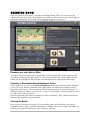
If you play on a small screen, you will find the zoom features handy.
To zoom-in or out: use the mouse wheel to zoom in – or out - of the area where you mouse
pointer is located. If you do not have a mouse wheel, use the + and - keys on your numerical
keypad.
If you have a mouse wheel, moving from one area of the map to another is really fast and
easy: zoom out with the wheel, move your mouse pointer above the map area, and zoom back
in.
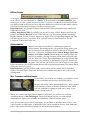
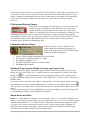
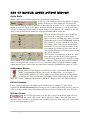
If you have one, your numerical keypad will also work like a mini-map: the 1 to 9 keys
instantly focus on a specific area of the battle map.
•
•
•
Keys 1 to 9 center and zoom the view quickly on
the corresponding portion of the map, as shown
on the diagram to this left
The + and - keys zoom in and out.
The 0 key fully zooms out, to show you the entire
map.
Panning (scrolling) can be done in several ways. You can use the arrow keys of your
keyboard. You can move your mouse cursor to the edges of the map. You can hold the space
bar key down and click-and-drag on the map to move it around. Or if you have a mouse wheel
than can be pressed, hold it down and move your mouse around.
Memoir '44 High Command
For Your Eyes Only
8