1
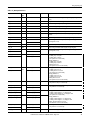
Analog Output (P_AOut)
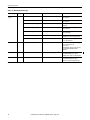
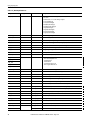
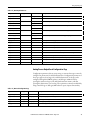
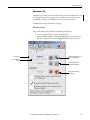
The global object parameters are as follows.
Parameter
Required
Description
#102
Y
Object tag to point to the name of the associated object’s
Add-On Instruction in the controller.
#103
Y
Path used for display navigation features to other objects. Include
program scope if tag is a program scope tag.
#120
N
Additional parameter to pass to the display command to open the
faceplate. Typically used to define position for the faceplate.
#121
N
Additional parameter to pass to the display command to open the
faceplate. if defining X and Y coordinate, separate parameters so that
X is defined by #120 and Y is defined by #121. This lets these same
parameters to be used in subsequent display commands originating from
the faceplate.
#122
Y
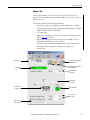
These are the options for the global object display:
0 = Always show faceplate
1 = Show Quick Display for users without Maintenance access (Code C)
2= Always show Quick Display
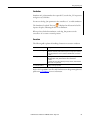
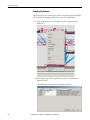
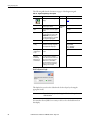
3. In the Value column, type the tag or value as specified in the Description
column.
TIP
Click the ellipsis (. . .) to browse and select a tag.
Values for items marked ‘(optional)’ can be left blank.
4. Click OK.
Rockwell Automation Publication SYSLIB-RM011E-EN-E - August 2014
29