1
•
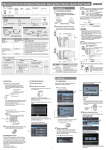
During the enrolment, please show your face in the middle of the screen according to the guide
on the screen like turn head to left or right side, or raise and lower head slightly, so that the every
part of your facial character will be acquired by the sensor;
•
When the white dashed frame appears, it means your face can’t be detected by the system,
please adjust your face expression and position;
•
•
•
•
The green line frame will display if the device detects your face successfully;
Below conditions are preferred: indoor use, normal face expression;
Below conditions are forbidden: direct sunshine, wear Sunglasses;
When you are wearing glass, please take off your glass/specs after the half enrolment process
then continue the second half enrolment.
85: What is the treatment of faulty product?
A:
We provide 24month warranty for products that have a manufacturing fault. Faulty products must
be returned to us for evaluation.
86: What is the expected life of the product?
A
Expected 7-10 years
87:
A:
What is the life of the labels and buttons?
The life is estimated at 3 years.
88: Can we interface this product to our access control system?
A:
Yes you will need the SDK
89: I do not recall….but should an admin person make changes, is
that persons details and the change made recorded and logged?
A:
Yes.
90: Does it record the date and time of any failed and or rejected
scans?
A:
We handle this function as optional setting.
91: Can we import a user database?
A:
You can upload by USB driver with a specified format.
92: Should we network the units together – is the data transferred
encrypted?
A:
Yes, our SDK can provide this kind of command.
93: Where are units installed?
A:
We have installed many units around the US, Europe and China.
21