1
User Manual
Handheld Remote Controller
Handheld Remote Controller
User Manual
This Installation Manual applies to the following products:
Product No.
Description
U105RHH001
Handheld Remote Controller
1
HANDHELD REMOTE CONTROLLER
IMPORTANT NOTES
HOW TO USE THIS MANUAL
This manual explains how to operate your ULTI Remote Controller. It provides the
guidelines you need to programme your ULTI switches and dimmers for different lighting
scenario settings.
PRODUCT SAFETY
The Remote Controller operates at a RF frequency band 315 MHz or 434 MHz. Please
contact local sales representatives for specifications in various countries. Operating range
is approximately 100 meters in an open area, subject to environmental conditions. The
effective radiated power does not exceed 10mW.
WARRANTY
ULTI products come with a one-year, equipment-only warranty. For more details, please
refer to the attached warranty form or visit www.clipsal-ulti.com
To enjoy product warranty, simply:
1) register on line by visiting the Warranty Registration section on www.clipsal-ulti.com, or
Customer Service Email: [email protected]
URL: www.clipsal-ulti.com
3
HANDHELD REMOTE CONTROLLER
CONTENTS
IMPORTANT NOTES
3
CONTENTS
5
ULTI PACKAGE COMPONENTS
6
INTRODUCTION
7
OPERATING FUNCTION
8
COMPONENT REPLACEMENT
10
10
10
11
PROGRAMMING PROCEDURES
12
12
15
17
18
19
Battery Replacement
Scene Control and Device Control & Labelling
Remote Controller Labelling
Scene Programming Procedures
Device Programming Procedures
Disabling Programmed Scene Setting (For Product No. starting with U20):
Enabling Programmed Scene Setting (For Product No. starting with U20)
Disabling All-Off Command (For Product No. starting with U20 only)
HANDHELD REMOTE CONTROLLER
LEARNING ID PROCEDURES
20
20
22
23
MEMORY CLEARING PROCEDURES
24
24
26
SPECIFICATION
27
TROUBLE SHOOTING GUIDE
28
Learning from Handheld to Handheld
Learning from FreeLocate 6-setting Switch to Handheld Remote Controller
Undo Learning ID
Switch/Dimmer Partial Memory Clearing Procedures
Switch/Dimmer Full Memory Clearing Procedures
HANDHELD REMOTE CONTROLLER
ULTI PACKAGE COMPONENTS
INTRODUCTION
ULTI CONCEPT
ULTI, The Ultimate Switch, is a Clipsal Concept. It is a state-of-the-art lighting control and
electrical automation scheme for residential, hotel and office use, offering sophisticated
design, operational simplicity and flexibility to control electrical devices.
ULTI WIRELESS LIGHTING CONTROL SOLUTION
With ULTI, you can use a Remote Controller to control all functions, including preprogramming of multi-combination light groups and electronic home appliances for up to
five different scenarios. With a simple touch of a button, you can call upon the preferred
lighting for your chosen activity.
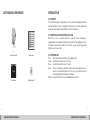
Remote Controller
Scenes Label
User Manual
AAA batteries x 2
ULTI TERMINOLOGY
Zone
Switch
Device
Scene
-
An area illuminated/controlled by a single lighting circuit.
A switch that controls the on-off of a zone.
A switch that controls the on-off of a zone.
A Scene is defined as a combination of lights and electronic appliances across
various zones with different light levels. You can set your favourite scenes by
following Programming Procedures in this manual.
Dimmer - A switch that controls the on-off and Dimming level of a zone.
6
7
HANDHELD REMOTE CONTROLLER
HANDHELD REMOTE CONTROLLER
OPERATING FUNCTION
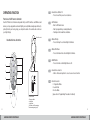
1
• Scene/Device Buttons 1-5
- Press to recall the pre-set scenes/devices.
2
• LED Indicator
- Blue for RF transmission.
- Red for programming or learning indication.
- Flashing red for low batteries indication.
3
• Master Dim Up
- Press to dim up the controlled lights of dimmers.
4
• Master Dim Down
- Press to dim down the controlled lights of dimmers.
5
• All-Off Button
- Press to turn all controlled lights/devices off.
6
• Scene/Device Selector
- Slide to the desired position to select scene or device function.
8
• Function Selector
i. Programme Mode
ii. Learn Mode
iii. In-Use Mode
(please refer to Programming Procedures for details)
Functions of ULTI Remote Controller
Each ULTI Remote Controller works parallel with your ULTI Switches and Dimmers and
allows you to pre-programme and recall lighting scenes (individual and group switches) to
perfectly match your mood, giving you complete freedom of movement and control over
your light settings.
Back Cover Lock
Handheld Remote Controller
2
1
3
4
5
6
Function Selector
• Programme Mode
• Learn Mode
• In-Use Mode
(For Details, refer to Programming
Procedures beginning on p.12)
8
HANDHELD REMOTE CONTROLLER
9
HANDHELD REMOTE CONTROLLER
COMPONENT REPLACEMENT
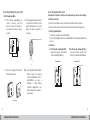
Battery Replacement
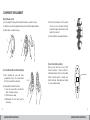
1) Press and push the release button and slide the back cover down to release.
2) Identify the correct battery polarity direction and insert two AAA alkaline batteries.
3) Clip the back cover back into place.
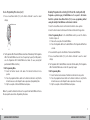
3) Attach the desired labels onto the plastic
cut sheet. Scene control labels should be
located on the upper slot and device control
labels on the lower slot.
3)
4) Upon completion, reassemble all the parts.
1)
2)
In
Remote Controller Labelling
When you have more than one set of ULTI
Remote Controllers, it may be difficult to
differentiate between them. Use the provided
Remote Controller labels to identify each
Remote Controller. (Extra labels are included
for your own label creation).
Scene Control and Device Control Labelling
1) After completing all scene and device
programming, choose the desired labels
from the Scene & Device Label sheet.
In
2) - (iii)
2) Disassemble the Remote Controller.
(i) Press the release button and slide the
back cover down to release.
(ii) Pull the back over apart.
(iii) Disassemble the front panel and the
inner panel.
Insert label here
In
10
11
HANDHELD REMOTE CONTROLLER
In
HANDHELD REMOTE CONTROLLER
PROGRAMMING PROCEDURES
Scene Programming Procedures
To set a lighting scene with multiple Switches/Dimmers and assign this scene to a
button on the Remote Controller.
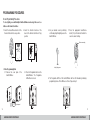
1. Select the Scene/Device Selector of the
Remote Controller to Scene position.
2. Select the Function Selector at the
back of the Remote Controller to Prog
position.
4. Set your desired scene by switching
on/off or adjusting the lighting level on the
Switch/Dimmer.
5. Press the appropriate Scene/Device
button (1-5) on the Remote Controller to
save the current settings.
Press to save setting
Scene Position
3. Enter Programming Mode
3.1 Remove the cover plate of the
Switch/Dimmer.
Adjust lighting scene
3.2 Press the Programme button on the
Switch/Dimmer. The Programme
LED will turn on in red.
6. The Programme LED of all the Switch/Dimmer will turn off immediately, indicating
programming is done. If the LED does not turn off, repeat step 5.
Press
push upward
Red
12
HANDHELD REMOTE CONTROLLER
turn off
13
HANDHELD REMOTE CONTROLLER
Device Programming Procedures
Scene Programming Procedures (con’t)
7. Exit Programming Mode
7.1 After finishing programming all
scenes or devices, select the
Function Selector at the back of
the Remote Controller to In-Use
position.
7.2 Press the programmed Scene button
on the Remote Controller to verify
that the instruction was successful.
Repeat the above procedures if
necessary.
Press to verify instruction
Using Remote Controller to switch on/off a particular device and save this setting on
the Remote Controller.
1. Select the Scene/Device Selector of the Remote Controller to Device position.
2. Select the Function Selector at the back of the Remote Controller to Prog position.
3. Enter Programming Mode
3.1 Remove cover plate of the Switch/Dimmer.
3.2 Press the Programme Button on the Switch/Dimmer. The Programme LED will turn
on in red.
4. Set Device:
A For Product No. starting with U10:
Switch on the specific control button
of the desired Switch/Dimmer.
Product No. U10
Press
7.3 Clip the cover plate of the Switch/
Dimmer back in place.
B For Product No. starting with U20. :
Press and hold the specific control
button of the desired Switch/Dimmer.
Product No. U20
Press & hold
Tips : If the Programme LED of Switch/
Dimmer flashes, the memory
of this Switch/Dimmer is full. A
Switch/Dimmer can save a
maximum of eight Remote
Controller identifications. See
Memory Clearing Procedures to
release space.
Clip cover plate
14
15
HANDHELD REMOTE CONTROLLER
HANDHELD REMOTE CONTROLLER
Device Programming Procedures (con’t)
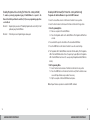
Disabling Programmed Scene Setting (For Product No. starting with U20):
5. Press a Scene/Device Button (1-5) on the Remote Controller to save the current
settings.
Programme a particular gang of Switch/Dimmer not to respond to the Remote
Controller’s particular Scene/Device Button (1-5) in scene programming, without
erasing the identity of Switch/Dimmer on the Remote Controller.
Press to save
1. Select the Scene/Device Selector on the Remote Controller to Scene position.
2. Select the Function Selector at the back of the Remote Controller to Prog position.
3. Enter Programming Mode for the Switch/Dimmer which you want the Remote
Controller to ignore to:
3.1 Remove the cover plate of the Switch/Dimmer.
3.2 Press the Programme Button on the Switch/Dimmer. The Programme LED will turn
on in red.
6. The Programme LED of the Switch/Dimmer should turn off immediately. If the Programme
LED of the Switch/Dimmer does not turn off, repeat step 5 again. (For U20 products,
once the Programme LED of Switch/Dimmer has turned off, cease pressing that
particular Switch/Dimmer’s button).
7. Exit Programming Mode.
7.1 Select the Function Selector at the back of the Remote Controller to In-Use
position.
7.2 Press the programmed Device button on the Remote Controller to verify that the
instruction was successful. Repeat the above procedures if programming fails.
7.3 Clip the cover plate of the Switch/Dimmer back in place.
4. Press and hold the specific control Button of the desired Switch/Dimmer.
5. Press a Scene/Device Button (1-5) on the Remote Controller to save the current
settings.
6. The Programme LED of Switch/Dimmer should turn off immediately. If the Programme
LED of the Switch/Dimmer does not turn off, repeat step 5 again.
7. Exit Programming Mode
7.1 Select Function Selector at back of the Remote Controller to In-Use position
7.2 Press the programmed Scene Button on the Remote Controller to verify that the
instruction was successful. Repeat the above procedures if necessary.
7.3 Clip the cover plate of the Switch/Dimmer back in place.
Note : If you want the Remote Controller not to respond to that Switch/Dimmer in Device
Mode, repeat the above Device Programming Procedures.
16
17
HANDHELD REMOTE CONTROLLER
HANDHELD REMOTE CONTROLLER
Enabling Programmed Scene Setting (For Product No. starting with U20)
Disabling All-Off Command (For Product No. starting with U20 only)
To enable a previously programmed gang of Switch/Dimmer to respond to the
Remote Controller’s particular Scene button (1-5) in scene programming again, there
are 2 methods.
Programme the Switches/Dimmers to ignore the All-Off Command.
Method 1 : Repeating the procedure of “Disabling Programmed Scene Setting” for that
particular gang of Switch/Dimmer.
Method 2 : Performing a Scene Programming procedure again.
1. Select the Scene/Device Selector of the Remote Controller to Scene position.
2. Select the Function Selector at the back of the Remote Controller to Prog position.
3. Enter Programming Mode
3.1 Remove cover plate of the Switch/Dimmer.
3.2 Press the Programme button on the Switch/Dimmer. The Programme LED will turn
on in red.
4. Press and hold the specific control button of the desired Switch/Dimmer.
5. Press the All-Off button on the Remote Controller to save the current settings.
6. The Programme LED of Switch/Dimmer should turn off immediately. If the Programme
LED of the Switch/Dimmer did not turn off, repeat step 5 again. (Once the Programme
LED of Switch/Dimmer has turned off, cease pressing thatparticular Switch/Dimmer’s
button).
7. Exit Programming Mode.
7.1 Select Function Selector at back of the Remote Controller to In-Use position.
7.2 Press the All-Off button on the Remote Controller to verify that the instruction was
successful. Repeat the above procedures if necessary.
7.3 Clip the cover plate of the Switch/Dimmer back in place.
Note : Repeat the above procedure to enable the All-Off command.
18
19
HANDHELD REMOTE CONTROLLER
HANDHELD REMOTE CONTROLLER
LEARNING ID PROCEDURES
To make two or more Remote Controllers (be they handheld Remote Controllers or
FreeLocate Switches) to learn one another’s function so that both Remote Controllers
function the same, meaning having one set of programmed scene/device settings. This
means there is only one original Remote Controller, which we shall define as Master
Remote Controller. All other Remote Controllers that learn the Master Remote Controller’s
identity and functions are termed as Slave Remote Controllers.
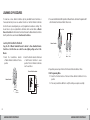
Learning from Handheld to Handheld
3. Press and hold the Master Dim Up button of Master Remote Controller. Programme LED
of both Remote Controllers will flash 3 times in red.
Press & hold
Flash 3
times in
Red.
Master Controller
Copy the ID of Master Handheld Remote Controller to Slave Handheld Remote
Controller so that the Slave can control the same lighting settings as that of the
Master.
1. Select the Scene/Device Selector
of Master Remote Controller to Device
position.
2. Select the Function Selector at the back
of both Remote Controller to Learn
position. Put both Remote Controllers
next to each other.
Master & Slave Controllers
Master Controller
Learn
Mode
Master
Slave
4. Repeat the previous steps if neither of the Remote Controllers flashes 3 times.
5. Exit Programming Mode
5.1 Select the Function Selector at the back of Slave Remote Controller to In-Use
position
5.2 Press any Scene/Device Buttons to verify the settings are copied successfully
Device
Position
20
21
HANDHELD REMOTE CONTROLLER
HANDHELD REMOTE CONTROLLER
Learning from FreeLocate 6-setting Switch to Handheld Remote Controller
Undo Learning ID
Copy the ID of FreeLocate 6-Setting Switch to Slave Handheld Remote Controller
so that the Slave can control the same lighting settings as FreeLocate 6-Setting
Switch.
To resume the original ID of Slave Remote Controller so that it does not control the
same lighting settings as the Master.
1. Select the Function Selector at the
back of both Remote Controllers to
Learn position.
2. Press the Delete Button of FreeLocate
6-Setting Switch.
1. Select the Function Selector at the back of Student Remote Controller to Learn
position.
2. Select the Scene/Device Selector of Slave Remote Controller to Device position.
3. Press and hold the Master Dim Down button of Student Remote Controller. The
Programme LED will flash in red for 3 times.
Master & Slave
Press Delete Button
Learn
Mode
4. Repeat the previous steps if neither of the Remote Controllers flashes 3 times.
5. Exit Programming Mode
5.1 Select the Function Selector at the back of Student Remote Controller to In-Use
position.
5.2 Press any Scene/Device button to verify the settings are resumed.
3. Press and hold Button 4 of the FreeLocate 6-Setting Switch. Programme LED of both
Remote Controllers will flash 3 times in red.
Press & hold
22
4. Exit Programming Mode
4.1 Select the Function Selector at the back of the Slave Remote Controller to In-Use
position.
4.2 Press any Scene/Device Buttons to verify the settings are copied successfully.
HANDHELD REMOTE CONTROLLER
23
HANDHELD REMOTE CONTROLLER
MEMORY CLEARING PROCEDURES
Switch/Dimmer Partial Memory Clearing Procedures
To remove the ID of individual Remote Controller that has been stored on the Switch/
Dimmer so that the Switch/Dimmer will not recognise any command sent by this
particular Freelocate Switch.
1. Select the Scene/Device Selector of the Remote Controller to Device position.
2. Select the Function Selector at the back of the Remote Controller to Prog position.
3. Enter Programming Mode:
3.1 Remove cover plate of the Switch/Dimmer.
3.2 Press the Programme button on the Switch/Dimmer. The Programme LED will turn
on in red.
4. Clear Memory
A For Product No. starting with U10.
Press the All-Off button on the Remote Controller.
B For Product No. starting with U20:
Press and hold the All-Off button for 5 seconds on the Remote Controller.
7. Exit Programming Mode.
7.1 Select the Function Selector at the back of the Remote Controller to In-Use
position.
7.2 Press the previously programmed Scene/Device button on the Remote Controller to
verify that the instruction was successful. Repeat the above procedures if
necessary.
7.3 Clip the cover plate of the Switch/Dimmer back in place.
5. The Programme LED of the Switch/Dimmer will turn off immediately, if it does not turn
off, repeat step 3 again.
6. Exit Programming Mode.
6.1 Select the Function Selector at the back of the Remote Controller to In-Use
position.
6.2 Press the previously programmed Scene/Device button on the Remote Controller to
verify that the instruction was successful. Repeat the above procedures if
necessary.
6.3 Clip the cover plate of the Switch/Dimmer back in place.
24
25
HANDHELD REMOTE CONTROLLER
HANDHELD REMOTE CONTROLLER
Switch/Dimmer Full Memory Clearing Procedures
To remove ALL IDs that have been stored on the Switch/Dimmer so that the Switch/
Dimmer will not respond to any Remote Controller or FreeLocate Switch.
1. Remove the cover plate of the Switch/Dimmer.
2. Press and hold the Clear button on the Switch/Dimmer for 3 seconds. The Programme
LED of the Switch/Dimmer will flash 3 times in red.
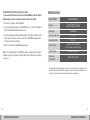
SPECIFICATIONS
Spec / Product
Memory
Battery Type
Remote Controller
5 scenes/5 devices settings,
Master Dim Up/Down and All-Off
2 x AAA batteries
3. Press the originally programmed Scene/Device button on the Remote Controller to verify
that the memory clear process was successful. If the Switch/Dimmer still responds to
the Remote Controller, repeat step 2.
Operating Temperature
4. Clip the cover plate of the Switch/Dimmer back in place.
Radio Frequency
Available in 315MHz & 434MHz
(Please consult your regional office)
Note : If the Programme LED of Switch/Dimmer flashes continuously then the Switch/
Dimmer’s memory is full and cannot recognise further Remote Controllers unless memory
clear is done.
Operating Range
100m (Open environment)*
Operating Humidity
Dimensions
(H) x (W) x (D)
0 °C to + 40 °C
0% to 95%
125mm x 51mm x 25mm
* The performance of the operating range is subject to the actual conditions of the environment, such
as weather. Under normal circumstances, longer range can be achieved outdoors than indoors since
obstacles like concrete walls and metal shelves may shorten the operating range.
26
27
HANDHELD REMOTE CONTROLLER
HANDHELD REMOTE CONTROLLER
TROUBLE SHOOTING GUIDE
Symptom
Switch / Dimmer
is not responding
to the Remote
Controller.
Possible Cause
Solution
Symptom
Possible Cause
Solution
1.Not previously
programmed
or improper
programming.
Repeat the Programming Procedures
in Remote Controller Manual.
1.Red Programme
LED flashes after
the Programme
Button is pressed.
This indicates the memory is full. (Refer
to Memory Clearing Procedures)
2.Switch is set to
Programme mode.
The LED indicator turns on red now,
indicating the unit is in Programming
mode. If programming is not required,
press the Programme button to exit
Programming mode.
2.The Switch does
not receive
programming
commands.
Check the position of the function
selector at the back of the Remote
Controller. Make sure it is in the
Programme position.
3.RF is disabled.
(Programme LED
flashes non-stop
in the pattern of 2)
Press the programme button of
Switch/Dimmer 6 times within 1
minute. Programme LED should stop
flashing.
1.Batteries are
installed incorrectly
or the batteries are
low or dead.
Replace with new batteries.
3.Voltage is too low.
Make sure the operating voltage range
is within the requirement.
4.Power rating is too
low.
Replace the load that meets the
minimum loading requirement.
5. RF is disabled.
(Programme LED
flashes non-stop
in the pattern of
2 flashes.)
Press the programme button of the
Switch/Dimmer 6 times within 1
minute. Programme LED should stop
flashing.
Unable to
programme.
Switch/Dimmer
is not responding
to the Remote
Controller and LED
does not flash.
28
29
HANDHELD REMOTE CONTROLLER
HANDHELD REMOTE CONTROLLER
TROUBLE SHOOTING GUIDE (con’t)
Symptom
Main light or LED
backlight does not
turn on.
Main load is turned
off automatically.
Possible Cause
Solution
1.Wires are not
properly secured
or connected in the
terminals.
Make sure the wires are secured,
screws are fastened and the Live or
Load wires have been connected to
the correct terminals.
2.MCB is OFF or has
been tripped.
Switch on the MCB. If a breaker
continually trips, contact a registered
electrician to find out the cause of
the problem.
3.Temporary disorder.
Switch off the MCB and then on
again to reset the switch.
1.Power rating is too
low.
Replace the load that meets the
minimum loading requirement.
2.Wires are not
properly secured
in the terminals.
Make sure the wires are secured and
screws are fastened properly.
3.Controlled by other
Remote Controller
within the area.
Determine
which
Remote
Controller(s) is (are) controlling
the particular main light. (Refer to
Memory Clearing Procedures in
Remote Controller Manual).
Symptom
The LED indicator
on the Switch/
Dimmer flashes in
red. The Remote
Controller is
unable to control
Switch/Dimmer.
Possible Cause
Solution
1.The Programme
button on the
Switch/Dimmer
has been
unintentionally
pressed 6 times
within 1 minute.
Press the Programme button 6 times
again will stop the flashing and enable
the Remote Controller to control the
Switch/Dimmer again.
2.The lighting load to
the Switch/Dimmer
is below minimum
load requirement
or 1 gang of the
Switch/Dimmer is
disconnected.
Replace lighting load to a higher
load.
30
31
HANDHELD REMOTE CONTROLLER
HANDHELD REMOTE CONTROLLER
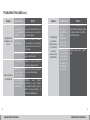
TROUBLE SHOOTING GUIDE (con’t)
Symptom
The Switch/Dimmer
does not respond
to the Remote
Controller, but LED
flashes.
The LED Indicator
keeps flashing
in red.
Possible Cause
Solution
1.Remote Controller
is not in the In-Use
mode.
Change the Remote Controller to InUse mode by selecting the Function
Selector to In-Use position.
2.The Switch/Dimmer
cannot receive
programming
commands.
Check the position of the Function
Selector at the back of the Remote
Controller. It may not be in the
Programme position.
1.Batteries are low.
Replace with new batteries.
All rights reserved
Specifications subject to change without notice
4301-7039-1
32
HANDHELD REMOTE CONTROLLER