1
12.
Switch NDIPDATA File
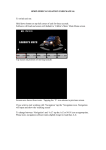
This screen is access via the Save As option on the Main Menu. If the user clicks on
“Switch NDIPDATA File” the dialogue box below is retuned.
This option enables the user to switch from one database to another. This is useful if the
user is dealing with several schools and wishes to retain data for each school in
separately identifiable files. The user selects the appropriate drive (C:/D: etc) from the
drop-down menu and the file name for the school to be processed.
NDIP User Manual V4.0
44 of 44
© Atos Origin 2008
29/07/14 15:43