1
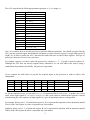
The ALU can perform the following operations (operands: a, b, cin; output: y):
Opcode
0000
0001
0010
0011
0100
0101
0110
0111
1000
1001
1010
1011
1100
1101
1110
1111
ALU Operation
y = not a
y = not b
y = a and b
y = a or b
y = a nand b
y = a nor b
y = a xor b
y = a xnor b
y=a
y=b
y=a+1
y=b+1
y=a–1
y=b–1
y=a+b
y = a + b + cin
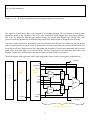
Now, let’s examine how to use this processor to perform different operations. You should recognize that the
ALU can only perform logical and arithmetic operations on values stored in register A (regA) and register B
(regB). So, in order to utilize the ALU, data must be loaded into one or both of these registers. This type of
processor is known as load and store processor.
For example, suppose we want to utilize the processor to compute A = 5 – 3 (result is stored in register A).
Although the ALU does not directly support binary subtraction, we can still achieve this task by using a
combination of operations. Specifically, the processor can perform:
A = 5 + complement of 3 + 1.
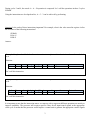
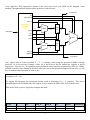
Let us complete the table below to provide the required inputs to the processor in order to achieve this
computation.
Cycle
X
sel
load_A
load_B
cin
opcode
operation
Instruction
So, for our simple processor, we can achieve A = A – B operation within 4 clock cycles. To produce the correct
result, all the input signals (X, sel, load_A, load_B, cin, and opcode) must be inserted at the right time. Instead
of memorizing the exact sequence of input signals, let’s give an instruction name to each operation.
For example, during cycle 1, 5 is loaded into register A. Let’s represent this operation with an instruction named
LDA # (load # into register A) where # represents any 4-bit number.
Similarly, during cycle 2, 3 is loaded into register B. Let’s represent this operation with an instruction named
LDB # (load # into register B) where # represents any 4-bit number.
2