1
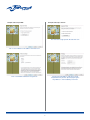
Setting IP addressing to DHCP
Setting IP addressing to Static IP
FIG. 5: Select assign specific IP and click next.
FIG. 3: Select Obtain an IP address and click next.
FIG. 4: Set DHCP and Auto IP assignment.
FIG. 6: Select IP address and subnet mask
compatible with your PC. Specifying the gateway address is not mandatory. Click next.
2