1
EOS System Message Guide
Software Release 4.15.3F
December 3, 2015
http://www.arista.com
email:[email protected]
Contents
1 System Message Overview
1.1
Message Format . . . . . . . . . . . . . . . . . . . . . . . . . . . . . . . . . . . . . . . . . .
1.2
Severity Levels . . . . . . . . . . . . . . . . . . . . . . . . . . . . . . . . . . . . . . . . . . .
2 System Messages
2.1
AAA Messages . . . . . . .
2.2
ACCOUNTING Messages . .
2.3
ACL Messages . . . . . . . .
2.4
AGENT Messages . . . . . .
2.5
ARP Messages . . . . . . . .
2.6
BFD Messages . . . . . . . .
2.7
BGP Messages . . . . . . . .
2.8
BIDIR Messages . . . . . . .
2.9
CAPACITY Messages . . . .
2.10
CAPI Messages . . . . . . .
2.11
CARD Messages . . . . . . .
2.12
CLEAR Messages . . . . . .
2.13
DATAPLANE Messages . . .
2.14
DOT1X Messages . . . . . .
2.15
ENVMON Messages . . . .
2.16
ETH Messages . . . . . . . .
2.17
EVENTMON Messages . . .
2.18
EXTENSION Messages . . .
2.19
FHRP Messages . . . . . . .
2.20
FLOW Messages . . . . . . .
2.21
FOCALPOINTV2 Messages
2.22
FRU Messages . . . . . . . .
2.23
FWK Messages . . . . . . .
2.24
GMP Messages . . . . . . .
2.25
HARDWARE Messages . . .
2.26
HSC Messages . . . . . . . .
2.27
IGMP Messages . . . . . . .
2.28
IGMPSNOOPING Messages
2.29
INTF Messages . . . . . . .
2.30
IP6ROUTING Messages . . .
2.31
IRA Messages . . . . . . . .
2.32
ISIS Messages . . . . . . . .
2.33
KERNELFIB Messages . . .
2.34
LACP Messages . . . . . . .
2.35
LAG Messages . . . . . . . .
2.36
LAUNCHER Messages . . .
2.37
LINEPROTO Messages . . .
2.38
LLDP Messages . . . . . . .
.
.
.
.
.
.
.
.
.
.
.
.
.
.
.
.
.
.
.
.
.
.
.
.
.
.
.
.
.
.
.
.
.
.
.
.
.
.
.
.
.
.
.
.
.
.
.
.
.
.
.
.
.
.
.
.
.
.
.
.
.
.
.
.
.
.
.
.
.
.
.
.
.
.
.
.
.
.
.
.
.
.
.
.
.
.
.
.
.
.
.
.
.
.
.
.
.
.
.
.
.
.
.
.
.
.
.
.
.
.
.
.
.
.
.
.
.
.
.
.
.
.
.
.
.
.
.
.
.
.
.
.
.
.
.
.
.
.
.
.
.
.
.
.
.
.
.
.
.
.
.
.
.
.
.
.
.
.
.
.
.
.
.
.
.
.
.
.
.
.
.
.
.
.
.
.
.
.
.
.
.
.
.
.
.
.
.
.
.
.
.
.
.
.
.
.
.
.
.
.
.
.
.
.
.
.
.
.
.
.
.
.
.
.
.
.
.
.
.
.
.
.
.
.
.
.
.
.
.
.
.
.
.
.
.
.
.
.
.
.
.
.
.
.
.
.
.
.
.
.
.
.
.
.
.
.
.
.
.
.
.
.
.
.
.
.
i
.
.
.
.
.
.
.
.
.
.
.
.
.
.
.
.
.
.
.
.
.
.
.
.
.
.
.
.
.
.
.
.
.
.
.
.
.
.
.
.
.
.
.
.
.
.
.
.
.
.
.
.
.
.
.
.
.
.
.
.
.
.
.
.
.
.
.
.
.
.
.
.
.
.
.
.
.
.
.
.
.
.
.
.
.
.
.
.
.
.
.
.
.
.
.
.
.
.
.
.
.
.
.
.
.
.
.
.
.
.
.
.
.
.
.
.
.
.
.
.
.
.
.
.
.
.
.
.
.
.
.
.
.
.
.
.
.
.
.
.
.
.
.
.
.
.
.
.
.
.
.
.
.
.
.
.
.
.
.
.
.
.
.
.
.
.
.
.
.
.
.
.
.
.
.
.
.
.
.
.
.
.
.
.
.
.
.
.
.
.
.
.
.
.
.
.
.
.
.
.
.
.
.
.
.
.
.
.
.
.
.
.
.
.
.
.
.
.
.
.
.
.
.
.
.
.
.
.
.
.
.
.
.
.
.
.
.
.
.
.
.
.
.
.
.
.
.
.
.
.
.
.
.
.
.
.
.
.
.
.
.
.
.
.
.
.
.
.
.
.
.
.
.
.
.
.
.
.
.
.
.
.
.
.
.
.
.
.
.
.
.
.
.
.
.
.
.
.
.
.
.
.
.
.
.
.
.
.
.
.
.
.
.
.
.
.
.
.
.
.
.
.
.
.
.
.
.
.
.
.
.
.
.
.
.
.
.
.
.
.
.
.
.
.
.
.
.
.
.
.
.
.
.
.
.
.
.
.
.
.
.
.
.
.
.
.
.
.
.
.
.
.
.
.
.
.
.
.
.
.
.
.
.
.
.
.
.
.
.
.
.
.
.
.
.
.
.
.
.
.
.
.
.
.
.
.
.
.
.
.
.
.
.
.
.
.
.
.
.
.
.
.
.
.
.
.
.
.
.
.
.
.
.
.
.
.
.
.
.
.
.
.
.
.
.
.
.
.
.
.
.
.
.
.
.
.
.
.
.
.
.
.
.
.
.
.
.
.
.
.
.
.
.
.
.
.
.
.
.
.
.
.
.
.
.
.
.
.
.
.
.
.
.
.
.
.
.
.
.
.
.
.
.
.
.
.
.
.
.
.
.
.
.
.
.
.
.
.
.
.
.
.
.
.
.
.
.
.
.
.
.
.
.
.
.
.
.
.
.
.
.
.
.
.
.
.
.
.
.
.
.
.
.
.
.
.
.
.
.
.
.
.
.
.
.
.
.
.
.
.
.
.
.
.
.
.
.
.
.
.
.
.
.
.
.
.
.
.
.
.
.
.
.
.
.
.
.
.
.
.
.
.
.
.
.
.
.
.
.
.
.
.
.
.
.
.
.
.
.
.
.
.
.
.
.
.
.
.
.
.
.
.
.
.
.
.
.
.
.
.
.
.
.
.
.
.
.
.
.
.
.
.
.
.
.
.
.
.
.
.
.
.
.
.
.
.
.
.
.
.
.
.
.
.
.
.
.
.
.
.
.
.
.
.
.
.
.
.
.
.
.
.
.
.
.
.
.
.
.
.
.
.
.
.
.
.
.
.
.
.
.
.
.
.
.
.
.
.
.
.
.
.
.
.
.
.
.
.
.
.
.
.
.
.
.
.
.
.
.
.
.
.
.
.
.
.
.
.
.
.
.
.
.
.
.
.
.
.
.
.
.
.
.
.
.
.
.
.
.
.
.
.
.
.
.
.
.
.
.
.
.
.
.
.
.
.
.
.
.
.
.
.
.
.
.
.
.
.
.
.
.
.
.
.
.
.
.
.
.
.
.
.
.
.
.
.
.
.
.
.
.
.
.
.
.
.
.
.
.
.
.
.
.
.
.
.
.
.
.
.
.
.
.
.
.
.
.
.
.
.
.
.
.
.
.
.
.
.
.
.
.
.
.
.
.
.
.
.
.
.
.
.
.
.
.
.
.
.
.
.
.
.
.
.
.
.
.
.
.
.
.
.
.
.
.
.
.
.
.
.
.
.
.
.
.
.
.
.
.
.
.
.
.
.
.
.
.
.
.
.
.
.
.
.
.
.
.
.
.
.
.
.
.
.
.
.
.
.
.
.
.
.
.
.
.
.
.
.
.
.
.
.
.
.
.
.
.
.
.
.
.
.
.
.
.
.
.
.
.
.
.
.
.
.
.
.
.
.
.
.
.
.
.
.
.
.
.
.
.
.
.
.
.
.
.
.
.
.
.
.
.
.
.
.
.
.
.
.
.
.
.
.
.
.
.
.
.
.
.
.
.
.
.
.
.
.
.
.
.
.
.
.
.
.
.
.
.
.
.
.
.
.
.
.
.
.
.
.
.
.
.
.
.
.
.
.
.
.
.
.
.
.
.
.
1
1
2
3
3
7
8
9
10
11
12
14
15
16
17
18
19
21
23
28
32
33
34
35
36
39
43
44
45
58
59
60
61
62
63
64
65
66
67
68
69
70
CONTENTS
2.39
2.40
2.41
2.42
2.43
2.44
2.45
2.46
2.47
2.48
2.49
2.50
2.51
2.52
2.53
2.54
2.55
2.56
2.57
2.58
2.59
2.60
2.61
2.62
2.63
2.64
2.65
2.66
2.67
2.68
2.69
2.70
2.71
2.72
2.73
2.74
2.75
2.76
2.77
2.78
2.79
2.80
2.81
2.82
2.83
2.84
2.85
2.86
2.87
2.88
2.89
2.90
2.91
2.92
2.93
LOGMGR Messages . . . . . . . . . . .
LOOPBACK Messages . . . . . . . . .
LOOPPROTECT Messages . . . . . . .
LSPPING Messages . . . . . . . . . . .
MAPREDUCEMONITOR Messages . .
MAX24305 Messages . . . . . . . . . .
MDIO Messages . . . . . . . . . . . . .
MIRRORING Messages . . . . . . . . .
MLAG Messages . . . . . . . . . . . .
MMODE Messages . . . . . . . . . . .
MROUTE Messages . . . . . . . . . . .
MRP Messages . . . . . . . . . . . . .
MSDP Messages . . . . . . . . . . . . .
MSRP Messages . . . . . . . . . . . . .
MVRP Messages . . . . . . . . . . . . .
NAT Messages . . . . . . . . . . . . . .
OPENFLOW Messages . . . . . . . . .
OSPF Messages . . . . . . . . . . . . .
OSPF3 Messages . . . . . . . . . . . .
PFC Messages . . . . . . . . . . . . . .
PIM Messages . . . . . . . . . . . . . .
PIMBSR Messages . . . . . . . . . . .
PORTSECURITY Messages . . . . . .
PREFIX Messages . . . . . . . . . . . .
PROCMGR Messages . . . . . . . . . .
PTP Messages . . . . . . . . . . . . . .
PWRMGMT Messages . . . . . . . . .
QOS Messages . . . . . . . . . . . . . .
QUARTZY Messages . . . . . . . . . .
QUEUEMONITOR Messages . . . . . .
REACHABILITYMONITOR Messages
REDUNDANCY Messages . . . . . . .
RIB Messages . . . . . . . . . . . . . .
ROUTING Messages . . . . . . . . . .
SAND Messages . . . . . . . . . . . . .
SANDACL Messages . . . . . . . . . .
SANDTOPO Messages . . . . . . . . .
SECURITY Messages . . . . . . . . . .
SERVERMONITOR Messages . . . . .
SPANTREE Messages . . . . . . . . . .
SSO Messages . . . . . . . . . . . . . .
STAGEMGR Messages . . . . . . . . .
STRATA Messages . . . . . . . . . . .
SYS Messages . . . . . . . . . . . . . .
SYSDB Messages . . . . . . . . . . . .
TAPAGG Messages . . . . . . . . . . .
TCP Messages . . . . . . . . . . . . . .
TRANSCEIVER Messages . . . . . . .
TUNNEL Messages . . . . . . . . . . .
VM Messages . . . . . . . . . . . . . .
VMTRACERSESS Messages . . . . . .
VMWAREVI Messages . . . . . . . . .
VMWAREVS Messages . . . . . . . . .
VRF Messages . . . . . . . . . . . . . .
VRRP Messages . . . . . . . . . . . . .
EOS User Manual
.
.
.
.
.
.
.
.
.
.
.
.
.
.
.
.
.
.
.
.
.
.
.
.
.
.
.
.
.
.
.
.
.
.
.
.
.
.
.
.
.
.
.
.
.
.
.
.
.
.
.
.
.
.
.
.
.
.
.
.
.
.
.
.
.
.
.
.
.
.
.
.
.
.
.
.
.
.
.
.
.
.
.
.
.
.
.
.
.
.
.
.
.
.
.
.
.
.
.
.
.
.
.
.
.
.
.
.
.
.
.
.
.
.
.
.
.
.
.
.
.
.
.
.
.
.
.
.
.
.
.
.
.
.
.
.
.
.
.
.
.
.
.
.
.
.
.
.
.
.
.
.
.
.
.
.
.
.
.
.
.
.
.
.
.
.
.
.
.
.
.
.
.
.
.
.
.
.
.
.
.
.
.
.
.
.
.
.
.
.
.
.
.
.
.
.
.
.
.
.
.
.
.
.
.
.
.
.
.
.
.
.
.
.
.
.
.
.
.
.
.
.
.
.
.
.
.
.
.
.
.
.
.
.
.
.
.
.
.
.
.
.
.
.
.
.
.
.
.
.
.
.
.
.
.
.
.
.
.
.
.
.
.
.
.
.
.
.
.
.
.
.
.
.
.
.
.
.
.
.
.
.
.
.
.
.
.
.
.
.
.
.
.
.
.
.
.
.
.
.
.
.
.
.
.
.
.
.
.
.
.
.
.
.
.
.
.
.
.
.
.
.
.
.
.
.
.
.
.
.
.
.
.
.
.
.
.
.
.
.
.
.
.
.
.
.
.
.
.
.
.
.
.
.
.
.
.
.
.
.
.
.
.
.
.
.
.
.
.
.
.
.
.
.
.
.
.
.
.
.
.
.
.
.
.
.
.
.
.
.
.
.
.
.
.
.
.
.
.
.
.
.
.
.
.
.
.
.
.
.
.
.
.
.
.
.
.
.
.
.
.
.
.
.
.
.
.
.
.
.
.
.
.
.
.
.
.
.
.
.
.
.
.
.
.
.
.
.
.
.
.
.
.
.
.
.
.
.
.
.
.
.
.
.
.
.
.
.
.
.
.
.
.
.
.
.
.
.
.
.
.
.
.
.
.
.
.
.
.
.
.
.
.
.
.
.
.
.
.
.
.
.
.
.
.
.
.
.
.
.
.
.
.
.
.
.
.
.
.
.
.
.
.
.
.
.
.
.
.
.
.
.
.
.
.
.
.
.
.
.
.
.
.
.
.
.
.
.
.
.
.
.
.
.
.
.
.
.
.
.
.
.
.
.
.
.
.
.
.
.
.
.
.
.
.
.
.
.
.
.
.
.
.
.
.
.
.
.
.
.
.
.
.
.
.
.
.
.
.
.
.
.
.
.
.
.
.
.
.
.
.
.
.
.
.
.
.
.
.
.
.
.
.
.
.
.
.
.
.
.
.
.
.
.
.
.
.
.
.
.
.
.
.
.
.
.
.
.
.
.
.
.
.
.
.
.
.
.
.
.
.
.
.
.
.
.
.
.
.
.
.
.
.
.
.
.
.
.
.
.
.
.
.
.
.
.
.
.
.
.
.
.
.
.
.
.
.
.
.
.
.
.
.
.
.
.
.
.
.
.
.
.
.
.
.
.
.
.
.
.
.
.
.
.
.
.
.
.
.
.
.
.
.
.
.
.
.
.
.
.
.
.
.
.
.
.
.
.
.
.
.
.
.
.
.
.
.
.
.
.
.
.
.
.
.
.
.
.
.
.
.
.
.
.
.
.
.
.
.
.
.
.
.
.
.
.
.
.
.
.
.
.
.
.
.
.
.
.
.
.
.
.
.
.
.
.
.
.
.
.
.
.
.
.
.
.
.
.
.
.
.
.
.
.
.
.
.
.
.
.
.
.
.
.
.
.
.
.
.
.
.
.
.
.
.
.
.
.
.
.
.
.
.
.
.
.
.
.
.
.
.
.
.
.
.
.
.
.
.
.
.
.
.
.
.
.
.
.
.
.
.
.
.
.
.
.
.
.
.
.
.
.
.
.
.
.
.
.
.
.
.
.
.
.
.
.
.
.
.
.
.
.
.
.
.
.
.
.
.
.
.
.
.
.
.
.
.
.
.
.
.
.
.
.
.
.
.
.
.
.
.
.
.
.
.
.
.
.
.
.
.
.
.
.
.
.
.
.
.
.
.
.
.
.
.
.
.
.
.
.
.
.
.
.
.
.
.
.
.
.
.
.
.
.
.
.
.
.
.
.
.
.
.
.
.
.
.
.
.
.
.
.
.
.
.
.
.
.
.
.
.
.
.
.
.
.
.
.
.
.
.
.
.
.
.
.
.
.
.
.
.
.
.
.
.
.
.
.
.
.
.
.
.
.
.
.
.
.
.
.
.
.
.
.
.
.
.
.
.
.
.
.
.
.
.
.
.
.
.
.
.
.
.
.
.
.
.
.
.
.
.
.
.
.
.
.
.
.
.
.
.
.
.
.
.
.
.
.
.
.
.
.
.
.
.
.
.
.
.
.
.
.
.
.
.
.
.
.
.
.
.
.
.
.
.
.
.
.
.
.
.
.
.
.
.
.
.
.
.
.
.
.
.
.
.
.
.
.
.
.
.
.
.
.
.
.
.
.
.
.
.
.
.
.
.
.
.
.
.
.
.
.
.
.
.
.
.
.
.
.
.
.
.
.
.
.
.
.
.
.
.
.
.
.
.
.
.
.
.
.
.
.
.
.
.
.
.
.
.
.
.
.
.
.
.
.
.
.
.
.
.
.
.
.
.
.
.
.
.
.
.
.
.
.
.
.
.
.
.
.
.
.
.
.
.
.
.
.
.
.
.
.
.
.
.
.
.
.
.
.
.
.
.
.
.
.
.
.
.
.
.
.
.
.
.
.
.
.
.
.
.
.
.
.
.
.
.
.
.
.
.
.
.
.
.
.
.
.
.
.
.
.
.
.
.
.
.
.
.
.
.
.
.
.
.
.
.
.
.
.
.
.
.
.
.
.
.
.
.
.
.
.
.
.
.
.
.
.
.
.
.
.
.
.
.
.
.
.
.
.
.
.
.
.
.
.
.
.
.
.
.
.
.
.
.
.
.
.
.
.
.
.
.
.
.
.
.
.
.
.
.
.
.
.
.
.
.
.
.
.
.
.
.
.
.
.
.
.
.
.
.
.
.
.
.
.
.
.
.
.
.
.
.
.
.
.
.
.
.
.
.
.
.
.
.
.
.
.
.
.
.
.
.
.
.
.
.
.
.
.
.
.
.
.
.
.
.
.
.
.
.
.
.
.
.
.
.
.
.
.
.
.
.
.
.
.
.
.
.
.
.
.
.
.
.
.
.
.
.
.
.
.
.
.
.
.
.
.
.
.
.
.
.
.
.
.
.
.
.
.
.
.
.
.
.
.
.
.
.
.
.
.
.
.
.
.
.
.
.
.
.
.
.
.
.
.
.
.
.
.
.
.
.
.
.
.
.
.
.
.
.
.
.
.
.
.
.
.
.
.
.
.
.
.
.
.
.
.
.
.
.
.
.
.
.
.
.
.
.
.
.
.
.
.
.
.
.
.
.
.
.
.
.
.
.
.
.
.
.
.
.
.
.
.
.
71
72
73
74
75
76
77
78
79
82
83
84
85
86
88
89
90
91
93
94
95
96
97
98
99
104
105
106
108
109
111
113
115
116
119
129
130
131
135
136
140
141
142
148
153
154
155
156
157
158
159
160
161
162
163
ii
CONTENTS
2.94
2.95
2.96
VXLAN Messages . . . . . . . . . . . . . . . . . . . . . . . . . . . . . . . . . . . . . . . . . 165
XMPP Messages . . . . . . . . . . . . . . . . . . . . . . . . . . . . . . . . . . . . . . . . . . 168
ZTP Messages . . . . . . . . . . . . . . . . . . . . . . . . . . . . . . . . . . . . . . . . . . . 169
EOS User Manual
iii
CHAPTER 1. SYSTEM MESSAGE OVERVIEW
Chapter 1
System Message Overview
1.1
Message Format
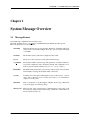
System Messages on EOS have the following format:
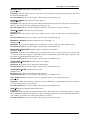
timestamp hostname process: [seq number:] %FACILITY-Severity-Mnemonic: Message text
Here’s an explanation of each of the fields:
timestamp
This is the time the message was generated. The time is obtained from the clock
on the switch. (You should configure the clock to get an accurate timestamp,
or use NTP)
hostname
The hostname is the system name configured for the switch
process
The process is the system process that generated the message
seq number
The sequence number of the message. The generation of sequence numbers is
an optional configuration, and is disabled by default. The configuration command to generate sequence numbers is [no] service sequence-numbers
FACILITY
The Facility that generated the syslog message. These are the various modules
used internally to manage all the functionality of the device
Severity
A number from 1 through 7, indicating the severity of the message. 1 is most
severe, and 7 is the least severe. See the section below to see a detailed description of severity levels
Mnemonic
This is a mnemonic code that uniquely identifies the message. Mnemonic
codes are all upper case character strings
Message text
This is the text of the system message containing details of the event. Some
messages have variable fields in the message, which may contain MAC addresses, interfaces names, etc
EOS User Manual
1
CHAPTER 1. SYSTEM MESSAGE OVERVIEW
1.2
Severity Levels
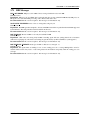
The severity of a system message varies from 0 through 7. The lower the severity, the higher the criticality of the
message. The different severity levels are described below.
Severity
0
1
2
3
4
5
6
7
Description
Emergency - system cannot be used. Immediate administrator attention is required
Alert - not used. We use severity level Emergency for critical messages
Critical - not used. We use severity level Emergency for critical messages
Error - the system has encountered an error. The message details help describe
the urgency
Warning - something may be wrong, or misconfigured. No immediate attention
is required, although further investigation is required
Notice - not used. We use severity level Information instead.
Information - informational message about the system. Provides changes in
operational status
Debug - used for aiding in troubleshooting. This could produce excessive output and should not be used without discussing with your technical support representative
EOS User Manual
2
CHAPTER 2. SYSTEM MESSAGES
Chapter 2
System Messages
2.1
AAA Messages
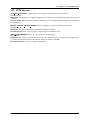
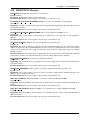
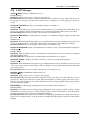
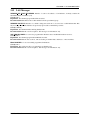
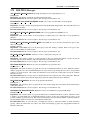
ACCT FALLBACK: Accounting method ’%s’ is currently unavailable; falling back to next method for action ’%s’.
Severity: Warning
Explanation: The accounting method failed to provide an answer and is considered unavailable. If the method list for
this service contains a fallback method, this request will be retried via that method.
Recommended Action: Check the availability and reachability of the accounting server(s).
ACCT MSG DROP: No available server; accounting messages will be dropped.
Severity: Warning
Explanation: None of the accounting servers are responsive, and the switch will drop messages until the error is
rectified.
Recommended Action: Check the availability and reachability of the accounting server(s).
ACCT MSG RESUME: Resumed successful sending of accounting messages.
Severity: Warning
Explanation: Accounting message successfully sent as the switch is able to contact the accounting server(s).
Recommended Action: No action is required – this message is for information only.
ACCT PLUGIN NOT READY: Accounting method ’%s’ is not ready
Severity: Warning
Explanation: Accounting an action using this accounting method failed because the method is not ready. This can
occur if the method has not been fully configured.
Recommended Action: Check to see if the accounting method has been configured.
ACCT QUEUE FULL: Accounting queue is full; the oldest %d messages will be dropped.
Severity: Warning
Explanation: There were too many messages in the accounting queue, and the switch discarded some pending
messages to avoid consuming too many resources. It normally means that the server was slow at taking the accounting
messages.
Recommended Action: Check the availability and reachability of the accounting server(s).
AUTHN FALLBACK: Authentication method ’%s’ is currently unavailable; falling back to next method for service
’%s’.
Severity: Warning
Explanation: The authentication method failed to provide an answer and is considered unavailable. If the method list
for this service contains a fallback method, this request will be retried via that method.
Recommended Action: Check the availability and reachability of the authentication server(s).
EOS User Manual
3
CHAPTER 2. SYSTEM MESSAGES
AUTHN PLUGIN NOT READY: Authentication method ’%s’ is not ready
Severity: Warning
Explanation: Authenticating a user with this authentication method failed because the method is not ready. This can
occur if the method has not been fully configured.
Recommended Action: Check to see if the authentication method has been configured.
AUTHZ FALLBACK: Authorization method ’%s’ is currently unavailable; falling back to next method for action
’%s’.
Severity: Warning
Explanation: The authorization method failed to provide an answer and is considered unavailable. If the method list
for this service contains a fallback method, this request will be retried via that method.
Recommended Action: Check the availability and reachability of the authorization server(s).
AUTHZ PLUGIN NOT READY: Authorization method ’%s’ is not ready
Severity: Warning
Explanation: Authorizing an action using this authentication method failed because the method is not ready. This
can occur if the method has not been fully configured.
Recommended Action: Check to see if the authorization method has been configured.
CMD AUTHZ FAILED: User %s failed authorization to execute command ’%s’
Severity: Warning
Explanation: AAA denied authorization for the specified command.
Recommended Action: Confirm that the user settings on authorization server(s) are correct.
EXEC AUTHZ FAILED: User %s failed authorization to start a shell
Severity: Warning
Explanation: AAA server denied authorization to start a shell.
Recommended Action: Confirm that the user settings on authorization server(s) are correct.
HOMEDIR SETUP ERROR: A problem occurred setting up the home directory for user %s
Severity: Warning
Explanation: AAA creates a home directory at the time of a user’s first login and may populate it with some settings
files. A problem occurred during this process, and the user’s home directory may not have been created or may be
partially populated.
Recommended Action: Log out and log back in. Contact your support representative if error persists.
INCOMPLETE LOGINS LIMIT: Too many incomplete login attempts
Severity: Error
Explanation: AAA has received too many incomplete login attempts within the last 5 minutes. Login via console is
available, but login via ssh or telnet may fail until some of the incomplete login sessions expire.
Recommended Action: Investigate whether the device is being attacked. Attempt login via the console. Contact your
support representative if error persists.
INVALID ACCT METHODLIST: Invalid accounting method list configured for action ’%s’: method ’%s’ is
unknown
Severity: Error
Explanation: An attempt to account for an action failed because the method list configured for the action contains a
method name that does not match any available accounting plugins.
Recommended Action: Fix the method list configuration.
INVALID AUTHENTYPE: Invalid authentication type ’%s’ requested
Severity: Error
Explanation: AAA received an authentication request containing an unknown authentication type.
Recommended Action: Contact your support representative if error persists.
EOS User Manual
4
CHAPTER 2. SYSTEM MESSAGES
INVALID AUTHN METHODLIST: Invalid authentication method list configured for service ’%s’: method ’%s’ is
unknown
Severity: Error
Explanation: An attempt to authenticate a user for the service failed because the method list configured for the
service contains a method name that does not match any available authentication plugins.
Recommended Action: Fix the method list configuration.
INVALID AUTHZ METHODLIST: Invalid authorization method list configured for action ’%s’: method ’%s’ is
unknown
Severity: Error
Explanation: An attempt to authorize an action failed because the method list configured for the action contains a
method name that does not match any available authorization plugins.
Recommended Action: Fix the method list configuration.
INVALID RADIUS SERVER: RADIUS server ’%s’ port %d could not be used: %s
Severity: Warning
Explanation: The configuration contains a RADIUS server that could not be used. One cause for this type of error is
a hostname for which DNS resolution fails.
Recommended Action: Correct the RADIUS server configuration.
INVALID REGEX IN ROLE: Rule %d of Role %s has an invalid regular expression
Severity: Error
Explanation: The specified rule has an invalid regular expression, and will not take effect until the syntax is fixed.
Recommended Action: Fix the role configuration.
INVALID TACACS SERVER: TACACS+ server ’%s’ port %d could not be used: %s
Severity: Warning
Explanation: The configuration contains a TACACS+ server that could not be used. One cause for this type of error
is a hostname for which DNS resolution fails.
Recommended Action: Correct the TACACS+ server configuration.
LOGIN: user %s logged in [from: %s] [service: %s]
Severity: Notice
Explanation: A user has logged in successfully
Recommended Action: No action is required – this message is for information only.
LOGIN FAILED: user %s failed to login [from: %s] [service: %s] [reason: %s]
Severity: Warning
Explanation: A user has failed to login to the switch
Recommended Action: No action is required – this message is for information only.
LOGOUT: user %s logged out [from: %s] [service: %s]
Severity: Notice
Explanation: A user has logged out or the session has terminated
Recommended Action: No action is required – this message is for information only.
NO VALID RADIUS SERVERS: No valid RADIUS servers for method list ’%s’
Severity: Error
Explanation: The configuration contains an authentication method list that is not associated with any valid RADIUS
servers. One common cause for this error is a hostname for which DNS resolution fails.
Recommended Action: Correct the RADIUS server configuration.
NO VALID TACACS SERVERS: No valid TACACS+ servers for method list ’%s’
Severity: Error
Explanation: The configuration contains an authentication method list that is not associated with any valid TACACS+
servers. One common cause for this error is a hostname for which DNS resolution fails.
Recommended Action: Correct the TACACS+ server configuration.
EOS User Manual
5
CHAPTER 2. SYSTEM MESSAGES
REMOTE LOGIN DENIED BY POLICY: Remote login from %s denied for user %s due to authentication policy
Severity: Warning
Explanation: A remote login attempt was denied due to authentication policy. For example, the configured policy
may prohibit remote logins for accounts with empty passwords.
Recommended Action: No action is required – this message is for information only.
ROOT PASSWORD NOTUPDATED: Password setting for root not changed due to internal error (%s)
Severity: Warning
Explanation: The password for the root user could not be changed from its current value. The old password (if any)
continues to be valid for the account. This is a potential security risk.
Recommended Action: If the problem persists, contact your support representative. Otherwise, no action is required.
SSHKEY FILESYSTEM ERROR: Error generating ssh key file at path %s: %s
Severity: Error
Explanation: An ssh key creation attempt failed because of a filesystem error.
Recommended Action: Check to see if the filesystem has run out of disk space. (Potentially from large log files)
Contact TAC Support if this problem persists
UNKNOWN RADIUS SERVER: RADIUS server group ’%s’ references unknown server ’%s’
Severity: Warning
Explanation: The RADIUS server group contains a server that was not configured using the ’radius-server host’
command.
Recommended Action: Configure the unknown server or remove it from the server group.
UNKNOWN TACACS MANDATORY ATTRIBUTE: Received unknown mandatory attribute ’%s’ from Tacacs+
server
Severity: Error
Explanation: The authorization response from tacacs server includesone or more mandatory attributes we donot
support;failing authorization.
Recommended Action: Change the TACACS+ server configuration.
UNKNOWN TACACS SERVER: TACACS+ server group ’%s’ references unknown server ’%s’
Severity: Warning
Explanation: The TACACS+ server group contains a server that was not configured using the ’tacacs-server host’
command.
Recommended Action: Configure the unknown server or remove it from the server group.
EOS User Manual
6
CHAPTER 2. SYSTEM MESSAGES
2.2
ACCOUNTING Messages
CMD: %s task id=%d start time=%d timezone=%s service=%s priv-lvl=%d cmd=%s
Severity: Info
Explanation: Command accounting message.
Recommended Action: No action is required – this message is for information only.
EXEC: %s task id=%d start time=%d timezone=%s service=%s%s
Severity: Notice
Explanation: Exec accounting message.
Recommended Action: No action is required – this message is for information only.
SYSTEM: %s task id=%d start time=%d timezone=%s service=%s event=%s reason=%s
Severity: Notice
Explanation: System accounting message.
Recommended Action: No action is required – this message is for information only.
EOS User Manual
7
CHAPTER 2. SYSTEM MESSAGES
2.3
ACL Messages
HW RESOURCE FULL: Hardware resources are insufficient to program all ACLs (%s)
Severity: Error
Explanation: The switch is unable to program all ACLs due to insufficient hardware resources.
Recommended Action: Reconfigure your ACLs to reduce the size and/or complexity of the ACL.
HW RESOURCE NORMAL: All ACLs are programmed in hardware (%s)
Severity: Error
Explanation: The switch was able to program all the ACLs in the hardware.
Recommended Action: No action is required – this message is for information only.
IP6ACCESS: list %s %s %s %s %s -¿ %s%s
Severity: Info
Explanation: A packet has matched one of the rules with ’log’ option in the specified IPv6 access-list.
Recommended Action: No action is required – this message is for information only.
IPACCESS: list %s %s %s %s
Severity: Info
Explanation: A packet has matched one of the rules with ’log’ option in the specified IP access-list.
Recommended Action: No action is required – this message is for information only.
IPV6 ERACL ROUTEDPORT: The IPv6 Egress ACL that was applied to interface %s will now be installed
Severity: Info
Explanation: IPv6 Egress ACLs on routed ports are supported. Since the interface has become a routed port, the
previously configured IPv6 Egress ACL will now be installed
Recommended Action: No action is required – this message is for information only.
IPV6 ERACL SWITCHPORT: The IPv6 Egress ACL applied to switchport %s will not be installed until the
switchport is converted to a routed port
Severity: Info
Explanation: IPv6 Egress ACLs on switch (non-routed) ports are not yet supported but the user configuration will be
stored. The ACL will become active when the interface is changed to a routed interface
Recommended Action: No action is required – this message is for information only.
IPV6 RACL DSCP: IPv6 ACLs with DSCP will not be applied to VLAN interfaces
Severity: Info
Explanation: This platform does not support the application of IPv6 ACLs with DSCP to VLAN interfaces
Recommended Action: No action is required – this message is for information only.
MACACCESS: list %s %s %s %s %s -¿ %s %s
Severity: Info
Explanation: A packet has matched one of the rules with ’log’ option in the specified MAC access-list.
Recommended Action: No action is required – this message is for information only.
EOS User Manual
8
CHAPTER 2. SYSTEM MESSAGES
2.4
AGENT Messages
EXCESSIVE WARMUP DELAY: Agent %s experiencing excessive warmup delay
Severity: Warning
Explanation: The agent is taking an excessive amount of time to reach steady state, meaning declare itself operating
consistently with its configuration, and may be hung.
Recommended Action: If the problem persists, try killing the agent and letting ProcMgr restart it by dropping into
bash mode, using ps(1) to find the process, and sending it SIGTERM or SIGKILL with kill(1).
SOCKET COMMAND ERROR: Error (%s) on command execution
Severity: Warning
Explanation: Unexpected error caught during the execution of the command.
Recommended Action: No action is required – this message is for information only.
SOCKET INVALID DESCRIPTOR: Invalid socket request call
Severity: Warning
Explanation: Bad file descriptor received.
Recommended Action: No action is required – this message is for information only.
SWITCHOVER DURING INIT: Agent %s is exiting because switchover happened during initialization
Severity: Warning
Explanation: The agent is exiting because switchover just happened while it is still initializing. It will restart and
operate normally.
Recommended Action: No action is required – this message is for information only.
WARM AFTER EXCESSIVE DELAY: Agent %s warm after excessive delay
Severity: Warning
Explanation: The agent took an excessive amount of time to reach steady state, but now it appears to be operating
normally.
Recommended Action: No action is required – this message is for information only.
EOS User Manual
9
CHAPTER 2. SYSTEM MESSAGES
2.5
ARP Messages
RELOAD HITLESS NEIGHBOR STATE RESTORATION TIMEOUT: Failed to restore state for %d ARP and
IPv6 Neighbor entries.
Severity: Warning
Explanation: This may result in some traffic disruption during the hitless reload.
Recommended Action: No action is required – this message is for information only.
EOS User Manual
10
CHAPTER 2. SYSTEM MESSAGES
2.6
BFD Messages
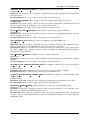
INTERFACE NOENT: Invalid BFD peer Request by protocol: %s for peer: %d. No such interface
Severity: Error
Explanation: A Bfd application has requested a Bfd peer add for an interface that does not exist
Recommended Action: No action is required – this message is for information only.
STALE APP REG: Bfd registration already present for peer: %s, app: %s
Severity: Warning
Explanation: Trying to add a duplicate Bfd peer request for an application
Recommended Action: No action required
STATE CHANGE: peer %s changed state from %s to %s
Severity: Notice
Explanation: Peer’s BFD state has changed
Recommended Action: No action required
VRF UNSUPPORTED: Enabling BFD for %s, VRF: %s not supported
Severity: Error
Explanation: Enabling BFD on non-default VRF not supported
Recommended Action: Undo BFD enabling config on non-default VRF
EOS User Manual
11
CHAPTER 2. SYSTEM MESSAGES
2.7
BGP Messages
ADJCHANGE: peer %s old state %s event %s new state %s
Severity: Notice
Explanation: The given peer has moved into or out of the Established state. If it is not Established, then route
exchange with the BGP peer is not possible.
Recommended Action: If the peering has gone down unexpectedly, check the physical connection between the
devices and the configuration of the system, including IP and BGP, on both ends.
CONVERGED: BGP in VRF %s has converged and its routes are in FIB
Severity: Notice
Explanation: BGP has converged after listening to updates from peers if any and is now ready to advertise best path
routes to peers
Recommended Action: No action is required – this message is for information only.
GRACEFUL RESTART TIMEOUT: Deleting stale routing information from peer %s.
Severity: Notice
Explanation: Session with graceful restarting speaker has not been established within the advertised restart time.
Deleting the routes from this peer.
Recommended Action: Check to see why the peer session did not get re-established.
IF MAXROUTESLIMIT: Peer %s has exceeded its configured maximum total number of routes (%d); Put into idle
state forever
Severity: Notice
Explanation: BGP has received more routes than it is configured to handle from this BGP peer. BGP route
information is no longer being exchanged with peer, so no route additions or deletions will occur. Routing information
may be incomplete, and may get further out of date.
Recommended Action: Determine whether the number of shared BGP routes is reasonable. If not, then, try to
reduce the number of routes being shared by your BGP peers. If the number of routes is reasonable, then increase the
maximum-routes limit. After taking either of these actions issue the ’clear ip bgp *—¡peer¿’ command, to reset the
BGP peer connection.
IF MAXROUTESRECOVER: Peer %s has managed to drop below its configured maximum total number of routes
(%d); routing information is no longer being lost
Severity: Notice
Explanation: The number of routes from this BGP peer is now below the limit, and we are exchanging routing
information with the peer, again.
Recommended Action: Determine why the number of shared routes exceeded maximum-routes limit in the first place.
IF MAXROUTESRESTART: Peer %s has exceeded its configured maximum total number of routes (%d); In idle
state; will restart in %d minutes
Severity: Notice
Explanation: BGP has received more routes than it is configured to handle from this BGP peer. Routing information
may be incomplete, and may get further out of date. Route information is no longer being exchanged with peer, so no
route deletions or additions will occur until the peer connection is restarted.
Recommended Action: Determine whether the number of shared BGP routes is reasonable. If not, then, try to
reduce the number of routes being shared by your BGP peers. If the number of routes is reasonable, then increase the
maximum-routes limit. Until you take one of these actions the BGP peer connection will continue to get into this state
and will continue to be cleared periodically.
EOS User Manual
12
CHAPTER 2. SYSTEM MESSAGES
IF MAXROUTESWARNING: Peer %s has exceeded its configured maximum total number of routes (%d);
ROUTING INFORMATION IS BEING LOST
Severity: Notice
Explanation: BGP has received more routes than it is configured to handle from this BGP peer. Routing information
may be incomplete, and may get further out of date. New routes will no longer be added until enough routes are
deleted to fall below this limit.
Recommended Action: If this warning persists, then determine whether the number of shared BGP routes is
reasonable. If not, then, try to reduce the number of routes being shared by your BGP peers. If the number of routes
is reasonable, then increase the maximum-routes limit.
MAXROUTES: BGP has exceeded its configured maximum total number of routes (%d); ROUTING INFORMATION IS BEING LOST
Severity: Notice
Explanation: BGP has received more routes than it is configured to handle. It will not accept any more routes.
Routing information may be incomplete, and may get further out of date.
Recommended Action: Determine whether the number of shared BGP routes is reasonable. Then, either reduce the
number of routes being shared by your BGP peers, or increase the maximum-routes limit. After taking either of these
actions issue the ’clear ip bgp *—¡peer¿’ command, to reset the BGP peer connection.
NOTIFICATION: received from/sent to neighbor %s %d/%d (%s/%s) %d bytes
Severity: Warning
Explanation: A BGP notification message of length bytes was seen from/to the given neighbor, with code/subcode
(string names s/s).Such messages notify a peer either about errors in the BGP session or (in the case of CEASE
(ErrorCode=6)) request the session to terminate. If an Error notification is received, this message means a neighbor
believes this machine sent an invalid BGP message.If sent, this message means this machine believes that a neighbor
sent an invalid BGP message. Either the message was malformed, or it arrived at a time when it was not expected.
Recommended Action: Some messages (such as ’cease’) require no action. Error messages (such as ’Message
Header Error’) can be symptomatic of some other BGP error. The data printed in the BGP-NOTIFICATION log entry
may help a technical support person determine the underlying error.
PEER CLEAR: BGP peering with %s was reset by %s on %s (%s)
Severity: Notice
Explanation: BGP peering was reset by CLI command
Recommended Action: No action is required – this message is for information only.
EOS User Manual
13
CHAPTER 2. SYSTEM MESSAGES
2.8
BIDIR Messages
RPA RESOURCE FULL: RPA used in Pim bidirectional has exceeded the limit.
Severity: Error
Explanation: Please make sure the number of RP used for Pim Bidirectional from BSR and static RP configuration
are not exceeding the limit.
Recommended Action: This is a serious error. Contact your customer support representative with the contents of the
message, and plan to be unable to use the system until the problem has been solved.
EOS User Manual
14
CHAPTER 2. SYSTEM MESSAGES
2.9
CAPACITY Messages
UTILIZATION HIGH: %s table utilization is currently at %d%%, crossed threshold %d%%
Severity: Alert
Explanation: The hardware table utilization has crossed the configured alert threshold value and may be reaching its
maximum limit
Recommended Action: Check the utilization of hardware table resources using ”show hardware capacity” and
remove unwanted entries / configuration to free up space
UTILIZATION NORMAL: %s table utilization is back to normal
Severity: Alert
Explanation: The hardware table utilization has come below the configured alert threshold value
Recommended Action: No action is required – this message is for information only.
EOS User Manual
15
CHAPTER 2. SYSTEM MESSAGES
2.10
CAPI Messages
CERTIFICATE CONFIGURATION CONFLICT: Certificate/key pair in the SSL Profile will not be used
Severity: Warning
Explanation: A server certificate is configured in HTTPS config.Only one server certificate can be configured at a
time.
Recommended Action: Remove the server certificate in HTTPS configwith ’no protocol https certificate’ in
’management apihttp-commands’
RESET DIFFIE HELLMAN PARAMETERS FAILED: Couldn’t reset diffie-hellman parameters
Severity: Warning
Explanation: Attempt to generate new Diffie-Hellman parameters has failed. Existing diffie-hellman parameters will
be used.
Recommended Action: If the problem persists, contact your support representative. Otherwise, no action is required.
EOS User Manual
16
CHAPTER 2. SYSTEM MESSAGES
2.11
CARD Messages
NOT COMPATIBLE: %s (%s) is not supported because %s.
Severity: Error
Explanation: In the current configuration, this card is incompatible.
Recommended Action: Change configuration using ’platform sand {fabric—forwarding} mode ¡mode¿’, save
configuration and reboot the system
EOS User Manual
17
CHAPTER 2. SYSTEM MESSAGES
2.12
CLEAR Messages
COUNTERS: Clear %scounters %sby %s on %s (%s)
Severity: Notice
Explanation: Counter was cleared by CLI command
Recommended Action: No action is required – this message is for information only.
EOS User Manual
18
CHAPTER 2. SYSTEM MESSAGES
2.13
DATAPLANE Messages
COUNTER RESOURCE CONFLICT: Counter resource conflict between %s and %s
Severity: Warning
Explanation: %s and %s are mutually exclusive, only one of them can be enabled.
Recommended Action: Use counter feature command to enable only one of the features
COUNTER RESOURCE FULL: Hardware resources are insufficient to enable counters for feature %s
Severity: Warning
Explanation: The switch is unable to program counter feature %s due to insufficient hardware resources.
Recommended Action: Use counter feature command (no hardware counter feature FEATURE) to disable some
features
CUT THROUGH DISABLED: Forwarding mode restricted to store-and-forward due to VXLAN and 1G interfaces
Severity: Warning
Explanation: Cut-through forwarding mode is not supported when there are 1G interfaces and VXLAN is configured
Recommended Action: No action is required – this message is for information only.
CUT THROUGH ENABLED: Forwarding mode no longer restricted to store-and-forward due to VXLAN and 1G
interface
Severity: Warning
Explanation: Forwarding mode no longer restricted to store-and-forward due to VXLAN and 1G interface. Switching
to cut-through (default) if the forwarding mode is not configured
Recommended Action: No action is required – this message is for information only.
MACTABLEENTRYCLEAR: Mac Table overflow condition for multicast group %s in VLAN %d has cleared
Severity: Warning
Explanation: The entry has been programmed and traffic should not flood for this group
Recommended Action: Okay to use this IP multicast group
MIRROR DESTINATION LAG RESOURCE FULL: Insufficient hardware resource to add all members of port
channel: %s as a mirror destination in session: %s .
Severity: Warning
Explanation:
Recommended Action: Supports only 8 members in the port channel.
MIRROR SESSION RESOURCES FULL: Mirroring hardware resources are insufficient to program the mirror
session %s.
Severity: Error
Explanation: The switch is unable to program the mirroring session due to the unavailability of hardware resources.
The maximum mirror sessions limit has been exceeded. As a result this mirroring session is not operational.
Recommended Action: To solve this issue, remove a mirroring session or unconfigure a feature that is using a mirror
session.
MIRROR SOURCE RESOURCES FULL: Insufficient hardware resources are available to add interface %s as a
source to session %s. There is a maximum of %d bidirectional sources or %d unidirectional sources available for a
mirror session.
Severity: Warning
Explanation: The switch is unable to program the source interface due to unavailability of hardware resources. The
limit of source interfaces that can be programmed in a mirror session has been exceeded. As a result traffic on this
interface shall not be mirrored.
Recommended Action: To solve this issue, remove a source interface or use fewer mirror sources in the mirror
sessions across the switch.
EOS User Manual
19
CHAPTER 2. SYSTEM MESSAGES
MIRROR SOURCE RESOURCES NORMAL: All mirror sources are programmed in hardware.
Severity: Warning
Explanation: The switch was able to program all sources in hardware.
Recommended Action: Normal mirroring has resumed.
MULTICASTGROUPCLEAR: The condition of having insufficient hardware resources for programming a
forwarding entry for the multicast group %s in VLAN %d has cleared
Severity: Warning
Explanation: Traffic sent to this multicast group will be forwarded only to ports belonging to this group
Recommended Action: Okay to use this IP multicast group.
NOMACTABLEENTRIES: Unable to program mac table entry for MAC address %s in VLAN %d due to hardware
resource exhaustion
Severity: Warning
Explanation: The specified MAC address could not be programmed into the switching ASIC due to hash collisions
in a bucket. Packets destined to the address will be flooded.
Recommended Action: Reduce the number of host table entries that need to be programmed into the switching
ASIC. One or more of the following steps might be helpful: 1. Reduce the number of static mac entries. 2. Clear
dynamic mac table entries. 3. Introduce additional layer 3 boundaries to reduce the number of MAC addresses. 4.
Use fewer IP multicast groups.
NOMULTICASTGROUPS: Insufficient hardware resources for multicast group %s in VLAN %d
Severity: Warning
Explanation: Insufficient hardware resources are available to program a forwarding entry for the multicast group,
which was learned via IGMP Snooping or static MAC table configuration. There is a limit of %d ( group address,
VLAN ) pairs, and this limit has been exceeded. As a result, traffic sent to this multicast group will be forwarded to
all ports.
Recommended Action: Use fewer IP multicast groups.
STORMCONTROLLERTCAMCLEAR: TCAM overflow condition for StormController setting on Unit %d Port
%d has cleared
Severity: Warning
Explanation: The StormController setting has been programmed and traffic should be controlled
Recommended Action: Okay to rely on StormController for this port
STORMCONTROLLERTCAMFULL: Unable to find TCAM entry to set stormController on Unit %d Port %d
Severity: Warning
Explanation: The stormController setting can’t be programmed into the switching ASIC due to exhaustion of TCAM
entries. Rate can’t be controlled for this port for now
Recommended Action: Reduce the number of TCAM entries that are programmed into the switching ASIC. One or
more of the following steps might be helpful: 1. Reduce the number of ACLs. 2. Use fewer StormController settings.
EOS User Manual
20
CHAPTER 2. SYSTEM MESSAGES
2.14
DOT1X Messages
ACCT FALLBACK: Accounting method ’%s’ is currently unavailable; falling back to next method.
Severity: Warning
Explanation: The accounting method failed to provide an answer and is considered unavailable. If the method list for
this service contains a fallback method, this request will be retried via that method.
Recommended Action: Check the availability and reachability of the accounting server(s).
ACCT MSG DROP: No available server; accounting message has been dropped.
Severity: Warning
Explanation: None of the accounting servers are responsive, and the switch has dropped the message.
Recommended Action: Check the availability and reachability of the accounting server(s).
AUTHN FALLBACK: Authentication method ’%s’ is currently unavailable; falling back to next method.
Severity: Warning
Explanation: The authentication method failed to provide an answer and is considered unavailable. If the method list
for this service contains a fallback method, this request will be retried via that method.
Recommended Action: Check the availability and reachability of the authentication server(s).
DUPLICATE SUPPLICANT: Supplicant with MAC %s authenticated on port %s attempted to communicate using
the 802.1X protocol on another port %s.
Severity: Error
Explanation: An authenticated supplicant appeared on another port.
Recommended Action: The supplicant will need to log off on former port in order to log on another port
INVALID RADIUS SERVER: RADIUS server ’%s’ port %d could not be used: %s
Severity: Warning
Explanation: The configuration contains a RADIUS server that could not be used. One cause for this type of error is
a hostname for which DNS resolution fails.
Recommended Action: Correct the RADIUS server configuration.
NO AUTHN METHODLIST: No authentication method list configured for 802.1x
Severity: Error
Explanation: An attempt to authenticate a port failed because there is no authentication method list configured for
802.1x.
Recommended Action: Add an authentication method list for 802.1x.
NO VALID RADIUS SERVERS: No valid RADIUS servers for method list ’%s’
Severity: Error
Explanation: The configuration contains an authentication method list that is not associated with any valid RADIUS
servers.
Recommended Action: Add at least one RADIUS server to the server group.
RADIUS FRAMED MTU EXCEEDED: Received from RADIUS server ’%s’ a packet %d bytes long which
exceeds the port Framed-MTU of %d bytes; Rejecting the Supplicant.
Severity: Error
Explanation: The RADIUS server did not honor the Frame-MTU attribute sent by the NAS.
Recommended Action: Either increase the MTU of the port which is to be authenticated, or configure the RADIUS
server to honor the Frame-MTU attribute in an Access-Request packet.
SUPPLICANT AUTHENTICATED: Supplicant with identity %s and MAC %s successfully authenticated on port
%s.
Severity: Info
Explanation: A supplicant was successfully authenticated on a 802.1X enabled port.
Recommended Action: No action is required – this message is for information only.
EOS User Manual
21
CHAPTER 2. SYSTEM MESSAGES
SUPPLICANT FAILED AUTHENTICATION: Supplicant with identity %s and MAC %s failed authentication on
port %s.
Severity: Error
Explanation: A supplicant attempted to authenticate using 802.1X but did not have the proper credentials.
Recommended Action: Verify the credentials the supplicant has for the identity it provided.
SUPPLICANT LOG OFF: Supplicant with identity %s and MAC %s has logged off of port %s.
Severity: Info
Explanation: A supplicant that was associated with an 802.1X port has logged off of it.
Recommended Action: No action is required – this message is for information only.
SUPPLICANT MULTIPLE SUPPLICANTS COMMUNICATING: Supplicant with MAC %s on port %s
attempted to communicate using the 802.1X protocol but MAC %s is already associated with this port.
Severity: Warning
Explanation: Only one MAC address can be associated with an 802.1X port at a time for communicating 802.1X
operations.
Recommended Action: Investigate if the latter supplicant should be the one authenticating. The former supplicant
will need to log off or time out to allow the latter supplicant to authenticate.
SUPPLICANT TIMEOUT: Supplicant with identity %s and MAC %s timed out during authentication on port %s.
Severity: Warning
Explanation: A supplicant timed out during the authentication sequence on a 802.1X enabled port.
Recommended Action: Examine the authentication software used if this persists.
UNKNOWN RADIUS SERVER: RADIUS server group ’%s’ references unknown server ’%s’
Severity: Warning
Explanation: The RADIUS server group contains a server that was not configured using the ’radius-server host’
command.
Recommended Action: Configure the unknown server or remove it from the server group.
EOS User Manual
22
CHAPTER 2. SYSTEM MESSAGES
2.15
ENVMON Messages
CARDINSUFFICIENTFANSDETECTED: Too few working fans detected for %s. If not resolved, the card will be
shut down in %d minutes.
Severity: Emergency
Explanation: Not enough fans of the correct type are functioning and this card will be shut down if the problem is
not resolved.
Recommended Action: Check that all fans are inserted and still spinning, and replace and missing or broken fans
immediately. Check that all fans are of the same type (i.e., front-to-back vs back-to-front airflow), and replace any
differing fans immediately.
CARDINSUFFICIENTFANSSHUTDOWN: %s is being shutdown due to insufficient fans.
Severity: Emergency
Explanation: Too many fans have failed or are missing, or fans of incompatible types have been inserted. The card is
being shut down to prevent damage.
Recommended Action: Replace the broken, missing, or incompatible fans immediately
CARDOVERHEATSHUTDOWN: %s temperature critical and is being shutdown
Severity: Emergency
Explanation: The specified card has surpassed its critical temperature and is being shutdown to prevent damage to
the hardware.
Recommended Action: Check that system fans are operating correctly. If the problem persists, please contact your
support representative for assistance.
CARDOVERHEATWARNING: %s is overheating
Severity: Emergency
Explanation: The specified card has begun to overheat. If the card continues to heat up, it will be shutdown to prevent
damage to the hardware
Recommended Action: Check that system fans are operating correctly. If the problem persists, please contact your
support representative for assistance.
CARDSUFFICIENTFANSRESTORED: Sufficient fans restored for %s.
Severity: Emergency
Explanation: Previously missing, failed, or incompatible fans have been replaced. The card has enough fans to
function properly and will not be shut down
Recommended Action: No action is required – this message is for information only.
CARDTEMPNORMAL: %s temperature has returned to normal
Severity: Emergency
Explanation: The specified card was overheating but has now returned to a normal operating temperature.
Recommended Action: No action is required – this message is for information only.
FABRIC MISSING: %d fabric card(s) missing.
Severity: Emergency
Explanation: The specified number of fabric cards are missing from the system.
Recommended Action: Insert the missing fabric cards.
FANFAILED: %s failure detected
Severity: Error
Explanation: The specified fan has failed or been removed.
Recommended Action: Replace the specified fan as soon as possible
FANOK: %s has recovered
Severity: Error
Explanation: The specified fan was previously missing or had previously failed but is now ok
Recommended Action: No action is required – this message is for information only.
EOS User Manual
23
CHAPTER 2. SYSTEM MESSAGES
FAN AIRFLOW DIRECTION INCORRECT: Airflow of %s is incompatible with the system airflow.
Severity: Emergency
Explanation: The specified fan’s airflow is opposite to the correct system airflow.
Recommended Action: Replace the fan with a fan that has correct airflow.
FAN AIRFLOW DIRECTION OK: Airflow of %s has been restored to compatible with the system airflow.
Severity: Emergency
Explanation: The specified fan’s airflow was previously wrong but is now correct.
Recommended Action: No action is required – this message is for information only.
FAN FAULT: %s logged a fan fault.
Severity: Error
Explanation: This may be caused by a defective fan or an overcurrent condition.
Recommended Action: Please try to re-seat the fan. If the problem persists, replace the specified fan as soon as
possible.
FAN FAULT OK: %s has recovered from a fan fault.
Severity: Error
Explanation: The specified fan previously had an overcurrent condition but is now ok.
Recommended Action: No action is required – this message is for information only.
FAN SPEED FORCED: All fan speeds have been forced to %d percent because one or more of the following
conditions have positive quanitites : %s.
Severity: Notice
Explanation: System and PSU fan speeds forced to a set number.
Recommended Action: No action is required – this message is for information only.
FAN SPEED NORMAL: All fan speeds have returned to normal operation.
Severity: Notice
Explanation: Conditions that mandate using a set speed have subsided.
Recommended Action: No action is required – this message is for information only.
FAN SPEED OK: The speed of %s has recovered.
Severity: Error
Explanation: The specified fan was previously too slow or too fast but is now ok.
Recommended Action: No action is required – this message is for information only.
FAN SPEED TOO FAST: The speed of %s is faster than its configured value.
Severity: Warning
Explanation: This may be caused by a defective fan.
Recommended Action: Please try to re-seat the fan. If the problem persists, replace the specified fan as soon as
possible.
FAN SPEED TOO SLOW: The speed of %s is slower than its configured value.
Severity: Error
Explanation: This may be caused by a defective fan.
Recommended Action: Please try to re-seat the fan. If the problem persists, replace the specified fan as soon as
possible.
INCOMPATIBLEFANSDETECTED: Incompatible fans have been detected. If not resolved, the system will be
shut down in %d minutes.
Severity: Emergency
Explanation: All fans must be the same type (i.e. front-to-back or back-to-front) but at least one miss-matched fan
has been detected. The system will be shut down if the problem is not resolved.
Recommended Action: Check that all fans are of the same type (i.e., front-to-back vs back-to-front airflow), and
replace any differing fan(s) immediately.
EOS User Manual
24
CHAPTER 2. SYSTEM MESSAGES
INSUFFICIENTFANSDETECTED: Too few working fans detected. If not resolved, the %s will be shut down in
%d minutes.
Severity: Emergency
Explanation: Not enough fans of the correct type are functioning and the system will be shut down if the problem is
not resolved.
Recommended Action: Check that all fans are inserted and still spinning, and replace any missing or broken fans
immediately.
INSUFFICIENTFANSSHUTDOWN: %s being shutdown due to insufficient or incompatible fans.
Severity: Emergency
Explanation: Too many fans have failed or are missing or incompatible fans have been detected. The system is being
shut down to prevent damage.
Recommended Action: Replace all broken, missing or incompatible fans immediately
POWERSUPPLY OVERHEAT CRITICAL: %s temperature critical
Severity: Emergency
Explanation: The specified power supply has surpassed its critical temperature.
Recommended Action: Check that system fans are operating correctly. If the problem persists, please contact your
support representative for assistance.
POWERSUPPLY OVERHEAT WARNING: %s is overheating
Severity: Emergency
Explanation: The specified power supply has begun to overheat.
Recommended Action: Check that system fans are operating correctly. If the problem persists, please contact your
support representative for assistance.
POWERSUPPLY TEMP NORMAL: %s temperature has returned to normal
Severity: Emergency
Explanation: The specified power supply was overheating but has now returned to a normal operating temperature.
Recommended Action: No action is required – this message is for information only.
PSU FANS INCOMPATIBLE: 2 or more incompatible power supply fans have been detected. If not resolved, the
system will be shut down in %d minutes.
Severity: Emergency
Explanation: At most one PSU fan can be incompatible, but more than one incompatible PSU fans have been
detected. The system will be shut down if the problem is not resolved.
Recommended Action: Replace any incompatible PSU(s) immediately.
PSU FANS OK: Previously incompatible power supply fans have been restored to be compatible with the system
airflow. The system will not shut down.
Severity: Emergency
Explanation: Atleast all but one PSU fans must match the system airflow, and they do now.
Recommended Action: No action is required – this message is for information only.
SUFFICIENTFANSRESTORED: Sufficient fans restored.
Severity: Emergency
Explanation: Previously missing, failed, or incompatible fans have been replaced. The system has enough fans to
function properly and will not be shut down
Recommended Action: No action is required – this message is for information only.
SYSTEMOVERHEATSHUTDOWN: System temperature critical and will be shutdown %s
Severity: Emergency
Explanation: The system has surpassed its critical temperature and will be shutdown to prevent damage to the
hardware.
Recommended Action: Check that system fans are operating correctly. If the problem persists, please contact your
support representative for assistance.
EOS User Manual
25
CHAPTER 2. SYSTEM MESSAGES
SYSTEMOVERHEATWARNING: The system is overheating
Severity: Emergency
Explanation: The system has begun to overheat. If the system continues to heat up, it will be shutdown
Recommended Action: Check that system fans are operating correctly. If the problem persists, please contact your
support representative for assistance.
SYSTEMSHUTDOWNDETECTED: System was previously shutdown for environmental reasons.
Severity: Warning
Explanation: The system was previously shutdown due to insufficient fans or critical system temperature.
Recommended Action: Check the output of ’show reset cause’ for more information. If the problem persists, please
contact your support representative for assistance.
SYSTEMTEMPNORMAL: System temperature has returned to normal
Severity: Emergency
Explanation: The system was overheating but has now returned to a normal operating temperature.
Recommended Action: No action is required – this message is for information only.
SYSTEM AIRFLOW DIRECTION ELECTED: The correct airflow for the system is %s.
Severity: Notice
Explanation: Correct system airflow either found for first time or changed.
Recommended Action: No action is required – this message is for information only.
SYSTEM FANS MISSING FAILED: %d system fan(s) missing or failed.
Severity: Emergency
Explanation: The specified number of system fans are missing from the system.
Recommended Action: Insert the missing fans and replace the failed fans.
TEMPSENSORFAILED: %s failure detected
Severity: Error
Explanation: The specified temp sensor has failed.
Recommended Action: If the problem persists, contact your support representative. Otherwise, no action is required.
TEMPSENSORINVALID: %s is reporting an invalid temperature
Severity: Error
Explanation: The specified temp sensor returned an invalid temperature reading. This can happen intermittently, but
should not persist.
Recommended Action: If the problem persists, contact your support representative. Otherwise, no action is required.
TEMPSENSOROK: %s has recovered
Severity: Error
Explanation: The specified temp sensor had previously failed but is now ok.
Recommended Action: No action is required – this message is for information only.
TEMPSENSOR OVERHEAT CRITICAL: %s is reporting %sC, which is above its critical threshold of %dC
Severity: Emergency
Explanation: The specified temp sensor is reporting a temperature above its critical threshold. The system will
disable the overheating component to prevent damage.
Recommended Action: If the problem persists, contact your support representative. Otherwise, no action is required.
TEMPSENSOR OVERHEAT WARNING: %s is reporting %sC, which is above its overheat threshold of %dC
Severity: Error
Explanation: The specified temp sensor is reporting a temperature above its overheat threshold, indicating a
component is overheating.
Recommended Action: If the problem persists, contact your support representative. Otherwise, no action is required.
EOS User Manual
26
CHAPTER 2. SYSTEM MESSAGES
TEMPSENSOR TEMP NORMAL: %s is reporting %sC, which is within the normal range
Severity: Error
Explanation: The specified temp sensor was overheating but has now returned to a normal operating temperature.
Recommended Action: If the problem persists, contact your support representative. Otherwise, no action is required.
XCVR OVERHEAT CRITICAL: %s temperature critical
Severity: Emergency
Explanation: The specified transciever has surpassed its critical temperature.
Recommended Action: Check that system fans are operating correctly. If the problem persists, please contact your
support representative for assistance.
XCVR OVERHEAT WARNING: %s is overheating
Severity: Emergency
Explanation: The specified transciever has begun to overheat.
Recommended Action: Check that system fans are operating correctly. If the problem persists, please contact your
support representative for assistance.
XCVR TEMP NORMAL: %s temperature has returned to normal
Severity: Emergency
Explanation: The specified transciever was overheating but has now returned to a normal operating temperature.
Recommended Action: No action is required – this message is for information only.
EOS User Manual
27
CHAPTER 2. SYSTEM MESSAGES
2.16
ETH Messages
ARP CACHE CLEAR: ARP cache cleared by %s on %s (%s)
Severity: Notice
Explanation: ARP cache cleared by CLI command
Recommended Action: No action is required – this message is for information only.
AUTONEGUNSUPPORTED: Auto-negotiation is unsupported on interface %s, link mode (speed and duplex) will
be forced to %s mode instead
Severity: Warning
Explanation: The interface is configured to auto-negotiate, but the transceiver currently inserted does not support
auto-negotiation. The switch will attempt to bring up the link with a forced configuration, as indicated in the message.
Recommended Action: Configure the interface to use one of the supported link modes, or replace the transceiver
with one that supports the configured link mode.
CONGESTION DROPS: Interface %s is experiencing congestion drops, %s
Severity: Info
Explanation: The interface’s frame buffer limits have been exceeded, causing packets to be dropped
Recommended Action: If the problem persists, consider redesigning your network to avoid congestion
ERRDISABLE: %s error detected on %s.
Severity: Warning
Explanation: The switch detected the reported error condition on the interface, and disabled the interface
Recommended Action: The switch detected the reported error condition (errdisable cause) on the interface. As
a precautionary measure, and to avoid the error condition from affecting the switch/network, the switch disables
the interface. If recovery timer has been configured for the errdisable cause, the switch will attempt to recover the
interface after the recovery timeout. The interface could also be recovered by performing the shutdown command,
followed by the no shutdown command in the interface configuration mode.
ETHTOOLFAIL: SIOCETHTOOL %s (%s, interface %s): %s
Severity: Error
Explanation: The Linux kernel reported an error when accessing the given interface.
Recommended Action: If the problem persists, please contact customer support.
HOST FLAPPING: Host %s in VLAN %s is flapping between interface %s and interface %s
Severity: Warning
Explanation: The MAC address was detected on multiple ports within a short timeframe.
Recommended Action: It is recommended to check your network for loops or MAC address conflicts.
LINKMODEUNCONFIGURED: Interface %s link mode is unconfigured
Severity: Warning
Explanation: The interface’s link mode has not been configured. The interface lacks a proper default configuration.
Recommended Action: If the problem persists, contact your support representative. Otherwise, no action is required.
LINKMODEUNSUPPORTED: Unsupported link mode %s for interface %s
Severity: Warning
Explanation: The currently inserted transceiver does not support the link mode (speed and/or duplex) that has been
configured for the interface.
Recommended Action: Configure the interface to use one of the supported link modes, or replace the transceiver
with one that supports the configured link mode.
EOS User Manual
28
CHAPTER 2. SYSTEM MESSAGES
MACADDRBANKFULL: Unable to program %s host table entry for MAC address %s in VLAN %d due to
hardware resource exhaustion
Severity: Warning
Explanation: The specified MAC address could not be programmed into the switching ASIC due to hash collisions
in a bucket. Packets destined to the address will be flooded.
Recommended Action: Reduce the number of host table entries that need to be programmed into the switching
ASIC. One or more of the following steps might be helpful: 1. Reduce the number of static mac entries. 2. Clear
dynamic mac table entries. 3. Introduce additional layer 3 boundaries to reduce the number of MAC addresses. Please
contact your technical support representative if you need additional assistance.
MAC ADDR TABLE CLEAR: Clear MAC address table on %s, %s by %s on %s (%s)
Severity: Notice
Explanation: MAC address table was cleared by CLI command
Recommended Action: No action is required – this message is for information only.
MAINTENANCE DOWN: Interface %s has been shutdown for maintenance.
Severity: Info
Explanation: This interface has been shutdown for maintenance.
Recommended Action: No action is required – this message is for information only.
POLLLINKSTATUSFAIL: Failed to poll link status on interface %s (%s)
Severity: Warning
Explanation: An attempt to poll the interface’s status failed.
Recommended Action: If the problem persists, contact your support representative. Otherwise, no action is required.
REMOTEMACADDRBANKFULL: Unable to program %s remote host table entry for MAC address %s in VLAN
%d due to hardware TCAM resource exhaustion
Severity: Warning
Explanation: The specified MAC address could not be programmed into the switching ASIC due to hardware TCAM
resource exhaustion. Packets destined to the address will be flooded.
Recommended Action: Reduce the number of host table entries that need to be programmed into the switching
ASIC. One or more of the following steps might be helpful: 1. Reduce the number of static mac entries. 2. Clear
dynamic mac table entries. 3. Introduce additional layer 3 boundaries to reduce the number of MAC addresses. Please
contact your technical support representative if you need additional assistance.
REMOTEMACADDRBSTFULL: Unable to program %s remote host table entry for MAC address %s in VLAN
%d due to FFU-BST hardware resource exhaustion
Severity: Warning
Explanation: The specified MAC address could not be programmed into the switching ASIC due to FFU BST
hardware resource exhaustion. Packets destined to the address will be flooded.
Recommended Action: Reduce the number of host table entries that need to be programmed into the switching
ASIC. One or more of the following steps might be helpful: 1. Reduce the number of static mac entries. 2. Clear
dynamic mac table entries. 3. Introduce additional layer 3 boundaries to reduce the number of MAC addresses. Please
contact your technical support representative if you need additional assistance.
SETADDRFAIL: Failed to set the MAC address of interface %s to %s
Severity: Warning
Explanation: An attempt to set the MAC address of the interface failed for an unknown reason.
Recommended Action: If the problem persists, contact your support representative. Otherwise, no action is required.
SETDISFAIL: Failed to disable interface %s
Severity: Warning
Explanation: An attempt to disable the interface failed for an unknown reason.
Recommended Action: If the problem persists, contact your support representative. Otherwise, no action is required.
EOS User Manual
29
CHAPTER 2. SYSTEM MESSAGES
SETENFAIL: Failed to enable interface %s
Severity: Warning
Explanation: An attempt to enable the interface failed for an unknown reason.
Recommended Action: If the problem persists, contact your support representative. Otherwise, no action is required.
SETLINKMODEFAIL: Failed to set speed/duplex on interface %s to %s/%s (%s)
Severity: Warning
Explanation: An attempt to set the interface’s speed/duplex mode failed.
Recommended Action: If the problem persists, contact your support representative. Otherwise, no action is required.
SETMTUFAIL: Failed to set interface %s mtu
Severity: Warning
Explanation: An attempt to set the interface mtu failed for an unknown reason.
Recommended Action: If the problem persists, contact your support representative. Otherwise, no action is required.
SETPAUSEPARAMFAIL: Failed to set pause parameters on interface %s (%s)
Severity: Warning
Explanation: An attempt to set the interface’s pause parameters failed.
Recommended Action: If the problem persists, contact your support representative. Otherwise, no action is required.
STORMCONTROL DISCARDS: Storm Control discarded packets on Interface %s: Broadcast %L, Multicast %L,
All %L
Severity: Info
Explanation: The interface’s traffic is exceeding the configured storm-control threshold causing packets to be
discarded
Recommended Action: No action is required – this message is for information only.
UNKNOWN MULTICAST FORWARDING DISABLED: Multicast sent to a group with no local members will
be discarded in VLAN %d: %s.
Severity: Warning
Explanation: Multicast packets for groups that have not been learned by IGMP Snooping nor programmed via the
CLI or Pim will be discarded in this VLAN because hardware resources are full
Recommended Action: Use fewer VLANs with unknown multicast traffic.
UNKNOWN MULTICAST FORWARDING RESUMED: Multicast sent to a group with no local members will
be flooded normally in VLAN %d
Severity: Warning
Explanation: Multicast packets for groups that have not been learned by IGMP Snooping nor programmed via the
CLI or Pim, will be flooded normally to the entire VLAN or router interfaces as expected.
Recommended Action: No action is required – this message is for information only.
VLAN ENCAP TABLE FULL: Unable to encapsulate %s packets on interface %s with VLAN %d due to hardware
resource exhaustion
Severity: Warning
Explanation: The encapsulation could not be programmed due to insufficient hardware resources. Packets on the
specified interface will no longer be encapsulated.
Recommended Action: To solve this issue, please reduce the number of vlan mappings that are currently configured
and try again.
VLAN FLOODSET FORWARDING DISABLED: Traffic sent to the vlan floodset in vlan %d will be discarded%s.
Severity: Error
Explanation: Broadcast and unknown DA traffic sent to the vlan floodset will be discarded in this VLAN. The vlan
floodset could not be programmed because hardware resources are full.
Recommended Action: Remove multicast groups or vlans in order to reduce hardware usage. When hardware
resources are freed, the vlan floodset will automatically be programmed
EOS User Manual
30
CHAPTER 2. SYSTEM MESSAGES
VLAN FLOODSET FORWARDING RESUMED: Traffic sent to the vlan floodset will be forwarded normally in
vlan %d
Severity: Error
Explanation: Broadcast and unknown DA traffic sent to the vlan floodset will be forwarded normally in this VLAN.
Recommended Action: No action is required – this message is for information only.
VLAN MAPPING TABLE FULL: Unable to map VLAN %d to %d for interface %s on %s due to hardware
resource exhaustion
Severity: Warning
Explanation: The specified VLAN mapping could not be programmed due to insufficient hardware resources.
Packets on the original VLAN will no longer be mapped.
Recommended Action: To solve this issue, please reduce the number of vlan mappings that are currently configured
and try again.
VNIVLANMAPFULL: Unable to program VLAN %d to VNI %d mapping due to hardware resource exhaustion.
Severity: Warning
Explanation: The specified mapping could not be programmed into the switching ASIC. Remote VXLAN packets
destined for the specified VNI from the specified VLAN will not be forwarded.
Recommended Action: Reduce the number of such mappings that need to be programmed into the switching ASIC.
Please contact your technical support representative if you need additional assistance.
EOS User Manual
31
CHAPTER 2. SYSTEM MESSAGES
2.17
EVENTMON Messages
DB WRITE FAILED: A sqlite %s exception occurred when writing to the EventMon database
Severity: Error
Explanation: An error occurred when trying to write to EventMon Database
Recommended Action: This is a serious error. Contact your customer support representative with the contents of the
message, and plan to be unable to use the system until the problem has been solved.
EOS User Manual
32
CHAPTER 2. SYSTEM MESSAGES
2.18
EXTENSION Messages
INSTALLED: Extension %s has been installed.
Severity: Info
Explanation: The extension has been installed.
Recommended Action: No action is required – this message is for information only.
INSTALLING: Installing extension %s, version %s, SHA-1 %s
Severity: Info
Explanation: EOS has started to install the extension.
Recommended Action: No action is required – this message is for information only.
INSTALL ERROR: Extension %s failed to install: %s
Severity: Error
Explanation: The extension failed to install. The log message may contain a reason why installation failed, such as a
missing dependency.
Recommended Action: Determine why the extension failed to install. If a dependency is missing, install it. If you
are unsure how to proceed, contact the developer of the extension or your support representative.
UNINSTALLED: Extension %s has been uninstalled.
Severity: Info
Explanation: The extension has been uninstalled.
Recommended Action: No action is required – this message is for information only.
UNINSTALLING: Uninstalling extension %s
Severity: Info
Explanation: EOS has started to uninstall the extension.
Recommended Action: No action is required – this message is for information only.
UNINSTALL ERROR: Extension %s failed to uninstall: %s
Severity: Error
Explanation: The extension failed to uninstall. The message may contain a reason why uninstallation failed, such as
a dependency from another installed extension.
Recommended Action: Determine why the extension failed to uninstall. Some extensions may not support uninstall,
requiring a reboot of the switch to remove the extension. If you are unsure how to proceed, contact the developer of
the extension or your support representative.
EOS User Manual
33
CHAPTER 2. SYSTEM MESSAGES
2.19
FHRP Messages
ADDR ERROR: Failed to %s a virtual address %s %s the kernel local routing table
Severity: Error
Explanation: VARP/VRRP virtual address was not added/removed from the kernel local routing table
Recommended Action: Check the configuration and ensure that VARP/VRRP addresses are unique and do not
conflict with interface addresses. Also check that no manual entries were added to the linux local routing table.
ARPTABLES ERROR: Failed to %s an arptables rule for virtual IP %s on interface %s.
Severity: Warning
Explanation: The arptables rule for a VARP virtual IP address was not added/removed, potentially leading to
incorrect source IPs and source mac addresses inside the arp header in arp requests for ip addresses inside a virtual IP
address subnet.
Recommended Action: Delete and reconfigure the virtual IP addresses for which arptables rules failed to be
added/removed.
ARPTABLES FLUSH ERROR: Failed to flush arptables for network namespace %s.
Severity: Warning
Explanation: The arptables were not flushed properly when restarting Acl. Arp requests sent from the router may
use incorrect source IP and mac address when arping for ip addresses inside a VARP ip address subnet.
Recommended Action: No action is required – this message is for information only.
IPTABLES ERROR: Failed to %s an iptables rule for virtual IP %s on interface %s.
Severity: Warning
Explanation: The iptables rule for a VARP/VRRP virtual IP address was not added/removed, potentially leading to
problems accessing the router via the virtual IP.
Recommended Action: Try changing the accept mode for FHRP and then changing it back.
IPTABLES FLUSH ERROR: Failed to flush iptables for network namespace %s.
Severity: Warning
Explanation: The iptables were not flushed properly when restarting Acl. There may be problems accessing the
router.
Recommended Action: No action is required – this message is for information only.
EOS User Manual
34
CHAPTER 2. SYSTEM MESSAGES
2.20
FLOW Messages
TCAM ERROR: Unable to add TCAM entry for OpenFlow/DirectFlow flow %s, error %s
Severity: Error
Explanation: The specified flow has not been created in hardware since TCAM entry could not be added
Recommended Action: If the error is because there is no space left in TCAM, remove some flows and retry adding
this flow
EOS User Manual
35
CHAPTER 2. SYSTEM MESSAGES
2.21
FOCALPOINTV2 Messages
ACL COUNTER A: Hardware resources to enable counting is available.
Severity: Info
Explanation: Reapply to enable counting.
Recommended Action: No action is required – this message is for information only.
ACL COUNTER FULL: Hardware resources full.
Severity: Info
Explanation: Counting will be disabled for some rules Acl¡%s¿.
Recommended Action: No action is required – this message is for information only.
ACL COUNTER NA: Hardware resources to enable counting is not available.
Severity: Info
Explanation: Counting Disabled for Acl¡%s¿
Recommended Action: No action is required – this message is for information only.
ACL DI NON ZERO INDEX MATCH IGNORED: %s match in ACL¡%s¿ is supported only when ’deepinspection payload l%d skip’ value is 0.
Severity: Info
Explanation: Rules in ACLs having deep-inspection aliases match will be applied without the aliases match
condition.
Recommended Action: No action is required – this message is for information only.
ACL DI NO TAPAGG MATCH IGNORED: %s match in ACL¡%s¿ is supported only in TapAgg mode.
Severity: Info
Explanation: Rules in ACLs having deep-inspection match will be applied without the deep-inspection match
condition.
Recommended Action: No action is required – this message is for information only.
ACL INNER VLAN MATCH IGNORED: Inner vlan match in ACL¡%s¿ are supported only in TapAgg mode.
Severity: Info
Explanation: Rules in ACLs having inner vlan match will be applied without inner vlan match condition.
Recommended Action: No action is required – this message is for information only.
ACL MAPPER CONFIG CHANGE: Change in ACL configuration in source port mapper requires a restart of the
FocalPointV2 agent.
Severity: Info
Explanation: ACLs in FFU will be re-initialized at bootup with new mapper configuration
Recommended Action: No action is required – this message is for information only.
ACL PERMIT LOGGING DISABLED: ACL logging can’t be enabled for permit rules in %s due to hardware
resource limitations.
Severity: Error
Explanation: Release a mirror session and reapply your ACLs to enable permit logging.
Recommended Action: No action is required – this message is for information only.
AGILEPORT MODE CHANGE: Change in agile port mode requires a restart of the FocalPointV2 agent.
Severity: Info
Explanation: An agile port mode change occurs the first time an agile port is configured for 40G and when the last
agile port configured for 40G is configured for 10G.
Recommended Action: No action is required – this message is for information only.
DMA ERROR: %s Packet DMA Error occurred in FocalPoint chip %s
Severity: Error
Explanation: A fatal Error affecting cpu packet DMA occurred in a FocalPoint switching ASIC. FocalPoint agent
restarted in order to recover from this error.
Recommended Action: No action is required – this message is for information only.
EOS User Manual
36
CHAPTER 2. SYSTEM MESSAGES
EACL VLAN INNER VLAN MATCH IGNORED: Vlan/inner vlan match in Egress ACL¡%s¿ are supported
only in TapAgg mode.
Severity: Info
Explanation: Rules in Egress ACLs having vlan/inner vlan match will be applied without vlan/inner vlan match
condition.
Recommended Action: No action is required – this message is for information only.
FFU BST CONFIG CHANGE: Change in allowed FFU BST features configuration requires a restart of the
FocalPointV2 agent.
Severity: Info
Explanation: FFU BST will be re-initialized at bootup with new configuration
Recommended Action: No action is required – this message is for information only.
LOADBALANCE HASH PROFILE SM FULL: The Hash Profile %s is not programmed in the hardware.
Severity: Info
Explanation: Hash Profiles Limit has been hit.
Recommended Action: No action is required – this message is for information only.
LOADBALANCE PAYLOAD FIELD IGNORED: Load-balancing on %s field is supported only in tap aggregation mode.
Severity: Info
Explanation: Custom fields will not be included in the load-balance hash calculation for this profile in non-tapagg
mode.
Recommended Action: No action is required – this message is for information only.
MLAG MIRROR HW RESOURCE FULL: Mirroring hardware resources are insufficient to enable MLAG. Mlag
will be made inactive until the mirroring resources are available.
Severity: Error
Explanation: The switch is unable to program mirroring session for logging certain packets traversing the peerlink to
the CPU.
Recommended Action: To solve this issue, remove a mirroring session or unconfigure a feature that is using a mirror
session.
MLAG MIRROR HW RESOURCE NORMAL: Mirroring hardware resouces are now available to enable MLAG.
Attempting to make mlag active.
Severity: Error
Explanation: Everything else being normal, MLAG should be active shortly.
Recommended Action: No action is required – this message is for information only.
MROUTE COUNTER HW FULL: Policer hardware resources are insufficient to program the mroute counter
Severity: Error
Explanation: The switch is unable to program the mroute counter due to insufficient policer hardware resources. The
mroute counter feature is either not able to reserve a new policer bank or has already used up the policer bank(s) it has
reserved
Recommended Action: To solve this issue, try to free up a policer bank used by some other feature
MROUTE COUNTER HW NORMAL: All mroute counters are programmed in hardware
Severity: Error
Explanation: The switch was able to program all mroute counters in the hardware.
Recommended Action: No action is required – this message is for information only.
MROUTE INTERNAL ERROR: Internal multicast routing error %d ( %s ) %s. %d multicast groups currently in
use
Severity: Error
Explanation: An internal error has happened during an operation in the multicast routing table. The internal state of
the multicast table might be inconsistent.
Recommended Action: If the problem persists, contact your support representative. Otherwise, no action is required.
EOS User Manual
37
CHAPTER 2. SYSTEM MESSAGES
MTUINDEXRESTORED: Restored hardware resources for programming MTU on vlan %d
Severity: Warning
Explanation: The vlan MTU value has been restored to its configured MTU value
Recommended Action: No action is required – this message is for information only.
NOMTUINDEX: Insufficient hardware resources for programming MTU on vlan %d
Severity: Warning
Explanation: Insufficient hardware resources to program more than 16 distinct MTU values. The vlan interface will
revert back to a default MTU value of 1500
Recommended Action: No action is required – this message is for information only.
NO MORE SPANNING TREES: Hardware resources are insufficient to create the number of requested spanning
trees
Severity: Error
Explanation: The switch is unable to create the number of requested spanning trees due to insufficient hardware
resources. When the switch is unable to create enough spanning trees, some VLANs may share a default spanning
tree instead.
Recommended Action: To solve this issue, reconfigure the network to reduce the number of spanning trees required.
NO STATIC NAT POLICERS: Hardware resources to enable counting is not available.
Severity: Info
Explanation: Counting disabled for some Static NAT connections.
Recommended Action: No action is required – this message is for information only.
PCIE ERROR: PCIE Error occurred in FocalPoint chip %s
Severity: Error
Explanation: FocalPoint agent restarted in order to recover from this error.
Recommended Action: No action is required – this message is for information only.
POLICER BANK FULL: Hardware resources are insufficient to program all NAT rules
Severity: Error
Explanation: The switch is unable to program all NAT rules due to insufficient hardware policer banks.
Recommended Action: To solve this issue, remove features that are using policer banks from the configuration.
POLICER BANK NORMAL: All new dynamic NAT connections will be programmed in hardware
Severity: Error
Explanation: The switch will program all new dynamic NAT connections in the hardware, all existing connections
will continue to be translated in software.
Recommended Action: No action is required – this message is for information only.
POLICER PARAMETERS INCONSISTENT: The burst capacity configured in %s for service-policy %s is not
sufficient for the hardware to achieve the programmed CIR.
Severity: Info
Explanation: Operational CIR might be less than CIR configured.
Recommended Action: No action is required – this message is for information only.
EOS User Manual
38
CHAPTER 2. SYSTEM MESSAGES
2.22
FRU Messages
CARD FAILURE: Hardware failure when reading the card in slot %s
Severity: Error
Explanation: A fatal error occurred when attempting to access a card.
Recommended Action: This is a software or hardware problem. It may be necessary to upgrade software or replace
the card.
CARD INSERTED: Card %s has been inserted. model: %s rev: %s serial number: %s
Severity: Info
Explanation: Card insertion detected
Recommended Action: No action is required – this message is for information only.
CARD INTERFACE CONFIG REMOVED: Interface configuration on %s removed due to incompatible card
model for configuration. current model: %s previous model: %s
Severity: Info
Explanation: Card interface configuration removed
Recommended Action: No action is required – this message is for information only.
CARD REMOVED: Card %s has been removed. model: %s rev: %s serial number: %s
Severity: Info
Explanation: Card removal detected
Recommended Action: No action is required – this message is for information only.
CARD SUBOPTIMAL COOLING: Card %s is located in a suboptimal slot for chassis cooling. It is optimized for
slots %s
Severity: Error
Explanation: The inserted card is located in a suboptimal slot for chassis cooling.
Recommended Action: Verify that the card is inserted into an optimal slot for chassis cooling. Please contact support
for information on optimal card configurations.
CARD UNSUPPORTED: Card in slot %s is unsupported (code %d)
Severity: Error
Explanation: The inserted card is not supported by the running software.The card is not brought online.
Recommended Action: Install software that supports the card.
CHASSIS FAILURE: Hardware failure when accessing the chassis
Severity: Emergency
Explanation: A fatal error occured when attempting to access the chassis.
Recommended Action: Upgrade software or contact support. System functionality may be severely limited
CHASSIS UNSUPPORTED: Chassis is unsupported
Severity: Emergency
Explanation: The chassis is not supported by the running software.System functionality may be severely limited.
Recommended Action: Install software that supports the chassis.
DEVICE DRIVER: Fatal software failure for the device in slot %s
Severity: Error
Explanation: A fatal error occurred when attempting to instantiate management software for the device.
Recommended Action: Upgrade software to the current release. Contact support if the problem persists following an
upgrade.
DEVICE INSERTED: Device in slot %s has been inserted
Severity: Info
Explanation: Device insertion detected
Recommended Action: No action is required – this message is for information only.
EOS User Manual
39
CHAPTER 2. SYSTEM MESSAGES
DEVICE REMOVED: Device in slot %s has been removed
Severity: Info
Explanation: Device removal detected
Recommended Action: No action is required – this message is for information only.
DEVICE UNSUPPORTED: Device in slot %s is not supported
Severity: Error
Explanation: The device inserted in the above slot is unknown and not supported by the software
Recommended Action: Replace the device with a one supported by the version of your software.
FAN INSERTED: %s has been inserted. model: %s serial number: %s
Severity: Info
Explanation: The specified fan has been inserted.
Recommended Action: No action is required – this message is for information only.
FAN REMOVED: %s has been removed. model: %s serial number: %s
Severity: Info
Explanation: The specified fan has been removed or is not properly seated.
Recommended Action: Reinsert the fan, or check that the fan is properly inserted.
FAN UNSUPPORTED: %s is unsupported
Severity: Error
Explanation: The specified is not supported by the running software.
Recommended Action: Check that the version of software you are running supports the specified fan type. Upgrade
software or replace the fan.
NOLBTDUMP: Unable to determine Aboot firmware version (%s)
Severity: Error
Explanation: nvramtool/lbtdump command failed
Recommended Action: No action is required – this message is for information only.
POWERSUPPLY DRIVER: Fatal software failure for the power supply in slot %s
Severity: Error
Explanation: A fatal error occurred when attempting to instantiate management software for the power supply.
Recommended Action: Upgrade software to the current release. Contact support if the problem persists following an
upgrade.
POWERSUPPLY FAILURE: Power Supply in slot %d failed
Severity: Error
Explanation: The power supply inserted in the above slot could not be identified due to hardware errors
Recommended Action: Check that the power supply is properly inserted. It may be necessary to replace the power
supply.
POWERSUPPLY INSERTED: Power Supply in slot %d has been inserted
Severity: Info
Explanation: Power supply insertion detected
Recommended Action: No action is required – this message is for information only.
POWERSUPPLY REMOVED: Power Supply in slot %d has been removed
Severity: Info
Explanation: Power supply removal detected
Recommended Action: No action is required – this message is for information only.
POWERSUPPLY UNSUPPORTED: Power Supply in slot %d is not supported
Severity: Error
Explanation: The power supply inserted in the above slot is unknown and not supported by the software
Recommended Action: Replace the power supply with a power supply supported by the version of your software.
EOS User Manual
40
CHAPTER 2. SYSTEM MESSAGES
SEEPROM CORRUPTED: A corrupted Seeprom was detected on device %s. Repair was %s.
Severity: Error
Explanation: Seeproms can very rarely be corrupted. Redundant state covers this issue and often allows for full
reparation. No action needs to be taken.
Recommended Action: Seeproms contain configurative informatin for the system hardware. While a corruption is
rare redundant state is provided against this occasion with repair logic built into the system.
SSD DETECTION ERROR: Failed to detect SSD on bootup. Error msg: %s
Severity: Error
Explanation: Failed to detect SSD during system bootup. This can happen if the device is not recognized by the
driver or if the system encountered an error when booting up.
Recommended Action: This is a serious error. Contact your customer support representative with the contents of the
message, and plan to be unable to use the system until the problem has been solved.
SSD PARTITION NOT MOUNTED: SSD partition %s not mounted as /mnt/drive
Severity: Error
Explanation: The specified SSD partition is not currently mounted as /mnt/drive. This can happen if the partition is
not properly formatted or if the SSD device was not detected by the driver.
Recommended Action: This is a serious error. Contact your customer support representative with the contents of the
message, and plan to be unable to use the system until the problem has been solved.
SSD UNEXPECTED PARTITION MOUNTED: Unexpected partition %s mounted as /mnt/drive. Expected SSD
partition %s to be mounted as /mnt/drive instead.
Severity: Error
Explanation: Expected the specified SSD partition to be mounted as /mnt/drive. But a different partition got mounted
as /mnt/drive. This is unexpected.
Recommended Action: This is a serious error. Contact your customer support representative with the contents of the
message, and plan to be unable to use the system until the problem has been solved.
SSD WRITECACHE DISABLE FAILED: Failed to disable write cache for SSD drive %s.
Severity: Error
Explanation: Failed to disable write cache on SSD drive.
Recommended Action: This is a serious error. Contact your customer support representative with the contents of the
message, and plan to be unable to use the system until the problem has been solved.
SYSTEM DEPRECATED: This system is not supported. The last supported EOS version for this system is ( %s )
Severity: Emergency
Explanation: The current hardware has been deprecated and is not supported by the running software. System
functionality is severely limited.
Recommended Action: Install older software and reboot
SYSTEM DRIVER: Fatal software failure for this system
Severity: Emergency
Explanation: A fatal error occurred when attempting to instantiate management software for the system.
Recommended Action: This is probably a problem with the installed software. It may be necessary to upgrade
software.
SYSTEM FAILURE: Failed to read hardware description of this system (code %d)
Severity: Emergency
Explanation: A fatal error occurred when attempting to read the factory-programmed hardware description of this
system. This may be a hardware or software failure. System functionality may be severely limited.
Recommended Action: Install new software and restart the Fru Agent, or replace the hardware.
EOS User Manual
41
CHAPTER 2. SYSTEM MESSAGES
SYSTEM UNSUPPORTED: Fru management software is not installed for this system (code %d)
Severity: Emergency
Explanation: The current hardware is not supported by the running Fru Agent software. System functionality is
severely limited.
Recommended Action: Install new software and restart the Fru Agent
TRANSCEIVER INSERTED: A transceiver for interface %s has been inserted. manufacturer: %s model: %s part
number %s rev %s serial number %s
Severity: Info
Explanation: Transceiver insertion detected
Recommended Action: No action is required – this message is for information only.
TRANSCEIVER REMOVED: The transceiver for interface %s has been removed
Severity: Info
Explanation: Transceiver removal detected
Recommended Action: No action is required – this message is for information only.
EOS User Manual
42
CHAPTER 2. SYSTEM MESSAGES
2.23
FWK Messages
ELB MEMORYLIMITEXCEEDED: AttrLog buffer memory limit exceeded. (%s)(%s)
Severity: Error
Explanation: A runtime subsystem memory limit was reached.
Recommended Action: Please contact technical support.
FAILED TO INSTANTIATE: Unable to instantiate entity %s requested by peer %s at %s
Severity: Warning
Explanation: The runtime subsystem was unable to instantiate an entity requested by a peer process. It is possible
that incompatible library versions are in use.
Recommended Action: This is likely a serious error. Please contact technical support.
INSTANTIATE READONLY: Instantiation of %s requested by read-only peer %s at %s
Severity: Warning
Explanation: The runtime subsystem refused to instantiate an entity requested by a peer process that mounted the
parent read-only.
Recommended Action: Please contact technical support.
MOUNT CLOSED EXIT: Process exiting.
Severity: Error
Explanation: A runtime subsystem lost contact with a peer process.
Recommended Action: Please contact technical support.
MOUNT PEER CLOSED: Peer closed socket connection. (%s)(%s)
Severity: Error
Explanation: A runtime subsystem lost contact with a peer process.
Recommended Action: Please contact technical support.
SOCKET CLOSE LOCAL: Closing connection to %s at %s (%s)
Severity: Error
Explanation: A runtime subsystem lost contact with a peer process.
Recommended Action: Please contact technical support.
SOCKET CLOSE REMOTE: Connection to %s at %s closed by peer (%s)
Severity: Error
Explanation: A runtime subsystem lost contact with a peer process.
Recommended Action: Please contact technical support.
EOS User Manual
43
CHAPTER 2. SYSTEM MESSAGES
2.24
GMP Messages
IGMP QUERY VERSION CONFIGURED DISCREPANCY: IGMP version %d query heard on vlan %d by a
querier configured to version %d.
Severity: Warning
Explanation: The switch detected an IGMP query message of a different version than the version that is currently
configured.
Recommended Action: Configure all queriers on the network to use the same querier version
EOS User Manual
44
CHAPTER 2. SYSTEM MESSAGES
2.25
HARDWARE Messages
AHWAHNEE PICASSO INIT FAILED: Ahwahnee picasso init failed
Severity: Warning
Explanation: Setting up of picasso pcie BAR on ahwahnee supe has failed
Recommended Action: This is a serious error. Contact your customer support representative with the contents of the
message, and plan to be unable to use the system until the problem has been solved.
ALTA POWER RAILS ADJFAILED: Failed to perform FM6000 power rail adjustment
Severity: Warning
Explanation: The system could not perform an adjustment of FM6000 power rails.
Recommended Action: Rebooting the system may solve the problem. This is a serious error. Contact your customer
support representative with the contents of the message, and plan to be unable to use the system until the problem has
been solved.
ALTA POWER RAILS ADJUSTED: Successfully adjusted FM6000 power rails.
Severity: Info
Explanation: Voltage on FM6000 power rails was adjusted to its optimal value.
Recommended Action: No action is required – this message is for information only.
CARD BAD INPUT VOLTAGE: %s supply voltage is incorrect (voltage is %s)
Severity: Error
Explanation: Software detected that the card has a power supply problem
Recommended Action: If the problem persists, contact your support representative. Otherwise, no action is required.
CARD EJECTOR CLOSED: Card %s’s ejector handle is now closed
Severity: Warning
Explanation: An ejector handle is closed on a fabric card. The ejector handle is used to detect card removal and
remove the fabric card from the system without dropping packets. If the ejector handle is not properly closed, software
will be unable to detect that a card is about to be removed and will be unable to perform a graceful shutdown.
Recommended Action: No action is required – this message is for information only.
CARD EJECTOR OPEN AFTER INSERTION: %s’s ejector handle was open after insertion. This will prevent a
clean shutdown of the card if it is removed, and packets may be dropped.
Severity: Warning
Explanation: An open fabric card ejector handle was detected. The ejector handle is used to detect card removal
and remove the fabric card from the system without dropping packets. If the ejector handle is not properly closed,
software will be unable to detect that a card is about to be removed and will be unable to perform a graceful shutdown.
Recommended Action: Make sure the ejector handle is properly closed.
CARD EJECTOR OPEN SHUTDOWN: Card %s’s ejector handle is now open and the card is being shut down.
Severity: Warning
Explanation: An ejector handle on a fabric card is open. The card will be shut down to prevent packet loss upon
fabric card removal.
Recommended Action: No action is required – this message is for information only.
CARD FAIL TO POWER ON: Card %s failed to power on in state %s, will retry in %d minutes. model: %s rev:
%s serial number: %s
Severity: Error
Explanation: Software detected a problem while attempting to power on a card
Recommended Action: If the problem persists, contact your support representative. Otherwise, no action is required.
CARD LOST COMMUNICATION: Communication with %s has been lost. PCIE FATAL ERROR signal is
asserted. model: %s rev: %s serial number: %s
Severity: Error
Explanation: Software detected a problem communicating to a PCIe switch in the system
Recommended Action: If the problem persists, contact your support representative. Otherwise, no action is required.
EOS User Manual
45
CHAPTER 2. SYSTEM MESSAGES
CARD LOST POWER: %s unexpectedly lost power. POWER GOOD signal deasserted. model: %s rev: %s serial
number: %s
Severity: Error
Explanation: Software detected a problem with power on a card in the system
Recommended Action: If the problem persists, contact your support representative. Otherwise, no action is required.
CARD POWERED OFF: Card %s has been powered off. model: %s rev: %s serial number: %s
Severity: Info
Explanation: Software has powered down the card
Recommended Action: No action is required – this message is for information only.
CARD POWERED ON: Card %s has been powered on. model: %s rev: %s serial number: %s
Severity: Info
Explanation: Software has powered up the card
Recommended Action: No action is required – this message is for information only.
CARD POWER CYCLE: Card %s was power cycled due to %s
Severity: Error
Explanation: A card power cycle is used to attempt recovery of an error.
Recommended Action: If the problem persists, contact your support representative. Otherwise, no action is required.
CARD RESET: Card %s in state %s was reset due to multiple failed power on attempts.
Severity: Error
Explanation: A card was reset in an attempt to recover from an error. It may appear that the card was removed from
the system momentarily.
Recommended Action: If the problem persists, contact your support representative. Otherwise, no action is required.
CARD TEMP ALERT ERROR: Temp Alert has been asserted on %s
Severity: Error
Explanation: Software detected a problem with temperature on a card in the system
Recommended Action: If the problem persists, contact your support representative. Otherwise, no action is required.
CHIP BAD VERSION: Cannot access %s (%s). Unexpected version: %d
Severity: Error
Explanation: The version of this chip is not what was expected. This probably means the read of the version register
failed, and we cannot access the chip’s registers.
Recommended Action: Remove and insert the card
CHL822X UPGRADED: Successfully upgraded Chl822X device to version %d
Severity: Info
Explanation: Device was successfully upgraded.
Recommended Action: No action is required – this message is for information only.
CHL822X UPGRADEFAILED: Failed to perform an upgrade of the Chl822X device
Severity: Emergency
Explanation: The system could not perform an upgrade of a Chl822X device. This may be due to a hardware or
software failure.
Recommended Action: Rebooting the system may solve the problem. This is a serious error. Contact your customer
support representative with the contents of the message, and plan to be unable to use the system until the problem has
been solved.
DISRUPTIVE RESTART: Non-disruptive restart of %s forwarding agent failed. All hardware entries in %s table
will be deleted and re-programmed in the hardware.
Severity: Error
Explanation: Forwarding agent could not recover its hardware state during restart. This could result in hardware
state being deleted and re-programmed in the hardware. This can result in traffic disruption.
Recommended Action: No action is required – this message is for information only.
EOS User Manual
46
CHAPTER 2. SYSTEM MESSAGES
DROP COUNTER: Internal drop ’%s’ occurred on %s
Severity: Error
Explanation: The named hardware error counter has incremented by more than the allowed threshold in the allowed
time. This is likely an indication that packet forwarding is being negatively impacted.
Recommended Action: This is a serious error. Contact your customer support representative with the contents of the
message, and plan to be unable to use the system until the problem has been solved.
ERROR DETECTED: Software has detected %s ’%s’.
Severity: Error
Explanation: Software has detected a problem.
Recommended Action: If the problem persists, contact your support representative. Otherwise, no action is required.
EXCESSIVE MULTIPLE BIT ERRORS: Excessive multibit memory errors detected in chip: %s.
Severity: Error
Explanation: An excessive number of multibit memory errors detected in a switchingASIC. Please contact support.
Recommended Action: This is a serious error. Contact your customer support representative with the contents of the
message, and plan to be unable to use the system until the problem has been solved.
FANCONTROLLER COMMUNICATION ERROR: Communication error with the fan controller %s.
Severity: Error
Explanation: An error occurred while giving commands over SMBus to a fan controller.
Recommended Action: If the problem persists, contact your support representative. Otherwise, no action is required.
FANSMBUSFAILURE: Error detected in the System Management Bus connection to fan slot %s
Severity: Error
Explanation: Software detected an error in the System Management Bus connection to the given fan. Fan detection
has been disabled for this slot.
Recommended Action: Try replacing the affected fan again. If the problem persists, please contact your support
representative for assistance.
FPGA ERROR: Hardware error occurred on a FPGA on the card %s. Reason: %s. Power cycle the card at your
earliest convenience to clear the error.
Severity: Error
Explanation: Software detected a hardware error on the named card FPGA
Recommended Action: If the problem persists, contact your support representative. Otherwise, no action is required.
FPGA ERROR DEBUG: Software has read debugging information for the hardware error on FPGA %s on
card %s. Partition: %s, frame address: %s, word address: %s, bit address: %s, FRAME CRC STAT0: %s,
FRAME CRC STAT1: %s
Severity: Info
Explanation: Software has read debugging information for the hardware FPGA error
Recommended Action: If the problem persists, contact your support representative. Otherwise, no action is required.
FPGA PROGRAMMER ERROR: Fpga programming failed for fpga %s
Severity: Error
Explanation: Software detected a problem while configuring the given fpga.
Recommended Action: If the problem persists, contact your support representative. Otherwise, no action is required.
FPGA STATIC UPGRADED: Successfully upgraded %s system fpga.
Severity: Info
Explanation: The above fpga was successfully upgraded.
Recommended Action: No action is required – this message is for information only.
FPGA STATIC UPGRADEFAILED: Failed to perform an upgrade of the %s system fpga.
Severity: Emergency
Explanation: The system could not perform an upgrade of an fpga. This may be due to a hardware or software
failure. System functionality will be severely limited.
Recommended Action: If the problem persists, contact your support representative. Otherwise, no action is required.
EOS User Manual
47
CHAPTER 2. SYSTEM MESSAGES
FPGA STATIC UPGRADING: The upgrade of the %s system fpga has begun.
Severity: Info
Explanation: The above fpga is currently upgrading
Recommended Action: No action is required – this message is for information only.
FPGA UNPROGRAMMED: The FPGA %s is unprogrammed.
Severity: Emergency
Explanation: The given FPGA is unprogrammed and cannot be accessed, possibly due to an interrupted or failed
attempt at upgrading the FPGA. Manual intervention may be able to fix the problem. System functionality will be
severely limited until then.
Recommended Action: Please see Knowledge Base article #NN for instructions on how to manually program the
FPGA.
FPGA UNRECOGNIZED: The %s FPGA image installed is not recognized by EOS
Severity: Error
Explanation: Fpgas provide logic and hardware level performance to many Arista switches. The above chip is not
currently recognized by the EOS operating system. If the above chip is a Stratix V with customer specific functionality
of the 7124FX family, please contact your internal FPGA team. Otherwise, contact Arista customer support.
Recommended Action: This is a serious error. Contact your customer support representative with the contents of the
message, and plan to be unable to use the system until the problem has been solved.
FPGA UPGRADED: Successfully upgraded the FPGA %s to version %d.%d
Severity: Info
Explanation: The above FPGA was successfully upgraded.
Recommended Action: No action is required – this message is for information only.
FPGA UPGRADEFAILED: Failed to perform an upgrade of the FPGA %s from version %d.%d to version %d.%d
Severity: Emergency
Explanation: The system could not perform an upgrade of an FPGA. This may be due to a hardware or software
failure. System functionality will be severely limited.
Recommended Action: Downgrading back to an earlier version of EOS may restore system functionality. This is a
serious error. Contact your customer support representative with the contents of the message, and plan to be unable to
use the system until the problem has been solved.
FPGA UPGRADEINTERRUPTED: A previous attempt to upgrade the FPGA %s was interrupted.
Severity: Info
Explanation: The system detected that a previous attempt to upgrade the given FPGA was interrupted before the
upgrade completed. This could be because the switch lost power while upgrading the FPGA.
Recommended Action: No action is required – this message is for information only.
FPGA UPGRADEMISSINGREVISION: A previous attempt to upgrade the FPGA %s could not proceed because
the system was given a missing or corrupt FPGA image file: %s
Severity: Error
Explanation: The system detected that the FPGA image file supplied to it was either missing or corrupt. Hence it
could not read the revision number for the supplied image.
Recommended Action: Please ensure that a valid image file is supplied for the upgrade.
FPGA VALID: The %s FPGA is currently being read by EOS
Severity: Notice
Explanation: Fpgas provide logic to and hardware level performance to many Arista switches. The above chip has
been programmed successfully and is recognized by the EOS operating system
Recommended Action: No action is required – this message is for information only.
EOS User Manual
48
CHAPTER 2. SYSTEM MESSAGES
FPV2 PERR CORRECTED: Parity error repaired by ECC logic in FocalPoint chip %s (%s) (count: %d)
Severity: Info
Explanation: A parity error occured in one of the SRAM areas in a FocalPoint switching ASIC. The affected entry
was repaired by ECC logic in the SRAM. Traffic forwarding will not be affected by this error.
Recommended Action: No action is required – this message is for information only.
FPV2 PERR FATAL: Fatal parity error occured in FocalPoint chip %s (%s)
Severity: Warning
Explanation: A fatal parity error occurred in a FocalPoint switching ASIC. The FocalPointV2 agent restarted in
order to recover from this error.
Recommended Action: No action is required – this message is for information only.
FPV2 PERR REPAIRED: Parity error detected and repaired in FocalPoint chip %s (%s) (count: %d)
Severity: Info
Explanation: A parity error occurred in one of the tables in a FocalPoint switching ASIC. The affected entry was
repaired by rewriting it from the software cache. Traffic forwarding may have been adversely affected for a few
milliseconds.
Recommended Action: No action is required – this message is for information only.
FPV2 PERR STATS UNCORRECTABLE: Uncorrectable parity error occurred in the statistics in FocalPoint chip
%s (%s)
Severity: Warning
Explanation: An uncorrectable but non-fatal parity error occurred in a FocalPoint switching ASIC. Traffic forwarding
will not be affected by this error. Some statistics are no longer accurate. To recover from this error, restart the
FocalPointV2 agent in a maintenance window.
Recommended Action: No action is required – this message is for information only.
FPV2 PERR TRANSIENT: Transient parity error occured in FocalPoint chip %s (%s) (count: %d)
Severity: Info
Explanation: A parity error occurred while forwarding a frame in a FocalPoint switching ASIC. The frame will have
been dropped (or transmitted cut-through with a forced bad CRC), but the error will have no further effect.
Recommended Action: No action is required – this message is for information only.
FPV2 PERR WRITEBACK END: Finish software correction of ECC protected memory in FocalPoint chip %s
(SRAM: %d).
Severity: Info
Explanation: A parity error occurred in one of the SRAM areas in a FocalPoint switching ASIC. The affected entry
is repaired on reads by ECC logic in the SRAM. To correct the hardware, a write to the affected entry is necessary.
Finishing this write. Traffic forwarding will not be affected by this.
Recommended Action: No action is required – this message is for information only.
FPV2 PERR WRITEBACK START: Start software correction of ECC protected memory in FocalPoint chip %s
(SRAM: %d).
Severity: Info
Explanation: A parity error occurred in one of the SRAM areas in a FocalPoint switching ASIC. The affected entry
is repaired on reads by ECC logic in the SRAM. To correct the hardware, a write to the affected entry is necessary.
Beginning this write. Traffic forwarding will not be affected by this.
Recommended Action: No action is required – this message is for information only.
FP PERR CUMULATIVE: Cumulative parity error occured in FocalPoint chip %s (%s) (count: %d)
Severity: Warning
Explanation: A parity error occurred in an SRAM in a FocalPoint switching ASIC. The affected segment (512 bytes)
of packet memory has been disabled.
Recommended Action: No immediate action is required. Reboot the switch during the next scheduled maintenance
window to recover the lost memory.
EOS User Manual
49
CHAPTER 2. SYSTEM MESSAGES
FP PERR FATAL: Fatal parity error occured in FocalPoint chip %s (%s)
Severity: Warning
Explanation: A fatal parity error occurred in a FocalPoint switching ASIC. The FocalPoint agent restarted in order
to recover from this error.
Recommended Action: No action is required – this message is for information only.
FP PERR REPAIRED: Parity error detected and repaired in FocalPoint chip %s (%s) (count: %d)
Severity: Info
Explanation: A parity error occurred in one of the tables in a FocalPoint switching ASIC. The affected entry was
repaired by rewriting it from the software cache. Traffic forwarding may have been adversely affected for a few
milliseconds.
Recommended Action: No action is required – this message is for information only.
FP PERR TRANSIENT: Transient parity error occured in FocalPoint chip %s (%s) (count: %d)
Severity: Info
Explanation: A parity error occurred while forwarding a frame in a FocalPoint switching ASIC. The frame will have
been dropped (or transmitted cut-through with a forced bad CRC), but the error will have no further effect.
Recommended Action: No action is required – this message is for information only.
FW LOAD FAILED: Failed to load firmware: %s
Severity: Emergency
Explanation: An error occurred while attempting to load firmware into the specified device(s). The device(s) are
non-operational until this problem is fixed.
Recommended Action: This is a serious error. Contact your customer support representative with the contents of the
message, and plan to be unable to use the system until the problem has been solved.
FW LOAD SLOW: Programming firmware is unexpectedly slow: %s
Severity: Info
Explanation: Firmware was loaded into the specified device successfully, but the process took longer than expected.
The device(s) is operating normally.
Recommended Action: No action is required – this message is for information only.
FW UPDATE DONE: Finished updating firmware: %s
Severity: Info
Explanation: The firmware for the specified devices has been successfully updated.
Recommended Action: No action is required – this message is for information only.
FW UPDATE START: Updating firmware: %s
Severity: Info
Explanation: The firmware for the specified devices is being updated. This may take a few minutes, and may delay
system startup.
Recommended Action: No action is required – this message is for information only.
KERNEL PANIC EEPROM RW FAIL: Failed to %s kernel panic eeprom
Severity: Info
Explanation: Software encountered failure in eeprom read/write operation
Recommended Action: If the problem persists, contact your support representative. Otherwise, no action is required.
MUX INIT ERROR: Card %s mux failed to initialize
Severity: Error
Explanation: Software was unable to configure the board’s smbus mux
Recommended Action: If the problem persists, contact your support representative. Otherwise, no action is required.
NOT PRESENT: Previously accessible hardware %s is no longer accessible.
Severity: Error
Explanation: Hardware which was previously accessible is no longer. Possibly the linecard was removed, or there is
a PciE problem.
Recommended Action: Remove and insert the card
EOS User Manual
50
CHAPTER 2. SYSTEM MESSAGES
PCIE COMM ERROR: Multiple smbus access to Pcie switch %s have failed
Severity: Error
Explanation: Software detected a problem communicating to a pcie switch in the system
Recommended Action: If this problem persists, please contact your support representative for assistance.
PCIE FATAL ERROR: Uncorrectable Fatal PCIe Error detected. PCI device name: %s, address: %s, error count:
%d.
Severity: Error
Explanation: The PCIe fabric is no longer reliable.
Recommended Action: If the problem persists, contact your support representative. Otherwise, no action is required.
PCIE NONFATAL ERROR: Uncorrectable Non-Fatal PCIe Error detected. PCI device name: %s, address: %s,
error count: %d.
Severity: Warning
Explanation: The PCIe fabric integrity is unaffected.
Recommended Action: If the problem persists, contact your support representative. Otherwise, no action is required.
PCIE SUPE INIT COMM ERROR: Smbus access to the supervisors Pcie switch %s has failed
Severity: Error
Explanation: Software detected a problem communicating to a pcie switch in the system, this may cause linecard or
fabric cards to fail to power on.
Recommended Action: If this problem persists, please contact your support representative for assistance.
PCIE SWITCH EGRESS CREDIT TIMEOUT: PCIE switch %s detected egress credit timeout on port %s
Severity: Info
Explanation: Possible hardware reset.
Recommended Action: No action required – this message if for information only
PCIE SWITCH NO UPSTREAM: Unable to find upstream device for %s
Severity: Error
Explanation: Possible hardware removal.
Recommended Action: No action required – this message if for information only
PERR CORRECTABLE: %s
Severity: Info
Explanation: A correctable parity error occurred in a switching ASIC. The affected entry will be repaired by
software.
Recommended Action: No action is required – this message is for information only.
PERR CORRECTED: %s
Severity: Info
Explanation: Software corrected a parity error that occurred in a switching ASIC. Normal traffic forwarding, if
affected by this error, will resume.
Recommended Action: No action is required – this message is for information only.
PERR FATAL: %s
Severity: Warning
Explanation: A fatal parity error occurred in a switching ASIC. The forwarding agent restarted in order to recover
from this error.
Recommended Action: No action is required – this message is for information only.
PHYTN LOADING FIRMWARE: Loading PHY firmware on interface %s. Link on this interface will briefly go
down.
Severity: Notice
Explanation: The firmware on the specified PHY is being reprogrammed.
Recommended Action: No action is required – this message is for information only.
EOS User Manual
51
CHAPTER 2. SYSTEM MESSAGES
PICASSO MEM ALLOC FAILED: Picasso memory allocation failed
Severity: Warning
Explanation: Picasso failed to allocate memory for sso.Picasso will disable sso feature
Recommended Action: No action is required – this message is for information only.
PLXEEPROM UPGRADED: Successfully upgraded PLX EEPROM to version in EOS image
Severity: Info
Explanation: Device was successfully upgraded.
Recommended Action: No action is required – this message is for information only.
PLXNIC FATAL ERROR: A PCIe fatal error occurred on the NIC port link between the supervisors.
Severity: Error
Explanation: PCIe NIC port link between the supervisors reported a PCIe uncorrectable fatal error.
Recommended Action: This is a serious error. Contact your customer support representative with the contents of the
message, and plan to be unable to use the system until the problem has been solved.
PLXNIC NON FATAL ERROR: A PCIe non-fatal error occurred on the NIC port link between the supervisors.
Severity: Error
Explanation: PCIe NIC port link between the supervisors reported a PCIe uncorrectable non-fatal error.
Recommended Action: This is a serious error. Contact your customer support representative with the contents of the
message, and plan to be unable to use the system until the problem has been solved.
POWERCONTROLLER BAD OUTPUT VOLTAGE: The power controller on %s detected a bad output voltage
of %f on rail %s (Rail%u).
Severity: Error
Explanation: Software detected that the power controller is not supplying the correct voltage on one or more of its
rails.
Recommended Action: If the problem persists, contact your support representative. Otherwise, no action is required.
POWERCONTROLLER BAD STATUS: The %s power controller reports a status that indicates an error (status is
%x)
Severity: Warning
Explanation: Software detected that the there is a power controller problem. By itself this message does not indicate
a problem, but will help diagnose a more serious power controller issue.
Recommended Action: If the problem persists, contact your support representative. Otherwise, no action is required.
POWERCONTROLLER COMMUNICATION ERROR: Communication error with the power controller on %s
(%s).
Severity: Error
Explanation: An error occurred while giving commands over SMBus to a power controller.
Recommended Action: If the problem persists, contact your support representative. Otherwise, no action is required.
POWERCONTROLLER OUTPUT VOLTAGE RECOVERED: The %s power controller recovered from bad
output voltage.
Severity: Error
Explanation: Software detected that the power controller has recovered from not supplying the correct voltage on
one or more of its rails.
Recommended Action: If the problem persists, contact your support representative. Otherwise, no action is required.
POWER OFF FAILED: Software failed to power off the system. Power cycle the system manually to recover.
Severity: Error
Explanation: Software tried to power off the system but was unable because of a communication error with the
system’s CPLD.
Recommended Action: If the problem persists, contact your support representative. Otherwise, no action is required.
EOS User Manual
52
CHAPTER 2. SYSTEM MESSAGES
POWER SUPPLY DATA INVALID: Power supply %d returned unexpected status information multiple times.
Severity: Warning
Explanation: Status information from the power supply is currently unreliable. The power supply might no longer
provide power to the system.
Recommended Action: If the problem persists, contact your support representative. Otherwise, no action is required.
POWER SUPPLY DATA OK: Power supply %d is returning expected status information.
Severity: Warning
Explanation: Status information from the power supply is reliable again.
Recommended Action: If the problem persists, contact your support representative. Otherwise, no action is required.
POWER SUPPLY FAILED: Power supply %d has failed (%s).
Severity: Error
Explanation: The power supply has failed and is no longer providing power to the system.
Recommended Action: Replace the power supply.
POWER SUPPLY FAN FAILURE WARNING: Power supply %d fan failure predicted.
Severity: Warning
Explanation: The power supply has detected that one of its fans is likely to fail. The power supply will shut down
once the fan fails.
Recommended Action: Replace the power supply when possible. Make sure that a redundant power supply is
inserted and operating properly.
POWER SUPPLY INPUT OVERCURRENT WARNING: Power supply %d input overcurrent detected (latest
reading %dA).
Severity: Warning
Explanation: The power supply detected a lower input voltage than expected.If the problem persists the power supply
will shut down.
Recommended Action: Check the input power to the power supply.
POWER SUPPLY INPUT OVERPOWER WARNING: Power supply %d input overpower detected (latest
reading %dW).
Severity: Warning
Explanation: The power supply has flagged an output overpower warning. If the problem persists the power supply
will shut down.
Recommended Action: If the problem persists, contact your support representative. Otherwise, no action is required.
POWER SUPPLY INPUT OVERVOLTAGE WARNING: Power supply %d input overvoltage detected (latest
reading %dV).
Severity: Warning
Explanation: The power supply has flagged an input overvoltage warning. If the problem persists the power supply
will shut down.
Recommended Action: If the problem persists, contact your support representative. Otherwise, no action is required.
POWER SUPPLY INPUT UNDERVOLTAGE WARNING: Power supply %d input undervoltage detected (latest
reading %dV).
Severity: Warning
Explanation: The power supply has flagged an input undervoltage warning. If the problem persists the power supply
will shut down.
Recommended Action: Check the input power to the power supply.
POWER SUPPLY OK: Power supply %d has recovered.
Severity: Error
Explanation: The power supply had previously failed but is now ok.
Recommended Action: While the power supply has recovered for now, it should still be replaced soon as possible.
EOS User Manual
53
CHAPTER 2. SYSTEM MESSAGES
POWER SUPPLY OUTPUT CURRENT FAILURE: Power supply %d has failed because output current (%dA)
dropped below the minimum allowed value (%dA).
Severity: Error
Explanation: The power supply has failed and might no longer provide power to the system.
Recommended Action: Replace the power supply.
POWER SUPPLY OUTPUT CURRENT OK: Power supply %d has recovered from being declared as failed
because of the output current (%dA) being below the minimum allowed value (%dA).
Severity: Error
Explanation: The power supply had previously failed but is now ok.
Recommended Action: While the power supply has recovered for now, it should still be replaced as soon as possible.
POWER SUPPLY OUTPUT OVERCURRENT WARNING: Power supply %d output overcurrent detected
(latest reading %dA).
Severity: Warning
Explanation: The power supply detected that it was providing a larger output current than expected. This can happen
if the system is drawing more power than the power supply can provide. If the problem persists the power supply will
shut down.
Recommended Action: Check that the power supply can provide enough power to meet the system’s requirements.
If the problem persists, contact your support representative. Otherwise, no action is required.
POWER SUPPLY OUTPUT OVERPOWER WARNING: Power supply %d output overpower detected (latest
reading %dW).
Severity: Warning
Explanation: The power supply has flagged an output overpower warning. If the problem persists the power supply
will shut down.
Recommended Action: If the problem persists, contact your support representative. Otherwise, no action is required.
POWER SUPPLY OUTPUT OVERVOLTAGE WARNING: Power supply %d output overvoltage detected (latest
reading %dV).
Severity: Warning
Explanation: The power supply has flagged an output overvoltage warning. If the problem persists the power supply
will shut down.
Recommended Action: If the problem persists, contact your support representative. Otherwise, no action is required.
POWER SUPPLY OUTPUT UNDERCURRENT FAILURE: Power supply %d has failed because the reported
output current (%sA) is outside the valid range. Overall system load is %sA.
Severity: Error
Explanation: The power supply has failed and is no longer providing power to the system.
Recommended Action: Replace the power supply.
POWER SUPPLY OUTPUT UNDERVOLTAGE WARNING: Power supply %d output undervoltage detected
(latest reading %dV).
Severity: Warning
Explanation: The power supply has flagged an output undervoltage warning. If the problem persists the power
supply will shut down.
Recommended Action: If the problem persists, contact your support representative. Otherwise, no action is required.
POWER SUPPLY OVERHEAT WARNING: Power supply %d is overheating (%s)
Severity: Warning
Explanation: The power supply is overheating. If the problem persists the power supply will shut down.
Recommended Action: Check that the power supply’s air intake and outlet vents are not blocked. Check that the
switch is operating within the recommended ambient temperature range. If the problem persists, contact your support
representative. Otherwise, no action is required.
EOS User Manual
54
CHAPTER 2. SYSTEM MESSAGES
REG ACCESS FAILED: Cannot read %s (%s) registers.
Severity: Error
Explanation: Failed to read a chip’s registers. This means either the chip is faulty, or PciE access has failed.
Recommended Action: Reset the linecard
REPEATER COMM ERROR: Smbus access to repeater %s-%s has failed
Severity: Error
Explanation: Software detected a problem communicating to a repeater in the system
Recommended Action: If the problem persists, contact your support representative. Otherwise, no action is required.
RETIMER COMM ERROR: Smbus access to retimer %s has failed
Severity: Error
Explanation: Software detected a problem communicating to a retimer in the system
Recommended Action: If this problem persists, please contact your support representative for assistance.
SCHAN DMA ERROR: Software detected an S-Channel Accelerator DMA engine error on %s.
Severity: Error
Explanation: Each SandFap agent periodically executes diagnostic DMA read operations against each switching
ASIC. An error occurred on the latest DMA read attempt.
Recommended Action: If the problem persists, contact your support representative. Otherwise, no action is required.
SMBUS ERROR: Card %s mux poll failed %d times before reappearing
Severity: Error
Explanation: Software detected a problem communicating to a smbus device
Recommended Action: If the problem persists, contact your support representative. Otherwise, no action is required.
STANDBYCPLD COMMUNICATION ERROR: Communication error with the standby domain CPLD %s.
Severity: Error
Explanation: An error occurred while giving commands over SMBus to a standby domain CPLD.
Recommended Action: If the problem persists, contact your support representative. Otherwise, no action is required.
SUPERVISOR IDENTIFICATION FAILED: Failed to identify the slot id of the supervisor
Severity: Emergency
Explanation: Hardware returned inconsistent results when determining the slot id of the supervisor from hardware.
System functionality may be severely limited.
Recommended Action: This is a serious error. Contact your customer support representative with the contents of the
message, and plan to be unable to use the system until the problem has been solved.
SUPERVISOR PCIE LINK ERROR: The Pcie link to the CPU has failed
Severity: Emergency
Explanation: Software detected a link failure between the CPU and one of its two Pcie switches, this will prevent the
system operating correctly
Recommended Action: Reboot the switch to try to recover the failure and contact your support representative for
assistance.
SUPERVISOR PCIE SWITCHOVER: %s is being switched over to the standby supervisor
Severity: Info
Explanation: Software detected a change in the active supervisor, hardware control is being transferred to the this
supervisor
Recommended Action: No action required.
SUPERVISOR PCIE SWITCHOVER FAILURE: Unable to switch %s over to the standby supervisor
Severity: Error
Explanation: Software detected a change in the active supervisor, but was unable to switch this card over to the
standby supervisor
Recommended Action: If this problem persists, please contact your support representative for assistance.
EOS User Manual
55
CHAPTER 2. SYSTEM MESSAGES
SUPERVISOR PCIE SWITCH BUS ERROR: Unable to switch %s over to the standby supervisor
Severity: Error
Explanation: Possible hardware removal.
Recommended Action: No action required – this message if for information only
SUPERVISOR PCIE SWITCH CONFIG ERROR: The Pcie switch %s port %s is misconfigured, one or more
cards will fail to operate
Severity: Emergency
Explanation: Software detected a configuration error in the Pcie switch, this will prevent the system operating
correctly
Recommended Action: Reboot the switch to try to recover the failure and contact your support representative for
assistance.
SYSTEM ABOOT IDENTIFICATION FAILED: Failed to identify the aboot version on this system
Severity: Warning
Explanation: The aboot version could not be identified on this system. If the aboot version is not compatible with the
boot image, the system may not behave reliably.
Recommended Action: This is a serious error. Contact your customer support representative with the contents of the
message, and plan to be unable to use the system until the problem has been solved.
SYSTEM ABOOT INCOMPATIBLE: Aboot version %s found on this system, version number ¿= %s is required
Severity: Emergency
Explanation: The Aboot version on this system is not compatible with the current boot image. The system will be
unusable.
Recommended Action: Please upgrade the Aboot version or downgrade the boot image configured on this system.
SYSTEM IDENTIFICATION FAILED: Failed to identify this system
Severity: Emergency
Explanation: A fatal error occurred while attempting to identify this sytem. This may be a hardware or software
failure. Upgrading software to a newer release may be required. System functionality will be severely limited.
Recommended Action: This is a serious error. Contact your customer support representative with the contents of the
message, and plan to be unable to use the system until the problem has been solved.
SYSTEM IDENTIFICATION FALLBACK: Unable to identify system details. Falling back to system description
programmed into hardware.
Severity: Info
Explanation: The detailed hardware description is unknown in this software version. The description programmed
into the hardware is being used.
Recommended Action: No action is required – this message is for information only.
VERIFY AGENT FAILED: Verification of forwarding agent failed.
Severity: Error
Explanation: %s Agent will restart
Recommended Action: No action is required – this message is for information only.
VERIFY AGENT RETRY NEEDED: Verification of forwarding agent did not complete.
Severity: Info
Explanation: %s
Recommended Action: No action is required – this message is for information only.
VRMFAILURE: Fatal hardware error of VRM %s
Severity: Emergency
Explanation: The given VRM can no longer be accessed. Functionality of the containing fru may be severely limited.
Recommended Action: This is a critical condition. Contact the Arista TAC (technical support) group and send them
this message. This system may be unusuable until this issue is resolved.
EOS User Manual
56
CHAPTER 2. SYSTEM MESSAGES
VRMFATALERROR: Fatal power error detected by VRM %s
Severity: Emergency
Explanation: The VRM detected a fatal power error. Functionality of the containing fru will be severely limited.
Recommended Action: This is a critical condition. Contact the Arista TAC (technical support) group and send them
this message. This system may be unusuable until this issue is resolved.
WATCHDOG ERROR: Reboot due to system watchdog
Severity: Warning
Explanation: The system rebooted due to a watchdog timeout.
Recommended Action: Harmless if seen infrequently, but may indicate a serious hardware or software problem if
seen often.
EOS User Manual
57
CHAPTER 2. SYSTEM MESSAGES
2.26
HSC Messages
INVALID VLAN MAP: [ %s ]: Invalid Vlan map on %s VlanId: %s, Error: %s
Severity: Warning
Explanation: Indicates that a VLAN to logical switch mapping requested by the controller could not be instantiated
by the switch because of a conflict with local configuration.
Recommended Action: Inspect switch system logs for more information.
IP PORT ERROR: [ %s ]: %s: %s: %s
Severity: Warning
Explanation: Indicates that the switch has been unable to create the routed interfaces requested by the NVC due to
conflicting configurations or a lack of hardware resources.
Recommended Action: Verify that the routed interface requested by the NVC does not conflict with the local switch
configurations.
IP UPLINK ERROR: [ %s ]: %s: %s: %s
Severity: Warning
Explanation: Indicates that the switch has been unable to create the routed interfaces requested by the NVC due to
conflicting configurations or a lack of hardware resources.
Recommended Action: Verify that the routed interface requested by the NVC does not conflict with local switch
configurations.
LR CREATION ERROR: [ %s ]: %s: %s
Severity: Warning
Explanation: Indicates that the switch has been unable to create the VRF requested by the NVC due to conflicting
configurations or a lack of hardware resources.
Recommended Action: Verify that the VRF configuration requested by the NVC does not conflict with local switch
configurations.
MAC TABLE EXHAUSTION ERROR: [ %s ]: %s: %s: %s
Severity: Warning
Explanation: Indicates that the switch has been unable to process MAC entries requested by the NVC due to lack of
table resources.
Recommended Action:
STATIC ROUTES ERROR: [ %s ]: %s: %s: %s
Severity: Warning
Explanation: Indicates that the switch has been unable to create the static routes requested by the NVC due to
conflicting configurations.
Recommended Action: Verify that the static routes requested by the NVC does not conflict with local switch
configurations.
UNSPECIFIED FAULT: [ %s ]: %s: %s
Severity: Warning
Explanation: Indicates that an error has occured in the switch but that no additional information is available.
Recommended Action: Inspect switch system logs for more information.
VIRTUAL ROUTER MAC ERROR: [ %s ]: %s: %s
Severity: Warning
Explanation: Indicates that the switch has been unable to configure the Virtual Router MAC requested by the NVC
due to conflicting configurations or a lack of hardware resources.
Recommended Action: Verify that the virtual MAC requested by the NVC does not conflict with local switch
configurations.
EOS User Manual
58
CHAPTER 2. SYSTEM MESSAGES
2.27
IGMP Messages
INTFID CONFLICT: Interface %a is being used both implicitly and explicitly for Igmp groups. Implicitly by an
EOS Agent, eg. Vxlan and its also configured explicity Please choose different interface names for them.
Severity: Warning
Explanation: Igmp interface names are in conflict with Igmp Agent and another Agent, eg. Vxlan Agent
Recommended Action: If the problem persists, contact your support representative. Otherwise, no action is required.
VRF UNSUPPORTED: Interface %a has a vrf %a configured
Severity: Warning
Explanation: Enabling IGMP on a VRF enabled interface is not supported.
Recommended Action: If the problem persists, contact your support representative. Otherwise, no action is required.
EOS User Manual
59
CHAPTER 2. SYSTEM MESSAGES
2.28
IGMPSNOOPING Messages
GROUP LIMIT EXCEEDED: IGMP group limit of %d groups exceeded in VLAN %d
Severity: Warning
Explanation: The switch detected that the number of IGMP groups joined by hosts in the specified VLAN exceeds
the configured number allowed for this VLAN.
Recommended Action: Increase the max-groups limit for the VLAN or configure the hosts in the VLAN to join
fewer groups.
GROUP LIMIT NO LONGER EXCEEDED: IGMP group limit of %d groups no longer exceeded in VLAN %d
Severity: Warning
Explanation: The switch detected that the number of IGMP groups joined by hosts in the specified VLAN no longer
exceeds the VLAN’s configured max-groups limit.
Recommended Action: No action is required – this message is for information only.
GROUP LIMIT NO LONGER EXCEEDED NO LIMIT: IGMP group limit no longer exceeded in VLAN %d
Severity: Warning
Explanation: The switch detected that the number of IGMP groups joined by hosts in the specified VLAN no longer
exceeds the VLAN’s previously configured max-groups limit. Currently no limit is configured.
Recommended Action: No action is required – this message is for information only.
HW RESOURCE FULL: Hardware resources are insufficient to program all IgmpSnooping groups%s.
Severity: Error
Explanation: The switch is unable to program all IgmpSnooping groups because the IgmpSnooping groups exceed
the available hardware resources.
Recommended Action: To solve this issue, reconfigure the network to reduce the number of IgmpSnooping
groups.When the number of groups reduces, the switch automatically programs any unprogrammed groups in
hardware.
HW RESOURCE NORMAL: All multicast routes are programmed in hardware.
Severity: Error
Explanation: The switch was able to program all the IgmpSnooping groups in hardware and normal hardware routing
has resumed.
Recommended Action: No action is required – this message is for information only.
NOT EXPECT ROUTER: Router detected in VLAN %d
Severity: Warning
Explanation: The switch report-flooding feature is designed for pure L2 environment
Recommended Action: Please correct network configuration
NO IGMP QUERIER: No IGMP querier detected in VLAN %d. IGMP report received from %d on %d for %d
Severity: Info
Explanation: The switch did not detect an IGMP querier running in the specified VLAN. This will cause multicast
traffic to be flooded to all members of the VLAN.
Recommended Action: Configure an IGMP querier for the specified VLAN.
QUERY VERSION CONFIGURED DISCREPANCY: IGMP version %d query heard on vlan %d by a querier
configured to version %d.
Severity: Warning
Explanation: The switch detected an IGMP query message of a different version than the version that is currently
configured.
Recommended Action: Configure all queriers on the network to use the same querier version
EOS User Manual
60
CHAPTER 2. SYSTEM MESSAGES
2.29
INTF Messages
MAX MTU EXCEEDED: Configured mtu (%d) exceeds the maximum mtu (%d) for interface %s
Severity: Warning
Explanation: This interface was configured with an mtu value that exceeds the maximum mtu supported for this type
of interface
Recommended Action: Change the interface configuration to be consistent with the maximum supported mtu for
this interface type.
RELOAD HITLESS CONFIG TIMEOUT: Time out waiting for config to be applied on all interfaces.
Severity: Warning
Explanation: This may result in some traffic disruption during reload hitless.
Recommended Action: No action is required – this message is for information only.
SNMP UNSUPPORTED: Interface %s is not supported by the Snmp agent
Severity: Error
Explanation: The software component that provides this type of interface does not properly support the Snmp agent,
so counters and other information for this interface will not be available via SNMP.
Recommended Action: Contact your support representative.
EOS User Manual
61
CHAPTER 2. SYSTEM MESSAGES
2.30
IP6ROUTING Messages
DAD FAILED: IPv6 DAD failed on interface %s for address %s
Severity: Warning
Explanation: IPv6 Duplicate Address Detection has failed.
Recommended Action: No action is required – this message is for information only.
ECMP ROUTE MAX PATHS EXCEEDED: ECMP route %a has exceeded number of allowed paths.
Severity: Info
Explanation: An ecmp route has more paths than allowed by the Resilient Ecmp Feature. The extra paths will not be
programmed in hardware.
Recommended Action: No action is required – this message is for information only.
ECMP ROUTE PATH NOT PROGRAMMED: Path %a not programmed for ECMP route %a
Severity: Info
Explanation: Path exceeds number of allowed paths in a resilient ecmp route. Path will not be programmed in
hardware.
Recommended Action: No action is required – this message is for information only.
HW RESOURCE FULL: Hardware resources are insufficient to program all routes
Severity: Error
Explanation: The switch is unable to program all routes due to insufficient hardware resources. When the switch is
unable to program routes due to insufficient hardware resources, it may drop certain packets in order to avoid potential
routing loops in the network. The switch encountered this issue because the routing table exceeds the available
hardware resources.
Recommended Action: To solve this issue, reconfigure the network to reduce the size of the routing table. When the
routing table size reduces, the switch automatically programs any unprogrammed routes in hardware.
HW RESOURCE NORMAL: All routes are programmed in hardware.
Severity: Error
Explanation: The switch was able to program all the routes in the routing table, in hardware and normal hardware
routing has resumed.
Recommended Action: No action is required – this message is for information only.
MAX PATHS EXCEEDED: Number of paths (%d) for adj %d higher than max supported value (%d)
Severity: Error
Explanation: The system is trying to allocate an ecmp route with more paths than the maximum allowed by the
hardware. The route cannot be allocated.
Recommended Action: No action is required – this message is for information only.
URPF IPV4 CONFLICT: IPv6 Unicast RPF on %s disabled, conflicts with IPv4 Unicast RPF
Severity: Warning
Explanation: IPv6 Unicast RPF on the listed interface is disabled because it conflicts with IPv4 Unicast RPF on the
interface
Recommended Action: No action is required – this message is for information only.
URPF IPV4 NO CONFLICT: IPv6 Unicast RPF on %s re-enabled. Doesn’t conflict with IPv4 Unicast RPF
Severity: Warning
Explanation: IPv6 Unicast RPF on the listed interface is re-enabled because it no longer conflicts with IPv4 Unicast
RPF on the interface
Recommended Action: No action is required – this message is for information only.
EOS User Manual
62
CHAPTER 2. SYSTEM MESSAGES
2.31
IRA Messages
RELOAD HITLESS INTF CONFIG RESTORATION TIMEOUT: Timed out waiting for IP configuration to be
applied on all interfaces.
Severity: Warning
Explanation: This may result in some traffic disruption during ASU.
Recommended Action: No action is required – this message is for information only.
RELOAD HITLESS INTF VRF RESTORATION TIMEOUT: Timed out waiting for vrf configuration to be
applied on all interfaces.
Severity: Warning
Explanation: This may result in some traffic disruption during ASU.
Recommended Action: No action is required – this message is for information only.
EOS User Manual
63
CHAPTER 2. SYSTEM MESSAGES
2.32
ISIS Messages
ADJACENCY CHANGE: Neighbor %a state changed to %s
Severity: Warning
Explanation: A neighbor’s IS-IS adjacency state has changed.
Recommended Action: Usually, no action is required. This information can be useful for troubleshooting IS-IS if
the switch is not properly maintaining adjacency with one or more neighbors.
EOS User Manual
64
CHAPTER 2. SYSTEM MESSAGES
2.33
KERNELFIB Messages
AGENT RESTART: KernelFib netlink socket has encountered ENOBUF %d times.
Severity: Notice
Explanation: Restarting the Agent.
Recommended Action: No action is required – this message is for information only.
THROTTLE REDUCED: KernelFib netlink socket has encountered ENOBUF.
Severity: Notice
Explanation: Limiting the number of outstanding netlink requests to %d.
Recommended Action: No action is required – this message is for information only.
EOS User Manual
65
CHAPTER 2. SYSTEM MESSAGES
2.34
LACP Messages
ACTOR CHURN: LACP Actor Churn Detected on %s
Severity: Warning
Explanation: LACP could not come to a decision on an aggregate
Recommended Action: Investigate the LACP configuration on this system and its peer. Ensure that all ports in
the aggregate are connected to the same remote system, and are all configured to be in the aggregate on the remote
system.
FALLBACK INACTIVE: Reverting to normal LACP negotiation on interface %s.
Severity: Notice
Explanation: An LACP message was received on a member interface of a port-channel after LACP fallback mode
became active. When this happens, LACP fallback mode is deactivated and normal LACP negotiation is resumed.
Recommended Action: No action is required – this message is for information only.
FALLBACK INDIVIDUAL: Activating members of interface %s as individual switchports without sucessful LACP
negotation
Severity: Notice
Explanation: The LACP fallback timer expired on a port-channel interface because no LACP messages were received
on any of its member interfaces. All members of this interface are being made active as individual switchports.
Recommended Action: No action is required – this message is for information only.
FALLBACK MISMATCH: Unable to enter fallback mode on interface %s due to mismatched fallback configuration
with MLAG peer.
Severity: Warning
Explanation: The port-channel is unable to enter fallback mode because the peer and local switches are configured
with different fallback modes.
Recommended Action: Configure the port-channel with the same fallback mode on each peer
FALLBACK STATIC: Activating one member of interface %s without successful LACP negotiation.
Severity: Notice
Explanation: The LACP fallback timer expired on a port-channel interface because no LACP messages were received
on any of its member interfaces. Will attempt to make one member of the port-channel statically active until LACP
control traffic resumes.
Recommended Action: No action is required – this message is for information only.
PARTNER CHURN: LACP Partner Churn Detected on %s
Severity: Warning
Explanation: LACP could not come to a decision on an aggregate
Recommended Action: Investigate the LACP configuration on this system and its peer. Ensure that all ports in the
aggregate are connected to the same remote system, and are all configured to be in the aggregate on the remote system.
If not associated with simultaneous actor churn, check if the remote system has aggregation limits that prevent this
port from joining the aggregate.
RXDOT1QPKT: An 802.1Q tagged LACP packet was received and discarded on interface %s.
Severity: Warning
Explanation: The switch received an 802.1Q tagged LACP packet. Arista Networks switches drop these packets
without further processing, so the protocol may not function properly on the receiving interface. To fix this problem,
reconfigure the sending switch to transmit its LACP packets untagged.
Recommended Action: The switch received and discarded an 802.1Q tagged LACP packet. LACP will not function
properly on the receiving interface. To fix this problem, reconfigure the sending switch to transmit its LACP packets
untagged.
EOS User Manual
66
CHAPTER 2. SYSTEM MESSAGES
2.35
LAG Messages
MEMBER HW LIMIT EXCEEDED: Interface %s can not be added to %s in hardware; it already contains the
maximum number of members (%d).
Severity: Error
Explanation: Port-channel group member limit exceeded.
Recommended Action: Please remove this member from the port-channel group.
MEMBER NO HW ID: Interface %s, which is being removed from %s, does not have a valid hardware ID. This
may not be a problem if the interface was previously ignored due to membership overflow.
Severity: Warning
Explanation: Port-channel member missing hardware ID.
Recommended Action: No action is required – this message is for information only.
NOT PROGRAMMED: %s can not be programmed in hardware due to insufficient hardware resources.
Severity: Error
Explanation: Port-channel group hardware ID limit exceeded.
Recommended Action: To free resources, remove another port channel that contains two or more members.
PROGRAMMED: %s was successfully programmed in hardware.
Severity: Error
Explanation: The switch was able to program this port-channel group
Recommended Action: No action is required – this message is for information only.
EOS User Manual
67
CHAPTER 2. SYSTEM MESSAGES
2.36
LAUNCHER Messages
BOOT STATUS: ’reload hitless’ reconciliation complete.
Severity: Info
Explanation: Prioritized agents participating in ’reload hitless’ have completed reconciliation.
Recommended Action: No action is required – this message is for information only.
PROCESS MISCONFIG: Internal error: process ’%s’ in role ’%s’ is misconfigured and can not be started. This is
a bug! Reason: %s
Severity: Error
Explanation: The named process is misconfigured, and can not be started. The feature it implements can not be
enabled. The system is at least partially broken. This is probably due to a bug.
Recommended Action: This is a serious error. Contact your customer support representative with the contents of the
message, and plan to be unable to use the system until the problem has been solved.
PROCESS RESTART: Configuring process ’%s’ to restart in role ’%s’
Severity: Info
Explanation: Launcher is configuring process ’%s’ to be restarted by ProcMgr due to a changed process configuration.
Recommended Action: No action is required – this message is for information only.
PROCESS START: Configuring process ’%s’ to start in role ’%s’
Severity: Info
Explanation: Launcher is configuring process ’%s’ to be started by ProcMgr
Recommended Action: No action is required – this message is for information only.
PROCESS STOP: Configuring process ’%s’ to stop in role ’%s’
Severity: Info
Explanation: Launcher is configuring process ’%s’ to be stopped by ProcMgr
Recommended Action: No action is required – this message is for information only.
PROCMGR WARMSTART: Initiating warm start of ’ProcMgr (worker)’
Severity: Info
Explanation: Launcher is initiating a ProcMgr worker warm start in order to get ProcMgr to start newly-configured
agents, or to stop de-configured agents. This message should have been preceded by at least one message regarding
process start, restart, or stop.
Recommended Action: No action is required – this message is for information only.
EOS User Manual
68
CHAPTER 2. SYSTEM MESSAGES
2.37
LINEPROTO Messages
TRANSIENT DOWN: Line protocol on Interface %s briefly went down %d times since last logged
Severity: Notice
Explanation: The link-layer connection on the given interface went down very briefly. This is a symptom of an
unreliable physical connection. Check the physical connection (e.g., cable) between the devices.
Recommended Action: If the problem persists, contact your support representative. Otherwise, no action is required.
UPDOWN: Line protocol on Interface %s, changed state to %s
Severity: Notice
Explanation: The link-layer connection on the given interface has come up or down. If it is not up, then communication with our link partner is not possible.
Recommended Action: If the connection has gone down unexpectedly, check the physical connection (e.g., cable)
between the devices and the configuration of the link on both ends.
EOS User Manual
69
CHAPTER 2. SYSTEM MESSAGES
2.38
LLDP Messages
NEIGHBOR GONE: Received a shutdown frame from LLDP neighbor with chassisId %s and portId %s on interface
%s
Severity: Notice
Explanation: An LLDP neighbor was deleted from the neighbor table since an LLDPDU with a TTL of 0 was
received from that neighbor.
Recommended Action: No action is required – this message is for information only.
NEIGHBOR NEW: LLDP neighbor with chassisId %s and portId %s added on interface %s
Severity: Notice
Explanation: A new LLDP neighbor was added to the neighbor table.
Recommended Action: No action is required – this message is for information only.
NEIGHBOR TIMEOUT: LLDP neighbor with chassisId %s and portId %s timed out on interface %s
Severity: Notice
Explanation: An LLDP neighbor was deleted from the neighbor table since it timed out.
Recommended Action: No action is required – this message is for information only.
REMOTE TABLES CLEARED: LLDP neighbor table cleared by %s on %s
Severity: Notice
Explanation: The LLDP neighbor table was cleared by a CLI command.
Recommended Action: No action is required – this message is for information only.
RX RATELIMIT: Exceeded Rx LLDPDU rate limit on %s (more than %d LLDPDUs in %f seconds)
Severity: Warning
Explanation: The switch received too many LLDPDUs on a port in too short a period of time, so we dropped the
most recent received LLDPDU.
Recommended Action: This could indicate a mis-configured neighbor, or a network loop. Check the configuration
of the neighbor connected to the interface and configure the LLDPDUs to be sent at a reasonable rate and ensure there
are no network loops.
EOS User Manual
70
CHAPTER 2. SYSTEM MESSAGES
2.39
LOGMGR Messages
CONSOLE LOGGING ERROR: An error occurred initializing console logging
Severity: Warning
Explanation: Console logging may not function properly because an error occurred while setting access permissions.
Recommended Action: If the problem persists, contact your support representative. Otherwise, no action is required.
TCP SOURCE INTERFACE UNSUPPORTED: Source-Interface spoofing requested with TCP.
Severity: Warning
Explanation: Configuring logging source-interface with a TCP host is not supported. The source-interface option
will be ignored.
Recommended Action: Please choose either UDP with source-interface spoofing or TCP without source-interface
spoofing.
TIMESTAMP FORMAT ERROR: Unknown timestamp format ’%s’ was specified
Severity: Error
Explanation: Logging to may not function as expected because an unknown timestamp format was requested. A
defaulttimestamp format will be used intstead
Recommended Action: If the problem persists, contact your support representative. Otherwise, no action is required.
EOS User Manual
71
CHAPTER 2. SYSTEM MESSAGES
2.40
LOOPBACK Messages
MODE CHANGE: The loopback mode of interface %s has changed to %s
Severity: Info
Explanation: The system detected that the loopback mode of an interface has changed
Recommended Action: No action is required – this message is for information only.
EOS User Manual
72
CHAPTER 2. SYSTEM MESSAGES
2.41
LOOPPROTECT Messages
INTF UP: Bringing interface %s back up after a loop was detected
Severity: Info
Explanation: Loop protection is configured to bring an interface back up after a period of time has elapsed.
Recommended Action: No action is required – this message is for information only.
RX OTHER: Received a malformed Loop Protection packet on interface %s
Severity: Info
Explanation: This may be caused by other switches on the network using ether type 0x88B7, but the source mac for
the packet matched this switch.
Recommended Action: No action is required – this message is for information only.
THROTTLE: Too many loop protection packet transmits in a second. Throttling.
Severity: Warning
Explanation: Loop protection is configured to rate-limit the number of packets sent per second and this limit was
reached.
Recommended Action: No action is required – this message is for information only.
EOS User Manual
73
CHAPTER 2. SYSTEM MESSAGES
2.42
LSPPING Messages
SERVER ERROR: %s
Severity: Error
Explanation: Lsp Ping server hit an error during operation.
Recommended Action: No action is required – this message is for information only.
EOS User Manual
74
CHAPTER 2. SYSTEM MESSAGES
2.43
MAPREDUCEMONITOR Messages
TASKTRACKER ACTIVE: TaskTracker %s changed state to active
Severity: Info
Explanation: TaskTracker resolved as locally attached by the switch
Recommended Action: No action is required – this message is for information only.
TASKTRACKER INACTIVE: TaskTracker %s changed state to inactive due to: %s
Severity: Info
Explanation: TaskTracker cannot be determined to be locally attached either due to unresolved ARP entry from
TaskTracker IP address or failure to resolve the TaskTracker name to an IP address.The log message provides the
cause.
Recommended Action: Check the connectivity from the switch to the TaskTracker and if TaskTracker name to IP
address resolution can be performed from the switch.
TASKTRACKER REMOVED: TaskTracker %s is not longer part of the Hadoop cluster %s
Severity: Info
Explanation: The TaskTracker is no longer part of the cluster as announced by the JobTracker.
Recommended Action: No action is required – this message is for information only.
EOS User Manual
75
CHAPTER 2. SYSTEM MESSAGES
2.44
MAX24305 Messages
INIT FAILED: Possible hardware error with the Max24305 chip.
Severity: Error
Explanation: Initialization of the Max24305 chip has failed.
Recommended Action: If the problem persists, contact your support representative. Otherwise, no action is required.
EOS User Manual
76
CHAPTER 2. SYSTEM MESSAGES
2.45
MDIO Messages
AGENT OUTSTANDING TXN NOTICE: The Mdio Agent has found unfinished transactions at startup even after
waiting for %d seconds.
Severity: Notice
Explanation: The Mdio Accelerator HW is going to be reset which may cause Phy devices to be eventually reset due
to unfinished transactions
Recommended Action: No action is required – this message is for information only.
EOS User Manual
77
CHAPTER 2. SYSTEM MESSAGES
2.46
MIRRORING Messages
ACL HW RESOURCE FULL: Hardware resources are insufficient to program all mirror ACLs
Severity: Error
Explanation: The switch is unable to program all ACLs due to insufficient hardware resources.
Recommended Action: Reconfigure your ACLs to reduce the size and/or complexity of the ACL.
NOSESSIONGROUPS: Insufficient hardware resources to allocate mirror session %s. The current limit on the
number of mirror sessions is %d.
Severity: Warning
Explanation: It is not possible to program the mirror session in hardware due to lack of hardware resources.
Recommended Action: Use fewer mirror sessions.
SESSION LIMIT EXCEEDED: Monitor session %s is inactive, because it exceeds the maximum number of
supported monitor sessions %d
Severity: Warning
Explanation: When the maximum number of supported monitor sessions is exceeded, newly created monitor sessions
are not programmed into hardware.
Recommended Action: Reduce the number of configured monitor sessions.
TIMESTAMP WITH TRUNCATE NOTSUPPORTED: Timestamping on interface %s( %s ) does not work with
truncation configured on mirror session %s.
Severity: Warning
Explanation: The trunction of the mirrored packet will cause the timestamp to be lost.
Recommended Action: Disable truncation on mirror session.
VOQ NOT DRAINED: VOQ %d on Fap %s for mirror destination %s is not draining. Queue size is %d bytes.
Severity: Error
Explanation: Egress port queue is in inconsistent state. This can lead to stuck port resulting in packet drops. The
port is unusable until the forwarding agent restarts.
Recommended Action: If the problem persists, contact your support representative. Otherwise, no action is required.
EOS User Manual
78
CHAPTER 2. SYSTEM MESSAGES
2.47
MLAG Messages
INTF ACTIVE: Local interface %s and peer interface %s are link up. MLAG %s is active.
Severity: Info
Explanation: Both local and peer interfaces assigned to an MLAG are link up.
Recommended Action: No action is required – this message is for information only.
INTF ESTABLISHED: Interface %s is in MLAG %s with peer interface %s.
Severity: Info
Explanation: Both peers added an enabled local interface to the same MLAG.
Recommended Action: No action is required – this message is for information only.
INTF INACTIVE LOCAL: Local interface %s is link down. MLAG %s is inactive.
Severity: Warning
Explanation: The local interface that is assigned to an MLAG is link down. The peer must handle all of the traffic on
that link until the MLAG is active.
Recommended Action: Ensure that the local interface comes up.
INTF INACTIVE PEER: Interface %s is link down on the MLAG peer. MLAG %s is inactive.
Severity: Warning
Explanation: The peer interface that is assigned to an MLAG is down. This chassis must handle all of the traffic on
the link until the MLAG is active.
Recommended Action: Ensure that the peer interface comes up.
INTF INACTIVE PEER LINK DOWN: The MLAG peer is down. MLAG %s became inactive.
Severity: Warning
Explanation: This chassis must handle all of the traffic on the link until the MLAG peer is up.
Recommended Action: Ensure that the MLAG peer resumes operation.
INTF UNESTABLISHED: Interface %s is no longer in MLAG %s.
Severity: Info
Explanation: A local interface is no longer part of an MLAG. Either it or its counterpart on the peer was either
disabled or removed from the MLAG.
Recommended Action: No action is required – this message is for information only.
PEER EVENT CONNECTION CLOSED: The TCP session with the MLAG peer was closed.
Severity: Warning
Explanation: The TCP connection between the MLAG peers was broken.
Recommended Action: Wait until MLAG reconnects with the peer or enters the inactive state.
PEER EVENT HEARTBEAT TIMEOUT: MLAG stopped receiving heartbeats from the peer.
Severity: Warning
Explanation: The TCP connection between the peers is intact, but no heartbeat was received from the peer during the
expected duration.
Recommended Action: Wait until MLAG reconnects with the peer or enters the inactive state.
PEER EVENT RECONNECT: The connection with MLAG peer %s was reestablished. MLAG state remains %s.
Severity: Warning
Explanation: MLAG successfully renegotiated with its peer.
Recommended Action: None
PEER EVENT STP STABLE TIMEOUT: MLAG did not receive an STP stability response from the peer %s
Severity: Warning
Explanation: An STP stability request was sent to the peer but no response was received during the expected
duration.
Recommended Action: Check the health of both Mlag agents. Test and troubleshoot IP connectivity (e.g., ping the
configured MLAG peer-address).
EOS User Manual
79
CHAPTER 2. SYSTEM MESSAGES
RELOAD DELAY ENDING: Mlag reload-delay period%swill end in %s seconds
Severity: Info
Explanation: Non peer-link interfaces will be enabled once reload-delay period is over
Recommended Action: No action is required – this message is for information only.
STATE INACTIVE CONNECTION CLOSED: MLAG is inactive with peer %s because the TCP session was
closed
Severity: Error
Explanation: The TCP connection between the MLAG processes was broken.
Recommended Action: Check the health of both Mlag agents. Test and troubleshoot IP connectivity (e.g., ping the
configured MLAG peer-address).
STATE INACTIVE FWD AGENT RESTART: MLAG is inactive with peer %s because the forwarding agent
restarted
Severity: Info
Explanation: The forwarding agent restarted, causing the peer relationship to end.
Recommended Action: No action is required – this message is for information only.
STATE INACTIVE HEARTBEAT TIMEOUT: MLAG is inactive with peer %s because it stopped receiving
heartbeats from the peer
Severity: Error
Explanation: The TCP connection between the peers is intact, but no heartbeat was received from the peer during the
expected duration.
Recommended Action: Check the health of both Mlag agents. Test and troubleshoot IP connectivity (e.g., ping the
configured MLAG peer-address).
STATE INACTIVE HW NOT READY: MLAG is inactive because the hardware is not ready.
Severity: Error
Explanation: Hardware resources needed for MLAG functionality are not ready.
Recommended Action: Check the forwarding agent logs to find the details of the resources MLAG is waiting for.
STATE INACTIVE LOCAL CONFIG: MLAG is inactive with peer %s because the MLAG configuration changed
Severity: Info
Explanation: The MLAG configuration changed, causing the peer relationship to end.
Recommended Action: No action is required – this message is for information only.
STATE INACTIVE LOCAL INTERFACE DOWN: MLAG is inactive because the local interface (%s) is down.
Severity: Error
Explanation: The configured local VLAN interface is down. The MLAG process is unable to accept connections
from its peer.
Recommended Action: Bring up the local interface
STATE INACTIVE PEER CONFIG: MLAG is inactive with peer %s because the peer’s MLAG configuration
changed
Severity: Info
Explanation: The MLAG configuration of the peer changed, causing the peer relationship to end.
Recommended Action: No action is required – this message is for information only.
STATE INACTIVE PEER LINK NOT PRESENT: MLAG is inactive because the peer link (%s) connected to
peer %s is not present
Severity: Error
Explanation: The configured peer link is not present. MLAG must become inactive because it cannot communicate
with the peer.
Recommended Action: Check the transceivers and linecards containing the peer link(s).
EOS User Manual
80
CHAPTER 2. SYSTEM MESSAGES
STATE PRIMARY: MLAG is active as primary with peer %s and peer link %s
Severity: Info
Explanation: MLAG protocol negotiation is complete, with this chassis assuming the primary role.
Recommended Action: No action is required – this message is for information only.
STATE PRIMARY PEER LINK DOWN: MLAG failed over to (or remained at) the primary state because the peer
link (%s) connected to peer %s is down
Severity: Warning
Explanation: The configured peer link is down; MLAG assumed the peer is dead and is now primary.
Recommended Action: Check on the health of the other MLAG chassis
STATE PRIMARY PEER LINK UP: MLAG connection restored with peer %s after the peer link (%s) came back
up. MLAG will retain the primary role
Severity: Warning
Explanation: The configured peer link is up; MLAG renegotiated with the peer and will remain primary.
Recommended Action: No action is required – this message is for information only.
STATE SECONDARY: MLAG is active as secondary with peer %s and peer link %s
Severity: Info
Explanation: MLAG protocol negotiation is complete, with this chassis assuming the secondary role.
Recommended Action: No action is required – this message is for information only.
STATE VERSION INCOMPATIBLE: MLAG will not negotiate with peer %s due to a version incompatibility
Severity: Error
Explanation: The current software image is incompatible with the peer’s software image. MLAG protocol negotiation
will be unsuccessful.
Recommended Action: Load a compatible software image on one of the peers. Refer to the release notes for the list
of compatible images.
TCAM HW RESOURCE FULL: Egress TCAM resources are insufficient to program MLAG peer link %s
Severity: Error
Explanation: The switch is unable to program MLAG peer link configuration due to insufficient Egress TCAM
resources.
Recommended Action: Reconfigure your Egress ACLs to free up some resources for MLAG.
TCAM HW RESOURCE RECOVERED: MLAG peer link %s is programmed.
Severity: Error
Explanation: The switch was able to apply MLAG peer link configuration in Egress TCAM.
Recommended Action: No action is required – this message is for information only.
EOS User Manual
81
CHAPTER 2. SYSTEM MESSAGES
2.48
MMODE Messages
INTF PROFILE CHANGE: For interface %s, interface profile changed to %s (was %s)
Severity: Notice
Explanation: A different interface profile was picked based on precedence because the same same interface was part
of multiple units.
Recommended Action: No action is required – this message is for information only.
MAINT OP WARNING: Unit config is deleted for unit %s. The unit is still undergoing maintenance operation.
Severity: Warning
Explanation: The maintenance status for the unit would be lost.
Recommended Action: Please check the configuration.
MAINT STAGE PROGRESS: Stage %s %s for unit %s
Severity: Info
Explanation: Stage Progression logs
Recommended Action: No action is required – this message is for information only.
MAINT UNIT STATE CHANGE: Maintenance unit state changed for unit %s. Old State %s, New State %s
Severity: Notice
Explanation: Maintenance unit state change log
Recommended Action: No action is required – this message is for information only.
EOS User Manual
82
CHAPTER 2. SYSTEM MESSAGES
2.49
MROUTE Messages
FASTDROP LIMIT EXCEEDED: This device has reached the software limit for fastdrop entries.
Severity: Warning
Explanation: Increase the number of allowed fastdrop entries or some rpf failures will continue coming to cpu.
Recommended Action: No action is required – this message is for information only.
FASTDROP LIMIT NO LONGER EXCEEDED: This device is no longer at the software limit for fastdrop
entries.
Severity: Warning
Explanation: Rpf failures will install fastdrop entries and no longer come to cpu.
Recommended Action: No action is required – this message is for information only.
HW RESOURCE FULL: Hardware resources are insufficient to program all multicast routes%s.
Severity: Error
Explanation: The switch is unable to program all multicast routes because the multicast routing table exceeds
available hardware resources
Recommended Action: To solve this issue, reconfigure the network to reduce the size of the multicast routing
table. When the routing table size reduces, the switch automatically programs any unprogrammed multicast routes in
hardware.
HW RESOURCE NORMAL: All multicast routes are programmed in hardware.
Severity: Error
Explanation: The switch was able to program all the multicast routes in hardware and normal hardware routing has
resumed.
Recommended Action: No action is required – this message is for information only.
EOS User Manual
83
CHAPTER 2. SYSTEM MESSAGES
2.50
MRP Messages
ERROR: %s
Severity: Info
Explanation: MRP error occurred
Recommended Action: No action is required – this message is for information only.
JOIN: MRP Join received on %s, attrType: %s, key: %s, state: %s, event: %s
Severity: Info
Explanation: MRP Join was received on an interface
Recommended Action: No action is required – this message is for information only.
LV: MRP Lv %s on %s, attrType: %s, key: %s, state: %s, event: %s
Severity: Info
Explanation: MRP Lv was handled on an interface
Recommended Action: No action is required – this message is for information only.
EOS User Manual
84
CHAPTER 2. SYSTEM MESSAGES
2.51
MSDP Messages
GROUP LIMIT: SA from peer %a, RP %a for (%a, %a) exceeded group-limit of %d for source prefix %s
Severity: Warning
Explanation: Due to group-limit configuration, a received SA was rejected i.e. not stored in the SA cache.
Recommended Action: No action is required – this message is for information only.
MAX SA CACHE SIZE: SA from peer %a, RP %a for (%a, %a) exceeded limit %d on max size of SA cache
Severity: Warning
Explanation: Due to limits on the total size of the SA cache, a received SA was rejected i.e. not stored in the cache.
Recommended Action: Deconfiguring a peer will cause that peer’s SAs to age out of the cache, making room for
more SAs.
NO RPF PEER: MSDP RPF Peer for Pim RP %a does not exist.
Severity: Warning
Explanation: MSDP is unable to find a RPF Peer for the Pim RP using MSDP RFC’s rules.
Recommended Action: If the problem persists, contact your support representative. Otherwise, no action is required.
PEER CONNECTED: MSDP connection with peer %a is up.
Severity: Info
Explanation: MSDP peering with the peer is successful, the peers will now exchange multicast sources.
Recommended Action: No action is required – this message is for information only.
PEER DISCONNECTED: MSDP connection with peer %a is down.
Severity: Info
Explanation: MSDP peering with the peer is unsuccessful, the peers will not exchange multicast sources.
Recommended Action: No action is required – this message is for information only.
PEER SETUP ERROR: %s while trying to set up MSDP connection with peer %a.
Severity: Warning
Explanation: A socket error occured while attempting to connect with this peer.
Recommended Action: If the problem persists, contact your support representative. Otherwise, no action is required.
SA LIMIT: SA from peer %a, RP %a for (%a, %a) exceeded sa-limit of %d
Severity: Warning
Explanation: Due to sa-limit configuration, a received SA was rejected i.e. not stored in the SA cache.
Recommended Action: No action is required – this message is for information only.
SETUP ERROR: Error ’%s’ occurred while trying to set up socket to listen for connections from MSDP peers.
Severity: Warning
Explanation: A socket error occured while attempting to start listening for MSDP peers. The Msdp agent will restart
in order to recover from this error.
Recommended Action: If the problem persists, contact your support representative. Otherwise, no action is required.
UNKNOWN PACKET TYPE: An unknown MSDP packet ( type: %d ) received and discarded.
Severity: Warning
Explanation: A MSDP packet type that is not handled by the implementation was received.
Recommended Action: No action is required – this message is for information only.
EOS User Manual
85
CHAPTER 2. SYSTEM MESSAGES
2.52
MSRP Messages
BW ALLOC FAIL: Bandwidth %d kbps allocation failed for listener on %s and streamId 0x%s
Severity: Info
Explanation: MSRP Bandwidth could not be allocated for a listener
Recommended Action: No action is required – this message is for information only.
BW ALLOC SUCCESS: Bandwidth %d kbps successfully allocated for listener on %s and streamId 0x%s
Severity: Info
Explanation: MSRP Bandwidth was allocated for a listener
Recommended Action: No action is required – this message is for information only.
BW DEALLOC: Bandwidth %d kbps deallocated for listener on %s and streamId 0x%s
Severity: Info
Explanation: MSRP Bandwidth was deallocated for a listener
Recommended Action: No action is required – this message is for information only.
DOMAIN JOIN: Domain Join %s on %s: Class: %d, Priority: %d, SrVID: %d
Severity: Info
Explanation: MSRP Domain message was transmitted/received on an interface
Recommended Action: No action is required – this message is for information only.
DOMAIN LV: Domain Lv %s on %s: Class: %d, Priority: %d, SrVID: %d
Severity: Info
Explanation: MSRP Domain message was transmitted/received on an interface
Recommended Action: No action is required – this message is for information only.
ERROR: %s
Severity: Info
Explanation: MSRP error occurred
Recommended Action: No action is required – this message is for information only.
LISTENER JOIN: Listener Join %s on %s: StreamId 0x%s, state %d
Severity: Info
Explanation: MSRP Listener message was transmitted/received on an interface
Recommended Action: No action is required – this message is for information only.
LISTENER LV: Listener Lv %s on %s: StreamId 0x%s, state %d
Severity: Info
Explanation: MSRP Listener message was transmitted/received on an interface
Recommended Action: No action is required – this message is for information only.
NOTIF: %s
Severity: Info
Explanation: MSRP notification
Recommended Action: No action is required – this message is for information only.
SR CLASS TRANSITION: MSRP %d state on %s changed from %d to %d
Severity: Info
Explanation: MSRP SR Class state transition occurred on an interface
Recommended Action: No action is required – this message is for information only.
TALKER ADV JOIN: TalkerAdv Join %s on %s: StreamId 0x%s, failureCode %d
Severity: Info
Explanation: MSRP Talker Advertise message was transmitted/received on an interface
Recommended Action: No action is required – this message is for information only.
EOS User Manual
86
CHAPTER 2. SYSTEM MESSAGES
TALKER ADV LV: TalkerAdv Lv %s on %s: StreamId 0x%s
Severity: Info
Explanation: MSRP Talker Advertise message was transmitted/received on an interface
Recommended Action: No action is required – this message is for information only.
TALKER FAIL JOIN: TalkerFail Join %s on %s: StreamId 0x%s, failureCode %d, failedBridgeId 0x%s
Severity: Info
Explanation: MSRP Talker Fail message was transmitted/received on an interface
Recommended Action: No action is required – this message is for information only.
TALKER FAIL LV: TalkerFail Lv %s on %s: StreamId 0x%s, failureCode %d
Severity: Info
Explanation: MSRP Talker Fail message was transmitted/received on an interface
Recommended Action: No action is required – this message is for information only.
EOS User Manual
87
CHAPTER 2. SYSTEM MESSAGES
2.53
MVRP Messages
ERROR: %s
Severity: Info
Explanation: MVRP error occurred
Recommended Action: Please check if the interface is a trunk port and vlan is configured in the trunk allowed VLAN
list.
NOTIF: %s
Severity: Info
Explanation: MVRP notification
Recommended Action: No action is required – this message is for information only.
VLAN JOIN: VLAN Join for %d %s on %s
Severity: Info
Explanation: MVRP Vlan Join message was transmitted/received on an interface
Recommended Action: No action is required – this message is for information only.
VLAN LV: VLAN Leave for %d %s on %s
Severity: Info
Explanation: MVRP Vlan Leave message was transmitted/received on an interface
Recommended Action: No action is required – this message is for information only.
VLAN NEW: VLAN New for %d %s on %s
Severity: Info
Explanation: MVRP Vlan New message was transmitted/received on an interface
Recommended Action: No action is required – this message is for information only.
EOS User Manual
88
CHAPTER 2. SYSTEM MESSAGES
2.54
NAT Messages
ACL FILTER INVALID ACTION: NAT ACL %s configured on interface %s has invalid action (%s)
Severity: Error
Explanation: The switch is unable to program this NAT rule.
Recommended Action: Reconfigure your ACL to use permit action.
ACL FILTER INVALID DESTINATION ADDRESS: NAT ACL %s configured on interface %s has invalid
destination address match (%s)
Severity: Error
Explanation: The switch is unable to program this NAT rule.
Recommended Action: Reconfigure your ACL to remove the destination address match.
ACL FILTER INVALID PROTOCOL: NAT ACL %s configured on interface %s has protocol match
Severity: Error
Explanation: The switch is unable to program this NAT rule.
Recommended Action: Reconfigure your ACL to remove the protocol match.
ACL FILTER INVALID SOURCE ADDRESS: NAT ACL %s configured on interface %s has invalid source
address match (%s)
Severity: Error
Explanation: The switch is unable to program this NAT rule.
Recommended Action: Reconfigure your ACL to remove the source address match.
CONNLIMIT DROP RULES: NAT active number of connections has exceeded the connection limit: %d, installing
iptable drop rules
Severity: Info
Explanation: Connection Limit is active and has reached its limit.
Recommended Action: Configure ’ip nat translation max-entries’ to a higher value, if required
CONNLIMIT NO DROP RULES: NAT active number of connections has reached below the connection limit low
mark: %d, deleting iptable drop rules
Severity: Info
Explanation: Connection Limit is active and active connections have reached low mark.
Recommended Action: Run ’show ip nat translation max-entries’ to see number of active connections and limit
HW RESOURCE CONFLICT: IP NAT hardware resources are already in use for Vxlan.
Severity: Error
Explanation: The switch encountered resource conflict between IP NAT and Vxlan features. It will not be able to
support both Vxlan and IP NAT at the same time.
Recommended Action: To solve this issue, remove both IP NAT and Vxlan on the switch and reconfigure only IP
NAT. Please contact your technical support representative if you need additional assistance.
HW RESOURCE FULL: Hardware resources are insufficient to program all NAT rules
Severity: Error
Explanation: The switch is unable to program all NAT rules due to insufficient hardware resources.
Recommended Action: Reconfigure your NAT rules to reduce the size and/or complexity of the NAT rules.
OVERLAPPED POOLRANGE: NAT Pool range ( %s, %s ) in pool ’%s’ overlaps with range( %s, %s ) in pool:
’%s’
Severity: Error
Explanation: The behavior with overlapping pool range is undefined
Recommended Action: Reconfigure pool with a different pool range
EOS User Manual
89
CHAPTER 2. SYSTEM MESSAGES
2.55
OPENFLOW Messages
BIND MODE CHANGE: OpenFlow Bind Mode changed from %s to %s
Severity: Info
Explanation: OpenFlow Bind Mode has been changed
Recommended Action: No action is required – this message is for information only.
CONTROLLER AUX CONNECT: Controller %s role %s auxiliary channel connected.
Severity: Info
Explanation: Controller Auxiliary connection is active
Recommended Action: No action is required – this message is for information only.
CONTROLLER AUX DISCONNECT: Controller %s role %s auxiliary channel disconnected.
Severity: Info
Explanation: Controller Auxiliary connection is inactive
Recommended Action: No action is required – this message is for information only.
CONTROLLER CONNECT: Controller %s role %s connected.
Severity: Info
Explanation: Controller main connection is active
Recommended Action: No action is required – this message is for information only.
CONTROLLER DISCONNECT: Controller %s role %s disconnected.
Severity: Info
Explanation: Controller main connection is inactive
Recommended Action: No action is required – this message is for information only.
FORWARDING PIPELINE CHANGE: OpenFlow Forwarding Pipeline changed from %s to %s
Severity: Info
Explanation: OpenFlow Forwarding Pipeline has been changed
Recommended Action: No action is required – this message is for information only.
TABLE PROFILE CHANGE: OpenFlow Table Profile changed from %s to %s
Severity: Info
Explanation: OpenFlow Table Profile has been changed
Recommended Action: No action is required – this message is for information only.
EOS User Manual
90
CHAPTER 2. SYSTEM MESSAGES
2.56
OSPF Messages
ADJACENCY ESTABLISHED: NGB %a, interface %a adjacency established.
Severity: Warning
Explanation: The switch has finished the OSPF handshaking process with a neighboring switch and now sees it as
adjacent.
Recommended Action: No action is required – this message is for information only.
ADJACENCY TEARDOWN: NGB %a, interface %a adjacency dropped: %s, state was: %s.
Severity: Warning
Explanation: The switch has removed a neighbor’s adjacent status for the given reason. There are many possible
causes, including invalid data received from a neighbor, a change in which neighbors are eligible for adjacency, or
OSPF being explicitly disabled on the switch or its neighbors.
Recommended Action: Depending on the reason and other network conditions, this may or may not require action.
CONVERGED: OSPF in VRF %s has converged and its routes are in FIB
Severity: Notice
Explanation: OSPF has converged after listening to updates from peers if any and is now ready to advertise best path
routes to peers
Recommended Action: No action is required – this message is for information only.
MAXLSALIMIT: The max-lsa limit of %d has been reached for OSPF instance %d, shutting down for %d minutes
(%d of %d)
Severity: Error
Explanation: The number of LSAs in the OSPF routing system has reached the configured limit, and the instance has
been shut down. It will be re-enabled after the configured time, in the hopes that the LSA flood is over.
Recommended Action: Identify the system that is advertising excessive LSAs or raise this system’s max-lsa
configuration.
MAXLSALIMIT WARNING: The max-lsa limit of %d has been reached for OSPF instance %d,
Severity: Error
Explanation: The number of LSAs in the OSPF routing system has reached the configured limit.
Recommended Action: Identify the system that is advertising excessive LSAs or raise this system’s max-lsa
configuration.
MAXLSARECOVER: OSPF instance %d has been re-enabled after it was shut down due to reaching the max-lsa
limit
Severity: Error
Explanation: The instance is being re-enabled after the max-lsa ignore time.
Recommended Action: No action is required. The system is once again operating normally.
MAXLSASHUTDOWN: The max-lsa limit of %d has been reached for OSPF instance %d %d times, shutting down
until reconfigured
Severity: Error
Explanation: The number of LSAs in the OSPF routing system has reached the configured limit too many times.
OSPF has been shut down until it is manually shut down and re-enabled.
Recommended Action: Identify the system that is advertising excessive LSAs or raise this system’s max-lsa
configuration.
MAXLSAWARNING: Current LSA count %d is approaching configured limit %d in OSPF instance %d
Severity: Warning
Explanation: The number of LSAs in the OSPF routing system is approaching the configured limit. If it reaches the
limit, the OSPF instance will shut down. Identify the system that is advertising excessive LSAs.
Recommended Action: Identify the system that is advertising excessive LSAs or raise this system’s max-lsa
configuration.
EOS User Manual
91
CHAPTER 2. SYSTEM MESSAGES
STATE CHANGE: NGB %a change from ¡%s¿ to ¡%s¿
Severity: Warning
Explanation: A neighbor’s OSPF state has changed.
Recommended Action: Usually, no action is required. This information can be useful for troubleshooting OSPF if
the switch is not properly maintaining adjacency with one or more neighbors.
EOS User Manual
92
CHAPTER 2. SYSTEM MESSAGES
2.57
OSPF3 Messages
ADJACENCY ESTABLISHED: Neighbor %a, interface %a adjacency established.
Severity: Warning
Explanation: The switch has finished the OSPFv3 handshaking process with a neighboring switch and now sees it as
adjacent
Recommended Action: No action is required – this message is for information only.
ADJACENCY TEARDOWN: Neighbor %a, interface %a adjacency dropped.
Severity: Warning
Explanation: The switch has removed a neighbor’s adjacent status. There are many possible causes, including invalid
data received from a neighbor, a change in which neighbors are eligible for adjacency, or OSPFv3 being explicitly
disabled on the switch or its neighbors.
Recommended Action: Depending on the reason and other network conditions, this may or may not require action
STATE CHANGE: Neighbor state change for ¡%a¿ on ¡%s¿: ¡%s¿ to ¡%s¿
Severity: Warning
Explanation: A neighbor’s OSPF3 state has changed.
Recommended Action: Usually, no action is required. This information can be useful for troubleshooting OSPF if
the switch is not properly maintaining adjacency with one or more neighbors.
EOS User Manual
93
CHAPTER 2. SYSTEM MESSAGES
2.58
PFC Messages
RECOVERY TIME ELAPSED: The priority flow control pause recovery-time elapsed after %f seconds for %s
queue %s of interface %s. %s
Severity: Info
Explanation: The queue identified in the log message has recovered from congestion for longer than the recoverytime configured for the interface
Recommended Action: No action is required – this message is for information only.
TIMEOUT EXPIRED: The priority flow control pause timeout expired after %f seconds for %s queue %s of
interface %s. %s
Severity: Error
Explanation: The queue identified in the log message was continuously paused for longer than the watchdog timeout
configured for the interface
Recommended Action: No action is required – this message is for information only.
WATCHDOG ACTION PROGRAMMING FAILED: PFC Watchdog action could not be programmed for %s
queue %s of interface %s due to hardware resource exhaustion.
Severity: Error
Explanation: Exceeded hardware resource limits
Recommended Action: No action is required – this message is for information only.
EOS User Manual
94
CHAPTER 2. SYSTEM MESSAGES
2.59
PIM Messages
BFD STATE CHANGE: neighbor %s %s to %s on interface %s
Severity: Notice
Explanation: The BFD state changed on the PIM neighbor.
Recommended Action: No action is required – this message is for information only.
BOUNDARY ACL DISCONTIG MASK: Pim Boundary ACL %s uses unsupported discontiguous mask (%s)
Severity: Warning
Explanation: The switch is unable to enforce this boundary rule. It will be ignored.
Recommended Action: Reconfigure the ACL to use contiguous masks.
BOUNDARY ACL INVALID MCAST ADDR: Pim Boundary ACL %s uses non multicast address (%s)
Severity: Warning
Explanation: The switch is unable to enforce this boundary rule. It will be ignored.
Recommended Action: Reconfigure the ACL to use multicast addresses.
MESSAGE INVALID DESTINATION: Invalid PIM destination %s for PIM type %d received from source %s.
Severity: Error
Explanation: The IP destination sent by the peer PIM router is not correct.
Recommended Action: Capture the packet using tcpdump and contact support.
MESSAGE INVALID TYPE: Invalid PIM type %d received from source %s.
Severity: Error
Explanation: The PIM type is not recognized.
Recommended Action: Capture the packet using tcpdump and contact support.
MESSAGE INVALID VERSION: Invalid PIM version %d received from source %s.
Severity: Error
Explanation: The version sent by the peer PIM router is not supported.
Recommended Action: Capture the packet using tcpdump and contact support.
MESSAGE UNPROCESSQ FULL: PIM unprocessed message queue is full for neighbor %s, message type %d.
Severity: Notice
Explanation: Delayed protocol convergence is expected.
Recommended Action: No action is required – this message is for information only.
MODE MISMATCH: Neighbor %s is running %s, while interface %s is running %s.
Severity: Error
Explanation: The PIM neighbor state cannot be formed due to mismatch in mode.
Recommended Action: No action is required – this message is for information only.
NBRCHG: neighbor %s %s on interface %s
Severity: Notice
Explanation: The PIM neighbor state changed on the interface.
Recommended Action: No action is required – this message is for information only.
NEIGHBOR SECONDARY ADDRESS CONFLICT: Neighbor %s advertised secondary address %s on interface
%s, which was previously advertised by neighbor %s
Severity: Notice
Explanation: There is a conflict and the same secondary address was previously advertised by another neighbor. The
most recently received mapping is maintained.
Recommended Action: No action is required – this message is for information only.
EOS User Manual
95
CHAPTER 2. SYSTEM MESSAGES
2.60
PIMBSR Messages
CRPADV ZONE SET: Received Candidate-RP Advertisements from C-RP %s with Zone bit set
Severity: Info
Explanation: This is an unusual condition for which RFC 5059 mentions BSR mechanism to log such activities. This
log is only for informational purpose and is produced when a multicast boundary router is configured as a Candidate
RP. This does not pose any operational issue.
Recommended Action: In order to not see this message remove Candidate-RP configuration from the multicast
boundary router.
MESSAGE CRP ZONE: C-RP advertisement received from %s with Zone bit set.
Severity: Notice
Explanation: Indicated C-RP is a ZBR. This message is logged in compliance to RFC 5059.
Recommended Action: If C-RP is not a ZBR contact support. This message is safe to ignore otherwise.
EOS User Manual
96
CHAPTER 2. SYSTEM MESSAGES
2.61
PORTSECURITY Messages
PSECURE PROTECT ACTIVE: Port security limit of %d addresses has been reached on %s in protect mode.
Severity: Info
Explanation: Traffic from any new MAC address on this port will be dropped.
Recommended Action: No action is required – this message is for information only.
PSECURE PROTECT FAILED: Application of port security protection policy failed on interface %s.
Severity: Error
Explanation: Typically, this is due to insufficient hardware resources.
Recommended Action: Try disabling and re-enabling port security.
PSECURE VIOLATION: Security violation occurred, caused by MAC address %s on vlan %d interface %s.
Severity: Critical
Explanation: The switch detected a violation of the MAC address table restrictions configured through the portsecurity facility.
Recommended Action: Review your network configuration and monitor the affected interface for unexpected MAC
addresses.
PSECURE VIOLATION CLEARED: Security violation previously reported on interface %s has cleared.
Severity: Notice
Explanation: The switch detected that a prior violation of the MAC address table restrictions configured through the
port-security facility has been lifted, as the interface is now in compliance with port-security requirements.
Recommended Action: No action is required – this message is for information only.
EOS User Manual
97
CHAPTER 2. SYSTEM MESSAGES
2.62
PREFIX Messages
MROUTE HW RESOURCE FULL: Hardware resources are insufficient to program all multicast prefix routes.
Severity: Error
Explanation: To solve this issue, reconfigure the network to reduce the size of the multicast prefix routes. When the
prefix routes reduces, the switch automatically programs any unprogrammed multicast prefix routes in hardware.
Recommended Action: This is a serious error. Contact your customer support representative with the contents of the
message, and plan to be unable to use the system until the problem has been solved.
EOS User Manual
98
CHAPTER 2. SYSTEM MESSAGES
2.63
PROCMGR Messages
CFGOPTION UNKNOWN: Fatal error: unknown ProcMgr config option in ’%s’: (%s=%s)
Severity: Emergency
Explanation: The specified config file contains an unknown config option. The unknown option is listed.
Recommended Action: Confirm that the packages containing ProcMgr is correctly installed. Plan to not be able to
use this system until the problem is fixed.
CONFIG NOTFOUND: Fatal error: cfg file ’%s’ not found!
Severity: Emergency
Explanation: The system is unusable, because the ProcMgr configuration file does not exist.
Recommended Action: This is a serious error. Confirm that the package containing ProcMgr is correctly installed.
Plan not to be able to use this system until the problem is fixed.
CONFIG UNPARSEABLE: Fatal error: parse error while parsing cfg file ’%s’: %s.
Severity: Emergency
Explanation: The system is unusable, because the ProcMgr config file could not be parsed. Was it corrupted or
overwritten?
Recommended Action: Confirm that the package containing ProcMgr is correctly installed. Plan to not be able to
use this system until the problem is fixed.
CONFIG UNREADABLE: Fatal error: cfg file ’%s’ is not readable!
Severity: Emergency
Explanation: The system is unusable, because the ProcMgr configuration file exists, but can not be read.
Recommended Action: This is a serious error. Confirm that the package containing ProcMgr is correctly installed.
Plan not to be able to use this system until the problem is fixed.
EXECFAILED: Error: ’%s’ is no longer running (exec() returned unexpectedly!)
Severity: Emergency
Explanation: The specified process failed to start.
Recommended Action: Plan not to be able to use this system until the problem has been fixed.
FINALSHUTDOWN: Final shutdown – ProcMgr %d and all related processes stopped!
Severity: Info
Explanation: This is the last message from ProcMgr before final shutdown.
Recommended Action: No action is required – this message is for information only.
FORKFAILED: Fatal error: unable to start ’%s’: %s
Severity: Emergency
Explanation: The specified process could not be started. The reason for the failure is specified in the message.
Recommended Action: Plan not to be able to use this system until the problem has been fixed.
HEARTBEATFILEMISSING: Heartbeat file of ’%s’ (PID=%d) is missing
Severity: Info
Explanation: The heatbeat file of the specified process is missingProcMgr will stop the process, and will restart it, if
applicable.
Recommended Action: Keep an eye on the message.
MASTER RUNNING: Master ProcMgr (PID=%d) monitoring ProcMgr worker (PID=%d)
Severity: Info
Explanation: The master ProcMgr is monitoring the ProcMgr worker process.
Recommended Action: No action is required – this message is for information only.
MASTER STARTED: Master ProcMgr process started. (PID=%d)
Severity: Info
Explanation: The ProcMgr master process has started running.
Recommended Action: No action is required – this message is for information only.
EOS User Manual
99
CHAPTER 2. SYSTEM MESSAGES
NEW PROCESSES: New processes configured to run under ProcMgr control: %s
Severity: Debug
Explanation: The specified processes have been added to the set of processes that run under ProcMgr control. This
message is informational only.
Recommended Action: No action is required – this message is for information only.
PROCCFG BADVALUE: Error: bad config value for process ’%s’: %s=%s.
Severity: Error
Explanation: The config file for the process specified a valid config option, but set that option to an invalid value.
The process will not be started.
Recommended Action: If the problem persists, contact your support representative. Otherwise, no action is required.
PROCCFG INCOMPLETE: Error! Process incompletely configured: exe=’%s’, argv=’%s’, heartbeatPeriod=’%s’.
Severity: Error
Explanation: One or more of the required process config parameters was not set.
Recommended Action: Confirm that the package containing the config file is installed correctly, and is up to date.
PROCCFG OPTION UNKNOWN: Error: config for ’%s’ has unknown option (%s=%s)
Severity: Error
Explanation: The specified config file contains an unknown config option. The unknown option is listed.
Recommended Action: Confirm that the package containing the file is correctly installed. Plan not to be able to use
this system until the problem is fixed.
PROCCFG UNPARSEABLE: Config file ’%s’ can not be parsed. The process configured in it will not be started.
Severity: Info
Explanation: The process config file is not parseable. This condition should be transient. If it persists, the system
might be unstable.
Recommended Action: A process config file was found to be unparseable. This can occur while the system is being
reconfigured (e.g., packages are installed/removed/updated), but should be transient. If the message persists, the system might be unstable, or some features might not work. Find out why the process config file is expected, but not there.
PROCESSES ADOPTED: ProcMgr (PID=%d) adopted running processes: %s
Severity: Debug
Explanation: During a warm restart, ProcMgr took over management of the listed process(es) already running.
Recommended Action: No action required – this message is informational only.
PROCESSES DECONFIGURED: Processes no longer running under ProcMgr control: %s
Severity: Debug
Explanation: The specified processes have been removed from the set of processes that run under ProcMgr control.
This message is informational only.
Recommended Action: No action is required – this message is for information only.
PROCESS CONFIG DUPLICATE: Duplicate config for ’%s’ detected. Using the config with ctime %d.
Severity: Warning
Explanation: More than one config file contains configuration for the specified agent. This can happen when the
system is being reconfigured (e.g., software is being installed/upgraded/uninstalled), but should not persist for longer
than a few minutes.
Recommended Action: If the problem persists, contact your support representative. Otherwise, no action is required.
PROCESS DELAYRESTART: ’%s’ (PID=%d) restarted too often! Delaying restart for %s (HH:MM:SS) (until
%s)
Severity: Error
Explanation: The specified process has required restart too often. In order to protect the system, restart of the process
is being delayed until the specified time.
Recommended Action: Figure out why the process needs to be restarted so often, and fix the problem.
EOS User Manual
100
CHAPTER 2. SYSTEM MESSAGES
PROCESS NOTRESTARTING: Letting ’%s’ (PID=%d) exit - NOT restarting it.
Severity: Info
Explanation: The specified process has stopped, and ProcMgr will not restart it. This could be due to the process
being deconfigured, for example.
Recommended Action: No action is required – this message is for information only.
PROCESS NOTSTARTING: Error: ’%s’ can not be started, because its config is bad.
Severity: Error
Explanation: The specified process will not be started because its configuration is bad.
Recommended Action: Confirm that the package containing the config file is correctly installed. Plan not to be able
to use this system until the problem is fixed.
PROCESS RESTART: Restarting ’%s’ immediately (it had PID=%d)
Severity: Info
Explanation: The specified process is being restarted immediately.
Recommended Action: Keep an eye on the process – if it restarts frequently, figure out why.
PROCESS STARTED: ’%s’ starting with PID=%d (PPID=%d) – execing ’%s’
Severity: Info
Explanation: The specified process is about to be started with the specified process ID. PPID refers to the parent
process’s PID.
Recommended Action: No action is required – this message is for information only.
PROCESS TERMINATED: ’%s’ (PID=%d) has terminated.
Severity: Info
Explanation: The specified process has stopped running. This may or may not be intentional.
Recommended Action: No action is required – this message is for information only.
PROGRAM NOTEXECUTABLE: Error! Program for ’%s’ (%s) not executable, but configured to run.
Severity: Error
Explanation: A major feature might not work, because the program that implements at least part of the feature can
not be executed.
Recommended Action: This is a serious error. Confirm that the package containing the program is correctly installed.
Plan not to be able to use the system until the problem is fixed.
PROGRAM NOTFOUND: Error! Program for ’%s’ (%s) not found, but configured to run.
Severity: Error
Explanation: A major feature might not work, because the program that implements at least part of the feature can
not be found.
Recommended Action: This is a serious error. Confirm that the package containing the program is correctly installed.
Plan not to be able to use the system until the problem is fixed.
SHORTSLEEP: Waking up after sleeping only %s (of at least %s requested)
Severity: Debug
Explanation: ProcMgr was unable to delay the next review of the system for the minimum requested.
Recommended Action: Keep an eye on the message. If it appears frequently, figure out why ProcMgr can’t sleep as
long as requested. (Is it being interrupted by signals?)
SHUTDOWNREQUESTED: ProcMgr shutdown requested via SIGQUIT or SIGTERM to worker (PID=%d) –
Master ProcMgr (PID=%d) exiting.
Severity: Error
Explanation: A requested shutdown of ProcMgr and all managed processes is being executed.
Recommended Action: No action is required – this message is for information only.
EOS User Manual
101
CHAPTER 2. SYSTEM MESSAGES
SHUTDOWN SIGKILLALL: ProcMgr shutting down – terminating all managed procs: %s
Severity: Info
Explanation: ProcMgr is shutting down: all processes under its management will be terminated with a SIGKILL.
The message lists the affected process IDs.
Recommended Action: No action is required – this message is for information only.
SHUTDOWN SIGKILLPROC: ProcMgr shutting down – stopping ’%s’ (PID=%d) with SIGKILL
Severity: Info
Explanation: ProcMgr will deliver SIGKILL to the listed processes to allow it to shutdown gracefully.
Recommended Action: No action is required – this message is for information only.
TERMINATE PROCESS SIGKILL: Heartbeats from ’%s’ (PID=%d) missing for %s secs – terminating it with
SIGKILL
Severity: Info
Explanation: ProcMgr is terminating the specified process because it is not behaving as expected, has been
reconfigured, or has been configured to stop.
Recommended Action: This message is expected when the system is being reconfigured. If this message appears
frequently when the system is not being reconfigured, there may be something wrong with the process.
TERMINATE PROCESS SIGQUIT: Heartbeats from ’%s’ (PID=%d) missing for %s secs – terminating it with
SIGQUIT. Process kernel stack is (%s). Syscall is (%s).
Severity: Warning
Explanation: ProcMgr is terminating the specified process because it has detected that the process is not behaving as
expected (heartbeats from the process are unexpectedly missing).
Recommended Action: Keep an eye on the process – if this happens frequently, there may be something wrong with
the process.
TERMINATE RUNNING PROCESS: Terminating deconfigured/reconfigured process ’%s’ (PID=%d)
Severity: Info
Explanation: A running process has been configured to stop, or its configuration has changed. ProcMgr will stop the
process, and will restart it with a new configuration, if applicable.
Recommended Action: This message is informational only – no action is required
UNEXPECTEDCFGFILESGONE: %d files disappeared from %s, but no SIGHUP to ProcMgr. Gone are: %s
Severity: Warning
Explanation: ProcMgr has discovered that some process config files have disappeared without ProcMgr being
informed. Running processes will not be stopped by ProcMgr, which is probably not the intention.
Recommended Action: Figure out why the files disappeared, and why ProcMgr was not told to rescan the directory
(by sending ProcMgr a SIGHUP).
UNEXPECTEDNEWCFGFILES: %d new config files in %s, but no SIGHUP to ProcMgr. New are: %s
Severity: Warning
Explanation: ProcMgr has discovered process config files that it was not told about. The processes will not be started
by ProcMgr, which is probably not the intention.
Recommended Action: Figure out where the files came from, and why ProcMgr was not told to rescan the directory
(by sending ProcMgr a SIGHUP).
WORKER COLDSTART: New ProcMgr worker cold start. (PID=%d) (Master ProcMgr PID=%d)
Severity: Info
Explanation: The ProcMgr worker thread is ready to begin its work.
Recommended Action: No action is required – this message is for information only.
WORKER RESTART: ProcMgr worker (PID=%d) terminated unexpectedly – starting new worker
Severity: Error
Explanation: The ProcMgr worker process terminated unexpectedly, and is being restarted immediately.
Recommended Action: Keep an eye on this message – if it happens frequently, something is wrong with the system.
EOS User Manual
102
CHAPTER 2. SYSTEM MESSAGES
WORKER WARMSTART: ProcMgr worker warm start. (PID=%d)
Severity: Info
Explanation: ProcMgr is doing a warm start (re-reading all config files, starting/stopping/adopting procs as needed).
Recommended Action: No action is required – this message is for information only.
WORKER WARMSTART DONE: ProcMgr worker warm start done. (PID=%d)
Severity: Debug
Explanation: ProcMgr has finished its warm start.
Recommended Action: No action is required – this message is for information only.
EOS User Manual
103
CHAPTER 2. SYSTEM MESSAGES
2.64
PTP Messages
GRANDMASTER CHANGE: Old Grandmaster %s New Grandmaster %s
Severity: Warning
Explanation: A change in the grandmaster clock in the PTP domain.
Recommended Action: No action required.
HARDWARE SYNC MASTER CLOCK ERROR: Possible hardware error with the PTP HardwareSync master
clock.
Severity: Error
Explanation: The master clock provider is producing a frequency other than expected.
Recommended Action: If the problem persists, contact your support representative. Otherwise, no action is required.
HARDWARE SYNC SLAVE CRC ERROR: PTP TimeSync CRC error detected on switch chip %s.
Severity: Error
Explanation: The aforementioned switch chip received a TimeSync message with a CRC error.
Recommended Action: If the problem persists, contact your support representative. Otherwise, no action is required.
HARDWARE SYNC SLAVE HW ERROR: Possible TimeSync counter frequency error for switch chip %s.
Severity: Error
Explanation: The switch chips interal TimeSync counter is counting at a frequency that is past the acceptable
tolerance.
Recommended Action: If the problem persists, contact your support representative. Otherwise, no action is required.
HARDWARE SYNC SLAVE TOO LONG TO SYNC: Switch chip %s is taking too long to synchronize with
TimeSync master.
Severity: Error
Explanation: The aforementioned switch chip has not synchronized with the TimeSync master for a long time.
Recommended Action: If the problem persists, contact your support representative. Otherwise, no action is required.
NOT SUPPORTED VERSION: PTP V1 packet has been received on interface %s
Severity: Warning
Explanation: An unsupported 1588 PTP V1 packet has been received on interface %s.
Recommended Action: You can configure ’ptp forward-v1’ cli command for incoming PTP V1 packets to pass
through the switch as normal multicast traffic
PEER DOWN: Interface %s is no longer AS Capable
Severity: Warning
Explanation: A gPTP capable peer is no longer present on this link.
Recommended Action: No action required.
PEER UP: Interface %s is AS Capable.
Severity: Info
Explanation: A gPTP capable peer was detected on this link.
Recommended Action: No action required.
EOS User Manual
104
CHAPTER 2. SYSTEM MESSAGES
2.65
PWRMGMT Messages
INPUT POWER LOSS: %s has lost input power.
Severity: Warning
Explanation: The power supply has lost input power.
Recommended Action: Check the input power source to the power supply and that the power supply is properly
plugged in. If the problem persists, contact your support representative. Otherwise, no action is required.
INPUT POWER OK: %s has regained input power.
Severity: Warning
Explanation: The power supply had previously lost input power but is now ok.
Recommended Action: No action is required – this message is for information only.
PSU STATUS FAILED: %s has failed and has stopped providing power to the system.
Severity: Error
Explanation: The power supply has failed and is no longer providing power to the system.
Recommended Action: Check the output of ’show environment power’ and other log messages for details of why the
power supply failed. The power supply may need to be replaced. The problem should be fixed as soon as possible to
avoid potential downtime in the future.
PSU STATUS OK: %s has recovered and is providing power to the system.
Severity: Error
Explanation: The power supply had previously failed but is now ok and is once again providing power to the system.
Recommended Action: Check for other log messages detailing why the power supply originally failed. While the
power supply has recovered, the problem should be fixed as soon as possible to avoid potential downtime in the future.
EOS User Manual
105
CHAPTER 2. SYSTEM MESSAGES
2.66
QOS Messages
COPP HW RESOURCE FULL: Insufficient TCAM resources to program the policy map %s.
Severity: Error
Explanation: The switch is unable to program QoS CoPP configuration due to insufficient TCAM resources.
Recommended Action: Reduce number of ACL rules in policy map classes or reconfigure your ACLs to free some
resources for CoPP
COPP HW RESOURCE NORMAL: Policy map %s is programmed in TCAM.
Severity: Error
Explanation: The switch was able to program entire CoPP configuration in the TCAM.
Recommended Action: No action is required – this message is for information only.
ECN GLOBAL HW FULL: Hardware resources insufficient to program global-buffer ECN
Severity: Error
Explanation: The switch is unable to program ECN configuration due to insufficient Hardware resources.
Recommended Action: No action is required – this message is for information only.
ECN QUEUE HW FULL: Hardware resources insufficient to program tx-queue ECN on queue %s for port %s
Severity: Error
Explanation: The switch is unable to program ECN configuration due to insufficient Hardware resources.
Recommended Action: No action is required – this message is for information only.
ECN TCAM FULL: TCAM resources are insufficient to program TCAM to avoid nonECT drops
Severity: Error
Explanation: The switch is unable to avoid ECN drops for non ECN Capable traffic due to insufficient TCAM
resources.
Recommended Action: Reconfigure other features that use TCAMs to free up some resources.
HW RESOURCE FULL: TCAM resources are insufficient to program %s for port %s
Severity: Error
Explanation: The switch is unable to program QoS configuration due to insufficient TCAM resources.
Recommended Action: Reconfigure other features that use TCAMs to free up some resources for QoS.
HW RESOURCE NORMAL: %s is programmed in TCAM for all ports
Severity: Error
Explanation: The switch was able to program entire QoS configuration in the TCAM.
Recommended Action: No action is required – this message is for information only.
POLICY COUNTERS AVAILABLE: A Policer bank is now available to enable counters for policy map based Qos.
Severity: Error
Explanation: New policies applied will have counters enabled. Reapply exisiting policies to enable counters on
them.
Recommended Action: No action is required – this message is for information only.
POLICY COUNTERS UNAVAILABLE: No Policer bank was available to enable counters for policy map based
Qos.
Severity: Error
Explanation: All policies will be programmed but counters will not be available.
Recommended Action: Disable features that are using policer banks and re-apply service-policies.
POLICY HW RESOURCE FULL: Insufficient hardware resources to program the %s policy-map %s.
Severity: Error
Explanation: The switch is unable to program QoS policy-map configuration due to insufficient hardware resources.
Recommended Action: Reduce number of ACL rules in policy-map classes or reconfigure your ACLs to free some
resources for policy-mapIf there is a policer in one of the classes, detaching policy-map from one of the interfaces
also frees up resourcs
EOS User Manual
106
CHAPTER 2. SYSTEM MESSAGES
POLICY HW RESOURCE NORMAL: Programmed %s policy-map %s in hardware.
Severity: Error
Explanation: The switch was able to program entire policy-map configuration in the hardware.
Recommended Action: No action is required – this message is for information only.
POLICY MULTIPLE ACTIONS: Multiple actions are attached to the class-map %s in the policy-map %s.
Severity: Error
Explanation: In case of conflicting actions only a single action is applied. Dscp rewrite is programmed over any
other action, cos rewrite is programmed over traffic-class selection.
Recommended Action: Reconfigure policy-map and specify only one action per class.
POLICY POLICER RESOURCE FULL: Insufficient hardware resources to program the police action for the
class-map %s in the policy-map %s on %s %s.
Severity: Error
Explanation: Remove some features using policer banks and reapply the policy-map to the interface to enable police
action.
Recommended Action: No action is required – this message is for information only.
SCH SHP UNIT MISMATCH: Shape rate is in %s and Bandwidth guaranteed is in %s causing unit mismatch for
queue %s on port %s. Not programming %s
Severity: Error
Explanation: Both Shape rate and Bandwidth guaranteed have to be in same units to be programmed properly in
hardware.
Recommended Action: Reconfigure shaperate units or bandwidth guaranteed units
EOS User Manual
107
CHAPTER 2. SYSTEM MESSAGES
2.67
QUARTZY Messages
INIT FAILED: Possible hardware error with the Quartzy chip.
Severity: Error
Explanation: Initialization of the Quartzy chip has failed.
Recommended Action: If the problem persists, contact your support representative. Otherwise, no action is required.
EOS User Manual
108
CHAPTER 2. SYSTEM MESSAGES
2.68
QUEUEMONITOR Messages
AGENT RESTART: Queue monitor on %s has experienced an irrecoverable error, restarting queue monitoring agent
to recover.
Severity: Warning
Explanation: Queue monitoring agent will restart immediately. Possible loss of congestion records may occur during
the restart.
Recommended Action: No action is required – this message is for information only.
COPROCESSOR ERROR: Queue monitor on %s has experienced an error, some congestion events may be lost
Severity: Warning
Explanation: Queue monitoring has stalled briefly. Possible loss of congestion records may occur while it recovers.
Recommended Action: No action is required – this message is for information only.
GLOBAL BUFFER USAGE LOW THRESHOLD: Global Buffer usage is under low threshold now, Maximum
buffer usage is %d segments
Severity: Info
Explanation: Global buffer usage is under threshold.
Recommended Action: No action is required – this message is for information only.
GLOBAL BUFFER USAGE OVER THRESHOLD: Global Buffer usage is over threshold of %d, current length
is %d
Severity: Info
Explanation: Global buffer usage update
Recommended Action: No action is required – this message is for information only.
HW RESOURCE FULL: %s
Severity: Error
Explanation: The ASIC is unable to program all LANZ configuration due to insufficient hardware resources.
Recommended Action: Reconfigure LANZ to reduce the amount of resources needed.
LENGTH OVER THRESHOLD: %s
Severity: Info
Explanation: Interface queue length is over threshold.
Recommended Action: No action is required – this message is for information only.
LENGTH UNDER THRESHOLD: Interface %s max queue length was %d, now back under low threshold of %d
Severity: Info
Explanation: Interface queue length is back under low threshold.
Recommended Action: No action is required – this message is for information only.
LENGTH UPDATE: %s
Severity: Info
Explanation: Interface queue length and queue drop update message.
Recommended Action: No action is required – this message is for information only.
MIRROR HW RESOURCE FULL: Mirroring hardware resources are insufficient to enable LANZ packet sampling. Packet sampling will be made inactive until the mirroring resources are available.
Severity: Error
Explanation: The switch is unable to program mirroring session to sample packets to destination.
Recommended Action: To solve this issue, remove a mirroring session or unconfigure a feature that is using a mirror
session.
RECOVERED: Queue monitoring resumed
Severity: Debug
Explanation: Queue monitoring has recovered from a stall.
Recommended Action: No action is required – this message is for information only.
EOS User Manual
109
CHAPTER 2. SYSTEM MESSAGES
STALLED: Queue monitoring has paused briefly, some congestion events may be lost
Severity: Debug
Explanation: Queue monitoring has stalled briefly. Possible loss of congestion records may occur while it recovers.
Recommended Action: No action is required – this message is for information only.
UNEXPSEQNUM: Congestion message with un-expected sequence number is received%s
Severity: Warning
Explanation: Reinitializing LANZ processor state
Recommended Action: If the problem persists, contact your support representative. Otherwise, no action is required.
VRF NOT EXIST: LANZ streaming VRF %s has been deleted
Severity: Warning
Explanation: Configure the required VRF for the streaming to happen
Recommended Action: This is a serious error. Contact your customer support representative with the contents of the
message, and plan to be unable to use the system until the problem has been solved.
EOS User Manual
110
CHAPTER 2. SYSTEM MESSAGES
2.69
REACHABILITYMONITOR Messages
EGRESS PROBE BURST DETECTED: Reachability Monitor detected this switch has recently transmitted a burst
of %d probes in 1 second.
Severity: Info
Explanation: These probes have been rate limited.
Recommended Action: No action is required – this message is for information only.
EGRESS PROBE BURST OK: Reachability Monitor probes are no longer being transmitted in a burst.
Severity: Info
Explanation: Probes are no longer rate limited.
Recommended Action: No action is required – this message is for information only.
EGRESS PROBE RATE EXCEEDED: Reachability Monitor detected this switch is sending probes too quickly.
More than %d probes per second are being sent by all streams on all transmitters.
Severity: Warning
Explanation: The total rate for all egress streams is too high on this switch.
Recommended Action: Please reduce the probe rate for some or all of the probe transmitters on this system or reduce
the number of egress streams associated with these transmitters.
EGRESS PROBE RATE OK: Reachability Monitor probes are being transmitted at an acceptable rate.
Severity: Warning
Explanation: Probe rate is within the limits allowed.
Recommended Action: No action is required – this message is for information only.
EGRESS STREAM TABLE EXCEEDED: Reachability Monitor detected this switch has exceeded the limit of
%d streams recorded in the egress stream table.
Severity: Warning
Explanation: Too many streams have been received by the switch.
Recommended Action: Please reduce the number of streams being sent from this switch.
EGRESS STREAM TABLE OK: Reachability Monitor detected this switch no longer exceeds the configured limit
for the number of streams recorded in the egress stream table.
Severity: Warning
Explanation: The number of streams received is appropriate for size of ingess stream table.
Recommended Action: No action is required – this message is for information only.
EXPIRED INGRESS STREAM: Reachability Monitor detected an expired probe stream: %s
Severity: Info
Explanation: The switch detected a probe stream that has expired because probes were not received for robustness
time intervals.
Recommended Action: No action is required – this message is for information only.
EXPIRED INGRESS STREAMS: Reachability Monitor detected %d expired probe stream(s) in the last %d
seconds.
Severity: Info
Explanation: The switch detected probe stream(s) that have expired because probes were not received for robustness
time intervals.
Recommended Action: No action is required – this message is for information only.
INGRESS STREAM TABLE EXCEEDED: Reachability Monitor detected this switch has exceeded the configured limit of %d streams recorded in the ingress stream table.
Severity: Warning
Explanation: Too many streams have been received by the switch.
Recommended Action: Please increase the size of the ingress stream table or reduce the number of streams being
sent to this switch by other beacons in the network.
EOS User Manual
111
CHAPTER 2. SYSTEM MESSAGES
INGRESS STREAM TABLE OK: Reachability Monitor detected this switch no longer exceeds the configured
limit for the number of streams recorded in the ingress stream table.
Severity: Warning
Explanation: The number of streams received is appropriate for size of ingress stream table.
Recommended Action: No action is required – this message is for information only.
NEW INGRESS STREAM: Reachability Monitor detected a new probe stream: %s
Severity: Info
Explanation: The switch detected a probe stream from which probes were not previously continually received.
Recommended Action: No action is required – this message is for information only.
NEW INGRESS STREAMS: Reachability Monitor detected %d new probe stream(s) in the last %d seconds.
Severity: Info
Explanation: The switch detected new probe stream(s).
Recommended Action: No action is required – this message is for information only.
PROBES DUPLICATED: Reachability Monitor detected %d probe(s) duplicated for all probe streams over the last
%d seconds
Severity: Warning
Explanation: The switch detected duplicated probe(s).
Recommended Action: Check network links and probe reception on neighboring devices to determine the cause of
probe duplication.
PROBES LOST: Reachability Monitor detected %d probe(s) lost for all probe streams over the last %d seconds.
Severity: Warning
Explanation: The switch detected lost probe(s).
Recommended Action: Check network links and probe reception on neighboring devices to determine the cause of
probe loss.
PROBES MISORDERED: Reachability Monitor detected %d probe(s) misordered for all probe streams over the
last %d seconds
Severity: Warning
Explanation: The switch detected out-of-order probe(s).
Recommended Action: Check network links and probe reception on neighboring devices to determine the cause of
probe misordering.
PROBE DUPLICATE ON STREAM: Reachability Monitor detected probe duplicate (%d probe(s) duplicates so
far) on the following stream: %s
Severity: Warning
Explanation: The switch detected duplicate probe(s) on this probe stream.
Recommended Action: Check network links and probe reception on neighboring devices to determine the cause of
probe duplication.
PROBE LOST ON STREAM: Reachability Monitor detected probe loss (%d probes lost so far) on the following
stream: %s
Severity: Warning
Explanation: The switch detected lost probe(s) on this probe stream.
Recommended Action: Check network links and probe reception on neighboring devices to determine the cause of
probe loss.
PROBE MISORDERED ON STREAM: Reachability Monitor detected probe misordering (%d probe(s) misordered so far) on the following stream: %s
Severity: Warning
Explanation: The switch detected out-of-order probe(s) on this probe stream.
Recommended Action: Check network links and probe reception on neighboring devices to determine the cause of
probe misordering.
EOS User Manual
112
CHAPTER 2. SYSTEM MESSAGES
2.70
REDUNDANCY Messages
CONFIG SYNC: %s synchronized from Supervisor %d (active) to Supervisor %d (standby)
Severity: Info
Explanation: The above configuration was sucessfully synchronized from the active supervisor to the standby
supervisor.
Recommended Action: No action is required – this message is for information only.
CONFIG SYNC FAILED: Failed to synchronize %s from Supervisor %d (active) to Supervisor %d (standby).
Reason: %s
Severity: Warning
Explanation: The active supervisor failed to synchronize the above configuration to the standby supervisor. Active
supervisor will keep retrying to synchronize the configuration until successful. The above configuration can be
manually copied to the standby supervisor to ensure proper operation on switchover.
Recommended Action: If the problem persists, contact your support representative. Otherwise, no action is required.
CONFIG SYNC SUCCEEDED: Synchronized %s from Supervisor %d (active) to Supervisor %d (standby)
Severity: Warning
Explanation: After the previous synchronization failure, the active supervisor persistenly retried and was able to
synchronize the above configuration to standby supervisor.
Recommended Action: No action is required – this message is for information only.
ISSHD RESTART FAILED: isshd service failed to restart on Supervisor %d (standby).
Severity: Notice
Explanation: The internal sshd service that runs on standby supervisor has stopped unexpectedly. The service
monitoring agent failed to restart it.
Recommended Action: If the problem persists, contact your support representative. Otherwise, no action is required.
ISSHD RESTART SUCCEEDED: isshd service has restarted on Supervisor %d (standby).
Severity: Notice
Explanation: The internal sshd service that runs on standby supervisor has stopped unexpectedly. The service
monitoring agent has restarted it.
Recommended Action: If the problem persists, contact your support representative. Otherwise, no action is required.
ISSHD STOP FAILED: stopping isshd service failed on Supervisor %d (active).
Severity: Error
Explanation: The internal sshd service should not run on active supervisor. The service monitoring agent failed to
stop it.
Recommended Action: If the problem persists, contact your support representative. Otherwise, no action is required.
IS ACTIVE: Supervisor became active
Severity: Notice
Explanation: This supervisor has become active. Now it will take over the management interface and control the
linecards and fabric cards.
Recommended Action: No action is required – this message is for information only.
IS DISABLED: Supervisor became disabled
Severity: Critical
Explanation: This supervisor has been disabled, which means that it will not become active even if the active
supervisor fails. Now the switch is running with one supervisor less.
Recommended Action: If you did not deliberately disable the supervisor, contact your support.
IS STANDBY: Supervisor became standby
Severity: Notice
Explanation: This supervisor has become standby. Now it is ready to become active, if the active supervisor fails.
Recommended Action: No action is required – this message is for information only.
EOS User Manual
113
CHAPTER 2. SYSTEM MESSAGES
OTHER ACTIVE: Other supervisor became active
Severity: Notice
Explanation: The other supervisor has become active. Now it will take over the management interface and control
the linecards and fabric cards.
Recommended Action: No action is required – this message is for information only.
OTHER DISABLED: Other supervisor became disabled
Severity: Critical
Explanation: The other supervisor has been disabled, which means that it will not become active even if the active
supervisor fails. Now the switch is running with one supervisor less.
Recommended Action: If you did not deliberately disable the other supervisor, contact your support.
OTHER STANDBY: Other supervisor became standby
Severity: Notice
Explanation: The other supervisor has become standby. Now it is ready to become active, if the active supervisor
fails.
Recommended Action: No action is required – this message is for information only.
PROTOCOL CHANGE: Operational redundancy protocol changed to %s
Severity: Notice
Explanation: The operational redundancy protocol changed to %s due to conditions on the standby supervisor.
Recommended Action: No action is required – this message is for information only.
RESTARTING SOFTWARE: Restarting software on Supervisor %d (standby)
Severity: Notice
Explanation: Software on the standby supervisor is being restarted. The is necessary when a new startup-config
is received from the active supervisor while in Route Processor Redundancy Mode. The standby supervisor may
temporarily stop participating in the election protocol.
Recommended Action: No action is required – this message is for information only.
SWITCHOVER COMPLETE: Stateful switchover is complete
Severity: Notice
Explanation: This supervisor has completed stateful switchover.
Recommended Action: No action is required – this message is for information only.
SWITCHOVER START: Stateful switchover started
Severity: Notice
Explanation: This supervisor has initiated stateful switchover.
Recommended Action: No action is required – this message is for information only.
SYNC SLOW: During SSO switchover, %s took longer than expected to sync its hardware shadow.
Severity: Info
Explanation: During SSO switchover cards have an expected timeframe to sync their hardware shadow. This card
took longer than expected to sync its shadow.
Recommended Action: No action is required – this message is for information only.
TIME SYNC: Monotonic Time Synchronization failed
Severity: Notice
Explanation: Monotonic Time synchronization failed. This could be either due to the standby supervisor not being
able to communicate with the active supervisor or due to the standby supervisor’s monotonic time being ahead in time
by more than a second. The sync operation will continue to be retried.
Recommended Action: No action is required – this message is for information only.
EOS User Manual
114
CHAPTER 2. SYSTEM MESSAGES
2.71
RIB Messages
IGP CONVERGED: IGP protocols in VRF %s have converged and their routes are in FIB
Severity: Notice
Explanation: IGP protocols( say OSPF ) have converged and routes are now available in FIB. Besides IGP protocols,
Rib agent is also done with initial processing of all connected and static routes
Recommended Action: No action is required – this message is for information only.
MAX PATHS EXCEEDED: Route %s has too many paths, using only %d
Severity: Error
Explanation: The RIB agent has attempted to allocate an ECMP route with more paths than the maximum supported
by the hardware. The extra paths have been discarded from the route.
Recommended Action: No action is required – this message is for information only.
ROUTE READY: Routes in VRF %s are ready and available in FIB
Severity: Notice
Explanation: With routes now being ready in FIB, forwarding agent will start syncing them down to hardware
without fear of purging any routes had router undergone graceful restart( say Rib restart/hitless system upgrade )
Recommended Action: No action is required – this message is for information only.
ROUTE READY TIMEOUT: Route types in VRF %s that are not converged: %s.
Severity: Notice
Explanation: Rib agent timed out waiting for one or more routing protocols to converge.During hitless reload or
stateful switchover this may lead to routes being deleted from hardware temporarily until the routing protocols
converge.
Recommended Action: No action is required – this message is for information only.
EOS User Manual
115
CHAPTER 2. SYSTEM MESSAGES
2.72
ROUTING Messages
ADJ SHARING MODE CHANGE: Operating adj sharing mode for agent changed to %d
Severity: Info
Explanation: Adj sharing operating mode changed. Restarting agent
Recommended Action: No action is required – this message is for information only.
ECMP ROUTE MAX PATHS EXCEEDED: ECMP route %a has exceeded number of allowed paths.
Severity: Info
Explanation: An ecmp route has more paths than allowed by the Resilient Ecmp Feature. The extra paths will not be
programmed in hardware.
Recommended Action: No action is required – this message is for information only.
ECMP ROUTE PATH NOT PROGRAMMED: Path %a not programmed for ECMP route %a
Severity: Info
Explanation: Path exceeds number of allowed paths in a resilient ecmp route. Path will not be programmed in
hardware.
Recommended Action: No action is required – this message is for information only.
EGRESS RACL SHARING OVERRIDE URPF: Unicast RPF does not work and is disabled since egress router
ACLs are configured
Severity: Warning
Explanation: Unicast RPF does not work when egress router ACL sharing is enabled. Remove all egress router
ACLs for unicast RPF to be enabled again
Recommended Action: No action is required – this message is for information only.
HW MAX PATHS EXCEEDED: Adjacency %s has too many paths, using only %d
Severity: Error
Explanation: The switch is unable to program all paths of the route because the number of paths exceeds the
maximum supported by the hardware. The extra paths have been discarded from the route.
Recommended Action: No action is required – this message is for information only.
HW RESOURCE FULL: Hardware resources are insufficient to program all routes
Severity: Error
Explanation: The switch is unable to program all routes due to insufficient hardware resources. When the switch is
unable to program routes due to insufficient hardware resources, it may drop certain packets in order to avoid potential
routing loops in the network. The switch encountered this issue because the routing table exceeds the available
hardware resources.
Recommended Action: To solve this issue, reconfigure the network to reduce the size of the routing table. When the
routing table size reduces, the switch automatically programs any unprogrammed routes in hardware.
HW RESOURCE NORMAL: All routes are programmed in hardware.
Severity: Error
Explanation: The switch was able to program all the routes in the routing table, in hardware and normal hardware
routing has resumed.
Recommended Action: No action is required – this message is for information only.
IPTUNNEL HW RESOURCE FULL: Hardware resources are insufficient to program all IP tunnels
Severity: Error
Explanation: The switch is unable to program all tunnels due to insufficient hardware resources. When the switch
is unable to program tunnels due to insufficient hardware resources, it may drop certain packets in order to avoid
potential routing loops in the network. The switch encountered this issue because the number of tunnel destinations
peering with this switch exceeds the size of the hardware tunnel table.
Recommended Action: To solve this issue, reconfigure the network to reduce the number of tunnel destination
peering. When the tunnel table size reduces, the switch automatically programs any unprogrammed tunnels in
hardware tunnel table.
EOS User Manual
116
CHAPTER 2. SYSTEM MESSAGES
IPTUNNEL HW RESOURCE NORMAL: All IP tunnels are programmed in hardware.
Severity: Error
Explanation: The switch was able to program all the tunnels in the tunnel table, in hardware and normal hardware
routing has resumed.
Recommended Action: No action is required – this message is for information only.
MAX PATHS EXCEEDED: Number of paths (%d) for adj %d higher than max supported value (%d)
Severity: Error
Explanation: The system is trying to allocate an ecmp route with more paths than the maximum allowed by the
hardware. The route will be programmed to to use only the maximum allowed.
Recommended Action: No action is required – this message is for information only.
MCAST REPLICATION MISMATCH: Incorrect multicast replication entry detected in hardware
Severity: Error
Explanation: The software has detected a multicast replication entry incorrectly programmed in hardware. The entry
has been automatically corrected.
Recommended Action: No action is required – this message is for information only.
MPLS RESOURCE FULL: Hardware resources are insufficient to program all MPLS routes
Severity: Error
Explanation: The switch is unable to program all routes due to insufficient hardware resources. When the switch is
unable to program routes due to insufficient hardware resources, it may drop certain packets.
Recommended Action: To solve this issue, reconfigure the network to reduce the size of the routing table or
the number of MPLS routes. When the hardware resources is available, the switch automatically programs any
unprogrammed routes in hardware.
MPLS RESOURCE NORMAL: All MPLS routes are programmed in hardware.
Severity: Error
Explanation: The switch was able to program all the MPLS routes in the hardware and normal hardware routing has
resumed.
Recommended Action: No action is required – this message is for information only.
NO EGRESS RACL SHARING OVERRIDE URPF: Unicast RPF is re-enabled since no egress router ACLs are
configured.
Severity: Warning
Explanation: Unicast RPF configuration is active again since no egress router ACLs are configured
Recommended Action: No action is required – this message is for information only.
NO ROUTE OPTIMIZATION OVERRIDE URPF: Unicast RPF is re-enabled since optimized IP route programming is not in effect
Severity: Warning
Explanation: Unicast RPF configuration is active again since optimized IP route programming is not in effect.
Recommended Action: No action is required – this message is for information only.
PERSISTENT CONFIG MOVED: /persist/sys/ribd.ami is obsolete, please use /mnt/flash/rib-startup
Severity: Error
Explanation: Persistent rib configuration in binary format in /persist/sys/ribd.ami is not recommended. Put a
plain-text list of commands in /mnt/flash/rib-startup instead.
Recommended Action: Archive the configuration using ”show tech-support ribd running-config ¿ flash:old-ribdconfig.txt”, delete the old /persist/sys/ribd.ami, and move any configuration that EOS does not support natively to
/mnt/flash/rib-startup.
EOS User Manual
117
CHAPTER 2. SYSTEM MESSAGES
ROUTE OPTIMIZATION OVERRIDE URPF: Unicast RPF does not work and is disabled since optimized IP
route programming option is configured
Severity: Warning
Explanation: Unicast RPF does not work when optimized IP route programming is configured.Unconfigure the
option for unicast RPF to be enabled again
Recommended Action: No action is required – this message is for information only.
EOS User Manual
118
CHAPTER 2. SYSTEM MESSAGES
2.73
SAND Messages
AGENT EXITING: Agent for %s is exiting and will restart.
Severity: Warning
Explanation: Sand agent is exiting and will restart.
Recommended Action: If the problem persists, contact your support representative. Otherwise, no action is required.
CARD INIT FAILED: Initialization of %s failed because of a software error.
Severity: Error
Explanation: In some rare cases, a linecard or fabric card cannot be initialized after a switchover because of a
software condition.
Recommended Action: Turn off and then turn on the power for the card that has failed to initialize.
COUNTER DMA ERROR: Counter DMA error (%d) on channel %d occurred for %s
Severity: Error
Explanation: An error has happened while reading queue counters. This may result in lost queue counter updates.
Recommended Action: This is a serious error. Contact your customer support representative with the contents of the
message, and plan to be unable to use the system until the problem has been solved.
DDR BIST FAILED: Switch ASIC %d, dram %d failed dram bist
Severity: Error
Explanation: The Arad switch ASIC failed dram bist test. Please contact support.
Recommended Action: This is a serious error. Contact your customer support representative with the contents of the
message, and plan to be unable to use the system until the problem has been solved.
DDR NO INFO: Switch ASIC %d, DDR memory bank settings not available.
Severity: Error
Explanation: The switch ASIC %d cannot be initialized without information about DDR memory banks.
Recommended Action: This is a serious error. Contact your customer support representative with the contents of the
message, and plan to be unable to use the system until the problem has been solved.
DDR NO LOCK: Switch ASIC %d, DDR memory bank %d was re-initialized.
Severity: Info
Explanation: When a switch ASIC does not recognize a DDR memory bank during initialization the switch ASIC is
re-initialized. No impact to functionality.
Recommended Action: No action is required – this message is for information only.
DMA DEVICE STATE ERROR: %s expected state: %s, actual state: %s
Severity: Error
Explanation: Device up/down state changed unexpectedly. Forwarding agent restarted in order to recover from this
error.
Recommended Action: No action is required – this message is for information only.
DRAM INIT FAILURE: DRAM %d of %s failed initialization. It did not read back what was written to it.
Severity: Error
Explanation: After initializing a Petra’s DRAMs, software verifies that it can write and read back from them. If the
value read back is not what was written to the DRAM, software exits and retries the initialization. This is normally a
transient condition, and the next initialization succeeds.
Recommended Action: If the problem persists, contact your support representative. Otherwise, no action is required.
EGRESS CONSISTENT: Egress buffer counters on %s have returned to normal, and the egress queues are operating
normally.
Severity: Error
Explanation: Egress counters have returned to normal. The chip is operating normally.
Recommended Action: No action is required – this message is for information only.
EOS User Manual
119
CHAPTER 2. SYSTEM MESSAGES
EGRESS INCONSISTENT: Egress buffer counters on %s are inconsistent with the number of available buffers
and/or descriptors. The egress queues may be stuck, causing traffic sent to this device to be dropped.
Severity: Error
Explanation: Egress counters are showing more buffers or descriptors than actually exist.
Recommended Action: If the problem persists, contact your support representative. Otherwise, no action is required.
ERROR OCCURRED: %s ’%s’ occurred. New=%d, Total=%d
Severity: Error
Explanation: An unusual event has been detected.
Recommended Action: If the problem persists, contact your support representative. Otherwise, no action is required.
ESEM RESOURCE FULL: Hardware resources are insufficient to program all entries in ESEM table.
Severity: Error
Explanation: The switch is unable to program all sub-intfs or vlan mappings due to insufficient hardware resources.
Recommended Action: Reconfigure your network to reduce the number of sub-intfs or vlan mappings in the switch.
ESEM RESOURCE NORMAL: Hardware resources to program sub-interfaces or vlan mappings are recovered.
Severity: Error
Explanation: The switch was able to program all sub-intfs/vlan mappings in hardware.
Recommended Action: No action is required – this message is for information only.
EXPECTED INGRESS RESET: Reset ingress blocks of switch chip %s. This is expected as part of config change.
Severity: Info
Explanation: Software reinitialized the ingress blocks of the chip to apply some configuration. This causes up to
50ms of traffic loss.
Recommended Action: No action is required – this message is for information only.
FABRICSERDES LINK FAILED: SERDES %s failed to link up with SERDES %s:%d
Severity: Warning
Explanation: The specified SERDES in the sytem has failed to synchronize and link up with the peer SERDES.
This link will not be used for sending and receiving traffic anymore. This may affect switching throughput on a
fully-loaded system
Recommended Action: If the problem persists, contact your support representative. Otherwise, no action is required.
FABRIC DMA ERROR: DMA operation of multicast table on %s failed with %s error.
Severity: Error
Explanation: DMA operation of the given table failed on the specified Fabric card ASIC.
Recommended Action: This might indicate a potential hardware issue in the specified Fabric. Try powering off and
powering back on the Fabric card using the configuration command ’[no] power enable module Fabric¡n¿’. If the
problem persists, contact your support representative.
FABRIC FIFO SIZE ERROR: %s, serdes %s, %s FIFO size out of range, size=%d, max allowed size=%d.
Severity: Error
Explanation: An unusual event has been detected.
Recommended Action: If the problem persists, contact your support representative. Otherwise, no action is required.
FABRIC MCAST TABLE INIT TIMEOUT: Fabric Chip %s timed-out during initialization of multicast tables.
Severity: Warning
Explanation: The multicast tables in the specified fabric chip were not properly initialized before enabling traffic to
be switched by the fabric chip. This may result in loss of multicast traffic during system boot-up and fabric agent
restart.
Recommended Action: If the problem persists, contact your support representative. Otherwise, no action is required.
FABRIC NOT PRESENT: %s can no longer access the switching fabric, stopping all traffic.
Severity: Error
Explanation: The chassis’s fabriccards have been removed, or are not working. The chassis must have working
fabriccards for traffic to forward.
Recommended Action: Reinsert the fabriccards.
EOS User Manual
120
CHAPTER 2. SYSTEM MESSAGES
FABRIC REQUEST AUDIT: Request audit of switch fabric.
Severity: Info
Explanation: Switch fabric audit was requested by CLI command.
Recommended Action: No action is required – this message is for information only.
FE600 RESTORED TO FABRIC: %s restored to the switch fabric.
Severity: Warning
Explanation: Switch fabric redundancy has been restored.
Recommended Action: No action is required – this message is for information only.
FE600 WITHDRAWN FROM FABRIC: %s withdrawn from the switch fabric, causing some loss in redundancy.
Severity: Warning
Explanation: A fabric chip has been taken offline due to persistent fabric errors. The fabric card may need to be
replaced.
Recommended Action: This is a serious error. Contact your customer support representative with the contents of the
message, and plan to be unable to use the system until the problem has been solved.
FPGA PARITY ERROR: Corrino memory parity errors occurred in %s
Severity: Error
Explanation: Corrino memory parity errors have been detected.
Recommended Action: If the problem persists, contact your support representative. Otherwise, no action is required.
INGRESS RESET: Reset ingress blocks of switch chip %s.
Severity: Warning
Explanation: Software re-initialized the ingress blocks of the chip, causing 50ms of traffic loss.
Recommended Action: No action is required – this message is for information only.
INIT FAILED: Initialization of %s switch asics failed.
Severity: Error
Explanation: The initialization of the switch asics on this card failed. This could be an intermittent problem, and it
will work next time, or it could be bad hardware.
Recommended Action: If the problem persists, contact your support representative. Otherwise, no action is required.
INIT SUCCEEDED: Initialization of %s switch asics succeeded.
Severity: Info
Explanation: The switch asics have been successfully initialized, and are operating normally.
Recommended Action: No action is required – this message is for information only.
INIT TOO LONG: %s has waited too long for %s during initialization. Exiting.
Severity: Error
Explanation: The card has taken longer than expected to initialize. Exiting and retrying
Recommended Action: If the problem persists, contact your support representative. Otherwise, no action is required.
INTERRUPT OCCURRED: Interrupt %s on %s. %s
Severity: Error
Explanation: Parity/Ecc errors have been detected in hardware. Most of these errors will be corrected by software
Recommended Action: If the problem persists, contact your support representative. Otherwise, no action is required.
IPV6 ROUTING OVERFLOW: %s is unable to fit all the ipv6 routes in hardware due to lack of %s. All ipv6
routed traffic will be dropped.
Severity: Error
Explanation: All ipv6 routed traffic will be dropped due to lack of hardware resources.
Recommended Action: Reconfigure your network.
IPV6 ROUTING OVERFLOW RECOVERY COMPLETED: %s recovered from ipv6 routing overflow.
Severity: Error
Explanation: All ipv6 routes have been re-added.
Recommended Action: No action is required – this message is for information only.
EOS User Manual
121
CHAPTER 2. SYSTEM MESSAGES
IPV6 ROUTING OVERFLOW RECOVERY STARTED: %s is starting to recover from ipv6 routing overflow.
Severity: Error
Explanation: All ipv6 routes are being re-added.
Recommended Action: Reconfigure your network if ipv6 routing overflow persists.
ISEMA RESOURCE FULL: Hardware resources are insufficient to program all entries in ISEM-A table.
Severity: Error
Explanation: The switch is unable to program all tunnels or sub-intfs or vlan mappings due to insufficient hardware
resources.
Recommended Action: Reconfigure your network to reduce the number of tunnels or sub-intfs or vlan mappings in
the switch.
ISEMA RESOURCE NORMAL: Hardware resources to program tunnels or sub-interfaces or vlan mappings are
recovered.
Severity: Error
Explanation: The switch was able to program all tunnels/sub-intfs/vlan mappings in hardware.
Recommended Action: No action is required – this message is for information only.
ISEMB RESOURCE FULL: Hardware resources are insufficient to program all entries in ISEM-B table.
Severity: Error
Explanation: The switch is unable to program all tunnels or sub-intfs or vlan mappings due to insufficient hardware
resources.
Recommended Action: Reconfigure your network to reduce the number of tunnels or sub-intfs or vlan mappings in
the switch.
ISEMB RESOURCE NORMAL: Hardware resources to program tunnels or sub-interfaces or vlan mappings are
recovered.
Severity: Error
Explanation: The switch was able to program all tunnels/sub-intfs/vlan mappings in hardware.
Recommended Action: No action is required – this message is for information only.
MAX STORM CONTROL LEVELS CONFIGURED: Cannot configure storm-control %s level for %s in
hardware, maximum storm control levels per chip limit reached.
Severity: Warning
Explanation: The forwarding ASIC only supports 32 unique storm control levels per chip. Trying to configure more
levels will not succeed. Please reuse one of the already configured storm control levels for this interface.
Recommended Action: No action is required – this message is for information only.
MCAST BOUNDARY UNSUPPORTED ERROR: Multicast boundary is not supported in the current platform.
Severity: Error
Explanation: A multicast boundary is configured but is currently not supported by the platform. The configuration
will be ignored.
Recommended Action: To avoid seeing this error again, remove all ”ip multicast boundary” commands from your
configuration file
MCAST PICASSO NOT READY: Picasso memory is not ready in SandMcast.
Severity: Error
Explanation: Picasso memory is not ready in SandMcast. SandMcast is about to restart.
Recommended Action: No action is required – this message is for information only.
MIRRORING ACL HW RESOURCE FULL: Hardware resources are insufficient to program all mirroring ACLs
Severity: Error
Explanation: The switch is unable to program all mirroring ACLs due to insufficient hardware resources.
Recommended Action: Reconfigure your mirroring ACLs to reduce the size and/or complexity of the ACL.
EOS User Manual
122
CHAPTER 2. SYSTEM MESSAGES
MIRRORING ACL HW RESOURCE NORMAL: All mirroring ACLs are programmed in hardware
Severity: Error
Explanation: The switch was able to program all the mirroring ACLs in the hardware.
Recommended Action: No action is required – this message is for information only.
MIRRORING UDF ACL HW RESOURCE FULL: Hardware resources are insufficient to program mirroring
ACLs with UDF
Severity: Error
Explanation: The switch is unable to program mirroring ACLs featuring UDF due to insufficient hardware resources
available in the TCAM.
Recommended Action: Reconfigure and reapply your mirroring ACLs in the session to reduce the size and/or
complexity of the ACLs featuring UDF.
MIRRORING UDF ACL HW RESOURCE NORMAL: All mirroring ACLs are programmed in hardware
Severity: Error
Explanation: The switch was able to program all the mirroring ACLs in the hardware.
Recommended Action: No action is required – this message is for information only.
PETRA NOT QUIET: %s ’%s’ are %d, but should be %d
Severity: Debug
Explanation: Traffic activity has been detected while verifying Petra quiescence
Recommended Action: No action is required – this message is for information only.
POSSIBLE FABRIC ERROR: Detected possible fabric error, which was not resolved by resetting the switch fabric.
See ’show platform sand health’ for more details.
Severity: Warning
Explanation: Errors occurred which were not resolved by resetting the fabric. This may be a symptom of a possible
problem with a fabric card.
Recommended Action: If the problem persists, contact your support representative. Otherwise, no action is required.
POSSIBLE STUCK PORT: %s may be stuck. Tx queues should be empty, but descriptors detected UC: %d MC:
%d chip: %d
Severity: Error
Explanation: There are packet descriptors in a disabled port’s tx queues. This can be a symptom of a stuck egress
port. If you enable the port, and no packets transmit out, the port is unusable until the forwarding agent restarts.
Recommended Action: If the problem persists, contact your support representative. Otherwise, no action is required.
POWER CYCLE AFTER INIT FAILURE: %s is being power cycled due to consecutive initialization failures
Severity: Error
Explanation: The initialization of switch asics failed and the card is being power cycled to recover from the failure.
Recommended Action: If the problem persists, contact your support representative. Otherwise, no action is required.
POWER CYCLE REQUIRED: Software detected an error condition which requires a power cycle to recover.
Please reload the system at the soonest convenient time.
Severity: Error
Explanation: Software detected that a power cycle is required, but is unable to power cycle the hardware. Please
reload the system to power cycle it, and recover from the error.
Recommended Action: If the problem persists, contact your support representative. Otherwise, no action is required.
POWER OFF AFTER DDR PLL LOCKED FAILURE: %s is being powered off due to consecutive initialization
failures.
Severity: Error
Explanation: The initialization of switch ASICs (DDR) failed and the card is beingpowered off.
Recommended Action: If the problem persists, contact your support representative. Otherwise, no action is required.
EOS User Manual
123
CHAPTER 2. SYSTEM MESSAGES
POWER OFF AFTER PERSISTENT DMA FAILURE: Powering off Linecard %d because of %d DMA health
check failures within %d hours
Severity: Warning
Explanation: The linecard was powered off due to persistent DMA failures on the linecard.
Recommended Action: If the problem persists, contact your support representative. Otherwise, no action is required.
QDR ECC ERROR: Ecc errors occurred in %s packet descriptor memory. New=%d, Total=%d
Severity: Error
Explanation: Ecc errors occurred in qdr packet descriptor memory of a switch chip. If the problem continues to
happen, please contact support.
Recommended Action: If the problem persists, contact your support representative. Otherwise, no action is required.
RACL MAX LIMIT: Additional RACL entries could not be programmed on %s for %s
Severity: Error
Explanation: RACLs on excess VLANs and VRRPs will fail
Recommended Action: No action is required – this message is for information only.
REBOOT AFTER INIT FAILURE: Initialization of %s switch ASICs failed. Automatically rebooting switch to
attempt recovery
Severity: Error
Explanation: The initialization of switch ASICs failed, and the switch is being rebooted to recover from the failure.
If initialization fails a second time, no automatic reboot will occur.
Recommended Action: If the problem persists, contact your support representative. Otherwise, no action is required.
REQUEST RESET: Request reset of %s.
Severity: Warning
Explanation: Specified reset was requested by CLI command.
Recommended Action: No action is required – this message is for information only.
RESET EGRESS SCHEDULER: Reset egress scheduler of switch chip %s.
Severity: Warning
Explanation: Software has reset the egress scheduler of the switch chip.
Recommended Action: No action is required – this message is for information only.
RESET FULL CHIP: Reset all internal blocks of switch chip %s.
Severity: Warning
Explanation: Software re-initialized all internal blocks of the switch chip. This reset causes some traffic loss, but
does not flap the links.
Recommended Action: No action is required – this message is for information only.
ROUTING ARP RESOURCE FULL: Hardware resources are insufficient to program all ARP entries
Severity: Error
Explanation: The switch is unable to program all ARP entries due to insufficient hardware resources.
Recommended Action: Reconfigure your network to reduce the number of ARP entries in the switch.
ROUTING ARP RESOURCE NORMAL: All ARP entries are programmed in hardware
Severity: Error
Explanation: The switch was able to program all the ARP entries in hardware.
Recommended Action: No action is required – this message is for information only.
ROUTING FEATURE INCOMPATIBLE: Egress IPv6 ACLs will not work while sharing next-hops between
IPv4/IPv6.
Severity: Error
Explanation: Egress IPv6 ACLs and next-hop sharing are not compatible features.
Recommended Action: Turn off adj sharing by issuing ’no ip hardware fib next-hop sharing’.
EOS User Manual
124
CHAPTER 2. SYSTEM MESSAGES
ROUTING GRE TUNNEL RESOURCE FULL: Hardware resources are insufficient to program all GRE tunnel
entries
Severity: Error
Explanation: The switch is unable to program all GRE tunnel entries due to insufficient hardware resources.
Recommended Action: Reconfigure your network to reduce the number of tunnel or ARP entries in the switch.
ROUTING GRE TUNNEL RESOURCE NORMAL: All GRE tunnel entries are programmed in hardware
Severity: Error
Explanation: The switch was able to program all the GRE tunnel entries in hardware.
Recommended Action: No action is required – this message is for information only.
ROUTING GRE TUNNEL SIP RESOURCE FULL: Hardware resources may be insufficient to program new
nexthop group entries with new source IP addresses
Severity: Warning
Explanation: The switch may be unable to program new nexthop group entries due to insufficient source IP index
hardware resources.
Recommended Action: Configure your network to have new nexthop group entries reuse existing nexthop group
source IP address configured in the switch.
ROUTING GRE TUNNEL SIP RESOURCE NORMAL: New nexthop groups with new source IP addresses
maybe programmed now in hardware
Severity: Warning
Explanation: The switch maybe able to program new nexthop group entries in hardware as source IP index resource
is now available.
Recommended Action: No action is required – this message is for information only.
ROUTING GRE TUNNEL TOS RESOURCE FULL: Hardware resources may be insufficient to program new
entries with new TOS values
Severity: Warning
Explanation: The switch may be unable to program new nexthop group entries due to insufficient TOS index
hardware resources.
Recommended Action: Configure your network to have new nexthop group entries reuse existing nexthop group
TOS values configured in the switch.
ROUTING GRE TUNNEL TOS RESOURCE NORMAL: New nexthop groups with new TOS values maybe
programmed now in hardware
Severity: Warning
Explanation: The switch maybe able to program new nexthop group entries in hardware as TOS index resource is
now available.
Recommended Action: No action is required – this message is for information only.
ROUTING GRE TUNNEL TTL RESOURCE FULL: Hardware resources may be insufficient to program new
nexthop group entries with new TTL values
Severity: Warning
Explanation: The switch may be unable to program new nexthop group entries due to insufficient TTL index
hardware resources.
Recommended Action: Configure your network to have new nexthop group entries reuse existing nexthop group
TTL values configured in the switch.
ROUTING GRE TUNNEL TTL RESOURCE NORMAL: New nexthop groups with new TTL values maybe
programmed now in hardware
Severity: Warning
Explanation: The switch maybe able to program new nexthop group entries in hardware as TTL index resource is
now available.
Recommended Action: No action is required – this message is for information only.
EOS User Manual
125
CHAPTER 2. SYSTEM MESSAGES
ROUTING IPV6 HOST ROUTE RESOURCE FULL: TCAM entry could not be allocated for IPv6 host route
Severity: Error
Explanation: The switch is unable to program IPv6 host routes due to insufficient hardware resources for new IPv6
networks
Recommended Action: Check the number of IPv6 networks with host routes and restrict unique /64 networks to 511
ROUTING IPV6 HOST TCAM ALLOCATED: TCAM bank successfully allocated for IPv6 host routes
Severity: Error
Explanation: TCAM bank is now available for programming IPv6 host routes in hardware
Recommended Action: No action is required – this message is for information only.
ROUTING IPV6 HOST TCAM ALLOC FAILED: TCAM bank could not be allocated for IPv6 host routes
Severity: Error
Explanation: The switch is unable to program ipv6 host routes due to insufficient hardware resources
Recommended Action: Reconfigure the switch to free up tcam resources for ipv6 host route programming OR
configure no ipv6 host-route exact-match to disable IPv6 host routes getting programmed in exact match table
ROUTING IP TUNNEL RESOURCE FULL: Hardware resources are insufficient to program all IP tunnel entries
Severity: Error
Explanation: The switch is unable to program all IP tunnel entries due to insufficient hardware resources.
Recommended Action: Reconfigure your network to reduce the number of IP tunnel entries in the switch.
ROUTING IP TUNNEL RESOURCE NORMAL: All IP tunnel entries are programmed in hardware
Severity: Error
Explanation: The switch was able to program all the IP tunnel entries in hardware.
Recommended Action: No action is required – this message is for information only.
ROUTING LEM RESOURCE FULL: Hardware resources are insufficient to program all mac and host route
entries
Severity: Error
Explanation: The switch is unable to program all mac and host route entries due to insufficient hardware resources.
Recommended Action: Reconfigure your network to reduce the number of mac and host route entries in the switch.
ROUTING LEM RESOURCE NORMAL: All mac and host route entries are programmed in hardware
Severity: Error
Explanation: The switch was able to program all the mac and host route entries in hardware.
Recommended Action: No action is required – this message is for information only.
ROUTING MPLS TUNNEL RESOURCE FULL: Hardware resources are insufficient to program all mpls tunnel
entries
Severity: Error
Explanation: The switch is unable to program all mpls tunnel entries due to insufficient hardware resources.
Recommended Action: Reconfigure your network to reduce the number of mpls tunnel entries in the switch.
ROUTING MPLS TUNNEL RESOURCE NORMAL: All mpls tunnel entries are programmed in hardware
Severity: Error
Explanation: The switch was able to program all the mpls tunnel entries in hardware.
Recommended Action: No action is required – this message is for information only.
ROUTING OVERFLOW: %s is unable to fit all the routes in hardware due to lack of %s. All routed traffic will be
dropped.
Severity: Error
Explanation: All routed traffic will be dropped due to lack of hardware resources.
Recommended Action: Reconfigure your network.
EOS User Manual
126
CHAPTER 2. SYSTEM MESSAGES
ROUTING OVERFLOW RECOVERY COMPLETED: %s recovered from routing overflow.
Severity: Error
Explanation: All routes have been re-added.
Recommended Action: No action is required – this message is for information only.
ROUTING OVERFLOW RECOVERY STARTED: %s is starting to recover from routing overflow.
Severity: Error
Explanation: All routes are being re-added.
Recommended Action: Reconfigure your network if routing overflow persists.
SERDES RESTORED TO FABRIC: Serdes %s restored to the switch fabric.
Severity: Warning
Explanation: A fabric serdes has been brought back online.
Recommended Action: No action is required – this message is for information only.
SERDES WITHDRAWN FROM FABRIC: Serdes %s withdrawn from the switch fabric.
Severity: Warning
Explanation: A fabric serdes has been taken offline due to persistent serdes errors.
Recommended Action: If the problem persists, contact your support representative. Otherwise, no action is required.
SSO NOT SUPPORTED: Redundancy protocol SSO for card %s is not supported in this software version.
Severity: Info
Explanation: In this software version, Stateful Switchover support for this card is not available.
Recommended Action: Configure redundancy protocol to RPR for thischassis.
STUCK SCHEDULER SHAPER: Detected stuck scheduler shaper on %s for flow %d from %s to %s.
Severity: Warning
Explanation: Software detected a possibly stuck scheduler shaper. If confirmed, software resets the egress scheduler
of this switch chip, to correct the condition.
Recommended Action: If the problem persists, contact your support representative. Otherwise, no action is required.
STUCK VOQ INCONSISTENT QUEUE: Software has detected that voq %d of switch %s pointing to fap %d port
%d with traffic class %d has %dB of packets with no dequeues. Found a queue table with inconsistent entries.
Severity: Error
Explanation: No description needed
Recommended Action: No action is required – this message is for information only.
STUCK VOQ WITH CREDITS: Software has detected that voq %d of switch %s pointing to fap %d port %d with
traffic class %d has %dB of packets with no dequeues in the last %d ms. It’s credit balance is %d and %d credits have
arrived in the same amount of time.
Severity: Warning
Explanation: No description needed
Recommended Action: No action is required – this message is for information only.
SWITCH INIT FAILED: %s (%s) initialization failed.
Severity: Error
Explanation: The initialization sequence of this switch asic failed. This could be an intermittent problem, and it will
work next time. If it persists, it could be bad hardware.
Recommended Action: If the problem persists, contact your support representative. Otherwise, no action is required.
TBL LOCK TIMEOUT: SandHam table lock timed out.
Severity: Error
Explanation: Software detected an excessive time required to acquire a lock required for accessing a Petra indirect
table.The agent was restarted.
Recommended Action: If the problem persists, contact your support representative. Otherwise, no action is required.
EOS User Manual
127
CHAPTER 2. SYSTEM MESSAGES
UNSUPPORTED URPF MODE: Ignoring unsupported uRPF mode %s.
Severity: Error
Explanation: Configured uRPF mode is not supported on this platform
Recommended Action: Remove unsupported uRPF mode from configuration.
EOS User Manual
128
CHAPTER 2. SYSTEM MESSAGES
2.74
SANDACL Messages
DB NOT SUPPORTED: The database %s is not supported in the current tcam profile
Severity: Warning
Explanation: The database needed by the feature is not programmed in the hardware
Recommended Action: Please use a tcam profile that supports this feature
ROUTED PORT ACL SHARING MODE CHANGE: ACLs applied on routed ports now share resources with
%s ACLs
Severity: Info
Explanation: ACLs applied on routed ports will be uninstalled and installed again
Recommended Action: No action is required – this message is for information only.
TTL1 CONFIG CONSISTENT: The ttl1 trapping configuration on petraA and arad is now consistent
Severity: Warning
Explanation: Ttl 1 trapping behavior is no longer different
Recommended Action: No action is required – this message is for information only.
TTL1 CONFIG INCONSISTENT: The ttl 1 trapping configuration on petraA and arad is different.
Severity: Warning
Explanation: Ttl 1 trapping behavior is different between the petraA and arad linecards. Ingerss behavior will differ
depending on the linecard packets ingerss on.
Recommended Action: To solve this issue, configure ttl1 trapping on petraA and arad as appropiate using [no]
platform petraA ip trap ttl-1 and [no] platform arad ip trap ttl-1
VLAN IPV6 ACL SHARING MODE CHANGE: Change in resource sharing behavior for IPv6 ACLs applied on
VLAN interfaces
Severity: Info
Explanation: SandAcl agent will restart to share/unshare ACL hardware resources attached across multiple VLAN
interfaces
Recommended Action: No action is required – this message is for information only.
EOS User Manual
129
CHAPTER 2. SYSTEM MESSAGES
2.75
SANDTOPO Messages
INIT FAILED: SandTopo agent initialization failed due to (%s) for the past (%s) seconds.
Severity: Error
Explanation: SandTopo initialization failed.
Recommended Action: No action is required – this message is for information only.
INIT RECOVERED: Initialization of SandTopo Agent succeeded.
Severity: Info
Explanation: SandTopo agent has initialized successfully and is running normally.
Recommended Action: No action is required – this message is for information only.
EOS User Manual
130
CHAPTER 2. SYSTEM MESSAGES
2.76
SECURITY Messages
ARP PACKET DROPPED: Dropped ARP packet on interface %s Vlan %s because %s. Received: %s/%s.
Severity: Warning
Explanation: ARP inspection dropped an ARP packet because it did not match an entry in the source binding
database.
Recommended Action: Determine why the bad ARP packet was sent and correct the issue.
ARP RATE EXCEEDED: Exceeded ARP warning rate on %s
Severity: Warning
Explanation: The switch received enough ARP packets to trigger this warning. This can cause the port to become
errdisabled depending on configuration. ARP packets may also be delayed in processing by the CPU.
Recommended Action: Determine why so many ARP packets are being sent and slow the rate to acceptable levels.
HW ENTROPY ERROR: Hardware entropy generation is encountering errors: %s
Severity: Error
Explanation: Hardware entropy generation is experiencing problems and the device is being reset. The SECURITY HW ENTROPY RECOVER message will be logged when the device is functioning properly.
Recommended Action: If the problem persists, contact your support representative. Otherwise, no action is required.
HW ENTROPY FATAL ERROR: Hardware entropy generation failed: %s: %s
Severity: Error
Explanation: Hardware entropy generation failed due to an unrecoverable error. The Sol agent will restart.
Recommended Action: If the problem persists, contact your support representative. Otherwise, no action is required.
HW ENTROPY RECOVER: Hardware entropy generation is now working properly.
Severity: Error
Explanation: Hardware entropy was experiencing problems which have been corrected and the device is functioning
properly again.
Recommended Action: No action is required – this message is for information only.
HW ENTROPY START: Hardware entropy generation started.
Severity: Info
Explanation: Notification that the hardware entropy generation is running.
Recommended Action: No action is required – this message is for information only.
HW ENTROPY STOP: Hardware entropy generation stopped.
Severity: Info
Explanation: Notification that the hardware entropy generation is not running.
Recommended Action: No action is required – this message is for information only.
HW ENTROPY UNSUPPORTED: %s does not support hardware entropy generation.
Severity: Warning
Explanation: Hardware entropy generation not supported on platform for the given reason.
Recommended Action: No action is required – this message is for information only.
IPSG HW RESOURCE FULL: Ingress TCAM resources are insufficient to program IP source guard entries%s
Severity: Error
Explanation: The switch is unable to program IP source guard entries due to insufficient ingress TCAM resources.
As a result, IP traffic is not properly filtered%s
Recommended Action: Free up some ingress TCAM resources for IP source guard. One or more of the following
steps might be helpful: 1. Remove unused IP source binding entries. 2. Reconfigure other features that use ingress
TCAMs.
IPSG HW RESOURCE RECOVERED: All IP source guard entries on unit %d are programmed in TCAM
Severity: Error
Explanation: The switch was able to install IP source guard entries to the ingress TCAM.
Recommended Action: IP source guard configuration on unit %d works in hardware.
EOS User Manual
131
CHAPTER 2. SYSTEM MESSAGES
SSH CLIENT CONNECTING: %s is connecting a SSH session from the switch to %s@%s:%s
Severity: Info
Explanation: A person logged into the switch began a SSH session to an external server.
Recommended Action: No action is required – this message is for information only.
SSH CLIENT DISCONNECTED: %s disconnected the SSH session from the switch to %s@%s:%d
Severity: Info
Explanation: The SSH session from the switch to the remote server is now over
Recommended Action: No action is required – this message is for information only.
SSH TUNNEL ALGORITHM MISMATCH: SSH tunnel %s was unable to connect to the configured remote
server due to not finding a matching %s.
Severity: Error
Explanation: The remote server did not support an algorithm that the switch could use.
Recommended Action: Check if the server and switch are configured correctly.
SSH TUNNEL CLOSED REMOTELY: SSH tunnel %s had it’s connection closed by the remote host.
Severity: Error
Explanation: The SSH Tunnels connection was closed by the remote host.
Recommended Action: Check the logs for the remote hosts SSH server.
SSH TUNNEL CONFIGURED: SSH tunnel %s from local TCP port %s to %s:%s via %s@%s is fully configured.
Severity: Info
Explanation: An SSH tunnel was just configured and will try to connect.
Recommended Action: No action is required – this message is for information only.
SSH TUNNEL CONNECTION REFUSED: SSH tunnel %s had its initial connection refused by the remote host.
Severity: Error
Explanation: The initial attempt to open an ssh connection was refused by the remote host.
Recommended Action: Check that the remote host has its ssh server running and accepting connections on port 22.
SSH TUNNEL CORRUPT PACKET RECEIVED: SSH tunnel %s received a corrupt packet from the configured
remote server.
Severity: Error
Explanation: A packet from the remote server was received that passed the TCP/IP checksum but failed the SSH
checks.
Recommended Action: If the problem persists, contact your support representative. Otherwise, no action is required.
SSH TUNNEL ESTABLISHED: SSH tunnel %s from local TCP port %s to %s:%s via %s@%s is established.
Severity: Info
Explanation: An SSH tunnel was just started to a remote server.
Recommended Action: No action is required – this message is for information only.
SSH TUNNEL HOSTKEY VERIFY FAILED: SSH tunnel %s was unable to connect to the configured host
because it could not verify the hostkey of the remote host.
Severity: Error
Explanation: The switch is set to check all hostkeys of remote entities it connects to. Verification of the remote host
failed and the switch did not connect.
Recommended Action: Make sure the known hosts for the switch contains the hostkey the remote SSH server is
offering upon connection.
SSH TUNNEL HOSTNAME: SSH tunnel %s was unable to resolve hostname: %s
Severity: Error
Explanation: The SSH tunnel was unable to resolve the hostname and could not connect.
Recommended Action: Check the hostname and DNS resolution.
EOS User Manual
132
CHAPTER 2. SYSTEM MESSAGES
SSH TUNNEL INITIAL TIMEOUT: SSH tunnel %s was unable to reach the remote host and the connection
timed out.
Severity: Error
Explanation: SSH Tunnels have a limited amount of time to reach the host to make the connection. The tunnel was
unable to find a route to the configured host in that timeframe.
Recommended Action: Check that the address for the configured host is correct and that a route exists from the
switch to the host.
SSH TUNNEL LOCAL PORT ERROR: SSH Tunnel %s was unable to use the configured local port.
Severity: Error
Explanation: The switch was unable to use the local port for an SSH Tunneling connection.
Recommended Action: Use a different local port that is not being used by another program.
SSH TUNNEL LOG FILE TOO LARGE: SSH Tunnel %s had its log file grow too large. The tunnel will be
restarted since this is indicative of an issue.
Severity: Warning
Explanation: The log file of an SSH Tunnel is generally a fixed size unless there is an issue. Since the log file got too
large a copy will be saved to the disk and the tunnel restarted.
Recommended Action: Check syslog and the tunnels log file at /etc/ssh/ to determine if there are any issues.
SSH TUNNEL REMOTE PORT ERROR: SSH Tunnel %s is unable to open the port on the remote host.
Severity: Error
Explanation: When the SSH Tunnel attempted to open a connection on the remote side it was prevented from doing
so by the remote hosts SSH server.
Recommended Action: Make sure the remote server allows TCP forwarding, allows the configured port to be
opened, and the port is not the point of a resource allocation conflict.
SSH TUNNEL SLOW RESTART: SSH Tunnel %s will be delayed before restarting
Severity: Warning
Explanation: SSH Tunnels can only restart a limited number of times before they are delayed. This is to prevent bad
connections from attempting to connect over and over. Once the tunnel successfully runs for some time, fast restarts
will work again.
Recommended Action: Check for previous syslog messages regarding SSH tunnels. If this doesn’t explain why the
SSH Tunnel is restarting so often check the tunnel logs under /etc/ssh.
SSH TUNNEL SWITCH HOSTKEY DENIED: SSH tunnel %s was unable to log into its configured host via
public-key authentication
Severity: Error
Explanation: The SSH tunnel attempted to log into the configured host with the switch’s hostkey and was denied.
Recommended Action: Check that the switches public hostkey is installed on the remote host for the username that
is being used to log in.
SSH TUNNEL TIMEOUT: SSH tunnel %s had the remote host timeout while connected.
Severity: Error
Explanation: The SSH tunnel periodically sends server alive messages through the tunnel and timed out on receiving
a reply for them.
Recommended Action: Check that the remote host has it’s SSH server running and if it has any error messages in its
log.
SSH TUNNEL UNCONFIGURED: SSH tunnel %s from local TCP port %s to %s:%s via %s@%s has been
unconfigured.
Severity: Info
Explanation: An SSH tunnel to a remote server just stopped running and will not be automatically restarted since it
was terminated by a command.
Recommended Action: No action is required – this message is for information only.
EOS User Manual
133
CHAPTER 2. SYSTEM MESSAGES
SSL DIFFIE HELLMAN PARAMETERS INIT FAILED: Initializing SSL Diffie-Hellman parameters failed.
Try ’reset ssl diffie-hellman parameters’ to recover
Severity: Error
Explanation: Attempt to initialize SSL Diffie-Hellman parameters has failed.
Recommended Action: If the problem persists, contact your support representative. Otherwise, no action is required.
SSL DIFFIE HELLMAN PARAMETERS RESET FAILED: Resetting SSL Diffie-Hellman parameters failed.
Existing parameters will be used
Severity: Error
Explanation: Attempt to reset SSL Diffie-Hellman parameters has failed. Existing Diffie-Hellman parameters will
be used.
Recommended Action: If the problem persists, contact your support representative. Otherwise, no action is required.
SSL PROFILE INVALID: SSL profile ’%s’ is invalid. Check ’show management security ssl profile %s’ for details
Severity: Error
Explanation: The SSL profile is invalid. Possible causes are missing certificate, missing key, mismatch of certificate
with the key, expired or not yet valid certificate and non root certificate in the trusted list.
Recommended Action: Check ’show management security ssl profile’ command and fix the errors reported under
’Error’ column.
SSL PROFILE VALID: SSL profile ’%s’ is valid
Severity: Info
Explanation: The SSL profile is valid.
Recommended Action: No action is required – this message is for information only.
EOS User Manual
134
CHAPTER 2. SYSTEM MESSAGES
2.77
SERVERMONITOR Messages
SERVER DISCOVERED: Server %s discovered on interface %s.
Severity: Info
Explanation: Server is discovered on the interface.
Recommended Action: No action is required – this message is for information only.
SERVER DOWN: Server %s is down on interface %s.
Severity: Info
Explanation: Server is disconnected. Either the connecting link is down or the server has shutdown.
Recommended Action: No action is required – this message is for information only.
SERVER INACTIVE: Server %s is inactive. It was last seen on interface %s.
Severity: Info
Explanation: The server is either not responding to any request or there’s no active traffic flow. Hence, it’s assumed
that the server is inactive.
Recommended Action: No action is required – this message is for information only.
SERVER MOVED: Server %s moved from interface %s to %s.
Severity: Info
Explanation: The switch discovered a server, previously learned on one interface, on another, different interface.
Recommended Action: No action is required – this message is for information only.
SERVER PROXY END: Proxy service ended for server %s on interface %s.
Severity: Notice
Explanation: Proxy service for the server has ended. Either the proxy service lifetime elapsed or the interface
connecting to the server is link up again.
Recommended Action: No action is required – this message is for information only.
SERVER PROXY IGNORED: Proxy service for server %s on interface %s ignored due to static MAC entry
Severity: Notice
Explanation: Proxy service for the server is ignored as there is a static mac entry for the MAC Address of the server
Recommended Action: No action is required – this message is for information only.
SERVER PROXY LIMIT EXCEEDED: Maximum number of servers that can be proxied simultaneously has been
reached.
Severity: Notice
Explanation: A maximum of 256 servers can be proxied simultaneously. No additional failed server will be proxied
after that limit has been reached.
Recommended Action: No action is required – this message is for information only.
SERVER PROXY LIMIT NO LONGER EXCEEDED: Number of servers that are currently being proxied is
below the maximum simultaneously proxied server limit.
Severity: Notice
Explanation: The number of servers currently being proxied is less than the maximum limit of 256. Additional failed
servers will be proxied from now on.
Recommended Action: No action is required – this message is for information only.
SERVER PROXY START: Proxy service started for server %s on interface %s.
Severity: Notice
Explanation: Proxy service for the server has started. Any host that sends traffic to the server will be notified that the
server is down.
Recommended Action: No action is required – this message is for information only.
SERVER UP: Server %s is up on interface %s.
Severity: Info
Explanation: Server is connected and active on the interface.
Recommended Action: No action is required – this message is for information only.
EOS User Manual
135
CHAPTER 2. SYSTEM MESSAGES
2.78
SPANTREE Messages
BLOCK BPDUGUARD: Received BPDU packet on %s with BPDU guard enabled. Disabling interface. (source
mac %s)
Severity: Warning
Explanation: The switch received a Spanning Tree BPDU packet on a port which has BPDU guard enabled. When
the switch receives a BPDU packet on a BPDU guard enabled port, it disables the port and drops the BPDU packet
without further processing.
Recommended Action: The switch received a Spanning Tree BPDU packet on a port which has BPDU guard
enabled. BPDU guard is configured directly for a port, or globally configured for all portfast interfaces. BPDU guard
is typically enabled on portfast or edge ports that are connected to end hosts. BPDU packets are not expected to be
received on portfast ports by the switch, and processing them can lead to problems in Spanning Tree. So, when the
switch receives a BPDU packet on a port with BPDU guard enabled, it disables the port. To address the issue, either
remove the device attached to the port that is sending the BPDU packet, or disable BPDU guard. After resolving the
issue, the port can be enabled by issuing the shutdown command, followed by no shutdown command in interface
configuration mode.
BLOCK RATELIMITER: Exceeded BPDU rate limiter on %s
Severity: Warning
Explanation: The switch received more Spanning Tree BPDUs than allowed by the configured maximum. The port
has been disabled to prevent a denial-of-service from excessive CPU usage.
Recommended Action: The switch received more BPDUs on a given port than allowed by the BPDU rate limiter
configured for that port, or the global rate limiter. In order to prevent a suspected denial-of-service attack, the switch
has disabled the port. Figure out why the number of BPDUs received on the port exceeds the expected maximum, and
re-enable the port.
DISABLED: Spanning tree is disabled.
Severity: Info
Explanation: The spanning tree protocol is disabled. All ports are forwarding.
Recommended Action: No action is required – this message is for information only.
INTERFACE ADD: Interface %s has been added to instance %s
Severity: Info
Explanation: The given interface is now running the given spanning tree instance.
Recommended Action: No action is required – this message is for information only.
INTERFACE BRIDGE ASSURANCE ENTER: Interface %s in %s is entering the bridge assurance inconsistent
state
Severity: Warning
Explanation: The given interface is configured as a network port with bridge assurance. Thus, it should be connected
to another bridge running bridge assurance at all times. However, the interface has not been receiving BPDUs so it
has been set to inconsistent to avoid STP loops.
Recommended Action: The port will exit the inconsistent state if it begins receiving BPDUs again, bridge assurance
is disabled, or the port is reconfigured as a non-network port.
INTERFACE BRIDGE ASSURANCE EXIT: Interface %s in %s is exiting the bridge assurance inconsistent state
Severity: Warning
Explanation: The given interface was previously in the bridge assurance inconsistent state in order to avoid STP
loops. This state has been cleared, and normal operation has resumed.
Recommended Action: The port exited the inconsistent state either because it began receiving BPDUs again, bridge
assurance was disabled on the interface, or the port is no longer configured a network port.
INTERFACE DEL: Interface %s has been removed from instance %s
Severity: Info
Explanation: The given interface is no longer running the given spanning tree instance.
Recommended Action: No action is required – this message is for information only.
EOS User Manual
136
CHAPTER 2. SYSTEM MESSAGES
INTERFACE SELF LOOPED: Interface %s received its own bpdu: blocking interface (bridge mac %s port id %d)
Severity: Warning
Explanation: The given interface received a bpdu that it transmitted. To prevent a spanning tree loop from developing,
the switch blocks the interface.
Recommended Action: The interface appears to be looped back to itself. First, find the source of the loop and
remove it. Then shutdown and re-enable the interface to restore normal traffic flow.
INTERFACE STATE: Interface %s instance %s moving from %s to %s
Severity: Info
Explanation: The spanning tree state of the interface in the given instance changed to the given new state.
Recommended Action: No action is required – this message is for information only.
LOOPGUARD BLOCK: Loop guard blocking port %s on %s
Severity: Warning
Explanation: The spanning tree message age timer expired, because no BPDUs were received from the designated
bridge. Because this condition could be caused by an unidirectional link failure, the interface is put into blocking state
and marked as loop guard inconsistent in order to prevent possible loops from being created.
Recommended Action: Use the show spanning-tree inconsistentports command to review the list of interfaces with
loop guard inconsistencies. Determine why devices that are connected to the listed ports are not sending BPDUs. One
reason could be that they do not run the Spanning Tree Protocol; in this case, you should disable loop guard in the
inconsistent interfaces or start the Spanning Tree Protocol on the other side of the links, depending on the context.
Another reason could be a failure in the cable. If the link has a failure that makes it unidirectional (you can transmit,
but you cannot receive), you should replace the old cable with a new cable.
LOOPGUARD CONFIG CHANGE: Loop guard %s on port %s.
Severity: Info
Explanation: There was a change in the spanning tree loop guard configuration for the listed interface. When enabled,
the interface will be put into blocking state and marked as loop guard inconsistent when the message age timer expires
because no BPDUs were received from the designated bridge. This feature is used to detect unidirectional links.
Recommended Action: Verify that this is the desired configuration for the listed interface. Correct it if this is not the
desired configuration; otherwise, no further action is required.
LOOPGUARD UNBLOCK: Loop guard unblocking port %s on %s
Severity: Warning
Explanation: The listed interface received a BPDU, and if the inconsistency was due to a unidirectional link failure,
the problem does not exist anymore. The loop guard inconsistency is cleared for the interface, which is taken out of
the blocking state.
Recommended Action: This is an informational message only; no action is required.
MODE CHANGE: Spanning tree mode is now %s.
Severity: Info
Explanation: The spanning tree operating mode has changed.
Recommended Action: No action is required – this message is for information only.
MSTPVST BORDER CLEARED: Cleared MST-PVST border on %s
Severity: Info
Explanation: The given interface is no longer a border port facing PVST region.
Recommended Action: No action is required – this message is for information only.
MSTPVST BORDER DETECTED: Detected MST-PVST border on %s
Severity: Info
Explanation: The given interface is a border port facing a PVST region.
Recommended Action: No action is required – this message is for information only.
EOS User Manual
137
CHAPTER 2. SYSTEM MESSAGES
MSTPVST BORDER INCONSISTENT ENTER: Interface %s is entering the PVST inconsistent state
Severity: Warning
Explanation: The given interface is a border port facing PVST region. However, the interface is receiving PVST
BPDUs with inconsistent root information so it has been set to inconsistent to avoid STP loops.
Recommended Action: The interface will exit the PVST inconsistent state if it begins receiving PVST BPDUs with
consistent root information or interface is connected to MST region or MST-PVST interoperation is disabled.
MSTPVST BORDER INCONSISTENT EXIT: Interface %s is exiting the PVST inconsistent state
Severity: Warning
Explanation: The given interface was previously in PVST inconsistent state in order to avoid STP loops. This state
has been cleared, and normal operation has resumed.
Recommended Action: The port exited the PVST inconsistent state either because it began receiving PVST BPDUs with consistent root information or interface is connected to MST region or MST-PVST interoperation is disabled.
MSTP REGION BORDER CLEARED: MSTP region border cleared on %s
Severity: Info
Explanation: The given interface is no longer a MSTP border.
Recommended Action: No action is required – this message is for information only.
MSTP REGION BORDER DETECTED: MSTP region border detected on %s
Severity: Info
Explanation: The given interface is a MSTP border facing another region
Recommended Action: No action is required – this message is for information only.
OVERRIDE: Spanning tree is disabled, port state is controlled by %s.
Severity: Info
Explanation: The spanning tree protocol is disabled and port state is now controlled by the specified feature.
Recommended Action: No action is required – this message is for information only.
ROOTCHANGE: Root changed for instance %s: new root interface is %s, new root bridge mac address is %s %s
Severity: Info
Explanation: The spanning tree root bridge of the given instance changed to the given new value.
Recommended Action: No action is required – this message is for information only.
ROOTGUARD BLOCK: Root guard blocking port %s on %s
Severity: Warning
Explanation: A BPDU was received on the listed interface that advertised a spanning tree root bridge that was
superior to the one already in use. The interface is put into a blocking state and marked as root guard inconsistent to
prevent a suboptimal spanning tree topology from forming.
Recommended Action: Enter the show spanning-tree inconsistentports command to review the list of interfaces with
root guard inconsistencies. Determine why devices that are connected to the listed ports are sending BPDUs with a
superior root bridge, and then take action to prevent further occurrences. Once the invalid BPDUs have been stopped,
the interfaces automatically recover and resume normal operation. By looking at the configuration, ensure that it is
appropriate to enable root guard on the interface.
ROOTGUARD CONFIG CHANGE: Root guard %s on port %s.
Severity: Info
Explanation: There was a change in the spanning tree root guard configuration for the listed interface. If root guard
is enabled, any BPDU that is received on the interface that advertises a superior spanning tree root bridge to the one
that is already in use will cause the interface to be put into blocking state and marked as root guard inconsistent.
Recommended Action: Verify that this is the correct configuration for the listed interface. If this is not the correct
configuration, change the configuration to one that is appropriate for the interface.
EOS User Manual
138
CHAPTER 2. SYSTEM MESSAGES
ROOTGUARD UNBLOCK: Root guard unblocking port %s on %s
Severity: Warning
Explanation: The listed interface is no longer receiving BPDUs that are advertising a superior root bridge. The root
guard inconsistency is cleared for the interface and then is taken out of the blocking state if appropriate.
Recommended Action: This is an informational message only; no action is required.
RXDOT1QPKT: A non-standard IEEE BPDU packet was received and discarded on interface %s (source mac %s).
The packet was inconsistent with the IEEE standard, because it was encapsulated with an 802.1Q header.
Severity: Warning
Explanation: The switch received an 802.1Q tagged Spanning Tree BPDU packet. Arista Networks switches drop
these packets without further processing, so the protocol may not function properly on the receiving interface. To
fix this problem, reconfigure the sending switch to transmit its Spanning Tree BPDU packets untagged or configure
’l2-protocol encapsulation dot1q vlan ¡x¿’ on Arista switches to enable tagged BPDU processing.
Recommended Action: The switch received an 802.1Q tagged Spanning Tree BPDU packet. According to the IEEE
Spanning Tree standards (802.1D, 802.1w, and 802.1s),Spanning Tree BPDU packets are to be sent untagged. Various
vendors use proprietary extensions to the standard that send tagged Spanning Tree BPDU packets. Arista Networks
switches drop these tagged packets without further processing, so the Spanning Tree protocol may not function
properly on the receiving interface. To fix this problem, reconfigure the sending switch to transmit its Spanning Tree
BPDU packets untagged. This usually requires configuring the sending switch to use a single Spanning Tree or to use
the IEEE standard Multiple Spanning Tree (802.1s) mode of the protocol. It may also require explicitly configuring
the sending switch to send its Spanning Tree BPDU packets untagged. Another workaround is to run the command
’l2-protocol encapsulation dot1q vlan ¡x¿’ command
TOPOLOGY ASSIGNED: A spanning tree topology has been assigned to VLAN %s
Severity: Info
Explanation: A VLAN that previously had no assigned topology due to maximum limit exceeded has now been
assigned one.
Recommended Action: No action is required – this message is for information only.
TOPOLOGY LIMIT EXCEEDED: No topology created for VLAN %s. The maximum number of supported
topologies is %s. The number of configured VLANs is %s more than the number of allowed topologies
Severity: Warning
Explanation: Maximum allowed spanning tree topologies exceeded. All traffic on this VLAN will be discarded.
Recommended Action: Remove some active vlans to go within the maximum limit supported.
TOPOLOGY MISMATCH: VLAN %s is not on the same topology as its primary VLAN %s.
Severity: Warning
Explanation: A primary VLAN and its secondary VLANs must be on the same topology. Spanning tree is disabled
on any secondary VLAN that does not share a topology with its primary VLAN.
Recommended Action: Assign the primary and secondary VLANs to the same topology.
EOS User Manual
139
CHAPTER 2. SYSTEM MESSAGES
2.79
SSO Messages
DATA CHECKSUM ERROR: SSO hardware shadow memory on standby does not match active for %s
Severity: Info
Explanation: SSO software will take corrective action
Recommended Action: If the problem persists, contact your support representative. Otherwise, no action is required.
PCIE DEVICE ERROR: No PCIe NT bridge devices found for SSO hardware shadow.
Severity: Error
Explanation: SSO software over PCIe will not work
Recommended Action: If this problem persists, please contact your support representative for assistance
PEER MANIFEST NOT ACCEPTABLE: Peer’s SSO manifest differs
Severity: Error
Explanation: SSO manifest mismatch between active and standby
Recommended Action: If this problem persists, please contact your support representative for assistance
EOS User Manual
140
CHAPTER 2. SYSTEM MESSAGES
2.80
STAGEMGR Messages
FATAL ERROR REBOOT REQUEST: Agent %s encountered a fatal error. The system will restart now. (%s)
Severity: Error
Explanation: One or more agents has encountered a problem. The system will now save diagnostic information and
do a normal reload to fix the problem.
Recommended Action: The system has generated diagnostic information to help pinpoint the failure. Please contact
your technical support representative to find out how to send this information to Arista.
PERSISTENT RESTART LOG REQUEST: Agent %s encountered a non-fatal error prior to reload. (%s)
Severity: Warning
Explanation: An agent encountered a problem prior to restarting the system.
Recommended Action: No action is required – this message is for information only.
STAGE COMPLETE AFTER TIMEOUT: %s resumed after stage %s completed after timeout.
Severity: Warning
Explanation: A stage that had been taking longer than expected to complete has now completed. Stages that depend
on this completion are able to proceed.
Recommended Action: No action is required – this message is for information only.
STAGE SLOW: %s stage %s timed out
Severity: Warning
Explanation: A stage in progression is taking longer than expected. Stages that depend on this stage will begin after
this stage is completed.
Recommended Action: No action is required – this message is for information only.
EOS User Manual
141
CHAPTER 2. SYSTEM MESSAGES
2.81
STRATA Messages
40G MODE CHANGE: Change in interface configuration from 10G to 40G or vice versa, the StrataAgent will
restart.
Severity: Info
Explanation: When a QSFP+ port is reconfigured from 4x10G to 1x40G or vice versa the switch ASIC must be
reconfigured, requiring the StrataAgent to restart.
Recommended Action: This behavior is expected.
AGENT RESTART: Strata agent requires to be restarted due to an unrecoverable exception, %s
Severity: Error
Explanation: An exception has occurred on the switch. StrataAgent will be restarted.
Recommended Action: No action is required – this message is for information only.
CONFIG CHANGE: Configuration change requires the Strata agent %s to restart
Severity: Info
Explanation: Configuration change requires the switch ASIC to be reconfigured, requiring the Strata agent to restart.
Recommended Action: No action is required – this message is for information only.
FABRIC LINK ERR DISABLED: Fabric link %s is disabled due to errors %s
Severity: Error
Explanation: Fabric interface is disabled when its link fails to come up or there are too many flaps
Recommended Action: Remove and re-insert linecard or fabric card the impacted fabric link connects to
FABRIC LINK FLAP: Fabric link %s is flapping
Severity: Warning
Explanation: Link on fabric interface comes up and down while connected to its peer interface
Recommended Action: Remove and re-insert linecard or fabric card the impacted fabric link connects to
HARDWARE HOT REMOVAL: Detected hardware hot removal in Strata switching ASIC %s
Severity: Info
Explanation: A hardware hot removal was detected in a Strata switching ASIC.
Recommended Action: No action is required – this message is for information only.
HITLESS INIT INTF POSSIBLE FLAP: Link may have flapped on %s while the forwarding agent was down.
Severity: Info
Explanation: Possible link flap was detected on an interface while the forwarding agent was down due to hitless
restart.
Recommended Action: No action is required – this message is for information only.
HITLESS RESTART MMU SCHED CHANGED: MMU scheduler structure is changed during agent hitless
restart, the StrataAgent will restart in normal mode, resulting in forwarding outage.
Severity: Info
Explanation: When StrataAgent restarts in hitless mode, MMU scheduler structure is checked to make sure software
and hardware is in sync, if not, switch ASIC will be reconfigured, requiring the StrataAgent to restart in normal mode.
Recommended Action: This behavior is expected.
HITLESS RESTART TIMEOUT: Hitless restart of StrataAgent timed out. The agent will restart in normal mode,
resulting in a forwarding outage.
Severity: Error
Explanation: StrataAgent failed to determine link statuses for all interfaces within the allotted time during hitless
restart. The agent will restart in normal mode, resulting in a forwarding outage.
Recommended Action: If the problem persists, contact your support representative. Otherwise, no action is required.
EOS User Manual
142
CHAPTER 2. SYSTEM MESSAGES
MIRRORING ACL HW RESOURCE FULL: Hardware resources are insufficient to program all mirroring ACLs
(%s, %s)
Severity: Error
Explanation: The switch is unable to program all mirroring ACLs due to insufficient hardware resources.
Recommended Action: Reconfigure your mirroring ACLs to reduce the size and/or complexity of the ACL.
MIRRORING ACL HW RESOURCE NORMAL: All mirroring ACLs are programmed in hardware (%s)
Severity: Error
Explanation: The switch was able to program all the mirroring ACLs in the hardware.
Recommended Action: No action is required – this message is for information only.
MIRRORING UDF ACL HW RESOURCE FULL: Hardware resources are insufficient to program mirroring
ACLs with UDF (%s, %s)
Severity: Error
Explanation: The switch is unable to program mirroring ACLs featuring UDF due to insufficient hardware resources
available in the TCAM.
Recommended Action: Reconfigure and reapply your mirroring ACLs in the session to reduce the size and/or
complexity of the ACLs featuring UDF.
MIRRORING UDF ACL HW RESOURCE NORMAL: All mirroring ACLs featuring UDF are programmed in
hardware (%s)
Severity: Error
Explanation: The switch was able to program all the mirroring ACLs featuring UDF in the hardware.
Recommended Action: No action is required – this message is for information only.
MIRROR SESSION RESOURCES FULL: Mirroring hardware resources are insufficient to program the mirror
session %s.
Severity: Error
Explanation: The switch is unable to program the mirroring session due to the unavailability of hardware resources.
The maximum mirror sessions limit has been exceeded. As a result this mirroring session is not operational.
Recommended Action: To solve this issue, remove a mirroring session or unconfigure a feature that is using a mirror
session.
MMU QUEUE RESERVED INVALID: Request to reserve %d bytes of memory for the MMU %s cannot be
satisfied.
Severity: Info
Explanation: The number of bytes requested exceeds available memory.
Recommended Action: Reduce the amount of memory that should be reserved by reconfiguring the trident mmu
queue.
MODULE RESET: Switch %s restarting. Cause: %s
Severity: Info
Explanation: A switch may restart due to configuration change or software defect. Restarting one switch may cause
other switches to restart. Please see cause for more information.
Recommended Action: No action is required – this message is for information only.
MPLS ENTRY RESOURCE FULL: Hardware resources are insufficient to add an MPLS route
Severity: Error
Explanation: The switch is unable to program the MPLS route for this action due to insufficient hardware resources.
Traffic forwarding will not happen via this MPLS route.
Recommended Action: Reconfigure your network to reduce the number of MPLS routes in theswitch.
EOS User Manual
143
CHAPTER 2. SYSTEM MESSAGES
MPLS MAC DA PROFILE TABLE FULL: Hardware resources are insufficient to add an MPLS adjacency for
%s
Severity: Error
Explanation: The switch is unable to create a destination MAC profile for the MPLS entry due to insufficient
hardware resources. Traffic forwarding will not happen to this MAC address.
Recommended Action: Reconfigure your network to reduce the number of MPLS entries in theswitch, or use less
interfaces for egress MPLS traffic.
MPLS NEXTHOP RESOURCE FULL: Hardware resources are insufficient to add an MPLS adjacency (%d)
Severity: Error
Explanation: The switch is unable to program the nexthop for the MPLS entry due to insufficient hardware resources.
Traffic forwarding will not happen to this MPLS nexthop/destination.
Recommended Action: Reconfigure your network to reduce the number of MPLS nexthops in theswitch.
MPLS RESERVED ENTRY PROGRAMMING FAILURE: Programming failure of MPLS table for required
resources (label %d)
Severity: Error
Explanation: The switch is unable to program a reserved entry in a hardware table that is necessary for MPLS to
function properly. Traffic forwarding of MPLS packets and other MPLS actions might not work.
Recommended Action: Try power cycling the switch. This problem should not occur under normal operation. Likely
the hardware is stuck in a bad state.
MPLS VC AND SWAP TABLE FULL: Hardware resources are insufficient to add an MPLS %s label
Severity: Error
Explanation: The switch is unable to program the nexthop for the MPLS entry due to insufficient hardware resources.
The MPLS action will not take effect on this label.
Recommended Action: Reconfigure your network to reduce the number of MPLS swap/push labels in the switch.
PORTGROUP MODE CHANGE: Change in port-group %s configuration, %s has been enabled, the StrataAgent
will restart
Severity: Info
Explanation: When a QSFP+ port or SFP+ port is enabled or disabled the switch ASIC must be reconfigured,
requiring the StrataAgent to restart.
Recommended Action: No action is required – this message is for information only.
RESERVED HOST TABLE EXCEEDED: The reserved value chosen for the host entries exceeds the current
number of available entries. Reserving only %d entries.
Severity: Info
Explanation: The number of entries reserved in the host table cannot exceed the current table capacity. The actual
number of entries reserved is lower than the configured one.
Recommended Action: No action is required – this message is for information only.
RXDMASTUCKERROR: RX Packet DMA Stuck Error occurred in StrataAgent chip %s
Severity: Error
Explanation: A fatal PCIE Error affecting cpu packet DMA occurred in a Strata switching ASIC. Strata agent
restarted in order to recover from this error.
Recommended Action: No action is required – this message is for information only.
SCHEDULER MODE CHANGE: Switch scheduler configuration changed to %s, the forwarding agent will restart.
Severity: Info
Explanation: When the switch scheduler configuration is changed the switch ASIC must be reconfigured, requiring
the forwarding agent to restart.
Recommended Action: No action is required – this message is for information only.
EOS User Manual
144
CHAPTER 2. SYSTEM MESSAGES
SYSTEM RESET: All switches restarting. Cause: %s
Severity: Info
Explanation: Some configuration changes require all switches to restart.
Recommended Action: No action is required – this message is for information only.
TABLE MODE CHANGE: Operating mode for %s table changed to %d
Severity: Info
Explanation: Table operating mode changed. Restarting Strata agent
Recommended Action: No action is required – this message is for information only.
TABLE MODE CONFLICT URPF: uRPF is enabled in hardware. Operating mode for %s table cannot be changed
to %d.
Severity: Info
Explanation: uRPF can only be configured when the table is in routing mode 2 or 4, and forwarding mode not 4. No
other modes are supported with uRPF configuration.
Recommended Action: No action is required – this message is for information only.
TABLE MODE NO CONFLICT URPF: uRPF is disabled in hardware. Operating mode for %s table changed to
configured mode %d.
Severity: Info
Explanation: Reverting the operating mode of routing tcam/forwarding table to configured value. uRPF disabled in
hardware and no longer causes any conflicts with the configured value
Recommended Action: No action is required – this message is for information only.
TEMP SENSOR INVALID: Switch sensor %d on %s is reporting an invalid temperature (%f).
Severity: Warning
Explanation: The specified temp sensor returned an invalid temperature reading. This can happen intermittently but
should not persist.
Recommended Action: If the problem persists, contact your support representative. Otherwise, no action is required.
TXDMASTUCKERROR: TX Packet DMA Stuck Error occurred in StrataAgent chip %s
Severity: Error
Explanation: A fatal PCIE Error affecting cpu packet DMA occurred in a Strata switching ASIC. Strata agent
restarted in order to recover from this error.
Recommended Action: No action is required – this message is for information only.
UDF HW RESOURCE FULL: Hardware resources insufficient to program UDF
Severity: Error
Explanation: The switch is unable to program UDF due to insufficient hardware resources.
Recommended Action: Reconfigure other ACLs or features that use UDF to free up UDF hardware resources.
UDF HW RESOURCE NORMAL: All UDFs are programmed in hardware
Severity: Error
Explanation: The switch was able to program all the UDFs in the hardware.
Recommended Action: No action is required – this message is for information only.
UNEXPECTED L2MOD FIFO MAC EVENT: An unexpected l2mod fifo mac event is received. msg = %s
Severity: Debug
Explanation: An unexpected l2mod fifo mac event is received.
Recommended Action: No action is required – this message is for information only.
UNEXPECTED RESTART: Unexpected restart of Strata agent %s occurred
Severity: Error
Explanation: Unexpected restart of the Strata agent occurred.
Recommended Action: If the problem persists, contact your support representative. Otherwise, no action is required.
EOS User Manual
145
CHAPTER 2. SYSTEM MESSAGES
URPF CONFLICT TABLE MODE: uRPF cannot be configured in hardware. %s table mode %d is not supported
with uRPF configuration.
Severity: Info
Explanation: uRPF can only be configured when the table is in routing mode 2 or 4, and forwarding mode not 4. No
other modes are supported with uRPF configuration.
Recommended Action: No action is required – this message is for information only.
URPF HW RESOURCE FULL: Insufficient TCAM resources for programming uRPF ACL entries.
Severity: Error
Explanation: The switch is unable to program ACL entries needed for uRPF due to insufficient TCAM resources. As
a result, uRPF will not be enabled in hardware.
Recommended Action: Reconfigure your ACLs to free up enough resources for uRPF.
VIRTUALPORT RESOURCE FULL: Hardware resources are insufficient to add virtual port for %s
Severity: Error
Explanation: The switch is unable to program virtual port (remote VTEP or edge vlan-port pair) for the vxlan end
point due to insufficient hardware resources. Traffic forwarding will not happen on this virtual port.
Recommended Action: Reconfigure the network to reduce the number of entries in the hardware table like remote
VTEPs or edge vlan-port pairs.
VLANXLATE RESOURCE FULL: Hardware resources are insufficient to add %s
Severity: Error
Explanation: The specified entry could not be programmed due to insufficient hardware resources. Traffic forwarding
will not happen on the specified entry.
Recommended Action: Reconfigure the network to reduce the number of entries in the hardware table like vlan
mappings, edge vlan-port pairs or vlan-vni mappings.
VLAN ACL SHARING MODE CHANGE: Change in resource sharing behavior for ACLs applied on VLAN
interfaces
Severity: Info
Explanation: The forwarding agent will restart to share/unshare ACL hardware resources attached across multiple
VLAN interfaces
Recommended Action: No action is required – this message is for information only.
VXLAN HWHER NEXTHOP RESOURCE FULL: Hardware resources are insufficient to head end replicate(HER) to vtep(%s)
Severity: Info
Explanation: A nexthop is required for flooding traffic to each remote vtep
Recommended Action: Reconfigure your network to reduce the number of nexthop entries in theswitch.
VXLAN MCAST RESOURCE FULL: Hardware resources are insufficient to add vxlan multicast group
Severity: Error
Explanation: The switch is unable to program multicast group for vxlan due to insufficient hardware resources.
Flood traffic may not be sent to all the ports in vlan.
Recommended Action: Reconfigure your network to reduce the number of multicast groups in the switch.
VXLAN NEXTHOP RESOURCE FULL: Hardware resources are insufficient to add vxlan port %s for vlan %d
Severity: Error
Explanation: The switch is unable to program nexthop for the vxlan port due to insufficient hardware resources.
Traffic forwarding will not happen on this port.
Recommended Action: Reconfigure your network to reduce the number of nexthop entries in theswitch.
EOS User Manual
146
CHAPTER 2. SYSTEM MESSAGES
VXLAN PORT TO NEXTHOP OVERLAP: Vxlan module ( %d ), port ( %d ) to nexthop ( %d ) table overlap %s
Severity: Info
Explanation: Vxlan tunnels resolved through same physical port do not share first hop router. Some of the tunnels
may not be reachable.
Recommended Action: Reconfigure your network so that tunnels resolved through same physical port share the
same first hop router.
VXLAN RECIRC CHANNEL CONFIGURED RECOVERY: Recirc-channel has now been configured for use
with Vxlan routing
Severity: Error
Explanation: Recovered from error state for flows involving routing into and/or from Vxlan tunnels
Recommended Action: No action is required – this message is for information only.
VXLAN RECIRC CHANNEL NOT CONFIGURED: Recirc-channel has not been configured for use with Vxlan
routing
Severity: Error
Explanation: A Recirc-channel interface with vxlan features is required for proper functioning of flows involving
routing into and/or from Vxlan tunnels
Recommended Action: Configure a Recirc-channel, and enable vxlan features on it
VXLAN ROUTING RESOURCE FULL: Unable to program router MAC address %s in VLAN %d due to
hardware resource exhaustion. Vxlan routing may not work as expected in this VLAN.
Severity: Warning
Explanation: The specified MAC address could not be programmed into the switching ASIC due to hardware
resource exhaustion. This MAC address is pointing to an internal recirculation port and is used for Vxlan routing.
Hence, Vxlan routing may not work as expected while the system is in this state.
Recommended Action: No action is required – this message is for information only.
VXLAN ROUTING RESOURCE NORMAL: Router MAC address %s in VLAN %d was successfully programmed in hardware.
Severity: Warning
Explanation: The specified MAC address was successfully programmed into the switching ASIC. Normal vxlan
routing should resume in this VLAN.
Recommended Action: No action is required – this message is for information only.
WATCHDOG POWERCYCLE: Power cycling %s due to watchdog timeout.
Severity: Error
Explanation: A card power cycle is used to attempt recovery of a non-responsive switch.
Recommended Action: If the problem persists, contact your support representative. Otherwise, no action is required.
EOS User Manual
147
CHAPTER 2. SYSTEM MESSAGES
2.82
SYS Messages
CLI HOSTNAME INVALID: Configured hostname ’%s’ is invalid
Severity: Error
Explanation: The configured hostname is invalid and has been ignored. The hostname must contain only alphanumeric characters, ’.’ and ’-’. It must begin and end with an alphanumeric character.
Recommended Action: Configure a valid hostname.
CLI SCHEDULER ABORT: Execution of scheduled CLI execution job ’%s’ was aborted due to an error: %s
Severity: Warning
Explanation: Scheduled execution of a CLI command was aborted. The output of that command has been stored in a
log file on flash if max-log-files ¿ 0.
Recommended Action: Please try to execute the CLI command interactively to make sure it works fine.
CLI SCHEDULER FILESYSTEM FULL: Execution of scheduled CLI execution job ’%s’ was aborted due to
flash: filesystem being full
Severity: Warning
Explanation: Scheduled execution of a CLI command was aborted due to lack of space in flash: filesystem.
Recommended Action: Please delete unused files to free up space.
CLI SCHEDULER JOB COMPLETED: The scheduled CLI execution job ’%s’ completed successfully.%s
Severity: Debug
Explanation: A scheduled CLI command successfully executed. The output of that command is stored in a log file
on flash if max-log-files ¿ 0.
Recommended Action: No action is required – this message is for information only.
CLI SCHEDULER SKIP: Execution of scheduled CLI execution job ’%s’ was skipped
Severity: Notice
Explanation: Scheduled execution of a CLI command was skipped since previous execution for this job is yet to
complete.
Recommended Action: This may be due to CLI command taking long to complete. Please try to increase execution
interval to a larger value.
COMMAND REQUEST ERROR: Error (%s) on command execution
Severity: Warning
Explanation: Unexpected error caught during the execution of the command.
Recommended Action: No action is required – this message is for information only.
CONFIG E: Enter configuration mode from %s by %s on %s (%s)
Severity: Notice
Explanation: A network administrator has entered global config mode or updated the system configuration from a
configuration file.
Recommended Action: No action is required – this message is for information only.
CONFIG I: Configured from %s by %s on %s (%s)
Severity: Notice
Explanation: A network administrator has exited global config mode or updated the system configuration from a
configuration file.
Recommended Action: No action is required – this message is for information only.
CONFIG REPLACE FAILURE: Configuration replace operation by %s with %s failed, on %s (%s)
Severity: Error
Explanation: A network administrator has attempted to replace the running configuration of the system, but the
operation failed. The running configuration of the system has not changed.
Recommended Action: No action is required – this message is for information only.
EOS User Manual
148
CHAPTER 2. SYSTEM MESSAGES
CONFIG REPLACE SUCCESS: User %s replaced running configuration with %s successfully on %s (%s)
Severity: Notice
Explanation: A network administrator has replaced the running configuration of the system successfully.
Recommended Action: No action is required – this message is for information only.
CONFIG SESSION ABORTED: User %s aborted configuration session %s on %s (%s)
Severity: Notice
Explanation: A network administrator has aborted a configuration session, thereby having no effect on the running
configuration of the system.
Recommended Action: No action is required – this message is for information only.
CONFIG SESSION COMMIT CONFIRMED SUCCESS: User %s committed session %s on %s (%s), pending
confirmation
Severity: Notice
Explanation: A network administrator has commit confirmed aconfiguration session, thereby modifying the running
configuration of the system temporarily.
Recommended Action: No action is required – this message is for information only.
CONFIG SESSION COMMIT CONFIRM ABORT: The last commit confirm operation has been aborted. The
system config has been rolled back.
Severity: Notice
Explanation: Commit confirm has been aborted manually.
Recommended Action: No action is required – this message is for information only.
CONFIG SESSION COMMIT CONFIRM FAILURE: User %s commit confirm operation in configuration
session %s failed on %s (%s)
Severity: Notice
Explanation: This failure happened because another session is in confirming state.
Recommended Action: No action is required – this message is for information only.
CONFIG SESSION COMMIT CONFIRM TIMEOUT: The last commit confirm operation has been aborted due
to timeout. The system config has been rolled back.
Severity: Notice
Explanation: Commit confirm has timed out.
Recommended Action: No action is required – this message is for information only.
CONFIG SESSION COMMIT FAILURE: User %s committed configuration session %s with errors on %s (%s)
Severity: Error
Explanation: A network administrator has commited a configuration session, but the operation failed. The system
may be in an inconsistent state.
Recommended Action: No action is required – this message is for information only.
CONFIG SESSION COMMIT SUCCESS: User %s committed configuration session %s successfully on %s (%s)
Severity: Notice
Explanation: A network administrator has commited a configuration session, thereby modifying the running
configuration of the system.
Recommended Action: No action is required – this message is for information only.
CONFIG SESSION DELETED: User %s deleted configuration session %s on %s (%s)
Severity: Notice
Explanation: A network administrator has deleted a configuration session, thereby having no effect on the running
configuration of the system.
Recommended Action: No action is required – this message is for information only.
CONFIG SESSION ENTERED: User %s entered configuration session %s on %s (%s)
Severity: Notice
Explanation: A network administrator has entered a configuration session.
Recommended Action: No action is required – this message is for information only.
EOS User Manual
149
CHAPTER 2. SYSTEM MESSAGES
CONFIG SESSION EXITED: User %s exited configuration session %s on %s (%s)
Severity: Notice
Explanation: A network administrator has exited a configuration session without committing or aborting, thereby
having no effect on the running configuration fo the system.
Recommended Action: No action is required – this message is for information only.
CONFIG STARTUP: Startup config saved from %s by %s on %s (%s).
Severity: Notice
Explanation: A network administrator has saved the system’s startup configuration.
Recommended Action: No action is required – this message is for information only.
EVENT ACTION FAILED: Event handler action %s did not complete with exit code 0: %s
Severity: Notice
Explanation: Event handler action did not exit normally. Check the logs found at /var/log/event/eventName for more
information and also examine the bash commands configured to run on activation if the failure persists.
Recommended Action: No action is required – this message is for information only.
EVENT ACTION FINISHED PAST EXPECTED: Event handler action %s finished running, but ran longer than
expected.
Severity: Warning
Explanation: Event handler action has finished, but took longer to run than the expected action timeout.
Recommended Action: No action is required – this message is for information only.
EVENT ACTION RUNNING PAST EXPECTED: Event handler action %s with PID %d is running longer than
expected.
Severity: Warning
Explanation: Currently running event handler action is running longer than the expected action timeout.
Recommended Action: Speed up the action or increase the timeout.
EVENT TRIGGERED: Event handler %s was activated
Severity: Info
Explanation: Event handler actions are configured from Cli to run when certain conditions are met. To see currently
configured event handlers run ’show event-handler’ from enabled mode.
Recommended Action: No action is required – this message is for information only.
KERNEL PANIC: Reboot due to kernel panic
Severity: Error
Explanation: The system rebooted due to a kernel panic.
Recommended Action: This may indicate a serious hardware or software problem. Contact your customer support
representative.
LOGMSG ALERT: Message from %s on %s (%s): %s
Severity: Alert
Explanation: As a result of ’send log’ command from the CLI.
Recommended Action: No action is required – this message is for information only.
LOGMSG CRIT: Message from %s on %s (%s): %s
Severity: Critical
Explanation: As a result of ’send log’ command from the CLI.
Recommended Action: No action is required – this message is for information only.
LOGMSG DBG: Message from %s on %s (%s): %s
Severity: Debug
Explanation: As a result of ’send log’ command from the CLI.
Recommended Action: No action is required – this message is for information only.
EOS User Manual
150
CHAPTER 2. SYSTEM MESSAGES
LOGMSG EMRG: Message from %s on %s (%s): %s
Severity: Emergency
Explanation: As a result of ’send log’ command from the CLI.
Recommended Action: No action is required – this message is for information only.
LOGMSG ERR: Message from %s on %s (%s): %s
Severity: Error
Explanation: As a result of ’send log’ command from the CLI.
Recommended Action: No action is required – this message is for information only.
LOGMSG INFO: Message from %s on %s (%s): %s
Severity: Info
Explanation: As a result of ’send log’ command from the CLI.
Recommended Action: No action is required – this message is for information only.
LOGMSG NOTICE: Message from %s on %s (%s): %s
Severity: Notice
Explanation: As a result of ’send log’ command from the CLI.
Recommended Action: No action is required – this message is for information only.
LOGMSG WARN: Message from %s on %s (%s): %s
Severity: Warning
Explanation: As a result of ’send log’ command from the CLI.
Recommended Action: No action is required – this message is for information only.
PLUGIN LOAD FAILED: Unable to load plugin %s, %s
Severity: Error
Explanation: A plugin could not be loaded. The functionality provided by the plugin is not available. Please check
the plugin and restart the agent if necessary.
Recommended Action: If the problem persists, contact your support representative. Otherwise, no action is required.
PORT ID ERROR: Unable to allocate a port ID for interface %s
Severity: Alert
Explanation: No unallocated port ID’s are available.
Recommended Action: No action is required – this message is for information only.
RESTART SERVICE: Service %s is not running. Attempting to restart it.
Severity: Warning
Explanation: Periodic health monitoring found that the said service was not running, and attempted to restart it.
Recommended Action: Check if there is a resource conflict which prevents the said service from running. For
example, the same TCP listener port may have been allocated to more than one service.
SCHEDULED RELOAD FAILED: Reload scheduled to occur at %s failed%s
Severity: Error
Explanation: An error occurred while trying to restart the system. Scheduled reload may not function properly
Recommended Action: This is a serious error. Contact your customer support representative with the contents of the
message, and plan to be unable to use the system until the problem has been solved.
SERVICE FILESYSTEM FULL: Write to %s for service ’%s’ failed because the filesystem is full
Severity: Warning
Explanation: A service attempted to write a file and failed because the filesystem is full
Recommended Action: Please delete unused files to free up space.
EOS User Manual
151
CHAPTER 2. SYSTEM MESSAGES
SSH HOST KEY REGENERATED: SSH host keys associated with a different system (mac address %s). Regenerating SSH host keys.
Severity: Info
Explanation: Software has noticed that the SSH host keys on this system are associated with the mac address of a
different system. This can happen in a modular system when a supervisor is moved to a different chassis. New SSH
host keys have been generated for the system.
Recommended Action: No action is required – this message is for information only.
SYSTEM RESTARTED: System restarted
Severity: Notice
Explanation: The system has restarted
Recommended Action: No action is required – this message is for information only.
SYSTEM WARMUP FAILED: System warmup after cli configuration by %s on %s (%s) failed
Severity: Notice
Explanation: The system is taking a long time to warm up after the last configuration request from the Cli. This may
mean an unusually large configuration change was requested from the Cli, which resulted in prolonged processing by
the switching software.
Recommended Action: No action is needed. However avoid loading the switch with large amount of configuration
changes in quick succession.
EOS User Manual
152
CHAPTER 2. SYSTEM MESSAGES
2.83
SYSDB Messages
STARTUP CONFIG ERROR: Unable to load initial configuration (code %d)
Severity: Emergency
Explanation: Error occurred while loading the initial system configuration. Exiting.
Recommended Action: This is a serious error. Contact your customer support representative with the contents of the
message, and plan to be unable to use the system until the problem has been solved.
STARTUP CONFIG PARSE ERROR: Errors encountered in parsing the startup-config
Severity: Error
Explanation: One or more errors were encountered while parsing the startup-config due to invalid, incomplete and/or
unavailable commands.
Recommended Action: Please run ’show startup-config errors’ to look at the exact error(s) and fix them in the
startup-config.
STARTUP CONFIG TIMEOUT: Timed out loading initial configuration
Severity: Emergency
Explanation: Loading the initial system configuration took longer than 60000 seconds.
Recommended Action: This is a serious error. Contact your customer support representative with the contents of the
message, and plan to be unable to use the system until the problem has been solved.
EOS User Manual
153
CHAPTER 2. SYSTEM MESSAGES
2.84
TAPAGG Messages
HW RESOURCE FULL: Hardware resources are insufficient to program all Tap Ports/TapAgg Policy-Maps
Severity: Error
Explanation: The switch is unable to program all Tap Ports/TapAgg Policy Maps due to insufficient hardware
resources.
Recommended Action: Reconfigure your TapAgg Policy-Maps or Tap ports.
OPERATIONAL MODE: Tap aggregation %s
Severity: Info
Explanation: Tap aggregation feature is enabled or disabled. Some features and/or ports may be disabled if their
configuration is not compatible with the current tap aggregation mode. In exclusive mode the layer2/layer3 protocols
may not work as expected
Recommended Action: No action is required – this message is for information only.
OPERATIONAL MODE CHANGE: Change of operational mode from tap aggregation to normal or vice versa
will restart the %s forwarding agent.
Severity: Info
Explanation: The forwarding ASIC will be re-initialized for the new mode on fowarding agent restart
Recommended Action: No action is required – this message is for information only.
POLICY HW RESOURCE FULL: Hardware resources are insufficient to program all Tap Policies
Severity: Error
Explanation: The switch is unable to program all TapAgg Policy Maps due to insufficient hardware resources.
Recommended Action: Reconfigure your TapAgg Policy-Maps
EOS User Manual
154
CHAPTER 2. SYSTEM MESSAGES
2.85
TCP Messages
BADAUTH: Invalid/Unexpected/No MD5 digest from %s(%d) to %s(%d)
Severity: Notice
Explanation: Passwords of BGP peers are not identical
Recommended Action: Make sure that passwords, if configured, are configured on both peers, and that they are
identical.
EOS User Manual
155
CHAPTER 2. SYSTEM MESSAGES
2.86
TRANSCEIVER Messages
AUTHENTICATION FAILED: The transceiver for interface %s has failed authentication. manufacturer: %s model:
%s rev %s serial number %s
Severity: Warning
Explanation: The specified transceiver has failed authentication. It may be counterfeit.
Recommended Action: Contact [email protected] immediately.
AUTHENTICATION PROTOCOL FAILED: The transceiver for interface %s is not responding as expected
during authentication. manufacturer: %s model: %s rev %s serial number %s
Severity: Warning
Explanation: The specified transceiver has failed authentication. It may be counterfeit.
Recommended Action: Contact [email protected] immediately.
DISABLED: The transceiver for interface %s has been disabled because it is not qualified. (manufacturer %s model
%s serial number %s)
Severity: Error
Explanation: The transceiver is not qualified. It has been disabled.
Recommended Action: Replace the transceiver with a qualified one.
EEPROMREADFAILED: Timeout while trying to read ID EEPROM for transceiver %s
Severity: Error
Explanation: The switch was unable to identify a newly discovered transceiver by reading its ID EEPROM.
Information about the transceiver is unavailable, and the port can not be brought up.
Recommended Action: Try re-inserting the transceiver. If the problem persists, contact your technical support
representative.
INCOMPATIBLE: The transceiver for interface %s has been disabled because it is not compatible. (transceiver type
%s manufacturer %s model %s serial number %s)
Severity: Error
Explanation: The transceiver is not compatible. It has been disabled
Recommended Action: Replace the transceiver with a compatible one
SPEED UNSUPPORTED: The transceiver for interface %s is speed %dG, which the interface does not support.
Severity: Error
Explanation: The transceiver is a speed which the interface does not support.
Recommended Action: Replace the transceiver with one which is 10G or 40G.
UNLOCK METHOD OBSOLETE: Obsolete transceiver unlock method ignored.
Severity: Warning
Explanation: An obsolete transceiver unlock method is configured on the switch.
Recommended Action: Disable the obsolete transceiver unlock method.
EOS User Manual
156
CHAPTER 2. SYSTEM MESSAGES
2.87
TUNNEL Messages
HW RESOURCE FULL: Hardware resources are insufficient to program all tunnels.
Severity: Error
Explanation: The switch is unable to program all tunnels due to insufficient hardware resources. Packets to/from one
or more tunnels may not get forwarded in hardware.
Recommended Action: Reconfigure your network to reduce the number of tunnels in the switch.
HW RESOURCE NORMAL: Hardware resources to program tunnels are recovered.
Severity: Error
Explanation: The switch was able to program all tunnels in hardware.
Recommended Action: No action is required – this message is for information only.
EOS User Manual
157
CHAPTER 2. SYSTEM MESSAGES
2.88
VM Messages
SERVICE FAILED: Failed to start the virtual machine service
Severity: Error
Explanation: Failed to start the virtual machine service. Configured virtual machines may not be running properly.
Recommended Action: If the problem persists, contact your support representative. Otherwise, no action is required.
EOS User Manual
158
CHAPTER 2. SYSTEM MESSAGES
2.89
VMTRACERSESS Messages
ADD VMENTRY: VM %s nic %s mac %s portgroup %s vlan %s switch %s host %s datacenter %s intf %s
Severity: Info
Explanation: A new VM has been added to the VM Tracer database
Recommended Action: No action is required – this message is for information only.
DEL VMENTRY: VM %s nic %s mac %s portgroup %s vlan %s switch %s host %s datacenter %s intf %s
Severity: Info
Explanation: VM has been deleted from VM Tracer database
Recommended Action: No action is required – this message is for information only.
RESTART CONFIG: Agent restart due to configuration change
Severity: Info
Explanation: VmTracerSess agent is restarting due to configuration change
Recommended Action: No action is required – this message is for information only.
EOS User Manual
159
CHAPTER 2. SYSTEM MESSAGES
2.90
VMWAREVI Messages
AGENT RESTART: Agent restarting due to network error.
Severity: Error
Explanation: This error indicates that there was loss of connectivity after a session was successfully established and
the agent is restaring.
Recommended Action: If the problem persists, contact your support representative. Otherwise, no action is required.
COMMUNICATION ERROR: Loss of connectivity to vCenter.
Severity: Error
Explanation: This error indicates that there was loss of connectivity after a session was successfully established with
vCenter.
Recommended Action: If the problem persists, contact your support representative. Otherwise, no action is required.
CONNECT FAILED: Failed to connect to vCenter. %s
Severity: Error
Explanation: This error indicates that the VMware VDS agent could not connect to vCenter.
Recommended Action: Check the configured URL in vmware vswitch session configuration and verify network
connectivity to vCenter.
LOGIN ERROR: Login to vCenter failed. %s
Severity: Error
Explanation: This error indicates that the VM Tracer agent could not login to vCenter using the configured username
and password
Recommended Action: Check the configured credentials in the VMware vSwitch session configuration.
RPC FAULT: The RPC %s failed.
Severity: Error
Explanation: This error indicates that the VM Tracer agent could not complete the RPC call to vCenter.
Recommended Action: If the problem persists, contact your support representative. Otherwise, no action is required.
VCENTER CONNECTED: VmTracer agent successfully connected to vCenter %s.
Severity: Info
Explanation: The VmTracer agent was successfully able to establish connection with the vCenter
Recommended Action: No action is required – this message is for information only.
VMOTION END: VM %s migrated to %s.
Severity: Info
Explanation: Vmotion completed on the VM
Recommended Action: No action is required – this message is for information only.
VMOTION STARTED: VM %s in vmotion from %s to %s.
Severity: Info
Explanation: Vmotion triggered on the VM
Recommended Action: No action is required – this message is for information only.
EOS User Manual
160
CHAPTER 2. SYSTEM MESSAGES
2.91
VMWAREVS Messages
CONNECTION FAILED: Failed to connect to VShield Manager.
Severity: Error
Explanation: This error indicates that the VM Tracer agent could not connect to VShield Manager.
Recommended Action: Check the configured URL in VM Tracer session configuration and verify network connectivity to VShield Manager.
CONNECTION SUCCESSFUL: Successfully connected to VShield Manager.
Severity: Info
Explanation: The VM Tracer agent was able to successfully establish connection with the VShield Manager
Recommended Action: No action is required – this message is for information only.
LOGIN ERROR: Login to VShield Manager failed.
Severity: Error
Explanation: This error indicates that the VM Tracer agent could not login to VShield Manager using the configured
username and password.
Recommended Action: Check the configured credentials in the VM Tracer session configuration.
REST FAULT: The REST request %s failed.
Severity: Error
Explanation: This error indicates that the VM Tracer agent could not complete the REST request to VShield
Manager.
Recommended Action: If the problem persists, contact your support representative. Otherwise, no action is required.
SERVER: VM Tracer detected an internal error in VShield Manager.
Severity: Error
Explanation: This error indicates that the VM Tracer agent did not get a timely response to a request of VShield
Manager. Check the health of the VShield Manager server.
Recommended Action: If the problem persists, contact your support representative. Otherwise, no action is required.
XML FAULT: Unable to process XML from the REST request %s.
Severity: Error
Explanation: This error indicates that the VM Tracer agent could not process the xml returned from REST request of
VShield Manager.
Recommended Action: If the problem persists, contact your support representative. Otherwise, no action is required.
EOS User Manual
161
CHAPTER 2. SYSTEM MESSAGES
2.92
VRF Messages
CREATED: VRF %s has been created with network namespace %s
Severity: Info
Explanation: The VRF instance has been successfully instantiated and The is now active.
Recommended Action: No action is required – this message is for information only.
CREATE RETRY: Another attempt to create network namespace %s for VRF %s will be made
Severity: Warning
Explanation: The network namespace corresponding to the VRF could not be created. Another attempt to create the
network namespace will be made.
Recommended Action: If the problem persists, contact your support representative. Otherwise, no action is required.
DELETED: VRF %s has been deleted
Severity: Info
Explanation: The VRF instance has been successfully deleted.
Recommended Action: No action is required – this message is for information only.
DELETE RETRY: Another attempt to delete the network namespace %s for VRF %s will be made
Severity: Warning
Explanation: The network namespace corresponding to the VRF could not be deleted. Another attempt to delete the
network namespace will be made.
Recommended Action: If the problem persists, contact your support representative. Otherwise, no action is required.
MAP OVERFLOW: A VRF table used internally to map VRF names to VRF identifiers has overflowed at %u
values.
Severity: Error
Explanation: When this happens, the device may not be able to forward traffic in some VRFs. This is likely caused
by configuring more VRFs that than the device can support, so a possible solution would be to unconfigure some
VRFs.
Recommended Action: This is a serious error. Contact your customer support representative with the contents of the
message, and plan to be unable to use the system until the problem has been solved.
STUCK PROCESS: Process %s (pid %d) is still using the namespace for VRF %s, %s
Severity: Warning
Explanation: The process with the listed pid has not exited and is thus preventing the namespace for the VRF from
being removed.
Recommended Action: No action is required – this message is for information only.
EOS User Manual
162
CHAPTER 2. SYSTEM MESSAGES
2.93
VRRP Messages
ADDRESS INCOMPATIBLE: VRRP MAC address %s in %s is incompatible with the most significant bytes of the
currently programmed addresses %s. Addresses may only vary in the lower 3 bits.
Severity: Error
Explanation: VRRP MAC addresses may only differ in the lower 3 bits.
Recommended Action: Remove the incompatible VRRP groups.
ADDRESS RECOVERED: Successfully programmed VRRP MAC address %s in %s that was previously unable to
fit in hardware.
Severity: Error
Explanation: Successfully programmed VRRP MAC address that previously was unable to fit in hardware.
Recommended Action: No action is required – this message is for information only.
AND MLAG PEER MAC CONFIGURATION CONFLICTING: VRRP configuration will be ignored because
Mlag peerMac is configured.
Severity: Error
Explanation: VRRP and Mlag peerMac cannot be configured at the same time.
Recommended Action: Remove either the VRRP or Mlag peerMac configuration.
AND MLAG PEER MAC CONFIGURATION NO LONGER CONFLICTING: %s configuration now in
effect because %s was deconfigured.
Severity: Error
Explanation: VRRP and Mlag peerMac configuration no longer conflicting.
Recommended Action: No action is required – this message is for information only.
AND VARP CONFIGURATION CONFLICTING: VRRP configuration will be ignored because VARP is configured.
Severity: Error
Explanation: VRRP and VARP cannot be configured at the same time.
Recommended Action: Remove either the VRRP or VARP configuration.
AND VARP CONFIGURATION NO LONGER CONFLICTING: %s configuration now in effect because %s
was deconfigured.
Severity: Error
Explanation: VRRP and VARP configuration no longer conflicting.
Recommended Action: No action is required – this message is for information only.
BFD EVENT: %s Grp %d Taking over %s and transitioning to master
Severity: Notice
Explanation: The VRRP router is transitioning to master because the BFD session goes down
Recommended Action: No action is required – this message is for information only.
BFD MISMATCH: %s Grp %d Bfd peer %s does not match master’s address %s
Severity: Warning
Explanation: The Bfd peer configured in Cli does not match the master’s Ip address in advertisement
Recommended Action: No action is required – this message is for information only.
CONFIGURED ADDRESSES COMPATIBLE: VRRP configuration is now compatible with hardware.
Severity: Error
Explanation: VRRP configuration is now compatible with hardware.
Recommended Action: No action is required – this message is for information only.
CONFIGURED ADDRESSES INCOMPATIBLE: Configured VRRP groups result in the following incompatible
addresses: %s. Addresses may only vary in the lower 3 bits.
Severity: Error
Explanation: VRRP MAC addresses may only differ in the lower 3 bits.
Recommended Action: Remove the incompatible VRRP configuration.
EOS User Manual
163
CHAPTER 2. SYSTEM MESSAGES
INCOMPATIBLE WITH MLAG PEER MAC: Ignoring VRRP MAC address %s in %s because Mlag peerMac is
configured.
Severity: Error
Explanation: VRRP and Mlag peerMac cannot be configured at the same time.
Recommended Action: Remove either the VRRP or Mlag peerMac configuration.
INCOMPATIBLE WITH VARP: Ignoring VRRP MAC address %s in %s because VARP is configured.
Severity: Error
Explanation: VRRP and VARP cannot be configured at the same time.
Recommended Action: Remove either the VRRP or VARP configuration.
STATECHANGE: %s Grp %d state %s -¿ %s
Severity: Notice
Explanation: The VRRP router has changed state.
Recommended Action: No action is required – this message is for information only.
UNPROGRAMMED ADDRESS NO LONGER CONFIGURED: No longer need to program VRRP MAC
address %s in %s that was previously unable to fit into hardware.
Severity: Error
Explanation: No longer need to program VRRP MAC address that was previously unable to fit into hardware.
Recommended Action: No action is required – this message is for information only.
EOS User Manual
164
CHAPTER 2. SYSTEM MESSAGES
2.94
VXLAN Messages
DYNA INVALID PORT NAME: Dynamic Port-VLAN pair from %s has been ignored: unknown interface name
%s.
Severity: Warning
Explanation: A dynamic Port-VLAN pair has been ignored because the interface name is invalid.
Recommended Action: Verify the Port-VLAN pair from the source.
DYNA VLANVNI CONFLICT CLI VLAN: Dynamic VLAN to VNI mapping (%d to %d) from %s on VTI %s
has been ignored because VLAN %d has explicitly been mapped to a different VNI (%d).
Severity: Info
Explanation: A dynamic VLAN to VNI mapping has been ignored because the specified VLAN has been mapped to
a different VNI through a CLI configuration.
Recommended Action: Verify the dynamic VLAN to VNI mapping source or change the configured VLAN to VNI
mapping. If you are deliberately overriding the dynamic configuration, no action is required
DYNA VLANVNI CONFLICT CLI VNI: Dynamic VLAN to VNI mapping (%d to %d) from %s on VTI %s has
been ignored because VNI %d has explicitly been mapped by a different VLAN (%d).
Severity: Info
Explanation: A dynamic VLAN to VNI mapping has been ignored because the specified VNI has been mapped by a
different VLAN through a CLI configuration.
Recommended Action: Verify the dynamic VLAN to VNI mapping source or change the configured VLAN to VNI
mapping. If you are deliberately overriding the dynamic configuration, no action is required
DYNA VLANVNI CONFLICT PEER: Dynamic VLAN to VNI mapping (%d to %d) from %s on VTI %s has
been ignored because it conflicts with other dynamic mappings (%d to %d from %s).
Severity: Warning
Explanation: A dynamic VLAN to VNI mapping has been ignored because the specified VLAN has been dynamically mapped to a different VNI, or vice versa. All conflicting mappings from dynamic sources have been ignored.
Recommended Action: Verify the dynamic VLAN to VNI mapping sources, or configure the intended mapping
directly using the CLI configuration for the VTI.
DYNA VLANVNI INVALID CONFIG: Dynamic VLAN to VNI mapping from %s has been ignored: a %s VLAN
config cannot be applied to %s port.
Severity: Warning
Explanation: A dynamic VLAN to VNI mapping has been ignored because we currently only support non-zero
VLAN mappings on trunk ports and zero VLAN mappings on access ports.
Recommended Action: Verify the dynamic VLAN to VNI mapping source or change the switch port mode of the
interface.
DYNA VLANVNI INVALID CONFIG INTERNAL: Dynamic VLAN to VNI mapping from %s has been ignored:
VLAN %d has already been allocated internally.
Severity: Warning
Explanation: A dynamic VLAN to VNI mapping has been ignored because the specified VLAN has already been
internally reserved by a routed port.
Recommended Action: Change the VLAN configured in the mapping.
DYNA VLANVNI INVALID CONFIG PEERLINK: Dynamic VLAN to VNI mapping from %s has been ignored:
VLAN %d has already been allocated to the MLAG peer link SVI.
Severity: Warning
Explanation: A dynamic VLAN to VNI mapping has been ignored because the specified VLAN has already been
allocated to the MLAG peer link SVI.
Recommended Action: Change the VLAN configured in the mapping.
EOS User Manual
165
CHAPTER 2. SYSTEM MESSAGES
HW FLOOD RESOURCE FAILED: Internal failure %d detected while programming vxlan multicast tunnels %s.
Severity: Error
Explanation: The switch is unable to program all multicast tunnels due to internal failure. When the switch is unable
to program multicast tunnels due to internal failure, it may drop certain packets in order to avoid potential routing
loops in the network.
Recommended Action: To solve this issue, one can shut and no shut interface vxlan.If the problem still perisists,
reconfigure the interface vxlan configuration.
HW FLOOD RESOURCE FULL: Hardware resources are insufficient to program all vxlan multicast tunnels.
Severity: Error
Explanation: The switch is unable to program all multicast tunnels due to insufficient hardware resources. When the
switch is unable to program multicast tunnels due to insufficient hardware resources, it may drop certain packets in
order to avoid potential routing loops in the network.
Recommended Action: To solve this issue, reduce the number of vxlan in the system, followed by shut and no shut
of interface vxlan.
HW RESOURCE CONFLICT: VXLAN hardware resources are already in use for IP NAT
Severity: Error
Explanation: The switch encountered resource conflict between IP NAT and VXLAN features. It will not be able to
support both VXLAN and IP NAT at the same time.
Recommended Action: To solve this issue, remove both IP NAT and VXLAN on the switch and reconfigure only
VXLAN. Please contact your technical support representative if you need additional assistance.
INVALID VARP VTEP ADDRESS: VARP VTEP configuration has been ignored due to multiple secondary IP
addresses on %s.
Severity: Error
Explanation: Configuration of VARP VTEP address is valid when there is only 1 secondary IP address on VXLAN
source-interface
Recommended Action: Configure only 1 secondary IP address on VXLAN source-interface
LEARN NOTALLOWED: Received VXLAN packet from VTEP %s for VNI %s, but that VTEP is not part of the
set of trusted sources for dataplane learning.
Severity: Warning
Explanation: The switch is only doing VXLAN dataplane learning from VTEPs that have been configured as trusted
using ’vxlan learn’.
Recommended Action: Please ensure that the VTEP configuration is consistent across all the switches. That might
imply adding this VTEP to the vxlan learn list.
ROUTING MULTICAST INCOMPATIBLE: VXLAN routing is not supported if flood replication mode is
multicast.
Severity: Error
Explanation: The switch encountered a VXLAN-enabled VLAN with SVI configured, while flood replication mode
for the VTI is configured as multicast.
Recommended Action: To solve this issue, remove multicast flood replication configuration on VTI and configure
flood replication mode as headend, or, remove the SVI configuration on the VLAN. Please contact your technical
support representative if you need additional assistance.
ROUTING VNI LENGTH UNSUPPORTED: VXLAN routing is not supported on a VLAN with VNI greater than
65535.
Severity: Error
Explanation: The switch encountered a VXLAN-enabled VLAN with SVI configured, and its mapped VNI value is
greater than 65535 (or 16 bits).
Recommended Action: To solve this issue, remove the invalid VNI mapping on the SVI VLAN and reconfigure
new VLAN to VNI mapping with vni ¡= 65535, or, remove the SVI configuration on the VLAN. Please contact your
technical support representative if you need additional assistance.
EOS User Manual
166
CHAPTER 2. SYSTEM MESSAGES
STATIC VLANVNI INVALID CONFIG INTERNAL: Configured VLAN to VNI mapping has been ignored:
VLAN %d has already been allocated internally.
Severity: Warning
Explanation: A configured VLAN to VNI mapping has been ignored because the specified VLAN has already been
internally reserved by a routed port.
Recommended Action: Change the VLAN configured in the mapping.
STATIC VLANVNI INVALID CONFIG PEERLINK: Configured VLAN to VNI mapping has been ignored:
VLAN %d has already been allocated to the MLAG peer link SVI.
Severity: Warning
Explanation: A configured VLAN to VNI mapping has been ignored because the specified VLAN has already been
allocated to the MLAG peer link SVI.
Recommended Action: Change the VLAN configured in the mapping.
VLAN UNSUPPORTED: VXLAN is not supported on VLAN 1.
Severity: Error
Explanation: Mapping VLAN 1 to a VXLAN VNI is unsupported on this platform.
Recommended Action: To solve this issue, remove the VNI mapping for VLAN 1. Please contact yourtechnical
support representative if you need additional assistance.
VTEP DEFAULT ENTRY HW RESOURCE FULL: VXLAN initialization failed due to insufficient hardware
resources
Severity: Error
Explanation: The switch is unable to initialize VXLAN in hardware, so VXLAN forwarding may not work as
expected.
Recommended Action: This is a serious error. Contact your customer support representative with the contents of the
message, and plan to be unable to use the system until the problem has been solved.
VTEP MIRROR HW RESOURCE FULL: Mirroring hardware resources are insufficient to program default vtep
learning entry.
Severity: Error
Explanation: The switch is unable to program mirroring session for the default vtep learning entry. When the switch
is unable to program this default entry, it will not be able to learn the remote vtep’s or the remote mac addresses
dynamically. Only statically configured remote vtep’s and remote mac addresses work.
Recommended Action: To solve this issue, remove a mirroring session on the switch and reconfigure the vxlan.
Please contact your technical support representative if you need additional assistance.
EOS User Manual
167
CHAPTER 2. SYSTEM MESSAGES
2.95
XMPP Messages
CLIENT AUTHEN FAIL: Authentication failure connecting to %s:%s
Severity: Error
Explanation: The authentication credentials provided are rejected by the configured XMPP server.
Recommended Action: Confirm the authentication credentials configured for the XMPP server are correct by
checking with your server administrator.
CLIENT CONNECTED: Connected to %s:%s with JID %s
Severity: Info
Explanation: The XMPP client is connected to the named server using the specified Jabber ID (JID)
Recommended Action: No action is required – this message is for information only.
CLIENT DISCONNECTED: Connection to %s:%s closed
Severity: Info
Explanation: The connection between XMPP client and server closed
Recommended Action: No action is required – this message is for information only.
DNS LOOKUP FAILURE: DNS lookup for XMPP server %s failed: %s
Severity: Error
Explanation: There was a problem resolving the XMPP server host name using the DNS.
Recommended Action: Confirm the XMPP server hostname exists in the DNS, that your switch has DNS name
servers configured, and that they are reachable.
GROUP FORBIDDEN: Forbidden from joining switch group %s by server %s:%s
Severity: Error
Explanation: The XMPP server has explicitly banned this switch from joining the switch group
Recommended Action: Check with the XMPP multi-user chat room (switch group) owner as to why they have
banned this switch.
GROUP NOT AUTHORIZED: Incorrect password for switch group %s
Severity: Error
Explanation: The XMPP server did not authorize the XMPP client to join the switch group. Configure the correct
password on the switch group for the group named in the error
Recommended Action: Check with the XMPP multi-user chat room (switch group) owner what the password should
be, and configure that under ’management xmpp’ on the appropriate ’switch-group’ line
GROUP REGISTRATION REQUIRED: Members-only switch-group %s requires pre-registration
Severity: Error
Explanation: The switch group is configured members-only, and this switch is not on the member list. The owner
must add the switch to the member list.
Recommended Action: Contact the XMPP multi-user chat room (switch group) owner and ask to have this switch
added to the room member list
EOS User Manual
168
CHAPTER 2. SYSTEM MESSAGES
2.96
ZTP Messages
CANCEL: Cancelling Zero Touch Provisioning
Severity: Notice
Explanation: Zero Touch Provisioning was cancelled at the CLI. The system will reboot with Zero Touch disabled.
Recommended Action: No action is required – this message is for information only.
CONFIG DOWNLOAD: Attempting to download the startup-config from %s
Severity: Notice
Explanation: Zero Touch Provisioning is attempting to download the startup-config or a config script from the URL
specified in the received DHCP response. To cancel Zero Touch Provisioning, type zerotouch cancel at the CLI.
Recommended Action: No action is required – this message is for information only.
CONFIG DOWNLOAD FAIL: Failed to download the startup-config from %s. Error: %s
Severity: Warning
Explanation: Zero Touch Provisioning failed to download the startup-config or a config script from the URL specified
in the received DHCP response.Check the URL specified in the DHCP response. To cancel Zero Touch Provisioning,
type zerotouch cancel at the CLI.
Recommended Action: If the problem persists, contact your support representative. Otherwise, no action is required.
CONFIG DOWNLOAD SUCCESS: Successfully downloaded %s from %s
Severity: Notice
Explanation: Zero Touch Provisioning successfully downloaded the startup-config or a config script from the URL
specified in the received DHCP response.
Recommended Action: No action is required – this message is for information only.
CONFIG DOWNLOAD TIMEOUT: Timed out trying to download the startup-config or a config script from %s
after %u seconds
Severity: Warning
Explanation: Zero Touch Provisioning timed out trying to download the startup-config or a config script from the
URL specified in the received DHCP response. To cancel Zero Touch Provisioning, type zerotouch cancel at the CLI.
Recommended Action: If the problem persists, contact your support representative. Otherwise, no action is required.
DHCP QUERY: Sending DHCP request on %s
Severity: Notice
Explanation: Zero Touch Provisioning is trying to discover a DHCP server on the network. Zero Touch Provisioning
will only accept a DHCP response with a valid DHCP option 67 present. To cancel Zero Touch Provisioning, type
zerotouch cancel at the CLI.
Recommended Action: No action is required – this message is for information only.
DHCP QUERY FAIL: Failed to get a valid DHCP response
Severity: Notice
Explanation: Zero Touch Provisioning failed to get a DHCP response with a valid DHCP option 67 answer from a
server on the network. Check your DHCP server for proper Zero Touch Provisioning configuration. To cancel Zero
Touch Provisioning, type zerotouch cancel at the CLI.
Recommended Action: No action is required – this message is for information only.
DHCP SUCCESS: DHCP response received on %s
Severity: Notice
Explanation: Zero Touch Provisioning successfully received a DHCP response with a valid DHCP option 67 present
from a server on the network.
Recommended Action: No action is required – this message is for information only.
EXEC SCRIPT: Executing the downloaded config script
Severity: Notice
Explanation: Zero Touch Provisioning is executing the downloaded config script.
Recommended Action: No action is required – this message is for information only.
EOS User Manual
169
CHAPTER 2. SYSTEM MESSAGES
EXEC SCRIPT FAIL: Config script exited with an error. Error code: %s
Severity: Warning
Explanation: Zero Touch Provisioning failed to execute the downloaded config script. This usually indicates a
problem executing the config script or the config script exiting with a non zero return code.
Recommended Action: Check the config script for any errors. If the problem persists, contact your support
representative. Otherwise, no action is required.
EXEC SCRIPT SIGNALED: Config script exited with an uncaught signal. Signal code: %s
Severity: Warning
Explanation: Zero Touch Provisioning failed to execute the downloaded config script. This usually indicates a
problem executing the config script.
Recommended Action: Check the config script for any errors. If the problem persists, contact your support
representative. Otherwise, no action is required.
EXEC SCRIPT SUCCESS: Successfully executed the downloaded config script
Severity: Notice
Explanation: Zero Touch Provisioning successfully executed the downloaded config script.
Recommended Action: No action is required – this message is for information only.
EXEC SCRIPT TIMEOUT: Timed out executing the downloaded config script after %u seconds
Severity: Warning
Explanation: Zero Touch Provisioning timed out after waiting long enough for the downloaded config script to
complete execution. This usually indicates a problem with the config script.
Recommended Action: Check the config script for any errors. If the problem persists, contact your support
representative. Otherwise, no action is required.
INIT: No startup-config found, starting Zero Touch Provisioning
Severity: Notice
Explanation: No startup-config was found on flash, the system has entered Zero Touch Provisioning mode and
is actively trying to download the startup-config from a remote system. To cancel Zero Touch Provisioning, type
zerotouch cancel at the CLI.
Recommended Action: No action is required – this message is for information only.
INTERFACE SPEED: Setting interface speed to %s for %s
Severity: Notice
Explanation: Set the global speed on all capable interfaces.
Recommended Action: No action is required – this message is for information only.
RELOAD: Rebooting the system
Severity: Notice
Explanation: Zero Touch Provisioning is rebooting the system after either a successful configuration of the system
or because Zero Touch Provisioning was cancelled at the CLI
Recommended Action: No action is required – this message is for information only.
RETRY: Retrying Zero Touch Provisioning from the beginning (attempt %d)
Severity: Notice
Explanation: Zero Touch Provisioning is retrying from the beginning. To cancel Zero Touch Provisioning, type
zerotouch cancel at the CLI.
Recommended Action: No action is required – this message is for information only.
STARTUP FILE SYNC FAIL: Failed to Synchronize the startup-config file with the standby
Severity: Notice
Explanation: rebooting the Active and Standby.
Recommended Action: No action is required – this message is for information only.
EOS User Manual
170
CHAPTER 2. SYSTEM MESSAGES
STARTUP FILE SYNC TIMEOUT: Waiting on File Replicator to synchronize the startup-config
Severity: Notice
Explanation: with the Standby.
Recommended Action: No action is required – this message is for information only.
EOS User Manual
171