1
4.4. Headers and runtime environment
20
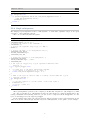
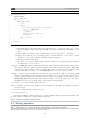
• local variables declaring the sums you want to use
• a series of if branches that return true, where the if’s condition is a single comparison or a
logical and of comparisons
• a final return false
You can use || in the if condition too, but be careful that after expanding to disjunctive normal
form, the number of subexpressions doesn’t exceed 64.
Note that you do not have to use all the subsignatures you declared in logical_trigger, you can
do more complicated checks (that wouldn’t obey the above restrictions) in the bytecode itself at runtime.
The logical_trigger function is fully compiled into a logical signature, it won’t be a runtime executed
function (hence the restrictions).
4.4. Headers and runtime environment
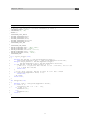
When compiling a bytecode program, bytecode.h is automatically included, so you don’t need to explicitly
include it. These headers (and the compiler itself) predefine certain macros, see Appendix ?? for a full
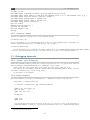
list. In addition the following types are defined:
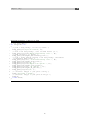
2
4
6
8
10
typedef
typedef
typedef
typedef
typedef
typedef
typedef
typedef
typedef
typedef
typedef
unsigned char uint8_t ;
char int8_t ;
unsigned short uint16_t ;
short int16_t ;
unsigned int uint32_t ;
int int32_t ;
unsigned long uint64_t ;
long int64_t ;
unsigned int size_t ;
int off_t ;
struct signature { unsigned id } __Signature ;
As described in Section 4.1 the width of integer types are fixed, the above typedefs show that.
A bytecode’s entrypoint is the function entrypoint and it’s required by ClamAV to load the bytecode.
Bytecode that is triggered by a logical signature must have a list of virusnames and patterns defined.
Bytecodes triggered via hooks can optionally have them, but for example a PE unpacker doesn’t need
virus names as it only processes the data.
20