1
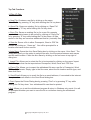
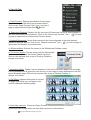
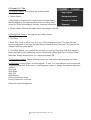
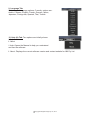
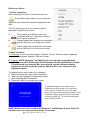
2. Edit (E) Tab:
a. Undo: Undoes the last operation by clicking on the
name “Undo” or by pressing “Z” key while holding the
Ctrl key down.
b. Redo: Redoes the last operation by clicking on the
name “Redo” or by pressing “Y” key while holding the
Ctrl key down.
c. Copy: Copies the selected object/objects to the
clipboard by clicking on the name “Copy”.
d. Cut: Copies the selected object/objects to the clipboard
and removes the selected object/objects on the active page.
e. Paste: Pastes the copied object/objects by clicking on the name “Paste”. The object/
objects can be resized and/or moved to the required location.
f. Clone: Copies and pastes the selected object/objects.
g. Delete: Deletes the selected object/objects.
h. Select All: Groups all objects on the page as a single group.
i. Select: Makes the cursor the Select tool.
Copyright A Brighter Image Pty Ltd, 2013