1
Disk Recorder
Issue: 2.1 – Date: October 2000
Technical Reference
DISK RECORDER
Technical Reference
Issue: 2.1
File: Technical_Reference_HCT4_001024.doc
Print: 26/10/00
Page: 1 / 1
Overview
W el com e i n t he EVS range of product s and t hank you f or your i nt erest i n t he
D i sk R ecorder Syst em . W e w i l l do our best t o sat i sf y your vi deo product i on
needs and we l ook f orward t o cont i nui ng worki ng wi t h you.
Thi s m anual i s di vi ded i n 7 sect i ons descri bi ng:
•=
•=
•=
•=
•=
•=
The
The
The
The
The
The
t echni cal speci f i cat i ons of EVS di sk recorder syst em s
cabl i ng i nst al l at i on
bi t rat e com pressi on
i nt erpol at i on process
Hardware descri pt i on
EVS sof t ware
Disk Recorder Main specifications
Al l EVS Di sk recorder syst em s are f ul l di gi t al i n PAL or NTSC st andard wi t h a
Search f unct i on whi l e recordi ng l i ve act i on, Cl i p M anagem ent and non-l i near
on l i ne edi t i ng, i nst ant pl ayback. W i t h t he i nt ernal 10-bi t di gi t al keyer-m i xer
board, t wo synchroni zed cl i ps can be di spl ayed si m ul t aneousl y i n spl i t screen
m ode and t arget t racki ng and pai nt i ng f eat ures can be bl ended wi t h recorded
m at eri al .
Video
4: 2. 2 SM PTE/ CCI R 601 di gi t al 10-bi t
NTSC: 525 l i nes / PAL: 625 l i nes
I nput s: 1 t o 4 channel s – Ful l f ram e Synchroni zer at each i nput .
Out put s: 1 t o 4 channel s
M oni t ori ng: PAL/ NTSC/ SDI wi t h keyi ng of TC and usef ul i nf orm at i on
Genl ock: Bl ackBurst
I nt ernal 10-bi t di gi t al keyer–m i xer board
Audio
Up t o 16 channel s of 16 bi t s, 48 kHz, anal ogue bal anced
Capacity
M ot i on-JPEG com pressi on @1, 5: 1 t o 20: 1
I nt ernal l y: up t o 12 hours @ 6: 1
W i t h ext ernal st orage: Up t o 24 hours @ 6: 1
Raid level: 5
The Vi deo Rai d uses st ri pi ng process across 5 di sk dri ves. The vi deo dat a i s
st ri ped over t he f i rst 4 dri ves whi l e t he pari t y i nf orm at i on i s saved on t he f i f t h
dri ve. I f one dri ve i s dam aged, t he Vi deo Rai d can use t he pari t y i nf orm at i on
t o recover t he m i ssi ng i nf orm at i on.
EVS Broadcast Equipment
Email : [email protected]
Tel: +32-4/361 7000 FAX: +32-4/361 7099
Issue: 2.1
File: Technical_Reference_HCT4_001024.doc
DISK RECORDER
Technical Reference
Print: 26/10/00
Page: 2 / 2
Chapter 1
Technical Specifications
1.1
Unpacking
On recei pt of t he Equi pm ent exam i ne packi ng f or obvi ous si gns of dam age. I f
dam aged, do not unpack and i nf orm t he carri er i m m edi at el y. Check t hanks t o
t he i ncl uded packi ng l i st i f al l t he i t em s are present and i f t hey show any
m echani cal dam age. I f yes, report dam age or t he m i ssi ng part s t o EVS or
t hei r appropri at e represent at i ve.
1.2
Dimensions
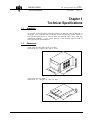
Vi deo di sk recorder M ai n f ram e 19 i nches
Rackm ount 6U – W ei ght : 32. 5 Kg/ 71. 5 Lbs.
Audi o di sk recorder (ADR)
Rackm ount 1U - W ei ght : 11. 5 Kg / 25. 3Lbs
EVS Broadcast Equipment
Email : [email protected]
Tel: +32-4/361 7000 FAX: +32-4/361 7099
DISK RECORDER
Technical Reference
Issue: 2.1
File: Technical_Reference_HCT4_001024.doc
Print: 26/10/00
Page: 3 / 3
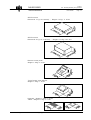
ADA Convert er
Rackm ount 1U (up t o 6 boards) - W ei ght : 5. 3 Kg / 11. 6 Lbs.
ADA Convert er
Rackm ount 3U (up t o 16 boards) - W ei ght : 10. 8 Kg / 23. 9 Lbs.
Rem ot e cont rol panel
W ei ght : 2. 9 Kg / 6. 3 Lbs.
Touch Screen Vi deo M oni t or
W ei ght : 3. 6 Kg / 7. 8 Lbs.
Keyboard - W ei ght : 0. 4 Kg / 0. 9 Lbs.
Tabl et - W ei ght : 0. 5 Kg / 1. 2 Lbs.
EVS Broadcast Equipment
Email : [email protected]
Tel: +32-4/361 7000 FAX: +32-4/361 7099
DISK RECORDER
Technical Reference
1.3
Issue: 2.1
File: Technical_Reference_HCT4_001024.doc
Print: 26/10/00
Page: 4 / 4
Installation
Verify the Disk recorder unit has the correct voltage specifications
for your power source prior to applying power.
(rear panel selectable 110/230 VAC)
Vi deo di sk recorder uni t :
Bef ore t urni ng on t he power, open t he f ront door of Vi deo di sk recorder uni t t o
check i f al l boards f i t i nt o t hei r gui des. I f a board i s out of i t s gui des, rem ove
caref ul l y t he board and repl ace i t i n t he sam e sl ot . I f i nt ernal ADA convert ers
are present (above t he di sk t ray), do not rem ove t he ADA board because t hi s
board i s t i ed t o t he rear connect ors.
Audi o di sk recorder uni t :
Bef ore t urni ng on t he power, check t hat bot h hard di sk rem ovabl e cart ri dges
are f ul l y engaged and l ocked. I f a cart ri dge i s not properl y l ocked, t he hard
di sk w i l l not st art .
Important remark :
It is recommended to connect the mains cable of the ADR to the mains plug
available on the power supply unit of the mainframe and leave the ADR mains
switch on the front panel turned ON permanently. This way, the mainframe and the
ADR will always start simultaneously when turning on the mainframe.
If the mains of the mainframe and the ADR are independent, make sure the ADR is
always turned on BEFORE the selected application starts loading.
1.4
Operating conditions
1.4.1 Power Supply
The EVS Di sk recorder syst em operat es on 220 VAC +/ - 5% or 100 VAC +/ 15% (rear panel sel ect abl e), 47-63Hz, 400W m axi m um .
The rem ot e panel , t he t ouch screen, t he ext ernal ADA rack and t he 16-ch
Audi o Di sk Recorder (ADR) are f i t t ed wi t h an AUTO SW I TCH power suppl y.
1.4.2 Grounding
Ensure t he Di sk recorder uni t i s properl y grounded at al l t i m es t o avoi d
el ect ri cal shock hazard.
1.4.3 Location
Avoi d usi ng t he Di sk recorder uni t i n areas havi ng hi gh hum i di t y (l ess 90%
non-condensi ng), hi gh t em perat ure (+5° C t o +35° C / 41° F t o 95° F), or
excessi ve dust .
EVS Broadcast Equipment
Email : [email protected]
Tel: +32-4/361 7000 FAX: +32-4/361 7099
Issue: 2.1
File: Technical_Reference_HCT4_001024.doc
DISK RECORDER
Technical Reference
1.4.4
Print: 26/10/00
Page: 5 / 5
Ventilation & Rack Mounting
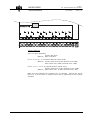
Adequat e vent i l at i on i s obvi ousl y requi red f or opt i m um perf orm ance. As resul t
of t hi s consi derat i on, ensure no ot her Equi pm ent i s l ocat ed cl ose t o ei t her
uni t . I n order t o avoi d overheat i ng probl em s we recom m end t he f ol l owi ng rack
m ount i ng l ayout :
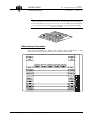
Remember that fans are used
to air cool Equipment to protect from overheating,
do not block fans intakes during operations
Havi ng regard t o t he wei ght of t he LSM and t he ADR uni t s, support gui des are
requi red f or t hese uni t s i nt o t he rack m ount .
The f ront ears of t hese uni t s are not desi gned t o support t hei r f ul l wei ght .
Appl yi ng f ul l wei ght on t hese m i ght resul t i n bendi ng t he m et al pl at e.
1.4.5 Compliance
The EVS Di sk recorder syst em s are i n com pl i ance wi t h t he Cl ass A norm of
t he FCC rul es and have been veri f i ed t o com pl y wi t h t he el ect rom agnet i c
com pat i bi l i t y st andards of t he European Di rect i ve 89/ 336/ EEC part i cul arl y
st andards EN50081-1 and EN50082-2. Al l EVS appl i cat i ons and product s are
Year 2000 com pl i ant .
EVS Broadcast Equipment
Email : [email protected]
Tel: +32-4/361 7000 FAX: +32-4/361 7099
Issue: 2.1
File: Technical_Reference_HCT4_001024.doc
DISK RECORDER
Technical Reference
Print: 26/10/00
Page: 6 / 6
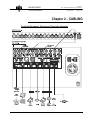
Chapter 2 – CABLING
Peripheral Equipment, Genlock and Timecode references
EVS Broadcast Equipment
Email : [email protected]
Tel: +32-4/361 7000 FAX: +32-4/361 7099
Issue: 2.1
File: Technical_Reference_HCT4_001024.doc
DISK RECORDER
Technical Reference
Print: 26/10/00
Page: 7 / 7
Comment 1: Genlock loop must be terminated if not used.
Comment 2: The ADR and the Mainframe must be genlocked with the same reference
signal, otherwise the synchronisation between audio and video might drift in time.
RS422 connector of the Remote control panel
The RS 422 cabl e of t he Rem ot e cont rol panel m ust be wi red PI N TO PI N
f ol l owi ng t he above di agram . Use shi el ded cabl e t o avoi d el ect rom agnet i c
i nt erf erence on l ong di st ances.
Important note: The Reset com m and f rom t he Rem ot e i s sent t hrough t he
Pi n n° 5 of RS422 connect or.
Video disk recorder cabling:
Vi deo and audi o cabl es are di f f erent l y wi red up dependi ng on t he operat i ng
sof t ware used. Pay at t ent i on t o t he cam eras l ocat i on on i nput connect ors.
EVS Broadcast Equipment
Email : [email protected]
Tel: +32-4/361 7000 FAX: +32-4/361 7099
DISK RECORDER
Technical Reference
Issue: 2.1
File: Technical_Reference_HCT4_001024.doc
Print: 26/10/00
Page: 8 / 8
Audio Disk Recorder cabling:
The ADR can be used i n conj unct i on wi t h a HCT2 or a HCT4 Vi deoRai d vi deo
di sk recorder. The f ol l owi ng schem at i cs f or audi o cabl i ng descri be t he vari ous
appl i cat i ons avai l abl e wi t h t he HCT4 Vi deoRai d di sk recorder. Pl ease ref er t o
t he correspondi ng sof t ware m anual f or m ore det ai l s.
Comment:
As the VDR and the ADR are two separate units and in order to ensure the audio
recording please check if the ADR rack unit is ON before loading the application,
the Audio parameter in the EVS menu is enabled, the RS422 link between units is
well connected, and both unit are genlocked with the same reference.
RS422 between the ADR and the VDR units
The RS 422 cabl e (l i ke t he Rem ot e cont rol cabl e) m ust be wi red PI N TO PI N
f ol l owi ng t he above di agram .
Important note: The Pi n n° 5 i s used t o i ni t i al i ze t he DSP.
1 CAM and SLSM
2 CAM’s
EVS Broadcast Equipment
Email : [email protected]
Tel: +32-4/361 7000 FAX: +32-4/361 7099
DISK RECORDER
Technical Reference
Issue: 2.1
File: Technical_Reference_HCT4_001024.doc
Print: 26/10/00
Page: 9 / 9
3 CAM’s
4 CAM’s
Video Delay
Spot Box
EVS Broadcast Equipment
Email : [email protected]
Tel: +32-4/361 7000 FAX: +32-4/361 7099
Issue: 2.1
File: Technical_Reference_HCT4_001024.doc
DISK RECORDER
Technical Reference
Print: 26/10/00
Page: 10 / 10
ADA converters:
The ADA convert er boards f i t i nt o vi deo di sk recorder uni t or can be used as a
st and al one uni t devi ce: boards are m ount ed hori zont al l y i n 1U hei ght rack or
vert i cal l y i n 3U rack and com bi ned accordi ng t o t he requi rem ent s of each
appl i cat i on:
Board
Single
Single
Single
Double
Double
Model
CD12-S
CD10-S
DC12-S
CD30/CD31-S
DC 30-S
converts
Composite
Composite, Y/C, S-VHS
4:2:2 serial digital
RGB/YUV
4:2:2 serial digital
To
4:2:2 serial digital
4:2:2 serial digital
Composite
4:2:2 serial digital
RGB/YUV
Example of video cabling with external ADA
EVS Broadcast Equipment
Email : [email protected]
Tel: +32-4/361 7000 FAX: +32-4/361 7099
Issue: 2.1
File: Technical_Reference_HCT4_001024.doc
DISK RECORDER
Technical Reference
Print: 26/10/00
Page: 11 / 11
Chapter 3 – COMPRESSION
Bit Rate Reduction - Table of quantization
The CODEC com pressi on/ decom pressi on board uses 255 di f f erent
quant i zat i on t abl es (Lum i nance and chrom i nance). Each t abl e i s num bered
f rom 1 t o 255.
Comment: Normal Quantization level is defined from 1 to 510. The CODEC uses
level 2, 4, 6, and 8…. 506, 508, 510 to obtain 255 tables.
2 i s a LOSSLESS t abl e, whi ch m eans t hat no quant i zat i on w i l l be done af t er
t he DCT process. However, we know t hat t hi s gi ves pi ct ures wi t h l ow
com pressi on l i ke 2: 1 or even l ess when t he pi ct ure cont ai ns a l ot of noi se or
hi gh f requenci es.
The 255 t h t abl e has t he m axi m um of quant i zat i on and m i ght be used f or a t rue
noi se pi ct ure. W e know t hat i f we i ncrease t he quant i zat i on, we i ncrease t he
com pressi on f or a part i cul ar pi ct ure. I t i s t hen possi bl e t o sel ect a
quant i zat i on t abl e, whi ch gi ves a t arget com pressi on rat i o. The di sk recorder
aut om at i cal l y does t hi s process.
The sel ect i on of t he quant i zat i on t abl e t o use i s done by l i near i nt erpol at i on
process based on t wo val ues: quant i zat i on t abl e and com pressi on gi ven by
t he t wo previ ous f i el ds.
Each f i el d i s saved wi t h i t s t abl e num ber f rom 1 t o 255. At pl ayback, t he
cont rol l er w i l l aut om at i cal l y decom press t he pi ct ure w i t h i t s own t abl e. Thi s
al l ows al m ost const ant com pressi on rat i o and t hus const ant capaci t y. I t al so
al l ows t he readi ng of f i el ds recorded wi t h vari ous com pressi on rat i os.
So, i n order t o adj ust t he average com pressi on rat i o, t he user m ust set t he
f ol l owi ng param et ers: (see EVS sof t ware)
LUM AM I N
CHROM AM I N
Request ed COM P
m i ni m um quant i zat i on t abl e f or l um i nance,
m i ni m um quant i zat i on t abl e f or chrom i nance,
average com pressi on request ed
I f each di sk provi des a sust ai ned rat e of 7, 5 M byt es per second, f our hard
di sks provi de 30 M byt es per second. I f t he appl i cat i on requi res
si m ul t aneousl y 4 channel s, each channel w i l l have 7, 5 M byt es per second (60
M bps) whi ch i s about 2. 6: 1.
EVS Broadcast Equipment
Email : [email protected]
Tel: +32-4/361 7000 FAX: +32-4/361 7099
DISK RECORDER
Technical Reference
Issue: 2.1
File: Technical_Reference_HCT4_001024.doc
Print: 26/10/00
Page: 12 / 12
Ram video buffer - Block size
The VI DEO RAI D Hard di sk cont rol l er board has 5 SI M M banks. Each bank
can recei ve a RAM m odul e up t o 128M b.
The f i rst bank i s dedi cat ed t o t he 68020 processor and t he 4 rem ai ni ng banks
are dedi cat ed t o t he onboard SCSI -2 cont rol l ers and com pose t he vi deo RAM
buf f er of t he uni t .
Note: SIMM specifications: 72-pin, 32-bit, EDO, no parity, Access-time: 60 ns.
On record: The vi deo buf f er RAM i s di vi ded i nt o di f f erent bl ocks, t he num ber
of bl ocks depends on t he si ze of t he vi deo RAM buf f er and of t he si ze of each
bl ock. The com pressed f i el ds are st ored i n t hose bl ocks. As soon as a bl ock
i s f i l l ed, i t i s t ransf erred t o t he di sks.
On pl ay-back: The opposi t e processi ng i s done. Bl ocks are sent one by one
f rom t he di sks.
W orki ng wi t h l arge bl ocks i s advi sed t o i m prove t he bandwi dt h of t he di sk i n
order t o m i ni m i ze t he di sk heads m ovem ent s. However, l arge bl ocks are not
agreeabl e when i n search m ode because i t t akes m ore t i m e t o l oad t hem . 256KB bl ocks on di sks are a good com prom i se. Theref ore a bl ock i s 1 M B i n
RAM . I f t he com pressi on i s 4: 1 or about 100 KB per f i el d, each bl ock cont ai ns
about 10 f i el ds or 200 m i l l i seconds of vi deo.
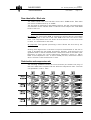
Disk duration and compression rate
The f ol l owi ng schem at i c shows t he record durat i on per channel wi t h t rays of
9Gb and 18Gb di sks com pared wi t h t he di f f erent com pressi on rat es. The Di sk
si ze param et er i s set t o 100%
EVS Broadcast Equipment
Email : [email protected]
Tel: +32-4/361 7000 FAX: +32-4/361 7099
Issue: 2.1
File: Technical_Reference_HCT4_001024.doc
DISK RECORDER
Technical Reference
Print: 26/10/00
Page: 13 / 13
Chapter 4 : Interpolation
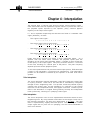
The pl ayi ng back of sm oot h sl ow m ot i on pi ct ures carri es speci f i c i ssues :
si nce som e f i el ds m ust be repeat ed at regul ar i nt erval t o provi de t he vi deo at
t he pl ayback speed requi red by t he operat or, pari t y vi ol at i on appears
regul arl y on t he out put vi deo si gnal .
I f O and E represent respect i vel y t he odd and even f i el ds of a st andard vi deo
si gnal (50/ 60 Hz), we have:
-
The ori gi nal vi deo si gnal :
O E O E O E O E O E O E O E O E
-
The out put vi deo si gnal at 50% speed :
O O E E O O E E O O E E O O E E
-
The out put vi deo si gnal at 33% speed :
O O O E E E O O O E E E O O O E
-
The out put vi deo si gnal at 25% speed :
O O O O E E E E O O O O E E E E
Fi el ds wi t h pari t y vi ol at i on are shown i n bol d, underl i ned l et t ers. As i t
appears f rom t he above t abl e, what ever t he pl ayback speed (wi t h t he
except i on of t he norm al 100% pl ayback speed), a num ber of f i el ds vi ol at e t he
norm al pari t y of t he out put si gnal . Thi s pari t y vi ol at i on i nduces a 1-l i ne shi f t
of t he f i el d, resul t i ng i n a vert i cal j i t t er of t he pi ct ure. The j i t t er f requency
depends upon t he chosen pl ayback speed.
To avoi d t hi s phenom enon and provi de a st abl e out put pi ct ure, EVS devel oped
2 t ypes of l i ne i nt erpol at or: 2-l i ne and 4-l i ne i nt erpol at ors. The i nt erpol at i on
process can be enabl ed or di sabl ed by t he operat or on al l EVS sl ow m ot i on
syst em s.
2-line interpolator:
The 2-l i ne i nt erpol at or act ual l y generat es a new f i el d, when t he ori gi nal f i el d
i s i n pari t y vi ol at i on. Each l i ne of t hi s new f i el d i s cal cul at ed by a wei ght ed
average of t he 2 nei ghbori ng l i nes. Thi s process sol ves t he probl em of pari t y
vi ol at i on and vert i cal j i t t er, but t he drawback i s a reduct i on of t he vert i cal
resol ut i on on t he i nt erpol at ed f i el ds, t hat appear unf ocused. Anot her by-si de
ef f ect i s t he al t ernat i on of ori gi nal f i el ds (perf ect l y f ocused) and i nt erpol at ed
f i el ds (unf ocused), resul t i ng i n a "pum pi ng" vi deo si gnal .
4-line interpolator:
The 4-l i ne i nt erpol at or uses a m ore sophi st i cat ed cal cul at i on based on t he 4
nei ghbori ng l i nes. By usi ng sui t abl e coef f i ci ent s f or t he wei ght of each l i ne i n
t he resul t i ng cal cul at i on, we appl y t hi s i nt erpol at i on t o al l f i el ds. The f i nal
resul t i s a perm anent l y, sl i ght l y unf ocused pi ct ure. The advant age i s a st abl e
out put si gnal wi t h no j i t t er and no "pum pi ng", but t he vert i cal bandwi dt h i s
even m ore reduced.
EVS Broadcast Equipment
Email : [email protected]
Tel: +32-4/361 7000 FAX: +32-4/361 7099
Issue: 2.1
File: Technical_Reference_HCT4_001024.doc
DISK RECORDER
Technical Reference
Print: 26/10/00
Page: 14 / 14
The i nt erpol at or i s of course al ways di sabl ed at 100% pl ayback speed,
because t here i s no pari t y vi ol at i on.
EVS use t he sam e t echni ques wi t h t he Super Sl ow M ot i on di sk recorder,
worki ng wi t h al l m odel s of Super M ot i on cam eras (150/ 180 Hz). The onl y
di f f erence bet ween t he processi ng of Super M ot i on and norm al scan (50/ 60
Hz) si gnal s i s t hat t he i nt erpol at or i s al ways di sabl ed at 33% pl ayback speed,
because t he Super M ot i on si gnal do not cause pari t y vi ol at i on at t hi s
part i cul ar speed.
W hat ever t he choi ce, t he resul t i ng pi ct ure i s t hus al ways a com prom i se
bet ween st abi l i t y and resol ut i on. W i t h EVS syst em s, t he operat or al ways has
got t he choi ce bet ween any of t he 3 above descri bed t echni ques : no
i nt erpol at i on, 2-l i ne i nt erpol at i on or 4-l i ne i nt erpol at i on. Even i f t he operat or
chooses t o use t he i nt erpol at i on, t hi s process wi l l be aut om at i cal l y di sabl ed
when not necessary (100% pl ayback f or 50/ 60 Hz si gnal , 33% and 100%
pl ayback f or 150/ 180 Hz si gnal ).
Comment: All professional VTR's use line interpolation in PlayVar mode to avoid
vertical jitters.
EVS Broadcast Equipment
Email : [email protected]
Tel: +32-4/361 7000 FAX: +32-4/361 7099
Issue: 2.1
File: Technical_Reference_HCT4_001024.doc
DISK RECORDER
Technical Reference
Print: 26/10/00
Page: 15 / 15
Chapter 5
Hardware description
Physical Specifications
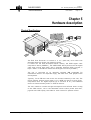
The EVS Di sk Recorder i s housed i n a 19 " (485 m m ) rack f ram e wi t h
ext ended dept h and 6 rack uni t (266 m m ) hei ght .
I t cont ai ns al l t he EVS devel oped boards: nam el y, t he JPEG di gi t al vi deo
com pressi on board (CODEC’ s), t he VI DEO RAI D board (save/ re-cal l t he di gi t al
vi deo dat a t o/ f rom hard di sks) wi t h 5 separat e st andard SCSI -2 busses, a
Keyer / M i xer / Fram e Buf f er board and t he Di gi t al I / O board (CCI R601).
The uni t i s cont rol l ed by an i nt ernal l y i nst al l ed I BM com pat i bl e PC
m ot herboard wi t h i t s own separat e f l oppy, I DE hard dri ve, VGA graphi c board
and keyboard.
Typi cal l y, f i ve 9 GB hard di sk dri ves are m ount ed i nt ernal l y i n t he uni t . The
record capaci t y wi t h t wo arrays di sks (2 x 5 x 9GB) can reach 12 hours (@ 6: 1
com pressi on rat e. For hi gher capaci t y (up t o 24 hours at 6: 1), t he addi t i onal
dri ves are f i t t ed i nt ernal l y and/ or i n ext ernal chassi s.
The user i nt erf ace i s m ade t hrough t he keyboard and di f f erent m enus rol l i ng
on t he VGA m oni t or, one or t wo dedi cat ed rem ot e cont rol panel s wi t h l ever,
j og-knob and LCD di spl ay, and t abl et or t ouch screen f or speci al s ef f ect s.
EVS Broadcast Equipment
Email : [email protected]
Tel: +32-4/361 7000 FAX: +32-4/361 7099
DISK RECORDER
Technical Reference
Issue: 2.1
File: Technical_Reference_HCT4_001024.doc
Print: 26/10/00
Page: 16 / 16
Internal PC Specifications:
The PC cont rol s t he operat i on of t he Di sk Recorder uni t . The boards pl ugged
i nt o t he PC I SA bus are:
•= I CP Pent i um m ot herboard
•= Adri enne LTC reader card.
•= EVS CPI PC card
(i nt erf ace bet ween t he PC and t he Vi deo hardware)
•= EVS SI O3 M ul t i I / O f or COM 9, 10, LPT2
•= Cl assi cal M ul t i I / O f or COM 3, 4 or COM 1, 2
EVS boards:
The boards i nst al l ed i n t he EVS Di sk Recorder uni t are:
1. I / O board wi t h 4: 2: 2 CCI R601 10-bi t i nput s (x2), out put s (x2) and 2 onboard
m oni t ori ng out put s (PAL/ NTSC/ SDI ) whi ch provi de T/ C and ot her i nf orm at i on
readout on rear BNC vi deo m oni t ori ng out put s.
2. One, t wo or t hree CODEC boards - wi t h t wo JPEG LSI chi pset s per board
(each chi pset can be set up t o ei t her encode or decode) - wi t h paral l el 601
i nput / out put and sof t ware set quant i zat i on qual i t y.
3. VI DEO RAI D cont rol l er board (HCT4) wi t h 5 onboard Nat i onal Sem i conduct or
SCSI -2 cont rol l ers. The 5 cont rol l ers spread t he vi deo read-wri t e dat a access
across 5 SCSI busses t o gi ve a 36 M byt es per second (288 M bps) ef f ect i ve
rat e.
Each cont rol l er i s f i t t ed wi t h a RAM cache t o cope wi t h i nt errupt i ons t o t he
di sk dat a f l ow caused by l ong di sk seek t i m es or di sk t herm al re-cal i brat i on, i f
used. Thi s RAM cache al l ows i nst ant access t o t he m at eri al recorded
m om ent s ago.
4. Di gi t al m i xer/ buf f er card f or t ransi t i on ef f ect s, t arget i ng/ pai nt i ng m odul e and
spl i t screen opt i on.
Al l t hose EVS devel oped boards are pl ugged hori zont al l y i nt o a propri et ary
bus-board wi t h 96-pi n connect ors.
EVS Broadcast Equipment
Email : [email protected]
Tel: +32-4/361 7000 FAX: +32-4/361 7099
DISK RECORDER
Technical Reference
Issue: 2.1
File: Technical_Reference_HCT4_001024.doc
Print: 26/10/00
Page: 17 / 17
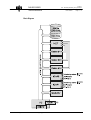
Block Diagram
EVS Broadcast Equipment
Email : [email protected]
Tel: +32-4/361 7000 FAX: +32-4/361 7099
DISK RECORDER
Technical Reference
Issue: 2.1
File: Technical_Reference_HCT4_001024.doc
Print: 26/10/00
Page: 18 / 18
Multi-access - Drives capacity
The basi c EVS di sk recorder i s a 2-channel uni t wi t h one recordi ng channel
and one i ndependent pl ay or search channel , bui l t wi t h t wo CODEC boards.
O t her conf i gurat i ons are avai l abl e, such as:
1 REC and 2 i ndependent PLAY channel s:
2 REC and 2 i ndependent PLAY channel s:
3 REC and 1 i ndependent PLAY channel :
The di f f erent dri ve arrangem ent s are:
M odul e
M odul e
M odul e
M odul e
EVS Broadcast Equipment
(4
(4
(4
(8
+
+
+
+
1)
1)
1)
2)
x 4 GB dri ves (t ot al 20 GB) : 80 m i nut es @ 6: 1
x 9 GB dri ves (t ot al 45 GB) : 3 hours @ 6: 1.
x 18 GB dri ves (t ot al 90 GB) : 6 hours @ 6: 1.
x 18 GB dri ves (t ot al 180 GB) : 12 hours @ 6: 1
Email : [email protected]
Tel: +32-4/361 7000 FAX: +32-4/361 7099
DISK RECORDER
Technical Reference
Issue: 2.1
File: Technical_Reference_HCT4_001024.doc
Print: 26/10/00
Page: 19 / 19
Comment: The Video Raid uses striping process across 5 disk drives. The video
data is striped over the first 4 drives (A, B, C, D) while the parity information is
saved on the fifth drive (E). If one drive (A, B, C or D) is damaged, the Video Raid
can use the parity information to recover the missing information if the RAID5
option is installed.
Video Hardware Presentation
Thi s sect i on descri bes i n det ai l s t he l ocat i on and conf i gurat i on of t he
el ect roni c boards devel oped by EVS f or i t s Vi deo Di sk Recorder.
EVS Broadcast Equipment
Email : [email protected]
Tel: +32-4/361 7000 FAX: +32-4/361 7099
DISK RECORDER
Technical Reference
Issue: 2.1
File: Technical_Reference_HCT4_001024.doc
Print: 26/10/00
Page: 20 / 20
Digital I/O4
The Di gi t al I / O boards m anage t he vi deo i nput s and out put s and send/ recei ve
t he vi deo i nf orm at i on t o/ f rom t he CODEC’ s.
The di gi t al I / O4 has t wo di gi t al i nput s, t wo di gi t al out put s, and 2 onboard
m oni t ori ng PAL/ NTSC out put s.
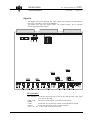
LED’s Information:
Bus_A/ B/ D/ E: shows t he vi deo i nput A i s sent t o bus A/ B and t he vi deo i nput
B i s sent t o bus D/ E
PVI D_ A/ B:
shows t he vi deo si gnal i s present on i nput A/ B
USER:
LOCK:
shows t he uni t i s act ual l y l ocked on t he Ref erence si gnal .
PGLCK:
shows t he presence of t he ref erence si gnal
+12V, -5V, +5V, +12V: show al l t ensi ons are OK.
EVS Broadcast Equipment
Email : [email protected]
Tel: +32-4/361 7000 FAX: +32-4/361 7099
Issue: 2.1
File: Technical_Reference_HCT4_001024.doc
DISK RECORDER
Technical Reference
Print: 26/10/00
Page: 21 / 21
Connectors:
I N_A/ B:
LOOP_A/ B:
Seri al Di gi t al vi deo i nput s
Loop t hrough of di gi t al i nput A/ B
REF_OUT:
M ON_A/ B:
Genl ock out put
Opt i onal : Seri al di gi t al m oni t ori ng out put s (requi res
chi ps U79 and U77)
Seri al Di gi t al vi deo out put s
OUT_A/ B:
Board configuration:
1.
Addi ng a second Di gi tal I / O (I / O4 m odel ) :
Comment: The Digital I/O boards have different configurations, depending on the
location inside the mainframe.
On Di gi t al I / O at l ocat i on # 1:
A D D j um per:
I NTG j um per:
S19 resi st or:
U24 chi p:
ON
on I RQ A
ON
ON
On Di gi t al I / O at l ocat i on # 2:
ADD jumper:
I NTG j um per:
S19 resi st or:
U24 chi p:
OFF
rem ove I RQ A
OFF
OFF
Bef ore addi ng t he second Di gi t al I / O board i nt o t he Di sk recorder syst em , t he
ADD j um per, t he I NTG j um per on I RQ A, t he S19 resi st or and t he U24 chi p
m ust be rem oved f rom t he I / O board.
2.
Di gi tal / Anal og m oni tori ng:
M ovi ng t he M ON_A and M ON_B j um pers al l ows you t o sel ect anal og or di gi t al
m oni t ori ng f rom t he connect ors on t he rear panel .
M ON A / B:
The m oni t ori ng out put f rom t he rear panel i s anal og.
Addi ng chi ps t o U79 and U77:
The m oni t ori ng out put f rom t he rear panel i s anal og AND di gi t al m oni t ori ng i s
avai l abl e f rom t he f ront connect ors (M ON_A and M ON_B)
+ Addi ng chi ps t o U79 and U77:
M ON A / B :
The m oni t ori ng f rom t he rear panel are di gi t al .
EVS Broadcast Equipment
Email : [email protected]
Tel: +32-4/361 7000 FAX: +32-4/361 7099
DISK RECORDER
Technical Reference
Issue: 2.1
File: Technical_Reference_HCT4_001024.doc
Print: 26/10/00
Page: 22 / 22
3. Di gi tal / Anal og si gnal l oop:
M ovi ng t he LOOP_A and LOOP_B j um pers al l ows t o sel ect anal og or di gi t al
i nput l oop (I N1, I N2, I N3, I N4) f rom t he connect ors of t he rear panel :
LOOP A / B:
The si gnal l oop f rom t he rear panel i s anal og.
LOOP A / B:
The si gnal l oop f rom t he rear panel i s di gi t al .
EVS Broadcast Equipment
Email : [email protected]
Tel: +32-4/361 7000 FAX: +32-4/361 7099
DISK RECORDER
Technical Reference
Issue: 2.1
File: Technical_Reference_HCT4_001024.doc
Print: 26/10/00
Page: 23 / 23
Single input Digital I/O:
I n LSM 3CAM and Super LSM conf i gurat i ons, an addi t i onal Di gi t al I / O board i s
requi red. The second I / O board m ay be one Di gi t al I / O4 or one Di gi t al I / O wi t h
a si ngl e i nput channel , wi t h no m oni t ori ng out put and no di gi t al out put . I n t hi s
case, t he si ngl e i nput I / O board i s l ocat ed i n t he I / O # 3 sl ot of t he m ai nf ram e
LED’s information:
PVI D:
OE1/ OE2:
shows t he vi deo si gnal i s present on i nput
shows t he vi deo i nput i s sent t o bus OE1/ OE2
Connectors:
I N:
LOOP:
EVS Broadcast Equipment
Seri al Di gi t al vi deo i nput
Loop t hrough of di gi t al i nput
Email : [email protected]
Tel: +32-4/361 7000 FAX: +32-4/361 7099
DISK RECORDER
Technical Reference
Issue: 2.1
File: Technical_Reference_HCT4_001024.doc
Print: 26/10/00
Page: 24 / 24
CODEC board:
The CODEC board i s t he i nt erf ace bet ween t he I / O and t he Vi deo Rai d
cont rol l er boards. I t m anages t he com pressi on and t he decom pressi on
processes. One CODEC board handl es si m ul t aneousl y 2 channel s, ei t her
record or pl ayback channel s, and proceeds wi t h t he vi deo com pressi on and
decom pressi on i n 4: 2: 2 qual i t y. CODEC boards are t i ed t o t he HCT board wi t h
one Bus Connect or on t he f ront si de.
LED’s information:
LA:
LB:
TF:
EVS Broadcast Equipment
f l ashes when t he DSP program i s runni ng.
l i ght s when t he channel # 1/ # 2 i s i n use, ei t her i n record or i n
pl ayback m ode.
f l ashes whi l e dat a t ransf er i s i n process bet ween t he CODEC and t he
HCT boards
Email : [email protected]
Tel: +32-4/361 7000 FAX: +32-4/361 7099
Issue: 2.1
File: Technical_Reference_HCT4_001024.doc
DISK RECORDER
Technical Reference
Print: 26/10/00
Page: 25 / 25
Jumpers Addresses:
Dependi ng on t he conf i gurat i on, one t o t hree CODEC boards are requi red.
The CODEC j um per m ust be m oved as f ol l owed:
EVS Broadcast Equipment
First CODEC :
t o l ocat i on # 1
Second CODEC:
t o l ocat i on # 2
Third CODEC:
t o l ocat i on # 3
Email : [email protected]
Tel: +32-4/361 7000 FAX: +32-4/361 7099
DISK RECORDER
Technical Reference
Issue: 2.1
File: Technical_Reference_HCT4_001024.doc
Print: 26/10/00
Page: 26 / 26
VIDEO RAID board:
The Vi deo Rai d or HCT4 board i s a RAI D cont rol l er t hat recei ves dat a f rom
t he CODEC boards i n Record m ode and sends dat a f or st orage t o SCSI di sks.
I n Pl ayback m ode, t he HCT board cal l s back t he dat a f rom t he di sks and
t ransf ers i t t o t he CODEC boards. One Vi deo Rai d board can m anage up t o 3
CODEC boards.
EVS Broadcast Equipment
Email : [email protected]
Tel: +32-4/361 7000 FAX: +32-4/361 7099
Issue: 2.1
File: Technical_Reference_HCT4_001024.doc
DISK RECORDER
Technical Reference
Print: 26/10/00
Page: 27 / 27
LED’s information:
W hi l e t he program i s l oadi ng, LED’ s A and B gi ve t he f ol l owi ng i nf orm at i on
about RAM SI M M ’ s t est i ng process:
A
On
On
-
B
On
On
At start-up
COMRAM is faulty
CPU RAM is faulty
All RAM’s are OK
W hen t he program l oadi ng i s com pl et e, bot h A and B are On.
EVS Broadcast Equipment
1
On
On
-
2
On
On
-
3
On
On
-
At start-up
VIDEO raid controller is OK
Two disks or more are faulty
Disk A is faulty
Disk B is faulty
On
On
On
-
On
On
Disk C is faulty
Disk D is faulty
Disk E is faulty
Email : [email protected]
Tel: +32-4/361 7000 FAX: +32-4/361 7099
DISK RECORDER
Issue: 2.1
File: Technical_Reference_HCT4_001024.doc
Technical Reference
Print: 26/10/00
Page: 28 / 28
Jumpers settings:
The Vi deo Rai d board can accept up t o 128M b RAM f or t he CPU, l i kewi se f or
t he Vi deo buf f eri ng.
up t o 32M B of RAM i nst al l ed i n each bank
up t o 128M B of RAM i nst al l ed i n each bank
Comment: The VIDEO RAID Hard disk controller board has 5 SIMM’s RAM
banks. The CPU RAM is dedicated to the processor and the 4 video buffer RAM’s
are dedicated to the onboard SCSI-2 controllers. In standard configuration, the
Video Raid board is provided with 16Mb for the CPU and 32Mb for the Video
buffering. Therefore jumpers onto HCT are set on 32Mb (means: up to 32Mb).
EVS Broadcast Equipment
Email : [email protected]
Tel: +32-4/361 7000 FAX: +32-4/361 7099
Issue: 2.1
File: Technical_Reference_HCT4_001024.doc
DISK RECORDER
Technical Reference
Print: 26/10/00
Page: 29 / 29
Video Backplane:
Al l boards above descri bed are pl ugged i nt o t he vi deo back pl ane.
The m oni t ori ng out put cabl es and t he Genl ock i nput cabl e are avai l abl e on t he
rear of t he backpl ane and are di rect l y f i xed t o t he connect ors on t he rear
panel of t he Vi deo Di sk recorder.
The J3, J4, J5 connect ors are connect ed t o t he CPI / PC card. Ensure
connect or pl ugs J4 and J5 are not i nvert ed, ot herwi se t he Vi deo Hardware wi l l
not be correct l y i ni t i al i zed.
Video boards layout
Dependi ng on t he f eat ures requi red, t he board arrangem ent s are di f f erent :
Software
SPOT BOX – 2 ch.
SPOT BOX – 4 ch.
LSM1CAM
LSM2CAM
LSM3CAM
SLSM
EVS Broadcast Equipment
HCT
CODEC
1
1
1
1
1
1
2
2
2
2
2
2
Email : [email protected]
Digital I/O
# 1/ # 2
1
1 or 2
1
1
1 or 2
1 or 2
Single Input Digital I/O Mix/Buffer
#3
0
0
0
0
0
1
0
1
0 or 1
0
0 or 1
1
Tel: +32-4/361 7000 FAX: +32-4/361 7099
DISK RECORDER
Technical Reference
Issue: 2.1
File: Technical_Reference_HCT4_001024.doc
Print: 26/10/00
Page: 30 / 30
Note: IN1S – IN2S – IN4S naming.
Digital I/O boards were previously named:
IN1S
has 1 Input
( = Single Input Digital I/O #3)
IN2S
has 1 input and 2 outputs
IN4S
has 2 inputs and 2 outputs ( = Digital I/O #1 / #2)
Boards have a def i ned l ocat i on on t he vi deo back pl ane i n order t o respect
t he cont rol busses organi zat i on and t he i nt ernal dat a t ransf er.
Exam pl e 1 : LSM 2CAM / LSM 3CAM / SLSM
Exam pl e 2 : LSM 2CAM / LSM 3CAM / SLSM
EVS Broadcast Equipment
Email : [email protected]
Tel: +32-4/361 7000 FAX: +32-4/361 7099
DISK RECORDER
Technical Reference
Issue: 2.1
File: Technical_Reference_HCT4_001024.doc
Print: 26/10/00
Page: 31 / 31
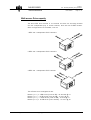
PC Pentium Hardware Configuration
The f unct i on of t he PC hardware i s m ai nl y t he cont rol of t he Vi deo hardware
vi a t he sof t ware and t o i nt erf ace t he peri pheral Equi pm ent (i . e. Rem ot e
cont rol panel ) wi t h t he vi deo hardware.
I n st andard conf i gurat i on t he PC hardware i s com posed of a Pent i um
M ot herboard wi t h 200M M X processor and an onboard VGA card, provi ded wi t h
4M b DRAM , and a 2Gb I DE HDD.
Lateral door to access the PC connections
The use and t he conf i gurat i on of each board i s det ai l ed i n t he next sect i on.
EVS Broadcast Equipment
Email : [email protected]
Tel: +32-4/361 7000 FAX: +32-4/361 7099
DISK RECORDER
Technical Reference
Issue: 2.1
File: Technical_Reference_HCT4_001024.doc
Print: 26/10/00
Page: 32 / 32
Classical Multi I/O card:
The com m on use (Type 2) of t he com m uni cat i on port s i s def i ned as f ol l ows:
I/O Type 2:
COM 1: The Pai nt i ng t abl et i s connect ed t o t hi s port t hrough t he J11 connect or
of SI O card.
COM 2: The Touch Screen vi deo m oni t or i s connect ed t o t hi s port t hrough t he
J9 on SI O card. (RS232 i s convert ed i nt o RS422)
LPT1: The swi t cher of t he Spl i t t er (i n SLSM conf i gurat i on) i s connect ed t o
t hi s port t hrough t he J8 connect or on SI O card.
Fi gure – Type 2 :
EVS SIO3 Multi I/O card:
The com m uni cat i on port s on t he SI O3 card are set as f ol l ows:
I/O Type 2:
COM 9:
The m ai n rem ot e cont rol panel i s connect ed t o t hi s port t hrough t he
J12 connect or of t he SI O card. RS422 si gnal i s convert ed wi t hi n t he
SI O card.
COM 10: The second rem ot e cont rol panel (or t he Sony © cont rol panel ) i s
connect ed t o t hi s port t hrough t he J10 connect or of t he SI O board.
RS422 si gnal i s convert ed wi t hi n t he SI O card.
LPT2:
The dongl e key i s di rect l y connect ed t o t hi s port .
Comment: In Spot Box system configuration, an additional EVS SIO3 Multi I/O
card replaces the Classical Multi I/O card in order to increase buffering capabilities
of serial ports.
EVS Broadcast Equipment
Email : [email protected]
Tel: +32-4/361 7000 FAX: +32-4/361 7099
DISK RECORDER
Technical Reference
Issue: 2.1
File: Technical_Reference_HCT4_001024.doc
Print: 26/10/00
Page: 33 / 33
EVS CPI PC card:
The CPI PC card i s t he i nt erf ace bet ween t he PC hardware and t he vi deo
hardware boards. The l i nk i s physi cal l y done wi t h 3 f l at cabl es di rect l y
connect ed f rom t he CPI PC card t o t he J3, J4, and J5 connect ors of t he vi deo
back pl ane. Onl y cont rol dat a i s t ransf erred t hrough t hi s l i nk.
Adrienne LTC reader card:
The LTC card reads t he Ti m ecode ref erence com i ng f rom an ext ernal source
(VTR, cam era, T/ C generat or. . . ) I f t he Ti m ecode ref erence i s di scont i nued or
i f t he card i s dam aged, t he syst em wi l l aut om at i cal l y sel ect t he PC i nt ernal
cl ock as ref erence at st art -up.
2Gb Hard disk:
The I DE di sk dri ve i s used f or st ori ng t he EVS sof t ware and t he DOS
operat i ng syst em . Nei t her audi o nor vi deo dat a i s saved on t hi s di sk.
The SIO card:
The SI O card, screwed i nt o t he rear panel , i s t he hardware l i nk bet ween t he
PC m ot herboard and t he peri pheral Equi pm ent : Rem ot e cont rol panel ,
keyboard, VGA, pai nt i ng t abl et . I t convert s RS232 si gnal i n RS422 si gnal .
RS422 i s used f or cont rol l i nks f or EVS rem ot e cont rol panel s, t he Sony ©
rem ot e cont rol l er, t he Touch Screen cont rol l er but t he Pai nt i ng t abl et uses
RS232 port t o com m uni cat e.
The J16 connect or (Reset PC) i s connect ed t o t he m ot herboard i n order t o
di rect l y reset t he PC hardware f rom t he rear panel (Reset but t on) or f rom t he
rem ot e cont rol panel .
The J17 connect or (Rem ot e Reset ) i s not used.
EVS Broadcast Equipment
Email : [email protected]
Tel: +32-4/361 7000 FAX: +32-4/361 7099
DISK RECORDER
Technical Reference
Issue: 2.1
File: Technical_Reference_HCT4_001024.doc
Print: 26/10/00
Page: 34 / 34
The Reset com m and from the Rem ote i s sent through the Pi n #5 of RS422
connector. A PI N-TO-PI N cabl e i s requi red wi th the Pi n 5
connected/ assi gned to the reset com m and. (see connect or di agram chapt er 2)
The TC/GPI card:
The TC/ GPI card, screwed i nt o t he rear panel , recei ves t he ext ernal Genl ock
si gnal , t he ext ernal Ti m eCode ref erence and di st ri but es t hem t o t he vi deo
hardware and t o t he PC hardware.
The RS 422 i nput i s assi gned t o t he cont rol dat a of t he ADR and i t i s di rect l y
connect ed wi t h a f l at cabl e t o t he COM C on SI O3 card.
The GPI i nput connect ed t o t he LPT2 port (SI O3 Card) al l ows t he cont rol of
som e f unct i ons wi t hi n t he sof t ware (Ai r Edi t and LSM 2Cam conf i gurat i ons)
Ref er t o t he appl i cat i on user’ s m anual f or det ai l s.
EVS Broadcast Equipment
Email : [email protected]
Tel: +32-4/361 7000 FAX: +32-4/361 7099
DISK RECORDER
Technical Reference
Issue: 2.1
File: Technical_Reference_HCT4_001024.doc
Print: 26/10/00
Page: 35 / 35
Chapter 6 - ADR (Audio Disk Recorder)
hardware description
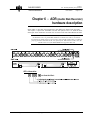
Audi o dat a i s recorded uncom pressed i n t he ADR uni t (Audi o Di sk recorder)
The i nput s / out put s are avai l abl e f rom t he rear panel of t he 1 U ext ernal rack:
Anal ogue Audi o Channel s 4 st ereo I N / 4 st ereo OUT 600 Ohm s Bal anced XLR.
Comment: As the VDR (Video Disk Recorder) and the ADR are two separate units,
the Genlock source is primordial and must be identical in order to avoid nonsynchronism problems (lipsync) between the video and the audio while recording or
playing back the material. On the rear panel of the Video Disk recorder unit, the
LOOP connector of the REF CB/BB is assigned to that end.
LED’s information:
EVS Broadcast Equipment
Email : [email protected]
Tel: +32-4/361 7000 FAX: +32-4/361 7099
DISK RECORDER
Technical Reference
Issue: 2.1
File: Technical_Reference_HCT4_001024.doc
Print: 26/10/00
Page: 36 / 36
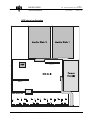
ADR internal configuration
EVS Broadcast Equipment
Email : [email protected]
Tel: +32-4/361 7000 FAX: +32-4/361 7099
DISK RECORDER
Technical Reference
Issue: 2.1
File: Technical_Reference_HCT4_001024.doc
Print: 26/10/00
Page: 37 / 37
Audio Level adjustements:
Peak and nom i nal audi o l evel s of each channel can be adj ust ed
i ndependent l y. These adj ust m ent s are m ade by changi ng j um pers’ posi t i ons
i nsi de t he ADR.
To access t he j um per’ s posi t i ons, t he cover of t he ADR m ust be rem oved.
Thi s operat i on shoul d be reserved t o a qual i f i ed EVS t echni ci an. I f you wi sh
t o perf orm t hese adj ust m ent s yoursel f , rem ove gent l y al l screws t o rel ease
cover pl at e.
Caution : High voltage is present inside the ADR and can cause electric shocks resulting
in serious hazards. Make sure the mains power cable is unplugged and wait at least 5
minutes to let electric capacitors discharge before opening the ADR.
1.
2.
3.
4.
5.
6.
7.
Peak l evel s:
j um per sel ect 12 or 18dBu
Nom i nal l evel s:
j um per sel ect –2 or 4 dBu
I nput i m pedance:
j um per sel ect 47K or 600 Ohm s
Out put i m pedance:
600 Ohm s
Sof t ware sel ect abl e i nput gai n:
0 t o 22. 5 dB (st ep 1. 5 dB)
Def aul t :
0 dB ot herwi se change l evel s specs
Sof t ware sel ect abl e out put at t enuat i on: 0 dB t o –46. 5 dB (st ep 1. 5 dB)
Comment:
1. The jumpers for selecting the input impedance are located next to the
corresponding XLR connectors.
2. The jumpers for selecting the input and the output levels are located opposite
the corresponding XLR connectors, next to the operational amplifiers.
EVS Broadcast Equipment
Email : [email protected]
Tel: +32-4/361 7000 FAX: +32-4/361 7099
DISK RECORDER
Technical Reference
Issue: 2.1
File: Technical_Reference_HCT4_001024.doc
Print: 26/10/00
Page: 38 / 38
Jum pers Set t i ngs:
ST17-24: I nput i m pedance
Cl osed: 600 Ohm s
(Def aul t ) Open: 47Kohm s
ST 1-2, 5-6, 9-10, 13-14: Peak & Nom i nal out put l evel s
(Def aul t ) Cl osed: Peak l evel 18 dBu, Nom i nal l evel 4dBu
Open: Peak l evel 12dBu, Nom i nal l evel –2dBu
ST 3-4, 7-8, 11-12, 15-16: Peak & Nom i nal I nput s l evel s
Cl osed: Peak l evel 12 dBu, Nom i nal l evel –2 dBu
(Def aul t ) Open: Peak l evel 18 dBu, Nom i nal l evel 4 dBu
M ake sure t hat set t i ngs are consi st ent f or al l channel s. Shoul d t hi s not be
t he case, i t woul d resul t i n di f f erent audi o l evel s, dependi ng on t he sel ect ed
channel s.
EVS Broadcast Equipment
Email : [email protected]
Tel: +32-4/361 7000 FAX: +32-4/361 7099
Issue: 2.1
File: Technical_Reference_HCT4_001024.doc
DISK RECORDER
Technical Reference
Print: 26/10/00
Page: 39 / 39
Chapter 7 - ADA converters
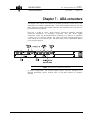
The di gi t al vi deo i nput s and out put s on t he BNC connect ors on t he rear of t he
m ai nf ram e are st andard CCI R601/ 656, 10-bi t Seri al Di gi t al I nt erf ace, and 270
M Hz. Separat e anal ogue PAL/ NTSC encoders are i nst al l ed on t he I / O board t o
provi de m oni t ori ng out put s.
EVS has a range of cards, whi ch perf orm conversi on bet ween anal ogue
com posi t e PAL/ NTSC or anal ogue com ponent and SDI seri al di gi t al
com ponent . These can be m ount ed ei t her i nt ernal l y or i n 1RU (up t o 6 boards)
or 3RU (up t o 16 boards) f ram es. The cards are f i t t ed wi t h adj ust m ent s f or
vi deo t i m i ng and TV st andard (625 l i ne/ 50Hz PAL or 525 l i ne/ 59. 94Hz NTSC)
i s set by push but t ons.
Note: Loop must be terminated if not used
I n som e conf i gurat i on, t he second si gnal out put coul d be assi gned as a
Genl ock Ref erence out put . Pl ease ref er t o t he ADA m anual f or j um pers’
set t i ngs.
EVS Broadcast Equipment
Email : [email protected]
Tel: +32-4/361 7000 FAX: +32-4/361 7099
Issue: 2.1
File: Technical_Reference_HCT4_001024.doc
DISK RECORDER
Technical Reference
Print: 26/10/00
Page: 40 / 40
Chapter 8 - EVS software
Version 6.17
Introduction
The EVS sof t ware i s used f or conf i gurat i on and m ai nt enance operat i ons. I t i s
al so used t o sel ect whi ch appl i cat i on t o run, si nce EVS M -JPEG di sk
recorders have t he abi l i t y t o run vari ous dedi cat ed appl i cat i ons (Vi deo Server,
Sl ow M ot i on, Vi deo Del ay, …).
W hen t urni ng on t he EVS m ai nf ram e, t he f i rst st ep i s t he PC boot sequence,
f ol l owed by a check of t he hardware st at us, and f i nal l y t he EVS sof t ware i s
st art ed. I f a def aul t appl i cat i on has been previ ousl y sel ect ed, t hi s appl i cat i on
w i l l st art aut om at i cal l y af t er a f ew seconds i f no key i s hi t . I f a def aul t
appl i cat i on hasn' t been def i ned or i f t he space bar i s hi t , t he syst em w i l l
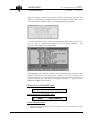
rem ai n i n t he EVS m ai n m enu (see snapshot next page) and wai t f or t he
operat or' s next com m and.
1. VGA↔
↔B&W Video Driver :
Bet ween t he PC boot and t he hardware check, t he vi deo dri ver i s l oaded and
t he di spl ay i s aut om at i cal l y swi t ched t o B&W vi deo m ode, al l owi ng t he VGA
screen t o be di spl ayed on a st andard com posi t e vi deo m oni t or usi ng t he
VGA↔ BNC adapt er provi ded wi t h t he uni t . I f a VGA screen i s di rect l y
connect ed t o t he VGA connect or of t he m ai nf ram e, press si m ul t aneousl y <
ALT > and <Backspace> on t he keyboard t o swi t ch back t o t he VGA m ode.
Pressi ng < ALT > and <Backspace> agai n wi l l swi t ch agai n t o B&W vi deo
m ode.
EVS Broadcast Equipment
Email : [email protected]
Tel: +32-4/361 7000 FAX: +32-4/361 7099
DISK RECORDER
Technical Reference
Issue: 2.1
File: Technical_Reference_HCT4_001024.doc
Print: 26/10/00
Page: 41 / 41
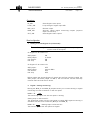
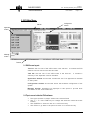
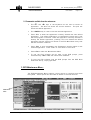
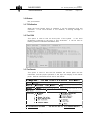
2. EVS Main Menu :
Title bar
Configuration
window
Application
window
Message
window
Task bar
2.1 EVS Screen layout:
Ti tl e bar: t he f i rst l i ne of t he VGA screen i s t he t i t l e bar. I t cont ai ns t he EVS
sof t ware revi si on and current dat e and t i m e.
Task bar: t he l ast l i ne of t he VGA screen i s t he t ask bar.
sum m ary of t he keyboard cont rol s avai l abl e.
I t cont ai ns a
Appl i cati on wi ndow: t hi s wi ndow cont ai ns t he l i st of al l appl i cat i ons i nst al l ed
on t he syst em .
Confi gurati on wi ndow: t hi s wi ndow shows t he hardware conf i gurat i on of t he
syst em .
M essage wi ndow: m essages are di spl ayed i n t hi s space t o provi de m ore
i nf orm at i on on t he current sel ect i on.
2.2 Tips to move inside the EVS software:
•= The act i ve wi ndow i s al ways shown wi t h a doubl e f ram e
•= Use <↑>, <↓> and <TAB> keys t o change t he sel ect i on i nsi de t he act i ve
wi ndow
•= Use <ENTER> t o sel ect an i t em or t o conf i rm an ent ry
•= Use <ESC> t o go back t o t he previ ous m enu or t o cancel an ent ry
EVS Broadcast Equipment
Email : [email protected]
Tel: +32-4/361 7000 FAX: +32-4/361 7099
Issue: 2.1
File: Technical_Reference_HCT4_001024.doc
DISK RECORDER
Technical Reference
Print: 26/10/00
Page: 42 / 42
2.3 Commands available from the main menu:
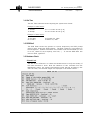
The < ↑ > and < ↓ > keys of t he keyboard can be used t o sel ect an
appl i cat i on. The bl ue l i ne shows t he current sel ect i on. The pi nk l i ne
shows t he def aul t appl i cat i on.
The <ENTER> key i s used t o st art t he sel ect ed appl i cat i on.
Press <F7> t o m ake t he appl i cat i on current l y sel ect ed t he new def aul t
appl i cat i on. The def aul t appl i cat i on i s aut om at i cal l y st art ed every t i m e
t he EVS program i s ent ered. W hen t he appl i cat i on current l y sel ect ed i s
al ready t he def aul t appl i cat i on, pressi ng <F7> w i l l di sabl e t he def aul t
appl i cat i on and t he syst em wi l l rem ai n i n t he E V S M ai n Menu every t i m e
t he EVS sof t ware i s ent ered.
Press <F8> t o open i m m edi at el y t he Param et ers wi ndow rel at ed t o t he
sel ect ed appl i cat i on. Press <ESC> t o com e back t o m ai n m enu.
Press <F9> t o ent er t he M ai nt enance M enu.
To exi t t he EVS sof t ware and go back t o t he DOS prom pt , press
si m ul t aneousl y <ALT>+<Q> and conf i rm wi t h <ENTER>.
To st art t he EVS sof t ware f rom t he DOS (except f rom t he DOS Shel l
m ent i oned above), si m pl y t ype RUN.
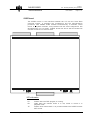
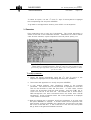
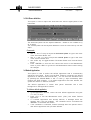
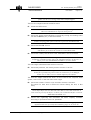
3. EVS Maintenance Menu :
The EVS M ai nt enance M enu cont ai ns vari ous opt i ons t o conf i gure and check
t he syst em . These opt i ons are descri bed i n det ai l s i n t he next sect i ons.
Maintenance
Menu
EVS Broadcast Equipment
Email : [email protected]
Tel: +32-4/361 7000 FAX: +32-4/361 7099
DISK RECORDER
Technical Reference
Issue: 2.1
File: Technical_Reference_HCT4_001024.doc
Print: 26/10/00
Page: 43 / 43
To sel ect an opt i on, use t he <↑> and <↓> keys of t he keyboard t o hi ghl i ght
t he correspondi ng l i ne and press <ENTER>
To go back t o t he Appl i cat i on wi ndow, press <ESC> on t he keyboard
3.1 Parameters
Every appl i cat i on has i t s own set of param et ers. The current appl i cat i on i s
shown i n t he t i t l e of t he Param et ers wi ndow. Param et ers are used t o def i ne
vi deo & audi o channel s, adj ust com pressi on rat i os & pi ct ure qual i t y, et c.
Important notice: Most parameters are factory preset, and should not be modified
without advice of qualified EVS staff. Improper values for some parameters will
prevent the proper operation of the system. Please refer to the parameter’s charts
for correct values
To modify a parameter :
1.
Sel ect t he desi red param et ers usi ng t he <↑> and <↓> keys of t he
keyboard t o hi ghl i ght t he correspondi ng l i ne and press <ENTER>
2.
Then sel ect t he appl i cat i on t o m odi f y and press <ENTER>
3.
A new wi ndow appears, wi t h i nf orm at i on rel at ed t o t he sel ect ed
param et er. The current val ue of t he param et er i s di spl ayed i n a sm al l box
and can be m odi f i ed t o ent er t he new val ue. I n som e cases, several
val ues can be adj ust ed f rom t he sam e wi ndow. Use t he <TAB> key t o
m ove f rom one box t o t he next one. The sel ect ed box i s shown wi t h a
RED background, t he ot her accessi bl e boxes are shown wi t h a BLUE
background. Som e i nf orm at i on about t he current param et er i s di spl ayed
i n t he cent er of t he wi ndow.
3. W hen t he desi red box i s sel ect ed, m odi f y t he param et er t o i t s new val ue
and press <ENTER> t o val i dat e. I f several val ues can be adj ust ed i n t he
sam e wi ndow, pressi ng <ENTER> wi l l val i dat e t he current ent ry and pl ace
t he cursor i n t he next box. I f t he current box i s t he l ast one, t he syst em
w i l l go back t o t he general Param et ers wi ndow
EVS Broadcast Equipment
Email : [email protected]
Tel: +32-4/361 7000 FAX: +32-4/361 7099
Issue: 2.1
File: Technical_Reference_HCT4_001024.doc
DISK RECORDER
Technical Reference
4.
Print: 26/10/00
Page: 44 / 44
W hen you are back t o t he general Param et ers wi ndow, you can ei t her
sel ect a new param et er t o adj ust usi ng t he <↑> and <↓> keys, or press
<ESC> t o go back t o t he M ai nt enance M enu
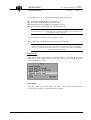
I f t he new val ue of t he param et ers i s out of range, t he ol d val ue i s not
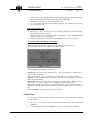
changed and t he f ol l owi ng m essage appears:
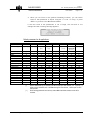
Default parameters for all applications:
Application
LSM 1CAM
VDL 2CH
VDL 4CH LSM 2CAM
NbrRecChnl (*)
1 (100) (1)
1 (100) (1)
2 (50,50)
(1,1)
(2)
1
0
1
256
90
-6
30
16
19
1
0
0
0
6
4
1000
3000
10
(2) or (4)
1
0
1
256
100
-6
25
16
19
1
0
0
0
6
4
1000
3000
10
(2,2)
2
0
1
256
100
-6
40
16
19
1
0
1
2
7
5
1000
3000
10
Multi Audio Options
nbrPlayChnl
teletex
audio
diskBlkSize
operationalDiskSize
lip-sync
requestedComp
minLumaTbl
MinChromaTbl
interpol4L
interpolValid
enableSCSITracking
MinTfrPnd (**)
MaxTfrPnd (**)
MaxTfrRec (**)
AdjFactMin
AdjFactMax
Vigour
(*)
(**)
EVS Broadcast Equipment
SLSM
LSM 3CAM
LSM4CAM SPOTBOX
2 (50,50)
(1,1)
1 (100) 1
3 (33,33,33)
(1,1,1)
N/A
2
0
1
256
90
-6
40
16
19
1
0
1
2
7
5
1000
3000
10
(2)
1
0
1
256
90
-6
55
16
19
1
1
1
2
7
5
1000
3000
10
N/A
1
0
1
256
90
-6
50
16
19
1
0
1
2
7
5
1000
3000
10
4
1 (100) (1)
(25,25,25,25)
(1,1,1,1)
N/A
N/A
2
3
0
0
1
1
256
256
90
100
-6
-6
70
30
16
16
19
19
1
1
0
0
1
0
2
0
7
6
5
4
1000
1000
3000
3000
10
10
Syntax : NbrRecChnl (% per channel) (nbr stereo inputs per video channel). Ex : 2 (50,50) (1,1)
means 2 record channels, 50% of available storage for each channel, 1 stereo input for each
video channel.
SCSI Tracking parameters are valid only with 32 MB Video Buffer installed on the HCT4
controller.
Email : [email protected]
Tel: +32-4/361 7000 FAX: +32-4/361 7099
DISK RECORDER
Technical Reference
Issue: 2.1
File: Technical_Reference_HCT4_001024.doc
Print: 26/10/00
Page: 45 / 45
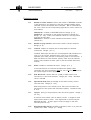
Parameters overview:
1. 1. 1
Num ber of vi deo channel : sel ect s t he num ber of RECORD channel s
of t he appl i cat i on, t he part i t i on of t he di sk st orage bet ween t hese
channel s, and t he associ at ed audi o channel s. Not al l com bi nat i ons
are val i d. Ref er t o t he correspondi ng appl i cat i on' s user' s m anual f or
m ore det ai l s.
nbrRecChnl : num ber of RECORD channel s. Range: [ 0…8]
Chnl Si ze X : percent age of di sk space al l ocat ed t o channel # X.
Range : [ 0…100] . Tot al of al l Chnl Si ze val ues f or one appl i cat i on
m ust not exceed 100% .
nbrAudi o X : num ber of audi o channel s associ at ed t o record
channel # X.
1. 1. 2
Num ber of pl ay channel : def i nes t he num ber of PLAY channel s.
Range: [ 0…8]
1. 1. 3
Tel etext: enabl es or di sabl es t he record/ pl ayback of t el et ext
i nf orm at i on. Range : [ 0 or 1] .
The EVS JPEG di sk recorder can record/ pl ayback VBI i nf orm at i on i n
l i nes 15 t o 22 f or PAL st andard and i n l i nes 16 t o 23 f or NTSC
st andard (even f i el d) and t he correspondi ng l i nes i n t he odd f i el d. I f
ADA convert ers are used wi t h t he syst em , m ake sure t he Tel et ext
m ode i s al so enabl ed on t hese (ref er t o t he associ at ed ADA user' s
m anual )
1. 1. 4
Audi o: enabl es or di sabl es t he audi o. Range: [ 0 or 1] .
I f t he ext ernal EVS 16-ch Audi o Di sk Recorder (ADR) i s not
connect ed, t he audi o param et er m ust be set t o 0 (zero). Ot herwi se,
t he syst em m i ght not work properl y.
1. 1. 5
Di sk bl ock si ze: def i nes t he si ze (i n KB) of dat a bl ocks t o be
recorded t o or read f rom t he di sks. Range: [ 64…1024] . St andard
val ue i s 256 KB.
1. 1. 6
Operati onal di sk si ze: percent age of t he di sks act ual l y used t o
st ore t he dat a. Range: [ 0…100] .
Rest ri ct i ng access t o t he cent er part of t he dri ves i ncreases t he
perf orm ance of t he syst em but decreases capaci t y. St andard val ue
i s 70 % .
1. 1. 7
Li psync: del ay (i n f i el d) bet ween vi deo and audi o si gnal s. Range: [ 50…50] .
A posi t i ve val ue m eans vi deo i s ahead of audi o. A negat i ve val ue
m eans audi o ahead of vi deo. Thi s adj ust m ent i s done duri ng t he
R EC O R D process. A new Li psync val ue w i l l appl y f or t he next
recorded pi ct ures onl y.
1. 1. 8
EVS Broadcast Equipment
Requested com pressi on: M -JPEG com pressi on rat i o (x 10) t hat t he
syst em m ust reach. Range: [ 17…32767] .
Email : [email protected]
Tel: +32-4/361 7000 FAX: +32-4/361 7099
DISK RECORDER
Issue: 2.1
File: Technical_Reference_HCT4_001024.doc
Technical Reference
Print: 26/10/00
Page: 46 / 46
The dynam i c com pressi on m anagem ent syst em m odi f y com pressi on
t abl es f or each recorded f i el d t o keep t he com pressi on rat i o as cl ose
as possi bl e t o t he t arget . A val ue of 60 f or t hi s param et ers m eans
an act ual com pressi on rat i on of 6 (com parabl e t o ßet acam SP
qual i t y). A val ue of 30 m eans an act ual rat i o of 3 (com parabl e t o
Di gi t al ßet acam qual i t y). A l ower com pressi on m eans bet t er pi ct ure
qual i t y and l ess st orage capaci t y but a hi gher bandwi dt h i s requi red.
I m proper val ues can l ead t o exceed di sks perf orm ance, causi ng
f rozen pi ct ures duri ng pl ayback.
1. 1. 9
M i ni m um l um a tabl e: val ue of t he l owest t abl e t o use f or
quant i zat i on of l um i nance. Range: [ 2…255] .
The l ower t he t abl e, t he bet t er t he f i nal pi ct ure qual i t y. However,
l ower t abl es requi re a hi gher bandwi dt h. I m proper val ues can l ead
t o exceed di sks perf orm ance, causi ng f rozen pi ct ures duri ng
pl ayback.
1. 1. 10
M i ni m um chrom a tabl e: val ue of t he l owest t abl e t o use f or
quant i zat i on of chrom i nance. Range: [ 2…255] .
The sam e rem ark appl i es f or t hi s param et er. Si nce t he chrom i nance
i s not as cri t i cal as l um i nance f or pi ct ure qual i t y, sl i ght l y hi gher
val ues can be used. A t ypi cal rat i o bet ween chrom i nance and
l um i nance t abl es i s 1. 2.
1. 1. 11
Four l i nes i nterpol ati on: sel ect s bet ween 2-l i ne and 4-l i ne
i nt erpol at i on process. Range: [ 0 or 1] . Sel ect 0 f or 2-l i ne
i nt erpol at i on and 1 f or 4-l i ne i nt erpol at i on. Ref er t o t he next
param et er f or det ai l s.
1. 1. 12
I nterpol ati on val i dati on: enabl es or di sabl es t he i nt erpol at i on
process. Range: [ 0 or 1] . Sel ect 0 t o di sabl e t he i nt erpol at i on
process, or 1 t o enabl e t he i nt erpol at i on process sel ect ed by t he
' Four l i nes i nt erpol at i on' param et er.
The i nt erpol at i on process i s ai m ed at reduci ng t he vert i cal j i t t er of
t he pi ct ures t hat i s present duri ng sl ow-m ot i on repl ays. Thi s vert i cal
j i t t er i s act ual l y caused by a vi ol at i on of t he f ram e pari t y when
pl ayi ng back t he pi ct ures at l ess t han 100 % speed.
The process consi st s i n re-bui l di ng new f ram es t o produce a m ore
t ransparent resul t .
These f ram es have t o be i nt erpol at ed i . e. cal cul at ed by m aki ng sui t abl y wei ght ed averages of adj acent
l i nes. There are 2 i nt erpol at i on m odes: t he 2-l i ne i nt erpol at or and
t he 4-l i ne i nt erpol at or. Di sadvant age of t hi s m et hod i s t hat i t
reduces t he vert i cal resol ut i on. Thi s i s part i cul arl y t rue wi t h t he 4l i ne i nt erpol at or.
The user can choose bet ween 3 m odes:
no i nterpol ati on : m axi m i ze t he vert i cal bandwi dt h of t he pi ct ure
but a vert i cal j i t t er appears i n “Sl oM o”. [ set ' I nt erpol at i on
val i dat i on' t o 0, what ever t he val ue of ' Four l i nes i nt erpol at i on' ]
EVS Broadcast Equipment
Email : [email protected]
Tel: +32-4/361 7000 FAX: +32-4/361 7099
Issue: 2.1
File: Technical_Reference_HCT4_001024.doc
DISK RECORDER
Technical Reference
Print: 26/10/00
Page: 47 / 47
2-l i ne i nterpol ator: reduce t he vert i cal j i t t er but t he vert i cal
bandwi dt h i s reduced. [ set ' Four l i nes i nt erpol at i on' t o 0 and
' I nt erpol at i on val i dat i on' t o 1]
4-l i ne i nterpol ator: t he pi ct ure i s perf ect l y st eady but t he vert i cal
bandwi dt h i s even m ore reduced. [ set ' Four l i nes i nt erpol at i on' t o
1 and ' I nt erpol at i on val i dat i on' t o 1]
Note that all VTRs use interpolation in PLAY VAR mode.
1. 1. 13
SCSI tracki ng: enabl e or di sabl e t he t racki ng of t he di sk bandwi dt h
t o adj ust aut om at i cal l y com pressi on param et ers i n order t o achi eve
t he best pi ct ure qual i t y. Range: [ 0 or 1]
1. 1. 14
M i n. tfr pnd: i nt ernal EVS param et er.
Do not m odi f y.
M ax. tfr. Pnd: i nt ernal EVS param et er.
Do not m odi f y.
M ax. tfr. rec: i nt ernal EVS param et er.
Do not m odi f y.
M i n. Adj usti ng Factor: i nt ernal EVS param et er.
Do not m odi f y.
M ax. Adj usti ng Factor: i nt ernal EVS param et er.
Do not m odi f y.
Vi gor: i nt ernal EVS param et er. Do not m odi f y.
1. 1. 15
1. 1. 16
1. 1. 17
1. 1. 18
1. 1. 19
Example:
Modifying the audio-video synchronisation ('Lipsync' parameter)
•= I n t he EVS M ai n M enu, use <↑> and <↓> keys t o sel ect t he appl i cat i on f or
whi ch you want t o m odi f y t he param et er
•= Press <F9> t o open t he M ai nt enance M enu
•= Use <↑> and <↓> keys t o m ove i nsi de t he l i st unt i l ' Param et ers' i s
hi ghl i ght ed
•= Press <ENTER> t o sel ect t hi s f eat ure.
di spl ayed on t he ri ght si de of t he screen
The Param et er wi ndow i s
•= Use <↑> and <↓> keys t o m ove i nsi de t he l i st unt i l ' Li psync' i s hi ghl i ght ed
•= Press <ENTER> t o sel ect t hi s param et er.
cent er of t he screen.
A new wi ndow appears i n t he
•= Type i n t he new val ue of t he l i psync.
•= Press <ENTER> t o val i dat e and ret urn t o t he general Param et ers wi ndow.
•= Sel ect anot her param et er t o m odi f y or press <ESC> t o ret urn t o t he
M ai nt enance M enu.
EVS Broadcast Equipment
Email : [email protected]
Tel: +32-4/361 7000 FAX: +32-4/361 7099
DISK RECORDER
Technical Reference
Issue: 2.1
File: Technical_Reference_HCT4_001024.doc
Print: 26/10/00
Page: 48 / 48
3.2 Configuration
Thi s f unct i on i s used t o set t he hardware conf i gurat i on of t he syst em (boards
rel ease num bers, port set t i ngs, …).
There' s onl y one conf i gurat i on of
hardware f or t he whol e syst em .
Important notice: The configuration is factory preset, and should not be modified
without advice of qualified EVS staff. Improper values for some parameters will
prevent the proper operation of the system.
Configuration window
To ent er t he conf i gurat i on wi ndow, press <F9> t o open t he M ai nt enance
m enu, sel ect ' Conf i gurat i on' and press <ENTER>. A doubl e f ram e appears
around t he Conf i gurat i on wi ndow, and t he cursor bl i nks next t o t he ' HCT'
l abel .
To modify an item in the configuration window :
1.
2.
3.
EVS Broadcast Equipment
Use <↑>, <↓> or <TAB> keys t o sel ect t he desi red i t em
Press <SPACE BAR> several t i m es unt i l t he correct val ue appears
Sel ect anot her i t em t o m odi f y or press <ESC> t o go back t o t he
M ai nt enance M enu
Email : [email protected]
Tel: +32-4/361 7000 FAX: +32-4/361 7099
DISK RECORDER
Issue: 2.1
File: Technical_Reference_HCT4_001024.doc
Technical Reference
Print: 26/10/00
Page: 49 / 49
Configuration items overview :
Note: The order of the boards in this list is the same as inside the mainframe, from
top to bottom. The revision of a board located in the front part of the mainframe is
always written on a white label on the left front end of the board
Rev : A1 SN : 154 DIGITAL I/O4
Board serial number
Board revision
Board type
1. 1. 1. HCT: revi si on of t he HCT board (Vi deo Rai d cont rol l er). The HCT board
i s l ocat ed i m m edi at el y underneat h t he di sk t ray and i s present on al l
syst em s.
1. 1. 2. CODEC 1: revi si on of t he f i rst CODEC board (i m m edi at el y underneat h
t he HCT board). Thi s board i s present on al l syst em s
1. 1. 3. CODEC 2: revi si on of t he second CODEC board (l ocat ed underneat h
CODEC1). Not present on al l syst em s.
1. 1. 4. CODEC 3: revi si on of t he t hi rd CODEC board (l ocat ed underneat h
CODEC2). Not present on al l syst em s.
1. 1. 5. I O3: revi si on of t he t hi rd di gi t al I / O board (*) (l ocat ed underneat h
CODEC3). Not present on al l syst em s.
1. 1. 6. I O2: revi si on of t he second di gi t al I / O board (*) (l ocat ed underneat h
I O3). Not present on al l syst em s.
1. 1. 7. I O Genl ock: revi si on of t he f i rst di gi t al I / O board (*) (l ocat ed
underneat h I O2). Thi s board i s present on al l syst em s.
1.1.8. KeyM i x Board: revi si on of t he Keyer/ M i xer board (l ocat ed underneat h
I O Genl ock). Not present on al l syst em s.
(*) There are 2 types of digital I/O boards: Digital I/O and Digital I/O4. Make sure
to check the revision number and the board type written on the left front end of the
I/O board. If the I/O board type is DIGITAL I/O, the revision number in the
configuration window can be A4, A5 or A6. If the I/O board type is DIGITAL I/O4,
the revision number in the configuration can be IO4 R0, IO4 R1, etc …
1. 1. 9. TC Board: revi si on of t he Ti m eCode board. Thi s board i s pl ugged i nt o
t he PC m ot herboard at t he back of t he syst em .
1. 1. 10. I O Type: set t i ngs of t he seri al port s of t he PC and t he st andard m ul t i I / O board. M ost appl i cat i ons use COM s 1, 2, 9, 10. Ref er t o t he
appl i cat i on' s operat i on m anual f or det ai l ed set t i ngs.
1. 1. 11. CPU : t ype of processor used on t he PC m ot herboard (486 or Pent i um )
1.1.12. Standard : vi deo st andard PAL or NTSC
3.3 Options
Thi s f unct i on i s used t o m anage sof t ware l i cense codes f or al l appl i cat i ons.
To run part i cul ar appl i cat i on sof t ware and/ or speci f i c sof t ware opt i ons, not
onl y t he sof t ware i t sel f i s requi red but al so a l i cense key, whi ch i s uni que f or
every opt i on on every syst em .
Thi s l i cense key can be t em porary unt i l a def i ned deadl i ne f or dem onst rat i on
purposes, or perm anent wi t h no t i m e l i m i t .
EVS Broadcast Equipment
Email : [email protected]
Tel: +32-4/361 7000 FAX: +32-4/361 7099
Issue: 2.1
File: Technical_Reference_HCT4_001024.doc
DISK RECORDER
Technical Reference
Print: 26/10/00
Page: 50 / 50
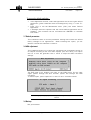
W hen a t em porary l i cense key i s about t o expi re, t he syst em w i l l w arn t he
operat or. The warni ng i s di spl ayed every t i m e t he EVS sof t ware st art s, f rom
a f ew days bef ore t he expi ry dat e. The f ol l owi ng m essage appears:
To ent er t he Opt i ons m enu, open t he M ai nt enance M enu, t hen use t he <↑>
and <↓> keys t o hi ghl i ght t he ' Opt i ons' l i ne, and press <ENTER>. The
Opt i ons wi ndow appears as shown bel ow:
The hi ghl i ght ed l i nes (yel l ow charact ers on a bl ue background) show t he val i d
opt i ons. The red l i ne i s t he current l i ne. Use t he <↑> and <↓> keys t o m ove
i nsi de t he opt i ons l i st . W hen t em porary opt i ons are present , t he l i m i t t i m e f or
t hese i s shown i n t he l ower part of t he Opt i ons wi ndow. To go back t o t he
M ai nt enance M enu, press <ESC>.
Example of line for a PERMANENT option:
10
PERM
LSM 1 CAM all options
Example of line for a TEMPORARY option:
21
DEMO
LSM 2 CAM Basic
To enter new license codes:
•= M ake sure t he cursor bl i nks i n t he ' Opt i on' box i n t he l ower part of t he
Opt i ons wi ndows
EVS Broadcast Equipment
Email : [email protected]
Tel: +32-4/361 7000 FAX: +32-4/361 7099
DISK RECORDER
Technical Reference
Issue: 2.1
File: Technical_Reference_HCT4_001024.doc
Print: 26/10/00
Page: 51 / 51
•= Type i n t he code correspondi ng t o t he desi red opt i on (l i cense codes are
sent by EVS Techni cal Support Dpt ) and press <ENTER>
•= Repeat t hi s operat i on f or t he next l i cense code
•= You can check t hat t he correspondi ng opt i ons are enabl ed by scrol l i ng
i nt o t he opt i ons l i st
To remove a license code:
•= Use t he <↑> and <↓> keys t o m ove i nsi de t he opt i ons l i st and sel ect t he
opt i on t hat m ust be rem oved
•= W hen t he opt i on i s sel ect ed (whi t e charact ers), press si m ul t aneousl y
<CTRL>+<DEL> on t he keyboard
•= Conf i rm t he del et e of t he opt i on wi t h <ENTER> or cancel wi t h <ESC>.
To check hardware key (dongle) information:
W hen t he Opt i ons wi ndow i s open, press si m ul t aneousl y <ALT>+<I >
A new wi ndow ' Opt i on I nf o' appears as shown bel ow:
The f ol l owi ng i nf orm at i on i s avai l abl e:
System I D : I D code of t he hardware key. Thi s i nf orm at i on i s necessary f or
l i cense code cal cul at i on
User: user' s nam e. Thi s i nf orm at i on i s a l abel and i s f or i nf orm at i on onl y
Seri al #: seri al num ber of t he m ai nf ram e. The S/ N i s al so wri t t en on t he back
pl at e of t he m ai nf ram e
Li m i t ti m e: expi ry dat e & t i m e f or t em porary l i cense codes. W hen t he l i m i t
dat e i s Jan 01, 1970, i t m eans t hat no t em porary codes are present
Key ti m e: current dat e & t i m e of t he hardware key. Thi s i s t he dat e used t o
det erm i ne whet her l i m i t t i m e f or t em porary l i cense codes has been reached or
not .
Press <ENTER> t o go back t o t he Opt i ons wi ndow
3.4 Clear Clips
Thi s f unct i on i s used t o erase al l cl i ps and pl ayl i st s of al l appl i cat i ons present
on t he syst em .
•= Use t he <↑> and <↓> keys t o sel ect t he ' Cl ear Cl i ps' l i ne and press
<ENTER>
•= You are asked t o conf i rm (<ENTER>) or cancel (<ESC>) t he com m and
EVS Broadcast Equipment
Email : [email protected]
Tel: +32-4/361 7000 FAX: +32-4/361 7099
DISK RECORDER
Technical Reference
Issue: 2.1
File: Technical_Reference_HCT4_001024.doc
Print: 26/10/00
Page: 52 / 52
3.5 V-H Phase definition
Thi s opt i on i s used t o adj ust t he hori zont al and vert i cal di gi t al phase of t he
m ai nf ram e.
The hori zont al phase can be adj ust ed bet ween - 25900 ns and +25900 ns by
37 ns st eps.
The vert i cal phase can be adj ust ed bet ween -6 and +6 vi deo l i nes by one-l i ne
st eps.
Commands:
•= Use <↑> and <↓> keys t o adj ust t he hori zontal phase or t ype i n t he val ue
i n t he ' Hori zont al Phase' box
•= Use <←> and <→> keys t o adj ust t he verti cal phase or t ype i n t he val ue
i n t he ' Vert i cal Phase' box
•= Use <TAB> key t o t oggl e bet ween ' Hori zont al Phase' and ' Vert i cal Phase'
boxes
•= Press <ENTER> t o save t he new val ues and ret urn t o t he M ai nt enance
m enu or press <ESC> t o go back t o t he M ai nt enance m enu wi t hout savi ng
t he changes
3.6 Default Application:
Thi s opt i on i s used t o def i ne t he def aul t appl i cat i on t hat i s aut om at i cal l y
st art ed by t he syst em . Every t i m e t he EVS sof t ware i s ent ered, t he def aul t
appl i cat i on i s st art ed a f ew seconds l at er. You can avoi d t he aut om at i c st art
by pressi ng t he <SPACE BAR> or t he < ↑> and <↓> keys i m m edi at el y when
ent eri ng t he EVS sof t ware. I f no def aul t appl i cat i on has been def i ned, t he
syst em wi l l rem ai n i n t he E V S sof t ware.
The def aul t appl i cat i on i s shown wi t h yel l ow charact ers and a bl ue
background i n t he Appl i cat i on wi ndow.
To define a default application:
•= I n t he Appl i cat i on wi ndow, sel ect t he new def aul t appl i cat i on usi ng t he
<↑> and <↓> keys.
•= Press <F7> or cal l t he M ai nt enance m enu (<F9>) and sel ect ' Def aul t
Appl i cat i on'
•= I f a def aul t appl i cat i on was al ready def i ned, a m essage warns t he
operat or t hat i t wi l l be di sabl ed. The com m and can be conf i rm ed wi t h
<ENTER> or cancel l ed wi t h <ESC>
•= I f t he com m and i s conf i rm ed, anot her m essage t el l s t he operat or t hat a
new def aul t appl i cat i on has j ust been def i ned.
EVS Broadcast Equipment
Email : [email protected]
Tel: +32-4/361 7000 FAX: +32-4/361 7099
DISK RECORDER
Technical Reference
Issue: 2.1
File: Technical_Reference_HCT4_001024.doc
Print: 26/10/00
Page: 53 / 53
To remove the default application :
•= I n t he Appl i cat i on wi ndow, sel ect t he appl i cat i on t hat i s t he current def aul t
appl i cat i on (yel l ow charact ers wi t h bl ue background) usi ng <↑> and <↓>
keys.
•= Press <F7> or cal l t he M ai nt enance m enu (<F9>) and sel ect ' Def aul t
Appl i cat i on'
•= a m essage warns t he operat or t hat t he current def aul t appl i cat i on w i l l be
di sabl ed. The com m and can be conf i rm ed wi t h <ENTER> or cancel l ed
wi t h <ESC>
3.7 Default parameters
Thi s com m and erases al l current param et ers set t i ngs and rest ore t he def aul t
f act ory set t i ngs f or al l appl i cat i ons. W hen sel ect i ng t hi s opt i on, you are
asked t o conf i rm t he com m and or cancel i t .
3.8 ADA adjustment
Thi s com m and al l ows you t o adj ust t he l um i nance and chrom i nance l evel s on
al l out put s accordi ng t o t he col or bars di spl ays (75% and 100% ). Thi s opt i on
act s as a col or bar generat or and i s usef ul t o adj ust t he ADA convert ers
set t i ngs.
The E2E m ode (Li ve) di spl ays one i nput on t he PGM out put . So t he vi deo
si gnal passes t hrough t he di sk recorder syst em and t hrough t he ADA
convert ers.
To swi t ch i nput s, press <space bar> i n t he I / O I N P U T S C A N N I N G wi ndow:
Note: To perform properly the ADA adjustments, please refer the ADA user’s
manual.
3.9 Backup
Not yet avai l abl e
EVS Broadcast Equipment
Email : [email protected]
Tel: +32-4/361 7000 FAX: +32-4/361 7099
DISK RECORDER
Technical Reference
Issue: 2.1
File: Technical_Reference_HCT4_001024.doc
Print: 26/10/00
Page: 54 / 54
3.10 Restore
Not yet avai l abl e
3.11 TS Calibration
W hen t he Touch Screen opt i on i s i nst al l ed, i t can be cal i brat ed usi ng t hi s
com m and. I f t he Touch Screen i s not i nst al l ed, a warni ng m essage i s
di spl ayed.
3.12 Test COM
Thi s opt i on i s used t o t est al l seri al port s of t he syst em . I t w i l l show
peri pheral s connect ed t o t he port s or echo t erm i nat or. I t can be used t o
i dent i f y probl em s on RS232 and RS422 l i nks.
3.13 Test Remote
Thi s opt i on i s used t o t est t he l i nk bet ween t he rem ot e panel and t he
m ai nf ram e, and t he proper operat i on of t he keys and di spl ay of t he rem ot e
panel . Several com m ands can be sent t o t he rem ot e:
EVS Broadcast Equipment
Email : [email protected]
Tel: +32-4/361 7000 FAX: +32-4/361 7099
Issue: 2.1
File: Technical_Reference_HCT4_001024.doc
DISK RECORDER
Technical Reference
Print: 26/10/00
Page: 55 / 55
3.14 Set Time
The Set Ti m e com m and al l ows adj ust i ng t he syst em t i m e & dat e.
Exam pl e of t i m e f orm at :
11: 24: 32a
10: 58: 00p
f or 11 h 24 m i n 32 sec (a. m . )
f or 10 h 58 m i n 00 sec (p. m . )
Exam pl e of dat e f orm at :
10-24-1999
03-15-2001
f or Oct ober 24, 1999
f or M arch 15, 2001
3.15 DOS Shell
The DOS Shel l al l ows t he operat or t o
wi t hout real l y exi t i ng t he EVS sof t ware.
t he background. Al l DOS com m ands are
f or a f i l e, check PC dri ve capaci t y, edi t
ret urn t o EVS, t ype EXI T.
access t em porari l y t he DOS prom pt
The EVS sof t ware i s st i l l present i n
avai l abl e f rom t he DOS Shel l (t o l ook
f i l es, …). To exi t t he DOS Shel l and
3.16 Hardware Check
Automatic test
The ai m of t hi s sof t ware i s t o check t he hardware and t o veri f y t he val i di t y of
t he dat a recorded t o di sks. Af t er t he sel ect i on of t hi s com m and f rom t he
M ai nt enance m enu, t he syst em aut om at i cal l y st art s t he t est processi ng. One
af t er t he ot her, t he di f f erent st ages are di spl ayed i n t he Check wi ndow:
EVS Broadcast Equipment
Email : [email protected]
Tel: +32-4/361 7000 FAX: +32-4/361 7099
DISK RECORDER
Issue: 2.1
File: Technical_Reference_HCT4_001024.doc
Technical Reference
Print: 26/10/00
Page: 56 / 56
Note: During the test process some error messages could appear. In this case,
please note the error message and contact EVS for support.
The f i rst f our st ages exam i ne t he HCT4 board:
#1: reset s t he HCT4 board
The LED B on the HCT4 board flashes during this stage.
This reset command never stops the check process.
#2: checks t he doubl e access RAM by successi vel y wri t i ng and readi ng codes
i nt o t he COM RAM (U17) of t he HCT4 board
If the test stops at this stage, an error message advises you to check if the HCT4
board is well plugged or if the U17 device is present on the HCT4 board
#3: checks t he EPROM versi on
If the test stops here, an error message notices the EPROM code is not found
and advises you to check the U23 device on the HCT4 board.
#4: checks t he val i di t y and t he si ze of t he CPU RAM of t he HCT4 board.
If the test stops here, an error message notices the size of the CPU RAM is
insufficient or another message notices the CPU RAM is defect. In this case, we
advise you to start the MEMORY CACHE test for more details.
The next st age downl oads/ reads t he C H E C K . B I N f i l e:
#5: checks t he presence, t he val i di t y and t he versi on of t he f i l e.
If the test stops here, an error message notices the CHECK.BIN file cannot be read.
So this file is probably not present in the current directory or is damaged.
In this case we advise you to re-install completely the software.
The next t wo st ages exam i ne t he di sks. As t hi s concerns t he com pl et e SCSI
syst em , t hi s sect i on of t he t est l ast s m uch l onger.
#6: checks t he num ber of di sks’ t rays and t est s t he di sk cont rol l ers.
The st at us f or each di sk i s not i ced as f ol l ows: Ready, No di sk, or Not
ready.
During this stage, the CHECK.LOG file is updated. A Time Out message appears
when a major defect has been detected in the disks or in the disk connectors. In
order to locate precisely the defect, we advise you to read the LOG file or start the
DISK READ & VERIFY test.
#7: checks di sk organi zi ng and cal cul at es t he di sks’ capaci t y avai l abl e
accordi ng t o operat i onal di sk si ze param et er.
If the test stops here, this means that the HCT4 board is not working properly but a
dysfunction has been previously detected during stage #1, #2, #3 or #4.
EVS Broadcast Equipment
Email : [email protected]
Tel: +32-4/361 7000 FAX: +32-4/361 7099
DISK RECORDER
Issue: 2.1
File: Technical_Reference_HCT4_001024.doc
Technical Reference
Print: 26/10/00
Page: 57 / 57
The st ages f rom 8 t o 11 downl oad/ read t he m i crocode sof t ware:
#8: downl oads
#9: downl oads
#10: downl oads
#11: downl oads
BOOT320. BI N f i l e (program f i l e)
CODEC. BI N f i l e (program f i l e)
HC4_ECC. RBF f i l e (conf i gurat i on f i l e)
HC4_VCT0. RBF f i l e (conf i gurat i on f i l e)
If the test stops at stage #8, #9, #10 or #11, an error message notices the file cannot
be read. So the file is probably missing or damaged. In this case we advise you to
re-install the complete software.
The l ast st age exam i nes t he si ze of m em ory cache:
#12: checks t he cache RAM and not i ces t he si ze avai l abl e.
If the test stops here, a message mentions a Time Out error.
This means that the microcode is not properly responding and the video buffer
RAM’s are probably implicated. In this case, we advise you to start the MEMORY
CACHE test for more details.
Diagnostic test
Af t er t he aut om at i c t est process, a sel ect i on m enu i s avai l abl e i n t he l ower
ri ght corner i n t he CHECK wi ndow. Thi s m enu al l ows you t o com pl et e and t o
ref i ne t he hardware check.
Disk defect
Thi s t est gi ves you det ai l s about t he di sks used: St at us, M anuf act urer,
Product t ype, Capaci t y, Pri m ary and Grown def ect s.
EVS Broadcast Equipment
Email : [email protected]
Tel: +32-4/361 7000 FAX: +32-4/361 7099
DISK RECORDER
Technical Reference
Issue: 2.1
File: Technical_Reference_HCT4_001024.doc
Print: 26/10/00
Page: 58 / 58
The pri m ary def ect s are norm al def ect s det ect ed at f act ory. The grown def ect s
are l i nked t o t he worki ng and shoul d be m oni t ored i f t he num ber i ncreases.
Disk Read & Verify
Thi s m enu t est s t he readi ng perf orm ance of di sks and checks t he val i di t y of
t he Dat a recorded.
To m ove t he cursor al ong by t he sel ect i on boxes, press <TABS>. To m ark a
sel ect i on box, press <SPACE BAR>
The Perform ance t est checks t he di sks’ access and cont rol s t he bandwi dt h.
The Veri fy t est checks t he val i di t y of Dat a recorded t o di sks
Each di sk can be cont rol l ed separat el y: press <TABS> and t hen <SPACE
BAR> t o sel ect t he desi red di sk.
I f one di sk i s f aul t y, t he t est processi ng st ops and t he <?> si gn appears on
t he error l ocat i on. I n t hi s case, we advi ce t o st art t he SCSI I nf o t est i n order
t o det erm i ne preci sel y t he error.
EVS Broadcast Equipment
Email : [email protected]
Tel: +32-4/361 7000 FAX: +32-4/361 7099
Issue: 2.1
File: Technical_Reference_HCT4_001024.doc
DISK RECORDER
Technical Reference
Print: 26/10/00
Page: 59 / 59
Disk Replace & Rebuild
This item is only available with the RAID5 option.
W hi l e t he wi ndow opens, t he sof t ware l oads t he Prot ect s t abl e i n order t o
det ect whi ch part of t he di sk has t o be rebui l t . The di sk t o rebui l d i s
aut om at i cal l y det ect ed and m arked wi t h a (° ) si gn.
To m ove t he cursor al ong by t he sel ect i on boxes, press <TABS>. To m ark a
sel ect i on box, press <SPACE BAR>
W hen a di sk probl em i s det ect ed, t he RAI D5 opt i on al l ows you t o work wi t h
onl y 4 di sks Sel ect t he No di sk to rebui l d i t em t o bypass t he recoveri ng
process, i f t hi s one i s not necessary, and t hen t o avoi d t he error m essages at
st art up.
Af t er t he di sk repl acem ent , you have t o st art t he REBUI LD process i n order t o
aut hori ze anew t he worki ng wi t h 5 di sks.
SCSI Info
This information is reserved to qualified EVS technicians.
The SCSI i nf orm at i on t races t he hi st ory of t he di f f erent def ect s spot t ed i n t he
ent i re SCSI syst em .
EVS Broadcast Equipment
Email : [email protected]
Tel: +32-4/361 7000 FAX: +32-4/361 7099
DISK RECORDER
Technical Reference
Issue: 2.1
File: Technical_Reference_HCT4_001024.doc
Print: 26/10/00
Page: 60 / 60
Memory cache test
Thi s i t em t est s t he vi deo buf f er RAM ’ s and t he M AC chi pset s l ocat ed on t he
HCT4 board. The above screen represent s graphi cal l y t he l ocat i on of
com ponent s on board.
I f one com ponent i s f aul t y, t he t est processi ng st ops and t he <?> si gn
appears on t he error l ocat i on. The com pl et e t est f or a 128M B cache si ze l ast s
12 m i nut es. For a qui ck t est , m ark t he Fast opt i on box by pressi ng <SPACE
BAR>
Log
The CHECK. LOG f i l e t races t he hi st ory of di sks over t he successi ve uses.
Thi s f i l e keeps wat ch on t he di sks’ def ect s.
EVS Broadcast Equipment
Email : [email protected]
Tel: +32-4/361 7000 FAX: +32-4/361 7099
DISK RECORDER
Technical Reference
Issue: 2.1
File: Technical_Reference_HCT4_001024.doc
Print: 26/10/00
Page: 61 / 61
Table of contents
Overview ___________________________________________________ 1
Disk Recorder Main specifications __________________________________________
Video_________________________________________________________________
Audio_________________________________________________________________
Capacity ______________________________________________________________
Raid level: 5 ___________________________________________________________
1
1
1
1
1
Chapter 1 - Technical Specifications _____________________________ 2
1.1 Unpacking__________________________________________________________ 2
1.2 Dimensions _________________________________________________________ 2
1.3 Installation__________________________________________________________ 4
1.4 Operating conditions _________________________________________________
1.4.1 Power Supply______________________________________________________
1.4.2 Grounding ________________________________________________________
1.4.3 Location __________________________________________________________
1.4.4 Ventilation & Rack Mounting __________________________________________
1.4.5 Compliance _______________________________________________________
4
4
4
4
5
5
Chapter 2 – Cabling___________________________________________ 6
Peripheral Equipment, Genlock and Timecode references _______________________ 6
RS422 connector of the Remote control panel_________________________________ 7
Video disk recorder cabling: _______________________________________________ 7
Audio Disk Recorder cabling: ______________________________________________ 8
RS422 between the ADR and the VDR units _______________________________ 8
1 CAM and SLSM____________________________________________________ 8
2 CAM’s ___________________________________________________________ 8
3 CAM’s ___________________________________________________________ 9
4 CAM’s ___________________________________________________________ 9
Video Delay ________________________________________________________ 9
Spot Box___________________________________________________________ 9
ADA converters: _______________________________________________________ 10
Chapter 3 – Compression_____________________________________ 11
Bit Rate Reduction - Table of quantization ___________________________________ 11
Ram video buffer - Block size _____________________________________________ 12
Disk duration and compression rate ________________________________________ 12
Chapter 4 : Interpolation______________________________________ 13
2-line interpolator: ______________________________________________________ 13
4-line interpolator: ______________________________________________________ 13
Chapter 5 - Hardware description ______________________________ 15
Physical Specifications __________________________________________________ 15
Internal PC Specifications: _______________________________________________ 16
EVS Broadcast Equipment
Email : [email protected]
Tel: +32-4/361 7000 FAX: +32-4/361 7099
DISK RECORDER
Technical Reference
Issue: 2.1
File: Technical_Reference_HCT4_001024.doc
Print: 26/10/00
Page: 62 / 62
Multi-access - Drives capacity ____________________________________________ 18
Video Hardware Presentation_____________________________________________ 19
Digital I/O4 ________________________________________________________ 20
Single input Digital I/O: _______________________________________________ 23
CODEC board: _____________________________________________________ 24
VIDEO RAID board: _________________________________________________ 26
Video Backplane: ___________________________________________________ 29
Video boards layout _________________________________________________ 29
PC Pentium Hardware Configuration _______________________________________ 31
Classical Multi I/O card: ______________________________________________ 32
EVS SIO3 Multi I/O card: _____________________________________________ 32
EVS CPI PC card:___________________________________________________ 33
Adrienne LTC reader card: ____________________________________________ 33
The SIO card: ______________________________________________________ 33
The TC/GPI card: ___________________________________________________ 34
Chapter 6 - ADR (Audio Disk Recorder) hardware description ______ 35
ADR internal configuration _______________________________________________ 36
Audio Level adjustements: _______________________________________________ 37
Chapter 7 - ADA converters___________________________________ 39
Chapter 8 - EVS software _____________________________________ 40
Introduction___________________________________________________________ 40
1. VGA↔B&W Video Driver :_____________________________________________ 40
2. EVS Main Menu : ____________________________________________________ 41
2.1 EVS Screen layout:_______________________________________________ 41
2.2 Tips to move inside the EVS software:________________________________ 41
2.3 Commands available from the main menu: ____________________________ 42
3. EVS Maintenance Menu : ______________________________________________ 42
3.1 Parameters _____________________________________________________ 43
3.2 Configuration ___________________________________________________ 48
3.3 Options ________________________________________________________ 49
3.4 Clear Clips _____________________________________________________ 51
3.5 V-H Phase definition______________________________________________ 52
3.6 Default Application:_______________________________________________ 52
3.7 Default parameters _______________________________________________ 53
3.8 ADA adjustment _________________________________________________ 53
3.9 Backup ________________________________________________________ 53
3.10 Restore _______________________________________________________ 54
3.11 TS Calibration__________________________________________________ 54
3.12 Test COM _____________________________________________________ 54
3.13 Test Remote___________________________________________________ 54
3.14 Set Time ______________________________________________________ 55
3.15 DOS Shell_____________________________________________________ 55
3.16 Hardware Check________________________________________________ 55
Automatic test ____________________________________________________ 55
Diagnostic test ____________________________________________________ 57
EVS Broadcast Equipment
Email : [email protected]
Tel: +32-4/361 7000 FAX: +32-4/361 7099
DISK RECORDER
Technical Reference
Issue: 2.1
File: Technical_Reference_HCT4_001024.doc
Print: 26/10/00
Page: 63 / 63
Notes
EVS Broadcast Equipment
Email : [email protected]
Tel: +32-4/361 7000 FAX: +32-4/361 7099
Europe, Africa & Middle East :
EVS Broadcast Equipment s.a.
Parc Scientifique du Sart Tilman - Rue Bois Saint-Jean 16 - 4102 Liege - BELGIUM
Tel : +32-4-361 7000 - Fax : +32-4-361 7099 -e-mail : [email protected]
France : EVS France s.a.
Quai Carnot 47 - 92210 Saint-Cloud - FRANCE
Tel : +33-1-5557 3625 - Fax : +33-1-4112 9783 - email : [email protected]
Italy : EVS Italia s.r.l.
Via Cipro 96 - 25124 Brescia - ITALY
Tel: +39-030 242 71 34 Fax: +39-030 2478182 - e-mail : [email protected]
North America : EVS Broadcast Equipment Inc.
9 Law Drive, Suite 200 – FAIRFIELD - NJ 07004 - USA
Tel : +1 (973) 575 7811 – Hotline: +1 (973) 575 7813 - Fax : +1 (973) 575 7812
e-mail : evsusa @ evs.tv
South America : EVS Argentina s.r.l.
Nicasio Oroño 1216 - 1416 Capital Federal - Buenos Aires Argentina
Tel: (0054) 11 4581-8465 - Fax: (0054) 11 4583-1143 - e-mail: [email protected]
Asia - Pacific : EVS Broadcast Equipment s.a.
430 DB Plaza - Discovery Bay - HONG KONG
Tel : +852-2914 2501 - Fax : +852-2914 2505 - e-mail : [email protected]