1
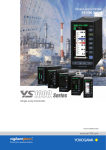
Single Loop Controller
YS1000 Series
Single Loop Controller
Bulletin 01B08A01-01E
www.ys1700.com
Easy to use
앬 Color LCD display with a wide variety of
screens
앬 Designed with a lightweight, compact case.
앬 Programs using text language or graphical
High reliability
앬 Dual CPU’s
앬 Built-in “hard manual”
앬 CE and FM Class I Div II approvals
Powerful and Flexible*
앬 Ethernet ready (MODBUS TCP)
앬 Supports MODBUS RTU serial
앬 Available peer to peer and DCS
communication options
앬 Extended I/O option available
A YS beyond ....
Compatibility
Compatible with 72 144mm cutout
IP54
Envision a plant...
The new YS1000 series of single-loop controllers is the
successor to the Yokogawa YS170 and YS80 single loop
controllers. The YS1000 series offers improved
connectivity with supervisory systems and incorporates
new, enhanced features that help operators work more
efficiently. The YS1000 will work efficiently in
petrochemical, chemical, power, pulp and paper, boiler
and combustion control applications.
앬 Easy upgrade for YS100
앬 Replacement housings for YS100 and YS80
controllers
앬 Excellent replacement for obsolete
competitive controllers
* Some of functions are available as optional features or
available to a specific model. Please see model and suffix
codes for ordering information.
YS1000™Series is a core building block of Yokogawa's
VigilantPlant solutions that promise to bring operational
excellence.
2
3
Easy to use
Functions that support process operations
Color LCD that’s easy to see and easier to use.
TREND Display NEW
ALARM Display
Displays when events are occurring.
messages can be displayed in English,
Chinese, Japanese and other
languages.
Your selection of up to 4 analog inputs
or outputs can be displayed as trends.
Color LCD alarm display makes it easy
to identify and review alarm activity.
LOOP Display
DUAL Display
Features a half-reflecting LCD
Loops color-coded for easy identification
Ideal for 2-element control such as
cascade or selector control
Main display
NEW
Event Display
Digital values displayed side-by-side
with an intuitive analog meter makes
the YS1000 the perfect replacement for
YS80 or obsolete “moving coil” controllers.
NEW
Single-loop controller
Maintains good visibility, even on panels subject to direct morning and evening
sunlight.
Under indoor fluorescent lighting
Exposure to Sunlight
Note: Avoid constant exposure to sunlight as this can shorten
the lifespan of the LCD display.
Designed with a lightweight, compact case
YS1000
250mm, 1.6kg
YS1000
YS100
320mm, 3.4kg
YS100
YS80
4
480mm, 6kg
YS80
Provides for greater freedom of
instrumentation design
Compact, lightweight design allows the use of
smaller and less expensive panel. Moreover, it
allows attachment to doors which was previously
difficult.
Reduction of engineering costs
YS1000 Configuration and Programming Software
Your Choice of Programming Style: Graphical or Text Based
New Graphic Programming Tool NEW
Original Text Based Programming
le
patib
m
o
C
YS170
ion
unct
ing f
r
o
t
i
on
ule m
mod
e
n
i
on-l
orts
Supp
ity
m
ogra
Pr
orts
p
Sup
c
capa locks
0B
40
Backwards compatible
with existing programs.
Conversion software for
existing YS170 user
programs is available(*).
SLPC
Backwards compatible
with existing programs.
Conversion tool for
importing programs
from YS80 SLPC ROM
is available(*).
city
capa teps.
m
a
s
r
Prog 1000 us YS170.
orts e previo
Sup.5ptimes of th
2
Programming is easier with our intuitive function block programming.
The online module monitoring function allows you to confirm the
performance while programming.
Three connection modes NEW
Connection modes: USB, Ethernet or
RS485
When connecting via RS485 or
Ethernet, a communication option is
required on the main unit.
Configuration and
Programming Software
YSS1000
Ethernet
communications
Dedicated
USB cable
Backwards compatible with existing YS170 users programs.
Increased programming capacity allows you to create more
sophisitated control schemes.
Full set of computation functions NEW
·Supports parameter setting for all YS1000 models
·Support for YS1700 custom programming.
- Calculations done using Engineering units and Floating point
math.
- Includes over one-hundred computation modules for exponents,
logarithms, temperature/pressure correction, and other operations.
- Function blocks (sub-programs) can be saved and reused.*
RS485
communication
Password protection function NEW
Passwords can be assigned to user programs to prevent
unauthorized access to proprietary programs.
A password on the main unit prevents unexpected changes in the
engineering parameters.
Calibration tool* NEW
Following the YSS1000’s online calibration instructions makes
calibration easy. Calibration records and data can be saved on the
YS1000, allowing you to load or print past calibration data as
needed.
*: under development. Inquire for release/shipping dates.
5
High reliability
Improved process up time
EW
Control output backup function N
Battery free memory backup
The control output backup function comes standard with YS1000
series controllers (YS1700 and YS1500) and the Manual Station for
MV Setting (YS1360).
Dual CPU
Display CPU's process
at normal condition
The YS1000 series achieves higher performance than previous
models (YS100 series).
·I/O accuracy
Main CPU's process
at normal condition
Back-up process at fail
Display
signal
Control
Key
operation Circuit
D/A
converter
Voltage input accuracy: ±0.2% ➞ ±0.1%
Voltage output accuracy: ±0.3% ➞ ±0.1%
Current output accuracy: ±1.0% ➞ ±0.2%
·Internal data resolution of the I/O signal: 1/1000 ➞ 1/10000
·Internal computation resolution of PID and other computations:
1/4096 ➞ 1/65536
Main
CPU
PV
MV
Output
Circuit
MV
MV
A/D
converter
PV
Hard
Manual
With dual-CPU construction (main CPU and display CPU), manual
control capability and display continues even if an abnormality
occurs on one of the CPUs. If controller self-diagnostics detects a
control circuit failure, the controller can suspend analog/digital
output, switch to manual mode and allow manual control by operator.
Failure area
All CPU and
Control Circuit
Main CPU fail
Display CPU fail
Control with “Hard manual”
✓
✓
✓
Manual operation with front keys
✓
✓
N/A
Functions
Display for PV and SV
Control algorithm
Nonvolatile memory is used for memory backup. Service life is
improved because no batteries, backup capacitors, or other
components are used.
W
Improved basic control performance NE
Display
CPU
MV operation
NEW
✓
✓
N/A
stop
stop
stop
tible
AC/DC power supply resists powerline fluctuations. Compa
The AC/DC (100V/24V) power supply powers the instrument to
provide consistent performance.Also accepts DC power regardless
of polarity (specify 220 V power supply when ordering).
Controller online replacement function
le
patib
(portable manual station)
Com
Use the YS110 portable manual station when exchanging or
performing maintenance on a controller. You can switch to the
spare controller without interrupting the control output.
Manual operation —“Hard manual”
Front Panel
Hard manual comes standard with the
YS1700, YS1500, and YS1360.
Manual operation is possible even if all CPUs
and control circuits are in a fail state.
Hard manual operation wheel
Independent manual override is built into the control circuits,
ensuring that control output can continue even when a control circuit
including the CPU experiences a problem.
6
YS1700, YS1500
Controller
Front panel conforms to
the IP54 waterproof standard
YS110
Portable manual station
NEW
Powerful and Flexible
EW
Ethernet support N
EW
Expandable I/O N
The instrument can be easily connected to DAQWORX, DAQSTATION,
general-purpose SCADA, and OPC servers via Ethernet (Modbus/TCP).
Ethernet (Modbus/TCP)
System connectivity functions
Ethernet (Modbus/TCP)
Additional I/O can be added by selecting the YS1700 basic model
(with Expandable I/O). The total number of input/outputs points with
the main unit and Expandable I/O are 8 analog inputs, 4 analog
outputs, and 14 DI/DO.
• External AI: 3 inputs
• External AO: 1 outputs
• External DI: 4 points
• External DO: 4 points
Expandable I/O Note: An interface for the additional
Expandable I/O cannot be added after
delivery. If there is a possibility that
extra input/outputs will be needed, we
recommend that you start with the basic
model (with expansion I/O).
DX1000/DX2000
Ethernet : Available to the YS1000 basic type.
Modbus/TCP server function (one connection).
Communication with PLC
NEW
Communication with CENTUM
Connections are enabled using the FA-M3’s UT link module and the
RS485 communication function. No programming is necessary to
exchange data between the instrument and the FA-M3.
le
patib
m
o
C
As with previous models, communication with Yokogawa’s DCS
(CENTUM) is supported. This is ideal for DCS backup in chemical
plants and other applications requiring extreamly high reliability.
Applicable Models: YS1700, YS1500, YS1350, and YS1360
FA-M3
CENTUM
(CS1000/3000)
HIS
Control bus
Modbus
FCS
RS485
FCU
ALR121
RS485
YS1700
YS1700
The YS1000 can also be connected to PLCs of various
manufacturers via the Modbus communication protocol.
EW
Peer-to-peer communication function N
YS1700 YS1500 YS1350 YS1360
A sample of System Construction
With peer-to-peer communication, up to 32 YS1700 can be
connected interchangeably. Four of the connected instruments can
each output 4 points of analog data and 16 points of status data.
This makes data exchange and I/O sharing possible since all
instruments under peer-to-peer communications can read all data
(16 analog and 64 status data).
I/O sharing
Data sharing
RS485
Field instruments
This is optimal for multi-loop control as
such with boiler instrumentation.
Inter-lock system
Upper system
YS1700
YS1310
YS1700
Note: Does not support the YS100 series peer-to-peer communication network (YS-net).
Maximum no. of connections
No. of receiving units
No. of transmitting units
Transmitted data
Communication interval
: 32
: 32
:4
: 4 analog and 16 status data per transmitting YS1700
: 200 ms average
(not synchronized to the control computation interval)
YS1500
YS1350
YS1360
Field wiring
Signal in the panel
Communication
7
Compatibility
Total cost reduction
e
atibl
p
m
Co
Cases and housing for replacing old models
Indispensable for lasting, stable operations at the plant when
replacing instrumentation. Case and housing are available for
replacement of older-model SLCs by Yokogawa Electric Corp. (the
EBS, I, EK, and HOMAC series) allowing you to exchange
2
YS100*1 YS80*
YS1000
compatible type
internal unit
Case
I,EBS*2
100line*2
Housing
Housing
EK*2
YS80*1
Case
Housing
instruments without modifying existing instrumentation panels.
Moreover, front panel design with analog-like meters lets you
update to new instruments without losing the familiarity of the old
interface.
Housing
YS80
YS1000
*1: Compatibility is established by inserting the YS1000’s internal circuitry of the appropriate compatible type into the existing case.
*2: Compatibility is established by inserting the entire YS1000 unit of the appropriate compatible type into the existing controller housing. Order the housing separately as needed.
Self-tuning (STC)
le
patib
m
o
C
Setpoint filter (SVF)
Simplifies tuning when starting up or changing the process unit
under control.
Before STC
60
40
40
At disturbance
P = 160%
I = 20sec.
D = 0sec.
SFA = 1.0
80
60
SV
Can optimize tracking with changes in set-points. Also can maintain
optimum responsiveness to disturbances.
Before STC
100
P = 80%
I = 20sec.
D = 0sec.
SFA = 1.0
80
SV·MV
80
SV·MV
After STC
100
P = 89%
I = 14sec.
D = 2sec.
SFA = 0.465
SV·MV
100
le
patib
m
o
C
At set-point change
PV without SVF
Set-point change
60
40
SV
SV
PV
20
PV
20
0
0
0
1
2
3
Time (min.)
Flexible DI/DO
PV
20
PV with SVF
0
0
1
2
3
Time (min.)
0
1
2
Direct input function*
The YS1700/YS1500’s six DI/DO terminals can be used for both
input and output.
With a user program, the program
function key (PF key) on the
instrument’s front panel can be used
as an ON/OFF switch for self-tuning,
or as a Start button for sequence
operation.
optimum responsiveness to disturbances.
optimize tracking with changes in set-points
Time (min.)
SFA : SVF Parameter
le
patib
m
o
C
Programable function key
3
le
patib
m
o
C
le
patib
m
o
C
An optional signal conversion function can be added for 1 channel.
Current, voltage pulse, thermocouples, RTDs, mV and
potentiometers signals from differential pressure gauges,
manometers, and flow meters can be connected directly to the
controller. The direct input employs highly noise resistant, isolated
inputs.
TC
mV
TAGTAGTAG
TAGTAGTA
RTD
LOOP1
H.MAN
°C
100.00
PV
C
123.45
°C
SV
–67.543
%
MV
A
34.56
M
ALARM–1
STC-ON
STC
ON
0.00°C
Pulse
2 wire
transmitter
* Options available for suffix code “2”, “3”, “4”, “5” of “Type”.
8
C
O
Applications
Automatic Boiler Control
Chemical Injection Control
An appropriate distribution of control functionality enables safe and
stable automatic boiler control.
-The controller can be connected with various sensors by eight analog
inputs.
-Feedwater flow and chemical injection volume can be controlled by
the dual-loop control function.
X1
(Boiler master)
Main steam pressure control
Y1
Feed water level control
Fx
PV1
FF
Cascade
PRD control
X2
Expandable I/O
Y3
PV2
PV
FF
X3
X4
X8
X7
X6
Steam
X5
Drum
level
SV
Air flow control
Main steam
pressure
Main steam
flow
Feed water
SV
Fuel flow control
Exhaust
gas oxygen
concentration
control
PV
PV
Fx
SV
Fuel oil
Fuel oil flow
Air flow
Oxygen
Exhaust
concentration gas
turbidity
Conductivity
PH
DO concentration
DO saturation
Dose
Air
-Cascade Primary Direct (PRD) control: Enables stable level control when the boiler is started.
-Cross limiting control calculation: Air and fuel flow are calculated so that air flow always
exceeds fuel flow to prevent incomplete combustion and explosion.
-Feedforward (FF) control: The main steam pressure and feed water level are controlled quickly
in response to changes in the main steam flow.
Flow
Temperature
Water Flow
Models and Suffix Codes (See General Specification Sheets for the ordereing information in the detail.)
Model
Suffix code
option code
—
—
—
—
—
—
—
—
—
—
—
—
—
—
—
—
—
—
—
YS1700
YS1500
YS1310
YS1350
YS1360
-0
Type
0
1
2
3
4
5
0
1
Power supply
Direct input *2
/A01
/A02
/A03
/A04
/A05
/A06
/A07
/A08
/A31
/A32
/A34
/FM
Communication
Certification
Model
Suffix code
option code
—
—
—
—
YSS1000
-0
0
Description
Programmable Indicating controller
Indicating controller
Indicator with alarm
Manual setter for SV setting
Manual setter for MV setting
Always 0
CE marking, IP54
Basic type
CE marking, IP54
Basic type with expandable I/O
CE marking
Compatible type for YS100 (with YS100 case)
Compatible type for YS80 internal unit, Compatible type for EBS, I, EK and HOMAC
Compatible type for YS80 (Compatible size for YS80 with YS100 terminal)
Compatible type for 100 line (with YS100 terminal)
100VAC, 24VDC
220VAC
mV input
Thermocouple input
RTD input
Potentiometer input
Isolator
2-wire transmitter input (isolated)
2-wire transmitter input (non-isolated)
Frequency input
RS-485 communication (PC-link, Modbus, YS protocol, Peer-to-peer) *3 *5
DCS-LCS communication *5
Ethernet communication (Modbus/TCP) *1
FM nonincendive approved (FM Class I, div 2) *1 *6
Description
Setting software for YS1000 series
Always 0
Always 0 (with CD Media and proprietary cable)
Option
User programming
Expandable I/O
Ethernet communication
RS485 communication (PC-link, Modbus, YS protocol)
RS485 communication (Peer-to-peer)
DCS-LCS communication
Direct input
YS1700
✓
✓(*4)
✓(*1)
✓(*5)
✓(*5)
✓(*5)
✓(*2)
YS1500
N/A
N/A
✓(*1)
✓(*5)
N/A
✓(*5)
✓(*2)
YS1310
N/A
N/A
✓(*1)
✓(*5)
N/A
N/A
✓(*2)
YS1350
N/A
N/A
✓(*1)
✓(*5)
N/A
✓(*5)
✓(*2)
YS1360
N/A
N/A
✓(*1)
✓(*5)
N/A
✓(*5)
✓(*2)
*1 Can be added only for basic type (when selecting type “0” or “1”)
*2 Can be added only for compatible type for YS100 (when selecting type “2”, “4” and “5”)
*3 Cannot be combined with type “3”
*4 For basic type with expandable I/O only (when selecting type “1”)
*5 /A31 and /A32 cannot be specified together.
*6 Under development
9
YS1000 Series Line-up
YS1700
YS1500
Programmable Indicating Controller
A programmable controller in which control and
computational functions are combined by the user with
the YSS1000 programming tool. Each YS1700 can run
two PID control calculations simultaneously and output
the respective 4-20 mA output signals. The YS1700 can
also be used as a multi-function controller without
programming, in the same way as the Model 1500.
Controller mode
Control type
Programmable, Multi-function mode (single-loop, cascade and auto-selector)
Basic PID control (built-in nonlinear control function),proportional control (built-in nonlinear
control function), sampling PI control, (built-in sampling PI control function), and batch PID
control
0.05, 0.1 and 0.2 sec (programmable mode), 0.1 sec (multi-function mode)
Control period
Adjustable setpoint filter (SVF), Self-tuning (STC), Non-linear PID control, PID control with
Additional control
function
reset bias function, output limiter, external cascade-control setpoint signal
Extended control function Input/output compensation, Variable gain, preset PID
Feed-forward control, output tracking, preset MV output, PV/SV tracking, operation mode
Auxiliary control
function
change, input filter, Square-root, 10-line-segment characterizer, ratio
1 to 5 V DC (5 channels or 8 channels with with expandable I/O)
Analog input
4 to 20 mA (1or 2 channels), 1 to 5 V DC (2 channels or 3 channels with expandable I/O)
Analog output
High/low/high-high/low-low limits, deviation limit, and velocity alarm
Alarm function
Six channels (each being common to both input and output)
Degital signal
Retransmission output PV1, PV2, SV1, SV2, and other analog inputs
Square-root with low signal cut off, 10-line-segment characterizer, first-order lag calculation,
Input computation
scaling of external cascade-control setpoint signal, feed-forward signal calculation
Output high/low limiting
Output computation
Four arithmetic operations, square-root, absolute, selector, limiter, ten segmen characterizer,
Computation modules
alarm, first-order lag, differentiation, dead time, velocity computations, moving average, timer,
program setting, counter, pulse output, temperature/pressure compasations, power,
logarithmic, logic computations, comparison, branching, switching, sub-program and register
manipulation
Function block or text (use YSS1000 configuration and programming software)
Program method
400 modules (function block), 1000 steps (text)
Program capacity
Protection by password
Security
Modbus/TCP, RS-485 (modbus, peer-to-peer), and DCS-LCS
Communication
Yes (standard)
Hardmanual
Indicating Controller
Incorporates fundamental control
functions required for PID control.
Necessary functions can be
selected in accordance with the
user’s purpose. The available
functions include those
necessary for input signal
processing, such as square root
extraction and linear segment
conversion, and feed-forward
calculation. Cascade and autoselector control is also possible.
Controller mode
Control type
single-loop, cascade and auto-selector
Basic PID control (built-in nonlinear control function),
proportional control (built-in nonlinear control function),
sampling PI control, (built-in sampling PI control function)
0.1 sec
Control period
Additional control Adjustable setpoint filter (SVF), Self-tuning (STC), Nonfunction
linear PID control, PID control with reset bias function,
output limiter, external cascade-control setpoint signal
Feed-forward control, output tracking, preset MV output,
Auxiliary control
function
PV/SV tracking, operation mode change, input filter,
Square-root, 10-line-segment characterizer, ratio
1 to 5 V DC (5 channels)
Analog input
4 to 20 mA (1 channel) and 1 to 5 V DC (2 channels)
Analog output
High/low/high-high/low-low limits, deviation limit, and
Alarm function
velocity alarm
Six channels (each being common to both input and
Degital signal
output)
Retransmission output PV1, PV2, SV1, SV2, and other analog inputs
Input computation Square-root with low signal cut off, 10-line-segment
characterizer, first-order lag calculation, scaling of external
cascade-control setpoint signal, feed-forward signal
calculation
Output computation Output high/low limiting
Protection by password
Security
Modbus/TCP, RS-485 (modbus), and DCS-LCS
Communication
Yes (standard)
Hardmanual
YS1310
YS1350
YS1360
YS110
Indicator with Alarm
Auto / Manual Station
for SV Setting
Auto / Manual Station
for MV Setting
Portable manual station
Indicating alarm monitor with
two inputs for simultaneous
monitoring of two loops. Highhigh, high, low, and low-low
alarms can be detected for each
of the two inputs, and logical
ANDs or ORs of arbitrary
alarms can be set. From among
these, a total of six alarms can
be assigned to alarm output
contacts.
This manual loader allows an
operator to send a setpoint to a
remote controller. Its operation
mode is switched by the mode
keys (C and M) or a status input.
A status identification output is
provided as standard.
This manual loader allows an
operator to interrupt a control
signal to a final control device
and manually control it's
operation temporally. Its
operation mode is switched by
the mode keys (C and M) or a
status input. A status
identification output is provided
as standard.
When a YS1700, YS1500 or
YS1360 requires maintenance, the
YS110 Portable Manual Station
can be used to output a 4 - 20 ma
signal to the final control
element. Simply swing up the
front panel of the controller,
connect this unit to the controller,
and replace the internal assembly
while keeping the existing
manipulated output active.
Analog input
Digital signal
Analog input
Analog output
Digital signal
Analog input
Analog output
Input signal
Manipulation signal
Input/manipulation
signal meters
1 to 5 V DC (2 channels)
Six outputs(with one for
digital input as backlight
off) and one FAIL contact
High/low/high-high/low-low
Alarm functions
limits
Input computation Square-root with low
signal cut off, first-order
lag calculation
Protection by password
Security
Trend display
Modbus/TCP, RS-485
Communication
(modbus), and DCS-LCS
10
1 to 5 V DC (2 channels)
1 to 5 V DC (1 channel)
Two input, three outputs
and one FAIL contact
High/low limits
Alarm functions
Input computation Square-root with low
signal cut off
Protection by password
Security
Trend display
Modbus/TCP, RS-485
Communication
(modbus), and DCS-LCS
1 to 5 V DC (2 channels)
4 to 20 mA (1 channel) and
1 to 5 V DC (1 channel)
Two input, three outputs
Digital signal
and one FAIL contact
High/low limits
Alarm functions
Input computation Square-root with low
signal cut off
Protection by password
Security
Trend display
Modbus/TCP, RS-485
Communication
(modbus), and DCS-LCS
Yes (standard)
Hardmanual
Output
manipulation
I/O connection
Models to be
backed up
1 to 5 V DC (1 channel)
4 to 20 mA DC (1 channel)
Moving-coil method
Range: 0 to 100%
Scaling: 20 equal divisions
Manual using the frontpanel dials
I/Os are coupled with the
connector on the case
using a dedicated cable.
YS1700, YS1500,
YS1360
Terminal Block
YS1700/YS1500 Terminal Arrangements
Terminal
No.
1
2
3
4
5
6
7
8
9
10
11
12
YS1700
Programmable mode
⫹
⫺
⫹
⫺
⫹
⫺
⫹
⫺
⫹
⫺
⫹
⫺
Analog input 1
(1-5V DC)
Analog input 2
(1-5V DC)
Analog input 3
(1-5V DC)
Analog input 4
(1-5V DC)
Analog input 5
(1-5V DC)
Fail output
YS1310/YS1350/YS1360 Terminal Arrangements
YS1700/YS1500
Single-loop mode
⫹
⫺
⫹
⫺
⫹
⫺
⫹
⫺
⫹
⫺
⫹
⫺
PV
(1-5V DC)
Cascade set point input
(1-5V DC)
Tracking input
(1-5V DC)
Feedforward input
(1-5V DC)
Direct input signal
output (*1)
Fail output
Cascade mode
⫹
⫺
⫹
⫺
⫹
⫺
⫹
⫺
⫹
⫺
⫹
⫺
PV1
(1-5V DC)
Cascade set point input
(1-5V DC)
PV2
(1-5V DC)
Feedforward input
(1-5V DC)
Direct input signal
output (*1)
Fail output
Selector mode
⫹
⫺
⫹
⫺
⫹
⫺
⫹
⫺
⫹
⫺
⫹
⫺
Terminal
No.
PV1
1
(1-5V DC)
2
Cascade set point input 1
3
(1-5V DC)
4
PV2
5
(1-5V DC)
6
Cascade set point input 2
7
(1-5V DC)
8
Direct input signal
9
output (*1)
10
11
Fail output
12
YS1310
⫹
⫺
⫹
⫺
⫹
⫺
⫹
⫺
YS1350
⫹
⫺
⫹
⫺
PV1
(1-5V DC)
PV2
(1-5V DC)
⫹
⫺
⫹
⫺
Direct input signal
output (*1)
Fail output
YS1360
PV1
(1-5V DC)
Cascade set point input
(1-5V DC)
⫹
⫺
⫹
⫺
⫹
⫺
⫹
⫺
Direct input signal
output (*1)
Fail output
PV1
(1-5V DC)
Cascade input
(1-5V DC)
Direct input signal
output (*1)
Fail output
13 Transmitter Power supply (24V DC) Transmitter Power supply (24V DC) Transmitter Power supply (24V DC) Transmitter Power supply (24V DC)
13 Transmitter Power supply (24V DC) Transmitter Power supply (24V DC) Transmitter Power supply (24V DC)
14 Communication SG
Communication SG
Communication SG
Communication SG
14 Communication SG
Communication SG
Communication SG
15 Communication SDA (⫺)
Communication SDA (⫺)
Communication SDA (⫺)
Communication SDA (⫺)
15 Communication SDA (⫺)
Communication SDA (⫺)
Communication SDA (⫺)
16 Communication SDB (⫹)
Communication SDB (⫹)
Communication SDB (⫹)
Communication SDB (⫹)
16 Communication SDB (⫹)
Communication SDB (⫹)
Communication SDB (⫹)
17 Communication RDA (⫺)or LCS (⫹) Communication RDA (⫺)or LCS (⫹) Communication RDA (⫺)or LCS (⫹) Communication RDA (⫺)or LCS (⫹)
17 Communication RDA (⫺)
Communication RDA (⫺)or LCS (⫹) Communication RDA (⫺)or LCS (⫹)
18 Communication RDB (⫹)or LCS (⫺) Communication RDB (⫹)or LCS (⫺) Communication RDB (⫹)or LCS (⫺) Communication RDB (⫹)or LCS (⫺)
18 Communication RDB (⫹)
Communication RDB (⫹)or LCS (⫺) Communication RDB (⫹)or LCS (⫺)
19
20
⫹
⫺
Direct input (*1)
⫹
⫺
Direct input (*1)
⫹
⫺
Direct input (*1)
⫹
⫺
19
Direct input (*1)
21
N
G
Ground (GND)
23
24
25
26
27
28
29
30
31
32
33
34
35
36
37
38
39
L
⫹
⫺
Direct input (*1)
⫹
⫺
Direct input (*1)
Direct input (*1)
21
⫹
⫺
⫹
⫺
⫹
⫺
⫹
⫺
⫹
⫺
⫹
⫺
⫹
⫺
⫹
⫺
⫹
⫺
⫹
⫺
22
20
⫹
⫺
Analog output 1
(4앑20mA DC)
Analog output 2
(1-5V DC)
Analog output 3
(4앑20mA DC/1-5V DC)
Degital output 1 or
Degital input 6
Degital output 2 or
Degital input 5
Degital output 3 or
Degital input 4
Degital output 4 or
Degital input 3
Degital output 5 or
Degital input 2
Degital output 6 or
Degital input 1
Power supply
⫹
⫺
⫹
⫺
⫹
⫺
⫹
⫺
⫹
⫺
⫹
⫺
⫹
⫺
⫹
⫺
⫹
⫺
⫹
⫺
MV1
(4앑20mA DC)
MV2
(1-5V DC)
SV
(1-5V DC)
PV1 high limit alarm
output
PV1 low limit alarm
output
Deviation alarm output
C/A·M status output
C·A/M status output
Action mode switching
input
Power supply
Ground (GND)
⫹
⫺
⫹
⫺
⫹
⫺
⫹
⫺
⫹
⫺
⫹
⫺
⫹
⫺
⫹
⫺
⫹
⫺
⫹
⫺
MV1
(4앑20mA DC)
MV2
(1-5V DC)
SV
(1-5V DC)
First loop alarm output
Second loop alarm output
O/C status output
C/A·M status output
C·A/M status output
Action mode switching
input
Power supply
Ground (GND)
⫹
⫺
⫹
⫺
⫹
⫺
⫹
⫺
⫹
⫺
⫹
⫺
⫹
⫺
⫹
⫺
⫹
⫺
⫹
⫺
MV1
22
(4앑20mA DC)
23
MV2
24
(1-5V DC)
25
SV
26
(1-5V DC)
27
N
⫹
⫺
⫹
⫺
⫹
⫺
⫹
⫺
⫹
⫺
⫹
⫺
⫹
⫺
G
Ground (GND)
28
First loop alarm output
29
30
Second loop alarm output
31
32
L/R status output
33
34
C/A·M status output
35
36
C·A/M status output
37
Action mode switching
38
input
39
L
Power supply
Ground (GND)
⫹
⫺
⫹
⫺
⫹
⫺
Alarm output 1
Alarm output 2
⫹
⫺
⫹
⫺
SV
(1-5V DC)
PV1 high limit alarm
output
PV1 low limit alarm
output
Alarm output 3
⫹
⫺
⫹
⫺
⫹
⫺
⫹
⫺
Alarm output 4
Alarm output 5
Alarm output 6
or Degital input 1
Power supply
C/M status output
Input for LCD backlight off
Action mode switching
input
Power supply
Ground (GND)
⫹
⫺
⫹
⫺
⫹
⫺
⫹
⫺
⫹
⫺
⫹
⫺
⫹
⫺
MV1
(4앑20mA DC)
MV2
(1-5V DC)
PV1 high limit alarm
output
PV1 low limit alarm
output
C/M status output
Input for LCD backlight off
Action mode switching
input
Power supply
Ground (GND)
*1: Only applicable for YS100 compatible terminal type (“2” “4” “5”)
YS1000 Series (Basic Type) Terminal Block
YS010 Expandable I/O Terminal Arrangements
Terminal
number
1
2
3
4
5
6
7
8
9
10
11
12
쎲 Our product names or brand names mentioned in this manual are the trademarks or registered
trademarks of YOKOGAWA Electric Corporation (hereinafter referred to as YOKOGAWA).
쎲 Microsoft, MS-DOS, Windows, Windows XP, and Windows NT are either registered trademarks or
trademarks of Microsoft Corporation in the United States and/or other countries.
쎲 Ethernet is a registered trademark of XEROX Corporation.
쎲 We do not use the TM or (r) mark to indicate these trademarks or registered trademarks in this
user’s manual.
쎲 All other product names mentioned in this user’s manual are trademarks or registered
trademarks of their respective companies.
⫹
⫺
⫹
⫺
⫹
⫺
⫹
⫺
⫹
⫺
⫹
⫺
1
2
3
4
5
6
7
8
9
10
11
12
13
14
15
16
17
18
19
20
21
22
23
24
Expandable I/O
Terminal
Analog input 6
Analog input 7
Digital input 7
Digital input 8
Digital input 9
Digital input 10
Terminal
number
13
14
15
16
17
18
19
20
21
22
23
24
⫹
⫺
⫹
⫺
⫹
⫺
⫹
⫺
⫹
⫺
⫹
⫺
Expandable I/O
Terminal
Analog input 8
Analog output 4
(1 to 5VDC)
Digital output 7
Digital output 8
Digital output 9
Digital output 10
11
Dimensions
67
Main Unit Dimensions
(YS1000 Basic Type)
56
Note 1
When swung up
60
Instrument panel thickness: 2.3 to 25 mm
60
Clamp bracket
162.4
13
144
136.4
13
72
24.6
Clamp bracket
250
Expandable I/O Terminal Dimensions
6
Panel Cutout Width
176
167
68
(For side-by-side mounting)
+0.7
0
L
+1
0
33.5
(when mounted on DIN rail)
24
137
220or more
lengfh:30±3cm
23
24
1
2
HRS
R1.25-4
137
220 or more
31.2
7
Expandable I/O Cable Dimensions
+2
0
M4xL8
+2
0
11
2n4
.5
9
4
5
29.75
50
60
(For single mounting)
Panel Cutout Width for
Side-by-side Mounting
Number of
instruments
to be mounted
L (mm)
2
3
4
5
6
7
8
9
10
11
12
13
14
140
212
284
356
428
500
572
644
716
788
860
932
1004
Third angle projection
Unit: mm
General tolerance: ±(value of tolerance class IT18 based on JIS B 0401-1998)/2
Weight: Approx. 1.6 kg
1
300±5cm
YOKOGAWA CORPORATION OF AMERICA
2 Dart Road, Newnan, Georgia 30265, U.S.A.
Phone: 800-447-9656, Fax: (1)-770-251-6427
YOKOGAWA EUROPE B.V.
Databankweg 20, 3821 AL Amersfoort, THE NETHERLANDS
Phone: (31)-33-4641806, Fax: (31)-33-4641807
YOKOGAWA ENGINEERING ASIA PTE. LTD.
5 Bedok South Road, Singapore 469270
Phone: (65)-62419933, Fax: (65)-62412606
YOKOGAWA ELECTRIC CORPORATION
Network Solutions Business Division
2-9-32 Nakacho, Musashino-shi, Tokyo, 180-8750 Japan
Phone: (81)-422-52-7179, Fax: (81)-422-52-6619
E-mail: [email protected]
Subject to change without notice.
All Rights Reserved, Copyright c 2007, Yokogawa Electric Corporation.
*1: When attaching a nameplate or the like to the panel within 60 mm above this instrument, ensure
that its thickness is less than 30 mm.
*2: To ensure adequate ventilation, allow space of at least 100 mm above and below the panel.
*3: Front display of YS1700 and YS1500 are shown, and they are slightly different from
that of YS13첸0 (keytop and front plate and the like) .
Represented by :
Vig-RM-1E
Sign up for our free e-mail newsletter
www.yokogawa.com/ns/
Printed in Japan, 701(KP)
[Ed : 01/b]