1
Appendixes• 19
CLEAR DTCs
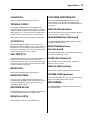
CUSTOMER PREFERENCES
All DTCs will be deleted (erased) from the PCM.
Select CUSTOMER PREFERENCES to set or to turn
vehicle options on or off through the vehicle controller.
Some Customer Preferences may offer additional programming options.
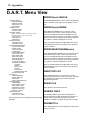
TROUBLE CODES
The TROUBLE CODES option reads and displays the
Diagnostic Trouble Codes (DTCs) recorded in a controller
module. Select the controller module (Engine, Transmission,
ABS, SRS, Body, etc.) you want to check, and then select
whether you want to see active DTCs or One Trip DTCs.
VEHICLE ID(entification)
Select VEHICLE ID to read or save the controller identification number into the D.A.R.T. memory.
Note: Trouble Codes may also be labeled as Fault Codes.
READ ENGINE ID(entification)#
ACTIVE DTCs
Select READ ENGINE ID# to read and display the engine
controller identification number.
Select ACTIVE DTCs to display the codes saved in the
PCM. Codes received are displayed as a number. Press the
ENTER key to see a description of the code positioned on
the top line of the display screen. Press the ↑ key to position
any other codes onto the top line for display.
ONE TRIP DTCs
Select the ONE TRIP DTC option to see codes saved due to
a fault that occurred at least once. Many faults are not
saved as a DTC until they have occurred over multiple trips
because one or two occurrences do not necessary indicate
a true fault that should set a DTC.
ERASE DTCs
READ TRANS(mission)
ID(entification)#
Select READ TRANS ID# to read and display the transmission controller identification number.
STORE ID(entification)#
Select STORE ID# to save the controller identification
number in D.A.R.T. memory.
VEHICLE INFO(rmation)
Select VEHICLE INFO to display the vehicle description.
All DTCs will be deleted (erased) from the PCM.
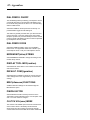
SKIM FUNCTIONS
Select the D.A.R.T. SKIM FUNCTION if the Sentry Key
Immobilizer Module (SKIM) must be reprogrammed for new
keys or if additional Sentry ignition keys need to be programmed into SKIM memory.
PROGRAM KEY(S)
The PROGRAM KEY(S) selection initiates a programming
process that programs keys into the SKIM system.
ERASE ALL KEYS
Select ERASE ALL KEYS to erase SKIM memory
SYSTEM CONF(iguration)
Select SYSTEM CONFIG to set up or to change the factory
settings for the BBS communication program.
BBS NUMBER
Select BBS NUMBER to change the number used to dial
into the Bulletin Board.