1
4.6.2. Data sending to host computer
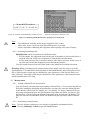
In the Memory/Send sub-menu you have the possibility to send the records of a selected
memory range to a host computer. In memory send function the selected range of
measurement data (located in the selected range of memory addresses) will be sent to the
receiver serial port on a preprogrammed speed. Refer section 4.6.1. for details about
setting the memory range to be sent. For setting the parameters of the serial port see
section 4.2.2.
Note: You can enter a new patient ID or modify an existing one for a selected memory record
both in Memory/Print and in Memory/Send sub-menu with the Set-ID function button.
4.6.3. Enter Patient ID for a memory record
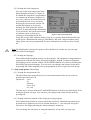
You can enter a new Patient ID or modify the old one for an existing memory record.
Enter the Memory/Print or the Memory/Send sub-menus and choose a data record by
adjusting the minima of the memory range (see figure 10). After pressing the Set ID
button you can enter a new Patient ID for the selected record or you may also modify an
existing one. Use the key pad for typing the Patient ID and store it by pressing the OK
button.
4.6.4. Clearing test data from memory
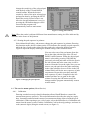
All data in the memory or only a specified record can be deleted in the Memory/Clear
sub-menu. Upper limit of storage place is 200 records. The memory address's lower and
upper limits can be set by using the UP and DOWN arrows in top-right corner of the
LCD (refer section 4.6.1. for details about setting the memory range to be cleared). After
setting the limits of the memory range that should be erased press the CLEAR button.
The address pointer returns to lower address of the field after execution of the memory
clear function. By pressing CLR.ALL button all existing records in the memory will be
cleared.
4.7. The Printer Station
The Printer Station connects the equipment to mains voltage and also provides power supply
for the Reader Unit while it is placed in its basic position. If you would like to send
measurement data either to the printer or to a computer via serial communication output, first
make sure the Reader Unit is connected to the Printer Station. Data communication is
executed through infrared (IR) transmission line: either docking the Reader Unit or holding it
in a visible distance from the Printer Station. Test data of the prior selected memory range
will be printed out in clinically meaningful (see chapter 4.3.1) units by the built in thermopaper printer with a speed of 2 lines per sec.
Note: The printer is operating only if it is connected to mains.
4.8. The Serial port
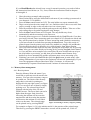
The HandUReader serial communication protocol offers two options: either the PC
Unidirectional protocol when upon a Start signal the selected data of the test
(measurement) is sent to the receiver computer, or Network protocol can be used. You
can select the communication protocol in the Menu/Setup/Serial sub-menu. By
checking the Bl. ID field you can determine whether the uploaded serial data should
be identified by Patient ID or by Sequence ID. In this sub-menu you can also disable
all serial data flow and the printer as well.
10