1
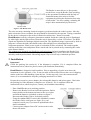
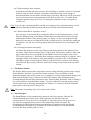
The Reader is menu-driven, so the operator
needs first to set up the Reader Unit according
to the operational conditions with the help of
functional menus, then only to feed the
equipment by placing the moisturized test strip
on the holder – the rest: reading, evaluating the
strips is done automatically by the device.
Figure 2. The Reader Unit
The urine test strip containing chemical reagents is positioned under the reader's sensor. After the
pads' colours have been evaluated, the strip should be discarded by the operator. Timing, controlled
by the device is adequate to the needs of chemical reactions time - about 60 seconds.
HandUReader works by reflectance photometer method: Inside the reader the strip is illuminated
by white light, and the light reflected from the strip is detected by a colour CCD sensor. The RGB
signals are digitalized by analogue-digital conversion. The digitalized image is processed by built-in
program: it locates the pads, then based on the reflected light-wave information the urine
component parameter values (as the result of evaluation) will be calculated. The results together
with the actual date, time and patient ID are stored and can be printed out by connecting the reader
to the Printer Station.
The equipment is designed specifically for professional use. In basic installation the Reader Unit
and the Printer Station is connected. Its physical design, including colour, meets the requirements
raised by medical professionals. Measuring output is up to 50 test strip evaluations per hour.
3. Installation
Important!
Check the packing list (section 8.) if the shipment is complete. If it is complete follow the
instructions below, otherwise please contact your distributor immediately.
HandUReader is shipped in card-board box. Prior to unpacking, clear the area where the
instrument is to be operated: a 30 x 50 cm size table will be needed. Please take care of shipping
marks on the box while handling. Open the box. Cut the tape only, leave the carton material
intact. (It is recommended to keep the packaging materials for a while)
Prepare the accessories: power adapter, the rechargeable batteries and printer paper. Check also
the packing list if the shipment is complete (see section 8). If it is complete follow the
instructions below, otherwise please, contact your distributor immediately.
- Place HandUReader to its working position.
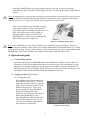
- Remove the Reader Unit from its docked position, find its
battery holder on the bottom and remove the cover-plate
and load the batteries (included) as shown on figure 3.
Reconnect the Reader Unit to its docked position.
- Using the standard RS232 serial cable (included), connect
the Reader Unit's serial port (see figure 2) to your
computer's serial port, if you want to upload and collect
data in a database.
- Connect power adapter first to DC socket on the reader,
then to the mains.
4
Figure 3. Installation of the batteries