1
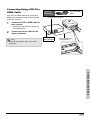
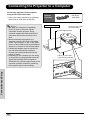
Connecting Using a DVI-D to
HDMI Cable
Use a DVI to HDMI cable when connecting
HDMI video equipment such as DVD players
to the DVI terminal.
1
Optional
accessory
DVI-D to HDMI
cable
To HDMI output terminal
Connect a DVI-D to HDMI cable to
the projector.
• Secure the connectors by tightening
the thumbscrews.
Connect the above cable to the
video equipment.
DVI-D to HDMI cable
(sold separately)
• Select the input signal type of the video
equipment.
D
DVI-
COM
-HD
RGB
P2
Y
P1
PB/C
R
PR/C
PB/C
B
-HD
RGB
COM
Y
B
Y
R
B
PR/C
R
Y
PB/C
DEO
S-VI
P2
COM
PR/C
PB/C
B
PR/C
R
DEO
S-VI
32
P1
COM
RS-2
10-2
AC1
40
12V ER
UGG
32
RS-2
40
DVD player or
DTV* decoder
10-2
AC1
Note
D
DVI-
2
Connections and Setup
11
12V
GG
TRU