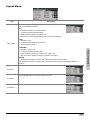
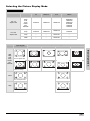
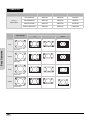
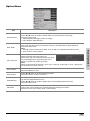
1
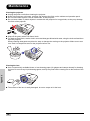
Maintenance Cleaning the projector Unplug the power cord before cleaning the projector. Avoid using benzene or thinners, as these can damage the finish on the cabinet and operation panel. Do not use volatile agents, such as insecticides, on the projector. Do not leave rubber or plastic objects in contact with the projector for long periods, as they may damage the finish of the projector. MENU ENTER CE SOUR Wipe off dirt gently with a soft flannel cloth. For hard-to-remove dirt, soak a cloth in a neutral detergent diluted with water, wring the cloth well and then wipe the projector. Strong cleaning detergents may discolor, warp or damage the coating on the projector. Make sure to test on a small, inconspicuous area on the projector before use. MENU ENTER CE SOUR Cleaning the lens Use a commercially available blower or lens cleaning paper (for glasses and camera lenses) for cleaning the lens. Do not use any liquid cleaning agents, as they may wear off the coating film on the surface of the lens. Appendix MENU ENTER CE SOUR The surface of the lens is easily damaged, do not to scrape or hit the lens. 34