1
Projector
User’s Manual
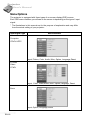
This menu provides precise control of the color settings including:
color temperature (preset & user define) and gamma.
Changing settings procedure (using either the Projector Control Panel or the Remote
Controller):
. English .
Color Menu
1.Press the MENU button to display OSD
menu.
2.Press the c or d button to select
COLOR menu.
3.To enter the sub-menu setting, press the
fbutton or the MENU button.
4.Press the c or d button to select the
sub-menu item.
5.Press the e or f button to adjust the value of desired sub-menu item.
On the Color Temp and Gamma sub-menus, press the e or f button to select
the desired setting.
6.After you have done with the adjustment of a sub-menu item:
a.To resume changing another sub-menu item: press the c or d button.
b.To exit from the current menu: toggle the MENU button.
The following table provides detail of the available sub-menu choices:
Sub-Menu
Color Temp
Option
Description
Adjusts the whiteness of the screen.
L(Low)
M(Middle)
Gives the white colors a red tint.
Gives the white colors a neutral tint.
H(High)
U(User)
Gives the white colors a blue tint.
Selects customized color temperature.
User
Gamma
Manually adjusts color temperature.
Selects a gamma correction curve.
Gamma1
Gamma2
Improves computer’s image mode.
Improves video’s image mode.
Note:
The color adjustment on the User setting can only be made if the Color Temp selection
is "User".
○ ○ ○ ○ ○ ○ ○ ○ ○ ○
EN-21