1
3.2.2. Parameters and Management
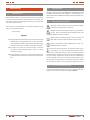
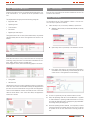
From this form there is access to several important data of the unit,
if the value allows it , it is possible to set the parameters of the
unit.
3.2.4. Time zone setting
From this form is possible to set the time scheduler of the unit. The
screen has two sections.
3.2.4.1. Time scheduler
The displayed data are grouped in the following categories:
• Equipment data
• Operating status
• Time and date
• Parameters
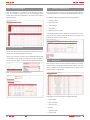
It is possible to set the ‘Time scheduler’ of Iluest+ from this section. The way to operate is as follows:
1. Select the day to set, it can be any weekday or special one.
a. Weekday, select the day to set between Monday to Sunday
from listbox.
• Digital inputs and outputs
Through the button next to value of the measurement, the possible
changes already done are saved. The appearance of the form is as
follows:
b. Special day, select a special day to set between 1 and 10.
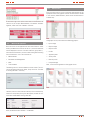
3.2.3. KWh
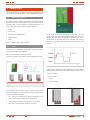
From this form there is access to the information of consumptions
and energy saving of the unit. This information is divided in two sections, ‘KWh’, which is shown in a tabular way:
And the graphic section, where the following graphics are shown:
c. Press button ‘Get settings’, the setting of the equipment is
consulted for the selected day, and the lower part of the
screen shows it. The appearance is the following:
• Saving KWh
• CO2 emission
Likewise there are two counters regarding the energy consumption
of the unit. One of them are the KWh saved by the equipment and
the other one is the instantaneous saving in CO2 of the equipment.
There are two additional counters that make the sum of the same
values for all the Iluest+ units of the client. Next, the appearance
of the form is shown:
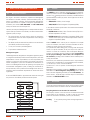
2. In case of a special day, the day and month have to be set.
3. Next, the Operating mode has to be established. It is possible
to select between 3 operating modes listed from 0 to 3. Every
time that the Operating mode is changed, the graph and different settings of the part change too.
4. Once the operating mode is selected, it is compulsory to select
if the Astronomical clock will be used. In case of yes, it will not
be possible to set the hour and minutes of turning on/off the
unit.
8
user’s manual