1
8.0 UT2 Throttle Control Panel
8.1 General color codes
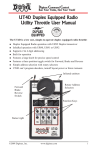
The UT2 is color coded according to how the keys are used.
The only RED key is Run/Stop. This is so you can't miss it in case of emergency. This is
The BLUE keys are used in conjunction with the "SHIFT" key.
8.2 The Throttle Knob
Turn clockwise to increase the speed of your locomotive. Turn counter clockwise to decrease the speed of your
locomotive. There is about 300 degrees of rotation from 0 speed to full throttle.
8.3 Direction Toggle Switch
Flip to the right for forward direction and to the left for reverse direction.
8.4 Address Selectors
Rotate these two selectors to select the two digit address ( 00 to 98 ) of the locomotive you wish to control. The left
selector dials in the 10’s and the Right selector dials in the 1’s. Select address “99” to select a locomotive or consist
that has been “DISPATCHED” from another Digitrax throttle. (see section on Dispatched locomotives)
8.5 Status Indicator
Indicates the status of the UT2.
• Dark indicates no locomotive is currently selected.
• Green indicates a locomotive has been successfully selected.
• Red indicates the direction and/or speed are out of correspondence on a locomotive being selected.
• Solid orange indicates the UT2 is in “Program Mode”.
• Blinking orange indicates the UT2 Is in “OPSW Mode”
8.6 Prog/Shift
•
•
•
Press and hold to access F3, F4, F5.
Press in conjunction with the “RUN/STOP” button to enter “Program Mode”.
Press and hold for 2 seconds then within 5 seconds press either F0, F1, or F2 to “Status Edit” decoder
speed steps to 128, 28, or 14 respectfully.
8.7 Run/Stop
•
•
Use as emergency stop. When held down will change locomotive speed to "0". Turn throttle to "0" speed
setting to regain control or press RUN/STOP again.
RUN/STOP key is used in conjunction with other keys to activate other throttle functions.
8.8 ACQ/DISP
•
•
•
•
Press to aquire any locomotive after the address has been dialed in with the selectors.
When address selector reads “99", press "ACQ/DISP” to acquire locomotive “DISPATCHED” by another
throttle in the system.
If address selector is set to other than “99” press ACQ/DISP and SHIFT to “DISPATCH” locomotive to
another throttle in the system.
Press ACQ/DISP along with RUN/STOP to set OPS Switches in your booster.
8.9 F0/F3/ADR
•
•
•
Press F0 to toggle front and rear headlights on and off.
Hold “Shift” and press F3 to toggle Function 3 on and off.
When in Programming Mode press to set locomotive Address.
8.10 F1/F4 ON / CV#
•
•
•
•
Press F1 to toggle Function 1 on and off.
Hold “Shift” and press F4 to toggle Function 4 on and off.
When in Programming Mode press to select locomotive CV’s
Press “RUN/STOP” and “ON" together to turn track power on.
8.11 F2/F5 OFF / CVAL
•
•
Press F2 to toggle Function 2 on and off.
Hold “Shift” and press F5 to toggle Function 5 on and off.
20