1
4.7 Shopping Cart Setup – Load and Save
The Load and Save functions are for you to first save your shopping cart setup and load it
later for use in another catalog. Fill in all the necessary setup information. To save all the
shopping cart setup settings, click the Save button. If you have added in Header and Footer
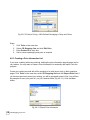
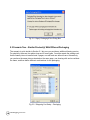
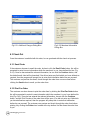
information, you will be prompted to save these information (Fig 4.7.1). Click the Yes button to
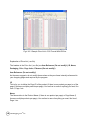
export and you will be further prompted to save the setup information (.ini) to a desired folder
(Fig 4.7.2). Click the Save button on the Export shopping info… dialog box. To retrieve this
setup information for another similar catalog, click the Load button, navigate to the folder you
have saved the information and click the Open button.
Fig 4.7.1 Export Header/Footer Information Confirm Dialog Box
Fig 4.7.2 Shopping Cart Setup – Save Setup
The setup information file can be edited with the Notepad or Excel program. So you may want
to edit the information separately with either of the programs and load it for use in another
catalog.
CD Shopping CartTM 1.0
137