1
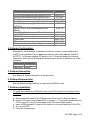
Hardware
Base Module
96 Well Interchangeable Block Module-SILVER
96 Well Interchangeable Block Module-GOLD
96 Well Interchangeable Block Module-ALU
Dual 384 well Interchangeable Block Module
Dual 96 Well Interchangeable Block ModuleAUTOLID
Manual Dual 96 Well Interchangeable Block
Module
0.5 ml 60 well Interchangeable Block Module
Ver 3.08 3.5” Disk for Up grades
SRAM PC card for storing methods
Printer cable
PC serial cable for serial port upgrades
Mac serial cable for serial port upgrades
AB Part #
N805-0200
N805-0251
4314443
4314445
N805-0400
4335726
4342718
4309131
0940-1064
N805-1326
N805-1327
N805-1328
4. Software Configuration
Embedded in the firmware is a checksum for the boot section of code (address 0 to
0x3FFF) and a checksum for the application section of the code (address 0x4000 to
0x7FFFF). All firmware upgrade PC cards for Ver 3.10 should contain the following
checksums, which can be verified by the instructions in Section 8, Subsection K of this
document.
Section
Checksum
Boot
0xE5E8
Application 0x8063
5. Software Generation
See Section 8. System Generation of this document.
6. Software Reproduction
See the Manufacturing guidelines for reproducing PCMCIA cards.
7. Software Installation
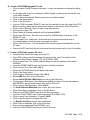
To install the software on a 9700 which has a raw CPU board and no existing code in
the Flash:
A. Remove the back panel of the 9700 as instructed in Part G of Section 8 below.
B. On the CPU board, move jumper SP10 to position 1-3. This jumper position tells the
9700 to boot off of the PC card instead of the CPU board Flash memory.
C. Insert a 9700 upgrade PC card into the card slot on the right hand side of the 9700.
D. Turn on the 9700.
E. Press the following keys:
4311000 Page 2 of 8