1
Table of Contents
1. Important Safety Instructions ............................................................................................................... 4
2. General ................................................................................................................................................ 4
3. Features ............................................................................................................................................... 5
4. Identifying Supplied Parts .................................................................................................................... 6
5. Specification......................................................................................................................................... 6
6. Product Overview ................................................................................................................................. 8
6.1. Functions ................................................................................................................................... 8
6.2. Product Explanation ................................................................................................................... 9
6.2.1. Panel Description ............................................................................................................ 9
6.2.2. Color Coded & Wiring Table............................................................................................. 9
7. Installation Tips & Check Points ......................................................................................................... 10
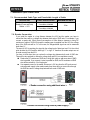
7.1. Recommended Cable Type and Permissible Length of Cable ................................................. 10
7.2. Reader Connection .................................................................................................................. 10
8. Installation of the Product.................................................................................................................... 11
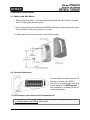
8.1. Mullion and Wall Mount ............................................................................................................. 11
8.2. System Initialization .................................................................................................................. 11
8.3. Network Connection of FGR006 .............................................................................................. 12
8.4. Wiring....................................................................................................................................... 12
8.4.1. Power ............................................................................................................................ 12
8.4.2. Input Connection ........................................................................................................... 12
8.4.3. Output Connections ....................................................................................................... 12
8.4.4. External Reader Connection (Applicable to FGR006EX Only) ...................................... 13
9. Communication .................................................................................................................................. 13
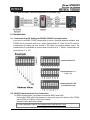
9.1. Communication ID Setting for RS485 / RS422 Communication............................................... 13
9.2. RS232 Communication Port Connection ................................................................................. 13
9.3. RS485 Communication Port Connection ................................................................................. 14
9.4. RS422 Communication Port Connection ................................................................................. 14
10. Operation ......................................................................................................................................... 14
10.1. Master Card Registration Mode ............................................................................................. 14
10.1.1. Master Card Registration ............................................................................................. 14
10.1.2. Master Card Change ................................................................................................... 15
10.1.3. Master Card Function. ................................................................................................. 15
10.2. Registration Mode .................................................................................................................. 15
10.2.1. Registration Mode Function ......................................................................................... 15
10.2.2. User Card Registration. ............................................................................................... 15
10.2.3. User Card Deletion ...................................................................................................... 16
10.3. Reader Mode ......................................................................................................................... 16
10.3.1. Reader Mode Function. ............................................................................................... 16
10.3.2. Authorization ................................................................................................................ 17
10.4. Identification Mode ................................................................................................................. 17
10.5. External RS232 Serial Jack (Option) ..................................................................................... 18
11. Operating Status of FGR006 ............................................................................................................ 19
11.1. LED Indicators Status ............................................................................................................ 19
2