1
INDEX
1
Introduction and software installation................................................................................. 3
1.1
Contents of the manual ..................................................................................................... 3
1.2
Software and hardware minimum requirements................................................................. 3
1.3
Installation process............................................................................................................ 3
1.4
Running the Supervisor X for the first time ........................................................................ 5
1.5
Upgrade the Supervisor X ................................................................................................. 6
1.6
Web form contact .............................................................................................................. 6
2
License activation ................................................................................................................. 7
2.1
Supervisor X license system ............................................................................................. 7
2.2
Software X license and VX/VS units .................................................................................. 7
2.3
Axis camera and NVX units licenses ................................................................................. 9
3
Functionality........................................................................................................................ 13
3.1
Functionality Description ................................................................................................. 13
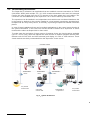
3.2
Functionality Architecture ................................................................................................ 16
4
Application description ...................................................................................................... 17
4.1
User permission and access ........................................................................................... 17
4.2
User interface components layout ................................................................................... 18
5
Live video ............................................................................................................................ 20
5.1
Camera and devices selection......................................................................................... 20
5.2
Visualization controls ....................................................................................................... 23
5.3
Dome control and audio connection ................................................................................ 24
5.4
VAV on live video ............................................................................................................ 25
6
Recorded video ................................................................................................................... 26
6.1
Recording video playback ............................................................................................... 27
6.2
Visualization controls ....................................................................................................... 29
6.3
Recorded video advanced search ................................................................................... 30
7
Units ..................................................................................................................................... 35
7.1
Add an object .................................................................................................................. 36
7.2
Data base: unit selection and management ..................................................................... 37
7.3
Connection tools.............................................................................................................. 40
7.4
Detailed information tabs ................................................................................................. 40
8
Event log.............................................................................................................................. 44
8.1
Events types.................................................................................................................... 45
8.2
Event Viewer ................................................................................................................... 47
8.3
Event management ......................................................................................................... 48
9
Patrols.................................................................................................................................. 49
9.1
Generic patrols ................................................................................................................ 50
9.2
Scheduled patrols............................................................................................................ 50
9.3
One-time patrols .............................................................................................................. 51
9.4
Unit selection................................................................................................................... 52
9.5
Screen information .......................................................................................................... 53
10 TV monitors AX-TV y VS-TV ............................................................................................... 54
10.1 AX-TV configuration and use in the Supervisor X ............................................................ 54
10.2 Use of views and global presentations ............................................................................ 56
10.3 VS-TV configuration in the Supervisor X ......................................................................... 58
11
Configuration ...................................................................................................................... 59
User manual - 1