1
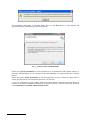
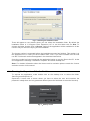
1 Introduction and software installation 1.1 Contents of the manual This manual contains detailed information about installation, configuration and use of the reception software Supervisor X to carry out the supervision and remote video management of any building or business establishment that they have installed VX/VS, NVX and Axis cameras. 1.1.1 Version Compatibility The reception software Supervisor X version 6.5 is compatible with: VX 4.0 units onward. Previous versions of VX and VS units with limited functionality. Supervisor X it is also compatible with Axis cameras with the following features: Axis camera application platform (ACAP, processor Artpec 3 or Artpec 4 and H.264 support). NVX units. 1.2 Software and hardware minimum requirements Supervisor X application can be installed on a PC or laptop having the following prerequisites: Windows 8 operative system. Windows 7 operative system. Windows Vista operative system. Note: Supervisor X in sever-client mode is not compatible with Windows Vista Home. Windows XP operative system with Windows XP Service Pack 2. .NETFramework V 4.0 In case of not having the .NET framework installed the Supervisor X will show a warning message and an Internet address to obtain it. Once the software pre-requisites are checked, the PC or laptop must have the following minimum configuration: XGA graphic board 1024x768. Mouse, keyboard and colour monitor. 4 GB minimum memory, 50 MB Free space for application files and 2 GB for the data base. Ethernet LAN board (TCP/IP) 1.3 Installation process Attention: The application must be installed from an operative system administrator user, being able to be used later from other users. The complete installation of Supervisor X software involves the following steps: Insert the Supervisor X CD or download it from the web (www.visual-tools.com). Select the executable file setup.exe to start the automatic installation process. It will appear a warning message to restart the unit when the installations ends, only for units installations with Windows Vista. User manual - 3