1
2.3 Keys Functionality
[BYPS]
Zone bypass mode
[CODE]
System fault list / violated high-numbered zone indication / violated tamper indication (only for ESIM364) / violated
high-numbered tamper indication (only for EPIR/EPIR2)
[*]
1st character for Configuration mode activation/deactivation command (for ESIM364 up to v02.06.20; EPIR all versions;
EPIR2 up to v1.01.08) / clear typed in characters / keypad partition switch (if enabled; only for ESIM364 up to v02.06.20)
[#]
Confirm (enter) command
[0] ... [9]
Command typing
[1]... [2]
Keypad partition switch (for ESIM364 v02.07.00 and up)
[STAY]
Manual Stay mode activation
[INST]
1st character for Configuration mode activation/deactivation command (for EPIR2 v1.01.11 and up; ESIM364
v02.07.00 and up)
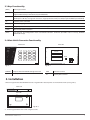
2.4 Main Unit & Connector Functionality
BACK SIDE
FRONT SIDE
A
B
ARMED
READY
SYSTEM
1
BYPS
7
8
2
9
3
4
5
6
10
11
12
1
2
3
STAY
4
5
6
BYPS
7
8
9
INST
*
0
#
CODE
+
BATTERY
-
-
BATTERY
+
+
BATTERY
-
TAMPER
5,6 kOhm
Z1 COM
Fig. No. 1
Fig. No. 2
TAMPER
Tamper-switch for EKB3W sabotage detection
COM
Common terminal
+/-
Battery slots
Z1
Security zone terminal
3. Installation
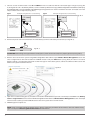
1. Detach keypad holder from EKB3W front side . Keypad holder detach points are marked with arrows (see Fig. No. 3).
DOWN SIDE
BACK SIDE
Fig. No. 3
2. Fix the keypad holder on the wall using the screws.
USER MANUAL EKB3W V1.4
3